
You are troubleshooting a complex routing issue after a recent change. Your customer has just called and reported that the issue now impacts all users. What should you do next?
A. Restore the last-known working configuration.
B. Ask the customer to send logs from each user
C. Explain to the customer what the issue is
D. Collect a show tech and log a case with TAC
Explanation:
The customer reports that a complex routing issue has escalated and now affects all users following a recent configuration change.
The immediate priority is to restore network service and minimize the impact on the customer. Rolling back to the last-known working configuration is the appropriate next step, provided the recent change is responsible for the issue and the rollback can be performed safely.
This approach helps restore connectivity before proceeding with a detailed root-cause investigation.
Why the other options are incorrect
B. Ask the customer to send logs from each user: This delays recovery and creates unnecessary work. The issue affects all users, so collecting individual user logs is not the immediate priority.
C. Explain to the customer what the issue is: Communication is important, but explaining the problem does not restore network service.
D. Collect a show tech and log a case with TAC: A technical support case may be necessary if the issue persists, but collecting diagnostic data should not delay a safe rollback when the recent change is the likely cause.
Exam tip
When a recent network change causes a widespread outage, prioritize restoring service through a safe rollback before performing an extended investigation.
Key takeaway: Restore service first, then investigate the root cause and involve TAC if needed.
A database administrator has reported intermittent connectivity issues with a SQL server hosted in the data center and has provided you with the source and destination IP addresses. Which troubleshooting methodology would be the most suitable to start with?
A. Spot the difference
B. Follow the path
C. Divide and conquer
D. Top-down/Bottom-up
Explanation:
When you are given specific source and destination IP addresses (such as a client/source communicating with a SQL server), the Follow the path methodology is the most direct and efficient approach. It involves tracking hop-by-hop across every intermediate device (switches, routers, and firewalls) along the exact data route to inspect interface error counters, buffer drops, or queue congestion that could trigger intermittent connectivity issues.
Why not the others:
Spot the difference: Best applied when comparing two configurations or devices where one is functioning correctly and the other is failing.
Divide and conquer: Typically used when the symptom spans a broader scope and you need to arbitrarily split layers or components to isolate the failure.
Top-down/Bottom-up: These approaches start systematically from the OSI model's top (Application) or bottom (Physical) layers, which is far more time-consuming when precise endpoint IPs are already known.
How to verify:
Confirm that end-to-end packet loss ceases (via continuous ping or application-level verification) and that interface error counters remain clean across all hops along the path.
Which queuing mechanism should you configure to ensure voice traffic is always forwarded with the highest priority?
A. Weighted Fair Queuing (WFQ
B. Virtual output queuing (VOQ
C. First In First Out (FIFO) queuing
D. Strict Priority (SP) queuing
Explanation:
Why Strict Priority (SP) queuing is the correct answer:
Strict Priority queuing is the only mechanism listed that guarantees absolute priority for a specific traffic class. When voice traffic is assigned to the highest-priority queue under SP queuing:
The scheduler always services the strict-priority queue first, as long as it contains packets.
Lower-priority queues are only serviced when the strict-priority queue is completely empty.
This provides the lowest possible latency, jitter, and packet loss for voice traffic, which are the critical requirements for real-time applications like VoIP.
This is why SP queuing is the industry-standard recommendation for latency-sensitive traffic such as voice and video. On HPE Aruba Networking AOS-CX switches, this is configured by assigning the voice traffic class to a queue with the strict scheduler in a QoS queue profile.
Why the other options are incorrect:
A. Weighted Fair Queuing (WFQ): WFQ allocates bandwidth fairly across flows based on configured weights. It does not guarantee absolute priority. Voice traffic could still be delayed if other queues are also being serviced. WFQ is better suited for general fairness across mixed traffic types.
B. Virtual Output Queuing (VOQ): VOQ is a technique used in switch fabrics to prevent head-of-line blocking. It is not an egress QoS queuing mechanism for prioritizing traffic classes.
C. First In First Out (FIFO) queuing: FIFO processes packets in the order they arrive, with no prioritization at all. Voice traffic would be treated the same as any other traffic, making it unsuitable for guaranteeing priority.
Key Takeaway
When the requirement is absolute priority for a specific traffic class—especially voice—Strict Priority (SP) queuing is the correct mechanism. It ensures that voice packets are always forwarded ahead of all other traffic, minimizing latency and jitter.
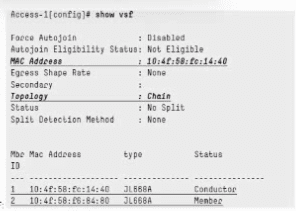
Refer to the exhibit for an HPE Aruba Networking CX 6300M VSF:
What VSF configuration is required for the stack configuration to work and avoid splitbrain?
A. vsf start-auto-stacking
B. vsf secondary-member 2
C. vsf conductor-member 2
D. vsl split-detect mgrep
Explanation:
Look closely at the exhibit — the critical clue is:
Split Detection Method: None
This is the giveaway. In an Aruba CX VSF (Virtual Switching Framework) stack, split-detection is the mechanism that prevents split-brain — the scenario where a VSF link (VSL) failure causes the stack to divide into two independently operating units, each potentially believing it should be the active conductor. Without a split-detection method configured, if the VSL goes down, both members could continue forwarding traffic independently with duplicate IP/MAC addresses — causing network instability, loops, or duplicate address conflicts.
Aruba CX VSF supports a split-detection method (commonly configured via a management-network-based mechanism, sometimes referred to using MGRE — Management-based Redundancy/heartbeat — depending on documentation wording) so that if the VSL fails, the stack members can still communicate out-of-band (via the management network) to determine which member should remain active and which should shut down its data-plane interfaces to avoid split-brain.
Since the exhibit clearly shows Split Detection Method: None, the required fix to prevent split-brain is to configure a split-detection method — matching Option D.
Why the other options are wrong:
A. vsf start-auto-stacking: Relates to enabling auto-join/auto-stacking behavior for new members to automatically join the VSF stack. It doesn't address split-brain protection.
B. vsf secondary-member 2: Manually assigns a member ID/role as secondary. The stack in the exhibit already shows defined roles (Conductor/Member), so this isn't the missing piece.
C. vsf conductor-member 2: Would designate member 2 as the conductor, but the exhibit already shows member 1 as Conductor and member 2 as Member — roles are already established, so this isn't what's missing.
Exam tip: Whenever a VSF/VSX exhibit shows "Split Detection Method: None", and the question asks about avoiding split-brain, the answer will point toward configuring split-detection — this is an important VSF resiliency concept on the HPE7-A08 exam.
A customer has set global qos trust dscp on an HPE Aruba Networking CX 6300 VSF configuration, which replaced the existing HPE Aruba Networking 5406R VSF. After the change, a video streaming service connected to ports 1/1/20 and 2/1/20, bound to LAG 20, no longer maps to the CoS priority queue mappings used in the old configuration. What configuration change would enable priority trust on DSCP by default and on traffic that requires CoS?
A. Bash
int 1/1/20, 2/1/20
qos trust none
!
int lag 20
qos trust cos
B. qos trust dscp, cos
C. Bash
int 1/1/20, 2/1/20
qos trust cos
D. Bash
int lag 20
qos trust cos
Explanation:
On Aruba CX switches (including the 6300 series), QoS trust mode can be set globally or overridden per interface, including LAGs.
The customer already configured the global setting qos trust dscp. This makes DSCP the default trust mode for all interfaces that do not have an override.
The video streaming service is connected via LAG 20 (ports 1/1/20 and 2/1/20). On CX platforms, QoS settings for a LAG must be applied to the LAG interface itself, not the individual member ports. The LAG setting takes precedence.
By applying qos trust cos only on LAG 20, traffic on that LAG uses the CoS-to-local-priority mappings (matching the old 5406R behavior), while all other interfaces continue to trust DSCP by default.
Why the other options are incorrect:
A – Setting the physical member ports to qos trust none: Unnecessary and has no effect while they belong to a LAG. The LAG-level setting is what matters.
B – Invalid syntax: The qos trust command accepts only one mode (none, cos, or dscp).
C – Configuring the physical ports: Has no effect for traffic arriving on a LAG; the LAG interface configuration overrides the members.
Key Takeaway: The recommended approach is to use global DSCP trust with a LAG-specific CoS override. This allows LAG 20 to use CoS-based classification while all other interfaces continue to use DSCP trust by default.
You need to find which change was made to the HPE Aruba Networking CX switch from the GUI. Which option can you use?
A. Use checkpoint diff to compare running-config with stored saved-config revisions
B. Use show checkpoint diff to compare running-config with stored checkpoints
C. Use show checkpoint diff to compare running-config with stored saved-config revisions
D. Use checkpoint diff to compare running-config with stored checkpoints
Explanation:
On HPE Aruba Networking CX switches, the Checkpoint feature is used to capture and store snapshots of the switch configuration at various points in time. This can happen automatically, such as before or after a change made through the GUI, or manually through the CLI or GUI. This is exactly the mechanism designed to help you determine what changed and when, including changes made through the GUI.
To identify a change, you compare the current running configuration against a previously stored checkpoint using the checkpoint diff functionality, which is accessible through both the CLI and the GUI's Configuration Management interface. The output shows a line-by-line difference, highlighting exactly what was added, removed, or modified between the checkpoint and the running configuration. This provides the most direct way to pinpoint a GUI-made change.
Why the other options are wrong:
A. Use checkpoint diff to compare running-config with stored saved-config revisions: Incorrect terminology. Aruba CX uses checkpoints as stored configuration snapshots; "saved-config revisions" is not the standard terminology for the comparison target in AOS-CX.
B. Use show checkpoint diff to compare running-config with stored checkpoints: Close, but the command is not prefixed with "show." The diff functionality is invoked directly using the appropriate checkpoint diff/compare command.
C. Use show checkpoint diff to compare running-config with stored saved-config revisions: Incorrect because it combines both errors from options A and B: the stored object terminology is incorrect, and the command syntax uses the wrong show prefix.
Exam tip: For AOS-CX, remember the terminology precisely:
Checkpoints: Stored configuration snapshots used for comparison, change tracking, and rollback.
Diff/Compare: Used to identify differences between the current configuration and a stored checkpoint.
Key takeaway: Checkpoint and rollback capabilities are important AOS-CX features for change management and troubleshooting, including restoring a last-known-good configuration.
Refer to the exhibit:
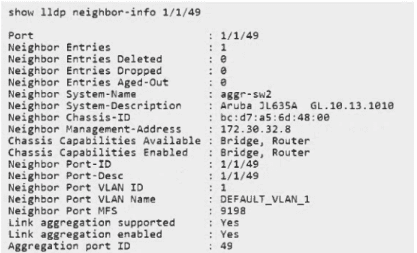
The neighbor switch is configured with the following IP interfaces:
mgmt: 172.30.32.8
loopback 0: 10.255.255.2
vlan 5: 192.168.5.2
How can you change the advertised management IP information to appear as the VLAN 5
IP?
A. Under interface vlan 5, issue command: lldp management-address
B. Issue in global context command: lldp management-address vlan 5
C. Under lldp context: lldp management-address 192.168.5.2
D. Issue in global context command: lldp management-ipv4-address vlan 5
Explanation:
The switch is advertising its management IP address through the LLDP Management Address TLV.
By default, AOS-CX selects a management address according to a defined precedence. To advertise the IP address of VLAN 5 instead of the management interface or loopback, configure VLAN 5 as the LLDP management VLAN.
Enter the following command in global configuration context:
switch(config)# lldp management-address vlan 5
This sets VLAN 5 as the source of the advertised management address. The neighbor should then receive 192.168.5.2 in the LLDP Management Address TLV, assuming no higher-precedence explicit LLDP management IP address is configured.
Why the other options are incorrect
Option A: The command is incomplete and is not the documented interface-level configuration.
Option C: The command syntax is incorrect. The IP address is not configured under an LLDP context using this command.
Option D: lldp management-ipv4-address expects an IPv4 address, not a VLAN ID.
Exam tip
Remember the distinction:
lldp management-address vlan 5: Selects the VLAN whose IP address is advertised.
lldp management-ip-address 192.168.5.2: Explicitly configures the advertised management IP address.
Key takeaway: The VLAN-based command is the intended answer for this question.
A database administrator has reported intermittent connectivity issues with a SQL server hosted in the data center and has provided you with the source and destination IP addresses. Which troubleshooting methodology would be the most suitable to start with?
A. Follow the path
B. Divide and conquer
C. Spot the difference
D. Top-down/Bottom-up
Explanation:
The administrator has provided the source and destination IP addresses of the SQL server connection. This information makes the Follow the path troubleshooting methodology a suitable starting point.
The objective is to trace the traffic between the two endpoints through the network infrastructure and identify where connectivity is interrupted or degraded.
Why the other options are incorrect
B. Divide and conquer
Isolates a problem by dividing the network into smaller sections and testing each section.
C. Spot the difference
Compares working and non-working configurations or operational outputs to identify discrepancies.
D. Top-down/Bottom-up
Troubleshoots systematically through the network layers, starting either at the application layer or physical layer.
Practical troubleshooting approach
With the source and destination IP addresses available:
- Identify the network path between the source and SQL server.
- Trace the traffic through the relevant switches, routers, and firewalls.
- Check interfaces along the path for errors, packet drops, and congestion.
- Investigate the segment where the connectivity issue occurs.
- For intermittent problems, collect evidence during the affected time period, because a successful traceroute alone does not rule out packet loss.
Exam takeaway:
Known source and destination IP addresses, combined with a connectivity issue, point to the Follow the path methodology.
Reference:
HPE7-A08 practice question reference
A multicast configuration on an HPE Aruba Networking CX 6300 VSF is used for a group address 239.0.0.1. The configuration is having issues, and the video streaming clients are not receiving the stream. What would be a possible root cause for the problems experienced?
A. The IGMP-snooping is using version 2 configured for the SVI.
B. The selected multicast address will overlay with Link-Local Multicast address scope
C. The selected multicast address will overlay with PIM-SM discovery address
D. The IGMP is enabled on the VLANs without any multicast traffic
Explanation:
The multicast group 239.0.0.1 can create an important Layer 2 multicast-address aliasing issue. IPv4 multicast addresses are mapped into Ethernet MAC addresses using only the lower 23 bits of the multicast IP address.
As a result:
224.0.0.1 → 01:00:5E:00:00:01
239.0.0.1 → 01:00:5E:00:00:01
Therefore, 239.0.0.1 maps to the same Ethernet multicast MAC address as 224.0.0.1, which is the link-local All Hosts multicast group. This MAC aliasing can interfere with normal IGMP multicast filtering/forwarding behavior. Aruba documentation describes this aliasing limitation and lists addresses such as 239.0.0.x among multicast ranges that can overlap with reserved/link-local multicast mappings.
For an application such as video streaming, it is preferable to select a multicast group that avoids these problematic mappings, for example an address such as 239.1.1.1.
Why the other options are incorrect:
A. IGMP snooping version 2: IGMPv2 is commonly used for multicast receiver membership and by itself would not prevent clients from receiving the stream.
C. PIM-SM discovery address: 239.0.0.1 is not a PIM-SM discovery/control address. PIM uses other reserved multicast addresses for its control functions.
D. IGMP enabled without multicast traffic: Simply enabling IGMP on VLANs does not create this failure.
Exam note:
Option B is referring primarily to the Ethernet MAC-address aliasing with link-local multicast, rather than saying that 239.0.0.1 literally belongs to the IPv4 link-local multicast range. At the IP layer, 239.0.0.0/8 is administratively scoped multicast.
Refer to the partial exhibit from an HPE Aruba Networking CX 8325:
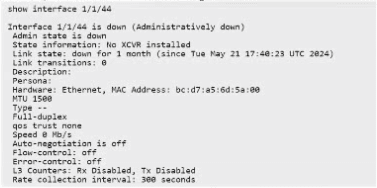
A new port 1/1/44 needs to be configured to connect to a 29301, which has the following
configuration:

Which configuration would be used?
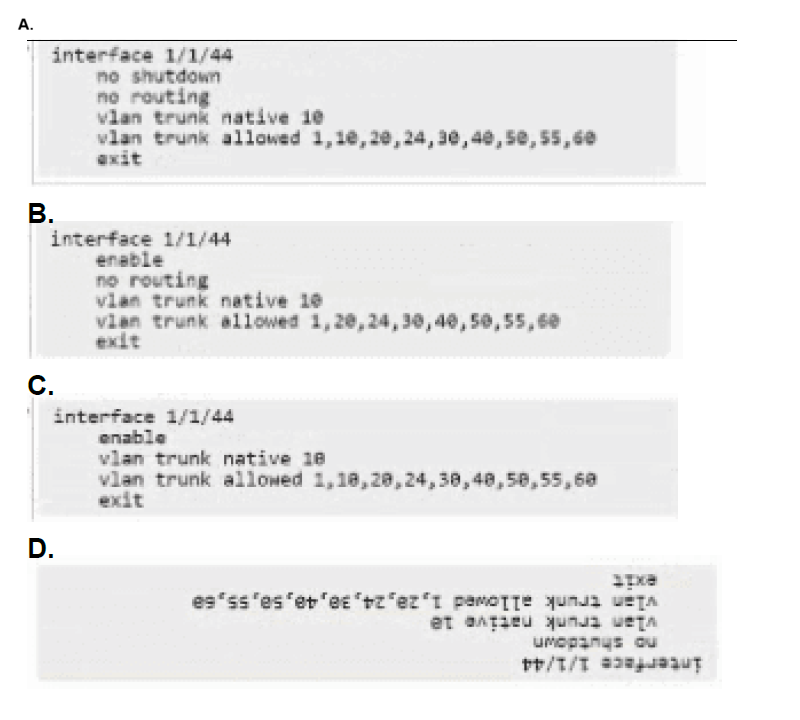
A. Option A
B. Option B
C. Option C
D. Option D
Explanation:
To correctly configure an interface on an HPE Aruba Networking CX 8325 data center switch to trunk with an ArubaOS-Switch (ProCurve-based) device like the 2930F, you must account for the specific architectural defaults of the CX 8325:
Layer 2 vs. Layer 3 Mode (no routing):
On data center switches like the 8325, physical ports default to Layer 3 (routed) mode. To use a port for VLAN trunking at Layer 2, you must explicitly issue the no routing command.
Administrative State (no shutdown):
AOS-CX uses standard CLI commands like no shutdown to enable administrative states (unlike legacy ProCurve syntax which uses enable).
VLAN Mapping:
The remote 2930F switch has VLAN 10 configured as untagged and several other VLANs configured as tagged. On the AOS-CX side, the untagged VLAN maps to the native VLAN configuration (vlan trunk native 10), and all corresponding VLANs must be included in the allowed trunk list (vlan trunk allowed 1,10,20,24,30,40,50,55,60).
Verification
How to verify success:
Run the show interface 1/1/44 and show mac-address or show vlan trunk commands to ensure the port status changes from Administratively down to Up/Up and that traffic across all specified VLANs passes successfully without packet drops.
Refer to the exhibit:
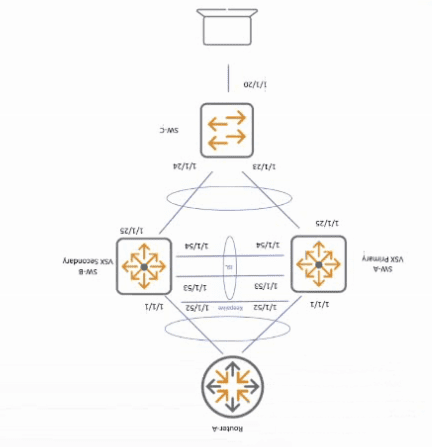
Interfaces 1/1/53 and 1/1/54 were accidentally disconnected from Switch-A, the primary
VSX member. Client A is experiencing network disruptions with network
connections to Router-A.
What needs to be done to prevent user traffic disruption in this scenario?
A. Configure keepalive VLAN on downstream lag.
B. Configure VSX shutdown on-split on SW-B.
C. Configure keepalive VLAN on upstream lag.
D. Configure VSX shutdown on-split on SW-A.
Explanation:
Interfaces 1/1/53 and 1/1/54 are the VSX ISL between SW-A and SW-B. When those links fail, the VSX pair enters a split condition.
SW-A is the VSX primary, while SW-B is the secondary. During a VSX split, VSX links on the secondary are taken down, but non-VSX interfaces on the secondary can remain operational. If the upstream connection from SW-B toward Router-A stays up, Router-A can continue forwarding traffic to SW-B even though SW-B has lost the forwarding path through the VSX topology. That can result in traffic being black-holed and Client A experiencing interruptions.
HPE Aruba specifically provides the vsx shutdown-on-split feature for this situation. It shuts down selected non-VSX interfaces on the VSX secondary when the ISL goes out of sync, forcing traffic to use the surviving primary switch.
The important point is that HPE's command documentation states that vsx shutdown-on-split has no effect on the VSX primary during a split. Therefore, configuring it for this purpose on SW-A would not solve the problem.
Why the other answers are incorrect
A. Keepalive VLAN on downstream LAG:
Keepalive determines whether the VSX peer is alive; it does not shut the problematic routed/upstream interface during an ISL failure.
C. Keepalive VLAN on upstream LAG:
Again, keepalive provides peer-state detection rather than preventing traffic from being forwarded into the isolated secondary.
D. VSX shutdown-on-split on SW-A:
SW-A is the primary. HPE documentation explicitly says the feature does not perform split shutdown on the primary during a VSX split.
Exam Answer
✅ B. Configure VSX shutdown-on-split on SW-B.
Important:
Some unofficial HPE7-A08 question banks list D, but that conflicts with current HPE Aruba documentation. HPE's own VSX guide describes this exact traffic-loss scenario as one where the relevant non-VSX interfaces on the secondary should be shut down.
Refer to the exhibit:
Interfaces 1/1/53 and 1/1/54 were accidentally disconnected from Switch-A, the primary
VSX member. Client A is experiencing network disruptions with network
connections to Router-A.
What needs to be done to prevent user traffic disruption in this scenario?
A. Configure keepalive VLAN on downstream lag
B. Configure VSX shutdown on-split on SW-B.
C. Configure keepalive VLAN on upstream lag.
D. Configure VSX shutdown on-split on SW-A.
Explanation:
Interfaces 1/1/53 and 1/1/54 are the VSX ISL between SW-A and SW-B. When those links fail, the VSX pair enters a split condition.
SW-A is the VSX primary, while SW-B is the secondary. During a VSX split, VSX links on the secondary are taken down, but non-VSX interfaces on the secondary can remain operational. If the upstream connection from SW-B toward Router-A stays up, Router-A can continue forwarding traffic to SW-B even though SW-B has lost the forwarding path through the VSX topology. That can result in traffic being black-holed and Client A experiencing interruptions.
HPE Aruba specifically provides the vsx shutdown-on-split feature for this situation. It shuts down selected non-VSX interfaces on the VSX secondary when the ISL goes out of sync, forcing traffic to use the surviving primary switch.
The important point is that HPE's command documentation states that vsx shutdown-on-split has no effect on the VSX primary during a split. Therefore, configuring it for this purpose on SW-A would not solve the problem.
Why the other answers are incorrect
A. Keepalive VLAN on downstream LAG:
Keepalive determines whether the VSX peer is alive; it does not shut the problematic routed/upstream interface during an ISL failure.
C. Keepalive VLAN on upstream LAG:
Again, keepalive provides peer-state detection rather than preventing traffic from being forwarded into the isolated secondary.
D. VSX shutdown-on-split on SW-A:
SW-A is the primary. HPE documentation explicitly says the feature does not perform split shutdown on the primary during a VSX split.
Exam Answer
✅ B. Configure VSX shutdown-on-split on SW-B.
Important:
Some unofficial HPE7-A08 question banks list D, but that conflicts with current HPE Aruba documentation. HPE's own VSX guide describes this exact traffic-loss scenario as one where the relevant non-VSX interfaces on the secondary should be shut down.
| Page 1 out of 11 Pages |
| 1234 |
Real-World Scenario Mastery: Our HPE7-A08 practice exam don't just test definitions. They present you with the same complex, scenario-based problems you'll encounter on the actual exam.
Strategic Weakness Identification: Each practice session reveals exactly where you stand. Discover which domains need more attention, before HPE Aruba Networking Certified Professional - Switching exam day arrives.
Confidence Through Familiarity: There's no substitute for knowing what to expect. When you've worked through our comprehensive HPE7-A08 practice exam questions pool covering all topics, the real exam feels like just another practice session.
Copyright © All Rights Reserved