
Refer to the exhibit:
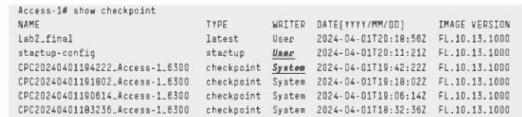
The current startup configuration on the HPE Aruba Networking CX 6300 switch no longer
includes a device profile that was created on the previous day. Based on the exhibit, how
can you validate if the configuration was removed without changing the current
configuration?
A. Use show checkpoint to see the changes created between the available checkpoints.
B. Use checkpoint diff to check for differences between the startup-config and available checkpoints.
C. Use copy startup-config checkpoint
D. Use checkpoint rollback to see the changes created between the available checkpoints.
Explanation:
The show checkpoint output in the exhibit lists several automatically created checkpoints from the previous day. Since the current startup-config no longer contains the device profile, you can compare it against an earlier checkpoint without altering the switch configuration.
Use:
checkpoint diff startup-config <checkpoint-name>
For example:
checkpoint diff startup-config CPC2024040119222_Access-1_6300
AOS-CX documents checkpoint diff specifically for comparing checkpoints, running-config, and startup-config. It only displays the differences, so it is safe for validation and does not roll back or modify the active configuration.
Why the other options are incorrect
A. show checkpoint:
Shows checkpoint information/configuration, but it does not directly produce a comparison between startup-config and a checkpoint.
C. copy startup-config checkpoint ...:
Creates/copies configuration data rather than simply comparing it.
D. checkpoint rollback:
Would actually restore a checkpoint and therefore change the configuration, which the question explicitly says to avoid.
Answer:
B. Use checkpoint diff to check for differences between the startup-config and available checkpoints.
Refer to the exhibit:
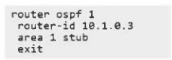
Using the configuration below, you have configured OSPF at a small branch site, which
only requires a single default route to reach the Internet and all other sites. When
examining the routing table, you still see other OSPF routes besides the default route.
What OSPF area type should you configure?
A. Totally Not-So-Stubby Area
B. Stub Area
C. Totally Stubby Area
D. Not-So-Stubby Area
Explanation:
The current configuration shows:
router ospf 1
router-id 10.1.0.3
area 1 stub
A normal stub area blocks external OSPF routes, but it can still receive inter-area summary routes from the ABR. That explains why the branch routing table still contains OSPF routes in addition to the default route.
For a small branch that should receive essentially only a default route for destinations outside the area, configure the area as a Totally Stubby Area. On AOS-CX, this is done with:
area 1 stub no-summary
HPE Aruba documents stub no-summary as a totally stubby area, where summary LSAs/inter-area routes are not injected into the stub area.
Why the other options are incorrect
A. Totally NSSA:
Used when the area must redistribute external routes locally while suppressing other external/inter-area information.
B. Stub Area:
Already configured in the exhibit and still permits inter-area summary routes.
D. NSSA:
Allows redistribution of external routes as Type 7 LSAs, which is not required here.
Answer:
C. Totally Stubby Area
Refer to the exhibits.
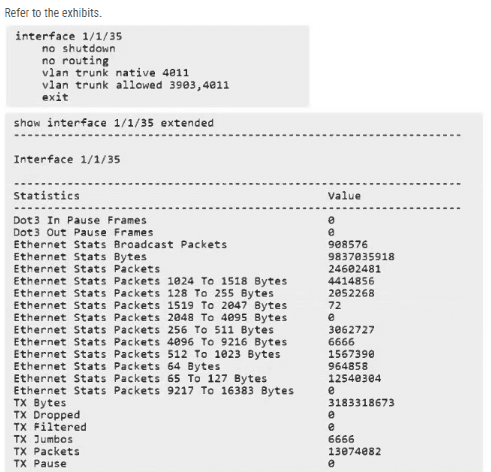
The interface is configured on an HPE Aruba Networking CX 8320 for a VMware server
NIC. The server admin complains that the VMware vMotion traffic on VLAN 3903 fails, but
the server can ping other peers with a large payload size. What must be done to correct the
issue based on the provided interface status and configuration?
A. The VLAN 3903 is configured with mtu 9198
B. The interface 1/1/35 is configured with mtu 9198
C. The VLAN 3903 is configured with jumbo
D. That interface 1/1/35 is configured with jumbo
Explanation:
The HPE Aruba Networking CX 8320 uses the interface MTU to determine the maximum Ethernet frame size that can be received and forwarded.
In the exhibit, interface 1/1/35 is configured as a Layer 2 trunk, allowing VLANs 3903 and 4011. However, no MTU is explicitly configured.
The default MTU is 1500 bytes. To support jumbo frames, the interface MTU must be increased to the required value. HPE AOS-CX supports an interface MTU of up to 9198 bytes on the 8320.
Why the other options are incorrect
A. VLAN 3903 configured with MTU 9198:
The interface is a Layer 2 trunk. The relevant setting is the physical interface MTU.
C. VLAN 3903 configured with jumbo:
AOS-CX does not use a per-VLAN jumbo command for this configuration.
D. Interface 1/1/35 configured with jumbo:
AOS-CX uses the mtu command rather than a separate jumbo command.
Configuration
configure terminal
interface 1/1/35
mtu 9198
Ensure the MTU is compatible across the complete vMotion path, including the VMware NICs and intermediate switches.
Exam takeaway:
On an AOS-CX 8320, configure mtu 9198 on the physical interface to support jumbo Ethernet frames.
You are helping another engineer troubleshoot a new downloadable user role configuration between your CX switches and ClearPass. Which configuration on the switch should you verify?
A. SNMP community string
B. User-role configuration
C. HTTPS client certificate
D. Trust Anchor profile
Explanation:
When troubleshooting a Downloadable User Role (DUR) implementation between HPE Aruba Networking CX switches and ClearPass Policy Manager (CPPM), the switch requires secure HTTPS communication to fetch the role definition files.
Why it is correct:
A Trust Anchor profile must be properly configured and verified on the switch. It contains the root Certificate Authority (CA) certificate used to validate the digital certificate presented by ClearPass during secure HTTPS/RADIUS transactions. If the trust anchor is missing, untrusted, or misconfigured, the switch will reject the secure connection, and the downloadable user role will fail to apply.
Why the others are incorrect:
- SNMP community string is used for basic network monitoring and management polling, not for downloading user roles from ClearPass.
- User-role configuration itself is dynamically downloaded from ClearPass rather than locally provisioned beforehand, so checking local static entries won't resolve a download breakdown.
- HTTPS client certificate is part of client/server authentication context, but the foundational validation required on the switch to trust the ClearPass server endpoint relies on the configured Trust Anchor profile.
Reference
ArubaOS-CX Security Guide – Downloadable User Roles & PKI Trust Anchor Configuration.
You have configured BFD for OSPF on a CX switch and have noticed the BFD session stays down but the OSPF neighbor state is up. What could explain this behavior?
A. The remote switch does not support BFD.
B. BFD is not supported on OSPF broadcast links, so OSPF ignores the config.
C. BFD has not been enabled at the global configuration level.
D. The local switch uses OSPFv3, but the remote switch uses OSPFv2
Explanation:
The behavior you are seeing—where the BFD session stays down while the OSPF neighbor state remains up—is a clear indicator that OSPF and BFD are operating independently on the local switch.
When you enable BFD for OSPF on an AOS-CX switch, OSPF registers with BFD to receive forwarding path detection failure messages. This means that for the BFD session to come up, both ends of the link must have BFD enabled and operational for that OSPF session.
If the remote switch does not support BFD, or simply does not have it enabled, the local switch will attempt to establish a BFD session but will receive no responses. The BFD session will therefore stay in a Down state. Meanwhile, OSPF itself continues to function normally because BFD failure does not tear down the OSPF adjacency—it is a separate mechanism meant to provide faster failure detection.
Why Other Options Are Incorrect
B. BFD is not supported on OSPF broadcast links:
BFD is supported on OSPF broadcast links on AOS-CX switches. The OSPF network type does not prevent BFD from functioning.
C. BFD has not been enabled at the global configuration level:
BFD can be enabled selectively on a per-interface basis for OSPF without a global BFD configuration. The ip ospf bfd command in interface configuration mode is sufficient to enable BFD for that specific OSPF interface.
D. The local switch uses OSPFv3, but the remote switch uses OSPFv2:
If the local switch is running OSPFv3 and the remote is running OSPFv2, the OSPF neighbor state would not be up. The fact that OSPF is up confirms that both switches are running the same OSPF version.
Key Concept
OSPF neighbor adjacency:
Established independently of BFD.
BFD session:
Requires BFD support and configuration on both ends of the link.
This is why you can have a stable OSPF neighbor while the BFD session remains down—OSPF and BFD are separate protocols that operate in parallel.
How does an HPE Aruba Networking CX VSX solution make the hardware replacement of a single switch a non-disruptive operation for Layer 2 configurations?
A. By the utilization of any of the four reserved ranges as system-MAC addresses
B. By the VSX-sync option for synchronization of the system-MAC.
C. By entering the primary switch system-MAC on the secondary switch.
D. By allowing the system MAC in the ServiceOS to be changed to the original system MAC.
Explanation:
HPE Aruba Networking CX VSX supports changing the system MAC address in ServiceOS so that a replacement switch can use the original switch's system MAC address.
This maintains MAC address consistency during hardware replacement, helping preserve Layer 2 control-plane behavior and avoid disruptions.
However, the wording of option D is important: it refers to changing the system MAC in ServiceOS, rather than configuring a common VSX system MAC through the normal AOS-CX configuration.
Why the other options are incorrect
A. Reserved system-MAC ranges:
These ranges are used for locally administered MAC addresses, but their use alone does not ensure seamless hardware replacement.
B. VSX-sync:
Synchronizes supported configuration between VSX peers; it does not synchronize the system MAC through a VSX-sync option.
C. Entering the primary system MAC on the secondary:
This is not the mechanism described for replacing a switch while preserving its original hardware identity.
Important technical distinction
HPE's official VSX documentation recommends configuring a common system MAC on both VSX switches using system-mac. This helps maintain consistent Layer 2 control-plane identifiers, including STP and LACP, during hardware replacement.
Exam takeaway:
The expected answer is D, referring to preserving the original system MAC during hardware replacement.
Refer to the exhibit:
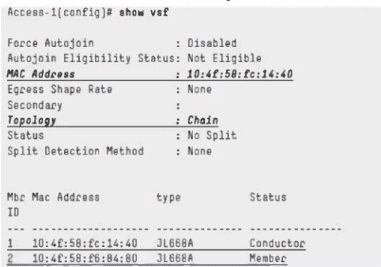
What is required on the VSF configuration for the stack configuration to work if either
member fails?
A. vsf split-detect mgmt
B. vsf start-auto-stacking
C. vsf secondary-member 2
D. vsf conductor-member 2
Which HPE Aruba Networking ClearPass configuration is required to implement DUR?
A. Enable the RadSec service
B. Create an admin user role
C. Import RADIUS dictionary attributes
D. Configure an HTTPS certificate
You must enable HTTPS access to an HPE Aruba Networking CX 8100 for an SVI 100 created after default settings. How do you meet this requirement?
A. Use the command https-server vrf mgmt to allow HTTPS access
B. The HTTPS server is accessible by default
C. The HTTPS server is accessible only from mgmt VRF.
D. Use the command https-server vrf default to allow HTTPS access
Your customer's CISO would like to deploy colorless ports across the network. Which will you need to configure to meet this requirement?
A. VRRP
B. VNBT
C. VSF
D. VRF
A recent routing change has caused an outage to one of your customer's branch sites. You
are about to run the command below:
copy checkpoint 20240722 running-config
Which troubleshooting methodology does this exemplify?
A. Divide and conquer
B. Top-down/Bottom-up
C. Replace configuration
D. Spot the difference
What does it mean when an event like the one below is seen on the HPE Aruba Networking CX switch?
2024-04-04T08:35:38.312254+00:00 ICX-Core-1 hpe-vaxd[2167]:
Event[701|LOG_INFO|AMM1/1|VSX2 state local up, remote down]
A. VSX secondary switch is down.
B. VSX keepalive has detected that the secondary member is down
C. The multichassis LAG 2 interface is down on both switches
D. The physical interface of LAG 2 on the secondary VSX member is down
| Page 3 out of 11 Pages |
| 1234 |
| HPE7-A08 Practice Test Home |
Real-World Scenario Mastery: Our HPE7-A08 practice exam don't just test definitions. They present you with the same complex, scenario-based problems you'll encounter on the actual exam.
Strategic Weakness Identification: Each practice session reveals exactly where you stand. Discover which domains need more attention, before HPE Aruba Networking Certified Professional - Switching exam day arrives.
Confidence Through Familiarity: There's no substitute for knowing what to expect. When you've worked through our comprehensive HPE7-A08 practice exam questions pool covering all topics, the real exam feels like just another practice session.
Copyright © All Rights Reserved