
What are two purposes of an aggregate route? (Choose two.)
A. to decrease the number of route advertisements
B. to hide internal routes from external peers
C. to allow external peers to see internal routes
D. to increase the number of route advertisements
Explanation:
An aggregate route combines multiple specific routes into one less‑specific prefix (e.g., summarizing 10.1.1.0/24, 10.1.2.0/24, and 10.1.3.0/24 into 10.1.0.0/22). This directly achieves two primary goals.
A. To decrease the number of route advertisements.
By advertising a single aggregate prefix instead of many specific routes, you reduce the routing table size and update frequency, conserving router memory, CPU, and bandwidth. This is a fundamental scaling technique in large networks.
B. To hide internal routes from external peers.
When you advertise only the aggregate to external neighbors (e.g., BGP peers), the specific internal subnets remain unknown outside your autonomous system. This improves security and stability because internal route flaps or changes do not propagate to external routers.
Why the other options are wrong:
C. To allow external peers to see internal routes.
Incorrect. Aggregation does the opposite—it prevents external peers from seeing specific internal routes. If you wanted external peers to see internal routes, you would advertise them individually, not aggregate them.
D. To increase the number of route advertisements.
Incorrect. Aggregation reduces the number of advertisements, not increases it. Increasing advertisements would harm network performance and is never a purpose of aggregation.
References:
Juniper Networks TechLibrary:“Understanding Aggregate Routes” – states that aggregate routes “reduce the number of routes in the routing table and limit the propagation of specific prefixes to neighbors.”
Your GRE tunnel is not transitioning to the Up status. What would be the first step in troubleshooting the problem?
A. Verify tunnel endpoint reachability.
B. Verify that the status of the management interface is up.
C. Verify the status of the management routing instance.
D. Verify that the routing instance for GRE tunnels is created.
Explanation:
For a GRE tunnel to transition to the Up state, the tunnel endpoints must be able to communicate with each other at the IP level. The tunnel source and destination addresses are used to encapsulate packets, and if the destination is unreachable (no route in the appropriate routing table), GRE keepalives (if configured) will fail or the interface will remain down. Therefore, the logical first step is to verify endpoint reachability, typically by pinging the destination IP from the source router. Without basic IP connectivity between endpoints, the GRE tunnel cannot come up.
Why other options are wrong:
B. Verify that the status of the management interface is up.
Incorrect. The management interface (e.g., fxp0 or em0) is used for out‑of‑band management and is not involved in forwarding GRE tunnel traffic. GRE tunnels rely on forwarding interfaces or routing instances, not the management interface.
C. Verify the status of the management routing instance.
Incorrect. The management routing instance is reserved for management traffic only. GRE tunnels operate within the default routing instance or a user‑defined non‑management routing instance. Checking the management instance is irrelevant.
D. Verify that the routing instance for GRE tunnels is created.
Incorrect. While GRE tunnels can reside in a non‑default routing instance, this is not required; they can also be in the default instance. Moreover, this is a configuration check, not the first troubleshooting step. Layer 3 reachability must be confirmed before investigating routing instance configuration.
Reference:
Juniper TechLibrary: “Troubleshoot GRE Tunnels” – “First, ensure that the tunnel destination address is reachable from the source router.”
JNCIS‑ENT Study Guide (Tunnels chapter) – “Basic IP connectivity between tunnel endpoints is a prerequisite for GRE tunnel state Up.”
You have two OSPF routers forming an adjacency. R1 has a priority of 32 and a router ID of 192.168.1.2. R2 has a priority of 64 and a router ID of 192.168.1.1. The routers were started at the same time and all other OSPF settings are the default settings. Which statement is correct in this scenario?
A. At least three routers are required for a DR/BDR election.
B. Router IDs must match for an adjacency to form.
C. R2 will be the BDR.
D. R1 will be the BDR.
Explanation:
In an OSPF broadcast network (e.g., Ethernet), the router with the highest interface priority becomes the Designated Router (DR), and the router with the second‑highest priority becomes the Backup Designated Router (BDR). If priorities are equal, the highest router ID (RID) breaks the tie. Here, R1 has priority 32, R2 has priority 64. R2 has the higher priority, so R2 becomes the DR. R1, with the next highest priority, becomes the BDR. Therefore, R1 will be the BDR is correct.
Why other options are wrong:
A. At least three routers are required for a DR/BDR election. Incorrect. Two routers are sufficient for a DR/BDR election. One becomes DR, the other BDR. A third router would become a DROther.
B. Router IDs must match for an adjacency to form. Incorrect. Router IDs must be unique within an OSPF domain. If they matched, adjacency would fail due to duplicate RID detection.
C. R2 will be the BDR. Incorrect. R2 has the higher priority (64 vs. 32), so R2 becomes the DR, not the BDR.
Additional note:
Because both routers started at the same time, no pre‑existing DR/BDR roles influence the election; they follow the standard priority‑based selection process. The router ID (192.168.1.1 for R2, 192.168.1.2 for R1) is irrelevant here because priorities are already different.
Reference:
Juniper TechLibrary: “OSPF Designated Router Election” – “The router with the highest priority on a network segment becomes the DR; the router with the second‑highest priority becomes the BDR.”
JNCIS‑ENT Study Guide (OSPF chapter) – “On broadcast multi‑access networks, DR/BDR election uses priority first, then router ID as tie‑breaker.”
Exhibit
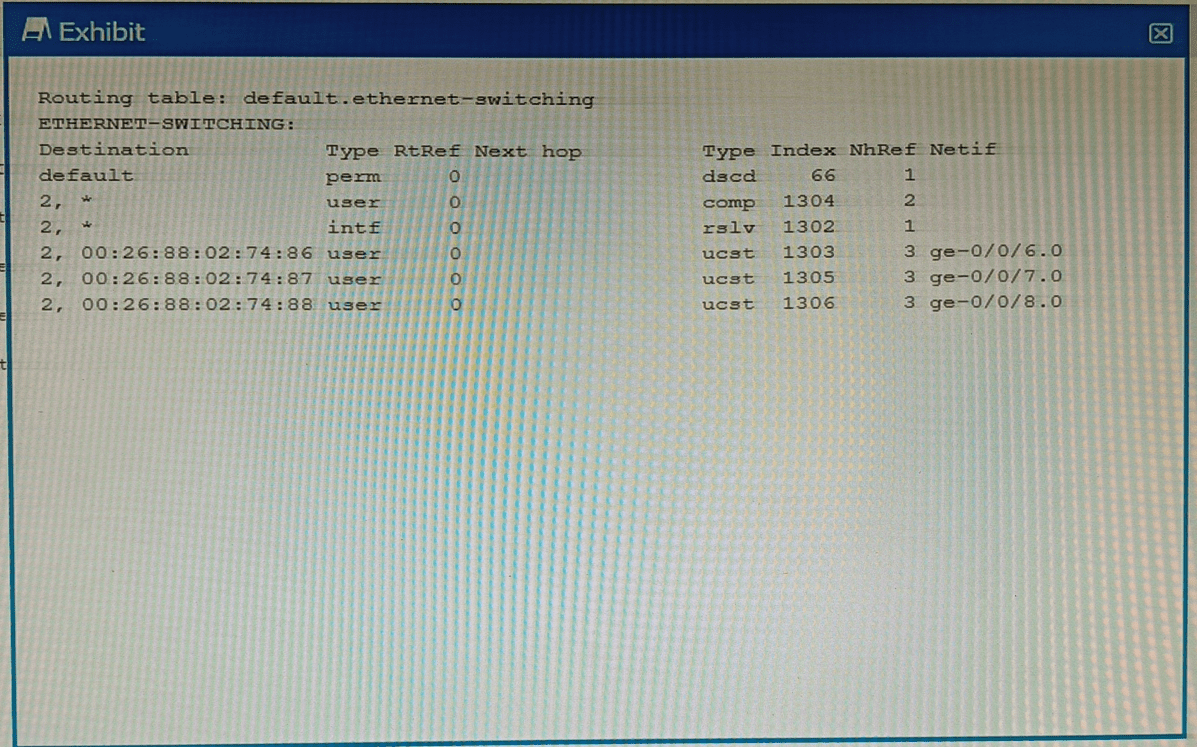
Which command displays the output shown in the exhibit?
A. show route forwarding-table
B. show ethernet-switching table
C. show ethernet—switching table extensive
D. show route forwarding—table family ethernet-switching
Explanation:
The exhibit displays a routing table under the heading default.ethernet-switching. This table contains entries such as a default route (next hop dscd, meaning discard), a 2,* prefix, and specific MAC addresses (00:26:88:02:74:86, etc.) mapped to unicast next hops (ucst) on interfaces ge-0/0/6.0, ge-0/0/7.0, and ge-0/0/8.0. Columns include Destination, Type (perm, user, intf), RtRef, Index, NhRef, and Netif. This output is not the standard MAC address table; instead, it is the forwarding table (PFE view) for the Ethernet switching family. On Juniper devices, the command show route forwarding-table family ethernet-switching displays exactly this information, showing how Layer 2 frames are forwarded through the system, including next‑hop types, discard routes, and interface associations. The presence of dscd (discard) for the default entry and ucst (unicast) for MAC‑based entries confirms this is a forwarding table, not a learning table.
Why other options are wrong:
A. show route forwarding-table
– Without the family ethernet-switching option, this command defaults to showing IPv4 (inet) forwarding entries. The exhibit contains no IPv4 addresses; it shows MAC addresses and ethernet‑switching‑specific next‑hop types. Therefore, this command would produce a completely different output (e.g., inet table with intf/unicast entries for IP prefixes).
B. show ethernet-switching table
– This displays the Layer 2 MAC learning table (also called the bridge table). Its typical output includes columns like VLAN, MAC address, Type, Age, and Interface. It does not show perm, dscd, ucst, RtRef, Index, or NhRef, nor does it present data in a routing‑table format. The exhibit lacks VLAN and Age fields, so this cannot be the correct command.
C. show ethernet-switching table extensive
– This adds even more detail to the MAC table, such as Flags, Last seen, and Learned from. The exhibit has none of these fields. Extensive output still does not resemble the routing‑table style shown. Like option B, it is for the bridge learning database, not the forwarding table.
References:
Juniper TechLibrary: “show route forwarding-table family ethernet-switching” – “Displays the Ethernet switching forwarding table, including discard routes, unicast next hops, and interface indices.”
JNCIS‑ENT Study Guide (Layer 2 Bridging and Forwarding) – “Use show route forwarding-table family ethernet-switching to examine the PFE’s forwarding entries for Layer 2 traffic.”
Which two statements are true about the default VLAN on Juniper switches? (Choose two.)
A. The default VLAN is set to a VLAN ID of 1 by default
B. The default VLAN ID is not assigned to any interface.
C. The default VLAN ID is not visible.
D. The default VLAN ID can be changed.
Explanation:
A. The default VLAN is set to a VLAN ID of 1 by default.
This is correct. On Juniper EX series switches, the default VLAN (named default) is preconfigured with VLAN ID 1. All switch ports initially belong to this VLAN as untagged members unless changed. VLAN 1 is the traditional default VLAN in many vendor switches, including Juniper.
D. The default VLAN ID can be changed.
This is also correct. Although the default VLAN initially uses VLAN ID 1, an administrator can modify it. For security or operational reasons, you may want to change the default VLAN ID to a different number (e.g., set vlans default vlan-id 999). After changing the ID, the VLAN still acts as the default VLAN for ports that remain in it, but traffic now uses the new VLAN ID.
Why B and C are incorrect:
B. The default VLAN ID is not assigned to any interface.
Incorrect. On a fresh Juniper switch, all interfaces belong to the default VLAN (VLAN ID 1) as untagged members. In fact, the default VLAN initially includes every access port. This is the opposite of "not assigned to any interface."
C. The default VLAN ID is not visible.
Incorrect. The default VLAN and its VLAN ID are fully visible in the configuration and operational commands. You can see the default VLAN by running show vlans or show configuration vlans. If it were not visible, troubleshooting and management would be nearly impossible. For example, the output of show vlans clearly displays default with VLAN ID 1. The statement might be confused with the default VLAN on some other platforms being "hidden," but that is not true for Juniper.
References:
Juniper TechLibrary: "Understanding VLANs on EX Series Switches" – "The default VLAN, named default, is assigned VLAN ID 1 and contains all interfaces initially."
Juniper TechLibrary: "Changing the Default VLAN ID" – "You can change the VLAN ID of the default VLAN using the vlan-id statement under the vlans default hierarchy."
Exhibit
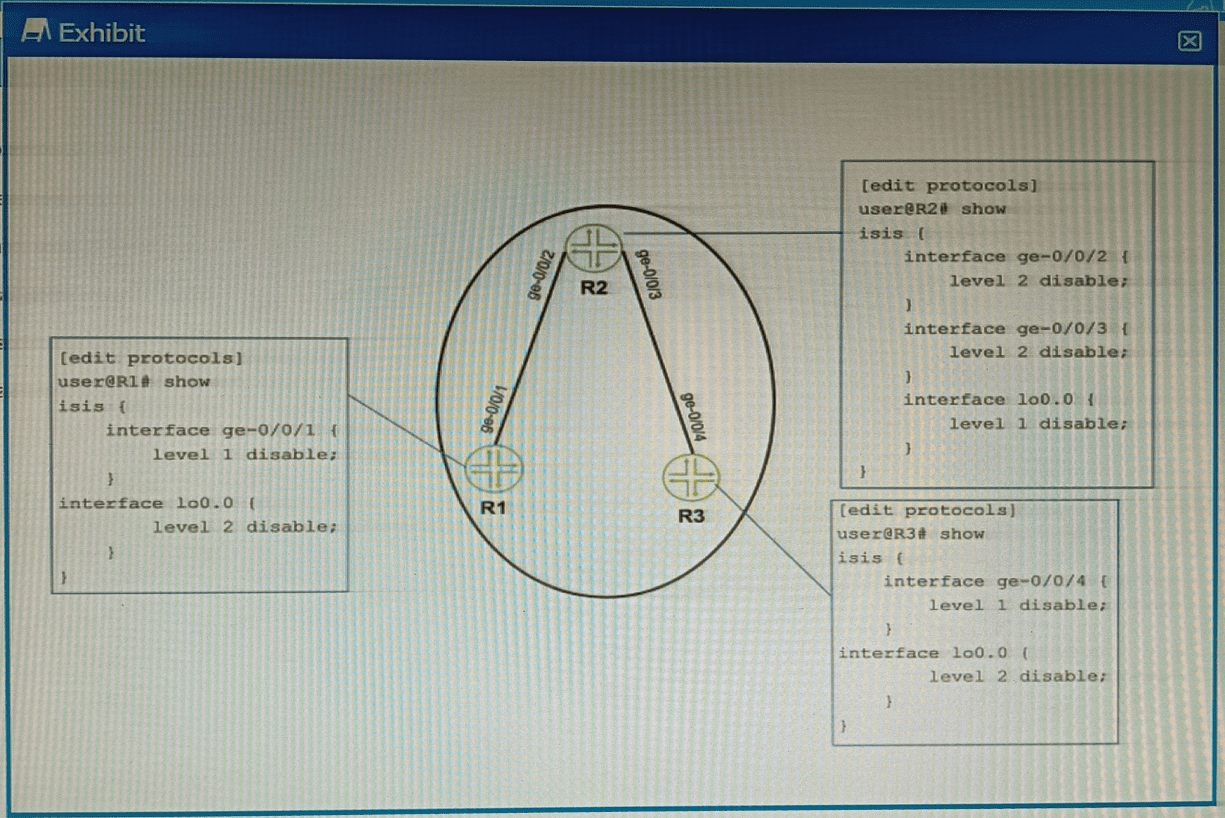
Referring to the exhibit, which two configuration changes must you apply for packets to
reach from R1 to R3 using IS-IS? (Choose two.)
A. On R1, enable Level 1 on the ge-0/0/1 interface.
B. On R3 disable Level 2 on the ge-0/0/4 interface.
C. On R1, disable Level 2 on the ge-0/0/1 interface.
D. On R3 enable Level 1 on the ge-0/0/4 interface
Explanation:
The exhibit shows IS-IS configurations on R1 and R3. IS-IS supports two levels:
Level 1 (intra-area routing, similar to OSPF non-backbone)
Level 2 (inter-area routing, similar to OSPF backbone)
For two routers to form an adjacency and exchange routes, they must share at least one common IS-IS level on the connecting interface.
A. On R1, enable Level 1 on the ge-0/0/1 interface.
Currently, R1’s ge-0/0/1 is not shown, so it presumably has defaults. Enabling Level 1 gives a common level with R3’s ge-0/0/4 once Level 1 is also enabled there.
D. On R3, enable Level 1 on the ge-0/0/4 interface.
R3’s ge-0/0/4 currently has Level 1 disabled. Removing level 1 disable allows Level 1 adjacencies.
Why B and C are incorrect:
B. On R3 disable Level 2 on ge-0/0/4
– This would leave Level 2 still disabled? Actually, it already has Level 1 disabled, so only Level 2 is active. Disabling Level 2 would leave no levels active on that interface, breaking adjacency.
C. On R1 disable Level 2 on ge-0/0/1
– Disabling Level 2 does not help because R3’s interface currently requires Level 2 (only Level 2 is active). Disabling Level 2 on R1 would remove the only possible common level.
Reference:
Juniper TechLibrary:“IS-IS Levels and Adjacencies” – “Neighbors must share at least one enabled level (Level 1 or Level 2) on the connecting interface to form an adjacency.”
JNCIS-ENT Study Guide (IS-IS chapter) – “Level 1 routers route within an area; Level 2 routes between areas. Mismatched levels prevent adjacency formation.”
What is a purpose of using a spanning tree protocol?
A. to look up MAC addresses
B. to eliminate broadcast storms
C. to route IP packets
D. to tunnel Ethernet frames
Explanation:
A spanning tree protocol (STP, RSTP, MSTP) is used in Ethernet networks to prevent Layer 2 loops. Loops occur when there are redundant paths between switches, causing broadcast frames to circulate endlessly. This leads to broadcast storms, which consume bandwidth, overload switch CPUs, and can bring down the network. STP logically disables redundant links by placing them in a blocking state, allowing only a single active path between any two switches. If the active path fails, STP re‑converges and unblocks a previously blocked port. By eliminating loops, STP directly eliminates broadcast storms.
Why other options are wrong:
A. To look up MAC addresses.
Incorrect. MAC address lookup is performed by the switch’s forwarding logic using the MAC address table (learned from source addresses). STP does not participate in MAC learning or lookup; it only manages loop prevention.
C. To route IP packets.
Incorrect. Routing IP packets is a Layer 3 function performed by routers or Layer 3 switches using routing tables. STP operates at Layer 2 and has no knowledge of IP addresses or routing.
D. To tunnel Ethernet frames.
Incorrect. Tunneling Ethernet frames (e.g., over GRE, L2TP, or MPLS) is used to transport Layer 2 traffic across a Layer 3 network. STP does not provide tunneling; it is strictly a loop‑avoidance mechanism within a switched network.
Reference:
IEEE 802.1D (STP standard) – “The Spanning Tree Protocol eliminates loops from a bridged network, preventing broadcast radiation and instability.”
Juniper TechLibrary: “Understanding Spanning Tree Protocols” – “The primary purpose of STP is to maintain a loop‑free Layer 2 topology and prevent broadcast storms.”
You are asked to change the setting for the LSAs age out back to the default value. In this scenario, which time interval will accomplish this task?
A. 1800 seconds
B. 600 seconds
C. 300 seconds
D. 3600 seconds
Explanation:
In OSPF, every Link State Advertisement (LSA) has an age field. The default maximum age (MaxAge) for an LSA is 3600 seconds (1 hour). When an LSA reaches this age without being refreshed by its originating router, it is considered invalid and is automatically removed (aged out) from the Link State Database (LSDB).
To prevent LSAs from reaching this maximum age, the originating router periodically refreshes its LSAs every 1800 seconds (30 minutes). This refresh action resets the age of the LSA to zero, ensuring that valid LSAs never reach the 3600-second expiration threshold under normal operating conditions.
To answer the specific question: If a network administrator has previously changed the LSA aging setting and is now asked to revert it to the default value, they must restore the MaxAge parameter to 3600 seconds. This ensures LSAs will time out and be removed from the database after one hour if no refresh is received.
Why the other options are incorrect:
A. 1800 seconds:
This is the LSRefreshTime, which controls how often a router sends out refreshed copies of its LSAs to prevent them from aging out. This is a different timer and not the age-out value.
B. 600 seconds:
his value (10 minutes) does not correspond to any standard LSA timer and is not the default aging interval.
C. 300 seconds:
Similarly, this value (5 minutes) is not the default LSA MaxAge or Refresh timer. While OSPF uses 300 seconds (5 minutes) for the "dead interval" for neighbor adjacency, it is not applicable to LSA aging.
Reference:
Juniper Networks Technical Documentation: OSPF LSAs have a maximum age of 3600 seconds (1 hour). When an LSA reaches this age, it is considered invalid and is removed from the OSPF database.
OSPF RFC (Request for Comments):
The MaxAge is defined as an architectural constant of 3600 seconds.
Which statement is correct about graceful Routing Engine switchover (GRES)?
A. The PFE restarts and the kernel and interface information is lost.
B. GRES has a helper mode and a restarting mode.
C. When combined with NSR, routing is preserved and the new master RE does not restart rpd.
D. With no other high availability features enabled, routing is preserved and the new master RE does not restart rpd.
Explanation:
Graceful Routing Engine switchover (GRES) is a Juniper high availability feature that allows a switchover from the master Routing Engine (RE) to the backup RE without interrupting packet forwarding. When GRES is enabled, the Packet Forwarding Engine (PFE) continues to forward traffic during the switchover, and interface information is preserved. However, GRES alone does not preserve routing protocols; control plane protocols (e.g., OSPF, BGP, IS‑IS) restart on the new master RE, and rpd (routing protocol daemon) restarts from scratch. This can cause neighbor resets and temporary routing instability.
Why other options are wrong:
A. The PFE restarts and the kernel and interface information is lost.
Incorrect. During GRES, the PFE does not restart; it continues forwarding traffic. Kernel and interface information are preserved across the switchover. This is the "graceful" aspect of GRES.
B. GRES has a helper mode and a restarting mode.
Incorrect. That description applies to Graceful Restart (GR), not GRES. Graceful Restart has a restarting router and helper routers. GRES is about Routing Engine switchover, not protocol restart helper mechanisms.
D. With no other high availability features enabled, routing is preserved and the new master RE does not restart rpd.
Incorrect. GRES alone does not preserve routing protocols; rpd restarts on the new master RE. Without NSR, protocol adjacencies are lost and must be re‑established. Only when GRES is combined with NSR is rpd preserved.
References:
Juniper TechLibrary: “Understanding Graceful Routing Engine Switchover (GRES)” – “GRES preserves interface and kernel information and keeps the PFE forwarding during switchover, but routing protocols restart unless NSR is also configured.”
Juniper TechLibrary: “Understanding Non‑Stop Routing (NSR)” – “When combined with GRES, NSR ensures the standby RE is fully synchronized so the new master RE does not restart rpd.”
Which two statements are correct about Martian routes? {Choose two.)
A. Martian routes are never installed in the route table.
B. Additional prefixes can be added to the list of Martian routes.
C. Martian routes only represent publicly used prefixes.
D. Martian routes are always host addresses.
Explanation:
A. Martian routes are never installed in the route table.
This is correct. Martian routes are defined as invalid or suspicious IP addresses and prefixes (e.g., loopback addresses, broadcast addresses, multicast ranges, and reserved/unused address spaces). Juniper devices, by default, discard any packet with a source or destination address matching a Martian prefix. These prefixes are explicitly excluded from the routing table and forwarding table. Even if a static route or dynamic routing protocol tries to install such a route, the device will reject it. Martian filters operate as a protection mechanism before route installation.
B. Additional prefixes can be added to the list of Martian routes.
This is also correct. Junos OS allows network administrators to customize the Martian list to suit their security policies. You can add new prefixes to be treated as Martian (discarded) or remove default Martian prefixes if necessary. The configuration is done under the [edit routing-options martians] hierarchy. For example, set routing-options martians 10.0.0.0/8 orlonger would treat all RFC 1918 private addresses as Martian (though this is not typical for private networks). This flexibility is essential for special security or routing policies.
Why C and D are incorrect:
C. Martian routes only represent publicly used prefixes.
Incorrect. Martian routes primarily represent invalid, reserved, or special-purpose addresses, which are often not publicly routable (e.g., 0.0.0.0/8, 127.0.0.0/8, 224.0.0.0/4, 240.0.0.0/4). However, the statement says "only publicly used prefixes" — that is wrong because public prefixes (e.g., 8.8.8.8/32) are not Martian by default. Martians are the opposite of normal public prefixes. Additionally, private addresses (e.g., 10.0.0.0/8) are not default Martians but can be added. So the definition is not about "publicly used."
D. Martian routes are always host addresses.
Incorrect. Martian routes can be host addresses (e.g., 127.0.0.1/32) or entire networks (e.g., 0.0.0.0/8, 255.0.0.0/8). They are defined by prefix and prefix length, often using orlonger to cover subnets as well. Saying they are "always host addresses" is false.
References:
Juniper TechLibrary: “Understanding Martian Addresses” – “Martian addresses are not installed in the routing table or forwarding table; the default list includes reserved and invalid prefixes, and you can add or remove entries.”
JNCIS‑ENT Study Guide (Routing Policy and Filtering) – “Martian routes are discarded and prevented from route table entry; the list is fully configurable.”
You are deploying a trunk port with multiple VLANs. In this scenario, which statement is true about the native VLAN?
A. The native VLAN must be the default VLAN on the port.
B. The native VLAN is automatically configured through DHCP.
C. The native VLAN is an untagged VLAN ID on the port.
D. The native VLAN is the highest tagged VLAN ID on the port.
Explanation:
On a trunk port, traffic from multiple VLANs is typically carried over the same link using 802.1Q tagging, where each Ethernet frame includes a VLAN tag. However, the native VLAN is an exception: frames belonging to the native VLAN are sent untagged. This allows devices that do not understand 802.1Q tagging (e.g., legacy devices or certain access points) to communicate over the trunk link while still participating in a specific VLAN. On Juniper switches, the native VLAN is defined using the native-vlan-id statement under the trunk interface configuration.
Why other options are wrong:
A. The native VLAN must be the default VLAN on the port.Incorrect. The default VLAN on a Juniper switch is VLAN 1, but the native VLAN can be set to any valid VLAN ID. The two are independent unless explicitly configured that way.
B. The native VLAN is automatically configured through DHCP Incorrect. The native VLAN is a static configuration set on the switch port; it is not learned or assigned dynamically via DHCP.
D. The native VLAN is the highest tagged VLAN ID on the port. Incorrect. The native VLAN is not determined by the highest or lowest tag; it is explicitly configured as a separate parameter. All other VLANs on the trunk are tagged, while the native VLAN is untagged, regardless of VLAN ID number.
Reference:
Juniper TechLibrary: “Configuring Trunk Ports with Native VLAN” – “On a trunk interface, the native VLAN is the VLAN for which frames are transmitted and received untagged. All other VLANs on the trunk are tagged.”
JNCIS‑ENT Study Guide (Layer 2 Switching / VLANs) – “The native VLAN allows untagged traffic on a trunk port; it is explicitly configured and does not have to be the default VLAN (VLAN 1).”
You enable persistent MAC learning on your Juniper switch In this scenario, which statement is correct?
A. You can enable persistent MAC learning on an interface where MAC learning is disabled.
B. You can enable persistent MAC learning on an interface that is part of a redundant trunk group.
C. You can only enable persistent MAC learning on an interface in access mode.
D. You can only enable persistent MAC learning on an interface on which 802.1x authentication is configured.
📖 Explanation:
Persistent MAC learning ensures that a MAC address learned on an access interface remains associated with that interface even if the link goes down or the switch reboots. This is particularly useful in environments with port security or 802.1X authentication, where consistency of MAC bindings is critical.
Option C is correctbecause persistent MAC learning is supported only on access mode interfaces. Trunk mode interfaces are designed to carry multiple VLANs, and persistent MAC learning is not applicable there.
❌ Distractor Analysis
A. Interface where MAC learning is disabled: Incorrect. If MAC learning is disabled, persistent MAC learning cannot function because there are no MAC addresses being learned.
B. Interface in a redundant trunk group: Incorrect. Persistent MAC learning is not supported on trunk interfaces or redundant trunk groups.
D. Interface with 802.1X authentication: Misleading. While persistent MAC learning is often used alongside 802.1X, it is not restricted to interfaces with 802.1X enabled. The requirement is access mode, not authentication.
🔗 Reference
Juniper Networks Documentation: Persistent MAC Learning Overview – Juniper TechLibrary (juniper.net in Bing)
Junos OS Switching Configuration Guide: MAC Learning and Persistent MAC Learning on Access Interfaces
| Page 1 out of 9 Pages |
| 123 |
Real-World Scenario Mastery: Our JN0-351 practice exam don't just test definitions. They present you with the same complex, scenario-based problems you'll encounter on the actual exam.
Strategic Weakness Identification: Each practice session reveals exactly where you stand. Discover which domains need more attention, before Enterprise Routing and Switching Specialist (JNCIS-ENT) exam day arrives.
Confidence Through Familiarity: There's no substitute for knowing what to expect. When you've worked through our comprehensive JN0-351 practice exam questions pool covering all topics, the real exam feels like just another practice session.
Copyright © All Rights Reserved