
What is the purpose of Audit Logs in Juniper Mist?
A. to record key performance events
B. to record security alerts
C. to record administrative activities
D. to record SLE violations
Explanation::
In Juniper Mist, Audit Logs are designed to track and record all administrative activities performed within the Mist UI or via APIs. This includes actions such as:
User logins and logouts
Configuration changes (e.g., creating sites, adding devices, modifying WLAN templates)
Role changes and permission assignments
API token generation or revocation
Audit Logs serve a compliance and security monitoring purpose, allowing administrators to see who did what, when, and from which IP address. They are distinct from other logs that focus on network performance or security events.
Why the other options are incorrect:
A. to record key performance events
→ Performance-related events (e.g., AP uptime, client connection issues) are typically found in Marvis Actions or event logs, not in Audit Logs.
B. to record security alerts
→ Security alerts (e.g., rogue AP detection, WIDS/WIPS events) are captured in Marvis or security-specific logs within Mist.
D. to record SLE violations
→ SLE (Service Level Expectation) violations (e.g., high latency, poor throughput) are tracked in SLE dashboards and Marvis queries, not in Audit Logs.
Reference:
Juniper Mist documentation: "Audit Logs track all configuration and administration changes made by users or API calls."
JNCIA-MistAI exam blueprint: Section on Mist Platform Operations – understanding audit trails vs. performance/security logs.
Which two statements describe SLEs? (Choose two.)
A. SLEs use machine learning to provide a proactive approach to understanding the enduser experience.
B. SLEs use data science to troubleshoot network issues on an ad hoc basis.
C. The metrics analyzed to meet specific SLE goals are categorized into classifiers.
D. SLEs display a detailed list of Wi-Fi clients who have connected to the network.
Explanation:
A. SLEs use machine learning to provide a proactive approach to understanding the end-user experience.
✅ Correct. Mist Service Level Expectations (SLEs) leverage machine learning and AI-driven analytics to proactively measure, monitor, and report on the actual user experience (e.g., time to connect, throughput, roaming success). This is a core component of Mist AIOps.
C. The metrics analyzed to meet specific SLE goals are categorized into classifiers.
✅ Correct. Each SLE (e.g., connectivity, capacity, coverage, performance) consists of multiple classifiers (individual metrics or conditions) that define success or failure for that SLE. For example, the "Successful Connect" SLE includes classifiers like DHCP success, DNS success, and AAA success.
Why the other options are incorrect:
B. SLEs use data science to troubleshoot network issues on an ad hoc basis.
❌ Incorrect. SLEs are not "ad hoc" troubleshooting tools; they provide continuous, proactive monitoring based on predefined thresholds and machine learning. While they help identify issues, "ad hoc" implies manual one-off use, which does not describe SLEs.
D. SLEs display a detailed list of Wi-Fi clients who have connected to the network.
❌ Incorrect. SLEs show aggregated success/failure rates (e.g., 98.5% successful connections) and trends, not a raw detailed list of individual clients. For client-level details, you would use Client Insights or Marvis queries, not SLE dashboards directly.
Reference:
JNCIA-MistAI Exam Objectives: Section 2.0 – SLEs
Mist AI documentation:"SLEs are AI-driven, proactive thresholds made up of multiple classifiers per SLE type."
Mist UI: SLE dashboards show classifiers (e.g., Assoc, DHCP, DNS, Auth) as component success metrics.
You want to change the default language for your Juniper Mist portal. What will accomplish this task?
A. Select your ranked language choice from the Alerts page.
B. Input your primary language in the My Accounts page.
C. Define your language using Organization templates.
D. Use the Change Language drop-down list of the Juniper Mist portal.
Explanation:
In the Juniper Mist portal, changing the display language is a user-specific setting, not an organization‑wide or template‑based configuration. The language selection is available directly from the portal's interface, typically via a drop-down list found in the user menu (often represented by a globe, language icon, or the user's profile).
Once changed, the portal interface—menus, labels, messages, and UI text—will display in the selected language for that logged‑in user.
Why the other options are incorrect:
A. Select your ranked language choice from the Alerts page.
❌ Incorrect. The Alerts page is for viewing system, SLE, and device alerts, not for language selection.
B. Input your primary language in the My Accounts page.
❌ Incorrect. Mist does not have a "My Accounts" page for language settings. There is a user profile or account settings area, but language is not set there—it's set via the UI language drop-down.
C. Define your language using Organization templates.
❌ Incorrect. Organization templates control configurations like device settings, WLANs, and policies, not the portal's display language per user. Language is not part of organization‑level templates.
Reference:
Juniper Mist portal interface: Language selector is located in the top‑right user menu.
JNCIA-MistAI exam topics: Basic portal navigation and user preferences.
Mist documentation: "You can change the language of the Mist UI using the language drop‑down list."
Which data format is used for exchanging data with the Juniper Mist REST API?
A. YAML
B. protocol buffers
C. JSON
D. XML
Explanation:
The Juniper Mist REST API uses JSON (JavaScript Object Notation) as the primary data format for both requests and responses. When you make an API call to the Mist cloud (e.g., GET /api/v1/sites or POST /api/v1/devices), the data is sent and received in JSON format, which is lightweight, human-readable, and widely adopted for RESTful APIs.
Why the other options are incorrect:
A. YAML
❌ Incorrect. YAML is often used for configuration files (e.g., in Ansible or Kubernetes), but Mist's REST API does not accept or return YAML. It is not supported for direct API exchange.
B. protocol buffers (Protobuf)
❌ Incorrect. Protocol buffers are used for high‑performance, binary serialization (e.g., gRPC). The Mist API is a REST API, which typically uses JSON, not Protobuf. Mist does not expose Protobuf for its external REST API.
D. XML
❌ Incorrect. While XML is a common data format for older SOAP‑based or some REST APIs, Mist only supports JSON. Sending XML will result in an error or not be processed.
Reference:
Juniper Mist API documentation: "The Mist API is a RESTful API that uses JSON for all request and response bodies."
JNCIA-MistAI exam objectives: Section on Mist APIs and automation.
Example API call (from Mist API docs):
curl -H "Authorization: Token
Your organization currently uses Access Assurance for 802.1X authentication of
wireless users using user certificates. All users are currently placed in the same
VLAN after authentication.
There are multiple VLANs at your sites.
In this scenario, how would you configure Access Assurance to make the network
more secure?
A. Configure MAC Authentication Bypass (MAB) and assign WxLAN roles based on groups of MAC addresses.
B. Configure user authentication using EAP-TTLS and assign WxLAN roles based on AD user group.
C. Configure host (machine) authentication using EAP-TLS and assign WxLAN roles based on AD user group.
D. Configure user authentication using EAP-TLS and assign WxLAN roles based on AD user group.
Explanation:
Your organization already uses user certificates with 802.1X. To improve security, you need two things: (1) maintain strong authentication, and (2) move users from a single VLAN to dynamic VLAN assignment based on identity.
Option D achieves both. EAP-TLS provides the strongest 802.1X method—mutual certificate-based authentication immune to password theft or brute force. By integrating Access Assurance with Active Directory (AD), the system reads the user's group membership (e.g., Sales vs. Engineering) during authentication and dynamically assigns a WxLAN role. That role places the user on the correct VLAN and enforces micro-segmentation, following Zero Trust principles.
Why others are incorrect:
A (MAB + MAC groups):
MAB authenticates by MAC address, which is easily spoofed. This is a fallback for legacy/IoT devices, not a security upgrade for 802.1X users.
B (EAP-TTLS + AD groups):
EAP-TTLS authenticates the server via certificate but transmits user credentials as username/password (PAP/MSCHAPv2). This is less secure than EAP-TLS and suited for BYOD/guest access, not high-security corporate users.
C (Host authentication with EAP-TLS + AD user groups):
This option is logically inconsistent. Host (machine) authentication validates the computer certificate, not the user. You cannot assign VLANs based on AD user group because the user identity is never presented. For user‑based policies, you must authenticate the user (user certificate), not just the machine.
References:
Juniper Mist Access Assurance documentation:"WxLAN policies allow dynamic VLAN/role assignment based on RADIUS attributes from identity stores like AD group membership."
JNCIA-MistAI exam objectives: Section 4.0 – Access Assurance with EAP methods and WxLAN.
Industry best practice (NIST SP 800-207): EAP-TLS with certificate-based user authentication provides the highest security for 802.1X networks.
Which Juniper Mist feature tracks the location of important devices and objects within a building?
A. Wireless Assurance
B. IoT Assurance
C. Asset Visibility
D. User Engagement
Explanation:
Juniper Mist Asset Visibility is the specific cloud service designed to track the real-time and historical location of important devices and objects within a building. It leverages patented virtual Bluetooth LE (vBLE) technology built into Juniper Access Points, combined with cloud-based machine learning, to provide highly accurate location tracking (typically 1-3 meters) for assets equipped with BLE tags. This allows organizations to efficiently locate equipment such as IV pumps, forklifts, inventory, or key personnel. The service also provides detailed analytics on asset movement and utilization.
Why the other options are incorrect
A. Wireless Assurance
❌ Incorrect. Wireless Assurance focuses on Wi-Fi performance, connectivity, and client experiences—not tracking physical objects. It monitors SLEs, AP health, and client roaming.
B. IoT Assurance
❌ Incorrect. IoT Assurance secures network connectivity for headless IoT and BYOD devices using MPSK/PPSK authentication. It does not provide location tracking of important objects.
D. User Engagement
❌ Incorrect. User Engagement tracks people (not objects/equipment) to deliver proximity notifications, wayfinding, and contextual offers via mobile devices. While it tracks location, its purpose is engaging users, not managing asset inventory.
References
Juniper Networks official documentation: "Juniper Mist Asset Visibility...enables real-time and historical location tracking of assets with unparalleled precision"
Juniper User Engagement datasheet:"User Engagement...tracks people...Asset Visibility locates tagged equipment"
JNCIA-MistAI exam objectives: Section on Location Services (Asset Visibility vs. User Engagement vs. IoT Assurance)
Exhibit
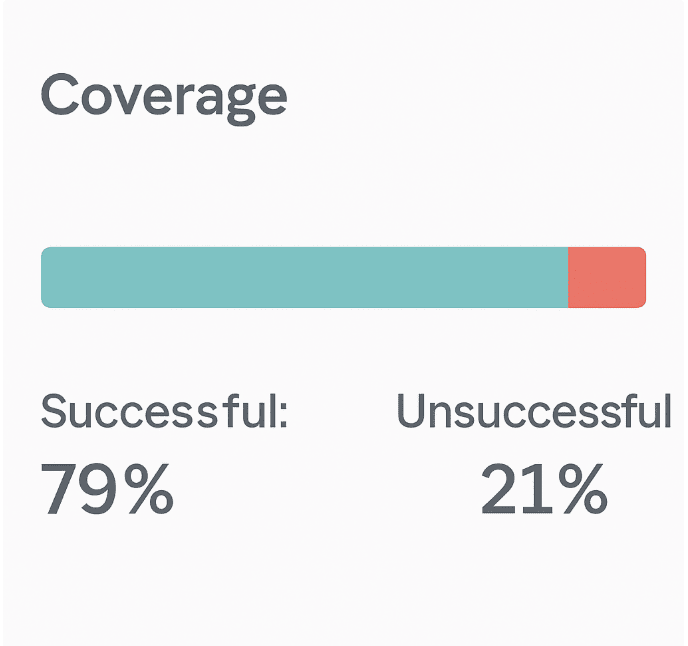
Referring to the exhibit, which percentage of Coverage was unsuccessful?
A. 9%
B. 21%
C. 79%
D. 15%
Explanation:
The exhibit shows a Coverage Service Level Expectation (SLE) dashboard from Juniper Mist. Two metrics are presented:
Successful: 79%
Unsuccessful: 21%
The question asks: "which percentage of Coverage was unsuccessful?" The answer is explicitly displayed as 21%. In Mist SLE dashboards, the successful and unsuccessful percentages always sum to 100%, representing the total client minutes analyzed. No calculation or interpretation is required—the answer is directly visible.
Why other options are incorrect:
A. 9%
❌ This value does not appear anywhere in the exhibit. It may be a distractor based on common misconceptions (e.g., subtracting 79% from 100% incorrectly yields 21%, not 9%; or confusing Coverage with another SLE like Capacity). There is no mathematical or visual basis for 9%.
C. 79%
❌ This is the successful Coverage percentage, not the unsuccessful one. This is a classic trick: the question asks for unsuccessful, but the larger, more prominent number is 79%, which candidates might select without reading carefully. In Mist SLE dashboards, both percentages are displayed side by side, but the label "Successful" or "Unsuccessful" must be followed.
D. 15%
❌ Not present in the exhibit. Fifteen percent might be a plausible value for unsuccessful in other SLE categories (e.g., Time to Connect or Throughput), but for this specific Coverage SLE, the displayed value is 21%. This option has no relation to the data shown.
References:
Juniper Mist documentation– SLE Coverage: "The Coverage SLE measures the percentage of time a client’s RSSI remains above -75 dBm. The dashboard displays both successful and unsuccessful percentages, which sum to 100% of client minutes."
JNCIA-MistAI Exam Blueprint (Section 2.0):"Interpret SLE dashboards including Coverage, Capacity, Connectivity, and Throughput."
Which two features are part of Juniper Mist Wired Assurance? (Choose two.)
A. template-based configuration for switches
B. template-based configuration for routers
C. WxLAN policies
D. port profiles
✅ Explanation:
Juniper Mist Wired Assurance is a cloud-native solution for managing Juniper EX Series switches. Two of its fundamental configuration features are template-based configuration for switches and port profiles .
A. Template-based configuration for switches
– Wired Assurance uses switch templates to apply consistent configurations across multiple switches or sites. Templates define global settings (RADIUS, NTP, VLANs) and can be assigned to sites, allowing switches to automatically inherit configurations upon onboarding . This streamlines deployment, reduces errors, and enables scalability.
D. Port profiles
– Port profiles are reusable configuration bundles applied to switch ports. They allow you to define settings like PoE, VLAN assignments, and speed negotiation once and apply them to multiple ports or devices (e.g., cameras, APs, IoT devices) . Combined with dynamic port configuration, this enables "colorless ports" where devices automatically inherit correct settings .
❌ Why other options are incorrect
B. Template-based configuration for routers
– Wired Assurance is specifically designed for EX Series switches, not routers. Router management falls under different Mist offerings like WAN Assurance, not Wired Assurance.
C. WxLAN policies
– WxLAN is primarily a wireless policy framework for network segmentation, role-based access, and micro-segmentation on Mist APs . While policies can apply across wired/wireless, WxLAN itself is not a core feature of Wired Assurance; it belongs to Wi-Fi Assurance.
References
Juniper Wired Assurance product page: "Configure and scale sites and switches using templates and port profiles"
Juniper configuration guide: "Create port profiles for camera devices...Switch templates allow you to apply the same settings to switches across sites"
What are two ways that Juniper Mist Access Assurance enforces network access control? (Choose two.)
A. It creates a VPN using an IPsec tunnel.
B. It monitors network traffic.
C. It assigns specific roles to users.
D. It groups users into network segments.
Explanation:
Juniper Mist Access Assurance is a cloud-native NAC service that enforces Zero Trust network access based on user and device identity . It controls network access through two primary mechanisms: dynamic role assignment and network segmentation.
C. It assigns specific roles to users. ✅
Access Assurance assigns granular user roles based on identity vectors including X.509 certificate attributes, group membership, MDM compliance state, and location context . These roles are enforced within the Juniper Mist WxLAN policy framework or switch policies, determining exactly what network resources the user can access .
D. It groups users into network segments. ✅
Based on user and device identity, Access Assurance dynamically places users into specific network segments using VLAN assignment or Group-Based Policy (GBP) technology . This enables identity-based micro-segmentation, ensuring users connect only to the network segment appropriate for their role .
Why the other options are incorrect:
A. It creates a VPN using an IPsec tunnel. ❌
Access Assurance is an access control service that operates at the network edge using 802.1X authentication and RADIUS . VPN creation and IPsec tunneling fall under WAN Assurance or SD-WAN features, not Access Assurance.
B. It monitors network traffic. ❌
While Access Assurance captures client connection events for troubleshooting, its primary function is policy enforcement—not traffic monitoring. Network traffic analysis belongs to other Mist services like Marvis or Wireless Assurance . Access Assurance focuses on authentication and authorization before access is granted.
References:
Juniper Access Assurance Datasheet: "Assign users to specific network segment (VLAN or group-based policy tag) as well as enforce network policy by assigning user roles"
HPE Product Overview: "Assign users specific roles and group them into network segments using VLAN or GBP technology"
Which Juniper Mist location-based service improves accuracy?
A. Proximity Detection
B. User Engagement
C. Asset Visibility
D. Wi-Fi Location
Explanation:
Juniper Mist offers multiple location-based services, but User Engagement is specifically engineered to deliver the highest accuracy among them, achieving 1- to 3-meter precision with sub-second latency .
The key technology enabling this accuracy is Juniper's patented virtual Bluetooth LE (vBLE) antenna array integrated directly into Mist Access Points. Unlike traditional triangulation methods that rely on manual calibration and battery-powered beacons, User Engagement uses an innovative probability surface approach combined with cloud-based machine learning .
The vBLE array features a patented 16-element directional antenna that transmits unique RF energy in multiple directions simultaneously . The Mist AI system in the cloud continuously adapts path-loss formulas for different devices and changing RF environments, eliminating the need for manual site surveys or ongoing calibration—factors that traditionally degrade location accuracy . This AI-driven learning ensures the system maintains "unprecedented accuracy" across diverse device types without manual tuning .
Why other options are incorrect
A. Proximity Detection ❌
– This is a feature within User Engagement, not a separate service. Proximity detection enables notifications when a user approaches a specific zone, but it relies on the underlying vBLE accuracy of User Engagement rather than improving it .
C. Asset Visibility ❌
– Asset Visibility tracks BLE-tagged equipment (e.g., IV pumps, forklifts) by detecting periodic asset signals, but it is designed for operational visibility (location, status, utilization, movement patterns) rather than delivering the highest real-time tracking accuracy . Its primary purpose is asset management and workflow optimization, not sub-meter precision .
D. Wi-Fi Location ❌
– Wi-Fi location uses RSSI from Wi-Fi signals for positioning, but it is less accurate than vBLE-based services . While useful for broader location context (e.g., "which floor or zone"), Wi-Fi location cannot match the 1-3 meter accuracy achieved by User Engagement's vBLE technology . Mist documentation confirms that the most accurate results require vBLE-enabled services rather than Wi-Fi alone .
References
Juniper User Engagement Datasheet:"1- to 3-meter location accuracy with sub-second latency... proprietary 16-element vBLE antenna"
Juniper Product Page – User Engagement: "Patented vBLE technology delivers location accuracy of 1 to 3 meters"
What is the sampling method used in supervised learning?
A. labeled dataset
B. regression
C. decision tree
Explanation:
In supervised learning, the fundamental sampling method requires a labeled dataset. This means each sample in the training data includes both the input features and the corresponding correct output label (or target value). The algorithm learns from these labeled examples to map inputs to outputs, then applies that mapping to new, unseen data.
How it works in Mist AI:
Juniper Mist uses supervised learning models trained on labeled historical network data. For example, to predict client connection failures, the model is trained on thousands of past connection attempts where each attempt is labeled as "successful" or "unsuccessful" along with associated telemetry (RSSI, DHCP latency, authentication logs). Once trained, the model can predict outcomes for real-time network events.
Why other options are incorrect
B. Regression
❌ – Regression is a type of supervised learning task (predicting continuous values, e.g., throughput in Mbps), not a sampling method. It is something you do with labeled data, not how you sample the data.
C. Decision tree
❌ – A decision tree is a supervised learning algorithm/model architecture, not a sampling method. Like regression, it operates on labeled datasets but does not describe the sampling technique itself.
References
JNCIA-MistAI Exam Objectives (Section 5.0 – AI Operations): Understand supervised vs. unsupervised learning and the role of labeled data.
Juniper Mist AI Concepts documentation: "Supervised learning models require labeled training data where each sample includes the correct answer."
Industry standard definition (Bishop, Pattern Recognition and Machine Learning):
"In supervised learning, the training data consists of input vectors and corresponding target labels."
Which Juniper Mist dashboard feature uses the ROAMINGOF element?
A. Conversational Assistant
B. Marvis Query Language
C. Marvis Minis
D. Wireless SLE
Explanation:
The ROAMINGOF element is a specific Marvis Query Language (MQL) command used to track and visualize wireless client roaming events within the Juniper Mist dashboard.
When you execute a query like ROAMINGOF
When roaming events occurred
Which Access Points the client moved from and to
Signal strength (RSSI) changes during the roaming process
Graphical representations showing roaming paths on floor plans
Event details such as association and authorization status
This query language feature is accessed through the Marvis Actions interface. To use it, navigate to Marvis > Marvis Actions in the Mist dashboard, click the "Ask a Question" button, and enter your ROAMINGOF query directly into the search bar.
While Mist also offers a Conversational Assistant (natural language interface), the ROAMINGOF command follows the structured syntax of Marvis Query Language rather than freeform natural language.
Why other options are incorrect
A. Conversational Assistant ❌
– This is the natural language chat interface (accessed via the bottom-right corner of the dashboard). While you can ask conversational questions about roaming, the specific ROAMINGOF syntax belongs to the structured Query Language feature, not the conversational interface.
C. Marvis Minis ❌
– Marvis Minis are synthetic testing agents that simulate client connections to proactively test network performance. They do not accept query commands like ROAMINGOF. This feature is for automated testing, not for querying existing client roaming data.
D. Wireless SLE ❌
– Service Level Expectations (SLEs) provide aggregated success/failure metrics for coverage, capacity, connectivity, and throughput. While poor roaming can impact SLE scores, the ROAMINGOF query is a detailed client-level diagnostic tool within Marvis, not an SLE dashboard feature.
References
Juniper Mist Documentation (January 12, 2023): "Results when using the Marvis search for the ROAMINGOF <> query now shows an additional 'Event' column to the Table view"
| Page 1 out of 9 Pages |
| 123 |
Real-World Scenario Mastery: Our JN0-253 practice exam don't just test definitions. They present you with the same complex, scenario-based problems you'll encounter on the actual exam.
Strategic Weakness Identification: Each practice session reveals exactly where you stand. Discover which domains need more attention, before Mist AI - Associate (JNCIA-MistAI) exam day arrives.
Confidence Through Familiarity: There's no substitute for knowing what to expect. When you've worked through our comprehensive JN0-253 practice exam questions pool covering all topics, the real exam feels like just another practice session.
Copyright © All Rights Reserved