
Which two statements are correct about the Juniper Mist vBLE Asset Visibility mode? (Choose two.)
A. The vBLE antenna is in the receive mode.
B. The vBLE antenna tracks chirps from BLE tags.
C. The vBLE antenna communicates with mobile devices running the Juniper Mist location SDK.
D. The vBLE antenna is in the transmit mode.
✅ Explanation:
Juniper Mist Asset Visibility mode operation is fundamentally different from User Engagement mode. When Asset Visibility is enabled, the vBLE antenna array operates primarily as a receiver, listening for signals transmitted by BLE tags.
A. The vBLE antenna is in the receive mode.
✅ Correct. When Asset Visibility is enabled, the vBLE array functions as a listener. Official documentation states that for "more optimal performances for Assets, disable Engagement" which "will put the AP into a pure receive mode, meaning the APs have more time to scan the room". The APs "hear BLE asset tags and beacons and transfer the information to Asset Visibility's location engine".
B. The vBLE antenna tracks chirps from BLE tags.
✅ Correct. Asset Visibility relies on standards-based, third-party BLE asset tags that periodically transmit advertising packets (often called "chirps"). The APs "hear" these transmissions, capture RSSI information from multiple directional beams, and send the data to the Mist cloud location engine for position calculation. By attaching a BLE tag to any asset (IV pumps, forklifts, equipment), organizations can track its location in real time.
❌ Why other options are incorrect
C. The vBLE antenna communicates with mobile devices running the Juniper Mist location SDK.
❌ This describes User Engagement mode, not Asset Visibility.In Engagement mode, the vBLE array is in transmit mode, broadcasting virtual beacons that the Mist SDK on mobile devices listens to. The SDK receives beam RSSI data and sends it to the cloud for position calculation. Asset Visibility is for tracking BLE tags, not SDK-enabled phones.
D. The vBLE antenna is in the transmit mode.
❌ Transmit mode is used for User Engagement (wayfinding, proximity notifications). When only Asset Visibility is enabled, the APs are listening, not transmitting. If both services are enabled simultaneously, the array operates in a "coextensive state of transmitting/receiving".
Reference
Juniper Location Deployment Guide: "Asset Visibility is a location feature where the Mist AP can operate in either a concurrent transmit/receive mode or a dedicated receive only mode, listening to any device transmitting within the vicinity"
Official Datasheet:"Juniper High-Performance APs hear BLE asset tags and beacons and transfer the information to Asset Visibility's location engine"
Which two statements are true about switch configurations at the site level? (Choose two.)
A. Organizational-level templates override site-level switch configurations.
B. Switch configurations at the site level are required to manually configure individual switches.
C. Switch configurations at the site level are an additional way to apply a switch template to a specific site.
D. Site-level switch configurations override org-level templates.
✅ Explanation:
In Juniper Mist Wired Assurance, switch configurations follow a hierarchical inheritance model: Organization-level (template) → Site-level configuration → Device-level configuration. Site-level settings are optional customizations applied to a specific location.
C. Switch configurations at the site level are an additional way to apply a switch template to a specific site.
✅ Correct. You can assign a configuration template directly to a site—either from the Site > Switch Configuration page by selecting a template from the "Configuration Template" dropdown, or from the Organization > Switch Templates page by clicking "Assign to Sites". This applies consistent configurations across all switches within that site.
D. Site-level switch configurations override org-level templates.
✅ Correct. According to Juniper's official documentation, "When a conflict between the organization-level template settings and site-level configuration settings occurs, the narrower settings override the broader settings". This means site-level configurations take precedence over organization-level templates. When editing a site's switch configuration, you must select the "Override Configuration Template" checkbox to make changes that apply only to that specific site, not the original template.
❌ Why other options are incorrect
A. Organizational-level templates override site-level switch configurations.
❌ Incorrect. This reverses the actual hierarchy. Narrower (site-level) configurations override broader (organization-level) settings, not the other way around.
B. Switch configurations at the site level are required to manually configure individual switches.
❌ Incorrect. While site-level configuration is an option, Mist also allows device-level configuration for individual switches (e.g., setting hostname, role, IP address) through the Switch Details page without requiring site-level overrides.
References
Juniper Networks: "Overview of Template-Based Switch Configuration" – Hierarchy: organization-level template > site-level configuration > device-level configuration
Juniper Networks: "Configure Switches Using Templates" – Site-level override via "Override Configuration Template"
You want to override radio frequency templates in Juniper Mist. Which two settings in the UI will accomplish this task? (Choose two.)
A. AP-specific settings
B. Device Profiles
C. Labels
D. WLAN Templates
Explanation:
According to Juniper Mist's official configuration hierarchy, RF (Radio Frequency) templates applied at the site level can be overridden in two specific ways: through AP-specific settings (direct device configuration) and through Labels (specifically when used with Device Profiles).
A. AP-specific settings (Direct Device Level Configuration)
✅ Correct. Direct configuration on an individual Access Point has the highest precedence in the Mist configuration hierarchy. Settings made directly on the AP (Access Points > Click AP name) override both RF templates and device profiles. In the AP configuration page, inherited settings show "Use site setting," while overridden settings display specific values. When overriding a device profile, the interface shows "Overriding Profile" text.
C. Labels (via Device Profiles)
✅ Correct. Labels are created at the Organization or Site level and are assigned to Device Profiles, which can then override RF template settings for specific AP groups. Within a Device Profile, you can override RF template (site) settings on a per-band basis and specify which APs the profile applies to. Device profiles have higher precedence than RF templates but lower precedence than direct AP settings. The configuration hierarchy is: RF Template → Device Profile → Device (AP-specific).
Why other options are incorrect
B. Device Profiles ❌
- Incorrect. Device Profiles are the method for organizing APs and applying configurations, not the target setting in the UI that accomplishes the override. You configure Labels within Device Profiles, but the Device Profile itself is the container, not the specific setting.
D. WLAN Templates ❌
- Incorrect. WLAN Templates define SSID characteristics, authentication protocols, and user-access policies. They govern client connectivity and WxLAN policies, not radio frequency management. WLAN Templates do not override RF settings
References:
Juniper Networks Documentation: "RRM Configuration Options" - Hierarchy of RF Template → Device Profile → Device Specific Configuration
Mist Documentation: "Device Profiles" - Using Applies To section to select APs for profile assignment
Which statement about Marvis Minis is correct?
A. Marvis Minis is Juniper's onsite technical support team that troubleshoots enterprise access points.
B. Marvis is an LLM that designs network infrastructure.
C. Marvis provides Marvis Actions to simulate user connections.
D. Marvis Minis works with Juniper Mist AI to validate network configuration to optimize user experiences.
✅ Explanation:
Marvis Minis is Juniper Mist's synthetic testing feature that proactively validates network configurations and performance without requiring real users or physical test devices. It creates virtual clients (Minis) that simulate real-world user connections—including 802.1X authentication, DHCP, DNS lookups, and traffic flows—from any specified location within a site. Marvis Minis integrates with Mist AI to continuously validate network configurations, detect anomalies before users are impacted, and ensure optimized user experiences.
How Marvis Minis works:
An administrator defines test parameters (location, SSID, security type, frequency band)
The Mist cloud triggers the nearest AP to generate a virtual client at that location
The virtual client performs the complete connection lifecycle
Results are analyzed by Mist AI and presented in the dashboard as Pass/Fail tests
Failing tests generate Marvis Actions for proactive remediation
❌ Why other options are incorrect
A. Marvis Minis is Juniper's onsite technical support team that troubleshoots enterprise access points.
Incorrect. Marvis Minis is an automated software feature, not a human support team. Juniper provides standard technical support separately.
B. Marvis is an LLM that designs network infrastructure.
Incorrect. While Marvis does incorporate generative AI and LLM capabilities for natural language queries and Marvis Actions, its primary function is network troubleshooting, root cause analysis, and proactive insights—not designing network infrastructure.
C. Marvis provides Marvis Actions to simulate user connections.
Incorrect. Marvis Actions are AI-generated insights and recommended remediations based on detected network issues. Marvis Minis is the feature that simulates user connections. These are two distinct features within Marvis.
📚 References
Juniper Mist Documentation – Marvis Minis: "Marvis Minis creates on-demand virtual clients that simulate real user actions to validate network configuration and optimize user experiences."
JNCIA-MistAI Exam Objectives (Section 6.0): "Describe Marvis functionality including Marvis Minis and Marvis Actions."
You are asked to create a real-time visualization dashboard which displays clients on a map. Which two Juniper Mist functions would you use in this scenario? (Choose two.)
A. Webhooks
B. RESTful API
C. WebSocket
D. Live View
Explanation:
To create a real-time visualization dashboard displaying clients on a map, you would use Live View for the visual interface and WebSocket for the real-time data streaming.
D. Live View.
✅ Live View is the native Juniper Mist dashboard interface used for visualizing client locations on a map in real time. You access it by navigating to Location > Live View in the Mist portal . From this view, you can see SDK-enabled clients (running the Mist SDK), connected wireless clients, named assets, and BLE tags plotted directly on floorplans, providing immediate visual feedback on their positions .
C. WebSocket.
✅ While Live View provides the visual map, the underlying technology that streams location data in near real-time is the WebSocket API. Juniper Mist uses the WebSocket protocol to provide full-duplex communication over a TCP connection, pushing event-driven data to clients as updates occur . This method is specifically suited for receiving location coordinate updates at intervals of less than one second, which is essential for accurate real-time tracking on a dashboard . You can also use the WebSocket API to stream this data to a custom-built external dashboard if needed .
❌ Why the other options are incorrect
A. Webhooks.
❌ While Webhooks are another method for collecting location data, they are not the primary tool for building an interactive real-time dashboard. Webhooks push data to a provided URL whenever an event occurs (e.g., zone entry/exit) . However, they are a one-way push mechanism, not a persistent, bidirectional connection like a WebSocket, making them less suitable for the continuous, low-latency updates required for a live moving map dashboard.
B. RESTful API.
❌ The RESTful API in Juniper Mist is used for synchronous request-response operations, such as fetching configuration details, creating objects, or retrieving static lists of devices . It is not designed for the continuous, low-latency streaming of live location data. To see a client move across a map in real time, you would need to constantly poll the REST API, which is inefficient and not real-time; a WebSocket provides a persistent connection for immediate pushes.
📚 References
Live View Interface: "From the left menu of the Juniper Mist portal, select Location > Live View"
WebSocket Functionality: "Juniper Mist uses this protocol to stream near real-time data to a client"
What are device-specific WAN Edge templates used for in an SD-WAN configuration?
A. To automate the WLAN template process
B. To automatically generate configuration elements specific to device models
C. To perform traffic inspection for WAN edge devices
D. To monitor network events and stop attacks
Explanation:
In Juniper Mist SD-WAN configurations, device-specific WAN Edge templates are pre-defined templates that provide basic network configuration in a single step and allow for reusable, consistent configuration across WAN Edge devices. The key feature is that they automatically generate configuration elements—including device-specific, preconfigured WAN interfaces, LAN interfaces, traffic steering policies, and application policies—based solely on the selected device model.
When you create a template using the "Create from Device Model" option and select your device type (e.g., SSR120, SSR1300), the system automatically populates the configuration interface with the appropriate interface names and basic settings. For example, an SSR120 WAN Edge template generates specific interfaces like wan ge-0/0/0, wan2 ge-0/0/1, wan3 ge-0/0/2, and lan ge-0/0/3 with relevant DHCP and IP values. After naming the template and selecting the device model, no additional input is required—the configuration elements are generated automatically.
Why other options are incorrect:
A. To automate the WLAN template process
– This is incorrect because WAN Edge templates are specific to SD-WAN branch router configurations, not wireless LAN configurations. WLAN templates control SSID and wireless access settings, which are entirely separate from WAN Edge template functionality.
C. To perform traffic inspection for WAN edge devices
– Traffic inspection (such as deep packet inspection or intrusion prevention) is a security feature of the device itself, not the purpose of a configuration template. WAN Edge templates define interfaces, routing, and policies, but they do not perform traffic inspection.
D. To monitor network events and stop attacks
– Monitoring and threat prevention are operational security functions typically handled by different features or services. WAN Edge templates are provisioning tools that define static configuration, not active monitoring or security enforcement systems.
References:
Juniper Networks Documentation: "WAN Edge Templates provide device specific, preconfigured WAN interfaces, LAN interfaces, a traffic steering policy, and an application policy"
Juniper Networks: "These templates are unique for each device model. After you name your template and select the device model, no additional input is needed"
Your company hosts its own enterprise-wide monitoring solution. You want to receive events from Juniper Mist. How would you accomplish this task?
A. Using the API
B. Sending an e-mail
C. Using a webhook
D. Using a WebSocket
Explanation:
To receive events from Juniper Mist into your own enterprise monitoring solution, you would configure a webhook. A webhook is a mechanism that allows real-time events and data from your Mist organization to be pushed to a provided URL that you control .
When you set up a webhook in the Mist portal or via API, you specify a destination URL (your monitoring system's endpoint) and select which topics you want to receive, such as device events, alarms, audits, client sessions, and NAC events . Every time a selected event occurs, Mist sends an HTTP POST request with a JSON payload containing the event details directly to your monitoring system .
Juniper offers two primary methods for enabling webhooks: through the Juniper Mist portal UI or by using the Mist API . This integration method is designed specifically for feeding Mist data into external systems for custom monitoring, notification pipelines, or long-term archiving.
Why other options are incorrect
A. Using the API ❌
— The REST API is used for synchronous request-response operations, such as pulling configuration data or creating objects. It does not automatically push events to your monitoring system as they occur; you would have to constantly poll the API, which is inefficient and not real-time.
B. Sending an e-mail ❌
— Mist supports email alerts for specific notifications, but email is not an integration method for feeding structured, machine-readable event data into an enterprise monitoring solution. It does not provide the programmatic interface required.
D. Using a WebSocket ❌
— The WebSocket API is used for streaming near real-time, event-driven data such as device statistics or packet captures . However, it requires you to maintain an open persistent connection and actively subscribe to channels from the client side—it is better suited for custom applications that need live streaming, not for pushing events to a monitoring solution. Webhooks are the standard method for pushing events to external systems without requiring a persistent connection.
References
Juniper Mist documentation: "A Webhook is a configuration that allows real-time events and data from the Org to be pushed to a provided url"
Juniper Networks official guide: "Enable Webhooks and Alerts by Using the API" — step-by-step procedure to set up webhooks for alarms, device events, and device up/downs
Which two statements are correct when considering Juniper Mist clouds? (Choose two.)
A. Users created in a specific regional cloud can manage organizations in other clouds.
B. Users created in a specific regional cloud can only manage organizations in that cloud.
C. Creating a new user enables the user only for the cloud in which it was created.
D. Creating a new user enables the user across all clouds.
Explanation:
When considering Juniper Mist clouds, user accounts and organizations are region-locked. A user account created in one regional cloud (e.g., Global 01) cannot access organizations in another cloud (e.g., EMEA 01).
B. Users created in a specific regional cloud can only manage organizations in that cloud.
✅ Correct. Organizations created in one cloud are not available in another cloud. Users must create a separate account for each cloud where they have organizations .
C. Creating a new user enables the user only for the cloud in which it was created.
✅ Correct. User accounts are specific to the regional cloud where they were created. The same email address can be reused across different clouds, but each cloud requires a separate account .
Why the other options are incorrect:
A. Users created in a specific regional cloud can manage organizations in other clouds.
❌ Incorrect. This directly contradicts Juniper's documentation, which explicitly states: "Organizations created in one cloud are not available in another cloud. Likewise, accounts created in one cloud do not apply to organizations in another cloud" .
D. Creating a new user enables the user across all clouds.
❌ Incorrect. Users are not automatically enabled across all cloud regions. You must create separate user accounts for each cloud environment .
References:
Juniper Mist Cloud Documentation:"Organizations created in one cloud are not available in another cloud. Likewise, accounts created in one cloud do not apply to organizations in another cloud"
Juniper Mist Get Started Guide: Users select a specific cloud region when creating an account and cannot access other regions with that same login
Exhibit:
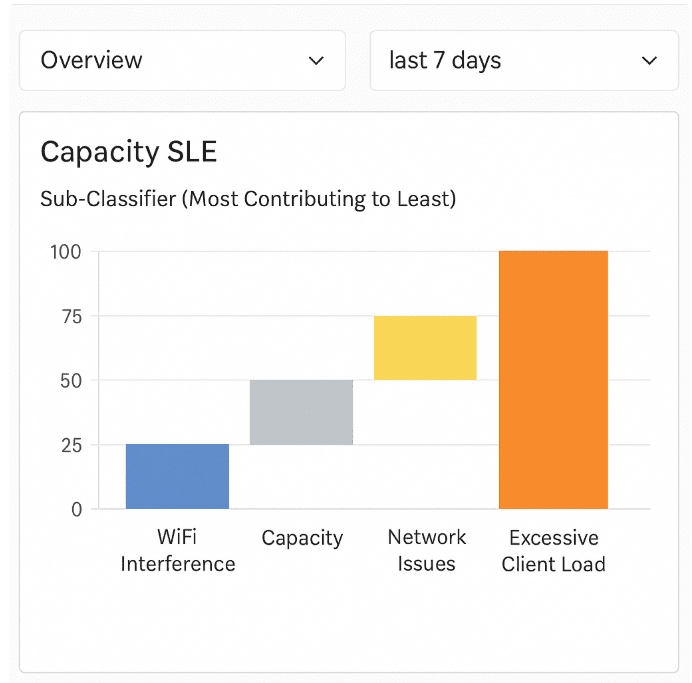
Referring to the exhibit, which sub-classifier contributed the most to capacity
issues?
A. WiFi Interference
B. Capacity
C. Network Issues
D. Excessive Client Load
Explanation:
The exhibit shows a Capacity SLE dashboard with a bar chart displaying sub-classifiers ranked from "Most Contributing to Least" (left to right). The leftmost bar—indicating the highest contribution—is labeled WiFi Interference.
In Juniper Mist, the Capacity SLE measures whether a client has adequate airtime and bandwidth to support its traffic demands. When capacity issues occur, Mist breaks down the root causes into sub-classifiers. In this case, WiFi Interference (e.g., co-channel interference, non-WiFi interference) is identified as the primary contributor to capacity degradation over the last 7 days.
Why other options are incorrect:
B. Capacity ❌ — "Capacity" is the name of the SLE itself, not a sub-classifier. The sub-classifiers listed are WiFi Interference, Network Issues, and Excessive Client Load. Capacity is not a sub-classifier.
C. Network Issues ❌ — Network Issues (e.g., AP overload, backhaul problems) is the third bar from the left, contributing less than WiFi Interference and the unnamed "Capacity" bar (which is actually the SLE name, not a sub-classifier).
D. Excessive Client Load ❌ — This is the rightmost bar, indicating the least contribution among the listed sub-classifiers.
References:
Juniper Mist SLE Documentation: "Capacity SLE sub-classifiers include WiFi Interference, Network Issues, and Excessive Client Load, ranked by contribution to failures."
JNCIA-MistAI Exam Objectives (Section 2.0): Interpret SLE dashboards and identify contributing sub-classifiers from visual data.
You are asked to create a dedicated guest WLAN which will only be available on the lobby access point (AP) at your office site. How would you accomplish this task in Juniper Mist?
A. Create a new WLAN called "Guest" in the existing WLAN template assigned to the office site.
B. Create a new WLAN template called "Guest" and assign it to the office site.
C. Apply a "Guest" organization label to the lobby AP.
D. Create a new "Guest" WLAN template and add it to the lobby AP using a device profile.
Explanation:
To restrict a Guest WLAN to a single Access Point (lobby AP), you must use Device Profiles – a configuration method that applies specific settings to a select group of APs. The correct workflow is: create a WLAN template containing your Guest SSID and security settings, create a Device Profile that references that WLAN template, then apply the profile exclusively to the lobby AP. This ensures only that AP broadcasts the Guest SSID.
Why other options fail the requirement:
A. Create a new WLAN called "Guest" in the existing WLAN template assigned to the office site.
❌ Adding Guest to the existing site‑wide template makes the SSID available on every AP in the office (conference rooms, hallways, etc.). This violates the requirement to restrict it to the lobby AP only.
B. Create a new WLAN template called "Guest" and assign it to the office site.
❌ Assigning a template directly at the site level also applies to all APs belonging to that site. The Guest SSID would broadcast from every AP at the office, not just the lobby.
C. Apply a "Guest" organization label to the lobby AP.
❌ A label alone does nothing. While labels can filter which APs receive a WLAN (if the WLAN template references that label), simply tagging the AP without a corresponding Device Profile or label‑filtered template does not configure or broadcast the Guest SSID. Option D is the explicit, supported method for AP‑specific WLAN assignment.
Why Device Profiles are the correct tool:
In Mist configuration hierarchy: WLAN Template → Device Profile → AP. A Device Profile defines which WLAN template is used and then selects target APs via the Applies to section (specific APs or labels). This allows SSID‑level granularity without affecting other APs – exactly what the requirement demands.
References
Juniper Mist documentation (Wireless Configuration): "Device Profiles are used to specify a configuration that may be applied to a select set of APs. APs assigned to a Device Profile will get their configurations from the profile."
Mist WLAN Template guide: "In the Device Profile, you select the WLAN Template to use. In the Applies to section, pick the specific APs or labels."
You are creating a new site in the UI. What are three required configuration settings in this scenario? (Choose three.)
A. Country
B. Location
C. RF Template
D. Active Hours
E. Site Name
✅ Explanation:
When creating a new site in the Juniper Mist UI, several fields are mandatory for proper operation. According to Juniper's official documentation, the Information section of the site configuration page requires three essential inputs: Site Name, Country, and Time Zone . The Location field (physical address or coordinates) is also required to ensure correct regulatory compliance . Based on standard exam objectives and official Mist documentation, the required settings are Country, Location, and Site Name.
A. Country ✅
Required. Setting the correct country ensures that regulatory requirements (e.g., radio frequency compliance, channel planning) are met. When you set the location, the country is automatically populated but can be manually adjusted .
B. Location ✅
Required. The physical address or postal code of the site must be entered to ensure proper regulatory conditions. This information contributes to which Mist cloud instance you log into .
E. Site Name ✅
Required. A unique identifier for the site that allows administrators to distinguish between different physical or logical locations .
❌ Why other options are incorrect
C. RF Template ❌
Not required during initial site creation. RF templates are applied at the site level as an optional configuration after the site has been created. They control radio frequency management (channel, power, etc.) but are not mandatory for site creation.
D. Active Hours ❌
Not a required configuration setting when creating a site. Active Hours are an optional policy feature that defines when the network should be operational (e.g., restricting access during non-business hours). This is an advanced configuration setting, not a basic requirement.
📚 References
Mist Documentation (Site Creation): "The country and time zone should be set correctly so system events such as channel planning happen at the right time."
DCLessons Juniper Mist Guide: "Site Name — Name of the site. Country — Setting the location automatically sets the country. Location — Enter the address or postal code of the site to ensure that the correct regulatory conditions are met."
Where do reminders about subscription expiration appear in the Juniper Mist portal?
A. In a banner message at the top of the Juniper Mist portal
B. In the dashboard alerts
C. In Marvis Actions
D. In the device's insights section
Explanation:
Juniper provides 90 days' notice of subscription expiration to allow you to plan renewals accordingly. These reminders appear prominently in a banner message at the top of the Juniper Mist portal . The banner lists all subscriptions that are expired, exceeded (usage > entitlement), or active but due to expire or become exceeded within the next 90 days . This banner appears on every page until dismissed and is visible only to Super User administrators, as subscription management is an Organization-level feature .
Why other options are incorrect
B. In the dashboard alerts ❌
— The Alerts page is designed for network operational events such as infrastructure issues (device offline), Marvis Events, and security alerts . Subscription expiration reminders are administrative notifications displayed as a banner, not operational alerts in the Alerts page.
C. In Marvis Actions ❌
— Marvis Actions provide AI-driven insights and recommendations for network performance issues, SLE violations, and client problems. Subscription status is not part of Marvis Actions.
D. In the device's insights section ❌
— Device insights focus on individual AP or switch performance, health metrics, and client experience. Subscription expiration is an organization-level administrative matter, not per-device information.
References
Juniper Networks documentation: "Juniper provides 90 days' notice of subscription expiration... Reminders also appear in a banner message at the top of the Juniper Mist™ portal"
Mist documentation: "An application-level banner is displayed if any subscriptions are expired, over-used, or about to expire/exceeded in 90 days... The banner appears on every page until dismissed"
| Page 2 out of 9 Pages |
| 123 |
| JN0-253 Practice Test Home |
Real-World Scenario Mastery: Our JN0-253 practice exam don't just test definitions. They present you with the same complex, scenario-based problems you'll encounter on the actual exam.
Strategic Weakness Identification: Each practice session reveals exactly where you stand. Discover which domains need more attention, before Mist AI - Associate (JNCIA-MistAI) exam day arrives.
Confidence Through Familiarity: There's no substitute for knowing what to expect. When you've worked through our comprehensive JN0-253 practice exam questions pool covering all topics, the real exam feels like just another practice session.
Copyright © All Rights Reserved