
Junos OS Fundamentals
Which two statements accurately describe the relationship between the routing table and the forwarding table on a Junos device? (Choose two.)
A. The routing table resides in the data plane for fast lookups.
B. The routing table selects the best route based on routing information.
C. The forwarding table is built from the routing table.
D. The routing table is built from the forwarding table.
Explanation:
In Junos OS, the routing table (RIB) is control-plane based, selects the best routes, and then populates the forwarding table (FIB) in the data plane for fast packet switching. The FIB is a derivative of the RIB, optimized for high-speed lookups.
Correct Option:
B: The routing table selects the best route based on routing information.
The routing table runs routing protocols (OSPF, BGP, static) and applies route preferences to select the single active, best path to each destination. This occurs in the control plane before any forwarding decision.
C: The forwarding table is built from the routing table.
Once the routing table determines the active routes, it exports them to the forwarding table (FIB). The FIB resides in the Packet Forwarding Engine (PFE) for efficient, high-speed packet forwarding.
Incorrect Option:
A: The routing table resides in the data plane for fast lookups.
The routing table resides in the control plane (Routing Engine), not the data plane. The data plane uses the forwarding table for fast lookups, while the routing table focuses on route learning and selection.
D: The routing table is built from the forwarding table.
This is backward. The routing table is built from routing protocols and static configurations; the forwarding table is a subset of the routing table’s active routes, optimized for forwarding. The forwarding table does not build the routing table.
Reference:
Juniper TechLibrary – “Routing Tables and Forwarding Tables Overview” (Junos OS Evolved or Junos OS documentation): The routing table (RIB) selects active routes; the forwarding table (FIB) is derived from the RIB and used by the PFE for packet forwarding.
What is the main function of the forwarding table on a Junos device?
A. It contains only active routes used to forward packets through the PFE.
B. It advertises routes to neighboring routers.
C. It stores all learned routes from routing protocols.
D. It determines the best route based on route preference.
Explanation:
The forwarding table (FIB) resides in the Packet Forwarding Engine (PFE) and contains only the active, best routes selected by the routing table. Its main function is to enable high‑speed packet forwarding without involving the control plane.
Correct Option:
A: It contains only active routes used to forward packets through the PFE.
The forwarding table is a subset of the routing table, holding only the optimal active routes. The PFE uses this table to make fast forwarding decisions for every packet, without consulting the Routing Engine.
Incorrect Option:
B: It advertises routes to neighboring routers.
Route advertisement is a function of routing protocols (OSPF, BGP, etc.) managed by the routing table and protocol daemons, not the forwarding table. The forwarding table has no role in control‑plane operations like advertisements.
C: It stores all learned routes from routing protocols.
All learned routes are stored in the routing table, not the forwarding table. The forwarding table receives only the active, selected routes from the routing table, not every learned route.
D: It determines the best route based on route preference.
Route selection and preference calculation are performed by the routing table in the control plane. The forwarding table simply uses the already‑selected best routes; it does not perform any route selection logic.
Reference:
Juniper TechLibrary – “Understanding the Forwarding Table”: The forwarding table is installed in the PFE and contains only active routes from the routing table, used for actual packet forwarding.
Which two statements describe the result when you enter ? at the command-line prompt? (Choose two.)
A. It lists the available commands and options.
B. It lists tips for the help menu.
C. It displays help about a text string contained in a statement.
D. It displays summary information about the commands and options.
Explanation:
In Junos OS CLI, typing ? (question mark) at the command-line prompt activates context-sensitive help. It lists all available commands, statements, or options at the current hierarchy level and provides a summary of their functions without executing any command.
Correct Option:
A: It lists the available commands and options.
The ? displays all possible completions for the current input context, including commands, options, and variables. This helps users discover syntax without consulting external documentation.
D: It displays summary information about the commands and options.
Alongside listing available commands and options, the ? output includes a brief one-line description or summary for each item, explaining what the command or option does.
Incorrect Option:
B: It lists tips for the help menu.
Junos ? does not provide meta‑tips about the help system itself. Tips or help usage instructions are typically obtained through commands like help or help reference, not through the ? operator.
C: It displays help about a text string contained in a statement.
Searching for a text string within statements is done using help grep or help reference
Reference:
Juniper TechLibrary – "CLI Tips and Tools" (Junos OS Operational Mode): Using ? at the CLI prompt displays a list of available commands, options, and a brief description for each, providing context‑sensitive help.
Which two statements about route preference in Junos OS are correct? (Choose two.)
A. Higher route preference values indicate higher priority.
B. Route preference is considered after evaluating the longest prefix match.
C. Lower route preference values indicate higher priority.
D. Route preference determines the forwarding table size.
Explanation:
Route preference (also called administrative distance) in Junos OS is a numeric value where lower values indicate higher priority. It is used to select the active route when multiple protocols provide routes to the same destination. Preference is evaluated before the longest prefix match.
Correct Option:
B: Route preference is considered after evaluating the longest prefix match.
This statement requires careful interpretation. In Junos route selection, the longest prefix match is evaluated first to find candidate routes. Among those with the same prefix length, the lowest route preference (highest priority) determines the active route. So preference is considered after prefix length is matched.
C: Lower route preference values indicate higher priority.
This is the core rule of route preference in Junos. Direct routes have preference 0, OSPF internal 10, Static 5, BGP 170 (or 20 for local preference). Lower number = more trusted = higher priority.
Incorrect Option:
A: Higher route preference values indicate higher priority.
This is the opposite of how Junos works. Higher preference values indicate lower priority (less trusted). For example, BGP (170) is less preferred than OSPF (10) unless overridden.
D: Route preference determines the forwarding table size.
The forwarding table size is determined by the number of active routes and hardware capacity, not by route preference values. Preference only affects which route becomes active but does not change the table size.
Reference:
Juniper TechLibrary – "Routing Policy, Route Preference, and Administrative Distance": Junos selects the route with the lowest preference value among routes to the same destination with the same prefix length. Preference is evaluated after longest prefix match.
You are creating a new user account on your Junos device. The user must be able to validate the routing table and interface statistics but should not be able to make any configuration changes. In this scenario, which permission flag would satisfy this requirement?
A. configure
B. all
C. view
D. network
Explanation:
In Junos OS, user permissions are controlled by class flags. The view permission flag allows read-only access to operational commands, including viewing the routing table and interface statistics, while completely blocking any configuration changes.
Correct Option:
C: view
The view flag provides read-only access to show, monitor, and help commands. Users can display routing tables (show route), interface statistics (show interfaces), and other operational data but cannot enter configuration mode or modify any device settings.
Incorrect Option:
A: configure
The configure flag explicitly grants access to configuration mode and the ability to modify the device's configuration. This would violate the requirement of preventing configuration changes.
B: all
The all flag grants superuser access with full read and write privileges, including configuration changes, file operations, and all operational commands. This exceeds the required permissions.
D: network
The network flag controls access to routing protocols and network-level operations. While it may allow viewing some routing information, it is not designed as a read-only permission and could potentially allow certain network-level changes depending on other flags assigned.
Reference:
Juniper TechLibrary – "Login Classes and Permission Flags": The view permission flag restricts users to operational mode commands without configuration or maintenance capabilities, ideal for monitoring roles.
You want to automatically back up your Junos device configuration to an external server every time you commit a configuration change. In this scenario, which command would accomplish this task?
A. set system commit synchronize
B. set system archival configuration transfer-interval
C. set system archival configuration transfer-on-commit
D. set system archival configuration archive-sites
Explanation:
Junos OS provides an automated configuration archival feature. The transfer-on-commit statement under set system archival configuration triggers an automatic backup of the candidate configuration to a specified archive site every time a commit operation is performed.
Correct Option:
C: set system archival configuration transfer-on-commit
This command enables automatic configuration backup upon every commit. When configured together with archive-sites, the device will transfer the active configuration to the external server each time a configuration change is committed.
Incorrect Option:
A: set system commit synchronize
This command is used only on chassis with dual Routing Engines. It forces both REs to commit simultaneously. It has no relation to configuration backup or archival.
B: set system archival configuration transfer-interval
This sets periodic time‑based backups (e.g., daily or hourly), not backup triggered by commit events. It does not satisfy the "every time you commit" requirement.
D: set system archival configuration archive-sites
This defines the destination (e.g., FTP, SCP, or HTTP URL) for archived configurations. However, without transfer-on-commit, no automatic backup occurs on commit. This command alone is insufficient.
Reference:
Juniper TechLibrary – "Automatically Archiving Configurations": Use transfer-on-commit under system archival configuration to back up configuration to archive-sites after each commit operation.
You are creating a new user account using a predefined login class on a Junos device. The account should be able to run operational mode commands such as show interfaces and ping, but should not be allowed to change or commit configuration. Which login class should you assign to this user?
A. maintenance
B. read-only
C. super-user
D. operator
Explanation:
Junos OS provides predefined login classes with specific permission sets. The operator class allows users to execute operational mode commands (show, ping, monitor, etc.) for monitoring and troubleshooting but explicitly denies access to configuration mode and commit operations.
Correct Option:
D: operator
The operator class is designed for network monitoring staff. It grants permissions for operational commands (show, ping, traceroute, monitor) and troubleshooting tools, but has no configuration or commit privileges. This matches the requirement exactly.
Incorrect Option:
A: maintenance
The maintenance class allows users to perform system maintenance tasks including clearing logs, restarting processes, and some diagnostic commands. However, it may also permit certain configuration-level changes and file manipulations.
B: read-only
There is no predefined read-only class in standard Junos. The closest is the view permission flag or custom class. The default class for read‑only access is typically operator or a custom view class.
C: super-user
The super-user class provides full, unrestricted access including configuration mode, commit operations, file system access, and all operational commands. This would violate the requirement of preventing configuration changes.
Reference:
Juniper TechLibrary – "Understanding Predefined Login Classes": The operator class provides permissions to run operational commands for monitoring and diagnosis but cannot change the configuration.
How are the Routing Engine and the Packet Forwarding Engine components connected?
A. They use shared memory access.
B. They use external breakout cables.
C. They use an MPLS connection.
D. They use an internal Ethernet link.
Explanation:
In Junos devices, the Routing Engine (RE) and Packet Forwarding Engine (PFE) communicate over an internal 100 Mbps or 1 Gbps Ethernet link. This control plane to data plane connection is used for exchanging routing tables, forwarding tables, statistics, and exception packets.
Correct Option:
D: They use an internal Ethernet link.
The RE and PFE are connected via an internal Ethernet interface (often called fxp0, em0, or internal fabric). The RE sends forwarding tables to the PFE and receives exception packets, monitoring data, and statistics over this dedicated internal link.
Incorrect Option:
A: They use shared memory access.
Shared memory is not used between RE and PFE because they are independent processing units. Shared memory typically exists within a single processor or system, not across separate components.
B: They use external breakout cables.
No external cables connect the RE to the PFE. Both components reside inside the chassis and communicate via internal backplane or dedicated Ethernet links, not external physical cables.
C: They use an MPLS connection.
MPLS is a forwarding mechanism for data packets, not a control plane interconnect. The RE and PFE do not use MPLS to communicate with each other; MPLS operates on data traffic passing through the PFE.
Reference:
Juniper TechLibrary – "Routing Engine and Packet Forwarding Engine Communication": The RE and PFE communicate over an internal Ethernet link that carries control traffic, forwarding tables, and monitoring statistics.
Click the Exhibit button.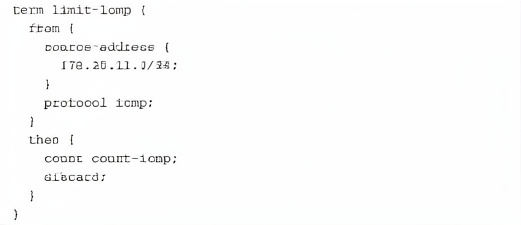
Referring to the exhibit, which two actions will occur when a packet matches the firewall filter? (Choose two.)
A. A counter will be incremented.
B. The packet will be discarded.
C. The packet will be forwarded.
D. An ICMP destination unreachable message will be returned.
Explanation:
The firewall filter term limit-icmp matches ICMP packets from source network 172.25.11.0/24. The then clause executes two actions: count count-icmp increments a counter, and discard silently drops the packet without sending any error notification.
Correct Option:
A: A counter will be incremented.
The count count-icmp action explicitly instructs the device to increment the counter named count-icmp each time a packet matches all conditions in the from statement. This is used for monitoring and statistics.
B: The packet will be discarded.
The discard action silently drops the matching packet. The packet is not forwarded to its destination, and no further processing occurs. No ICMP error message is generated unless explicitly configured.
Incorrect Option:
C: The packet will be forwarded.
This is incorrect because the discard action overrides any implicit accept behavior. The packet is dropped immediately after counting, so it never reaches the forwarding stage.
D: An ICMP destination unreachable message will be returned.
The discard action performs a silent drop. To send an ICMP unreachable message, you would need to use reject instead of discard. The discard action does not generate any notification to the source.
Reference:
Juniper TechLibrary – "Firewall Filter Term Actions": The count action increments a named counter; discard silently drops the packet without sending any ICMP error message. For ICMP notifications, use the reject action.
Exhibit: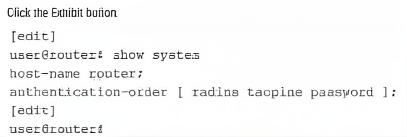
You have configured multiple authentication methods on your Junos device, including RADIUS, TACACS+, and local user accounts. A user attempts to log in, but the RADIUS server is unavailable. Referring to the
exhibit, which statement is correct?
A. The user is prompted to select a different authentication method.
B. The login attempt fails immediately
C. Junos will continue to attempt to authenticate with the RADIUS server until it responds.
D. Junos attempts the next configured authentication method.
Explanation:
The authentication-order statement defines the sequence in which Junos checks authentication methods. In the exhibit, the order is RADIUS first, then TACACS+, then local password. When RADIUS is unavailable (timeout or no response), Junos automatically proceeds to the next configured method.
Correct Option:
D: Junos attempts the next configured authentication method.
With authentication-order [ radius tacplus password ], if RADIUS servers are unreachable or do not respond, Junos moves to TACACS+. If TACACS+ also fails, it falls back to the local password database. This ensures continued access even if an external server is down.
Incorrect Option:
A: The user is prompted to select a different authentication method.
Junos does not prompt the user to choose a method. The authentication order is system‑defined and automatic. The user simply provides credentials; the system tries each method sequentially.
B: The login attempt fails immediately.
The login attempt does not fail immediately when RADIUS is unavailable. Junos only fails after exhausting all configured authentication methods in the specified order.
C: Junos will continue to attempt to authenticate with the RADIUS server until it responds.
Junos does not retry the same unreachable server indefinitely for a single login attempt. It respects the timeout and then moves to the next method in the list.
Reference:
Juniper TechLibrary – "Authentication Order": Junos attempts authentication methods in the order specified. If a method is unavailable, the system proceeds to the next method in the list.
Which statement is correct about traffic flow in the network shown in the exhibit?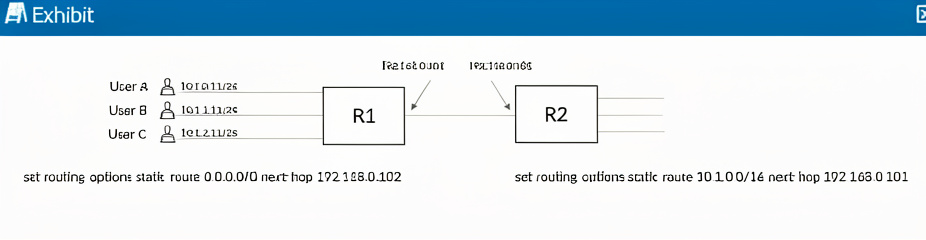
A. A routing loop can occur if one of the users sends packets to 10.1.99.1.
B. Only User A can reach destinations beyond Router R1.
C. Router R2 will drop packets destined for user B and user C.
D. Router R1 will discard all packets from all three users.
Explanation:
The exhibit shows R1 with two static routes: a default route (0.0.0.0/0) pointing to R2 (192.168.0.102), and a route for 10.1.0.0/16 pointing back to R1's own interface (192.168.0.101). No route exists on R2 back to the 10.1.0.0/16 network, creating potential asymmetry and loops.
Correct Option:
A: A routing loop can occur if one of the users sends packets to 10.1.99.1.
10.1.99.1 falls within the 10.1.0.0/16 summary route on R1. R1 forwards such packets toward 192.168.0.101 (itself?), which is problematic. More importantly, if R2 receives a packet for 10.1.0.0/16 and has only a default route back to R1, a loop forms between R1 and R2.
Incorrect Option:
B: Only User A can reach destinations beyond Router R1.
All users (10.1.0.0/24, 10.1.1.0/24, 10.1.2.0/24) are within the 10.1.0.0/16 network, so R1's summary route applies to all. However, the next-hop 192.168.0.101 is likely R1's own interface, which is invalid. No user will properly reach beyond R1 without correct next-hop.
C: Router R2 will drop packets destined for user B and user C.
R2 may have a default route pointing to R1, so it would forward packets toward R1 rather than dropping them. Dropping would occur only if no route exists, but default routes often exist in such topologies.
D: Router R1 will discard all packets from all three users.
R1 will not discard packets; it will attempt to route them according to its static routes. The issue is forwarding misconfiguration (next-hop pointing to itself), not discarding.
Reference:
Juniper TechLibrary – "Static Routing and Routing Loops": A routing loop occurs when two or more routers have inconsistent routing information, causing packets to bounce between them. Invalid next-hop addresses (pointing to self) also cause forwarding failures.
You successfully committed a configuration change. You now realize an issue exists and must revert back to the previous configuration. Which command entered in configuration mode will accomplish this task when committed?
A. show | compare
B. save config
C. rollback 0
D. rollback 1
Explanation:
Junos OS maintains a committed configuration history (0 = active, 1 = most recent previous, up to 49). After committing a problematic change, the previous working configuration is stored as rollback 1. Using rollback 1 in configuration mode restores that configuration, which then takes effect after a commit.
Correct Option:
D: rollback 1
rollback 1 in configuration mode replaces the candidate configuration with the configuration that was active before the most recent commit. After issuing rollback 1, you must run commit to activate the reverted configuration.
Incorrect Option:
A: show | compare
This command displays the differences between the candidate configuration and the active configuration. It is used for viewing changes, not for reverting to a previous configuration.
B: save config
The save command writes the current configuration to a file. It does not revert or roll back any changes. This is used for backup purposes.
C: rollback 0
rollback 0 replaces the candidate configuration with the currently active (committed) configuration. Since the problematic change is already committed, rollback 0 discards any uncommitted edits but does not revert the active configuration.
Reference:
Juniper TechLibrary – "Rolling Back to a Previous Configuration": Use rollback 1 to revert to the configuration prior to the most recent commit. Follow with commit to activate the rolled‑back version.
| Page 1 out of 8 Pages |
| 123 |
Real-World Scenario Mastery: Our JN0-106 practice exam don't just test definitions. They present you with the same complex, scenario-based problems you'll encounter on the actual exam.
Strategic Weakness Identification: Each practice session reveals exactly where you stand. Discover which domains need more attention, before Junos - Associate (JNCIA-Junos) Junos OS 21.2 exam day arrives.
Confidence Through Familiarity: There's no substitute for knowing what to expect. When you've worked through our comprehensive JN0-106 practice exam questions pool covering all topics, the real exam feels like just another practice session.
Copyright © All Rights Reserved