
Routing Policy and Firewall Filters
Which statement describes the primary purpose of a routing policy in Junos OS?
A. It controls which routes are accepted or advertised by a routing protocol.
B. It determines the physical interface used for forwarding traffic.
C. It sets the maximum number of routes in the routing table.
D. It enables automatic rollback of routing changes.
Explanation:
Routing policies in Junos OS are used to control routing information flow. They evaluate routes based on conditions (prefix, protocol, next-hop, etc.) and apply actions such as accept, reject, or modify route attributes (preference, metric, tags) for routes being imported or exported by routing protocols.
Correct Option:
A: It controls which routes are accepted or advertised by a routing protocol.
This is the primary purpose. Routing policies are applied to protocol import/export statements (e.g., import my-policy under OSPF or BGP) to filter which routes enter the routing table or are advertised to neighbors. Policies can also modify route characteristics like local preference or MED.
Incorrect Option:
B: It determines the physical interface used for forwarding traffic.
Physical interface selection is determined by the forwarding table and routing decisions, not routing policies. Policies affect route acceptance and attributes, but the actual forwarding interface is chosen based on the active route's next-hop.
C: It sets the maximum number of routes in the routing table.
Route limits are configured using routing-options (e.g., maximum routes) or protocol-specific limits. Routing policies do not impose global maximums on the routing table size.
D: It enables automatic rollback of routing changes.
Automatic rollback is a configuration management feature (commit and rollback), unrelated to routing policies. Routing policies do not provide auto-rollback capabilities for routing changes.
Reference:
Juniper TechLibrary – "Routing Policy Overview": Routing policies control the import and export of routing information, allowing you to filter routes and set routing attributes for routes exchanged between routing protocols.
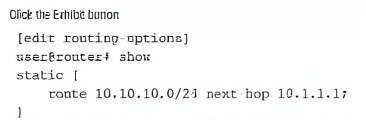
Referring to the exhibit, you are configuring a Junos router to provide connectivity to a building across town on the network 10.10.10.0/24. The next-hop router is at 10.10.1.1, which is reachable using interface ge-0/0/1. After committing the configuration in the exhibit, users report they still cannot reach the 10.10.10.0/24 network, and the route does not appear as active in the routing table. In this scenario, which statement is correct?
A. The next-hop address 10.1.1.1 is not directly connected or reachable through another route.
B. Static routes must include the outgoing interface as the next hop.
C. The static route requires a preference value to be specified or it will not install.
D. The static route requires the retain keyword to remain active in the routing table.
Explanation:
A static route in Junos becomes active (appears in the routing table) only if its next-hop address is resolvable. The next-hop must be directly connected via an interface with an active IP address, or recursively reachable through an existing route. In this case, 10.1.1.1 is not in the same subnet as ge-0/0/1 (which reaches 10.10.1.1), causing resolution failure.
Correct Option:
A: The next-hop address 10.1.1.1 is not directly connected or reachable through another route.
The exhibit shows next-hop 10.1.1.1, but the description states the actual gateway is 10.10.1.1. The mismatch means the router cannot resolve 10.1.1.1 to an active interface. For the route to install, the next-hop must be directly connected or recursively resolved via another active route.
Incorrect Option:
B: Static routes must include the outgoing interface as the next hop.
Junos static routes can use either a next-hop IP address or an outgoing interface (e.g., next-hop ge-0/0/1). Using an IP address is valid and commonly used; the issue here is an incorrect or unreachable IP address.
C: The static route requires a preference value to be specified or it will not install.
Static routes have a default preference value of 5. Specifying a preference is optional and only needed to override the default for route selection purposes. Lack of a preference value does not prevent installation.
D: The static route requires the retain keyword to remain active in the routing table.
The retain keyword keeps a static route in the forwarding table even if the next-hop becomes unreachable. It is not required for normal route activation. The route fails to install due to resolution failure, not because retain is missing.
Reference:
Juniper TechLibrary – "Static Routes: Next-hop Resolution": For a static route to be installed, the next-hop address must be reachable via an active directly connected interface or resolved through an existing route in the routing table.
What does the Junos CLI prompt indicate when it ends with a hash symbol (#)?
A. The user is in operational mode.
B. The user is in configuration mode.
C. The user is in shell mode.
D. The user is in recovery mode
Explanation:
In Junos CLI, the prompt indicates the current operational state. A prompt ending with # (e.g., user@router#) signifies that the user is in configuration mode. In this mode, commands like set, delete, and commit are available to modify the device's configuration.
Correct Option:
B: The user is in configuration mode.
When you enter configure from operational mode, the prompt changes from > to #. The hash symbol clearly indicates that you are now in configuration mode, where you can view and edit the candidate configuration.
Incorrect Option:
A: The user is in operational mode.
Operational mode is indicated by a > symbol at the end of the prompt (e.g., user@router>). In operational mode, you can run show, ping, monitor, and other operational commands but cannot change the configuration.
C: The user is in shell mode.
Shell mode (Unix shell) is accessed via the start shell command. The prompt changes to a system shell prompt (e.g., % or $), not a # after the hostname. Junos CLI # is not the shell prompt.
D: The user is in recovery mode.
Recovery mode is a special boot state used for password recovery or system rescue. It does not use the standard Junos CLI prompt format user@router#.
Reference:
Juniper TechLibrary – "CLI Modes": Operational mode prompt ends with >, configuration mode prompt ends with #. The hash symbol indicates the user has entered configuration mode via the configure command.
You want to redeploy a Junos device by clearing the existing configuration and resetting it to factory defaults. In this scenario, which command would help to accomplish this task?
A. show system storage
B. request system storage cleanup dry-run
C. request system zeroize
D. request system storage cleanup
Explanation:
The request system zeroize command is the standard Junos method for securely erasing all configuration data, logs, and user-created files, then rebooting the device to factory default settings. This is used before redeploying or decommissioning a device to ensure no sensitive data remains.
Correct Option:
C: request system zeroize
This command permanently removes all configuration, commits, rollback files, logs, and user files, then reboots the device. After reboot, the device loads the factory-default configuration, ready for redeployment. The operation is irreversible and typically requires confirmation.
Incorrect Option:
A: show system storage
This command displays disk usage statistics (e.g., available space, filesystem usage). It provides visibility into storage but does not modify or clear any configuration or reset the device.
B: request system storage cleanup dry-run
This command simulates the storage cleanup process, showing which log and temporary files would be deleted without actually removing them. It does not reset configuration or restore factory defaults.
D: request system storage cleanup
This command deletes unnecessary log files, temporary files, and old core dumps to free up storage space. It does not clear configuration or perform a factory reset.
Reference:
Juniper TechLibrary – "request system zeroize": This command erases all user configuration, log files, and generates a new SSH key, then reboots the device to factory‑default settings. Use before redeployment or disposal.
Exhibit: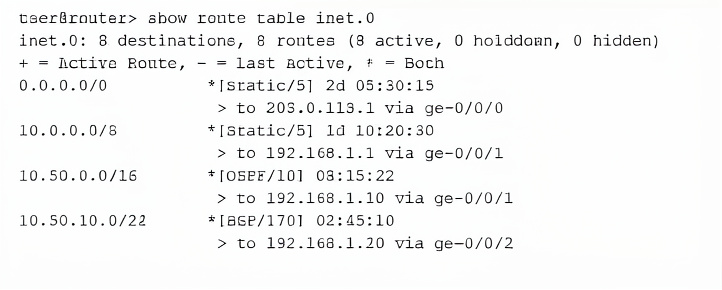
Referring to the exhibit, which route will be selected for a packet destined to IP address 10.50.10.55?
A. Route 0.0.0.0/0 will be selected using next hop 203.0.113.1 because the default route matches all destinations and has been active the longest.
B. Route 10.50.0.0/16 will be selected using next hop 192.168.1.10 because OSPF has a better preference value than BGP.
C. Route 10.50.10.0/24 will be selected using next hop 192.168.1.20 because it has the longest prefix match for the destination address.
D. Route 10.0.0.0/8 will be selected using next hop 192.168.1.1 because it was learned from the static routing protocol which has the lowest preference value.
Explanation:
Junos route selection follows a specific order: longest prefix match first, then preference (lower is better), then other tie-breakers. For destination 10.50.10.55, the most specific match is 10.50.10.0/24 (24-bit prefix) versus 10.50.0.0/16 (16-bit) or default route (0/0). Longest prefix match overrides preference values.
Correct Option:
C: Route 10.50.10.0/24 will be selected using next hop 192.168.1.20 because it has the longest prefix match for the destination address.
10.50.10.55 falls within the 10.50.10.0/24 network. Although the exhibit shows two 10.50.10.0/24 routes (BGP/170 and OSPF/10), the OSPF route has lower preference (10 vs. 170), so it becomes active. However, the key point is the /24 prefix is chosen over less specific routes due to longest match.
Incorrect Option:
A: Route 0.0.0.0/0 will be selected using next hop 203.0.113.1 because the default route matches all destinations and has been active the longest.
The default route is the least specific (0-bit prefix). Longest prefix match is evaluated before default route. A more specific route (any /24, /16, or /8) will always be preferred over default regardless of age or preference.
B: Route 10.50.0.0/16 will be selected using next hop 192.168.1.10 because OSPF has a better preference value than BGP.
The /16 route is less specific than the /24 route. Longest prefix match takes priority over preference comparison. The existence of a /24 route supersedes the /16 route regardless of protocol preference
D: Route 10.0.0.0/8 will be selected using next hop 192.168.1.1 because it was learned from the static routing protocol which has the lowest preference value.
The /8 route is far less specific than the /16 or /24 routes. Longest prefix match rule ensures that a longer prefix (e.g., /24) is chosen before a shorter prefix (/8 or /0), even if the shorter prefix has a better preference (static preference 5).
Reference:
Juniper TechLibrary – "Routing Tables and Route Selection": Junos selects the active route by first performing the longest prefix match, then comparing route preference (lower is better), and finally tie-breakers such as next-hop or age.
What are two fiber-optic connector types? (Choose two.)
A. LC
B. RJ-45
C. SC
D. BNC
Explanation:
Fiber-optic connectors are specialized interfaces designed for terminating optical fibers. LC (Lucent Connector) and SC (Subscriber Connector) are two common fiber connector types used in networking equipment, including Juniper devices, for Gigabit Ethernet and other optical interfaces.
Correct Option:
A: LC
LC (Lucent Connector) is a small form-factor fiber-optic connector with a 1.25 mm ferrule. It is widely used on SFP, SFP+, and QSFP transceivers due to its high density and push-pull latching mechanism.
C: SC
SC (Subscriber Connector or Standard Connector) is a square-shaped, push-pull fiber connector with a 2.5 mm ferrule. It is commonly found on older Gigabit Ethernet interfaces and GPON networks.
Incorrect Option:
B: RJ-45
RJ-45 is a copper twisted-pair connector used for Ethernet (Cat5, Cat6) and telephony. It is not a fiber-optic connector; it carries electrical signals over copper cables.
D: BNC
BNC (Bayonet Neill-Concelman) is a coaxial cable connector used for legacy 10BASE2 Ethernet, video, and RF applications. It is not designed for fiber optics.
Reference:
Juniper TechLibrary – "Fiber-Optic Connectors": Common fiber connector types include LC, SC, FC, ST, and MTP/MPO. LC and SC are frequently used on Juniper optical interfaces and transceivers.
Which two statements are examples of exception traffic? (Choose two.)
A. An IP packet with the Router Alert option set in the IP options field.
B. SSH traffic to the local Junos OS device.
C. An IP packet that has the IP precedence CoS bits of 111 in the ToS field.
D. SSH traffic to a remote server on the Internet.
Explanation:
Exception traffic in Junos refers to packets that cannot be processed entirely within the Packet Forwarding Engine (PFE) and must be sent to the Routing Engine (RE) for further handling. This includes packets destined to the RE itself (management traffic) and packets requiring special processing like IP options.
Correct Option:
A: An IP packet with the Router Alert option set in the IP options field.
IP packets with options (including Router Alert) cannot be fast-forwarded by the PFE and are treated as exception traffic. They are punted to the RE for processing, as the PFE cannot parse complex IP options at line rate.
B: SSH traffic to the local Junos OS device.
Any traffic destined to the device's own IP addresses (management traffic such as SSH, telnet, SNMP, or NETCONF) is exception traffic. The PFE forwards these packets to the RE because the RE is the ultimate destination.
Incorrect Option:
C: An IP packet that has the IP precedence CoS bits of 111 in the ToS field.
CoS bits (DSCP/IP Precedence) do not cause exception handling. The PFE can classify and forward such packets based on CoS settings without involving the RE, as long as the packet is transit traffic.
D: SSH traffic to a remote server on the Internet.
SSH traffic that transits the device (destined for a remote server) is normal transit traffic. It is processed by the PFE and forwarded out the appropriate interface without being sent to the RE.
Reference:
Juniper TechLibrary – "Exception Traffic": Exception traffic includes packets destined to the Routing Engine (e.g., management protocols) and packets requiring special processing such as IP options, fragmented packets, or TTL expiry.
Which two statements describe rollback configuration behavior in Junos OS? (Choose two.)
A. Rollback configurations are applied automatically after a commit confirmed timeout.
B. Rollback 0 always refers to the factory default configuration.
C. Rollback files are stored automatically after each commit.
D. Up to 100 rollback configurations are maintained by default.
Explanation:
Junos OS automatically stores committed configurations as rollback files (numbered 0 through 49 by default). Rollback 0 is the currently active configuration. The commit confirmed feature automatically rolls back to the previous configuration (rollback 1) if not confirmed within the specified timeout.
Correct Option:
A: Rollback configurations are applied automatically after a commit confirmed timeout.
When you issue commit confirmed, the device commits the changes and starts a timer. If you do not issue commit before the timer expires, Junos automatically performs a rollback 1 followed by commit, reverting to the previous active configuration.
C: Rollback files are stored automatically after each commit.
Every successful commit automatically saves the newly committed configuration as a rollback file. The previous rollback files shift (e.g., rollback 0 becomes rollback 1, rollback 1 becomes rollback 2, etc.). This provides a history of configuration changes.
Incorrect Option:
B: Rollback 0 always refers to the factory default configuration.
Rollback 0 refers to the currently active (committed) configuration, not factory defaults. Factory default configuration is typically rollback 0 only on a freshly zeroized device before any changes are made.
D: Up to 100 rollback configurations are maintained by default.
The default number of rollback files maintained is 50 (rollback 0 through rollback 49), not 100. This can be increased using set system max-configurations-on-flash up to 49 additional files.
Reference:
Juniper TechLibrary – "Configuration Rollback and Commit Confirmed": Junos stores up to 50 rollback files by default. commit confirmed automatically reverts to the previous configuration if not confirmed. Each successful commit generates a new rollback file.
A network administrator must set up the initial configuration of the out-of-band management interface on a new Juniper router to ensure management traffic is isolated from the default routing table (inet.0). In this scenario, which configuration step is required to accomplish this task in Junos OS?
A. Configure an IP address on interface ge-0/0/0.0 and enable ethernet-switching family.
B. Configure the lo0.0 loopback interface with a management IP and apply it to the [edit system services] hierarchy.
C. Assign an IP address to the me0.0 interface and set the routing-options to instance-type virtual-router.
D. Assign an IP address to interface fxp0.0 or em0.0 and use the command set system managementinstance to enable the management routing instance.
Explanation:
In Junos OS, the out-of-band management interface is typically fxp0 (on older platforms) or em0 (on newer platforms like vMX or certain appliances). To isolate management traffic from the default inet.0 routing table, you enable the management instance using set system management-instance, which places the management interface into a dedicated routing instance called mgmt_junos.
Correct Option:
D: Assign an IP address to interface fxp0.0 or em0.0 and use the command set system management-instance to enable the management routing instance.
The management-instance feature automatically moves fxp0 or em0 into a separate routing instance (mgmt_junos). This isolates all management traffic (SSH, SNMP, NTP, syslog) from transit traffic in inet.0, improving security and avoiding routing conflicts.
Incorrect Option:
A: Configure an IP address on interface ge-0/0/0.0 and enable ethernet-switching family.
ge-0/0/0 is typically a data-plane interface, not out-of-band management. Enabling ethernet-switching is for Layer 2 switching, not for isolating management traffic into a separate routing instance.
B: Configure the lo0.0 loopback interface with a management IP and apply it to the [edit system services] hierarchy.
lo0.0 is a loopback interface used for router IDs and stable management addresses, but it does not provide out-of-band isolation. Applying it under system services is not a valid method for creating a separate management routing instance.
C: Assign an IP address to the me0.0 interface and set the routing-options to instance-type virtual-router.
me0.0 is the management Ethernet interface on some Juniper platforms (e.g., MX series). However, setting instance-type virtual-router under routing-options is incorrect syntax; the management instance is enabled via set system management-instance, not by manually defining a virtual-router.
Reference:
Juniper TechLibrary – "Configuring the Management Instance": Use set system management-instance to isolate management traffic on fxp0 or em0 into a dedicated routing instance called mgmt_junos. Management and transit traffic remain separate.
Your team alerts you that users connected to ge-0/0/5 are experiencing intermittent slowness. You log in to the switch and want to see live, real-time traffic updates for that interface to determine whether the link is being over-utilized. Which monitoring command should you use in this scenario?
A. show chassis hardware
B. monitor interface ge-0/0/5
C. show interfaces terse
D. show interfaces ge-0/0/5 extensive
Explanation:
The monitor interface command in Junos provides real-time, continuously updating statistics for a specified interface. It displays live traffic rates (input/output bps, pps, and utilization) at a configurable interval, making it ideal for identifying intermittent slowness or over-utilization as it happens.
Correct Option:
B: monitor interface ge-0/0/5
This command refreshes interface statistics at a default interval of every 10 seconds. It shows live ingress/egress bandwidth usage, packet rates, and errors, allowing you to observe traffic spikes or sustained high utilization that could cause slowness.
Incorrect Option:
A: show chassis hardware
This command displays hardware inventory including FPCs, PICs, and interface modules. It provides no traffic statistics or real-time monitoring; it only shows physical components and their serial numbers.
C: show interfaces terse
This command provides a summarized, static view of all interfaces (or a specific one) showing operational status, protocol status, and configured IP addresses. It does not offer real-time traffic rates or continuous updates.
D: show interfaces ge-0/0/5 extensive
This command displays detailed static statistics (since last counter reset) including input/output rates averaged over a longer period. While useful for historical analysis, it does not provide live, refreshing updates like monitor interface.
Reference:
Juniper TechLibrary – "Monitoring Interface Traffic": The monitor interface command provides a dynamically updating display of interface traffic statistics, including current bandwidth utilization, to help troubleshoot performance issues in real time.
You manage a Junos device with 20 interfaces. Each interface requires the same description and MTU setting. Which configuration approach would reduce repetitive commands and ensure consistency?
A. Use the wildcard delete command to remove duplicate settings.
B. Configure each interface individually.
C. Use a configuration group.
D. Use search and replace to apply settings across interfaces.
Explanation:
Configuration groups in Junos allow you to define a set of configuration statements once and apply them to multiple hierarchy levels using the apply-groups statement. This reduces repetitive commands, ensures consistency across interfaces, and simplifies future changes by updating only the group definition.
Correct Option:
C: Use a configuration group.
Create a group (e.g., groups interface-defaults) with common interface settings (description, MTU). Then apply this group to each interface using set interfaces ge-0/0/x apply-groups interface-defaults. Changes to the group automatically affect all interfaces using it.
Incorrect Option:
A: Use the wildcard delete command to remove duplicate settings.
wildcard delete is used to remove multiple similar configuration statements, not to apply consistent settings. It does not help in initially configuring interfaces uniformly.
B: Configure each interface individually.
While possible, this approach is repetitive, error-prone, and time-consuming for 20 interfaces. It does not leverage Junos automation features and makes bulk updates difficult.
D: Use search and replace to apply settings across interfaces.
Junos CLI does not have a native search-and-replace command for applying settings across multiple interfaces. You would need to manually edit the configuration or use scripts, which is less efficient than configuration groups.
Reference:
Juniper TechLibrary – "Configuration Groups": Configuration groups allow you to create reusable blocks of configuration that can be applied to multiple hierarchy levels, reducing redundancy and ensuring consistent settings across interfaces, protocols, or other elements.
Which statement about class of service (CoS) in a network is correct?
A. CoS encrypts traffic to secure data across the network.
B. CoS prioritizes certain types of traffic during congestion.
C. CoS assigns IP addresses dynamically to optimize routing.
D. CoS prevents broadcast storms by segmenting VLANs.
Explanation:
Class of Service (CoS) in networking manages bandwidth allocation and traffic prioritization. During network congestion, CoS identifies critical traffic (e.g., voice, video) and gives it preferential treatment over less sensitive traffic (e.g., email, file transfers), ensuring quality of service for important applications.
Correct Option:
B: CoS prioritizes certain types of traffic during congestion.
This is the core function of CoS. Using classification, queuing, and scheduling mechanisms, CoS ensures that high-priority traffic (like real-time voice) is forwarded before low-priority traffic (like web browsing) when link congestion occurs.
Incorrect Option:
A: CoS encrypts traffic to secure data across the network.
Encryption is a security function handled by protocols like IPsec, SSL/TLS, or MACsec. CoS does not provide encryption; it only deals with traffic prioritization and bandwidth management.
C: CoS assigns IP addresses dynamically to optimize routing.
Dynamic IP address assignment is performed by DHCP (Dynamic Host Configuration Protocol), not by CoS. CoS operates on already-assigned IP packets and does not affect addressing.
D: CoS prevents broadcast storms by segmenting VLANs.
Broadcast storm prevention is achieved through VLAN segmentation, spanning-tree protocols, or storm control features. CoS does not segment VLANs or prevent broadcast storms; it prioritizes traffic within existing network segments.
Reference:
Juniper TechLibrary – "Class of Service Overview": CoS provides mechanisms to prioritize certain types of traffic when network congestion occurs, ensuring that critical applications receive the required bandwidth and latency treatment.
| Page 2 out of 8 Pages |
| 123 |
| JN0-106 Practice Test Home |
Real-World Scenario Mastery: Our JN0-106 practice exam don't just test definitions. They present you with the same complex, scenario-based problems you'll encounter on the actual exam.
Strategic Weakness Identification: Each practice session reveals exactly where you stand. Discover which domains need more attention, before Junos - Associate (JNCIA-Junos) Junos OS 21.2 exam day arrives.
Confidence Through Familiarity: There's no substitute for knowing what to expect. When you've worked through our comprehensive JN0-106 practice exam questions pool covering all topics, the real exam feels like just another practice session.
Copyright © All Rights Reserved