
- Select the answer that correctly completes the sentence.
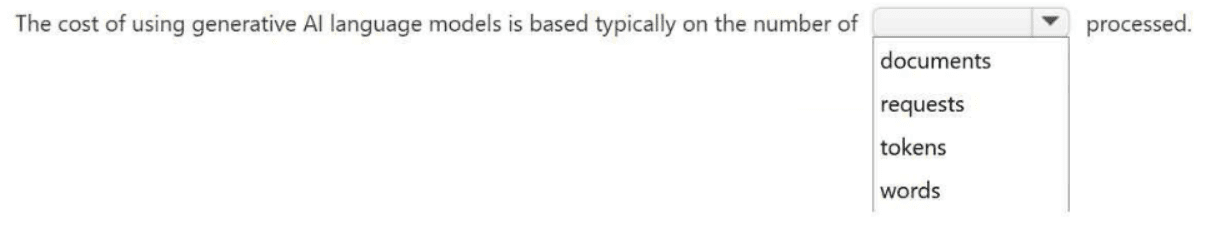
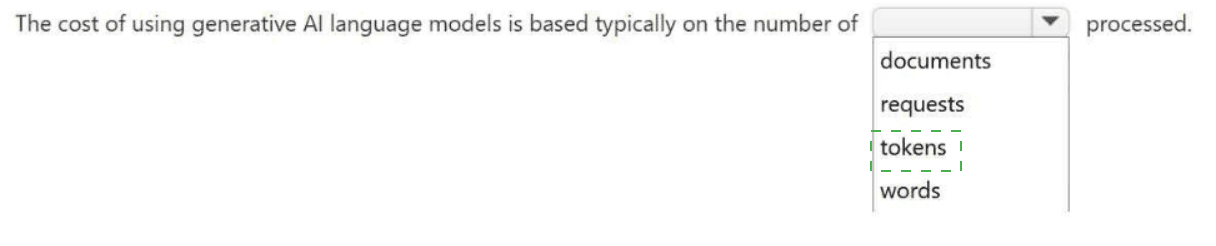
The cost of using generative AI language models is based typically on the number of
__________ processed.
Explanation:
Generative AI language models charge based on tokens because tokens represent the fundamental unit of processing. A token is roughly 4 characters of text for English (e.g., "Microsoft" = 1 token, "AI" = 1 token, "transformation" = 2-3 tokens). Both input (prompt) and output (completion) consume tokens, so pricing is typically per 1,000 tokens.
Why other options are incorrect:
Documents
— A "document" has no fixed length; a 10-page document costs far more than a 1-page one, so it's not a reliable billing unit.
Requests
— API requests vary wildly in size; a 1-token request vs. a 10,000-token request would cost the same if billed per request, which is unfair and not how providers operate.
Words
— Tokenization doesn't align with words (e.g., punctuation attaches differently, code is tokenized unpredictably, non-English languages break into uneven token counts). Words would also create pricing anomalies for technical content.
References:
Microsoft Azure OpenAI Service pricing page: "Pricing is based on the number of tokens processed" — Microsoft Learn
OpenAI API documentation: "You are charged per token, which is a unit of text the model reads or generates" — OpenAI Docs
Your company is deploying Microsoft 365 Copilot. The deployment must provide users with access to the Researcher agent to search across data in Microsoft SharePoint. You need to recommend a licensing plan for the solution. What should you recommend?
A. pay-as-you-go
B. a Microsoft 365 subscription entitlement
C. a Microsoft 365 Copilot per-user add-on license
D. a usage-based consumption license in Azure
Explanation:
Microsoft 365 Copilot, including the Researcher agent that searches across SharePoint, is a premium AI capability that sits on top of existing Microsoft 365 services. It is not included in standard Microsoft 365 licenses such as E3 or E5. Instead, it requires a paid per-user add-on license assigned individually to each user who needs access. This license is billed monthly at a fixed rate per user, regardless of usage volume (number of queries, tokens, or documents processed). Once assigned, users gain full Copilot functionality across Microsoft 365 apps, including the Researcher agent for searching and synthesizing content from SharePoint.
Why other options are incorrect:
A. Pay-as-you-go
– This model is used for Azure OpenAI Services or other Azure resources where you pay based on actual consumption (e.g., API calls, compute hours). Microsoft 365 Copilot does not offer a pay-as-you-go model; it is strictly a per-user subscription add-on.
B. A Microsoft 365 subscription entitlement
– Standard Microsoft 365 subscriptions (Business Premium, E3, E5) do not entitle users to Copilot. They only provide the prerequisite services (SharePoint, Teams, OneDrive) that Copilot relies on. Copilot requires an explicit additional license beyond the base subscription.
D. A usage-based consumption license in Azure
– This applies to Azure AI services like Cognitive Search or OpenAI token-based billing. Microsoft 365 Copilot is not metered by tokens, requests, or documents. It is a fixed monthly per-user fee, making usage-based Azure licensing inapplicable.
References:
Microsoft Learn: *"Microsoft 365 Copilot is available as an add-on license to Microsoft 365 E3, E5, and Business Premium. You must assign the license to each user individually."* – Microsoft 365 Copilot Requirements
Microsoft Partner Center: *"Microsoft 365 Copilot is a per-user per-month add-on SKU. It is not usage-based nor included in any standard M365 plan."*
Your company plans to implement a proof of concept PoC agent that uses Azure OpenAI. The solution must start small and provide flexibility to scale usage as demand grows. Which pricing model should you use?
A. Microsoft 365 Copilot
B. Batch API
C. Provisioned PTUs
D. Standard On-Demand
Explanation:
For a proof of concept (PoC) agent using Azure OpenAI that must start small and scale flexibly as demand grows, Standard On-Demand is the appropriate pricing model. This model charges only for the tokens you actually consume (input + output), with no upfront commitment. You can start with minimal usage (e.g., a few hundred tokens per day) and seamlessly scale to millions of tokens as your PoC gains traction. The model automatically handles throughput within service limits, making it ideal for unpredictable or growing workloads.
Why other options are incorrect:
A. Microsoft 365 Copilot
– This is a per-user add-on license for Microsoft 365 Copilot (Researcher, Business Chat, etc.), not a pricing model for building custom agents on Azure OpenAI. It does not apply to custom PoC agents using Azure OpenAI APIs.
B. Batch API
– The Batch API is designed for asynchronous, high-volume, non-real-time processing (e.g., overnight document summarization). It offers lower cost per token but with higher latency (up to 24 hours). This is not suitable for a PoC that needs interactive responsiveness and flexible scaling start small.
C. Provisioned PTUs
– Provisioned Throughput Units (PTUs) guarantee a fixed level of throughput (measured in tokens per minute) with a monthly commitment, regardless of actual usage. This is cost-effective only for high, predictable, sustained demand. For a PoC starting small, PTUs would be wasteful and inflexible because you pay even for unused capacity.
References:
Microsoft Azure OpenAI pricing page: "Standard (On-Demand) – Pay only for what you consume. No upfront commitment. Ideal for prototyping, variable workloads, and production ramp-up." – Azure OpenAI Pricing
Microsoft Learn:
"Provisioned PTUs are best for consistent, high-volume production workloads. Standard On-Demand is recommended for exploration and PoCs." – Azure OpenAI throughput units
For each of the following statements, select Yes if the statement is true. Otherwise, select
No. NOTE: Each correct selection is worth one point.
Statement 1:
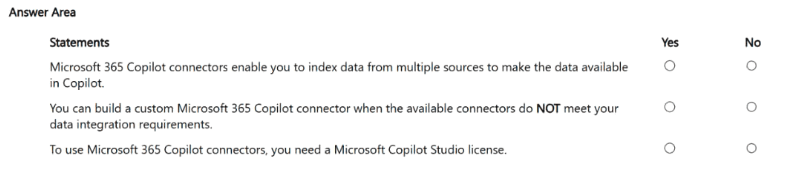
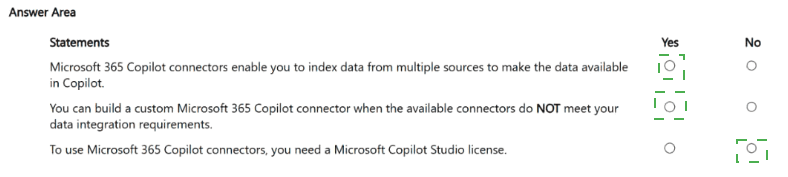
Microsoft 365 Copilot connectors enable you to index data from multiple sources to make the data available in Copilot.
Answer: Yes
Explanation
Microsoft 365 Copilot connectors are specifically designed to extend the reach of Copilot and Microsoft Search by connecting to data beyond Microsoft 365 . These connectors index external content—whether from cloud-based (SaaS) sources, on-premises data stores, or public websites—directly into the Microsoft Graph . Once indexed, this external data becomes discoverable and usable within Copilot experiences across Microsoft 365 apps just like native Microsoft data . The connectors respect source permissions, so users only see content they are authorized to access .
Why "No" is incorrect: This statement is factually accurate based on Microsoft's official documentation.
Statement 2:
You can build a custom Microsoft 365 Copilot connector when the available connectors do NOT meet your data integration requirements.
Answer: Yes
Explanation
Microsoft provides over 30 prebuilt connectors, and ecosystem partners have created more than 100 additional connectors for common data sources . However, if an organization has a proprietary or uncommon data source with no available prebuilt connector, Microsoft explicitly allows customers and developers to build custom synced connectors to ingest their business data . Custom connectors use the Microsoft Graph connectors API to crawl, index, and bring external data into the unified index for Copilot and Search .
Why "No" is incorrect: Microsoft's documentation clearly states that custom connector development is a supported option when prebuilt connectors do not meet requirements .
Statement 3:
To use Microsoft 365 Copilot connectors, you need a Microsoft Copilot Studio license.
Answer: No
Explanation
To use Microsoft 365 Copilot connectors, you need a Microsoft 365 Copilot license (the add-on license), not specifically a Copilot Studio license . The connectors are a core feature of Microsoft 365 Copilot that bring external data into the Graph for Copilot to access. While Copilot Studio can also leverage connectors for building custom agents, the connectors themselves are tied to the Microsoft 365 Copilot license . Alternatively, tenants with usage-based billing (pay-as-you-go) enabled can also access connector capabilities without a full Copilot license, though with some limitations . A standalone Copilot Studio license is required primarily for premium capabilities like custom agent deployment to external channels or use of premium connectors, not for basic connector functionality .
Why "Yes" is incorrect: Microsoft's licensing documentation clearly states that Microsoft 365 Copilot add-on license (not Copilot Studio license) is the primary requirement for accessing agents grounded in tenant data via Copilot connectors
- For each of the following statements, select Yes if the statement is true. Otherwise, select
No. NOTE: Each correct selection is worth one point.
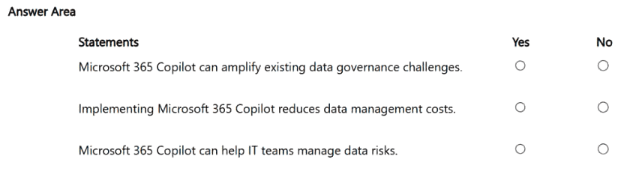
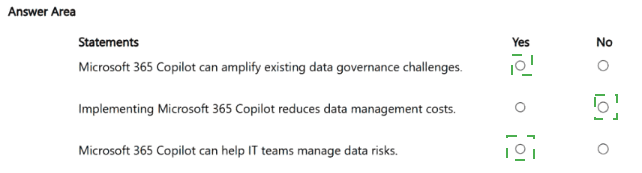
Explanation:
Microsoft 365 Copilot, when combined with Microsoft Purview and other security tools, actively helps IT teams identify, monitor, and manage data risks. Several capabilities are specifically designed for risk management:
Purview Data Security Posture Management (DSPM) for AI provides a central dashboard to identify SharePoint sites where sensitive data is exposed through Copilot interactions, with guided remediation workflows
Data Loss Prevention (DLP) policies for Copilot can block sensitive information types in prompts and prevent Copilot from processing items with specific sensitivity labels
Insider Risk Management includes a "risky AI usage" policy template that detects user prompts and AI responses containing sensitive information across Copilot, contributing to user risk scoring
Audit logging and eDiscovery capture Copilot interaction metadata, enabling IT to review what data users are asking Copilot to access and investigate potential oversharing
Administrative controls allow IT to designate authoritative SharePoint sources, exclude specific web domains, and monitor usage patterns to optimize licensing and manage costs
While Copilot introduces risks, it simultaneously provides IT teams with powerful tools to detect and remediate those same risks.
Why "No" is incorrect: Microsoft has built extensive governance and security features specifically to help IT teams manage Copilot-related data risks
Your company is building a portfolio of AI-powered business solutions. Company executives want to understand how Microsoft responsible AI principles can support the company's long-term goals. Which benefit best demonstrates the importance of responsible AI? Select the BEST answer.
A. guarantees that AI models provide accurate and relevant responses
B. reduces the need for data protection policies and governance
C. enhances stakeholder trust and fosters sustainable AI adoption throughout the organization
D. reduces the need for executive oversight in AI decision-making
Explanation:
Responsible AI is not about technical guarantees or reducing governance—it's about building trust. When an organization demonstrates commitment to Microsoft's six responsible AI principles (fairness, reliability, safety, privacy, security, inclusiveness, transparency, accountability), stakeholders including employees, customers, regulators, and partners gain confidence that AI is being deployed ethically and safely. This trust directly enables sustainable, long-term adoption of AI across the enterprise, because people are more willing to use, invest in, and scale systems they believe are responsible. Without trust, AI initiatives often fail due to internal resistance, regulatory action, or reputational damage.
Why other options are incorrect:
A. guarantees that AI models provide accurate and relevant responses
– Responsible AI does not guarantee accuracy. Accuracy depends on data quality, model training, and fine-tuning. Responsible AI includes transparency about limitations (e.g., "AI can make mistakes"), not perfection guarantees.
B. reduces the need for data protection policies and governance
– False. Responsible AI increases the need for robust data protection, privacy policies, and governance (e.g., Microsoft Purview, data loss prevention, access controls). It never reduces them.
D. reduces the need for executive oversight in AI decision-making
– False. Responsible AI emphasizes human accountability, not reduced oversight. Executives remain accountable for AI outcomes, and frameworks like impact assessments require more oversight, not less.
References:
Microsoft Learn – Responsible AI principles: "Responsible AI helps build trust, which is essential for sustainable AI adoption and innovation." – Microsoft Responsible AI
Microsoft documentation:"Trust is the foundation of long-term AI success. Organizations that operationalize responsible AI principles see higher user adoption and lower compliance risk."
For each of the following statements, select Yes if the statement is true. Otherwise, select
No. NOTE: Each correct selection is worth one point.
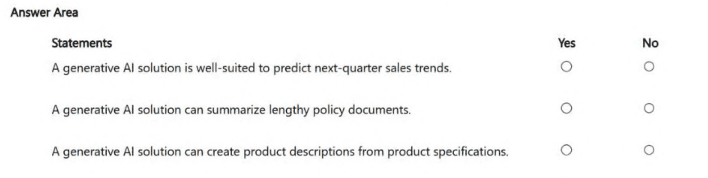
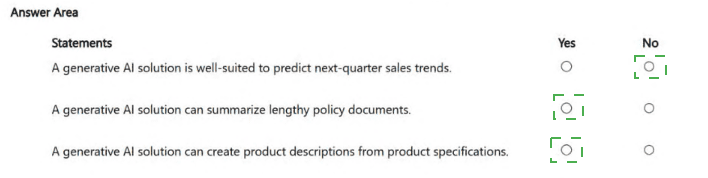
Statement 1:
A generative AI solution is well-suited to predict next-quarter sales trends.
Answer: No
Explanation
Generative AI (LLMs like GPT-4) excels at creating new content (text, code, summaries, images) based on patterns learned from training data. However, it is not well-suited for numerical time-series forecasting like predicting next-quarter sales trends. Sales forecasting requires:
Statistical models (ARIMA, exponential smoothing)
Machine learning regression models (XGBoost, Prophet, LSTM)
Historical numerical data with seasonality, trends, and external factors
Generative AI lacks inherent mathematical forecasting capabilities, produces unpredictable numerical outputs, and cannot guarantee accuracy for structured quantitative predictions. While you could prompt an LLM to "guess" a number, it would be unreliable for business planning. Predictive AI or analytical AI (not generative AI) is the correct tool for this task.
Statement 2:
A generative AI solution can summarize lengthy policy documents.
Answer: Yes
Explanation
Summarization is a core strength of generative AI. LLMs can process long documents (up to context window limits, e.g., 128K–1M tokens) and produce concise, accurate summaries while preserving key facts, requirements, and actions. This applies to policy documents, legal contracts, compliance manuals, HR handbooks, and technical specifications. Generative AI can produce:
Executive summaries
Bullet-point key changes
Actionable insights for different audiences (employees, managers, auditors)
Microsoft 365 Copilot, Azure OpenAI, and other LLMs are widely used for this exact purpose in enterprise settings.
Statement 3:
A generative AI solution can create product descriptions from product specifications.
Answer: Yes
Explanation
Content generation from structured or semi-structured inputs is another core capability of generative AI. Given product specifications (e.g., "Material: aluminum, Weight: 2.5 kg, Color: silver, Features: waterproof, rechargeable"), an LLM can generate:
Marketing product descriptions
E-commerce listing copy
SEO-optimized bullet points
Technical specifications for different audiences (consumer vs. professional)
This saves significant manual writing effort and ensures consistency across product catalogs. Microsoft Copilot, Azure OpenAI, and other LLMs are routinely used for this task in retail, manufacturing, and e-commerce.
Reference
Generative AI → Creates new content: text, summaries, code, images, descriptions, translations.
Predictive/Analytical AI → Forecasts numbers, classifies data, detects anomalies, predicts trends.
DRAG DROP - Match the Microsoft responsible AI principles to the appropriate
descriptions. NOTE: Each correct match is worth one point.
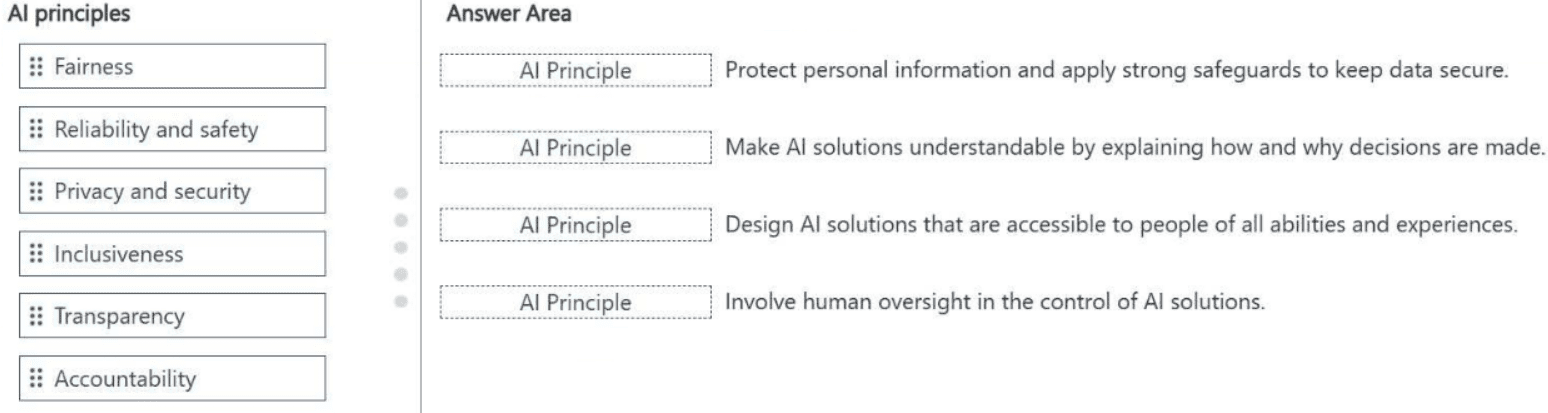
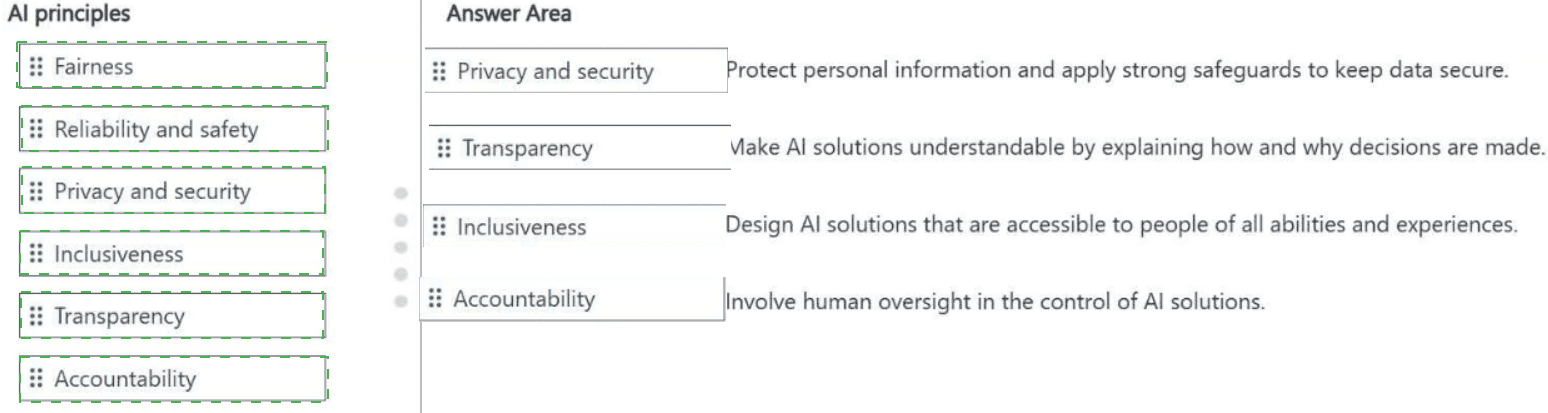
Explanation:
1. Privacy and security
Description: "Protect personal information and apply strong safeguards to keep data secure."
Why:This principle ensures that AI systems respect data privacy, protect personally identifiable information (PII), and defend against security breaches. It includes data encryption, access controls, compliance with regulations (GDPR, HIPAA), and secure data handling throughout the AI lifecycle.
2. Transparency
Description: "Make AI solutions understandable by explaining how and why decisions are made."
Why: Transparency requires that AI systems are interpretable and that users can understand the rationale behind AI outputs. This includes documentation, explanations of model behavior, disclosure of limitations, and enabling users to question or challenge AI decisions.
3. Inclusiveness
Description: "Design AI solutions that are accessible to people of all abilities and experiences."
Why: Inclusiveness mandates that AI systems empower everyone, including people with disabilities (e.g., vision, hearing, motor, cognitive). This means following accessibility standards, supporting assistive technologies, designing for diverse user needs, and avoiding exclusionary practices.
4. Accountability
Description: "Involve human oversight in the control of AI solutions."
Why: Accountability means that humans are ultimately responsible for AI system design, deployment, outcomes, and corrections. This includes maintaining human-in-the-loop controls, establishing governance structures, conducting impact assessments, and ensuring that no fully autonomous AI operates without accountable human decision-makers.
References
Microsoft Learn– Responsible AI principles: Microsoft Responsible AI
Microsoft documentation – Six principles: Fairness, Reliability & Safety, Privacy & Security, Inclusiveness, Transparency, Accountability.
HOTSPOT - Select the answer that correctly completes the sentence.
Microsoft 365 Copilot can be used to __________.
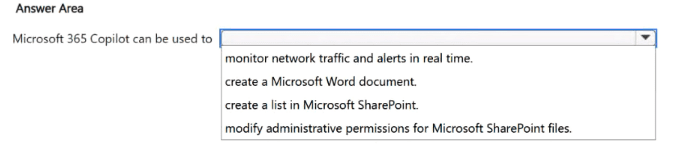
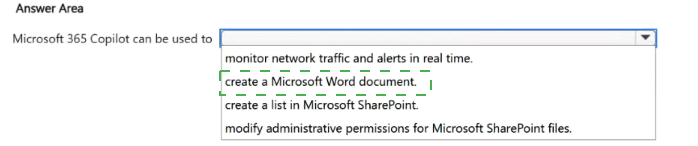
Explanation:
Monitor network traffic and alerts in real time – No. Microsoft 365 Copilot does not monitor network traffic. That requires network monitoring tools like Microsoft Sentinel or Azure Network Watcher. Copilot works with Microsoft 365 data such as documents, emails, chats, and SharePoint content.
Create a Microsoft Word document – Yes. Users can ask Copilot to draft a new Word document from a prompt, generate content from existing emails or files, or create structured documents like reports and proposals.
Create a list in Microsoft SharePoint – Yes. Within SharePoint, Copilot can create lists based on user prompts, populate items from existing documents (e.g., "create a task list from this project plan"), or generate list structures automatically.
Modify administrative permissions for Microsoft SharePoint files – No. Copilot cannot change permissions. It operates strictly under the signed-in user's existing access rights and cannot elevate privileges or modify access control lists.
References
Microsoft Learn – Microsoft 365 Copilot overview: Copilot in Word can draft, edit, and create documents
Microsoft Learn – Copilot in SharePoint: Copilot can create lists and generate content
For each of the following statements, select Yes if the statement is true. Otherwise, select
No. NOTE: Each correct selection is worth one point.
Statement 1:
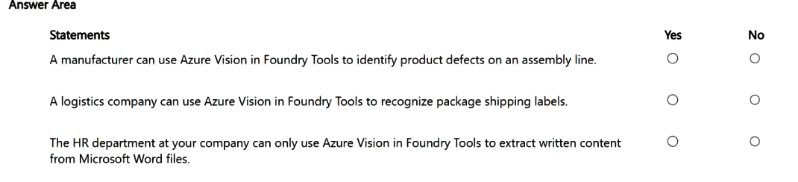
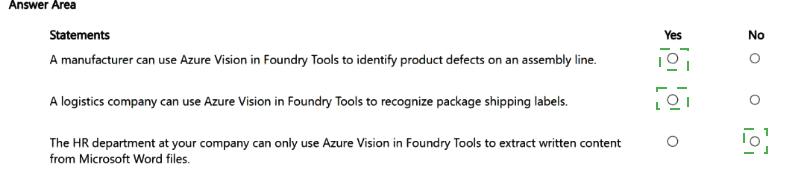
A manufacturer can use Azure Vision in Foundry Tools to identify product defects on an assembly line.
Answer: Yes
Explanation:
Azure Vision provides advanced image analysis capabilities including object detection, image classification, and surface inspection. These features can be applied to identify product defects by analyzing images captured on an assembly line. The service can detect anomalies, missing components, surface scratches, or other quality issues in real-time using computer vision models. This is a common industrial use case supported by Azure Vision services.
Statement 2:
A logistics company can use Azure Vision in Foundry Tools to recognize package shipping labels.
Answer: Yes
Explanation:
Azure Vision includes Optical Character Recognition (OCR) capabilities specifically designed to extract printed text from images. This can be applied to recognize and extract information from shipping labels on packages, including addresses, tracking numbers, barcodes, and other printed details. The OCR service works on various surfaces and backgrounds commonly found in logistics environments.
Statement 3:
The HR department at your company can only use Azure Vision in Foundry Tools to extract written content from Microsoft Word files.
Answer: No
Explanation:
This statement is incorrect for two reasons. First, Azure Vision is primarily designed for extracting text from images, photos, screenshots, and scanned documents—not natively from Microsoft Word files. For Word documents, Azure Document Intelligence (a separate service) is optimized for text extraction from Office files. Second, HR departments are not limited to only extracting written content; Azure Vision supports many other use cases including facial recognition, object detection, content moderation, and image analysis. The word "only" makes this statement false.
- For each of the following statements, select Yes if the statement is true. Otherwise, select No.
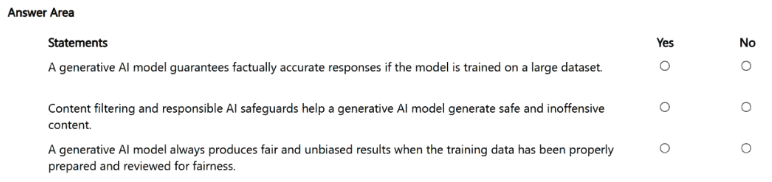
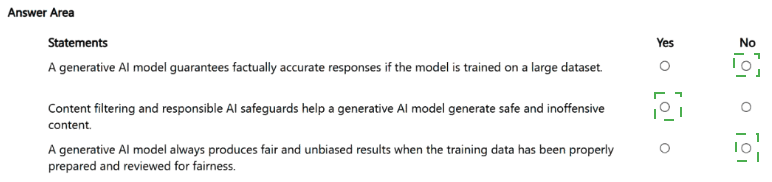
Statement 1: A generative AI model guarantees factually accurate responses if the model is trained on a large dataset.
Answer: No
Explanation:
Generative AI models do not guarantee factual accuracy regardless of dataset size. These models predict the most probable next token based on patterns in training data, not on truth or fact verification. Even with massive datasets, models can produce hallucinations—confidently stating incorrect or fabricated information. Accuracy depends on factors including data quality, model architecture, fine-tuning with reinforcement learning from human feedback (RLHF), and retrieval-augmented generation (RAG). Large dataset size alone cannot eliminate hallucinations or guarantee correctness.
Statement 2: Content filtering and responsible AI safeguards help a generative AI model generate safe and inoffensive content.
Answer: Yes
Explanation:
Content filtering systems (such as Azure OpenAI's content moderation) and responsible AI safeguards are specifically designed to block or mitigate harmful outputs including hate speech, violence, self-harm, and sexual content. These systems work alongside the base model to evaluate prompts and completions against safety thresholds. They do not guarantee perfect safety but significantly reduce the likelihood of offensive or dangerous content. Microsoft implements multiple layers including prompt filtering, completion filtering, and abuse monitoring as part of responsible AI practices.
Statement 3: A generative AI model always produces fair and unbiased results when the training data has been properly prepared and reviewed for fairness.
Answer: No
Explanation: Even with carefully prepared and reviewed training data, generative AI models can still produce unfair or biased results. Bias can arise from multiple sources beyond training data, including model architecture, tokenization methods, fine-tuning processes, prompt engineering, and evaluation metrics. Additionally, fairness is context-dependent—what is fair in one scenario may be unfair in another. The word "always" makes this statement false because no model can guarantee perfectly unbiased outputs under all conditions. Responsible AI practices aim to reduce, not eliminate, bias through continuous monitoring and mitigation.
- For each of the following statements, select Yes if the statement is true. Otherwise, select
No. NOTE: Each correct selection is worth one point.
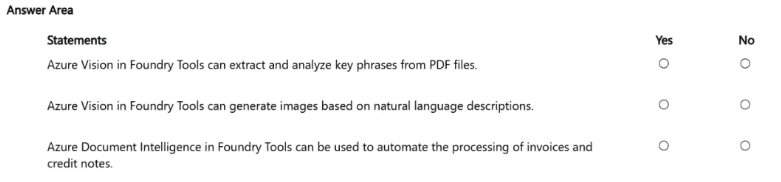
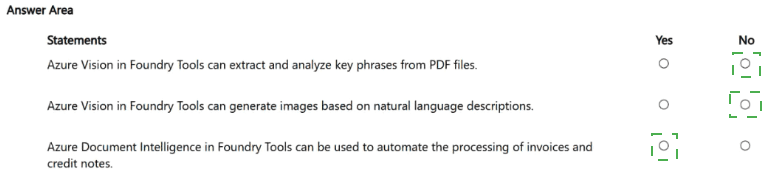
Statement 1: Azure Vision in Foundry Tools can extract and analyze key phrases from PDF files.
Answer: No
Explanation: Azure Vision is optimized for extracting text from natural images such as product labels, screenshots, posters, and street signs using a fast synchronous API. For PDF files and Office documents, Microsoft explicitly recommends using Document Intelligence's Read OCR model, which is optimized for text-intensive digital and scanned documents and uses an asynchronous API. Key phrase analysis is also not a capability of Azure Vision—key phrase extraction falls under language analysis services like Azure Language Service, not computer vision.
Statement 2: Azure Vision in Foundry Tools can generate images based on natural language descriptions.
Answer: No
Explanation:
Image generation from natural language descriptions (text-to-image) is a capability of Azure OpenAI in Foundry Tools, specifically using DALL-E or GPT-image models. Azure Vision provides image analysis, optical character recognition (OCR), and face detection—not image generation. The documentation explicitly states: "Use Azure OpenAI for image generation from natural language descriptions by using DALL-E or GPT-image models" and "Don't use Azure Vision for analysis that large, multimodal foundation models like GPT-4o already support".
Statement 3:Azure Document Intelligence in Foundry Tools can be used to automate the processing of invoices and credit notes.
Answer: Yes
Explanation:
Document Intelligence includes prebuilt models specifically designed for invoice processing. The prebuilt-invoice model can detect and extract structured data from invoices including customer name, vendor name, invoice ID, due date, total amount, tax amount, line items, and more. These capabilities can be automated through Logic Apps workflows that trigger processing when documents are added to folders like OneDrive, then extract information and route it to email or other systems. Credit notes are similarly processed as they follow invoice-like structures.
| Page 1 out of 7 Pages |
| 123 |
Real-World Scenario Mastery: Our AB-731 practice exam don't just test definitions. They present you with the same complex, scenario-based problems you'll encounter on the actual exam.
Strategic Weakness Identification: Each practice session reveals exactly where you stand. Discover which domains need more attention, before AI Transformation Leader exam day arrives.
Confidence Through Familiarity: There's no substitute for knowing what to expect. When you've worked through our comprehensive AB-731 practice exam questions pool covering all topics, the real exam feels like just another practice session.
Copyright © All Rights Reserved