
Your company manages an online catalog of office supplies. You plan to use a generative AI solution to create product descriptions for your company’s website. The solution must ensure descriptions can be posted immediately after creation, enable selection/inclusion of product details, and be fast and simple for non-technical staff. What is the best type of solution to use? Select the BEST answer.
A. custom Azure Machine Learning model
B. the Researcher agent in Microsoft 365 Copilot
C. an interactive AI agent
D. a fine-tuned large language model LLM
Explanation:
An interactive AI agent (e.g., Microsoft Copilot Studio or Azure AI Foundry agent) allows non-technical staff to generate product descriptions through a simple chat interface. Staff can select which product details to include by typing instructions naturally, receive instant output ready for copy-paste, and post immediately—no coding, no model deployment, no waiting.
Why other options are incorrect:
A. Custom Azure Machine Learning model
– Requires ML engineers to build, train, and deploy models. Far too complex and slow for non-technical staff. Violates "simple" and "immediate" requirements.
B. Researcher agent in Microsoft 365 Copilot
– Designed to search across enterprise data (SharePoint, emails) and synthesize answers, not to generate structured product descriptions from specifications with user-controlled detail selection. Also requires expensive per-user licensing.
D. Fine-tuned LLM
– Requires technical expertise to prepare training data, run fine-tuning jobs (hours to days), and deploy models. Must be retrained when requirements change. Violates "fast and simple for non-technical staff." Fine-tuning is overkill when prompting in an interactive agent achieves the same result.
References
Microsoft Learn – Copilot Studio: "Build no-code conversational agents that empower business users to generate content and automate workflows" – Copilot Studio Docs
Azure AI Foundry: "Interactive agents provide a natural language interface for non-technical users to interact with LLMs without writing code"
You need to create a custom Azure Machine Learning model. The data used to train the model is consistent and uniform. What should you do first?
A. Prepare the training data.
B. Evaluate the model.
C. Train the model.
D. Tune hyperparameters.
E. Deploy the model.
Explanation:
Before any training, evaluation, tuning, or deployment can happen, the data must be prepared. Even when data is described as consistent and uniform, preparation is still the essential first step in any machine learning workflow. Data preparation includes:
Cleaning (handling missing values, removing duplicates, correcting inconsistencies)
Formatting (converting to the required structure like CSV, Parquet, or JSON)
Splitting into training, validation, and test sets
Labeling (if supervised learning)
Feature engineering and normalization
Ensuring data quality and integrity
Without properly prepared data, any subsequent steps—training, evaluation, hyperparameter tuning, or deployment—will produce unreliable or incorrect results.
Why other options are incorrect
B. Evaluate the model – Evaluation happens after training, not before. You cannot evaluate a model that does not yet exist.
C. Train the model – Training requires prepared data as input. Jumping to training without data preparation leads to errors or poor model quality.
D. Tune hyperparameters – Hyperparameter tuning occurs during or after initial training, not before data is prepared.
E. Deploy the model – Deployment is the final step after training, evaluation, and tuning are complete. It cannot be done first.
References
Microsoft Learn – Azure Machine Learning workflow:"The first step in creating a custom model is to prepare your data—clean, transform, and split it before training." – Azure ML Data Preparation
Standard ML lifecycle: Data preparation → Model training → Evaluation → Hyperparameter tuning → Deployment.
- For each of the following statements, select Yes if the statement is true. Otherwise, select
No. NOTE: Each correct selection is worth one point.
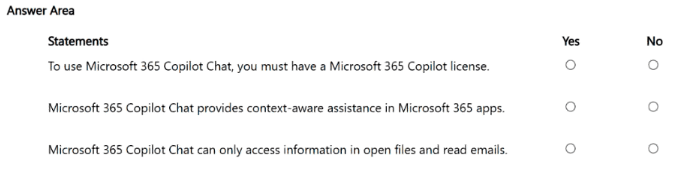
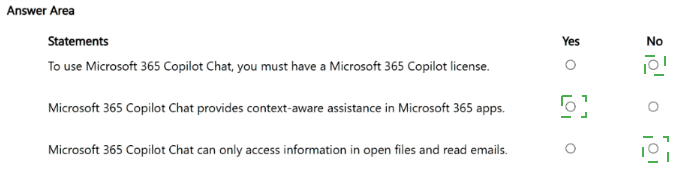
Statement 1: To use Microsoft 365 Copilot Chat, you must have a Microsoft 365 Copilot license.
Answer: No
Explanation:
Microsoft 365 Copilot Chat is included in standard Microsoft 365 subscriptions at no additional cost. Eligible licenses include Microsoft 365 Business Basic/Standard/Premium, E3/E5, F1/F3, Office 365 E1/E3/E5, Teams licenses, and A1/A3/A5 for education. A paid Microsoft 365 Copilot add-on license is not required. The premium license adds capabilities like full work data reasoning across emails, meetings, and files, as well as priority access to advanced agents like Researcher and Analyst. Without the add-on license, users still access Copilot Chat with enterprise data protection, file upload capabilities, and web search.
Why "Yes" is incorrect: Microsoft documentation explicitly lists Copilot Chat as included with many standard subscriptions, not requiring the paid Copilot license.
Statement 2: Microsoft 365 Copilot Chat provides context-aware assistance in Microsoft 365 apps.
Answer: Yes
Explanation:
In Microsoft 365 apps like Word, Excel, PowerPoint, Outlook, and OneNote, Copilot Chat is content-aware, meaning it understands the specific file you have open and tailors responses accordingly. The chat panel opens as a side pane alongside your document, eliminating the need to switch between apps or copy-paste text. Users can reference other files by typing "/" and searching for needed documents.
Why "No" is incorrect: Multiple sources confirm the content-aware integration directly within Microsoft 365 applications.
Statement 3: Microsoft 365 Copilot Chat can only access information in open files and read emails.
Answer: No
Explanation:
This statement is false because of the word "only." Copilot Chat has multiple ways to access organizational content beyond open files and emails. Users can upload files directly using the "+" button, reference files by typing "/" to search across SharePoint and OneDrive, copy-paste content into the chat, and access intranet pages when using Microsoft Edge. In Outlook specifically, Copilot Chat can access calendar, meetings, chats, and files from OneDrive and SharePoint, not just emails.
Why "Yes" is incorrect: Copilot Chat's data access includes file upload, file referencing via search, copy-paste, and web content—far broader than "only" open files and emails.
References
Microsoft Learn – Minimum requirements for Microsoft 365 Copilot Chat: "Copilot Chat is included in your Microsoft 365 subscription"
Microsoft Learn – Copilot Chat license eligibility: Lists all qualifying licenses without requiring paid Copilot add-on
Your company creates a custom Azure Machine Learning model that uses a generative AI assistant. The model initially delivers strong results. However, six months later, the model predictions become noticeably less accurate. What is a possible cause of the issue?
A. The input data changed over time.
B. The model requires additional compute resources.
C. The model was trained incorrectly.
Explanation:
The scenario describes a model that initially performed well but became less accurate after six months. This is a classic example of model drift (specifically data drift), where the statistical properties of the input data change over time. Real-world data is not static—customer behavior, market conditions, product catalogs, language patterns, and seasonal trends evolve. A model trained on historical data may no longer reflect current reality, leading to declining accuracy.
Why other options are incorrect:
B. The model requires additional compute resources
– Compute resources affect processing speed and throughput, not prediction accuracy. Adding more CPUs, GPUs, or memory does not improve how accurately a model maps inputs to outputs. If a model was accurate before, insufficient compute would cause slow responses or timeouts, not gradual accuracy decline.
C. The model was trained incorrectly
– If the model was trained incorrectly, it would have delivered poor results from the beginning, not "strong results" initially. Training errors (e.g., data leakage, wrong loss function, overfitting) manifest immediately during validation and testing, not six months later.
What the company should do: Implement continuous monitoring for data drift and concept drift, retrain the model periodically with fresh data, and establish an MLOps pipeline for automated retraining.
References
Microsoft Learn – Model monitoring for Azure Machine Learning: "Data drift occurs when input data changes over time, causing model accuracy to degrade. Monitor for drift and retrain as needed." – Azure ML Model Monitoring
Microsoft documentation: "A model that performed well in production may become less accurate over time due to changes in the underlying data distribution. This is known as model drift."
Your company purchases Microsoft 365 Copilot for its sales department. The sales department needs to find and summarize information across internal documents quickly. From which two data sources can the sales department obtain results by default? (Select TWO.)
A. an on-premises file share
B. a custom customer relationship management (CRM) system
C. Microsoft SharePoint
D. Microsoft OneDrive
E. Microsoft Sway
Explanation:
When a company licenses Microsoft 365 Copilot for a sales department, the tool is designed to integrate seamlessly with the Microsoft 365 ecosystem. By default, it connects directly to Microsoft Graph to source data from a user's existing Microsoft 365 environment. This allows it to generate responses grounded in the organization's existing content .
From the provided options, SharePoint and OneDrive are the two primary sources of internal documents. Microsoft 365 Copilot can read and synthesize information from documents stored in both locations. In fact, Microsoft documentation specifies that when Copilot Studio agents are configured to use these sources, they synchronize with the files so updates are automatically reflected, and they respect the user's existing permissions to ensure data security .
Why Other Options Are Incorrect
A. An on-premises file share:
Microsoft 365 Copilot does not access on-premises data by default. To index this data, you must specifically set up a Microsoft Graph connector (e.g., the File Share Graph Connector) to bring that content into the Microsoft Graph, which requires extra configuration .
B. A custom CRM system:
A third-party or custom CRM is not a default data source for Microsoft 365 Copilot. While Microsoft Copilot can connect to CRM data (especially Dynamics 365 through Dataverse ), accessing a custom system requires building a custom connector or plugin. It does not happen by default .
E. Microsoft Sway:
Sway is a presentation tool, not primarily a data repository for document storage and retrieval. It is not a default source for grounding Copilot responses.
References
Microsoft Q&A: "Copilot Pro can’t directly access or ground data from OneDrive or SharePoint. That feature is only available with Microsoft 365 Copilot for education or enterprise users..."
Microsoft Copilot Studio: "You can add files and folders from SharePoint as a knowledge source for your agent... The files you add are synchronized, so changes are automatically updated."
Select the answer that correctly completes the sentence.
When a generative AI model produces output that seems realistic but contains incorrect
information, the behavior is known as __________.


Explanation:
When a generative AI model produces output that appears confident, fluent, and realistic but contains factual errors or entirely fabricated information, the behavior is specifically known as overreliance (often discussed alongside the term "hallucination" in Microsoft's responsible AI guidelines).
Overreliance refers to the user's tendency to trust AI outputs without verification, but in Microsoft's terminology for the AB-731 exam, this is the term used to describe the result of the model confidently presenting incorrect information as fact. Microsoft defines overreliance as accepting AI-generated content as accurate when it may not be.
Why other options are incorrect:
Data leakage – This occurs when training data unintentionally includes information from the validation or test sets, causing overly optimistic performance metrics. It has nothing to do with realistic-sounding incorrect outputs.
Model inaccuracy – This is a general term for any deviation between model output and ground truth. It does not specifically describe the phenomenon where output seems realistic but is wrong. A model can be inaccurate due to bias or noise without producing confident, fluent fabrications.
Prompt injection – This is a security vulnerability where malicious inputs override the model's original instructions. It is not related to the model spontaneously generating incorrect but realistic information.
Reference:
Microsoft Learn – Responsible AI guidance for generative AI: "Overreliance occurs when users trust AI-generated content without critical evaluation, especially when the output is fluent and realistic but factually incorrect. Mitigations include grounding, citations, and user education." – Microsoft Responsible AI
- What should you use for each task? To answer, select the appropriate options in the
answer area. NOTE: Each correct selection is worth one point.
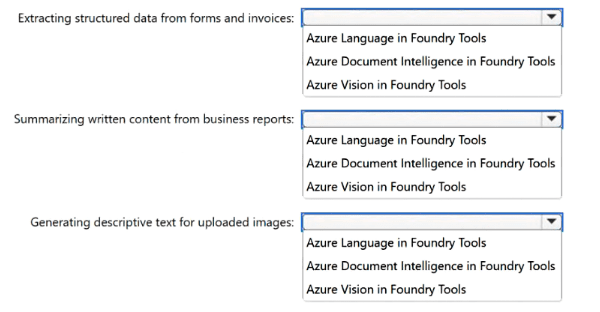
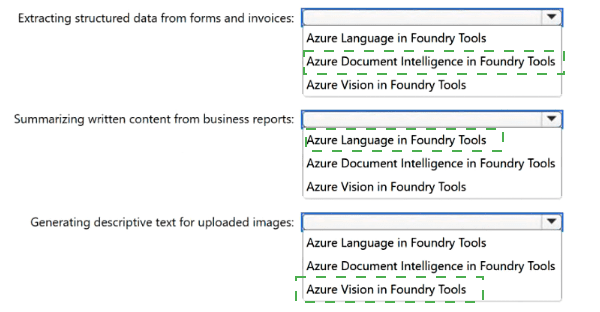
Extracting structured data from forms and invoices: Azure Document Intelligence in Foundry Tools
Explanation: Azure Document Intelligence is specifically designed to turn documents into usable data by extracting key-value pairs, tables, and line items from forms and invoices . It uses machine learning models trained to understand document structure and can handle both prebuilt invoice models and custom models for unique form layouts . The service outputs structured JSON data that preserves relationships within the original file. Azure Vision is optimized for natural images and small scanned documents like business cards, not structured form extraction . Azure Language focuses on text analytics tasks such as sentiment analysis and entity recognition, not on extracting tabular field data from document layouts .
Summarizing written content from business reports: Azure Language in Foundry Tools
Explanation: The Summarization capability is a core feature of Azure Language Service . It provides both extractive and abstractive summarization for documents, accepting native formats including Word documents and PDF files . The service generates concise overviews, extracts key sentences, and condenses complex business reports into human-readable summaries while preserving the document's essential meaning . Azure Document Intelligence extracts structured data but does not generate text summaries. Azure Vision describes visual content in images and cannot summarize written text documents.
Generating descriptive text for uploaded images: Azure Vision in Foundry Tools
Explanation: Azure Vision includes dedicated Caption and Dense Captions features that generate human-readable descriptions of image content . The service analyzes an image and returns descriptive phrases (e.g., "a man walking a dog on a leash") along with confidence scores. Dense captions can describe up to 10 different regions within a single image . Azure Language processes text only and cannot analyze pixel data. Azure Document Intelligence focuses on forms and documents, not general photographs.
References:
Microsoft Learn - Document Intelligence: "Turns documents into usable data... extracts key-value pairs and tables"
Microsoft Learn - Language Service Summarization: "Generative summarization for Word documents, PDFs, or plain text"
For each of the following statements, select Yes if the statement is true. Otherwise, select
No. NOTE: Each correct selection is worth one point.
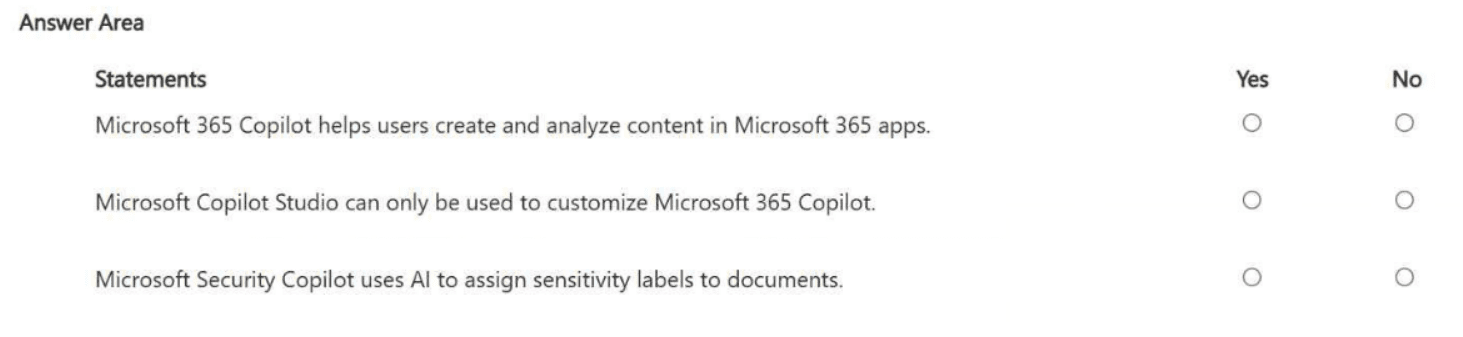
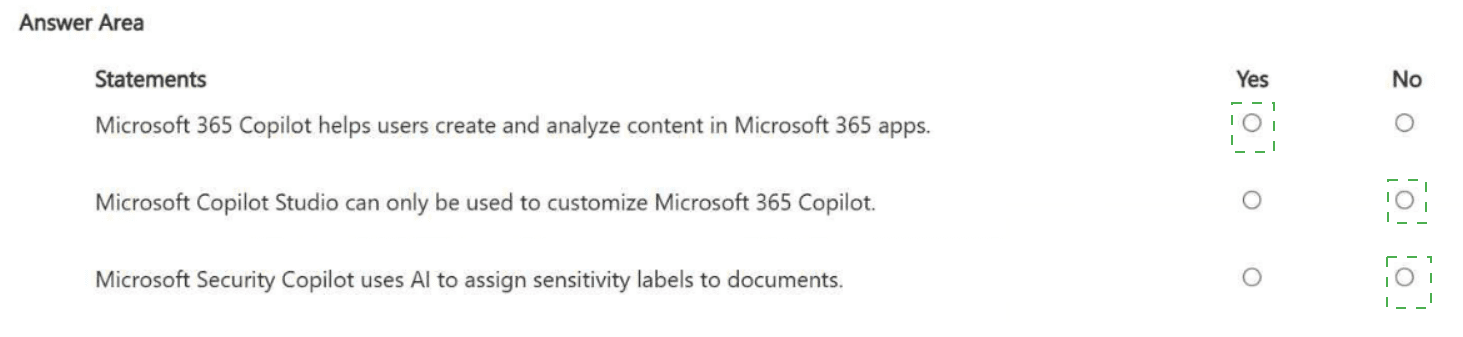
Statement 1: Microsoft 365 Copilot helps users create and analyze content in Microsoft 365 apps.
Answer: Yes
Explanation:
This is a core function of Microsoft 365 Copilot. It integrates directly into Word, Excel, PowerPoint, Outlook, and Teams to help users draft documents, summarize emails, analyze spreadsheets, and create presentations. For example, Copilot in Word can turn meeting notes into structured documents, in Excel can identify sales trends, and in PowerPoint can generate entire slide decks from a brief.
Why "No" is incorrect: Microsoft documentation extensively documents these creation and analysis capabilities across M365 apps.
Statement 2: Microsoft Copilot Studio can only be used to customize Microsoft 365 Copilot.
Answer: No
Explanation:
Copilot Studio is not limited to customizing Microsoft 365 Copilot. You can build custom agents from scratch that work across multiple channels including Microsoft 365 Copilot, Teams, and other platforms. Additionally, Copilot Studio supports publishing custom agents as standalone chatbots or deploying them to external channels beyond the Microsoft ecosystem.
Why "Yes" is incorrect: The word "only" makes this false. Copilot Studio has broader capabilities including building custom agents with knowledge sources (SharePoint, Dataverse), tools (Power Platform connectors), and multi-channel deployment.
Statement 3: Microsoft Security Copilot uses AI to assign sensitivity labels to documents.
Answer: No
Explanation: Sensitivity labels are not assigned by Security Copilot. They are managed through Microsoft Purview, where administrators define and publish labels. Microsoft 365 Copilot then inherits and applies sensitivity labels from source content when generating new documents. The label assignment is based on pre-configured Purview policies, not AI-driven assignment.
Why "Yes" is incorrect: Security Copilot is for threat detection and security investigations, not document labeling. Label inheritance happens automatically based on source content, not through Security Copilot AI.
References
Microsoft Learn – Copilot productivity workflows: "Copilot in Word, Excel, and PowerPoint creates structured documents and analyzes content"
Microsoft Copilot Studio documentation: "Custom agents can be published to Microsoft 365 Copilot, Teams, and other channels"
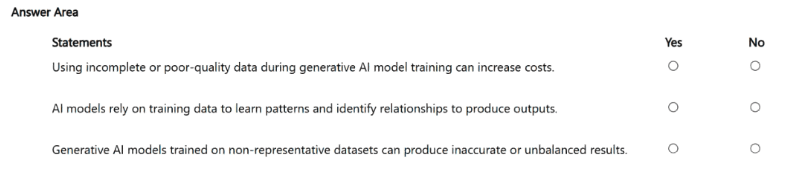
- For each of the following statements, select Yes if the statement is true. Otherwise, select No.
NOTE: Each correct selection is worth one point.
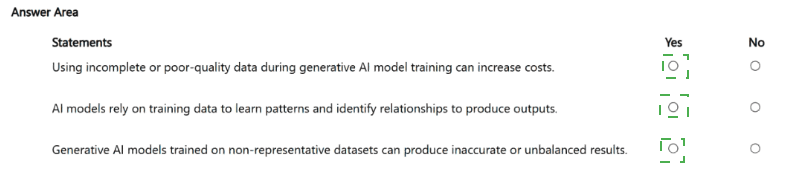
Explanation:
Statement 1: Data Quality vs. Training Costs (Yes)
Why it is correct: Generative AI training requires massive computational resources. Poor-quality or incomplete data introduces noise, forcing models to take longer to converge or leading to failed training runs. This significantly increases cloud compute (GPU/TPU) consumption and engineering labor costs.
Why "No" is incorrect: Ignoring data quality is not cost-neutral; fixing underlying data errors after training through extensive fine-tuning or reinforcement learning is far more expensive than preprocessing data correctly.
Statement 2: Foundation of AI Mechanics (Yes)
Why it is correct: Machine learning models do not use traditional, hard-coded logical rules. Instead, they ingest training data to mathematically map statistical patterns, semantic structures, and correlations. They use these learned relationships to predict outputs.
Why "No" is incorrect: Without data to parse patterns, an AI model possesses no foundational knowledge base or algorithmic architecture to generate contextually relevant text, code, or images.
Statement 3: Representative Datasets and Bias (Yes)
Why it is correct: A model's output is directly constrained by its input data. If training datasets lack demographic or situational diversity, the model fails to generalize properly, leading to systemic bias, high error rates in underrepresented scenarios, and false fabrications.
Why "No" is incorrect: Skewed training data does not balance out naturally during generation; it actively amplifies historical biases and statistical gaps present in the source corpus.
References
Microsoft Corporate Governance: Responsible AI Standard (v2) – Highlights the pillars of Fairness and Inclusiveness, mandating that deployment teams ensure training data is diverse, highly representative, and thoroughly scrubbed of historical imbalances to prevent algorithmic bias.
Microsoft Azure Architecture Framework: AI & Machine Learning Data Fundamentals – Explicitly states that upstream data quality, formatting, and completeness dictate downstream computational efficiency and directly minimize the risk of wasted cloud consumption expenditure.
You are exploring how Microsoft 365 Copilot uses Microsoft Graph to deliver AI-powered experiences. Which information in Microsoft Graph can Copilot use by default?
A. emails, files, meetings, and chats in Microsoft 365
B. data stored in a file share
C. social media activity
D. content from public websites
Explanation
Microsoft 365 Copilot is natively integrated with the Microsoft Graph, which acts as the unified data gateway for the Microsoft 365 ecosystem . By default, Copilot can securely access and ground its responses in a user's existing Microsoft 365 data without requiring any additional configuration. This includes emails from Exchange Online, files from OneDrive and SharePoint, meeting transcripts and calendar events, and chat history from Microsoft Teams . The system automatically respects existing user permissions, ensuring Copilot only surfaces data the user is already authorized to see .
Why other options are incorrect:
B. Data stored in a file share (e.g., on-premises)
– This is not available by default. External data sources, such as on-premises file shares or third-party SaaS platforms, require the explicit setup of Microsoft Graph Connectors to be indexed into the Graph . Without these connectors, Copilot cannot access this data.
C. Social media activity
– This data is external to the Microsoft 365 tenant. While custom connectors exist, Copilot does not automatically ingest or access social media feeds by default .
D. Content from public websites
– While Microsoft 365 Copilot can reference public web content, this feature is not enabled by default. Administrators must specifically turn on this setting in the Microsoft 365 admin center, and end users must also enable a toggle in their chat settings to allow grounding in web content . Therefore, it is not a default data source.
References
Microsoft Learn: *"Microsoft Graph connectors ... provide a platform for organizations to bring their unstructured line-of-business data into Microsoft Graph. Doing so enables Microsoft 365 Copilot to holistically analyze and understand your organization's enterprise content"*
Microsoft Learn: "Synced connectors crawl and index content from external sources into Microsoft Graph ... Support connections to cloud-based (SaaS) and on-premises data sources"
Your company sells hiking and camping gear online. You need a generative AI solution that can interact with customers and ask questions about their needs. What should you include in the solution?
A. a chatbot
B. predictive AI
C. computer vision
D. a recommendation engine
Explanation:
The requirement is a generative AI solution that can interact with customers and ask questions about their needs. This is exactly what a chatbot does—it engages in conversational dialogue, asks clarifying questions, understands customer intent, and provides relevant responses. When powered by generative AI (e.g., GPT-4), a chatbot can hold natural, context-aware conversations, helping customers find appropriate hiking and camping gear by asking about trip type, group size, weather conditions, and product preferences.
Why other options are incorrect:
B. Predictive AI
– Predictive AI forecasts future outcomes based on historical data (e.g., predicting which products a customer might buy next). It cannot hold interactive conversations or ask questions. It provides a recommendation score, not a dialogue.
C. Computer vision
– Computer vision analyzes images and videos (e.g., identifying a tent from a photo). It does not interact conversationally or ask questions about customer needs. It is for visual understanding, not dialogue.
D. A recommendation engine
– Recommendation engines suggest products based on past behavior or collaborative filtering (e.g., "customers who bought this also bought..."). They are passive—they do not ask questions or engage in back-and-forth conversation. While useful for e-commerce, they do not meet the interactive requirement.
What a generative AI chatbot can do for outdoor gear sales: Ask about hiking experience level, tent size needs, sleeping bag temperature ratings, budget, and trip duration. It can then recommend specific products and explain why they fit the customer's needs.
References
Microsoft Learn – Azure OpenAI Service:*"ChatGPT and GPT-4 models enable conversational AI for customer support, product discovery, and needs assessment through natural dialogue."*
Microsoft Copilot Studio: "Build generative AI chatbots that can ask questions, understand intent, and guide customers through product selection."
Which business requirement most closely relates to grounding a generative AI model?
A. supporting multiple languages
B. measuring the number of user interactions per day
C. enabling users to interact by using natural language queries
D. ensuring that verified company data sources are used for response generation
Explanation:
Grounding is the process of constraining a generative AI model to use specific, trusted data sources (e.g., company documents, knowledge bases, or databases) when generating responses, rather than relying solely on the model's internal training data. This prevents hallucinations and ensures outputs are factually accurate and relevant to the organization. Grounding connects the model to "verified company data sources" so responses reflect real, current, and authorized information rather than general internet knowledge or fabricated content.
Why other options are incorrect:
A. Supporting multiple languages
– This relates to model multilingual capabilities and translation, not grounding. A model can be multilingual without being grounded in company data.
B. Measuring the number of user interactions per day
– This is usage analytics or telemetry, not grounding. It measures volume of engagement, not data source fidelity.
C. Enabling users to interact by using natural language queries
– This describes conversational AI or natural language processing (NLP) interface capability. Grounding is about where the answer comes from, not how the user asks the question.
Why grounding requires verified company data sources: Without grounding, a generative AI model may produce plausible-sounding but incorrect information (hallucinations). By grounding to specific company data sources (e.g., SharePoint, OneDrive, or a vector database), the model retrieves and generates responses based only on approved, up-to-date, and authoritative content. This is essential for customer support, internal knowledge management, and any use case requiring accuracy and compliance.
References
Microsoft Learn – Azure OpenAI grounding: "Grounding refers to the ability of an AI model to generate responses based on a specific set of documents or data sources you provide, rather than relying solely on its training data."
Microsoft Learn – Copilot and grounding: "Microsoft 365 Copilot grounds responses in your organization's Microsoft Graph data—emails, files, meetings, and chats—ensuring answers are relevant and secure."
| Page 2 out of 7 Pages |
| 123 |
| AB-731 Practice Test Home |
Real-World Scenario Mastery: Our AB-731 practice exam don't just test definitions. They present you with the same complex, scenario-based problems you'll encounter on the actual exam.
Strategic Weakness Identification: Each practice session reveals exactly where you stand. Discover which domains need more attention, before AI Transformation Leader exam day arrives.
Confidence Through Familiarity: There's no substitute for knowing what to expect. When you've worked through our comprehensive AB-731 practice exam questions pool covering all topics, the real exam feels like just another practice session.
Copyright © All Rights Reserved