
The DevOps Engineer was tasked to deploy a new application on a local cluster. When the application was deployed in the Namespace, it was decided that a newer version of Kubernetes was required. The DevOps Engineer requested the vSphere Admin to upgrade their Kubernetes version. The vSphere Admin checked compatibility between the Supervisor and all running VKS clusters, and then successfully upgraded vSphere Supervisor to the latest version. The DevOps Engineer could not get the application to work. What caused the application to fail?
A. The vSphere Admin failed to complete all the pre-checks before the upgrade.
B. The vSphere Admin pulled down the wrong version of the Supervisor.
C. The vSphere Admin did everything correctly and the DevOps Engineer is deploying the application wrong.
D. The vSphere Admin upgraded the Supervisor Control Plane.
Explanation:
In vSphere with Tanzu, the Supervisor Cluster runs the control plane for all Tanzu Kubernetes Grid (TKG) clusters (also called VKS clusters). Upgrading the Supervisor does not automatically upgrade existing TKG clusters. The DevOps Engineer needed a newer Kubernetes version for the application cluster, but the vSphere Admin only upgraded the Supervisor, leaving the workload cluster unchanged. The application fails because the cluster still runs the older Kubernetes version.
Correct Option:
D. The vSphere Admin upgraded the Supervisor Control Plane –
The Supervisor runs its own version, but each Tanzu Kubernetes cluster has its own Kubernetes version independent of the Supervisor. Upgrading the Supervisor does not change the Kubernetes version of existing VKS clusters. The vSphere Admin should have created a new TKG cluster with the desired Kubernetes version or upgraded the existing workload cluster via the Tanzu CLI or Cluster API.
Incorrect Options:
A. The vSphere Admin failed to complete all the pre-checks before the upgrade –
The question states the admin checked compatibility and successfully upgraded the Supervisor. Pre-checks are for the Supervisor upgrade itself, which succeeded. The root cause is not missing pre-checks but performing the wrong upgrade action (Supervisor instead of workload cluster).
B. The vSphere Admin pulled down the wrong version of the Supervisor –
The upgrade completed successfully, and the question does not indicate any mismatch or error with the Supervisor version. Even if the Supervisor version was correct, the issue remains that the workload cluster's Kubernetes version was not upgraded.
C. The vSphere Admin did everything correctly and the DevOps Engineer is deploying the application wrong –
This assumes the admin's action was correct. However, the requirement was to upgrade the Kubernetes version of the cluster running the application. Upgrading the Supervisor does not fulfill that requirement, so the admin did not act correctly for the stated need.
Reference:
VMware vSphere with Tanzu Documentation – "Upgrading Tanzu Kubernetes Clusters" and "Upgrading the Supervisor Cluster" are separate procedures. VMware KB article: "Upgrading the Supervisor does not upgrade existing TKG guest clusters. TKG clusters must be upgraded individually using the Tanzu CLI or Cluster API." Also refer to Kubernetes version compatibility matrix between Supervisor and Tanzu Kubernetes releases.
A company standardized on the following configurations:
• vSphere Kubernetes Service (VKS) upgrade is separate from vCenter upgrades.
• A private registry will be utilized.
How should an administrator adhere to these standards?
A. Issue a PowerCLI command to point to the private registry.
B. Issue a kubectl command pointing the service definition to the private registry.
C. When uploading the service definition, chooseAsynchronous Private.
D. When uploading the service definition, chooseAsynchronous Public.
Explanation:
The two company standards are:
VKS upgrade separate from vCenter upgrades
Use of a private registry
The Asynchronous Private registration method satisfies both requirements because:
Asynchronous registration decouples VKS version registration from vCenter and Supervisor updates. This allows upgrading VKS independently without waiting for vCenter releases.
Private indicates the VKS package is relocated from the public registry to a private registry (e.g., Harbor) before registration. This is mandatory for air-gapped or private registry environments.
The workflow involves: downloading the service definition YAML from the public site, relocating the package to a private registry using Carvel imgpkg, then registering the new version with vCenter.
Why other options are incorrect:
A (PowerCLI command to point to private registry):
PowerCLI is not used for VKS private registry configuration. VKS registration is performed via vCenter UI or API when uploading the service definition, not through PowerCLI.
B (kubectl command pointing service definition):
While kubectl is used for cluster management, private registry configuration for VKS package relocation occurs at registration time, not via kubectl commands on running clusters.
D (Asynchronous Public):
This downloads the VKS definition from the public registry but does not relocate it to a private registry. This fails the "private registry will be utilized" requirement.
Reference:
VMware TechDocs - "Using the vSphere Kubernetes Service" - Registering New VKS Versions with vCenter table; "Upgrade VKS from a Private Registry".
An administrator is operating a sovereign private cloud built on VMware Cloud Foundation (VCF) and is providing isolated Supervisor Namespaces as well as associated Kubernetes clusters. The architecture must ensure consistent provisioning, management, and monitoring of these clusters across tenants while maintaining compliance with internal governance and automation frameworks, considering:
• Deploying and scaling Kubernetes clusters
• Managing Supervisor Namespaces and configurations
• Monitoring cluster health, workloads, and resources across tenants
What three clients are supported for provisioning, managing, and monitoring VMware vSphere Kubernetes Service (VKS) clusters? (Choose three.)
A. kubectl
B. Cluster API
C. esxtop
D. VCF CLI
E. esxcli
F. esxcli
Explanation:
A. kubectl
– Primary CLI for managing VKS clusters and workloads within Supervisor Namespaces. Supports cluster provisioning, scaling, and configuration via native Kubernetes API objects (e.g., Cluster, TanzuKubernetesCluster).
B. Cluster API
– Underlying provider (CAPV – Cluster API Provider vSphere) used by VKS for declarative cluster lifecycle management. Enables consistent provisioning, scaling, and upgrades across tenants via Cluster API controllers.
D. VCF CLI
– Provides VCF‑specific commands for managing the software lifecycle, including VKS cluster operations integrated with VCF’s automation and governance frameworks.
Why other options are incorrect:
C (esxtop)
– Real‑time ESXi performance monitoring tool; does not provision or manage VKS clusters.
E (esxcli)
– ESXi command line for host‑level configuration and troubleshooting; unrelated to VKS cluster management.
F (esxcli)
– Duplicate of E, same incorrect reasoning.
Reference:
VMware Cloud Foundation 9.0 Documentation – "Managing vSphere Kubernetes Service with kubectl, Cluster API, and VCF CLI." VMware Validated Design for Sovereign Clouds – Tenant‑aware cluster lifecycle management using CAPV and VCF automation interfaces.
Which four capabilities are provided by a VMware Kubernetes Service (VKS) cluster?
A. Authentication, storage integration, pod networking, and load balancing.
B. Identity federation, persistent logging, firewall services, and monitoring.
C. Identity federation, external storage, virtual machine networking, and DNS services.
D. Authentication, backup services, VLAN segmentation, and DHCP.
Explanation:
A VMware vSphere Kubernetes Service (VKS) cluster (Tanzu Kubernetes Grid cluster on vSphere) provides essential Kubernetes capabilities for running containerized workloads. The four foundational capabilities include authentication (user access control), storage integration (persistent volumes via CSI), pod networking (CNI-based pod-to-pod communication), and load balancing (L4/L7 ingress or load balancer services). These are core to any production Kubernetes cluster.
Correct Option:
A. Authentication, storage integration, pod networking, and load balancing –
This is correct because VKS clusters integrate with vSphere SSO/OIDC for authentication, vSphere CSI driver for storage, Antrea or other CNI plugins for pod networking, and NSX Advanced Load Balancer or Envoy-based solutions for load balancing. These four capabilities are mandatory for deploying and managing containerized applications.
Incorrect Options:
B. Identity federation, persistent logging, firewall services, and monitoring –
Identity federation is a subset of authentication but not a core capability; persistent logging and monitoring are typically added via third-party tools (e.g., Prometheus, Fluentd), not provided natively by the VKS cluster itself. Firewall services are handled by network policies, not a guaranteed capability.
C. Identity federation, external storage, virtual machine networking, and DNS services –
Identity federation is too specific; external storage is part of storage integration but phrased narrowly; virtual machine networking is unrelated to pods (pods use overlay or routed pod networking, not VM networking). DNS is provided by CoreDNS as a standard add-on, but this option omits load balancing and authentication.
D. Authentication, backup services, VLAN segmentation, and DHCP –
Backup services are not native to VKS (Velero can be added). VLAN segmentation is not typical for pod networking (VXLAN or NSX segments are used). DHCP is not a standard capability; pods get IPs from CNI, not DHCP servers. Authentication is correct, but the other three are incorrect.
Reference:
VMware vSphere with Tanzu Documentation – "vSphere Kubernetes Service (VKS) Architecture" (VMware Docs). Core capabilities include: integration with vSphere SSO/OIDC (authentication), vSphere CSI (storage), Antrea or NSX-T CNI (pod networking), and NSX ALB or Contour (load balancing). Backup, DHCP, and VLAN segmentation are not native VKS cluster capabilities.
An administrator is deploying vSphere Kubernetes Service (VKS) on a VMware Cloud Foundation workload domain to support a new internal AI and data analytics platform. The environment must host both virtual machine (VM) applications and containerized workloads while maintaining a unified networking and security model through NSX. The design documentation outlines the requirements for the Supervisor infrastructure components.
What three components form the foundation of a VMware vSphere Kubernetes Service (VKS) Supervisor deployment? (Choose three.)
A. Cluster API
B. NSX Manager virtual machine
C. Supervisor control plane virtual machine
E. Virtual Machine Service
F. NSX Advanced Load Balancer Controller virtual machine
Explanation:
To enable vSphere Kubernetes Service (VKS) within a VMware Cloud Foundation (VCF) 9.0 environment, the Supervisor must be instantiated. The Supervisor is not a single appliance but a collection of integrated services that transform a vSphere Cluster into a Kubernetes-orchestrated control plane.
The three foundational components are:
A. Cluster API:
This is the core engine used by the Supervisor to manage the lifecycle of Tanzu Kubernetes Grid (TKG) workload clusters. It treats clusters as custom resources, allowing the Supervisor to provision, configure, and scale Kubernetes clusters automatically using declarative YAML manifests.
C. Supervisor control plane virtual machine:
When Workload Management is enabled, three specialized Supervisor Control Plane VMs are deployed on the ESXi hosts. These VMs run the Kubernetes API server and integrated services (like the Spherelet), acting as the management "brain" for the Namespace environment.
E. Virtual Machine Service:
This foundational component allows DevOps engineers to deploy and manage traditional Virtual Machines using Kubernetes APIs. In an AI/Analytics platform, this is critical for running legacy database nodes alongside containerized processing units, all within the same resource boundaries and networking logic.
Why the Other Options are Incorrect
B. NSX Manager virtual machine:
While NSX provides the networking fabric for VCF, the NSX Manager itself is part of the SDDC management infrastructure, not a component of the Supervisor deployment. The Supervisor consumes NSX services but the Manager is an external dependency.
F. NSX Advanced Load Balancer Controller:
Similar to the NSX Manager, the Controller is an external appliance (Load Balancing-as-a-Service). While it is a requirement for production networking, it is categorized as an integrated load-balancing solution rather than a fundamental internal component of the Supervisor’s own control plane architecture.
References
VMware Cloud Foundation 9.0 Design Guide: vSphere with Tanzu Architecture and Components.
vSphere 8.x/9.0 Documentation: Concepts and Architecture of the Supervisor.
Which two package management tools can be used to configure and install applications on VMware vSphere Kubernetes Service (VKS)? (Choose two.)
A. Fluent Bit
B. Multus
C. Helm
D. Grafana
E. Carvel
Explanation:
In VMware Cloud Foundation (VCF) 9.0 and the vSphere Kubernetes Service (VKS), application management is designed to be cloud-native and declarative. The platform leverages two primary industry standards for managing the deployment, configuration, and lifecycle of applications:
C. Helm:
Helm is the "de facto" package manager for Kubernetes. VKS supports the use of Helm charts to define, install, and upgrade complex Kubernetes applications. Administrators can use the Helm CLI to deploy charts directly into VKS clusters, or utilize the integrated Helm Controller (available as an add-on) to manage Helm releases declaratively through Kubernetes Custom Resources.
E. Carvel:
Carvel (formerly a VMware Tanzu project) provides a set of reliable, single-purpose tools for application configuration and deployment. Specifically, VKS uses the Carvel Packaging Standard (via kctrl and the kapp-controller) to package and distribute applications as Carvel Packages. This is the primary mechanism for VKS "Standard Packages" (like Fluent Bit or Prometheus) and is used to provide a consistent, versioned installation experience across clusters.
Why the Other Options are Incorrect
A. Fluent Bit:
This is a log processor and forwarder. While it is a service that can be installed using a package manager on VKS, it is not a package management tool itself.
B. Multus:
This is a Meta CNI (Container Network Interface) plugin that allows multiple network interfaces to be attached to a Pod. It is a networking component, not a deployment tool.
D. Grafana:
This is an observability and visualization platform. Like Fluent Bit, it is an application that is managed by Helm or Carvel, but it does not perform package management functions.
References
VMware vSphere Kubernetes Service Release Notes: Managing VKS Standard Packages and Add-ons.
Broadcom TechDocs: Installing and Configuring Carvel Packages on VKS Clusters.
An organization has standardized on the following configurations:
vSphere Kubernetes Services upgrade is separate from vCenter upgrades.
A private registry will be utilized.
What is the recommended solution to adhere to these standards?
A. Issue a kubectl command pointing service definition to the private registry.
B. Issue a PowerCLI command to point to the private registry.
C. When uploading the service definition, choose Asynchronous Public.
D. When uploading the service definition, choose Asynchronous Private.
Explanation:
The question specifies two key requirements: (1) VKS upgrades are separate from vCenter upgrades (asynchronous upgrade model), and (2) use of a private registry. In VMware vSphere with Tanzu, when uploading a service definition for VKS, the "Asynchronous Private" option ensures that the service (Kubernetes components) can be upgraded independently of vCenter and pulls images from a private container registry rather than VMware's public registry.
Correct Option:
D. When uploading the service definition, choose Asynchronous Private –
This is correct because "Asynchronous" allows VKS to be upgraded on its own cadence, separate from vCenter lifecycle management. "Private" configures the service to use a private registry (e.g., Harbor or a customer-managed registry) for storing and pulling VMware Tanzu container images, meeting both stated requirements.
Incorrect Options:
A. Issue a kubectl command pointing service definition to the private registry –
While kubectl can modify configurations, there is no single kubectl command that simultaneously enables asynchronous upgrades and private registry integration for the entire VKS service definition. This approach is manual, error-prone, and not the recommended VMware-supported method.
B. Issue a PowerCLI command to point to the private registry –
PowerCLI is used for vSphere infrastructure automation, not for managing VKS service upgrade modes or registry configurations. It cannot set the asynchronous upgrade flag or registry source at the service definition level.
C. When uploading the service definition, choose Asynchronous Public –
This option supports independent upgrade cadence (asynchronous) but still uses VMware's public container registry. This violates the second requirement of utilizing a private registry, which is often driven by security, air-gapped environments, or compliance needs.
Reference:
VMware vSphere with Tanzu Documentation – "Uploading and Managing vSphere Kubernetes Service Definitions" (VMware Docs). Also refer to VMware Cloud Foundation (VCF) Guide on Asynchronous Services: Asynchronous Private is the recommended pattern for disconnected or private registry deployments where Tanzu Kubernetes Grid Service images are mirrored to an internal registry.
An architect is meeting with a customer to deploy a mission-critical application using the vSphere Kubernetes Service. The architect learns that the ticketing application runs at a steady state 80% of the time but has significant spikes when an event is announced. The application is unable to meet demand even though resources are available.
What will address the issue of peak demand?
A. Install cluster autoscaling.
B. Enable Foundation Load Balancer to manage the network traffic during peak demand.
C. Oversubscribe the vSphere Kubernetes environment so that adequate resources are always available.
D. Install the Contour Supervisor Services package.
Explanation:
The application experiences steady-state demand with unpredictable spikes during events. The issue is that the cluster lacks sufficient worker nodes to handle peak loads, even though the underlying vSphere infrastructure has available resources. Cluster autoscaling automatically increases the number of worker nodes in the VKS cluster when pods cannot be scheduled due to resource constraints, and scales down when demand decreases . This directly addresses the peak demand problem by adding compute capacity dynamically.
Why other options are incorrect:
B (Foundation Load Balancer): Manages network traffic distribution, not compute capacity. It cannot add worker nodes.
C (Oversubscribe environment): Wasteful and inefficient, always keeping excess resources running instead of scaling dynamically.
D (Contour package): An ingress controller for HTTP traffic routing, completely unrelated to cluster compute scaling.
Reference:
VMware TechDocs - "About Cluster Autoscaling" - The cluster autoscaler automatically adjusts the number of worker nodes in a VKS cluster based on workload demands .
What is the purpose of a network policy in a Kubernetes cluster?
A. Creates and operates workload clusters natively in vSphere Supervisor.
B. Defines how pods communicate with each other and other network endpoints.
C. Provides routing capability for inbound pod traffic.
D. Allows external access to a port opened on each worker node through the Kubernetes network proxy.
Explanation:
A Kubernetes Network Policy is a specification that defines how groups of pods are allowed to communicate with each other and with other network endpoints. It implements ingress (incoming) and egress (outgoing) rules at Layer 3/4, acting as a firewall for pods. Network Policies enforce application-level segmentation and security within the cluster.
Why other options are incorrect:
A (creates and operates workload clusters natively):This describes the vSphere Supervisor or Tanzu Kubernetes Grid Service, not a Network Policy.
C (provides routing capability for inbound pod traffic): This describes Ingress (HTTP/S routing), not a Network Policy.
D (allows external access to a port on each worker node): This describes a NodePort Service, not a Network Policy.
Reference:
Kubernetes Documentation – "Network Policies" – A Network Policy specifies how groups of pods are allowed to communicate. VMware VKS fully supports standard Kubernetes Network Policies when using NSX-T or Antrea as the CNI.
What statement describes Cluster API?
A. It is a native Kubernetes certificate management controller that adds certificates and certificate issuers as resource types in Kubernetes clusters.
B. It is a specialized toolset to bring declarative cluster creation, configuration, and management in the Kubernetes ecosystem.
C. It enables pod networking and enforces network Kubernetes policies.
D. It is responsible for scanning language-specific packages in container images, such as Java, Python, Go, and others.
Explanation:
Cluster API (CAPI) is a Kubernetes sub-project that provides declarative APIs for provisioning, upgrading, and operating Kubernetes clusters across multiple infrastructure providers (vSphere, AWS, Azure, etc.). It uses Kubernetes-style resource definitions (Cluster, Machine, MachineDeployment) to manage cluster lifecycle, making cluster operations as declarative as application deployments.
Correct Option:
B. It is a specialized toolset to bring declarative cluster creation, configuration, and management in the Kubernetes ecosystem –
This is accurate because Cluster API extends Kubernetes through custom resource definitions (CRDs) and controllers. It enables infrastructure-as-code for Kubernetes clusters themselves. Operations like scaling worker nodes, upgrading control planes, or rotating certificates become declarative API objects, reducing operational complexity.
Incorrect Options:
A. It is a native Kubernetes certificate management controller that adds certificates and certificate issuers as resource types –
This describes cert-manager, an external project (not part of Kubernetes or Cluster API). Cert-manager automates X.509 certificate issuance and renewal. Cluster API does not manage certificates for workloads; it may generate cluster certificates during provisioning but is not a certificate management controller.
C. It enables pod networking and enforces network Kubernetes policies –
This describes Container Network Interface (CNI) plugins like Antrea, Calico, or Cilium. Cluster API does not implement pod networking; it delegates networking to CNI providers after cluster creation. Network policy enforcement is entirely outside Cluster API's scope.
D. It is responsible for scanning language-specific packages in container images, such as Java, Python, Go, and others –
This describes image vulnerability scanners (e.g., Trivy, Clair, Grype) often integrated into CI/CD pipelines or container registries. Cluster API has no image scanning capabilities; it focuses solely on cluster lifecycle management, not container content analysis.
Reference:
Cluster API Official Documentation – "What is Cluster API?" (https://cluster-api.sigs.k8s.io/). Also referenced in VMware Tanzu Kubernetes Grid documentation: Cluster API is the underlying technology for declarative cluster management across vSphere, AWS, and Azure. VMware uses Cluster API for TKG cluster lifecycle operations.
An administrator upgrades a VMware Cloud Foundation (VCF) Supervisor and the upgrade fails. Order the steps the administrator should take to determine the cause of the failure.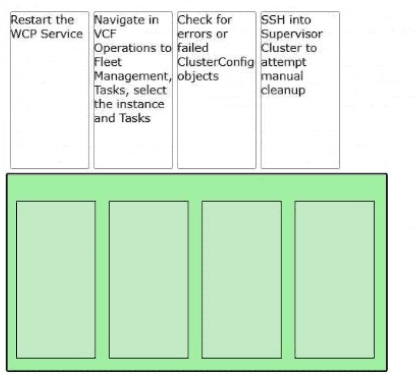
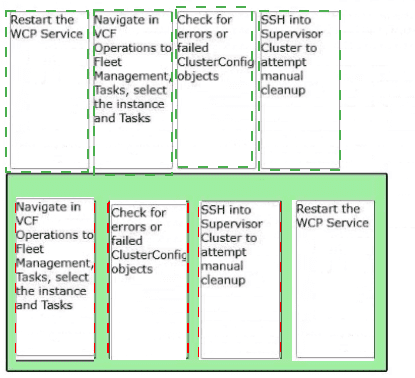
Explanation:
Navigate in VCF Operations to Fleet Management, Tasks, select the instance and Tasks:
This is the first step to identify which specific sub-task in the upgrade workflow failed within the VCF management plane.
Check for errors or failed ClusterConfig objects:
Once the task is identified, checking the ClusterConfig objects provides technical details on whether the failure is related to state mismatch or resource configuration.
SSH into Supervisor Cluster to attempt manual cleanup:
If the automated process is stuck due to orphaned resources or stale configurations, manual intervention via the command line on the Supervisor nodes is required.
Restart the WCP Service:
As a final step to clear the "failed" state and re-initialize the Workload Management (WCP) agent, the service is restarted to pick up the changes or retry the configuration.
Technical Breakdown
VCF Fleet Management:
In VCF 9.0, Fleet Management provides a centralized view of all Supervisors. Starting here allows the admin to see if the error is localized or environmental.
ClusterConfig Objects:
These are Kubernetes Custom Resources within the Supervisor that define the desired state. When an upgrade fails, these objects often show a status field with the specific reason for the "Degraded" or "Failed" state.
WCP (Workload Control Plane) Service:
This service runs on vCenter and is responsible for communicating with the Supervisor. Restarting it is a common remediation to "unstick" an upgrade process after manual cleanup has been performed.
References
VMware Cloud Foundation 9.0 Operations Guide: Troubleshooting Workload Management Upgrades.
vSphere with Tanzu Diagnostics and Troubleshooting: Monitoring Task Progress in Fleet Management.
What three controllers maintain the lifecycle of VMware vSphere Kubernetes Service (VKS) clusters? (Choose three.)
A. Container Network Interface
B. Virtual Machine Service
C. Cloud Provider Plug-in
D. Container Storage Interface
E. Cluster API
Explanation:
In VMware Cloud Foundation (VCF) 9.0, the vSphere Kubernetes Service (VKS) uses a declarative model to manage the lifecycle of workload clusters. The "Lifecycle" refers to the automated provisioning, scaling, patching, and deletion of these clusters. This process is governed by three primary controllers:
B. Virtual Machine Service:
This controller is responsible for managing the lifecycle of the actual Virtual Machines that serve as the Kubernetes nodes (Control Plane and Worker nodes). It translates Kubernetes-style YAML requests into vSphere VM actions.
C. Cloud Provider Plug-in:
Also known as the vSphere Cloud Provider (vCP), this controller integrates the VKS cluster with the underlying vSphere infrastructure. It handles the lifecycle of infrastructure-specific resources, such as ensuring load balancers and node networking remain consistent with the cluster state.
E. Cluster API (CAPI):
This is the core foundational controller for lifecycle management. It provides the high-level orchestration, using a management cluster (the Supervisor) to manage the lifecycle of "child" workload clusters as custom resources.
Why the Other Options are Incorrect
A. Container Network Interface (CNI):
While essential for networking within a pod (such as Antrea or NSX), the CNI handles network connectivity for containers, not the structural lifecycle (creation/deletion) of the Kubernetes cluster itself.
D. Container Storage Interface (CSI):
The CSI (specifically the vSphere CSI) manages the lifecycle of persistent volumes. While it handles how storage is attached to the cluster, it does not manage the lifecycle of the cluster nodes or the control plane.
References
VMware Cloud Foundation 9.0 Design Guide: vSphere with Tanzu Architecture and Components.
vSphere 8.x/9.0 Workload Management Documentation: Understanding Cluster API and the VM Service.
| Page 1 out of 7 Pages |
| 123 |
Real-World Scenario Mastery: Our 3V0-24.25 practice exam don't just test definitions. They present you with the same complex, scenario-based problems you'll encounter on the actual exam.
Strategic Weakness Identification: Each practice session reveals exactly where you stand. Discover which domains need more attention, before Advanced VMware Cloud Foundation 9.0 vSphere Kubernetes Service exam day arrives.
Confidence Through Familiarity: There's no substitute for knowing what to expect. When you've worked through our comprehensive 3V0-24.25 practice exam questions pool covering all topics, the real exam feels like just another practice session.
Copyright © All Rights Reserved