
Which command is used to initially add a search head to a single-site indexer cluster?
A. splunk edit cluster-config -mode searchhead -manager_uri https://10.0.0.1:8089 -secret changeme
B. splunk edit cluster-config -mode peer -manager_uri https://10.0.0.1:8089 -secret changeme
C. splunk add cluster-manager -manager_uri https://10.0.0.1:8089 -secret changeme
D. splunk add cluster-manager -mode searchhead -manager_uri https://10.0.0.1:8089 -secret changeme
Explanation:
To add a search head to an indexer cluster in a single-site deployment, the search head must be configured to communicate with the Cluster Manager (formerly the master node). This allows it to retrieve the list of indexer peers and distribute search requests appropriately.
The correct command is:
splunk edit cluster-config -mode searchhead -manager_uri https://
Key parameters
* -mode searchhead → Defines the instance as a search head in an indexer cluster
* -manager_uri → Specifies the URI of the Cluster Manager (master node)
* -secret → Shared secret used for secure communication with the cluster
After executing this command, Splunk must be restarted. Once restarted, the search head will:
* Retrieve the list of peer indexers from the Cluster Manager
* Dispatch search jobs across cluster peers
* Respect cluster search affinity and bucket distribution rules
Why the other options are incorrect
B — splunk edit cluster-config -mode peer -manager_uri ...
This configures an indexer peer node, not a search head. Peers are responsible for indexing and storing data, so using this mode for a search head is incorrect.
C — splunk add cluster-manager -manager_uri ... -secret ...
This is an invalid command. Splunk does not support add cluster-manager. The correct command is edit cluster-config.
D — splunk add cluster-manager -mode searchhead ...
This option is incorrect because the add cluster-manager command does not exist, and combining it with -mode searchhead is syntactically invalid in Splunk CLI.
Reference
Splunk Docs – Add a search head to an indexer cluster
“Run splunk edit cluster-config -mode searchhead -manager_uri
Splunk Enterprise Certified Architect Lab Guide – Indexer Clustering
“Search heads join the cluster using edit cluster-config with -mode searchhead, not -mode peer.”
Which of the following is a good practice for a search head cluster deployer?
A. The deployer only distributes configurations to search head cluster members when they “phone home”.
B. The deployer must be used to distribute non-replicable configurations to search head cluster members.
C. The deployer must distribute configurations to search head cluster members to be valid configurations.
D. The deployer only distributes configurations to search head cluster members with splunk apply shcluster-bundle.
Explanation:
The deployer in a Search Head Cluster operates on a "pull" model, not a "push" model. Let's break down the correct statement and why the others are incorrect.
Why A is Correct:
The SHC deployer acts as a central repository for apps and configurations (the "bundle"). The individual search head cluster members are configured to periodically "phone home" to the deployer. During this check-in, they ask, "Is there a new bundle for me?" If there is, the member pulls it down and applies it locally. This design is crucial for the autonomy and stability of the cluster, as it prevents the deployer from forcefully pushing a potentially broken configuration to all members simultaneously.
Key Concept: Pull-based distribution.
Why the Other Options Are Incorrect:
B. The deployer must be used to distribute non-replicable configurations to search head cluster members.
Incorrect: This statement is backwards. The deployer is specifically used for configurations that are replicable (apps, knowledge objects, saved searches). "Non-replicable" configurations (like server.conf settings unique to each member, such as its hostname) must be managed locally on each search head member and are explicitly excluded from the deployer bundle.
C. The deployer must distribute configurations to search head cluster members to be valid configurations.
Incorrect: This is too absolute and misleading. While the deployer is the recommended and primary method for distributing shared configurations, it is not the only way configurations become valid. A member can have locally applied configurations that are valid for its own operation. Furthermore, the statement implies a dependency that doesn't exist; a configuration's validity is not contingent on the deployer distributing it.
D. The deployer only distributes configurations to search head cluster members with splunk apply shcluster-bundle.
Incorrect: This command is run on the deployer, not on the members. Its purpose is to finalize the creation of a new app bundle on the deployer (e.g., after you have copied an app into the $SPLUNK_HOME/etc/shcluster/apps/ directory). Running splunk apply shcluster-bundle on the deployer makes the new bundle available. It is then the responsibility of the individual SHC members to "phone home" and pull this new bundle down. The command does not actively "distribute" or "push" the bundle to the members.
Reference
This process is documented in the official Splunk Enterprise documentation, particularly in the "Distribute configurations to the search head cluster" section. The documentation states:
"The deployer does not push the configuration bundle to the members. Instead, each member periodically polls the deployer to see whether a new bundle is available. If a new bundle is available, the member restarts and loads the new bundle."
This clearly describes the "phone home" (polling) mechanism, confirming that option A is the correct and accurate description of a good practice.
Buttercup is deploying Splunk IT Service Intelligence (ITSI). The IT department provides the following
information:
Item Count
KPIs 900
Entities 1500
Glass Tables 10
Service Definitions 20
Which ITSI component is the primary factor influencing Splunk deployment sizing?
A. The number of KPIs tracked
B. The number of glass tables present
C. The number of entities
D. The number of service definitions
Explanation:
In Splunk IT Service Intelligence (ITSI), deployment sizing is primarily driven by the number of KPIs (Key Performance Indicators) being monitored. Each KPI represents a scheduled search that continuously runs to collect, evaluate, and aggregate performance data, which directly impacts system resources such as CPU, memory, and storage.
Why KPIs (900) are the correct answer
KPIs are the most significant factor in ITSI sizing because each one generates recurring scheduled searches and calculations. As the number of KPIs increases, the workload on search heads and supporting infrastructure increases proportionally. This makes KPIs the primary driver for capacity planning in ITSI environments.
Why the other options are less significant
Entities (1500)
Entities represent infrastructure or business components being monitored. While they are essential for service modeling, they do not generate the same level of continuous search load as KPIs, so they have a smaller impact on sizing.
Glass Tables (10)
Glass Tables are visualization dashboards in ITSI. They depend on KPI data but do not themselves generate significant processing load, so they have minimal impact on sizing decisions.
Service Definitions (20)
Services are logical groupings of KPIs and entities. While they organize monitoring logic, they do not directly drive search execution load like KPIs do, making them less critical for sizing.
Conclusion
Among all ITSI components, KPIs are the dominant factor influencing deployment sizing because they directly determine the volume of scheduled searches and system processing requirements.
Reference
Splunk Docs — ITSI Deployment Planning
“The number of KPIs is the primary factor in determining ITSI deployment sizing. Each KPI represents a scheduled search that consumes system resources.”
In the deployment planning process, when should a person identify who gets to see network data?
A. Deployment schedule
B. Topology diagramming
C. Data source inventory
D. Data policy definition
Explanation:
In Splunk deployment planning, the stage where you determine who is authorized to view specific data, including sensitive network data, is the data policy definition phase. Policies are the formal rules that govern data visibility, retention, access control, and compliance requirements. They ensure Splunk aligns with organizational security standards, regulatory frameworks, and internal governance.
A deployment plan is not just about technical topology; it also requires clear rules for data governance. Splunk environments often ingest highly sensitive information such as firewall logs, authentication events, and network traffic metadata. Without a defined policy, there is risk of unauthorized access, regulatory violations, or exposure of confidential information. Therefore, the correct answer is D. Data policy definition, because this is the point in planning where access rights and visibility are explicitly defined.
Why the other options are not correct
Option A: Deployment schedule A deployment schedule defines when Splunk components (indexers, search heads, forwarders, etc.) will be rolled out. It is a timeline artifact, not a governance artifact. While important for project management, it does not address who can see data. Access control decisions are not part of scheduling.
Option B: Topology diagramming Topology diagrams illustrate how Splunk components are arranged across the IT environment. They show current and future architecture, clustering, and scaling strategies. However, they do not define who has permission to view specific datasets. Topology is structural, not policy‑driven.
Option C: Data source inventory A data source inventory catalogs what data sources exist (e.g., firewalls, routers, application logs). It is critical for onboarding and ingestion planning, but it does not define who can access those logs once ingested. Inventory is descriptive, not prescriptive.
Option D: Data policy definition Correct, because this is the step where Splunk architects define data ownership, access rights, retention rules, and compliance boundaries. Policies ensure that sensitive network data is only visible to authorized roles (e.g., security analysts, compliance officers) and not exposed to general users.
References:
Splunk Docs –
Deployment Planning
Splunk Security Overview –
Data Governance
The performance of a specific search is performing poorly. The search must run over All Time and is expected to have very few results. Analysis shows that the search accesses a very large number of buckets in a large index. What step would most significantly improve the performance of this search?
A. Increase the disk I/O hardware performance.
B. Increase the number of indexing pipelines.
C. Set indexed_realtime_use_by_default = true in limits.conf.
D. Change this to a real-time search using an All Time window.
Explanation:
Why A is correct
The scenario describes a classic sparse search bottleneck.
The search must span “All Time” to find a very small number of matching events inside a massive index.
Because the events are rare, Splunk is forced to open, read, and scan a very large number of buckets across the storage array to locate only a few matching events.
In this situation, the primary bottleneck is disk read latency and throughput.
Upgrading the underlying storage to hardware with higher IOPS, such as moving from HDDs to NVMe SSDs, significantly reduces the time required for Splunk to scan bucket files.
This results in the greatest search performance improvement for sparse searches over large historical datasets.
Why B is incorrect
Increasing the number of indexing pipelines improves ingestion throughput only.
It helps Splunk process and index incoming data faster, but it does not improve historical search performance or reduce disk scanning time during searches.
Why C is incorrect
The indexed_realtime_use_by_default setting in limits.conf affects real-time searches only.
It changes how Splunk handles real-time search processing by using indexed data streams to reduce CPU usage.
It does not improve the performance of historical “All Time” searches.
Why D is incorrect
Running an “All Time” real-time search is extremely resource-intensive and not recommended in production environments.
A real-time search continuously monitors incoming data while maintaining active processing across historical data ranges.
This increases system load and does not resolve the underlying disk I/O bottleneck causing the slow search performance.
Architectural Note Beyond the Exam
Although upgrading disk I/O is the correct answer among the available choices, a Splunk Architect would ideally optimize the search design instead of relying only on hardware improvements.
Common architectural optimizations include:
Creating accelerated data models
Using summary indexing
Improving search syntax and filtering
Reducing search scope with metadata filters
These approaches allow Splunk to avoid scanning large numbers of raw bucket files and greatly improve performance.
Key Concept
Sparse historical searches are typically limited by storage performance rather than CPU or ingestion throughput.
Higher IOPS storage results in faster bucket scanning and reduced search latency.
Reference
Splunk Capacity Planning Manual – Summary of factors that affect performance
Splunk Enterprise Certified Architect – Search Head and Indexer Performance Tuning (IOPS Metrics)
Configurations from the deployer are merged into which location on the search head cluster member?
A. SPLUNK_HOME/etc/system/local
B. SPLUNK_HOME/etc/apps/APP_HOME/local
C. SPLUNK_HOME/etc/apps/search/default
D. SPLUNK_HOME/etc/apps/APP_HOME/default
Explanation:
Correct Answer:
A. SPLUNK_HOME/etc/system/local
When configurations are pushed from the deployer to a search head cluster (SHC) member, Splunk merges them into the system/local directory. This location is the highest precedence layer in Splunk’s configuration hierarchy. The deployer’s role is to distribute app and configuration bundles across all SHC members, ensuring consistency. Once delivered, the bundle is unpacked and merged into etc/system/local on each member, overriding lower‑precedence settings.
This behavior is critical because search head clustering requires uniformity across members. By merging into system/local, Splunk guarantees that deployer‑pushed settings take precedence over app defaults or local overrides, maintaining cluster stability and predictable behavior.
Why the Other Options Are Incorrect
B. SPLUNK_HOME/etc/apps/APP_HOME/local
This directory holds local app‑specific overrides created manually on a single search head. These are not touched by the deployer. If deployer bundles were merged here, they could overwrite administrator‑specific local customizations, which Splunk explicitly avoids. Thus, deployer merges bypass app/local directories.
C. SPLUNK_HOME/etc/apps/search/default
Default directories contain vendor‑supplied baseline configurations for apps. They are static and never overwritten by deployer pushes. The deployer does not merge into default directories because defaults are meant to remain pristine, serving as the fallback baseline.
D. SPLUNK_HOME/etc/apps/APP_HOME/default
Same reasoning as option C. Default directories are immutable baselines. Deployer bundles are not merged here, as doing so would break the principle of configuration layering. Defaults always remain untouched, while deployer merges occur at the system/local layer.
References
Splunk Docs: Search Head Cluster: Deploy configurations — confirms deployer bundles are merged into system/local.
Splunk Docs: Configuration file precedence — explains the hierarchy of default vs local vs system/local.
Splunk Admin Guide: Manage app deployment in SHC — details how deployer pushes bundles and where they land.
An admin removed and re-added search head cluster (SHC) members as part of patching the operating system. When trying to re-add the first member, a script reverted the SHC member to a previous backup, and the member refuses to join the cluster. What is the best approach to fix the member so that it can re-join?
A. Review splunkd.log for configuration changes preventing the addition of the member.
B. Delete the [shclustering] stanza in server.conf and restart Splunk.
C. Force the member add by running splunk edit shcluster-config —force.
D. Clean the Raft metadata using splunk clean raft.
Explanation
In a Splunk Enterprise environment, SHC members rely on a Raft-based consensus system to maintain cluster state, captain election, and replication consistency.
When a search head member is:
removed from the cluster
restored from a backup (especially an older or inconsistent one)
reintroduced with stale cluster state
it can contain incompatible Raft metadata such as:
outdated cluster identity
mismatched captain history
stale peer configuration
This causes the node to refuse joining the cluster.
Why splunk clean raft is the correct fix
Running:
splunk clean raft
removes the local Raft state so the instance:
forgets old cluster membership
resets SHC consensus metadata
can safely rejoin as a fresh member
This is the recommended recovery action for SHC membership corruption or stale state issues.
Why the Other Options Are Incorrect
“Review splunkd.log for configuration changes…”
Useful for diagnosis, but does not fix Raft state corruption preventing cluster join.
“Delete the [shclustering] stanza in server.conf…”
Incorrect and risky. This does not clear SHC state and can further break configuration consistency.
“Force the member add by running splunk edit shcluster-config --force”
There is no supported “force” bypass for corrupted SHC Raft state. This would not resolve underlying metadata mismatch.
Key Exam Point
For SPLK-2002:
If an SHC member cannot rejoin after restore or re-add operations, suspect stale or corrupted Raft metadata.
The fix is:
splunk clean raft → restart → rejoin cluster
Reference
Splunk Enterprise Documentation – Search Head Clustering Troubleshooting
A customer has an environment with a Search Head Cluster and an indexer cluster. They are troubleshooting license usage data, including indexed volume in bytes per pool, index, host, sourcetype, and source. Where should the license_usage.log file be retrieved from in this environment?
A. Cluster Manager and Search Head Cluster Deployer
B. License Manager
C. Search Head Cluster Deployer only
D. All indexers
Explanation:
In a distributed Splunk architecture, the License Manager (formerly known as the License Master) is the central node responsible for managing licenses and tracking license consumption across the entire environment.
Why B is correct
Every Splunk instance that consumes license quota acts as a license slave and reports its daily usage back to the License Manager. The License Manager aggregates this data and writes it directly to its local $SPLUNK_HOME/var/log/splunk/license_usage.log file.
This log is the definitive source of truth for detailed licensing metrics, including breakdown by pool, index, host, sourcetype, and source.
Why A & C are incorrect
The Cluster Manager manages the indexer cluster state, and the Deployer pushes configuration bundles to the Search Head Cluster. Neither of these components aggregates or tracks global license usage data.
Why D is incorrect
While individual indexers log their own local processing activity, retrieving logs from all indexers would require manual, tedious aggregation of fragmented data.
Furthermore, in an indexer cluster, the indexers report up to the License Manager, making the License Manager the single, centralized location to find the complete, environment-wide data.
Reference
Splunk Docs: About license usage logging and Configure a license manager.
The license_usage.log file on the License Manager is also the primary data source populated into the Monitoring Console (MC) for license tracking dashboards.
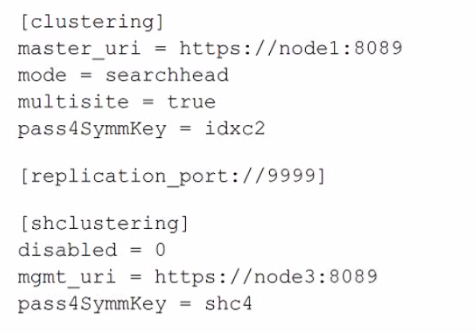
A search head cluster member contains the following in its server .conf. What is the Splunk server name of this member?
A. node1
B. shc4
C. idxc2
D. node3
Explanation:
The question asks for the Splunk server name of the search head cluster member itself. In a server.conf file, the mgmt_uri parameter within the [shclustering] stanza defines the management URI of that specific search head cluster member. This URI contains the hostname or IP address that other cluster members use to communicate with it. The master_uri in the [clustering] stanza points to the external cluster manager for the indexer cluster, not the local server's name.
Correct Option:
D. node3:
This is the correct server name. The mgmt_uri = https://node3:8089 in the [shclustering] stanza explicitly identifies this search head cluster member's own management endpoint as node3. This is the name that defines the individual identity of this server within the search head cluster.
Incorrect Options:
A. node1:
This is the hostname of the indexer cluster manager, as specified by master_uri = https://node1:8089 in the [clustering] stanza. This is an external dependency, not the name of the local server.
B. shc4:
This is the value of the pass4SymmKey for the search head cluster. It is a shared secret key used for authentication between cluster members, not a server name.
C. idxc2:
This is the value of the pass4SymmKey for the indexer cluster. It is the shared secret used to authenticate with the cluster manager (node1), not a server name.
Reference:
Splunk Enterprise Admin Manual: "Configure the search head cluster with server.conf". The documentation specifies that for a search head cluster member, the mgmt_uri in the [shclustering] stanza must be set to the member's own management URI, which includes its resolvable hostname.
A Splunk deployment is being architected and the customer will be using Splunk Enterprise Security (ES) and Splunk IT Service Intelligence (ITSI). Through data onboarding and sizing, it is determined that over 200 discrete KPIs will be tracked by ITSI and 1TB of data per day by ES. What topology ensures a scalable and performant deployment?
A. Two search heads, one for ITSI and one for ES.
B. Two search head clusters, one for ITSI and one for ES.
C. One search head cluster with both ITSI and ES installed.
D. One search head with both ITSI and ES installed.
Explanation:
Splunk Enterprise Security (ES) and Splunk IT Service Intelligence (ITSI) are both premium applications that are highly resource-intensive. ES performs continuous correlation searches and accelerates multiple data models, while ITSI generates numerous KPI baseline searches and services analytics. Running them on the same search head or a single shared cluster creates significant resource contention (CPU, memory), leading to performance degradation for both applications. Isolating them ensures that the workload of one does not impact the other.
Correct Option:
B. Two search head clusters, one for ITSI and one for ES:
This is the correct topology for a scalable and performant deployment. It provides both high availability and resource isolation. Each application can scale its search head resources independently based on its specific workload (200 KPIs for ITSI, 1TB/day for ES). This prevents either application from starving the other of CPU and memory, ensuring consistent performance.
Incorrect Options:
A. Two search heads, one for ITSI and one for ES:
While this provides basic isolation, it lacks high availability. If either standalone search head fails, that premium application becomes completely unavailable. A search head cluster is the recommended and supported deployment for both ES and ITSI in production.
C. One search head cluster with both ITSI and ES installed:
This creates a single point of resource contention. The combined load of ES's correlation searches and ITSI's KPI searches would compete for the same cluster resources, likely causing search delays, timeouts, and instability for both applications. This is not a scalable architecture for such high loads.
D. One search head with both ITSI and ES installed:
This is the least scalable and least performant option. A single search head lacks both high availability and the capacity to handle the immense concurrent search load from two major premium apps. It is a single point of failure and a performance bottleneck.
Reference:
Splunk Enterprise Security Installation and Configuration Manual and Splunk ITSI Installation and Configuration Manual. Both guides recommend dedicated, scaled search head clusters for production deployments, especially when handling significant data volumes and complex workloads. Co-locating them on the same cluster is not a supported best practice for large-scale implementations due to the risk of resource contention.
Which of the following is true regarding Splunk Enterprise performance? (Select all that apply.)
A. Adding search peers increases the maximum size of search results.
B. Adding RAM to an existing search heads provides additional search capacity.
C. Adding search peers increases the search throughput as search load increases.
D. Adding search heads provides additional CPU cores to run more concurrent searches.
Explanation:
Splunk Enterprise performance depends on how resources are allocated between search heads and indexers (search peers). This exam question is designed to test your understanding of distributed search architecture and hardware scaling.
B. Adding RAM to an existing search head provides additional search capacity ✅
This is true. Search heads are responsible for managing search jobs, merging results from indexers, and handling user interactions. Their performance is heavily dependent on available memory.
More RAM allows the search head to manage more concurrent searches.
Larger result sets can be cached in memory.
Responsiveness improves when multiple users run searches simultaneously.
Splunk documentation emphasizes that memory is a critical resource for search heads. Increasing RAM directly increases search capacity.
D. Adding search heads provides additional CPU cores to run more concurrent searches ✅
This is also true. Each search head brings its own CPU resources. By adding search heads, you increase the number of CPU cores available across the cluster, which allows more concurrent searches to be executed.
Search head clustering distributes user search requests across multiple search heads.
More search heads = more CPU cores = higher concurrency capacity.
This improves scalability for environments with many users running searches simultaneously.
It’s important to note that CPU cores are not pooled across search heads for a single search, but concurrency across multiple searches is improved.
Why the Other Options Are Incorrect
A. Adding search peers increases the maximum size of search results ❌
Incorrect. The maximum size of search results is not determined by the number of search peers. Search peers distribute indexing and search workloads, but they do not change the maximum result size. That limit is controlled by search head memory and configuration parameters such as maxresultrows.
C. Adding search peers increases the search throughput as search load increases ❌
Misleading. Adding search peers (indexers) does improve indexing throughput and distributes search execution, but search throughput is primarily constrained by the search head’s ability to manage jobs and by query efficiency. Simply adding peers does not guarantee higher throughput unless the bottleneck is indexing capacity. In exam context, this option is considered incorrect because Splunk stresses that search head resources (RAM/CPU) are the limiting factor for search capacity.
Exam Relevance
This is a common SPLK‑2002 exam trap. Candidates often confuse scaling indexers with scaling search heads. The exam expects you to recognize that search head resources (RAM/CPU) are the limiting factor for search capacity.
References
Splunk Docs:
Distributed search overview
Splunk Docs:
Search head clustering
Splunk configuration parameter settings can differ between multiple .conf files of the same name contained within different apps. Which of the following directories has the highest precedence?
A. System local directory.
B. System default directory.
C. App local directories, in ASCII order.
D. App default directories, in ASCII order.
Explanation:
Splunk loads configuration files in a specific order, where settings from directories with higher precedence override those from directories with lower precedence. The standard precedence order (from highest to lowest) is:
User-defined preferences (from the user interface)
App local directories (within a specific app)
App default directories (within a specific app)
System local directory ($SPLUNK_HOME/etc/system/local/)
App local directories (from all apps, in alphabetical order)
App default directories (from all apps, in alphabetical order)
System default directory ($SPLUNK_HOME/etc/system/default/)
Let's break down why A is correct and the others are not, based on this hierarchy:
A. System local directory (Correct):
The $SPLUNK_HOME/etc/system/local/ directory has the highest precedence among the directories listed in the options. A setting defined here will override the same setting in any app's local or default directory, as well as the system default directory. It is the recommended place for administrators to make system-wide customizations that should not be overridden by app updates.
B. System default directory (Incorrect):
The $SPLUNK_HOME/etc/system/default/ directory has the lowest precedence. These files contain the factory-default settings for Splunk. Any setting here will be overridden by a setting for the same stanza and key in any other directory, including all app directories and the system local directory.
C. App local directories, in ASCII order (Incorrect):
While settings in an app's local directory ($SPLUNK_HOME/etc/apps/
D. App default directories, in ASCII order (Incorrect):
App default directories ($SPLUNK_HOME/etc/apps/
Reference:
Splunk Documentation:
"Configuration file precedence"
| Page 1 out of 18 Pages |
| 123456 |
Real-World Scenario Mastery: Our SPLK-2002 practice exam don't just test definitions. They present you with the same complex, scenario-based problems you'll encounter on the actual exam.
Strategic Weakness Identification: Each practice session reveals exactly where you stand. Discover which domains need more attention, before Splunk Enterprise Certified Architect exam day arrives.
Confidence Through Familiarity: There's no substitute for knowing what to expect. When you've worked through our comprehensive SPLK-2002 practice exam questions pool covering all topics, the real exam feels like just another practice session.
Copyright © All Rights Reserved