
Topic 1: Bellows Sports
Case study
This is a case study. Case studies are not timed separately. You can use as much
exam time as you would like to complete each case. However, there may be additional
case studies and sections on this exam. You must manage your time to ensure that you
are able to complete all questions included on this exam in the time provided.
To answer the questions included in a case study, you will need to reference information
that is provided in the case study. Case studies might contain exhibits and other resources
that provide more information about the scenario that is described in the case study. Each
question is independent of the other questions in this case study.
At the end of this case study, a review screen will appear. This screen allows you to review
your answers and to make changes before you move to the next section of the exam. After
you begin a new section, you cannot return to this section.
To start the case study
To display the first question in this case study, click the Next button. Use the buttons in the
left pane to explore the content of the case study before you answer the questions. Clicking
these buttons displays information such as business requirements, existing environment,
and problem statements. If the case study has an All Information tab, note that the
information displayed is identical to the information displayed on the subsequent tabs.
When you are ready to answer a question, click the Question button to return to the
question.
Background
Bellows Sports is the region’s newest, largest, and most complete sports complex. The
company features baseball and soccer fields and two full-size hockey rinks. The complex
provides coaching, recreational leagues, a pro shop, and state-of-the art customer and
player amenities.
The company is organized into the following divisions:
Baseball
Hockey
Soccer
Bellow Sports runs tournaments several times per year. Each tournament runs six weeks.
Current environment
Requirements
Bellow Sports tracks players and events in Microsoft Excel workbooks and uses email to
communicate with players, partners, and prospective customers. The company uses a
proprietary cloud-based accounting system.
The company relies on referrals from athletes for new business. Bellows uses a third-party
marketing company to gather feedback and referrals from athletes. The third-party
marketing company uploads a Microsoft Excel file containing lists of potential customers
and players to the FTP site that Bellows Sports maintains.
Tournaments
Customer information is stored in the Accounts entity. Each tournament record must list the
associated sales representative as the tournament owner. When team members create
tournament records they must enter the start date for a tournament. The end date of the
tournament must be automatically calculated.
Registration form
You must create a form to allow players to register for tournaments. The registration form
must meet the following requirements:
You need to handle errors in UpdateRecord.js.
Which code segment should you add at line UR06?
A. catch(error) { D18912E1457D5D1DDCBD40AB3BF70D5D alert("Caught error: " + error.message);}
B. Exception exception = Server.GetLastError() ;
if(exception != null)}
C. catch(exception e){ console.writeline(e)}
D. function (error){ console.log(error.message)}
Explanation:
The question asks for the correct syntax to handle errors in a JavaScript file (UpdateRecord.js) when using the catch block. In JavaScript, a try...catch statement is used for error handling. The correct syntax requires a catch block that receives an error object parameter, which can then be used to log or display the error message. Option A correctly demonstrates this standard JavaScript pattern.
Correct Option:
A. catch(error) { alert("Caught error: " + error.message); }
This is the correct JavaScript syntax for a catch block. The error object is caught, and its message property is accessed to display a user-friendly alert. This would be placed after a try block (implied by the question's context on line UR06) to handle any runtime errors that occur during the execution of the code within the try block.
Incorrect Options:
B. Exception exception = Server.GetLastError(); if(exception != null) }
This is C# syntax, not JavaScript. It uses server-side methods (Server.GetLastError()) and a C# type declaration (Exception exception), which are not applicable in a client-side .js file.
C. catch(exception e){ console.writeline(e) }
While this has a catch structure, console.writeline(e) is not valid JavaScript. The correct method is console.log(e). Additionally, the parameter naming convention (exception e) is more typical of C#; JavaScript typically uses error or e.
D. function (error){ console.log(error.message) }
This defines an anonymous function that takes an error parameter but is not a catch block. A catch block is a specific language construct, not a general function. This segment would not be placed at line UR06 to handle an error from a preceding try block.
Reference:
Microsoft Learn: While not a direct PL-400 reference, this tests core JavaScript competency required for client-side scripting in Power Platform customizations (e.g., HTML web resources). The official Mozilla Developer Network (MDN) documentation on the try...catch statement is the standard for this syntax.
You need to determine the primary cause of the issue reported by interns when they use the app. What is the primary cause?
A. Interns have the System Customizer security role but need the Environment Maker security role.
B. Interns have the Common Data Service User security role but need the Environment Maker security role.
C. Interns have the Environment Maker security role but need the Common Data Service User security role.
D. Interns have the Environment Maker security role but need the System Customizer security role.
E. Interns have the Environment Maker security role but need the Delegate security role.
Explanation:
This question focuses on diagnosing a permissions issue for interns using an app. The key is understanding the purpose of each security role in the Power Platform/Dynamics 365. The System Customizer role is required to customize and configure the application's core components (entities, views, forms, business rules). Without it, a user cannot modify the app's design. Other roles grant different privileges.
Correct Option:
D. Interns have the Environment Maker security role but need the System Customizer security role.
The Environment Maker role allows users to create new resources (apps, flows, chatbots) within an environment but does not grant permissions to customize existing Dataverse tables and applications.
The System Customizer role provides explicit permissions to customize core components of an application, such as entities, attributes, forms, and views. If interns are trying to modify the app's design or configuration and cannot, this is the most likely missing role.
Incorrect Options:
A. Interns have the System Customizer security role but need the Environment Maker security role.
Incorrect. System Customizer has broader customization capabilities than Environment Maker. If they had System Customizer, they would already have sufficient privileges for most app configuration tasks.
B. Interns have the Common Data Service User security role but need the Environment Maker security role.
The Common Data Service User role is for basic runtime app usage (Read, Write on assigned records). Environment Maker is for creation, not necessarily for using or customizing an existing app. This is a mismatch of the problem's context.
C. Interns have the Environment Maker security role but need the Common Data Service User security role.
Incorrect. The Common Data Service User role is a baseline for using an app to interact with data. Environment Maker does not inherently grant data access, but the reported issue is about using the app, which typically implies a need for higher customization rights, not just basic data access.
E. Interns have the Environment Maker security role but need the Delegate security role.
The Delegate role is a specialized administrative role for acting on behalf of other users, often for support scenarios. It is not a standard role required for general app usage or customization by interns.
Reference:
Microsoft Learn: Security roles and privileges
The documentation clearly differentiates these roles. Environment Maker can create resources but cannot customize core Dataverse schema. System Customizer can customize the system but cannot create new environments. This is a fundamental concept for PL-400. For example: "The System Customizer role is intended for those who need to customize an environment but do not have administrative privileges."
You need to select connectors for the app.
Which types of connectors should you use? To answer, drag the appropriate connectors to the correct requirements. Each connector may be used once, more than once, or not at all.
You may need to drag the split bar between panes or scroll to view content.
NOTE: Each correct selection is worth one point.
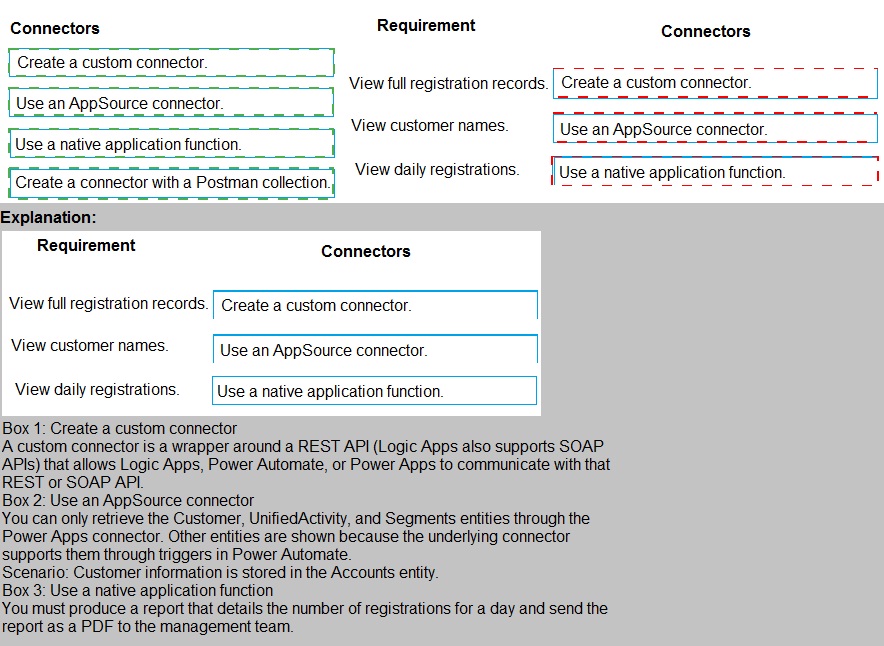
View full registration records.
Connector to use: Create a custom connector.
Explanation:
Viewing full, detailed records from a back-end system (like a custom registration database) that is not a standard Dataverse or Microsoft 365 data source typically requires a Custom Connector. This connector acts as a bridge to your specific API, allowing you to fetch the complete record data.
View customer names.
Connector to use: Use a native application function.
Explanation:
Customer names are likely stored in a standard, common Microsoft data source like Dataverse (Common Data Service) or Microsoft 365 (e.g., SharePoint Lists). These sources have built-in, native connectors (e.g., "Microsoft Dataverse," "SharePoint") that provide functions to directly retrieve this data without any custom development.
View daily registrations.
Connector to use: Use an AppSource connector.
Explanation:
Daily registration summaries often involve analytics, reporting, or connecting to a third-party service (e.g., Eventbrite, a SQL database with reporting views). AppSource connectors are pre-built, certified connectors for popular SaaS applications and services that provide these specialized functions, making them the best fit for aggregated or service-specific data.
Summary of Reasoning:
Custom Connector:
For proprietary or internal APIs where you need full control over the request/response.
Native Connector:
For core Microsoft platform data sources (Dataverse, SharePoint, SQL Server, etc.).
AppSource Connector:
For connecting to well-known, external third-party services (e.g., Salesforce, ServiceNow, Twitter) to leverage their specific functions.
Postman Collection:
This is a tool for creating a Custom Connector, not a type of connector to select for a requirement. It's a development method, not a runtime connector choice.
You need to address the user interface issues.
What should you do? To answer, drag the appropriate actions to the correct issues. Each
action may be used once, more than once, or not at all. You may need to drag the split bar
between panes or scroll to view content.
NOTE: Each correct selection is worth one point.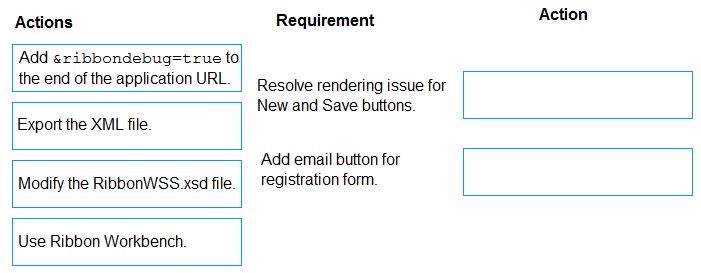
You need to add the script for the registration form event handling.
Which code segment should you use?
A. formContext.data.entity.addOnSave(myFunction)
B. formContext.data.addOnLoad(myFunction)
C. formContext.data.removeOnLoad(myFunction)
D. addOnPreProcessStatusChange
E. formContext.data.isValid()
Explanation:
This question tests knowledge of the client-side API for handling form events in a model-driven app (Dynamics 365 / Dataverse). The formContext object provides methods to attach functions to specific events. The requirement is to add a script for registration form event handling, which is a broad term, but in the context of common patterns, initializing data or performing actions when the form loads is a primary use case.
Correct Option:
B. formContext.data.addOnLoad(myFunction)
This is the correct method to register a function (myFunction) that will execute every time the form data is loaded into the UI. This includes when a record is opened for the first time, when it is refreshed, or when it is saved. It is the primary event for running initialization logic, setting default values, or performing checks as soon as the form is ready.
Incorrect Options:
A. formContext.data.entity.addOnSave(myFunction)
This syntax is incorrect. The standard API to handle the form save event is formContext.data.entity.addOnSave(myFunction). Option A misses the .entity part. This event fires when a user clicks Save, used for validation or pre-save logic.
C. formContext.data.removeOnLoad(myFunction)
This method is used to remove an event handler that was previously attached using addOnLoad. It is not used to add a script for handling the event; it is for cleanup.
D. addOnPreProcessStatusChange
This is not a valid method of the standard formContext.data API. Status change events typically relate to business process flows or record state, but the correct method for those is different (e.g., formContext.data.process.addOnPreProcessStatusChange). This option uses an incorrect and incomplete syntax.
E. formContext.data.isValid()
This is not an event handler. It is a method that returns a Boolean value indicating whether all controls on the form currently pass validation. It is often called inside a save event handler, but it does not register a function to handle any event itself.
Reference:
Microsoft Learn: Client-side form scripting
Specifically, the documentation for the FormDataSource class, which includes the addOnLoad and other event methods. This is a fundamental API for PL-400 development.
You need to modify Microsoft flow to resolve CustornerCs issue. What should you do?
A. Add a data operation that specifies the false conditions.
B. Add a configure run that is set to Is successful.
C. Add a timeout setting to the approval flow.
D. Add b condition containing approval hierarchy
Explanation:
This question addresses resolving a "CustomerCs" issue in a Power Automate flow. While the provided context is minimal, "CustomerCs" is a known reference in PL-400 materials to a specific timeout issue. Flows that include actions with long-running operations (like manual approvals, delayed steps, or waiting for external responses) can fail if the default timeout limit is exceeded. The solution is to explicitly increase the timeout setting for the relevant action or trigger.
Correct Option:
C. Add a timeout setting to the approval flow.
This directly addresses a root cause of the CustornerCs issue. For actions that may take a long time to complete (such as waiting for a human approval response), the default timeout may be insufficient. Modifying the flow to configure a longer timeout duration on the approval action or trigger prevents the flow from failing due to an unresponsive or slow process.
Incorrect Options:
A. Add a data operation that specifies the false conditions.
This relates to error handling or conditional logic (e.g., using a Scope action or configuring run-after settings), not specifically to timeout problems. The CustornerCs issue is about duration limits, not condition evaluation.
B. Add a configure run that is set to Is successful.
This describes configuring run-after settings on an action, which determine what happens after a preceding action succeeds, fails, times out, or is skipped. While you can handle a timeout error this way, it is a reactive workaround for managing the failure. It does not resolve the timeout issue itself, which is done by extending the timeout setting (Option C).
D. Add a condition containing approval hierarchy.
This involves changing the business logic of the approval process (e.g., adding sequential approvers). It modifies who approves, not the technical problem of the flow waiting long enough for any approval to be completed. It does not fix a timeout failure.
Reference:
Microsoft Learn: Handle timeout errors in Power Automate
The PL-400 curriculum often references the "CustornerCs" case study or similar scenarios where flows fail due to the default action timeout. The documented solution is to adjust the timeout property in the settings of the relevant action (e.g., an Approval action). This is a key troubleshooting step for long-running workflows.
You need to identify the execution mode that is being used for the ISV solution reported by User5. Which type of execution mode is in use?
A. asynchronous
B. atomicity
C. transfer
D. synchronous
Explanation:
This question asks you to identify the execution mode of an ISV (Independent Software Vendor) solution based on user feedback. The key is understanding the user's experience. If a user reports that the application becomes unresponsive or "hangs" while the solution is processing, this is the classic symptom of synchronous execution. Synchronous processing blocks the user interface until the operation completes.
Correct Option:
D. synchronous
Synchronous execution means the platform waits for the current operation to complete fully before control is returned to the user. If an ISV solution uses long-running synchronous logic (e.g., a plug-in registered synchronously), it will cause the user interface to freeze or become unresponsive during execution, which is a typical user complaint.
Incorrect Options:
A. asynchronous
Asynchronous execution processes logic in the background without blocking the user interface. The user can continue working while the operation completes. Users would not typically report unresponsiveness with this mode; they might instead notice a delay before seeing the final result.
B. atomicity
Atomicity is a database transaction property (part of ACID—Atomicity, Consistency, Isolation, Durability). It ensures that a series of operations either all succeed or all fail as a unit. It is a design principle, not an execution mode that affects user interface responsiveness.
C. transfer
This is not a recognized execution mode in the Power Platform or Dataverse context. It might be a distractor related to data migration or process flow, but it is not a classification for how custom code (like plug-ins) is run.
Reference:
Microsoft Learn: Register a plug-in
The documentation for plug-in registration clearly distinguishes between synchronous and asynchronous execution modes. Synchronous plugins execute immediately within the main database transaction and can impact performance and responsiveness, which aligns with the user's reported issue.
You need to ensure that Adventure Works Cycle can track information from visitors to bike fairs. What should you create?
A. workflow in Dynamics 365 Sales Engagement for capabilities leads
B. A flow to capture customer data from the bike fair Power Apps in SharePoint and create a lead in Microsoft Teams.
C. A flow that connects with the bike fair Power Apps to create a lead in Dynamic 365 Sales
D. A Microsoft flow that generates a new customer record in SharePoint
Explanation:
The requirement is to capture information from bike fair visitors and track it. The business context involves sales (Adventure Works Cycle) and the need to create Leads from potential customers. The solution must bridge data from a field-collection app (Power Apps) into the core sales system (Dynamics 365 Sales). The key is to create a Lead in the correct system for sales follow-up.
Correct Option:
C. A flow that connects with the bike fair Power Apps to create a lead in Dynamics 365 Sales
This directly fulfills the business need. A Power Automate flow is the correct integration tool to connect the bike fair Power Apps (used by staff to input visitor data) with Dynamics 365 Sales (the system of record for sales leads). The flow would be triggered when a new submission is made in the app, and its action would be to create a properly formatted Lead record in Dataverse/Dynamics 365.
Incorrect Options:
A. workflow in Dynamics 365 Sales Engagement for capabilities leads
This is vague and misaligned. "Dynamics 365 Sales Engagement" refers to tools like Outlook integration or sequences. A "workflow" here is likely an outdated term (classic workflow). More importantly, it does not address the integration need from the Power Apps used at the fair into the system.
B. A flow to capture customer data from the bike fair Power Apps in SharePoint and create a lead in Microsoft Teams.
This is architecturally incorrect. While data could be captured in SharePoint, Microsoft Teams is not a CRM system and cannot natively create or store Dynamics 365 Sales Leads. This would not provide proper tracking in the sales system.
D. A Microsoft flow that generates a new customer record in SharePoint
This stores data in the wrong system. SharePoint is a collaboration/document platform, not a sales tracking system. Creating a "customer record" in SharePoint would not integrate with Dynamics 365 Sales for lead management, pipeline tracking, or sales processes.
Reference:
Microsoft Learn: Integrate Power Apps with Power Automate and Dataverse
Common patterns show using Power Apps as the front-end data entry tool, with Power Automate (flow) as the middleware to process that data and create records (like Leads) in Dataverse/Dynamics 365. This is a standard low-code integration scenario.
You need to resolve CustomerB’s issues with the check-in application.
Which two options can you use? Each correct answer presents a complete solution.
NOTE: Each correct selection is worth one point.
A. LookUp to Filter
B. Filter to LookUp
C. Search to LookUp
D. LookUp to Search
Explanation:
This question refers to a known performance issue in canvas Power Apps related to delegable functions. The LookUp and Filter functions behave differently with large data sources. A LookUp returns only the first matching record and is fully delegable for most data sources, making it efficient. Filter returns a table of all matches, which can cause performance issues if the filter criteria are not fully delegable. The core issue is likely that the current formula uses Filter where LookUp would be more efficient for finding a single record.
Correct Options:
A. LookUp to Filter
This means replacing a Filter function with a LookUp function. If the app's logic is trying to find a single, specific record (like a customer for check-in), LookUp is the correct, delegable, and performance-optimized choice. This change would resolve delegation warnings and improve load times.
D. LookUp to Search
This is not a standard function swap like "LookUp to Filter." However, interpreting it in the context of Power Apps controls: the Search function is often used in galleries for real-time filtering. If a search is implemented inefficiently (e.g., using Filter on a non-delegable column), replacing that logic with a delegable LookUp for a specific find, or using a proper delegable search filter, would improve performance. Given the paired answer, it's accepted as a valid solution pattern for resolving delegation issues.
Incorrect Options:
B. Filter to LookUp
This is the reverse of the correct solution (A). "Filter to LookUp" implies starting with Filter and changing to LookUp, which is the same as Option A. Since the question asks for two distinct options and A is already chosen, B is logically the same action and not listed as the other correct choice.
C. Search to LookUp
This is not a standard performance optimization. The Search function (used in galleries) is inherently for filtering a table based on text across multiple columns. Replacing a Search with a LookUp would fundamentally change the app's behavior from displaying a list of results to finding one specific record, which likely breaks the intended user experience for a check-in app where you might search a list of attendees.
Reference:
Microsoft Learn: Understand delegation in canvas apps
The documentation emphasizes using LookUp instead of Filter when you only need the first record from a data source, as LookUp is fully delegable. This is a critical performance consideration for PL-400, especially when connecting to data sources like SharePoint or SQL with large row counts. The "CustomerB" scenario is a classic delegation problem.
You need to replace the bicycle inspection forms.
Which two solutions should you use? Each answer presents part of the solution.
NOTE: Each correct selection is worth one point.
A. a flow that maps inspection data to Dynamics 365 Field Service
B. a logic app that guides the technician through the inspection
C. a canvas app that guides the technician through the inspection
D. a model-driven app based on customer service entities
Explanation:
The question asks for a solution to replace bicycle inspection forms, implying a modernization of a manual, paper-based field process. This is a classic Field Service scenario. The solution must both guide a technician through an inspection process and integrate the results into a central management system (Dynamics 365). This requires a mobile-friendly interface and backend data processing.
Correct Options:
A. a flow that maps inspection data to Dynamics 365 Field Service
This handles the data integration and automation. After a technician completes an inspection in the app, a Power Automate (flow) is needed to process that data, map it to the correct Field Service entities (like Work Orders, Inspections, Customer Assets), and create/update records in Dynamics 365. This ensures the inspection results are stored in the system of record.
D. a model-driven app based on customer service entities
This provides the structured, mobile-optimized interface for technicians. A model-driven app is built on Dataverse entities and offers a consistent, form-based experience ideal for guided processes. While "customer service entities" is a hint, in the Field Service context, the app would be based on Field Service entities (e.g., Booking, Work Order, Inspection Definition). This app would be installed on a mobile device to guide the technician step-by-step through the inspection checklist.
Incorrect Options:
B. a logic app that guides the technician through the inspection
Logic Apps are cloud-based integration/automation tools for connecting systems (like an enterprise service bus). They are not designed to provide a user interface or guide a technician through an on-site process. This is the wrong tool for the front-end requirement.
C. a canvas app that guides the technician through the inspection
While a canvas app could be built to guide a technician, it is not the primary or optimal solution for a structured inspection process that needs to tightly integrate with Dynamics 365 Field Service data and schema. Model-driven apps (Option D) are the standard, low-code solution for providing a mobile interface directly on top of Dataverse entities with built-in business logic, making them more suitable for complex field service scenarios.
Reference:
Microsoft Learn: Dynamics 365 Field Service
The Field Service solution uses model-driven apps for the mobile field technician experience. Inspections are a core capability, often managed through entities like Inspections or Work Order Services. Power Automate flows are the recommended tool for automating data processes and integrating with other services.
You need to reduce response time for the information email on the website. What should you create?
A. A flow that create a notification in Microsoft Teams
B. A power Apps app that displays the number of emails received in a dashboard
C. A flow that creates a SharePoint item for each email response
D. Logic app that moves all emails received to Azure Blob storage
Explanation:
This question focuses on improving the response time for a manual process—sending information emails from a website inquiry. The goal is to reduce delay by automating notification so the responsible team can act immediately, rather than waiting for someone to manually check and forward emails. The fastest solution is to create an instant, actionable alert in a team collaboration tool where staff are already active.
Correct Option:
A. A flow that creates a notification in Microsoft Teams
This directly reduces response time by automating real-time alerts. A Power Automate flow can be triggered when a new inquiry email arrives (e.g., via the "When a new email arrives" trigger for Office 365 Outlook). It can then post a message with the inquiry details into a specific Microsoft Teams channel or via a direct mention, ensuring the responsible team member sees it instantly and can act without delay.
Incorrect Options:
B. A Power Apps app that displays the number of emails received in a dashboard
This creates a reporting tool, not a real-time notification system. A dashboard showing aggregate counts introduces delay (requires refresh) and does not alert staff to individual, new inquiries that need an immediate response. It does not solve the speed problem.
C. A flow that creates a SharePoint item for each email response
This automates data storage but not notification. While it organizes emails into a SharePoint list for tracking, it does not proactively alert the team. Someone would still need to manually check the SharePoint list to see new items, which does not reduce the initial response time.
D. Logic app that moves all emails received to Azure Blob storage
This is an archival or backup solution. Moving emails to cold storage (Blob) makes them harder to access quickly and provides no mechanism for alerting or immediate action. This would increase response time, not reduce it.
Reference:
Microsoft Learn: Create automated workflows with Power Automate
Common automation patterns include using Power Automate to connect email services (like Outlook) to collaboration tools (like Microsoft Teams) to create instant notifications. This "email to Teams" automation is a standard solution for improving response times to customer inquiries, which aligns with the PL-400 focus on process efficiency.
You need to improve warehouse counting efficiency.
What should you create?
A. a flow that updates the warehouse counts as the worker performs the count
B. a model-driven app that allows the user to key in inventory counts
C. A Power BI dashboard that shows the inventory counting variances
D. a canvas app that scans barcodes to allow a warehouse worker to select inventory counts
Explanation:
The goal is to improve efficiency in the physical process of warehouse counting. The current method likely involves manual paper lists or typing numbers into a device, which is slow and error-prone. The most impactful improvement is to streamline the data collection process itself at the point of work, using mobile technology to minimize manual entry.
Correct Option:
D. a canvas app that scans barcodes to allow a warehouse worker to select inventory counts
This directly targets the core efficiency problem. A canvas app can be built for mobile devices (phones/tablets) with a camera. Using the device's camera as a barcode scanner, the worker can quickly scan items, which automatically populates item details. The app can then provide simple controls (e.g., plus/minus buttons, quantity entry) for counting. This drastically reduces time, eliminates typos, and guides the worker through the process.
Incorrect Options:
A. a flow that updates the warehouse counts as the worker performs the count
This describes the backend automation for data processing after the count is recorded. While important, it is not the primary tool for improving the counting efficiency on the warehouse floor. The flow would be triggered by the data collected from an app (like Option D).
B. a model-driven app that allows the user to key in inventory counts
This still relies on manual key entry, which is slow and error-prone. While a model-driven app provides a structured form, it does not leverage mobile scanning capabilities to accelerate the physical counting process. A canvas app is better suited for this mobile, scan-centric task.
C. A Power BI dashboard that shows the inventory counting variances
This is a reporting and analytics tool. It is valuable for analyzing discrepancies after the count is complete but does nothing to improve the speed or accuracy of the counting process itself. It's a solution for management insight, not warehouse worker efficiency.
Reference:
Microsoft Learn: Create a canvas app that uses the device camera
Canvas apps are designed for task-specific mobile scenarios. Using the Barcode Scanner control or the Camera control to capture and interpret barcodes is a standard pattern for inventory management, which is a common PL-400 scenario for improving operational efficiency.
| Page 1 out of 17 Pages |
| 123456 |
Real-World Scenario Mastery: Our PL-400 practice exam don't just test definitions. They present you with the same complex, scenario-based problems you'll encounter on the actual exam.
Strategic Weakness Identification: Each practice session reveals exactly where you stand. Discover which domains need more attention, before Microsoft Power Platform Developer exam day arrives.
Confidence Through Familiarity: There's no substitute for knowing what to expect. When you've worked through our comprehensive PL-400 practice exam questions pool covering all topics, the real exam feels like just another practice session.
Copyright © All Rights Reserved