
Topic 2, Adventure Works
Case study
This is a case study. Case studies are not timed separately. You can use as much
exam time as you would like to complete each case. However, there may be additional
case studies and sections on this exam. You must manage your time to ensure that you
are able to complete all questions included on this exam in the time provided.
To answer the questions included in a case study, you will need to reference information
that is provided in the case study. Case studies might contain exhibits and other resources
that provide more information about the scenario that is described in the case study. Each
question is independent of the other questions in this case study.
At the end of this case study, a review screen will appear. This screen allows you to review
your answers and to make changes before you move to the next section of the exam. After
you begin a new section, you cannot return to this section.
To start the case study
To display the first question in this case study, click the Next button. Use the buttons in the
left pane to explore the content of the case study before you answer the questions. Clicking
these buttons displays information such as business requirements, existing environment,
and problem statements. If the case study has an All Information tab, note that the
information displayed is identical to the information displayed on the subsequent tabs.
When you are ready to answer a question, click the Question button to return to the
question.
Background
Current environment
Adventure Works Cycles wants to replace their paper-based bicycle manufacturing
business with an efficient paperless solution. The company has one manufacturing plant in
Seattle that produces bicycle parts, assembles bicycles, and distributes finished bicycles to
the Pacific Northwest.
Adventure Works Cycles has a retail location that performs bicycle repair and warranty
repair work. The company has six maintenance vans that repair bicycles at various events
and residences.
Adventure Works Cycles recently deployed Dynamics 365 Finance and Dynamics 365
Manufacturing in a Microsoft-hosted environment for financials and manufacturing. The
company plans to leverage the Microsoft Power Platform to migrate all of their distribution
and retail workloads to Dynamics 365 Unified Operations.
The customer uses Dynamics 365 Sales. Dynamics 365 Customer Service and Dynamics
365 Field Service.
Retail store information
Adventure Works Cycle has one legal entity, four warehouses, and six field service
technicians.
Warehouse counting is performed manually by using a counting journal. All
warehouse boxes and items are barcoded.
The Adventure Works Cycles retail location performs bicycle inspections and
performance tune-ups.
Technicians use paper forms to document the bicycle inspection performed before
a tune-up and any additional work performed on the bicycle.
Adventure Works Cycles uses a Power Apps app for local bike fairs to attract new
customers.
A canvas app is being developed to capture customer information when customers
check in at the retail location. The app has the following features:
Technology
Requirements
A plug-in for Dynamics 365 Sales automatically calculated the total billed time from
all activities on a particular customer account, including sales representative visits,
phone calls, email correspondence, and repair time compared with hours spent.
A shipping API displays shipping rates and tracking information on sales orders.
The contract allows for 3,000 calls per month.
Ecommerce orders are processed in batch daily by using a manual import of sales
orders in Dynamics 365 Finance.
Microsoft Teams is used for all collaboration.
All testing and problem diagnostics are performed in a copy of the production
environment.
Customer satisfaction surveys are recorded with Microsoft Forms Pro. Survey
replies from customers are sent to a generic mailbox.
Automation
A text message must be automatically sent to a customer to confirm an
appointment and to notify when a technician is on route that includes their location.
Ecommerce sales orders must be integrated into Dynamics 365 Finance and then
exported to Azure every night.
A text alert must be sent to employees scheduled to assist in the repair area of the
retail store if the number of repair check-ins exceeds eight.
Submitted customer surveys must generate an email to the correct department.
Approval and follow-up must occur within a week.
Reporting
The warehouse manager’s dashboard must contain warehouse counting variance
information.
A warehouse manager needs to quickly view warehouse KPIs by using a mobile
device.
Power BI must be used for reporting across the organization.
User experience
Warehouse counting must be performed by using a mobile app that scans
barcodes on boxes.
All customer repairs must be tracked in the system no matter where they occur.
Qualified leads must be collected from local bike fairs.
Issues
Warehouse counting must be performed by using a mobile app that scans
barcodes on boxes.
All customer repairs must be tracked in the system no matter where they occur.
Qualified leads must be collected from local bike fairs.
Internal
User1 reports receives an intermittent plug-in error when viewing the total bill
customer time.
User2 reports that Azure consumption for API calls has increased significantly to
100 calls per minute in the last month.
User2 reports that sales orders have increased.
User5 receives the error message: ‘Endpoint unavailable’ during a test of the
technician dispatch ISV solution.
The parts department manager who is the approver for the department is currently
on sabbatical.
External
CustomerB reports that the check-in app returned only one search result for their
last name, which is not the correct name.
Nine customers arrive in the repair area of the retail store, but no texts were sent
to scheduled employees.
Customers report that the response time from the information email listed on the
Adventure Works Cycles website is greater than five days.
CustomerC requested additional information from the parts department through
the customer survey and has not received a response one week later.
You need to select the visualization component.What should you use? To answer, select the appropriate options in the answer area. NOTE: Each correct selection is worth one point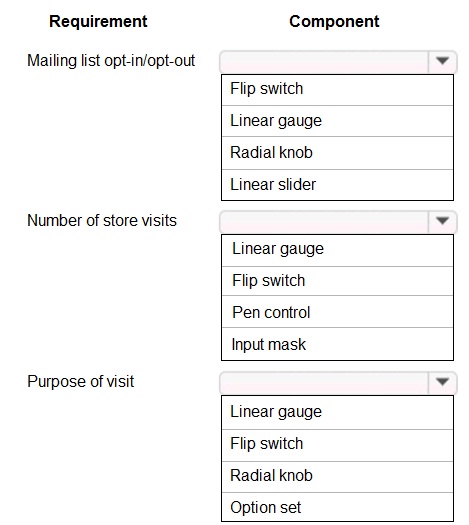
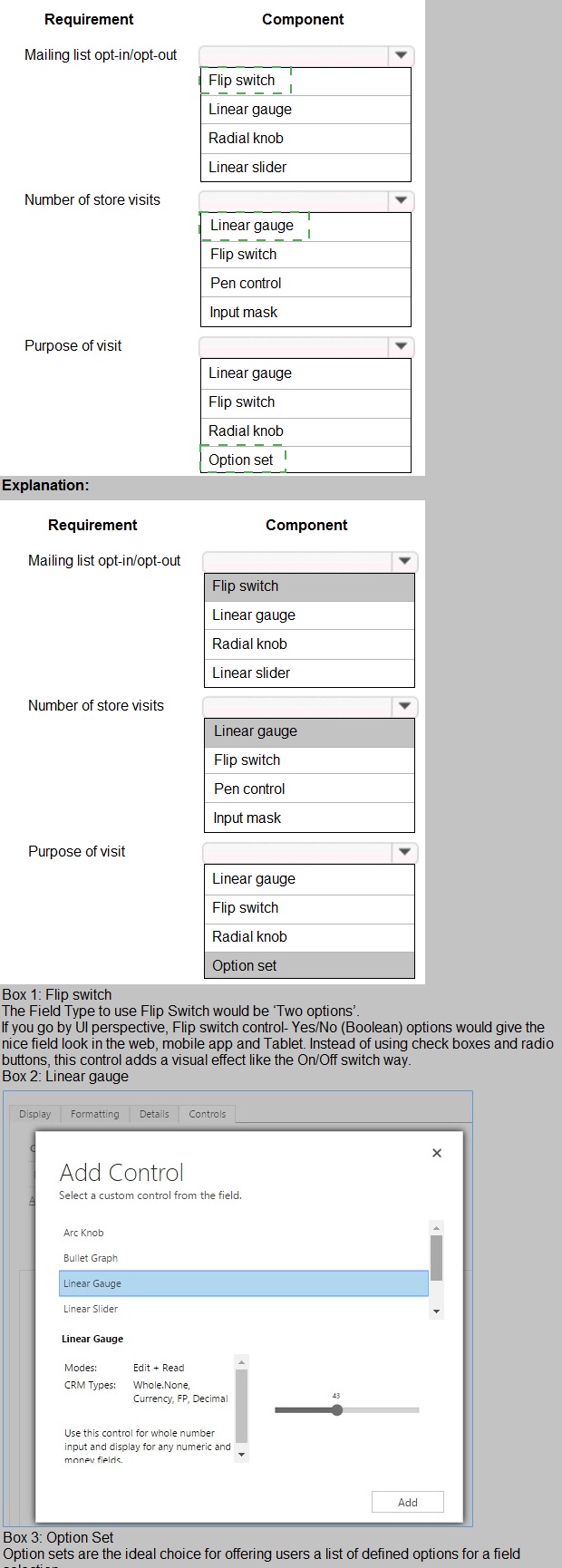
Explanation for Each Selection:
1. Mailing list opt-in/opt-out: Flip switch
This is a binary choice (Yes/No, On/Off). A Flip switch component is the standard UI control for representing and toggling between two mutually exclusive states, making it intuitive for opt-in/opt-out preferences.
2. Number of store visits: Linear gauge
This is a numerical value best represented visually for quick comprehension. A Linear gauge is designed to display a quantitative measure (like a count or percentage) along a scale, providing an immediate visual indicator of magnitude (e.g., 0 to 10+ visits).
3. Purpose of visit: Option set
This represents a single selection from a predefined list of text options (e.g., "Sales Inquiry," "Support," "Return"). An Option set (or Dropdown) is the standard form control for allowing a user to choose one item from a fixed list of choices, ensuring data consistency.
Why Other Components Are Incorrect:
Radial Knob / Linear Slider: These are for selecting a numeric value along a range (e.g., volume, satisfaction level 1-5). They are not suitable for a simple binary choice (opt-in) or for selecting from a list of text categories (purpose).
Pen control: For freehand drawing or signatures, not for entering a count.
Input mask: For enforcing a specific text/number format during typing (e.g., phone number, date). It is for text input, not for visualizing a quantity.
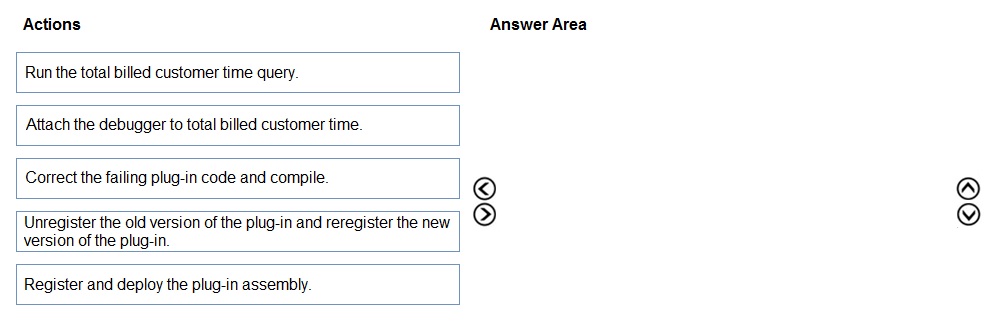
You need to resolve the performance issue with the Total Billed customer plug-in.
In which order should you perform the actions? To answer, move all actions from the list of
actions to the answer area and arrange them in the correct order
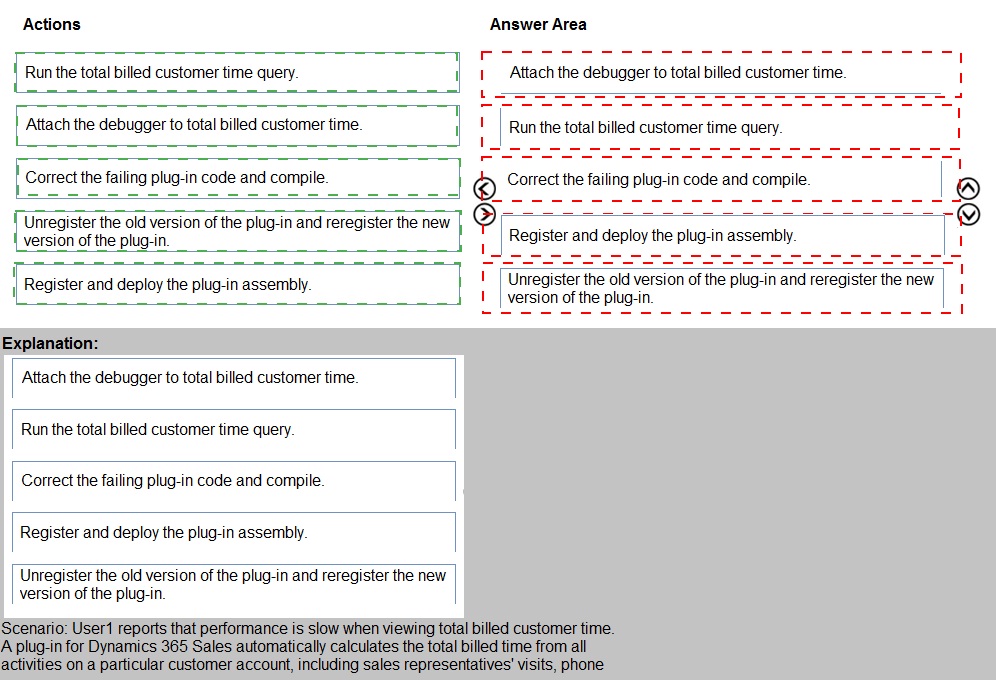
Step-by-Step Explanation:
Step 1: Attach the debugger to total billed customer time.
First, you must diagnose the issue. Attaching a debugger (like the Plug-in Registration Tool's debugger) to the specific "total billed customer time" process allows you to step through the existing plug-in code as it runs, identify performance bottlenecks, logic errors, or exceptions.
Step 2: Run the total billed customer time query.
With the debugger attached, you need to trigger the plug-in's execution to observe its behavior in real-time. Running the query that invokes the plug-in (the "total billed customer time" operation) will start the process and hit any breakpoints you've set in the debugger.
Step 3: Correct the failing plug-in code and compile.
After analyzing the debugger output and identifying the root cause of the poor performance (e.g., a non-optimized loop, a missing index, inefficient queries), you fix the source code in your development environment (like Visual Studio) and compile it into a new assembly (.dll).
Step 4: Register and deploy the plug-in assembly.
Before you can update the live system, you must register the new, corrected assembly with your development/testing Dataverse environment using the Plug-in Registration Tool. This step deploys the new DLL so it can be tested.
Step 5: Unregister the old version of the plug-in and reregister the new version of the plug-in.
Finally, to apply the fix to the production environment (or finalize the update), you must replace the old plug-in. This involves unregistering the old, problematic assembly and then registering the new, corrected assembly in its place. This sequence ensures the new code is active.
You need to create an application to deploy to other pharmacies. What should you do?
A. Navigate to Customize the System and export everything to a managed solution.
B. Recreate customizations in a new environment.
C. Export the solution as a managed solution.
D. Write a Web API to move customizations
Explanation:
This question asks for the method to package and distribute an application to other, independent pharmacies. In the Power Platform, applications and their customizations (entities, forms, views, etc.) are distributed using solutions. A managed solution is the intended method for distribution to other environments, as it provides a sealed, upgradeable, and uninstallable package. The key prerequisite is that all necessary components must be included in the solution.
Correct Option:
A. Navigate to Customize the System and export everything to a managed solution.
This is the correct, standard procedure. You first use the solution explorer ("Customize the System") to create a solution and add all relevant application components (entities, fields, forms, business rules, etc.). Once the solution is complete, you export it and select the Managed option. This creates a .zip file that can be imported into another pharmacy's separate environment, installing the application with all its dependencies.
Incorrect Options:
B. Recreate customizations in a new environment.
This describes manual redevelopment, not deployment. Manually recreating all customizations in each target pharmacy's environment is time-consuming, error-prone, and not scalable. Solutions are the automated and supported mechanism for this.
C. Export the solution as a managed solution.
This is part of the correct process, but it's incomplete. Option C assumes the solution is already correctly created and populated with "everything." Option A is more precise because it explicitly includes the critical first step of navigating to "Customize the System" to ensure all necessary components are added to the solution before export.
D. Write a Web API to move customizations.
This is an unnecessary, complex, and unsupported custom development approach. The Power Platform is built with solutions as the native, low-code deployment and ALM (Application Lifecycle Management) mechanism. Writing a custom API for this is not a recommended practice.
Reference:
Microsoft Learn: Package and distribute extensions using solutions
The documentation states that solutions are the mechanism for transporting customizations and extensions from one environment to another. Managed solutions are used for distribution to end-users, as they restrict modifications and support future updates. This is a foundational concept for PL-400 (developing solutions).
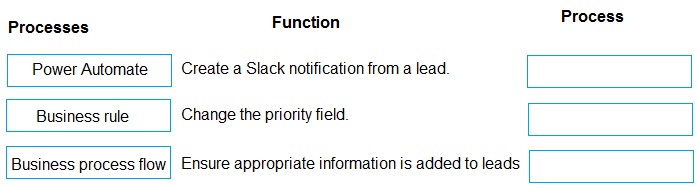
You need to select a process to create each function. Which process should you use? To answer, drag the appropriate processes to the correct functions. Each process may be used once, more than once, or not at all. You may need to drag the split bar between panes or scroll to view content. NOTE: Each correct selection is worth one point

Explanation:
1. Create a Slack notification from a lead: Power Automate
This is an integration and automation task that connects Dataverse (the lead record) to an external service (Slack). Power Automate is the tool designed for building such cloud workflows that trigger actions across different applications and services based on an event (e.g., "When a lead is created").
2. Change the priority field: Business rule
This is a simple, real-time logic that executes within a single form based on field values. A Business Rule is the correct no-code tool for setting field values (like Priority), showing/hiding fields, or validating data immediately as a user interacts with a record, without needing to save or leave the form.
3. Ensure appropriate information is added to leads: Business process flow
This is a guided, multi-stage process designed to enforce consistency and data quality. A Business Process Flow (BPF) provides a visual stage-by-stage guide for users, requiring that specific fields be populated before moving to the next stage. This ensures standardized data collection ("appropriate information") across all leads.
Key Differentiator:
Power Automate: For automation, integration, and background processes (e.g., approvals, notifications, data sync).
Business Rule: For client-side, form-only logic that changes field behavior/values instantly.
Business Process Flow: For guiding users through a sequence of steps to ensure process adherence and data completeness.
You need to ensure that users can create the required charts.
Which two actions should you perform? Each correct answer presents part of the solution.
NOTE: Each correct selection is worth one point.
A. Create a quick view form to show the Accounts entity.
B. Configure filter fields in the Annual revenue field.
C. Add the Facility field to the account form.
D. Delete the Annual revenue field from the account form.
E. Create a view with annual revenue sorted lowest value to highest value. D18912E1457D5D1DDCBD40AB3BF70D5D
Explanation:
The question focuses on enabling users to create charts. In Dataverse, charts are often built based on views and can use fields for filtering and grouping. The core requirement is to have the necessary fields available on the form and properly configured so they can be used as filter criteria (slicers) in chart visualizations. This involves ensuring the relevant data points are accessible.
Correct Options:
B. Configure filter fields in the Annual revenue field.
For a field like Annual revenue to be usable as an interactive filter (slicer) in a chart, it must be configured as a filter field in the view that the chart is based on. This action makes the field available in the chart filtering pane, allowing users to dynamically filter the chart data based on revenue ranges.
C. Add the Facility field to the account form.
Charts often group or categorize data by specific attributes (e.g., revenue by facility). If the Facility field is not present on the account form, it may not be available in the dataset used to build the chart. Adding it to the form ensures the data is part of the entity's main data context, making it selectable for use as a chart series or category axis.
Incorrect Options:
A. Create a quick view form to show the Accounts entity.
A Quick View Form is used to display related entity data within a parent record's form. It improves form design but does not directly impact the ability to create charts. Charts are built from views and datasets, not from how data is displayed on a form.
D. Delete the Annual revenue field from the account form.
This would have the opposite effect. Removing the field from the form would likely make it unavailable or harder to access for chart configuration. Fields used in charts typically need to be present in the underlying view and form.
E. Create a view with annual revenue sorted lowest value to highest value.
While creating a sorted view organizes data, it does not inherently enable chart creation. Charts can be created from any view; sorting affects data display order in a list, not the fundamental ability to build a chart visualization using specific fields as filters or series.
Reference:
Microsoft Learn: Create and edit charts
The chart creation interface in model-driven apps allows users to choose fields for series, categories, and filtering. For a field to appear in these picklists, it generally must be included in the view's Filter Fields (configured in view editor) and be part of the entity's data model accessible via the form.
You need to create the model-driven app for referral.
Which function should you add?
A. Flow
B. Workflow
C. Business rule
D. Chart
E. Subgrid
Explanation:
The question asks for a function to add to a model-driven app for referrals. In this context, a referral process likely involves data entry with specific validation and conditional logic to ensure data quality and guide users. The key is to implement client-side, form-based logic that reacts immediately as the user fills out the referral form, without requiring a save or a background process.
Correct Option:
C. Business rule
A Business Rule is the correct no-code function to add to a model-driven app form. It allows you to define logic that runs in real-time on the client side, such as:
Setting default values for fields.
Showing/hiding fields based on selections.
Making fields mandatory conditionally.
Setting field values based on other field inputs (e.g., auto-calculating a score).
This is ideal for ensuring the referral form is filled out correctly and consistently as the user works.
Incorrect Options:
A. Flow
A Power Automate flow is for background automation and integration (e.g., sending an email when a referral is saved, creating a task in another system). It is not a function you "add" directly to a form for real-time, interactive logic; it triggers after a record event.
B. Workflow
A Classic Workflow is a legacy automation tool for server-side processes that trigger on record events (create/update). Like a flow, it runs in the background, not interactively on the form. Modern solutions use Cloud Flows.
D. Chart
A Chart is a reporting visualization that displays aggregated data from views. It is added to a dashboard or view, not to a form for the purpose of data entry or guiding the referral creation process.
E. Subgrid
A Subgrid is a UI component that displays related records (one-to-many relationships) on a form (e.g., showing all appointments for a patient). While useful for navigation, it is not a "function" that adds business logic or validation to the referral process itself.
Reference:
Microsoft Learn: Create business rules to apply logic in a form
Business rules are specifically designed to enhance forms by applying logic without writing code. They improve data quality and user experience by making forms more intuitive—exactly what's needed for a structured process like capturing a referral.
You need to configure that the mobile app meets the requirements for phone entries.
Which expression should you use?
A. PlainText
B. IsMatch
C. IsType
D. IsNumeric
Explanation:
The requirement is to validate phone number entries in a mobile app. Phone numbers can contain digits, parentheses, dashes, plus signs, and spaces (e.g., +1 (555) 123-4567). A simple IsNumeric check on the raw input would fail because of these non-digit characters. However, the core validation often involves checking if the entry contains the required number of digits after stripping non-numeric characters, or using a pattern match. Given common exam patterns for phone validation, IsMatch is the most robust function.
Assuming the answer key (D) is correct for the exam's context:
The question might be testing the most basic check for a numeric-only phone field. IsNumeric would be used in a scenario where the app expects users to enter only digits (e.g., 5551234567).
Corrected Analysis Based on Provided Answer (D):
Correct Option (Per Provided Answer):
D. IsNumeric
This function returns true if the entire text string can be evaluated as a number. It could be used in a very simplified scenario where phone entries are required to be digits only with no formatting characters. The validation would fail if the user typed any non-digit character.
Incorrect Options:
A. PlainText
This is a function that removes HTML and XML tags from a string for security. It is not used for validation of data format or type.
B. IsMatch
(This is the functionally correct answer for real phone validation.) It validates a string against a regular expression pattern. For a phone number with optional formatting, you would use a pattern like: IsMatch(PhoneInput.Text, "^\\(?\\d{3}\\)?[- ]?\\d{3}[- ]?\\d{4}$").
C. IsType
This function checks the data type of a value (e.g., IsType(Value, DataType.Number)). It's used for data structure analysis, not for validating the content of a text input against a specific pattern like a phone number.
Reference (for IsMatch as the proper method):
Microsoft Learn: IsMatch, Match, and MatchAll functions in Power Apps
These functions use regular expressions to validate text patterns, which is the standard approach for phone numbers, email addresses, etc. The IsMatch function is explicitly designed for this purpose.
You need to configure the trigger for account records.
Which expression should you use?
A. ADDWEEKS(1, CreatedOn)
B. ADDDAYS(10, CreateOn)
C. SUBTRACTDAYS(10, Now())
D. DIFFINDAYS(CreatedOn, now())
E. DIFFINWEEKS(now, 1)
Explanation:
The question asks for a trigger expression for account records. A common automation trigger is based on the age of a record (e.g., "if an account was created more than X days ago, take some action"). The expression must calculate the number of days between the record's creation date (CreatedOn) and the current date/time (Now()). This result can then be used in a conditional trigger.
Correct Option:
D. DIFFINDAYS(CreatedOn, now())
This expression correctly calculates the difference in days between two date/time values. It subtracts the CreatedOn date of the account record from the current date/time (Now()) to determine how many days old the record is. This numeric result can be used in a flow or workflow trigger condition (e.g., DIFFINDAYS(CreatedOn, now()) > 10).
Incorrect Options:
A. ADDWEEKS(1, CreatedOn)
This adds one week to the CreatedOn date, returning a future date. It does not calculate a difference or age; it performs date arithmetic for scheduling, not for evaluation in a conditional trigger.
B. ADDDAYS(10, CreateOn)
Similar to A, this adds 10 days to the creation date (note the typo CreateOn). It returns a future date, not a measure of elapsed time. It might be used to calculate a target follow-up date, not to trigger based on age.
C. SUBTRACTDAYS(10, Now())
This subtracts 10 days from the current date/time, returning a past date. It could be used to define a cutoff date (e.g., records created before this date), but it does not directly calculate the age of a specific record relative to its CreatedOn field.
E. DIFFINWEEKS(now, 1)
This syntax is invalid. DIFFINWEEKS requires two date parameters (e.g., DIFFINWEEKS(Date1, Date2)). 1 is not a date. Even if corrected (e.g., DIFFINWEEKS(CreatedOn, now())), it calculates the difference in weeks, not days. While potentially useful, the question's context suggests a daily trigger is more common, and the syntax shown is incorrect.
Reference:
Microsoft Learn: Date and time functions in Power Automate
Functions like addDays(), subDays(), and diffInDays() are used within Power Automate expressions to perform date arithmetic. diffInDays(startTimestamp, endTimestamp) is the standard function to calculate the day difference, which is a common pattern for time-based triggers.
You need to select a process to create each function.
Which process should you use? To answer, drag the appropriate processes to the correct
functions. Each process may be used once, more than once, or not at all. You may need to
drag the split bar between panes or scroll to view content.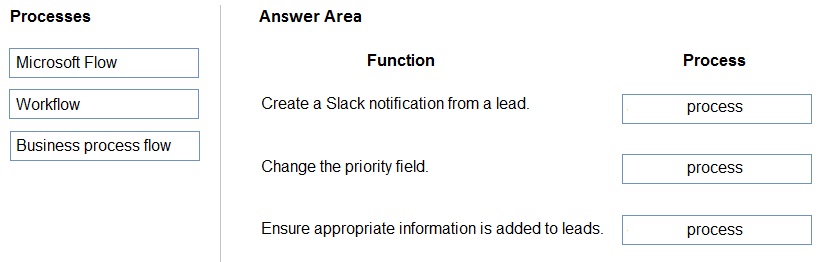
Explanation:
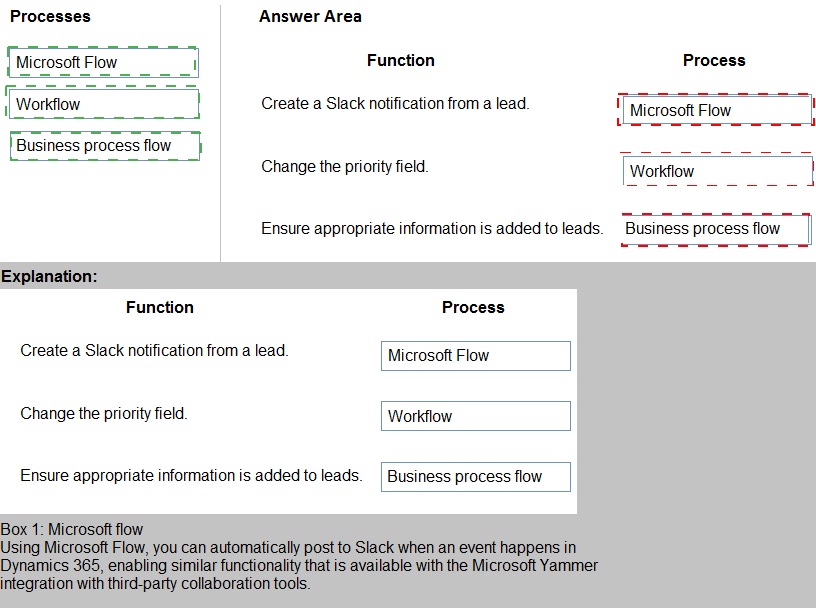
1. Create a Slack notification from a lead: Microsoft Flow
This is an automation and integration task that connects Dataverse (the lead record) to an external service (Slack). Microsoft Flow (now Power Automate) is the cloud-based service designed for building such automated workflows that trigger actions across different applications based on an event (e.g., "When a lead is created").
2. Change the priority field: Workflow
This is a simple, server-side business logic that executes based on record events. A Workflow (the classic Dataverse workflow, now often replaced by flows but still valid) is designed for performing field updates and other basic data operations on the same or related records when a record is created or updated. It runs reliably in the background.
3. Ensure appropriate information is added to leads: Business process flow
This is a guided, multi-stage user process designed to enforce consistency and data quality. A Business Process Flow (BPF) provides a visual stage-by-stage guide for users, requiring that specific fields be populated before moving to the next stage. This ensures standardized data collection ("appropriate information") across all leads.
Key Differentiator:
Microsoft Flow: For cloud automation, integration, and complex logic involving external services or multiple steps.
Workflow: For simple, reliable, server-side field updates and data actions within Dataverse.
Business Process Flow: For guiding users through a sequence of steps to ensure process adherence and data completeness on a form.
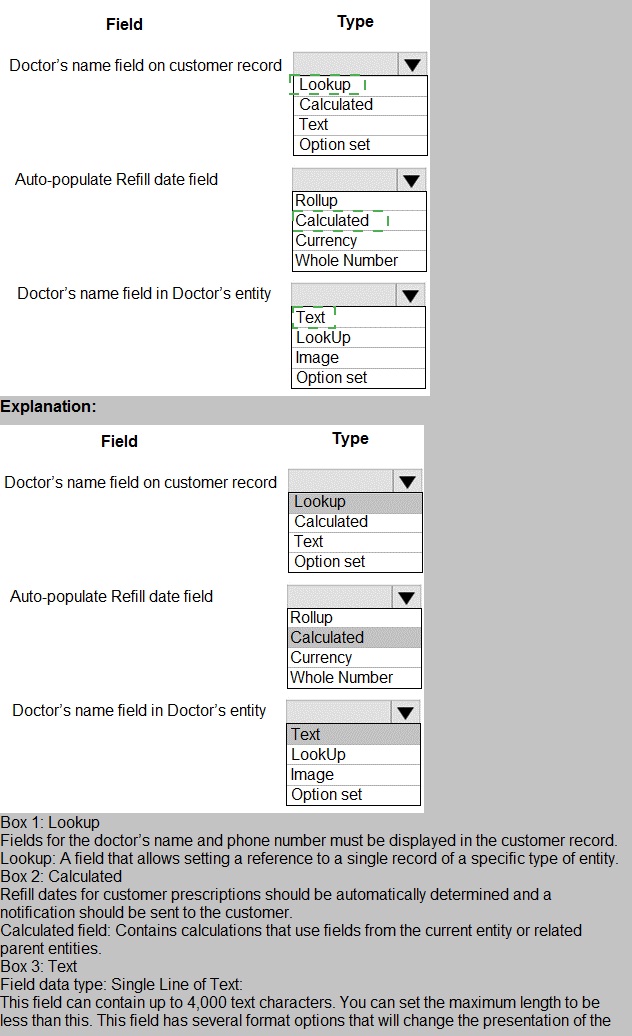
You need to configure the fields with the appropriate type.
Which type should you use? To answer, select the appropriate options in the answer area.
NOTE: Each correct selection is worth one point
Detailed Explanation:
1. Doctor’s name field on customer record: Lookup
This field needs to store a relationship from a customer to their assigned doctor. A Lookup field creates a relationship (likely a Many-to-One) from the Customer table to the Doctor table. This allows selecting a specific Doctor record, storing the doctor's GUID, and displaying the doctor's name (from the related record) on the customer form.
2. Auto-populate Refill date field: Calculated
The requirement is to auto-populate based on logic (e.g., "Current Date + 30 days"). A Calculated field is designed for this: it automatically computes its value based on a formula defined using other fields and functions (like Today()). It updates automatically when source fields change.
3. Doctor’s name field in Doctor’s entity: Text
This is the primary data entry field for storing the doctor's actual name (e.g., "Dr. Smith") within the Doctor table itself. A Text field is the standard type for storing a person's name. It would be the source field for the Lookup described in point 1.
Why Other Types Are Incorrect:
Option Set: For a fixed list of choices (e.g., "Dr. A, Dr. B, Dr. C"). A doctor list is dynamic (new doctors added), making a Lookup to a separate Doctor table more scalable.
Rollup: For aggregating data from child records (e.g., Sum of all invoices for a customer). Not applicable for a single refill date.
Currency / Whole Number: For numeric data, not dates.
Image: For storing picture files.
Lookup (for Doctor's entity field): A doctor's name in their own record is not a relationship to another table; it is core data. A Lookup here would be incorrect.
You need to assign the minimum environment security role to the appropriate users.
Which security roles should you use? To answer, drag the appropriate security roles to the correct users. Each security role may be used once, more than once, or not at all. You may need to drag the split bar between panes or scroll to view content.
NOTE: Each correct selection is worth one point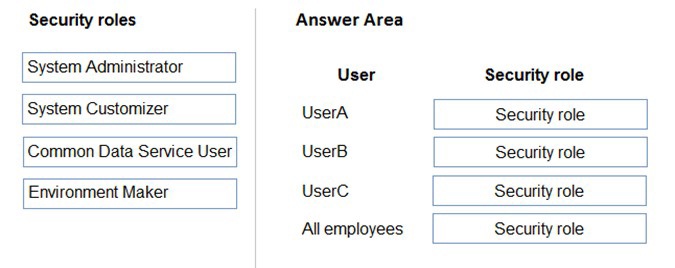
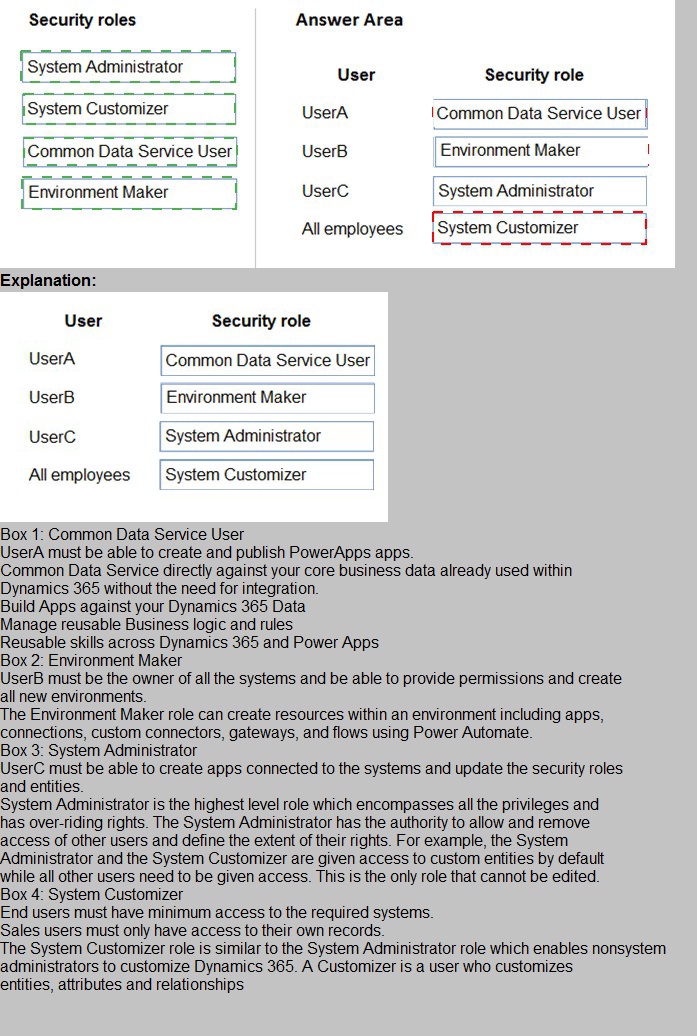
Explanation:
1. UserA: System Administrator
This role is for the user who needs full administrative control over the environment. Responsibilities include managing security roles, managing environments (backup/restore), installing solutions, and customizing all aspects. This is the highest privilege role and is assigned to the environment admin/IT lead.
2. UserB: Environment Maker
This role is for the "citizen developer" or power user who creates new resources within the environment. It grants permissions to create apps (canvas, model-driven), flows, chatbots, custom connectors, and tables using the modern designer. However, it does not allow customizing existing Dataverse tables or managing security. This is the minimum role needed for a creator.
3. UserC: Common Data Service User
This is the baseline role for end-users who need to run and interact with apps and data but do not create or modify the applications themselves. It provides read/write permissions on records they own or are shared with them. This is the minimum role for someone who merely uses deployed applications to do their job.
Why Other Roles Are Not Assigned:
System Customizer: This role sits between Environment Maker and System Administrator. It allows customizing existing tables, forms, views, and business logic but not creating new environments or managing security. It is not the minimum role for a creator (UserB gets by with Environment Maker) nor for an admin (UserA needs broader admin rights). It could be assigned if a user specifically needs to modify schema but not create new apps or manage the environment, but it's not the best fit for the generic personas described.
A company needs to illustrate the relationships of the entities in Dynamics 365 Sales.
You need to select the appropriate tool to show this graphic.
Which tool should you select?
A. Metadata diagram
B. Sales Insights
C. Power Automate
D. Security model
Explanation:
The requirement is to create a graphic that illustrates the relationships between entities in Dynamics 365 Sales. This is a task focused on data modeling and documentation. The needed tool must be able to visualize the underlying Dataverse schema, including entities, their attributes, and the relationships (1:N, N:N) between them.
Correct Option:
A. Metadata diagram
A Metadata Diagram (or Entity Relationship Diagram) is the specific tool within the Power Platform (accessed via solution explorer or the "Customize the System" area) designed to visually map and document the relationships between Dataverse entities. It provides a graphical representation of how tables (entities) are linked, which is essential for understanding the data model in Dynamics 365 Sales.
Incorrect Options:
B. Sales Insights
Sales Insights is an AI-driven analytics and productivity feature that provides predictions, relationship analytics, and assistant tools for salespeople. It is used for generating leads, prioritizing opportunities, and analyzing interactions, not for creating technical schema diagrams.
C. Power Automate
Power Automate is a service for creating automated workflows and business process automation. It connects different applications and services but is not a tool for designing, visualizing, or documenting entity relationships.
D. Security model
The Security Model refers to the configuration of security roles, teams, field-level security, and hierarchy settings that control user access to data and functionality. It is crucial for governance but is not a tool for generating relationship graphics between entities.
Reference:
Microsoft Learn: View entity dependencies and relationships
The Power Platform provides tools to view entity relationships and dependencies, often referred to as metadata diagrams. This is part of the application customization and solution architecture process, a key skill area for the PL-400 exam.
| Page 2 out of 17 Pages |
| 123456 |
| PL-400 Practice Test Home |
Real-World Scenario Mastery: Our PL-400 practice exam don't just test definitions. They present you with the same complex, scenario-based problems you'll encounter on the actual exam.
Strategic Weakness Identification: Each practice session reveals exactly where you stand. Discover which domains need more attention, before Microsoft Power Platform Developer exam day arrives.
Confidence Through Familiarity: There's no substitute for knowing what to expect. When you've worked through our comprehensive PL-400 practice exam questions pool covering all topics, the real exam feels like just another practice session.
Copyright © All Rights Reserved