
Refer to the exhibit.
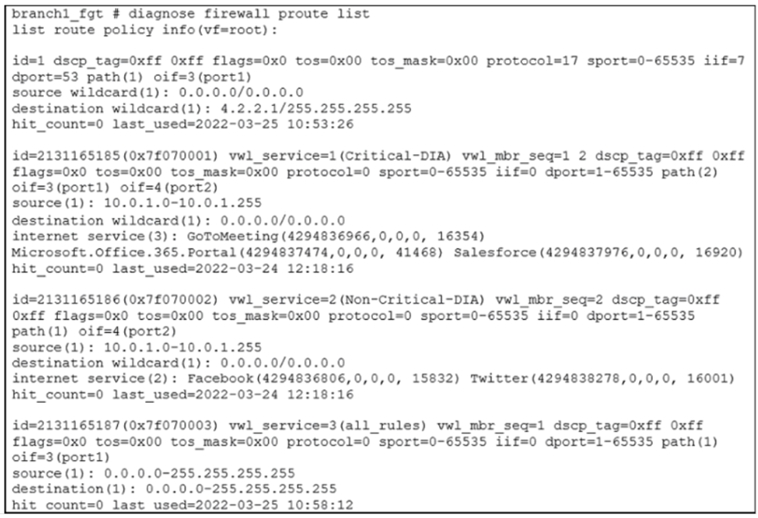
Based on the output, which two conclusions are true? (Choose two.)
A. There is more than one SD-WAN rule configured.
B. The SD-WAN rules take precedence over regular policy routes.
C. The all_rules rule represents the implicit SD-WAN rule.
D. Entry 1(id=1) is a regular policy route.
Explanation:
The command diagnose firewall proute list displays the policy route table. This table includes both traditional Policy Routes and SD-WAN Rules, and the output has distinct identifiers for each.
Key Identifiers in the Output:
id=1: A simple numerical ID. This is the format for a traditional Policy Route.
id=2131165185 (0x7f070001): A very large, hex-formatted ID. This is the standard format for an SD-WAN Rule. The wwl_service and wwl_mbr_seq fields are also clear indicators of an SD-WAN rule.
Analysis of Each Option:
A. There is more than one SD-WAN rule configured.
Correct. The output shows three distinct SD-WAN rules with the large-numbered IDs:
id=2131165185 for "Critical-DIA" (using port1 and port2)
id=2131165186 for "Non-Critical-DIA" (using port2)
id=2131165187 for "all_rules" (using port1)
B. The SD-WAN rules take precedence over regular policy routes.
Incorrect. While this statement is generally true in FortiOS path selection logic, this specific output does not prove it. The order of entries in the proute list is not necessarily the order of evaluation. The output shows the traditional policy route (id=1) first, but the SD-WAN rules (which are evaluated first in the data path) are listed afterward. We cannot conclude the precedence order solely from the list. The order of evaluation is a system behavior, not a display property.
C. The all_rules rule represents the implicit SD-WAN rule.
Incorrect. The implicit SD-WAN rule is a system-generated rule that acts as a catch-all. It is not visible in the GUI and is only displayed in the CLI with a specific name. The rule here, id=2131165187, is named all_rules and has manually defined source/destination (0.0.0.0-255.255.255.255). This is a user-configured catch-all rule, not the true, hidden implicit rule. The implicit rule has a fixed ID and different characteristics.
D. Entry 1 (id=1) is a regular policy route.
Correct. This entry has a simple numerical ID (id=1), lacks any SD-WAN-specific fields like wwl_service, and matches the classic structure of a policy route (matching DSCP, protocol, sport, dport, and interface). It is configured to send DNS traffic (protocol 17, dport 53) arriving on interface iif=7 out through port1.
Reference:
Fortinet Documentation / CLI Reference:
The output of diagnose firewall proute list is the definitive source. The difference in ID numbering and the presence of wwl_ (WAN-WAN Link) fields are the key differentiators between a traditional policy route and an SD-WAN rule.
The implicit rule is a specific concept documented in the FortiOS SD-WAN guide, which states it is not a user-created object and has a distinct identifier in the CLI (often related to a high ID and a specific name). The user-created all_rules rule is not it.
Which diagnostic command can you use to show the SD-WAN rules, interface information, and state?
A. diagnose sys sdwan neighbor
B. diagnose sys sdwan service
C. diagnose sys sdwan route-tag-list
D. diagnose sys sdwan member
Explanation:
This command is the primary tool for verifying the configuration and real-time operational state of SD-WAN rules and their associated members.
Analysis of Each Option:
A. diagnose sys sdwan neighbor
Incorrect. This command is used to display BGP neighbor information specifically for SD-WAN, showing the state of BGP peering sessions over the SD-WAN overlay. It does not show the SD-WAN rules themselves or the general state of member interfaces.
B. diagnose sys sdwan service
Correct. This is the most comprehensive command for viewing SD-WAN rules and member status. Its output typically includes:
SD-WAN Rules: Lists all configured SD-WAN service rules (by ID, name, source, destination, etc.).
Interface/Member Information: Shows each SD-WAN member (e.g., port1, port2, ipsec_tunnel) that is part of the rule.
State: Displays the real-time state of each member for the rule, including:
alive or dead based on SLA probe results.
Latency, jitter, and packet loss metrics.
The selected best path for the rule (indicated with a *).
It provides a complete overview of how the SD-WAN policy is being applied.
C. diagnose sys sdwan route-tag-list
Incorrect. This command is used for more advanced routing scenarios where BGP routes are tagged with communities. It displays the list of BGP route-tags and their associated SD-WAN services. It is not used for showing the general state of interfaces or the core SD-WAN rule configuration.
D. diagnose sys sdwan member
Incorrect. While this command shows information about the SD-WAN member interfaces (like their real-time SLA statistics: latency, jitter, packet loss), it does not display the configured SD-WAN rules. It focuses solely on the health and status of the individual links, not on how they are grouped and used by the policy rules.
Reference:
Fortinet Documentation Library:
The FortiOS CLI Reference for SD-WAN commands clearly describes the purpose of each. The diagnose sys sdwan service command is documented as the go-to command for "Displaying SD-WAN rule settings and status," which includes the member state information.
When troubleshooting, the output of diagnose sys sdwan service is the first place to look to see if rules are configured correctly and which members are alive and being selected.
Refer to the exhibit.
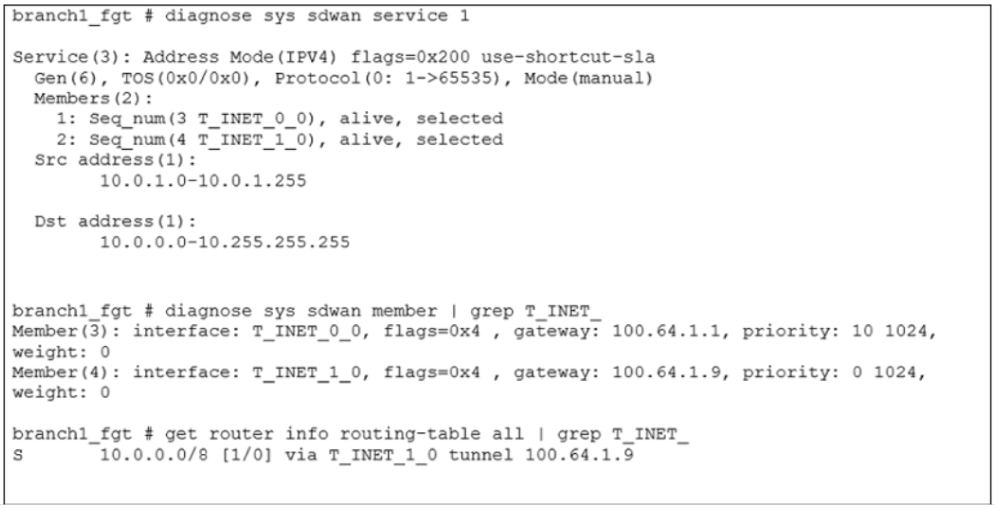
An administrator is troubleshooting SD-WAN on FortiGate. A device behind branch1_fgt generates traffic to the 10.0.0.0/8 network. The administrator expects the traffic to match SD-WAN rule ID 1 and be routed over T_INET_0_0. However, the traffic is routed over T_INET_1_0. Based on the output shown in the exhibit, which two reasons can cause the observed behavior? (Choose two.)
A. The traffic matches a regular policy route configured with T_INET_1_0 as the outgoing device.
B. T_INET_1_0 has a lower route priority value (higher priority) than T_INET_0_0.
C. T_INET_0_0 does not have a valid route to the destination.
D. T_INET_1_0 has a higher member configuration priority than T_INET_0_0.
Explanation:
The core issue is that the SD-WAN rule is configured correctly and sees both members as "alive," yet the traffic is being routed according to the routing table (get router info routing-table) which points solely to T_INET_1_0. This happens due to a fundamental SD-WAN principle.
Key SD-WAN Path Selection Principle:
Before the SD-WAN rule engine selects a member, the underlying Routing Information Base (RIB) must have a valid route to the destination through that specific member interface. The SD-WAN rule then chooses from among the members that pass this initial route check.
Analysis of the Output:
diagnose sys sdwan service 1: This shows the SD-WAN rule is healthy.
It matches traffic from 10.0.1.0/24 to 10.0.0.0/8.
Both members T_INET_0_0 (seq 3) and T_INET_1_0 (seq 4) are "alive" and "selected" by the SD-WAN logic.
get router info routing-table all: This reveals the real decision-maker.
The output shows: 10.0.0.0/8 [1/0] via T_INET_1_0 tunnel 100.64.1.9
This is a static route with an Administrative Distance of 1. This is a very high-priority route.
Crucially, there is NO route for 10.0.0.0/8 via T_INET_0_0 in the routing table.
Why is this happening?
The SD-WAN rule is being skipped. The fundamental principle from a previous question applies here: "By default, SD-WAN rules are skipped if the best route to the destination is not an SD-WAN member." In this case, the best route is an SD-WAN member (T_INET_1_0), but the rule requires multiple valid members to make a choice. Since the routing table only has a valid route via one member (T_INET_1_0), the SD-WAN rule does not need to be invoked; traffic simply follows the single best route.
Analysis of Each Option:
A. The traffic matches a regular policy route configured with T_INET_1_0 as the outgoing device.
Incorrect. While a policy route could cause this, the exhibit shows the reason definitively. The get router info routing-table command shows that a static route (with AD=1) is directing the traffic to T_INET_1_0. The problem is in the routing table, not a policy route.
B. T_INET_1_0 has a lower route priority value (higher priority) than T_INET_0_0.
Correct. The routing table shows a static route with an Administrative Distance of 1 via T_INET_1_0. If the route for T_INET_0_0 had a higher AD (a less preferable value, like 10 or 250), it would not appear in the routing table. The route via T_INET_1_0 wins because it has the lowest (best) AD.
C. T_INET_0_0 does not have a valid route to the destination.
Correct. This is the most direct explanation. For the SD-WAN rule to load-balance or choose between members, each member must have a valid route to the destination. The exhibit proves that T_INET_0_0 has no route to 10.0.0.0/8 in the routing table. Therefore, even though the SD-WAN health check marks it "alive," it is skipped for traffic selection because it fails the fundamental route lookup.
D. T_INET_1_0 has a higher member configuration priority than T_INET_0_0.
Incorrect. The diagnose sys sdwan member output shows the opposite. T_INET_0_0 has a priority: 10, while T_INET_1_0 has a priority: 0. In FortiOS SD-WAN, a lower priority number is more preferred. So, T_INET_1_0 (priority 0) is actually configured as higher priority than T_INET_0_0 (priority 10). However, this SD-WAN member priority is irrelevant in this scenario because the routing table decision is overriding the SD-WAN process entirely.
Reference:
Fortinet Documentation Library:
The FortiOS SD-WAN guide on "Path Selection" clearly states the prerequisites for an SD-WAN member to be considered, including having a valid route to the destination in the RIB.
It also explains that the best route from the RIB must point to an SD-WAN interface zone for the SD-WAN rule to be activated. If only one member has a valid route, that member is used without invoking the rule's load-balancing logic.
Refer to the exhibits.
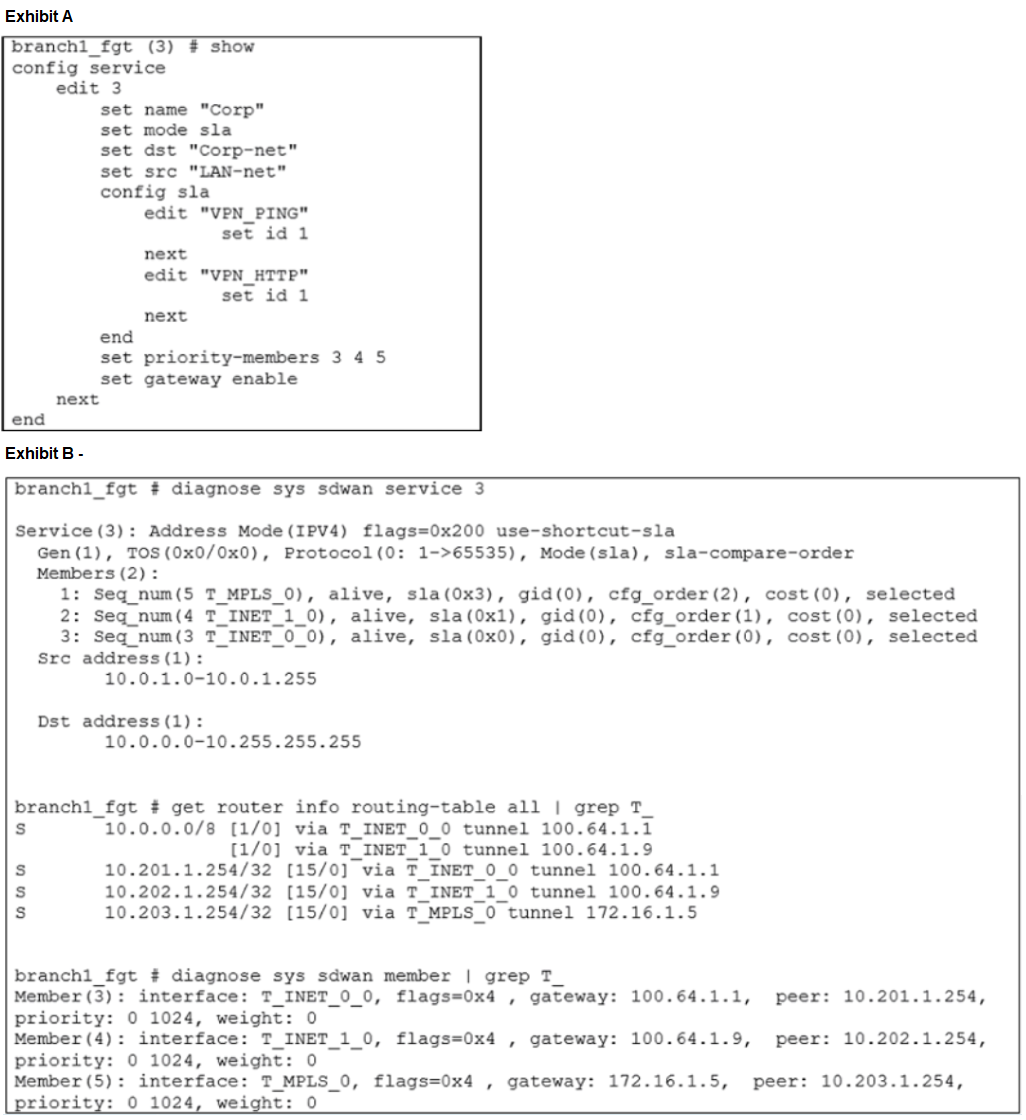
Exhibit A shows the configuration for an SD-WAN rule and exhibit B shows the respective rule status, the routing table, and the member status.
The administrator wants to understand the expected behavior for traffic matching the SDWAN rule.
Based on the exhibits, what can the administrator expect for traffic matching the SD-WAN rule?
A. The traffic will be load balanced across all three overlays.
B. The traffic will be routed over T_INET_0_0.
C. The traffic will be routed over T_MPLS_0.
D. The traffic will be routed over T_INET_1_0.
Explanation:
To solve this, we need to understand how the SD-WAN rule is configured and how the system state meets that configuration.
1. Analyze the SD-WAN Rule Configuration (Exhibit A):
Rule 3 ("Corp") is set to mode sla. This means it will select the best-performing member based on Performance SLA targets.
It has priority-members 3 4 5. These are the member sequence numbers (T_INET_0_0, T_INET_1_0, T_MPLS_0). The order (3, 4, 5) might imply a manual priority, but in sla mode, this list simply defines the pool of members eligible for SLA comparison. The cfg_order seen in the diagnostics is what reflects this sequence.
It has two SLA targets configured: "VPN_PING" and "VPN_HTTP". The rule will compare members based on their performance against these targets.
2. Analyze the SD-WAN Service Status (Exhibit B - diagnose sys sdwan service 3):
This is the most critical output. It shows the real-time status and SLA compliance of each member for this specific rule.
Member 3 (T_INET_0_0): alive, sla(0x0)
Member 4 (T_INET_1_0): alive, sla(0x1)
Member 5 (T_MPLS_0):alive, sla(0x3)
The sla(0x...) value is a bitmask indicating which SLA targets the member is passing.
sla(0x0) = Passes 0 out of 2 SLA targets. (Fails all)
sla(0x1) = Passes 1 out of 2 SLA targets.
sla(0x3) = In binary, this is 11, meaning it passes both bit 0 and bit 1 – which corresponds to 2 out of 2 SLA targets. (Passes all)
3. Apply the SD-WAN Logic for sla Mode:
In sla mode, the FortiGate selects the member with the highest number of passed SLA targets. If there's a tie, it then uses the priority (lower number is better) and cfg_order (lower number is better) to break it.
In this case:
T_MPLS_0 passes 2 SLAs. (Winner)
T_INET_1_0 passes 1 SLA.
T_INET_0_0 passes 0 SLAs.
T_MPLS_0 is the only member that meets all the required performance criteria. Therefore, it will be selected for all traffic matching this rule.
Analysis of Each Option:
A. The traffic will be load balanced across all three overlays.
Incorrect. Load balancing occurs in manual mode when members have equal cost, or in sla mode if multiple members have the same (highest) number of passed SLAs. Here, the members have different levels of SLA compliance, so one is clearly the best.
B. The traffic will be routed over T_INET_0_0.
Incorrect. T_INET_0_0 is failing all SLA checks (sla(0x0)). It will not be used as long as another member is passing more SLAs.
C. The traffic will be routed over T_MPLS_0.
Correct. As explained, T_MPLS_0 is the only member that is passing all configured SLA targets (sla(0x3)), making it the best-performing path according to the rule's criteria.
D. The traffic will be routed over T_INET_1_0.
Incorrect. While T_INET_1_0 is passing one SLA, it is inferior to T_MPLS_0, which is passing both. The rule in sla mode will always choose the member with the highest SLA pass count.
Reference:
Fortinet Documentation Library:
The FortiOS SD-WAN guide explains the "sla" mode algorithm: "The FortiGate... compares the SLA of the priority members and chooses a member that meets the SLA target. If more than one member meets the SLA target, the FortiGate chooses the member with the best SLA."
The diagnose sys sdwan service command output is key for troubleshooting, where the sla(0x...) bitmask directly shows compliance. A value of 0x3 (binary 11) indicates the first two SLA targets in the list are being met.
Refer to the exhibits.
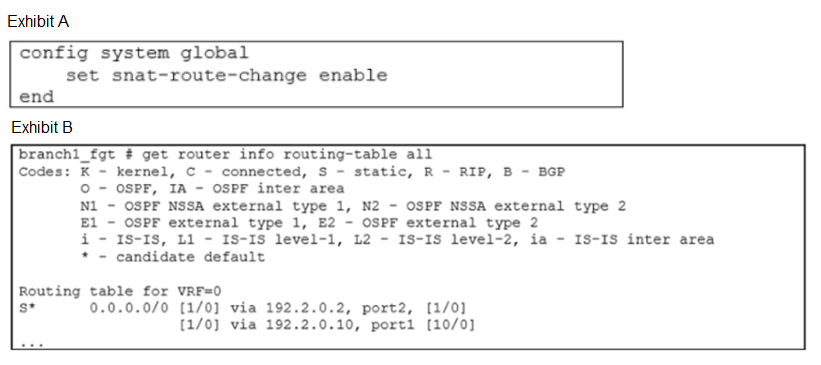
Exhibit A shows the source NAT (SNAT) global setting and exhibit B shows the routing table on FortiGate. Based on the exhibits, which two actions does FortiGate perform on existing sessions established over port2, if the administrator increases the static route priority on port2 to 20? (Choose two.)
A. FortiGate flags the sessions as dirty.
B. FortiGate continues routing the sessions with no SNAT, over port2.
C. FortiGate performs a route lookup for the original traffic only.
D. FortiGate updates the gateway information of the sessions with SNAT so that they use port1 instead of port2.
Explanation:
This question tests the understanding of the set snat-route-change enable command and its interaction with the routing table.
1. Understanding the Initial State (Exhibit B):
The routing table has two default routes.
via 192.2.0.2, port2 has an Administrative Distance (AD) of 1.
via 192.2.0.10, port1 has an Administrative Distance (AD) of 10.
In routing, a lower AD is preferred. Therefore, all new sessions will egress via port2.
2. Understanding the Configuration (Exhibit A):
set snat-route-change enable is a critical global setting.
When this is enabled, the FortiGate will dynamically update the NAT and routing information for existing sessions if a better route becomes available. Without this setting, existing sessions would continue on their original path even if a better route appears.
3. Analyzing the Change: "Increases the static route priority on port2 to 20"
In FortiOS, "priority" for static routes refers to the Administrative Distance (AD).
Increasing the AD from 1 to 20 makes the route less preferable.
After this change, the routing table will look like this:
via 192.2.0.2, port2 [20/0]
via 192.2.0.10, port1 [10/0]
Now, the route via port1 has the better (lower) AD and becomes the new best route for new sessions.
4. The Impact on Existing Sessions with snat-route-change enable:
Because snat-route-change is enabled, the FortiGate will not let existing sessions stay on the now-inferior path (port2). It will take the following actions:
Flag Sessions as Dirty:
The FortiGate identifies all existing sessions that are using the now-less-preferred route (port2). It marks these sessions as "dirty" in the session table, indicating they need to be re-evaluated.
Perform a New Route Lookup: For these "dirty" sessions, the FortiGate performs a new route lookup. This lookup will now find the best route is via port1.
Update Session Information:
The session table is updated with the new egress interface (port1) and, crucially, the SNAT IP address will be changed to an IP address belonging to port1 (or its associated IP pool). The session is then routed out the new interface.
Analysis of Each Option:
A. FortiGate flags the sessions as dirty.
Correct. This is the initial step in the process of updating existing sessions when snat-route-change is enabled and a better route is found.
B. FortiGate continues routing the sessions with no SNAT, over port2.
Incorrect. This would be the behavior if snat-route-change was set to disable (the default). The exhibit shows it is enable, so the sessions will not continue over port2.
C. FortiGate performs a route lookup for the original traffic only.
Incorrect. The phrase "original traffic only" is ambiguous and misleading. The FortiGate performs a new route lookup for the existing sessions that were flagged, not just for the initial packet. Furthermore, this action is part of the process but is not a complete description of the outcome on its own.
D. FortiGate updates the gateway information of the sessions with SNAT so that they use port1 instead of port2.
Correct. This accurately describes the final result of the process. The session's egress interface and SNAT IP are updated to match the new best route via port1.
Reference:
Fortinet Documentation Library:
The FortiOS CLI reference for config system global describes the snat-route-change option: "Enable/disable the ability to change the source NAT (SNAT) IP address when a link fails or the route changes... If enabled, the source NAT IP address is updated when a link failure or route change causes the egress interface to change."
This behavior is crucial for SD-WAN and multi-WAN deployments to ensure seamless failover for existing TCP sessions and UDP streams.
Refer to the exhibit.

The device exchanges routes using IBGP. Which two statements are correct about the IBGP configuration and routing information on
the device? (Choose two.)
A. Each BGP route is three hops away from the destination.
B. ibgp-multipath is disabled.
C. Additional-path is enabled.
D. You can run the get router info routing-table database command to display the additional paths.
🔍 Explanation:
The exhibit shows multiple BGP routes for the same prefix (10.0.2.0/24), each with identical administrative distance and metric ([200/0]), but different next-hop IPs and tunnels. This behavior is only possible when BGP additional-path is enabled, allowing the device to install and retain multiple paths for the same prefix — even if they’re not used for forwarding.
C. Additional-path is enabled ✔️ Correct:
The presence of multiple BGP entries for the same prefix confirms that the device is configured to receive and store additional paths via IBGP. This is a feature explicitly enabled under BGP configuration.
D. You can run the get router info routing-table database command to display the additional paths ✔️ Correct:
This command shows all learned routes, including non-best paths retained due to additional-path. It’s the correct diagnostic tool to verify additional-path behavior.
❌ Incorrect options:
A. Each BGP route is three hops away from the destination ⛔ Incorrect:
The [3] in the output refers to the number of multipath entries, not hop count. Hop count is not shown in this output, and recursive next-hop resolution via VPN tunnels makes hop count ambiguous.
B. ibgp-multipath is disabled ⛔ Incorrect:
The presence of multiple equal-cost BGP routes suggests ibgp-multipath is enabled or additional-path is active. Without explicit config output, we cannot confirm that ibgp-multipath is disabled.
📚 Reference:
Fortinet KB:
Understanding BGP Additional Path
What are two reasons for using FortiManager to organize and manage the network for a group of FortiGate devices? (Choose two.)
A. It simplifies the deployment and administration of SD-WAN on managed FortiGate devices.
B. It improves SD-WAN performance on the managed FortiGate devices.
C. It sends probe signals as health checks to the beacon servers on behalf of FortiGate.
D. It acts as a policy compliance entity to review all managed FortiGate devices.
E. It reduces WAN usage on FortiGate devices by acting as a local FortiGuard server.
Explanation:
FortiManager provides centralized management for Fortinet devices. Its primary benefits are related to operational efficiency, consistency, and oversight, not direct data plane performance.
Analysis of Each Option:
A. It simplifies the deployment and administration of SD-WAN on managed FortiGate devices.
Correct. This is a core function of FortiManager. It allows network administrators to define SD-WAN templates, zones, rules, and performance SLAs in a central location and push them out to dozens or hundreds of FortiGate devices. This eliminates the need to configure each device individually, drastically simplifying deployment and ongoing administration.
B. It improves SD-WAN performance on the managed FortiGate devices.
Incorrect. FortiManager handles the configuration and policy management of SD-WAN. The actual performance of the SD-WAN data path (latency, jitter, packet loss) is determined by the underlying WAN links, the FortiGate's local processing, and the results of its local performance SLA probes. FortiManager does not directly impact these real-time performance metrics.
C. It sends probe signals as health checks to the beacon servers on behalf of FortiGate.
Incorrect. Performance SLA probes (health checks) are generated directly by the individual FortiGate devices themselves. This is a local function critical for the FortiGate to make real-time path selection decisions. FortiManager does not originate these probes.
D. It acts as a policy compliance entity to review all managed FortiGate devices.
Correct.FortiManager includes powerful policy and configuration compliance tools. It can perform audits to check if managed devices are compliant with the central policy definition. It can identify configuration drift (where a device's config has been changed locally and differs from the central template) and report on or remediate those differences, ensuring security and configuration consistency across the entire network.
E. It reduces WAN usage on FortiGate devices by acting as a local FortiGuard server.
Incorrect. This function is performed by FortiGuard Anycast or a dedicated FortiManager with a specific license and role for local FortiGuard distribution. A standard FortiManager used for device configuration management does not inherently act as a local FortiGuard server to cache and serve security updates (IPS, AV, Web Filtering databases). This is a separate, specialized role.
Reference:
Fortinet Documentation Library:
The FortiManager Administration Guide emphasizes its role in "centralized management," "template-based deployment," and "policy and object management," which directly supports options A and D.
The guide on SD-WAN management with FortiManager specifically details how to create and push SD-WAN configurations to multiple devices from a single pane of glass.
Which action fortigate performs on the traffic that is subject to a per-IP traffic shaper of 10Mbps?
A. FortiGate applies traffic shaping to the original traffic direction only.
B. FortiGate shares 10 Mbps of bandwidth equally among all source IP addresses. RIAS
C. Fortigate limits each source ip address to a maximum bandwidth of 10 Mbps.
D. FortiGate guarantees a minimum of 10 Mbps of bandwidth to each source IP address.
Explanation:
In FortiOS, a per-IP traffic shaper enforces a bandwidth ceiling on each individual source IP address. When configured with a 10 Mbps limit, FortiGate ensures that each unique source IP can transmit traffic up to 10 Mbps, but no more. This is especially useful in multi-user environments like branch offices or guest networks, where administrators want to prevent any single user or device from consuming excessive bandwidth.
The shaping mechanism is applied at the session level, and FortiGate tracks sessions per source IP. Once the cumulative traffic from a source IP reaches the defined threshold, FortiGate begins to drop or delay packets to maintain the limit. This shaping is not shared across IPs and does not guarantee bandwidth—it simply enforces a maximum.
This behavior is consistent across FortiOS 7.2 and is applicable whether the traffic shaper is applied in a firewall policy, SD-WAN rule, or QoS profile.
Why the other options are incorrect:
A. FortiGate applies traffic shaping to the original traffic direction only.
❌ Incorrect. Traffic shaping can be applied to either direction—ingress or egress—depending on configuration. FortiGate allows shaping on both directions if needed, and per-IP shaping is not restricted to just the original direction.
📚 Reference:
FortiOS 7.2 Admin Guide –
Traffic Shaping Direction Settings
B. FortiGate shares 10 Mbps of bandwidth equally among all source IP addresses.
❌ Incorrect. This describes a shared shaper, not a per-IP shaper. In a shared shaper, the total bandwidth is divided among all users. In contrast, a per-IP shaper gives each IP its own limit, independent of others.
📚 Reference:
Fortinet KB Article – Difference Between Shared and Per-IP Shapers
D. FortiGate guarantees a minimum of 10 Mbps of bandwidth to each source IP address.
❌ Incorrect. Traffic shaping in FortiGate is used to limit bandwidth, not to guarantee it. Guaranteeing bandwidth would require priority-based QoS or bandwidth reservation, which is not the function of a per-IP shaper.
📚 Reference:
FortiOS 7.2 CLI Guide – set guaranteed-bandwidth (used in QoS, not per-IP shaper)
Operational Use Case:
Imagine a branch office with 100 users and a 1 Gbps internet link. To prevent any single user from hogging bandwidth—say, for large downloads or video streaming—the admin configures a per-IP shaper of 10 Mbps. This ensures fair usage: each user can use up to 10 Mbps, but not more, regardless of how idle or busy the rest of the network is.
This setup is ideal for environments where fairness and bandwidth containment are more important than performance guarantees.
CLI Example:
bash
config firewall shaper per-ip-shaper
edit "limit-10mbps"
set maximum-bandwidth 10000
next
end
Apply this shaper in a firewall policy or SD-WAN rule to enforce the limit per source IP.
📚 References:
FortiOS 7.2 Administration Guide –
Traffic Shaping
FortiOS CLI Reference –
Per-IP Shaper Configuration
What is a benefit of using application steering in SD-WAN?
A. The traffic always skips the regular policy routes.
B. You steer traffic based on the detected application.
C. You do not need to enable SSL inspection.
D. You do not need to configure firewall policies that accept the SD-WAN traffic.
Explanation:
Application steering is a core, advanced feature of SD-WAN that moves beyond simple routing based on IP addresses and ports.
Analysis of Each Option:
A. The traffic always skips the regular policy routes.
Incorrect. The relationship between SD-WAN rules and policy routes is fixed: SD-WAN rules always have precedence over policy routes, regardless of whether application steering is used. This is not a unique benefit of application steering; it's a fundamental characteristic of the SD-WAN path selection order.
B. You steer traffic based on the detected application.
Correct. This is the primary benefit and definition of application steering. It leverages FortiGate's deep packet inspection (DPI) capabilities to identify applications regardless of the port, protocol, or IP address they use. This allows you to create intelligent SD-WAN rules such as:
"Route all Microsoft 365 traffic (identified as an application) over the high-priority link."
"Block all social media applications."
"Send all VoIP traffic (e.g., Skype, Zoom) over the low-latency MPLS link."
This provides granular, business-centric control over network traffic.
C. You do not need to enable SSL inspection.
Incorrect. In fact, the opposite is often true. To accurately identify applications that use encrypted HTTPS traffic (which is most modern traffic), you must enable and use SSL/HTTPS inspection. Without it, the FortiGate can only see the initial TLS handshake and the destination IP, severely limiting its ability to perform deep application detection. Application steering often relies on SSL inspection for its accuracy.
D. You do not need to configure firewall policies that accept the SD-WAN traffic.
Incorrect. This is a fundamental misunderstanding of the FortiOS security model. SD-WAN rules are for path selection, not packet acceptance. All traffic, regardless of SD-WAN rules, must still be permitted by a stateful firewall policy that specifies the source interface, source address, destination interface, destination address, and service. The SD-WAN rule determines which path an accepted packet takes, but the firewall policy determines if the packet is accepted in the first place.
Reference:
Fortinet Documentation Library:
The FortiOS SD-WAN guide has a specific section on "Application-based SD-WAN rules." It explicitly states that you can "create SD-WAN rules that steer traffic matching specific applications or groups of applications to a specified SD-WAN service."
It emphasizes that this allows for more granular and intelligent control over traffic than traditional routing based on IP/subnet alone.
Refer to the exhibit, which shows the IPsec phase 1 configuration of a spoke.
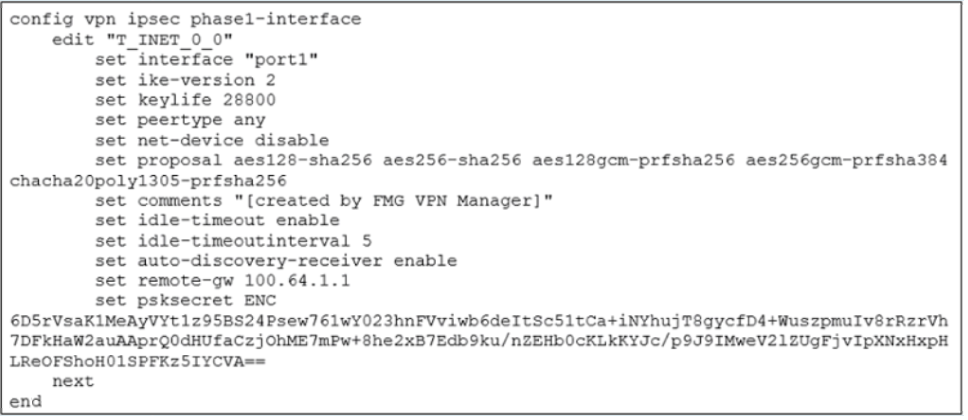
What must you configure on the IPsec phase 1 configuration for ADVPN to work with SDWAN?
A. You must set ike-version to 1.
B. You must enable net-device.
C. You must enable auto-discovery-sender.
D. You must disable idle-timeout.
Explanation:
For ADVPN (Auto-Discovery VPN) to function within an SD-WAN overlay, the IPsec tunnels themselves must be capable of participating in the ADVPN protocol. This is controlled by two specific commands in the Phase 1 configuration.
Analysis of Each Option:
A. You must set ike-version to 1.
Incorrect. While ADVPN can work with IKEv1 in some specific scenarios, IKEv2 is strongly recommended and required for a full SD-WAN and ADVPN implementation. IKEv2 provides better support for dynamic addressing, rekeying, and dead peer detection (DPD), which are crucial for a stable and scalable SD-WAN network. The exhibit correctly shows set ike-version 2.
B. You must enable net-device.
Incorrect. The net-device setting controls whether a virtual IPsec interface is created in the kernel. For ADVPN and SD-WAN, this must be disabled (set net-device disable). This is a critical requirement because it allows the FortiGate to treat the IPsec tunnel as a logical member of an SD-WAN zone and apply SD-WAN policies and routing to it. The exhibit correctly shows set net-device disable.
C. You must enable auto-discovery-sender.
Correct. ADVPN requires two roles:
auto-discovery-receiver:
This is enabled on the hub FortiGate (or on spokes that will accept incoming shortcut requests). The hub acts as the receiver for queries. The exhibit shows this is enabled (set auto-discovery-receiver enable), which is correct for a hub or a spoke that can receive shortcuts.
auto-discovery-sender:
This must be enabled on the spoke FortiGates that will initiate the shortcut tunnels. This allows them to send the SHORTCUT_QUERY messages to the hub.
For a full ADVPN setup, the hub has receiver enabled, and the spokes have sender enabled. Since the question asks what "you must configure" for ADVPN to work, enabling auto-discovery-sender on spokes is a mandatory part of that configuration.
D. You must disable idle-timeout.
Incorrect. The idle-timeout feature is actually very beneficial for ADVPN. It allows the dynamically created spoke-to-spoke shortcuts to be torn down automatically after a period of inactivity, conserving resources. This is not a requirement but a best practice for managing the lifecycle of on-demand tunnels. The exhibit shows it is enabled, which is fine.
Reference:
Fortinet Documentation Library:
The FortiOS Cookbook chapter on "ADVPN" explicitly details the Phase 1 configuration requirements. It states that for a hub, you configure set auto-discovery-receiver enable, and for a spoke, you configure set auto-discovery-sender enable.
Which two statements describe how IPsec phase 1 main mode is different from aggressive mode when performing IKE negotiation? (Choose two )
A. A peer ID is included in the first packet from the initiator, along with suggested security policies.
B. XAuth is enabled as an additional level of authentication, which requires a username and password.
C. A total of six packets are exchanged between an initiator and a responder instead of three packets.
D. The use of Diffie Hellman keys is limited by the responder and needs initiator acceptance.
Explanation:
The key difference between Main Mode and Aggressive Mode in IKEv1 is the trade-off between security and speed, primarily reflected in the number of messages exchanged and the exposure of identity information.
Analysis of Each Option:
A. A peer ID is included in the first packet from the initiator, along with suggested security policies.
Correct. This is a fundamental and critical difference. In Aggressive Mode, the first packet from the initiator contains the peer ID (often the IP address), the Diffie-Hellman public value, a nonce, and all the security proposals. This exposes the identities before a secure channel is established. In Main Mode, the identities of the peers are exchanged only in the third and fourth packets, after the secure tunnel (ISAKMP SA) has been established, thus hiding them from eavesdroppers.
B. XAuth is enabled as an additional level of authentication, which requires a username and password.
Incorrect. Extended Authentication (XAuth) is an optional feature that can be used with either Main Mode or Aggressive Mode. It is not a defining characteristic that differentiates the two modes. XAuth occurs after the IKE Phase 1 negotiation is complete.
C. A total of six packets are exchanged between an initiator and a responder instead of three packets.
Correct. This is the most obvious operational difference.
Main Mode uses a 6-packet exchange (3 round trips).
Aggressive Mode uses a 3-packet exchange (1.5 round trips).
The reduced number of packets in Aggressive Mode is why it is faster, but it achieves this speed by compromising on security aspects like identity protection.
D. The use of Diffie Hellman keys is limited by the responder and needs initiator acceptance.
Incorrect. The Diffie-Hellman key exchange is a core part of both Main Mode and Aggressive Mode. The process is conceptually the same in both: the initiator and responder exchange DH public values and use them to generate a shared secret. The responder does not "limit" the DH groups; rather, both peers must agree on a DH group from the list of proposals offered by the initiator. This negotiation process is similar in both modes.
Reference:
General IPsec/IKEv1 Knowledge:
The 6-packet vs. 3-packet exchange and the identity protection (hiding) in Main Mode are standard, fundamental differentiators between the two modes, documented in RFC 2409 and all major network security textbooks.
Fortinet Documentation Library:
While the FortiOS documentation may not have a dedicated section comparing the two, the CLI reference for config vpn ipsec phase1-interface includes the mode option (main/aggressive), and the underlying protocol behavior is consistent with these industry-standard principles.
Which two statements about the SD-WAN zone configuration are true? (Choose two.)
A. The service-sla-tie-break setting enables you to configure preferred member selection based on the best route to the destination.
B. You can delete the default zones.
C. The default zones are virtual-wan-link and SASE.
D. An SD-WAN member can belong to two or more zones.
Explanation:
SD-WAN zones are logical groupings of interfaces (members) that share common characteristics, allowing you to apply rules to a group rather than individual interfaces.
Analysis of Each Option:
A. The service-sla-tie-break setting enables you to configure preferred member selection based on the best route to the destination.
Correct. The service-sla-tie-break command is used in the SD-WAN rule configuration (config service) to determine how to break a tie when multiple members have the same, best SLA score. One of the options for this setting is cfg-order, which means it will select the member based on the order they are listed in the priority-members list. However, another key option is input-device. When set to input-device, the FortiGate will prefer the member that matches the best route's input device, effectively using the routing table as the tie-breaker. This makes the statement true.
B. You can delete the default zones.
Incorrect. Default zones are system-defined and cannot be deleted. You can create and delete custom zones, but the pre-defined ones like virtual-wan-link are permanent.
C. The default zones are virtual-wan-link and SASE.
Correct. In FortiOS, the virtual-wan-link is the traditional, long-standing default SD-WAN zone. With newer versions and the integration of FortiSASE, the SASE zone has been added as another default zone to facilitate SD-WAN policies for Secure Access Service Edge architectures. These are both pre-configured and cannot be removed.
D. An SD-WAN member can belong to two or more zones.
Incorrect. A fundamental rule of SD-WAN configuration is that a physical or logical interface (a member) can be assigned to one and only one SD-WAN zone. This is because the zone is used to determine the egress path for traffic, and having an interface in multiple zones would create ambiguity in the path selection logic.
Reference:
Fortinet Documentation Library:
The FortiOS SD-WAN guide explains the concept of zones and states that "An SD-WAN zone is a logical group of one or more SD-WAN members." It implies the one-to-one relationship between a member and its zone.
The CLI reference for config system sdwan and config service details the service-sla-tie-break option and its input-device parameter, which uses the routing table information for selection.
The list of default zones (virtual-wan-link, SASE) is visible in the GUI when creating a new SD-WAN zone or in the CLI when using autocomplete.
| Page 1 out of 8 Pages |