
Which are two benefits of using CLI templates in FortiManager? (Choose two.)
A. You can reference meta fields.
B. You can configure interfaces as SD-WAN members without having to remove references first.
C. You can configure FortiManager to sync local configuration changes made on the managed device, to the CLI template.
D. You can configure advanced CLI settings.
Explanation:
FortiManager CLI templates offer advanced configuration flexibility for managing FortiGate devices. Two key benefits are:
✅ A. You can reference meta fields.
CLI templates support meta fields, which are dynamic placeholders tied to device-level variables. This allows administrators to create reusable templates that adapt per device, enabling scalable and efficient deployments. For example, you can define a meta field like vlan_id and use it across multiple devices without hardcoding values.
This is especially useful in large environments where device-specific values (like IPs, interface names, or VLANs) vary but the configuration logic remains consistent.
📚 Reference:
Fortinet Docs –
Interface Template Support for Meta Fields
✅ D. You can configure advanced CLI settings.
CLI templates allow access to low-level configuration options not exposed in the GUI. This includes advanced VPN parameters, custom routing tweaks, debug commands, and other granular settings. These templates are essential when GUI-based policy packages or object templates lack the required depth.
For example,
configuring auto-discovery-sender for ADVPN or applying custom SD-WAN health checks often requires CLI-level access.
📚 Reference:
Fortinet Docs –
CLI Templates
❌ B. You can configure interfaces as SD-WAN members without having to remove references first.
Incorrect.FortiManager requires removal of existing references before reassigning interfaces to SD-WAN zones. This applies regardless of whether you use CLI templates or GUI. Attempting to assign an interface already referenced in another object (e.g., zone or policy) will result in a conflict.
📚 Reference:
Fortinet KB – SD-WAN Interface Assignment Limitations
❌ C. You can configure FortiManager to sync local configuration changes made on the managed device, to the CLI template.
Incorrect. FortiManager does not automatically sync local changes from FortiGate back into CLI templates. While you can detect and import changes using revision control or policy package diff tools, CLI templates remain static unless manually updated. There is no reverse sync mechanism from device to template.
📚 Reference:
Fortinet Docs –
Policy and Object Synchronization
Summary:
CLI templates in FortiManager are powerful tools for advanced configuration and scalable deployments. Meta fields enable dynamic, device-specific provisioning, while CLI access allows full control over FortiGate features. However, interface assignment and config sync limitations still apply, reinforcing the need for careful template design and version control.
Refer to the exhibits.
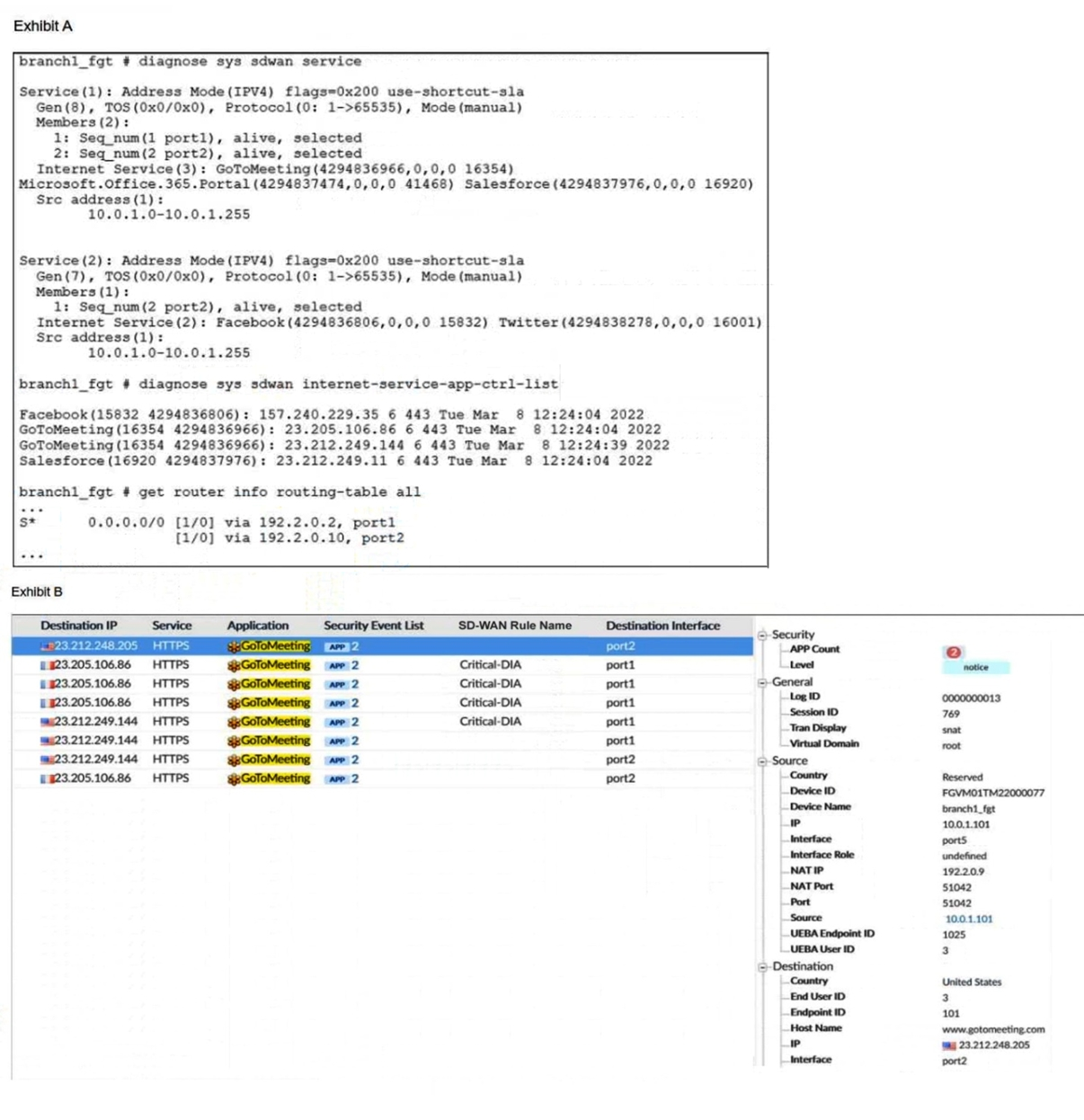
An administrator is testing application steering in SD-WAN. Before generating test traffic, the administrator collected the information shown in exhibit A. After generating GoToMeeting test traffic, the administrator examined the respective traffic log on FortiAnalyzer, which is shown in exhibit B. The administrator noticed that the traffic matched the implicit SD-WAN rule, but they expected the traffic to match rule ID 1. Which two reasons explain why the traffic matched the implicit SD-WAN rule? (Choose two.)
A. FortiGate did not refresh the routing information on the session after the application was detected.
B. Port1 and port2 do not have a valid route to the destination.
C. Full SSL inspection is not enabled on the matching firewall policy.
D. The session 3-tuple did not match any of the existing entries in the ISDB application cache.
Explanation:
In FortiGate SD-WAN deployments, application steering relies on accurate identification of traffic using ISDB (Internet Service Database) and deep packet inspection. When traffic unexpectedly matches the implicit SD-WAN rule instead of a defined rule (e.g., rule ID 1), it typically indicates a failure in application detection or session steering logic. Two key reasons explain this behavior:
✅ A. FortiGate did not refresh the routing information on the session after the application was detected.
FortiGate performs application steering based on session information. If the application is detected after the session is established and FortiGate does not refresh the routing decision, the session continues using the default or implicit SD-WAN rule. This is a known behavior in FortiOS where late application identification does not retroactively apply SD-WAN rules unless session refresh is triggered.
This issue is more common when application detection is delayed due to inspection settings or encrypted traffic. FortiGate may classify the session as generic HTTPS initially, and only later identify it as GoToMeeting, but by then the SD-WAN rule has already been bypassed.
📚 Reference:
Fortinet Docs –
Application Steering Using SD-WAN Rules
Fortinet KB –
SD-WAN Application Steering Behavior
✅ C. Full SSL inspection is not enabled on the matching firewall policy.
Application steering depends on accurate application identification, which often requires full SSL inspection. Without it, FortiGate cannot decrypt and inspect HTTPS traffic deeply enough to identify applications like GoToMeeting. Instead, it may classify the traffic as generic SSL or HTTPS, which does not match the ISDB signature required by SD-WAN rule ID 1.
This results in the traffic falling back to the implicit SD-WAN rule, which handles unmatched sessions. Enabling full SSL inspection allows FortiGate to extract application signatures from encrypted payloads, ensuring proper rule matching.
📚 Reference:
Fortinet KB –
Application Control and SSL Inspection
❌ B. Port1 and port2 do not have a valid route to the destination.
Incorrect. If port1 and port2 lacked valid routes, the traffic would be dropped or rerouted, but this would not cause a fallback to the implicit SD-WAN rule. The SD-WAN rule matching process occurs before routing decisions. The issue here is rule matching, not routing.
❌ D. The session 3-tuple did not match any of the existing entries in the ISDB application cache.
Incorrect. ISDB uses multiple attributes beyond just the 3-tuple (source IP, destination IP, port) to identify applications. Even if the 3-tuple is new, FortiGate can still identify the application if SSL inspection is enabled and the traffic matches known patterns. The failure here is due to lack of inspection, not cache mismatch.
Summary:
The traffic matched the implicit SD-WAN rule because:
Application detection occurred too late, and FortiGate did not refresh the session routing.
Full SSL inspection was not enabled, preventing accurate identification of GoToMeeting.
Which two statements are true about using SD-WAN to steer local-out traffic? (Choose two.)
A. FortiGate does not consider the source address of the packet when matching an SDWAN rule for local-out traffic.
B. By default, local-out traffic does not use SD-WAN.
C. By default, FortiGate does not check if the selected member has a valid route to the destination.
D. You must configure each local-out feature individually, to use SD-WAN.
Explanation:
"Local-out" traffic refers to sessions where the FortiGate itself is the source of the traffic. This includes management traffic (SSH, GUI, DNS queries, NTP, FortiGuard updates), traffic generated by features like IPsec VPN tunnels (DPD, IKE), and explicitly defined traffic from central SNAT policies.
Analysis of Each Option:
A. FortiGate does not consider the source address of the packet when matching an SD-WAN rule for local-out traffic.
Incorrect. For local-out traffic, the source address is critical for matching an SD-WAN rule. The source of the packet is one of the FortiGate's own IP addresses. You must configure the SD-WAN rule's source to match this specific FortiGate IP address (e.g., the management IP, the IP used for FortiGuard updates, etc.) for the rule to be applied. The rule does not match based on the internal user's IP for this type of traffic.
B. By default, local-out traffic does not use SD-WAN.
Correct. By default, traffic originating from the FortiGate follows the standard routing table and is not subjected to SD-WAN rule evaluation. You must explicitly enable SD-WAN steering for this type of traffic on a per-feature basis.
C. By default, FortiGate does not check if the selected member has a valid route to the destination.
Incorrect. This statement is false. The fundamental SD-WAN principle that a member must have a valid route to the destination still applies to local-out traffic. The SD-WAN rule will not select a member that lacks a route to the target, regardless of the traffic's origin.
D. You must configure each local-out feature individually, to use SD-WAN.
Correct.This is the key to making it work. You cannot simply create an SD-WAN rule and expect all local-out traffic to use it. You must go into the configuration of each specific service and direct it to use the SD-WAN zone or rule. Common examples include:
System > Feature Visibility: Enable "SD-WAN traffic originating from the FortiGate".
System > Settings: Configuring the "SD-WAN Zone" for management services (HTTPS, SSH, PING).
Network > DNS: Setting the "SD-WAN Zone" for DNS servers.
Security Fabric > Fabric Connectors: Setting the "SD-WAN Zone" for FortiGuard services.
Policy & Objects > Central SNAT: Creating policies that specify an SD-WAN zone as the outgoing interface.
Reference:
Fortinet Documentation Library:
The FortiOS SD-WAN guide has a specific section on "SD-WAN for Local Traffic" or "SD-WAN for traffic originating from FortiGate." It explicitly states that this is disabled by default and details the steps required to enable it for various services like management, DNS, and FortiGuard updates.
The documentation emphasizes that you must configure the source address in the SD-WAN rule to be the IP of the FortiGate interface that generates the traffic you want to steer.
Refer to the exhibit.
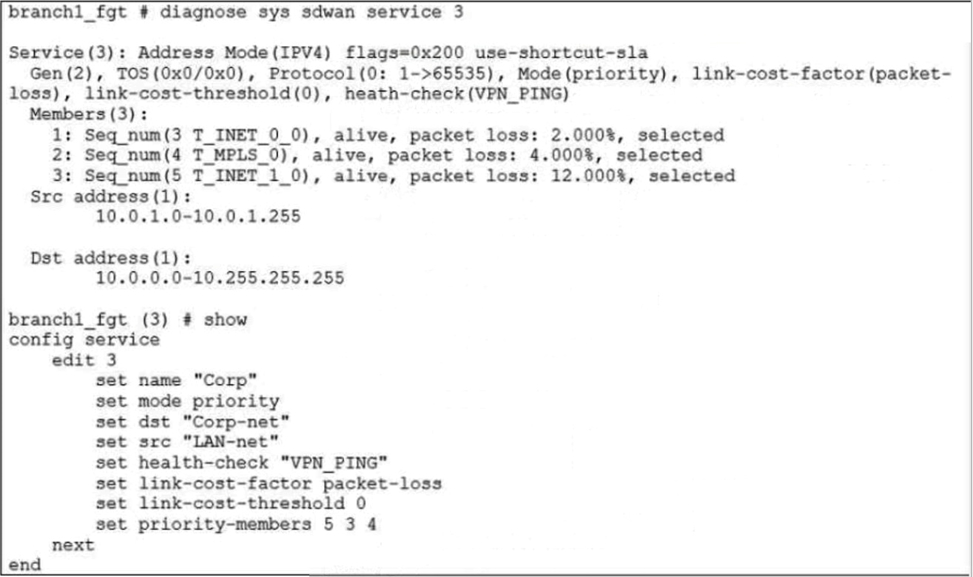
The exhibit shows the SD-WAN rule status and configuration. Based on the exhibit, which change in the measured packet loss will make T_INET_1_0 the new preferred member?
A. When all three members have the same packet loss.
B. When T_INET_0_0 has 4% packet loss.
C. When T_INET_0_0 has 12% packet loss.
D. When T_INET_1_0 has 4% packet loss.
Explanation:
In the SD-WAN configuration shown in the exhibit, the service named "Corp" is operating in priority mode, and the link-cost-factor is set to packet-loss. This means FortiGate selects the preferred member based on the lowest packet loss among the listed priority members.
The current priority member list is: set priority-members 5 3 4 This means:
Member 5 has highest priority
Member 3 (T_INET_0_0) is next
Member 4 (T_INET_1_0) is lowest among the three
From the diagnostic output:
Both T_INET_0_0 and T_MPLS_0 (member 3 and 4) are alive with 0% packet loss
T_INET_1_0 (member 5) is not currently selected, likely due to higher packet loss or SLA failure
To make T_INET_1_0 the preferred member, FortiGate must detect that higher-priority members (5 and 3) have worse SLA metrics, specifically packet loss, since that’s the configured link-cost-factor.
✅ Why C. T_INET_0_0 has 12% packet loss is correct:
If T_INET_0_0 (member 3) experiences 12% packet loss, it will fail SLA thresholds or become less preferred.
If T_INET_1_0 (member 5) has better packet loss metrics, FortiGate will shift preference to it.
This aligns with FortiOS SD-WAN behavior: priority mode + SLA degradation = failover to next viable member.
📚 Reference:
Fortinet Docs –
SD-WAN Performance SLA and Link Cost
❌ Why other options are incorrect:
A. When all three members have the same packet loss.
✖️ Incorrect. If all members have equal SLA metrics, FortiGate will stick to the configured priority order, not switch to T_INET_1_0.
B. When T_INET_0_0 has 4% packet loss.
✖️ Incorrect. A 4% packet loss may not be high enough to trigger SLA failure or reprioritization, especially if T_INET_1_0 has worse metrics.
D. When T_INET_1_0 has 4% packet loss.
✖️ Incorrect. This does not improve T_INET_1_0’s standing unless higher-priority members degrade further. FortiGate won’t prefer a lower-priority member unless SLA dictates.
Summary:
To make T_INET_1_0 the preferred SD-WAN member, FortiGate must detect significant packet loss on higher-priority members. A 12% packet loss on T_INET_0_0 is sufficient to trigger this shift, assuming T_INET_1_0 maintains better SLA metrics.
Exhibit.
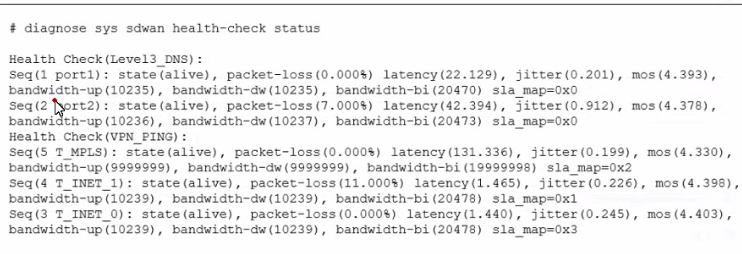
The exhibit shows the output of the command diagnose sys sdwan health-check status collected on a FortiGate device. Which two statements are correct about the health check status on this FortiGate device? (Choose two.)
A. The health-check VPN_PING orders the members according to the lowest jitter.
B. The interface T_INET_1 missed one SLA target.
C. There is no SLA criteria configured for the health-check Level3_DNS.
D. The interface T_INET_0 missed three SLA targets.
Explanation:
The key to interpreting this output is the sla_map value for each member. This value is a bitmask that indicates which specific SLA targets (e.g., latency, jitter, packet loss) the member is passing.
sla_map=0x0 means the member is passing 0 SLA targets.
sla_map=0x1 means it is passing the first target (binary 001).
sla_map=0x2 means it is passing the second target (binary 010).
sla_map=0x3 means it is passing the first and second targets (binary 011).
Analysis of Each Option:
A. The health-check VPN_PING orders the members according to the lowest jitter.
Incorrect. The output shows the members for the VPN_PING health check, but it does not show the final ordered list for an SD-WAN rule. The diagnose sys sdwan service command would show that. This command only shows the raw health check results. We cannot conclude the final ordering from this output alone.
B. The interface T_INET_1 missed one SLA target.
Correct. Let's look at the VPN_PING health check members:
Seq(4 T_INET_1) ... sla_map=0x1
A sla_map value of 0x1 (binary 001) indicates this member is passing one SLA target. If we assume the health check has multiple targets (e.g., latency, loss, jitter), passing only one target means it has missed the other(s). Therefore, it missed at least one SLA target.
C. There is no SLA criteria configured for the health-check Level3_DNS.
Correct. Look at the Level3_DNS health check members:
Seq(1 port1) ... sla_map=0x0
Seq(2 port2) ... sla_map=0x0
A sla_map value of 0x0 for both members means neither is passing any SLA targets. The most logical explanation for this is that no SLA targets (like maximum latency or maximum loss) are configured for the Level3_DNS health check. The probe is running and reporting metrics, but there are no thresholds defined for it to pass or fail.
D. The interface T_INET_0 missed three SLA targets.
Incorrect. Let's look at VPN_PING again:
Seq(3 T_INET_0) ... sla_map=0x3
A sla_map value of 0x3 (binary 011) indicates this member is passing two SLA targets (the first and the second). It is the member with the highest number of passed targets in this health check. Therefore, it did not miss three targets; it is the most successful one.
Reference:
Fortinet Documentation Library:
The FortiOS CLI reference for diagnose sys sdwan health-check explains that the sla_map is a "hex value of the SLA pass map," where each bit represents a specific SLA target defined in the health check configuration.
A value of 0 consistently across all members for a health check is a strong indicator that the health check is being used for monitoring and logging only, without any active SLA thresholds to enforce.
Which two statements about SD-WAN central management are true? (Choose two.)
A. It does not allow you to monitor the status of SD-WAN members.
B. It is enabled or disabled on a per-ADOM basis.
C. It is enabled by default.
D. It uses templates to configure SD-WAN on managed devices.
Explanation:
SD-WAN central management is a core feature of FortiManager that allows for the centralized configuration, deployment, and monitoring of SD-WAN across a fleet of FortiGate devices.
Analysis of Each Option:
A. It does not allow you to monitor the status of SD-WAN members.
Incorrect. This is the opposite of the truth. A primary benefit of central management is the ability to monitor the entire SD-WAN fabric from a single pane of glass. FortiManager provides dashboards and views that show the status, health, and performance metrics (latency, jitter, packet loss) of SD-WAN members for all managed devices.
B. It is enabled or disabled on a per-ADOM basis.
Correct. An ADOM (Administrative Domain) is a logical container for managing a set of devices. The SD-WAN central management feature is configured within the settings of each ADOM. An administrator can choose to enable SD-WAN management for one ADOM (e.g., the "Production" network) while leaving it disabled in another (e.g., a "Lab" environment).
C. It is enabled by default.
Incorrect. SD-WAN central management is not enabled by default. An administrator must explicitly enable it within the ADOM settings to begin using templates and the centralized workflow for SD-WAN configuration.
D. It uses templates to configure SD-WAN on managed devices.
Correct. This is the fundamental mechanism of central management. Instead of configuring each FortiGate individually, an administrator creates SD-WAN templates (for interfaces, zones, rules, performance SLAs) on the FortiManager. These templates are then applied to one or many managed FortiGate devices, ensuring consistency and drastically reducing deployment and maintenance time.
Reference:
Fortinet Documentation Library:
The FortiManager Administration Guide has a dedicated section on "SD-WAN Central Management." It explicitly states that you must first "Enable SD-WAN Configuration" in the ADOM settings.
It details the process of using "SD-WAN Templates" to define the configuration that is pushed to member devices, which is the core of the centralized management paradigm.
What does enabling the exchange-interface-ip setting enable FortiGate devices to exchange?
A. The gateway address of their IPsec interfaces
B. The tunnel ID of their IPsec interfaces
C. The IP address of their IPsec interfaces
D. The name of their IPsec interfaces
Explanation:
The exchange-interface-ip setting in FortiGate’s IPsec phase1-interface configuration enables devices to exchange the IP addresses of their tunnel interfaces during IKE negotiation. This is critical for dynamic routing protocols (like BGP or OSPF), ADVPN shortcut creation, and overlay visibility between peers.
When enabled, each FortiGate shares its local tunnel interface IP with the remote peer. This allows both ends to dynamically learn and use each other's overlay IPs for routing, monitoring, and establishing direct tunnels in ADVPN topologies.
This setting is especially important in hub-and-spoke ADVPN deployments, where spokes need to discover each other's tunnel IPs via the hub to form shortcut tunnels. Without this exchange, dynamic routing and shortcut creation may fail due to lack of IP reachability.
📚 Reference:
Fortinet KB –
How to use exchange-interface-ip in IPsec Tunnel
Fortinet Docs –
ADVPN Configuration Guide
Why other options are incorrect:
A. The gateway address of their IPsec interfaces
❌ Incorrect. Gateway addresses are static and typically defined in the remote-gw setting. They are not exchanged dynamically via exchange-interface-ip.
B. The tunnel ID of their IPsec interfaces
❌ Incorrect. Tunnel IDs are internal identifiers used by FortiGate for session tracking and configuration references. They are not part of IKE negotiation or interface IP exchange.
D. The name of their IPsec interfaces
❌ Incorrect. Interface names (e.g., vpn1, T_INET_0_0) are local to each FortiGate and are not shared or relevant to remote peers. They are used only within local configuration and diagnostics.
Operational Impact:
Enabling exchange-interface-ip ensures that both FortiGates can:
Dynamically learn each other's tunnel IPs
Establish routing adjacencies over IPsec interfaces
Support ADVPN shortcut tunnels between spokes
Enable overlay monitoring and SLA tracking
Without this setting, routing protocols may fail to establish neighbor relationships, and ADVPN spokes may not form direct tunnels due to missing IP information.
CLI Example:
bash
config vpn ipsec phase1-interface
edit "T_INET_0_0"
set exchange-interface-ip enable
next
end
This command ensures that the local tunnel IP is advertised during IKE negotiation and that the remote peer’s tunnel IP is learned and usable.
Summary:
The exchange-interface-ip setting allows FortiGate devices to exchange IPsec tunnel interface IPs, enabling dynamic routing and ADVPN functionality. It does not exchange gateway addresses, tunnel IDs, or interface names. This setting is essential for scalable VPN deployments and dynamic peer discovery.
Refer to the exhibit.
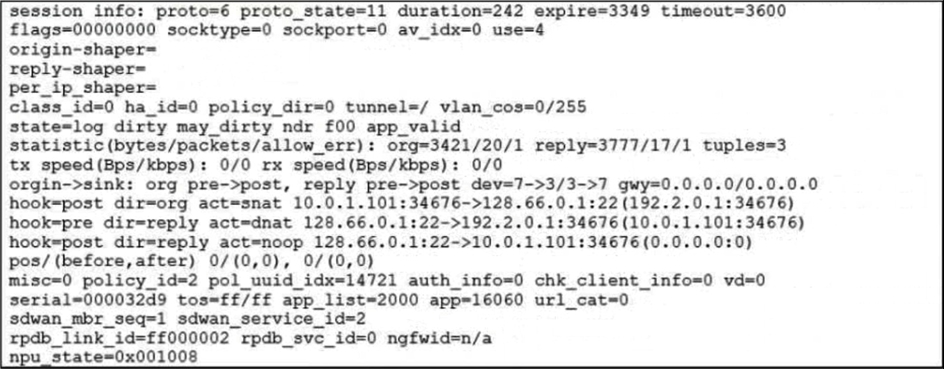
Which statement explains the output shown in the exhibit?
A. FortiGate performed standard FIB routing on the session.
B. FortiGate will not re-evaluate the session following a firewall policy change.
C. FortiGate used 192.2.0.1 as the gateway for the original direction of the traffic.
D. FortiGate must re-evaluate the session due to routing change.
Explanation:
The session output in the exhibit includes the keyword dirty in both hook=pre and hook=post lines, specifically:
hook=pre dirty=act
hook=post dirty=act
This indicates that FortiGate marked the session as "dirty", meaning the session is flagged for re-evaluation due to a change in routing or SD-WAN path selection. When routing changes occur—such as a new preferred route, SD-WAN member failover, or dynamic path adjustment—FortiGate does not immediately tear down the session. Instead, it marks it as dirty and re-evaluates the session at the next opportunity (e.g., on policy lookup or routing decision).
This behavior ensures that sessions adapt to new routing conditions without requiring manual intervention or immediate session termination.
📚 Reference:
Fortinet KB –
FortiGate Session Table Interpretation
Why other options are incorrect:
A. FortiGate performed standard FIB routing on the session.
❌ Incorrect. If standard FIB routing were used, the session would not be marked as dirty. The presence of dirty=act implies routing changes, not static FIB routing.
B. FortiGate will not re-evaluate the session following a firewall policy change.
❌ Incorrect. FortiGate does re-evaluate sessions when marked dirty due to policy or routing changes. This is part of its dynamic session management.
C. FortiGate used 192.2.0.1 as the gateway for the original direction of the traffic.
❌ Incorrect. The exhibit does not show any reference to 192.2.0.1. Gateway information is not present in the session output provided.
Summary:
The presence of dirty=act in both pre and post hooks confirms that FortiGate must re-evaluate the session due to a routing change. This ensures traffic follows updated SD-WAN or routing decisions without manual session teardown. Let me know if you want to simulate session re-evaluation or trace SD-WAN path shifts in real time.
Refer to the exhibits.
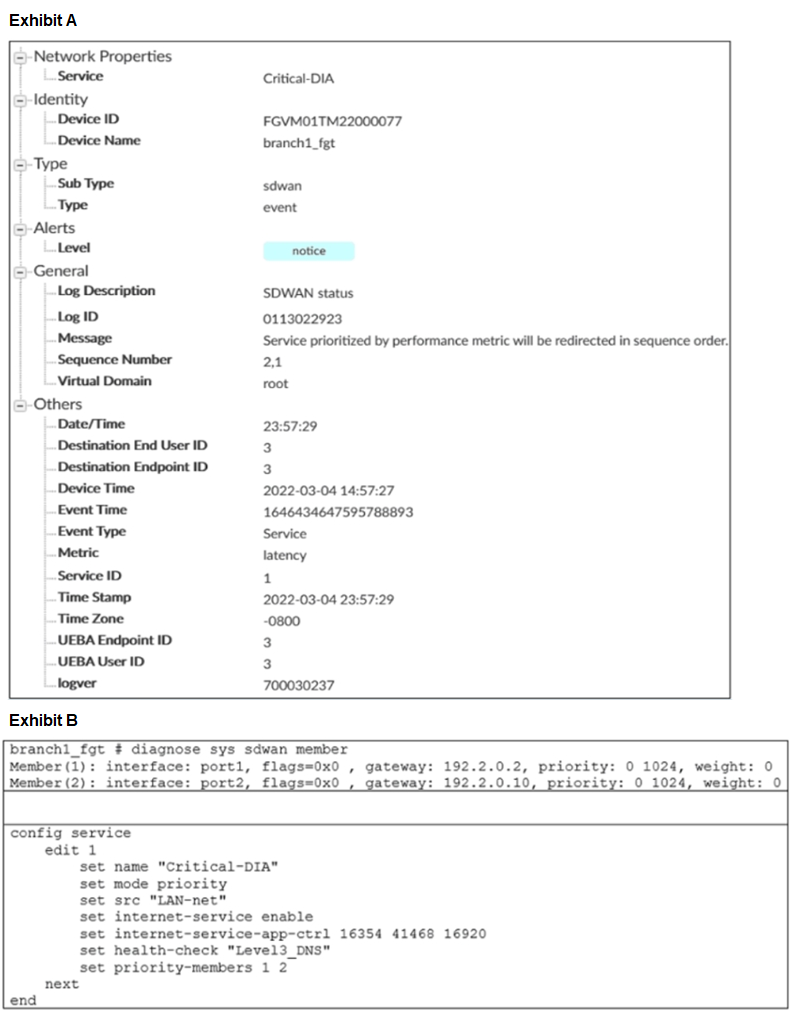
Exhibit A shows an SD-WAN event log and exhibit B shows the member status and the SD-WAN rule configuration. Based on the exhibits, which two statements are correct? (Choose two.)
A. FortiGate updated the outgoing interface list on the rule so it prefers port2.
B. Port2 has the highest member priority.
C. Port2 has a lower latency than port1.
D. SD-WAN rule ID 1 is set to lowest cost (SLA) mode.
Refer to the exhibit.
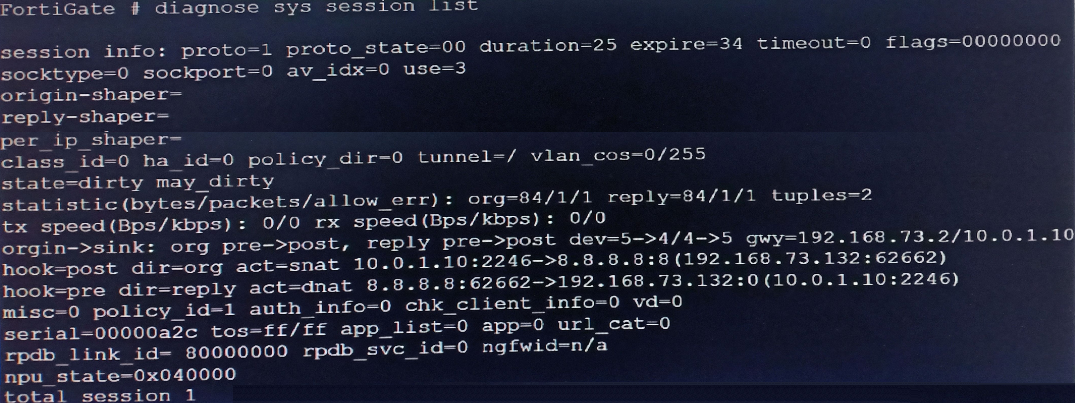
Based on the exhibit, which statement about FortiGate re-evaluating traffic is true?
A. The type of traffic defined and allowed on firewall policy ID 1 is UDP.
B. FortiGate has terminated the session after a change on policy ID 1.
C. Changes have been made on firewall policy ID 1 on FortiGate.
D. Firewall policy ID 1 has source NAT disabled.
Refer to the exhibits.
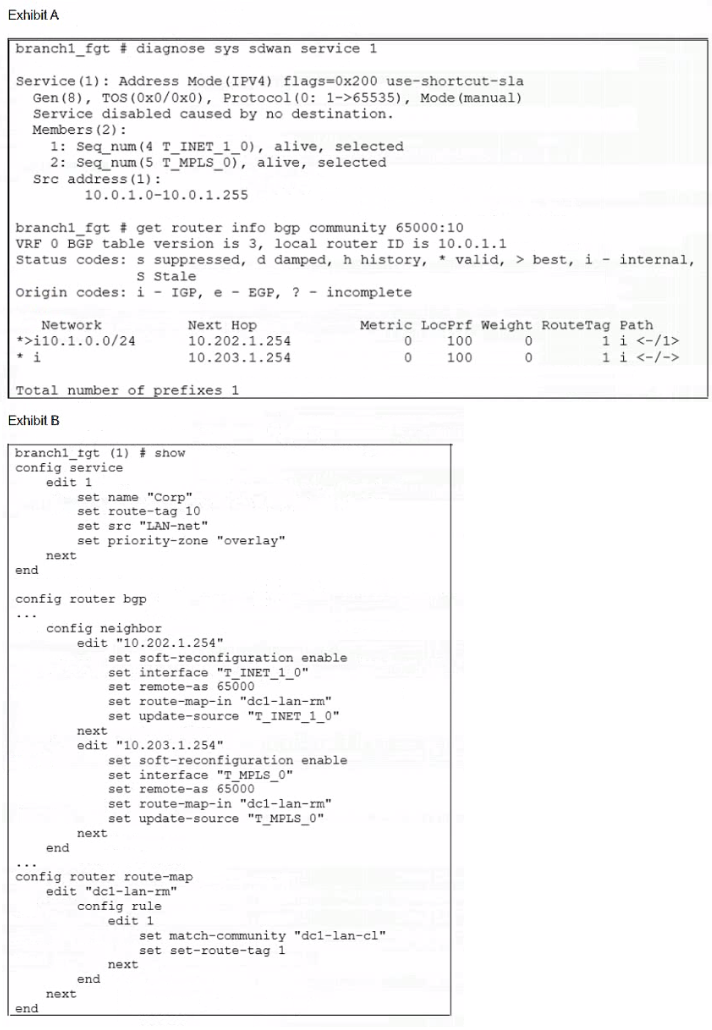
Exhibit A shows the SD-WAN rule status and the learned BGP routes with community 65000:10. Exhibit B shows the SD-WAN rule configuration, the BGP neighbor configuration, and the route map configuration. The administrator wants to steer corporate traffic using routes tags in the SD-WAN rule ID 1. However, the administrator observes that the corporate traffic does not match the SD-WAN rule ID 1. Based on the exhibits, which configuration change is required to fix issue?
A. In the dcl-lab-rm route map configuration, set set-route-tag to 10.
B. In SD-WAN rule ID 1, change the destination to use ISDB entries.
C. In the BGP neighbor configuration, apply the route map dcl-lab-rm in the outbound direction.
D. In the dcl-lab-rm route map configuration, unset match-community.
Refer to the exhibit.
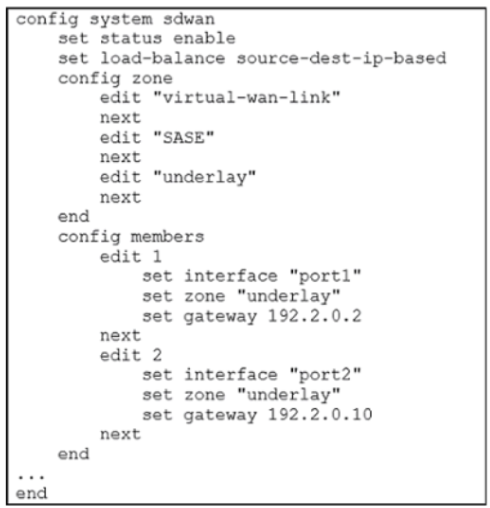
Which algorithm does SD-WAN use to distribute traffic that does not match any of the SDWAN rules?
A. All traffic from a source IP to a destination IP is sent to the same interface.
B. All traffic from a source IP is sent to the same interface.
C. All traffic from a source IP is sent to the most used interface.
D. All traffic from a source IP to a destination IP is sent to the least used interface.
| Page 2 out of 8 Pages |
| Previous |