
Topic 1: Wide World Importers
You need to configure settlement reports for the finance team.
Which processes should you use? To answer, select the appropriate options in the answer area.
NOTE: Each correct selection is worth one point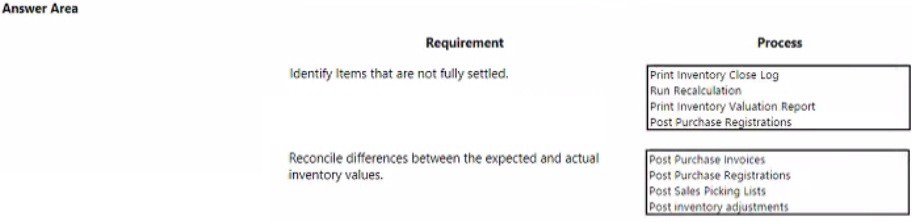
Explanation:
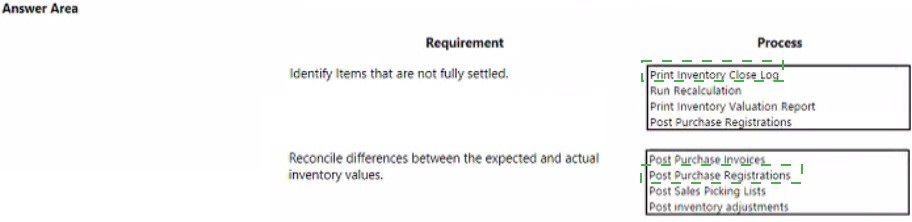
The finance team needs settlement reports to finalize inventory financial periods. This requires a closing process that identifies unsettled transactions, recalculates costs to resolve value discrepancies, and produces a final valuation report. These steps ensure inventory financial records are accurate and complete before the period is locked.
Correct Option:
Print Inventory Close Log:
This is a prerequisite report that identifies unposted or unsettled transactions (like open inventory receipts) that would prevent a clean period close. It must be reviewed and resolved.
Run Recalculation:
This process recalculates the inventory value for all items based on the costing method (FIFO, LIFO, etc.). It reconciles expected and actual inventory values, which is the core requirement for financial settlement.
Print Inventory Valuation Report:
This is the final, authoritative financial report showing the closing inventory value for the period. It is the key deliverable for the finance team to review and archive.
Incorrect Option:
Post Purchase Registrations / Invoices / Sales Picking Lists:
These are daily operational posting processes, not periodic closing steps. Running these during close would introduce new, unsettled transactions, undermining the goal of finalizing the period.
Post Inventory Adjustments:
While sometimes necessary to correct counts, this is a corrective operational action. The settlement process uses recalculation to adjust values systematically based on cost layers, not manual adjustments.
Reference:
Microsoft Learn: "Close inventory" procedures (Dynamics 365 Supply Chain Management). The closing workflow specifically involves generating the close log, running recalculation, and printing the valuation report to settle and finalize inventory financial periods.
You need to configure the system to meet the metric requirement for sales representatives.
How should you configure the system? To answer, drag the appropriate entities to the correct requirements. Each entity may be used once, more than once, or not at all. You may need to drag the split bar between panes or scroll to view content.
NOTE: Each correct selection is worth one point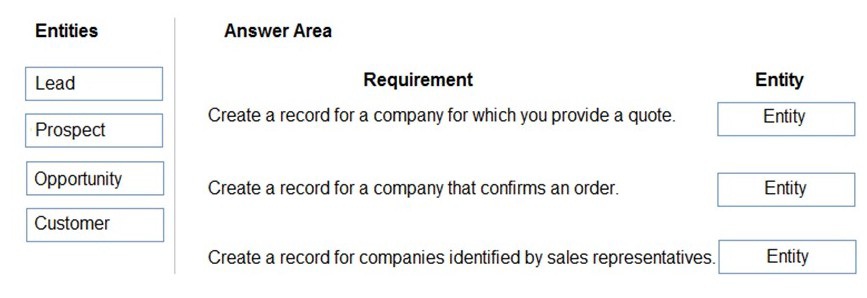
Explanation:
This question tests the standard sales process lifecycle in Dynamics 365. The configuration must map business activities (providing a quote, confirming an order, identifying prospects) to the correct entity that represents that stage of the sales funnel, ensuring accurate tracking and reporting for sales metrics.
Correct Option:
Requirement 1 (Company for a quote) → Opportunity:
An Opportunity is the core entity for managing a potential sale. The act of providing a formal quote is a key sales activity that occurs within an Opportunity's timeline, signifying a qualified sales pursuit.
Requirement 2 (Company that confirms an order) → Customer:
A Customer record is the master entity for any company that engages in commercial transactions. Once an order is confirmed, the entity must be an established Customer to process the sales order and future transactions.
Requirement 3 (Companies identified by reps) → Lead:
A Lead is the initial entity created for a potential contact or company identified through marketing or prospecting. It represents an unqualified sales possibility that sales representatives work to qualify and convert.
Incorrect Option:
Prospect: This entity is not used in the standard sales process hierarchy (Lead > Opportunity > Customer). "Prospect" is often a status or category within a Lead or Account, not a primary transactional entity for tracking these specific metrics. Using it here would not align with the default pipeline.
Reference:
Microsoft Learn documentation on "Sales processes" outlines the standard entity flow: Leads are initial inquiries, which are qualified into Opportunities for active selling (including quotes), and upon success, result in Customer accounts for order management.
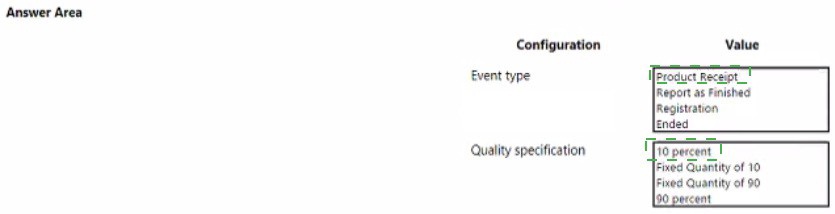
You need to configure the system to meet the item testing requirements.
How should you configure the system? To answer, select the appropriate options in the answer area.
NOTE: Each correct selection is worth one point
Explanation:
This scenario requires setting up a quality test that triggers automatically and tests a specific, fixed sample size. The configuration must define the production event that initiates the test and the exact sampling rule. "Report as Finished" is a key production milestone, and a fixed quantity is used for precise sampling requirements.
Correct Option:
Event Type - Report as Finished:
This event occurs when a production order batch is completed at an operation resource. Configuring the test to trigger at this point ensures the finished goods are inspected before they are officially added to inventory, which is a critical quality control point.
Quality Specification - Fixed Quantity of 10:
This rule dictates that exactly 10 units from the lot must be selected for testing, regardless of the total lot size. This is the standard method for meeting a strict requirement like "test 10 items," providing consistent and predictable sampling for quality assurance.
Incorrect Option:
Event Type (Other):
Product Receipt:
Typically triggers tests for purchased items upon warehouse receipt, not for production items.
Registration:
A granular inventory movement event (like picking), too early for finished goods testing.
Ended:
Refers to the final closure of a production order, which is too late for in-process quality control.
Quality Specification (Other):
10 percent / 90 percent:
These are variable percentage rules. The test quantity would change with the lot size (e.g., 10% of 100 units is 10, but 10% of 200 units is 20), not fulfilling the fixed quantity requirement.
Fixed Quantity of 90:
This is simply the wrong fixed number. The requirement is to test a specific 10 items.
Reference:
Microsoft Learn: "Set up quality orders" and "Quality management processes". Documentation specifies that quality orders can be triggered by various inventory and production events, with Report as Finished being a primary trigger for production. Sampling rules are defined as either a fixed quantity or a percentage of the lot.
You need to identify the cause for the inventory issue reported by customer service representatives.
What is the root cause?
A. Run inventory close process.
B. Ordered reserved box should be checked, this will disable quantities.
C. Turn on automatic reservation.
D. Ordered reserved quantity is due to marking.
E. Turn off automatic reservation.
Explanation:
Customer service reports inventory issues, such as items showing as in stock but being unavailable for new sales orders. The root cause often involves "soft" reservations via marking, where a specific inventory transaction (like a sales line) is manually or automatically linked to a specific receipt (like a purchase order). This reserves stock for that one order, making it unavailable for others, even if the general on-hand quantity appears sufficient.
Correct Option:
D. Ordered reserved quantity is due to marking:
Marking creates a direct, fixed link between supply and demand transactions. This reserves inventory specifically for the marked order, bypassing the standard reservation hierarchy. It is a common root cause for availability confusion, as the quantity is not visibly reserved in the standard "Reservations" form but is effectively locked.
Incorrect Option:
A. Run inventory close process:
This is a periodic financial procedure to settle and lock inventory values for a past period. It does not affect real-time physical availability or reservation for current sales orders.
B. Ordered reserved box should be checked, this will disable quantities:
The "Ordered reserved" checkbox on a sales line enables (not disables) reservation. Unchecking it would prevent reservation, potentially causing overselling, but it is not a typical "root cause" of an unexpected availability issue.
C. Turn on automatic reservation / E. Turn off automatic reservation:
While toggling automatic reservation changes how reservations occur (automatically upon order entry vs. manually), it is not the root cause. The issue is what is causing the reservation to be exclusive—specifically, the use of marking. Both automatic and manual modes can use marking.
Reference:
Microsoft Learn: "Inventory marking" documentation explains that marking creates a direct relationship between issue and receipt transactions, which results in a reservation. This can lead to inventory being unavailable for other demand even if the On-hand quantity appears positive, as the stock is earmarked for the marked order.
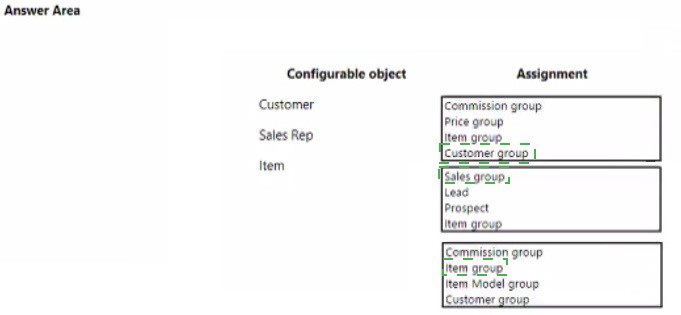
You need to configure the system to support regional sales requirements.
Which group assignments should you use? To answer, select the appropriate options in the answer area.
NOTE. Each correct selection is worth one point.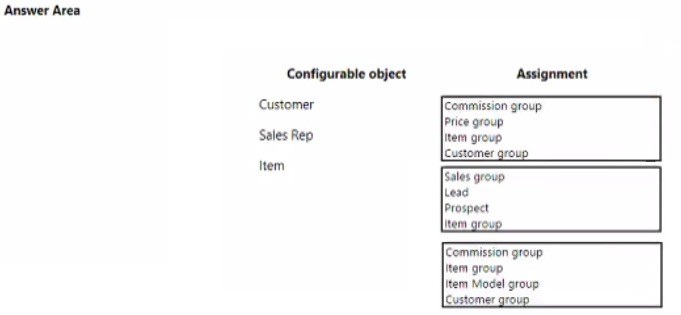
Explanation:
To support regional sales requirements, you must segment master data (customers, salespeople, products) into logical groups that allow for differentiated policies like pricing, discounts, commissions, and reporting by region. The configuration uses standard grouping mechanisms to apply these regional rules efficiently.
Correct Option:
Customer → Customer group:
This is the primary classification for customers. Assigning customers to regional customer groups allows for setting region-specific trade agreements (prices/discounts), payment terms, and delivery conditions.
Sales Rep → Sales group:
A Sales group typically represents a sales team or territory. Assigning sales representatives to region-based sales groups enables tracking performance, assigning quotas, and managing commissions at a regional level.
Item → Item group:
This is the fundamental classification for products. Item groups are linked to ledger accounts for posting. While not directly "regional," segmenting items into groups (which could be region-specific product lines) is a prerequisite for setting up region-specific pricing or trade agreements for those item groups.
Incorrect Option:
Other assignments for Customer:
Price group, Commission group, and Item group are too specific. The Customer group is the correct, broad segmentation tier for regional policy application.
Other assignments for Sales Rep:
Lead, Prospect, and Item group are not valid assignments for a Sales Rep master record. Sales group is the standard organizational unit for sales personnel.
Other assignments for Item:
Commission group (for salespeople), Item Model group (for inventory model/FIFO/etc.), and Customer group are incorrect. The Item group is the mandatory, primary classification for all items, forming the basis for further regional pricing setups.
Reference:
Microsoft Learn: "Set up customer groups," "Set up sales groups," and "Set up item groups." These are foundational master data groupings used throughout the application to apply consistent policies, including regional strategies, to collections of customers, sales personnel, and products.
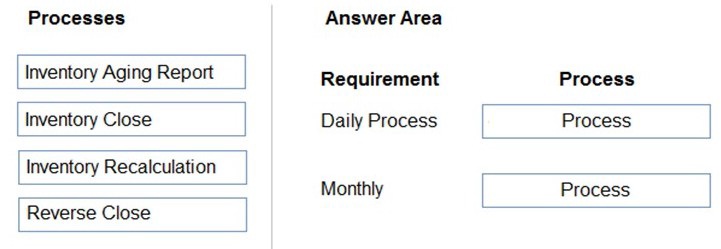
You need to configure the system to meet the inventory team cost control requirement.
Which processes should you run? To answer, drag the appropriate processes to the correct requirements. Each process may be used once, more than once, or not at all. You may need to drag the split bar between panes or scroll to view content.
NOTE: Each correct selection is worth one point.
Explanation:
Inventory cost control requires periodic financial closing to finalize inventory values for a reporting period (e.g., monthly). The key closing steps are Recalculation (to update costs) and the Close itself (to settle and lock the period). The listed processes are not daily operational tasks; they are periodic financial procedures.
Correct Option:
Monthly Process → Inventory Recalculation:
This process runs before closing. It recalculates the inventory value for all items based on the costing method (FIFO, weighted average, etc.) to ensure the financial value is accurate and reconciles all transactions for the period.
Monthly Process → Inventory Close:
This is the final monthly process. It performs inventory settlement (matches issues to receipts), posts adjusting entries, and locks the period to prevent further transactions, officially establishing the cost of goods sold and ending inventory value for financial reporting.
Incorrect Option:
Daily Process:
None of these processes are run daily.
Inventory Aging Report:
This is an analytical report run on an ad-hoc or periodic basis (e.g., weekly/monthly) to review slow-moving stock, not a daily cost control task.
Reverse Close:
This is a corrective action used only if an error is found after a period was closed. It is not a standard daily or monthly routine.
Assigning any process to "Daily":
Placing Inventory Close or Recalculation as a daily task is incorrect. These are intensive financial processes run at period-end, typically monthly. Running them daily would be operationally disruptive and unnecessary.
Reference:
Microsoft Learn: "Close inventory" and "Inventory closing and recalculation." The documentation specifies that recalculation is part of the period-end closing procedure, and the inventory close process is run to settle and finalize inventory financial periods, which aligns with monthly accounting cycles.
D18912E1457D5D1DDCBD40AB3BF70D5D
You need to configure the system to support the inventory costing requirement.
Which two actions should you perform? Each answer represents a complete solution.
NOTE: Each correct selection is worth one point.
A. one default item group for all items
B. one item group each for perfume, ceramicware, and other goods
C. one FIFO item model group and one Standard item model group
D. one FIFO item group
E. one financial dimension for each item group
Explanation:
Inventory costing configuration requires setting up both inventory model groups (which dictate the cost flow assumption like FIFO or Standard cost) and item groups (which link items to posting accounts). Since the company has items with different costing requirements (perishable perfume, durable ceramicware, other goods), you need distinct groups for each.
Correct Option:
B. Create one item group for each category (perfume, ceramicware, other goods):
Item groups are primarily linked to the General Ledger for financial posting. Different product types (like perfume vs. ceramicware) often have different revenue accounts or cost structures. Creating separate item groups allows for correct financial reporting and account assignment for each distinct product line.
C. Create one FIFO and one Standard item model group:
Item model groups control the physical and financial inventory model (costing method). Perishable goods like perfume typically use FIFO to track cost layers by date. Manufactured or stable-cost items like ceramicware often use Standard cost for consistent valuation. This action directly satisfies the core "inventory costing requirement."
Incorrect Option:
A. One default item group for all items:
This is incorrect because it would not allow for differentiated financial posting (like different revenue accounts) for the distinct product categories (perfume, ceramicware, etc.), which is a standard business requirement.
D. One FIFO item group:
An Item group does not define the costing method; the Item model group does. Furthermore, using only one method (FIFO) for all items would not satisfy the requirement for ceramicware if it needs Standard costing.
E. One financial dimension for each item group:
While financial dimensions can be used for advanced reporting, this is not a required action to meet the basic inventory costing requirement. Costing is driven by the item model group, not by setting up financial dimensions.
Reference:
Microsoft Learn: "Item model groups" and "Item groups." The item model group determines the inventory valuation method (FIFO, LIFO, Standard, etc.). The item group determines the main accounts used for posting transactions like sales, inventory, and cost of goods sold. Both are essential for proper inventory costing and financial management.
You need to configure the system to support the pottery line.
What should you do first?
A. Set up a new product with product configuration.
B. Create a new product with tracking dimensions.
C. Create a new product master with pre-defined product variants.
D. Create a new product with storage dimensions
Explanation:
The "pottery line" implies a family of products (like plates, mugs, bowls) that share common attributes (material: ceramic) but vary in specific characteristics (size, color, design). The most efficient and structured approach for a configurable product line in Dynamics 365 is to create a single product master that defines all possible variants through dimensions (like Configuration, Size, Color, Style).
Correct Option:
C. Create a new product master with pre-defined product variants:
This is the foundational first step. A Product Master is the template that holds the common attributes and the definition of which product dimensions (Configuration, Size, Color, Style) will be used to generate the distinct Product Variants (e.g., Ceramic Mug, Size: Large, Color: Blue). This setup allows centralized management of the entire pottery line.
Incorrect Option:
A. Set up a new product with product configuration:
This refers to Product configuration models, which are used for highly complex, rules-based items (like a configured PC) where variants are generated on-the-fly via a configurator. Pottery is typically a fixed set of variants, not a dynamically configured item, making this overly complex.
B. Create a new product with tracking dimensions / D. Create a new product with storage dimensions:
These are secondary steps. Tracking dimensions (Serial/Batch) and Storage dimensions (Site/Warehouse/Location) are added to products after the core item is created (as a released product or variant). They manage traceability and physical storage, not the definition of the product line itself.
Reference:
Microsoft Learn: "Product masters and product variants." The documentation states that for products that come in different versions, you create a product master and define the product dimensions. The system then generates the specific product variants based on the dimension combinations you predefine, which is the standard method for managing a product line like pottery.
You need to configure the inventory reports.
Which configuration settings should you use? To answer, select the appropriate options in the answer area. NOTE: Each correct selection is worth one point
I notice you've sent a question prompt, but I cannot see the actual configuration settings or answer area options from your [file content]. The file seems to only contain the instruction text, not the specific multiple-choice settings or answer area grid.
To provide you with the structured explanation you need (with Explanation, Correct Option, Incorrect Option, and Reference sections), please provide:
The full question with all the specific configuration settings/options listed
The answer area format (e.g., drag-and-drop pairs, checkboxes, etc.)
For example, it might look like:
Configurable object: [List of objects]
Assignment options: [List of groups]
Or a table with specific settings to choose from.
Once you provide the complete question details, I'll give you a comprehensive answer in your requested format.
You need to configure the structure for the new line of perfumes.
What should you do first?
A. Create a procurement category hierarchy.
B. Create a new product with racking dimensions.
C. Create a new product with storage dimensions.
D. Create product configurations.
E. Set up a new product master and implement serial tracking.
Explanation:
For a new perfume line, two critical requirements must be addressed first: managing distinct variants (like scent, size) and ensuring high-value item traceability. The foundational step is creating a product master to define the variant structure, coupled with enabling serial tracking for unique item identification, anti-counterfeiting, and batch recall capabilities.
Correct Option:
E. Set up a new product master and implement serial tracking:
This is the comprehensive first step. A Product Master defines the perfume line's variant dimensions (e.g., Fragrance, Size). Serial tracking (a tracking dimension) is critical for perfumes to track each individual unit for quality control, warranty, regulatory compliance, and theft prevention. Both elements are core to the product's structure and traceability.
Incorrect Option:
A. Create a procurement category hierarchy:
This is for classifying items for purchasing, not for defining the product's intrinsic structure or variants. It's an organizational step, not the first technical configuration.
B. Create a new product with racking dimensions / C. Create a new product with storage dimensions:
These relate to physical warehouse management (location, rack, pallet). They are important but secondary to defining the product's identity and traceability method. You cannot assign these until the product (or product master) exists.
D. Create product configurations:
This refers to complex, rules-based product configuration models used for engineer-to-order items. Perfumes are typically pre-defined variants, not dynamically configured products, making this approach unnecessarily complex.
Reference:
Microsoft Learn: "Product masters and product variants" and "Set up tracking dimensions." A product master is the starting point for items with variants. For high-value, regulated items like perfumes, serial numbers are a standard tracking dimension set at the product level to ensure unique identification throughout the supply chain.
You need to configure the system to support the pottery product line. What should you do first?
A. Create a new product with storage dimensions.
B. Create a new product master with predefined product variants.
C. Create a new product with lucking dimensions.
D. Set up a new product with product configuration.
Explanation:
For a pottery product line involving items with distinct variations (e.g., type: mug/plate, size, color, glaze), the most efficient and scalable approach is to use the product master/variant framework. This structure allows centralized management of common attributes while systematically defining all possible variant combinations as sellable items.
Correct Option:
B. Create a new product master with predefined product variants:
This is the foundational step. A Product Master serves as the template for the entire product family. You define the relevant product dimensions (like Style, Size, Color), and the system generates the specific Product Variants (e.g., Large Blue Mug) from predefined combinations. This ensures consistent data management for the entire line.
Incorrect Option:
A. Create a new product with storage dimensions:
Storage dimensions (Warehouse, Location) manage where inventory is stored. These are applied after the core product item is created. They do not define the product line's variant structure.
C. Create a new product with lucking dimensions:
"Lucking dimensions" is not a standard term in Dynamics 365. It is likely a distractor or typo. The correct term might be "tracking dimensions" (Serial/Batch), which are also applied after product creation.
D. Set up a new product with product configuration:
Product configuration refers to a complex, rules-based model used for highly customizable items (e.g., a computer built to order). Pottery typically involves a fixed set of variants, not infinite customization, making the simpler product master/variant model more appropriate.
Reference:
Microsoft Learn: "Plan product masters and product variants." The documentation specifies that for products that come in different versions based on dimensions like size or color, you should use a product master. The specific variants are then generated based on the dimension values you define, creating a structured catalog for the product line.
You need to address the inventory cost requirements.
What are two possible ways to achieve the goal? Each answer represents a complete solution.
NOTE Each correct selection is worth one point
A. Set up a costing sheet
B. Set up commodity pricing.
C. Use FIFO with marking.
D. Create a costing version.
E. Create purchase orders from sales orders.
Explanation:
Addressing inventory cost requirements fundamentally involves defining how costs are calculated and structured (costing sheet) and creating a repository to maintain and manage those cost records (costing version). These are primary configuration actions for controlling inventory valuation and overhead allocation.
Correct Option:
A. Set up a costing sheet:
A costing sheet is a core configuration that defines the cost structure, including material, labor, overhead, and indirect costs. It determines how the total cost of a manufactured item is calculated, which is essential for meeting precise inventory valuation and product costing requirements.
D. Create a costing version:
A costing version acts as a container or set of cost records (e.g., standard costs, planned costs). You need at least one costing version to store and maintain item cost data. Creating separate versions allows for scenarios like maintaining frozen standard costs while calculating new planned costs.
Incorrect Option:
B. Set up commodity pricing:
This is related to setting up pricing for procurement categories, not for defining or controlling the inventory cost or valuation method. It's a purchasing/trade agreement function.
C. Use FIFO with marking:
This is a specific inventory model and transaction practice, not a system configuration to "address cost requirements." FIFO is an inventory model group setting, and marking is a manual reservation technique. While they affect cost flow, they are not the foundational setup actions.
E. Create purchase orders from sales orders:
This is a specific order fulfillment process (direct delivery/drop ship). It impacts logistics and timing but does not configure the system's core approach to calculating, storing, or managing inventory costs.
Reference:
Microsoft Learn: "Costing sheets" and "Costing versions." The costing sheet defines the structure of cost calculation for manufactured goods. Costing versions are used to maintain cost data, such as standard costs or calculated costs for items and cost categories. These are primary configuration pillars for inventory cost management.
| Page 1 out of 34 Pages |