
Topic 1: Wide World Importers
You need to address the inventory costing requirements.
What are two possible ways to achieve the goal? Each answer represents a complete solution. NOTE: Each correct selection is worth one point.
A. Use FIFO with marking.
B. Create purchase orders from sales orders.
C. Set up commodity pricing.
D. Create a costing version.
E. Set up a costing sheet
Explanation:
Inventory costing requirements are fundamentally met by establishing the framework for cost calculation and the repository for cost data. These are primary configuration pillars, especially for manufactured items where costs include materials, labor, and overhead.
Correct Option:
D. Create a costing version:
This is essential for managing cost records. A costing version is a set of cost records for items and cost categories. You need at least one version to maintain standard costs, calculate planned costs, or view historical cost data. It's a core component of any costing strategy.
E. Set up a costing sheet:
The costing sheet defines the structure of how a product's cost is built. It specifies direct materials, direct manufacturing costs, and how indirect costs (overhead) are allocated. This is mandatory for accurate product costing and inventory valuation in manufacturing.
Incorrect Option:
A. Use FIFO with marking:
This is a specific inventory model and transactional practice. FIFO is chosen in the item's model group, and marking is a manual reservation technique. While they influence which cost is assigned to a sale, they do not configure the system's overarching costing framework.
B. Create purchase orders from sales orders:
This is a supply chain fulfillment process (like drop shipping or direct delivery). It affects order flow but has no bearing on configuring how inventory costs are calculated, stored, or managed in the system.
C. Set up commodity pricing:
This is a procurement feature used to assign prices to procurement categories for purchase agreement enforcement. It relates to the price paid for purchased items but is not a method for establishing the costing system or the valuation of inventory on hand. It is more about spend management than inventory costing methodology.
Reference:
Microsoft Learn: "Cost management home page" and key tasks like "Set up a costing sheet" and "Work with costing versions." The costing sheet determines the cost calculation structure, while costing versions store and manage the cost data (standard, planned, etc.). These are foundational configurations for inventory costing.
You need to consolidate orders and prepare to rate shop shipments.
How should you complete the setup? To answer, select the appropriate options in the answer area.
NOTE: Each correct selection is worth one point.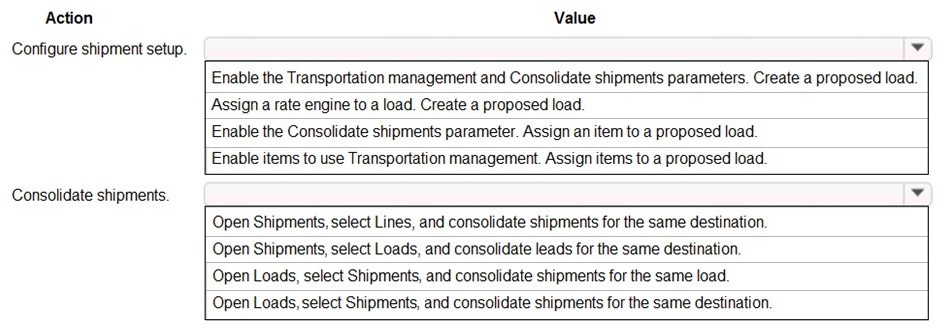
Explanation:
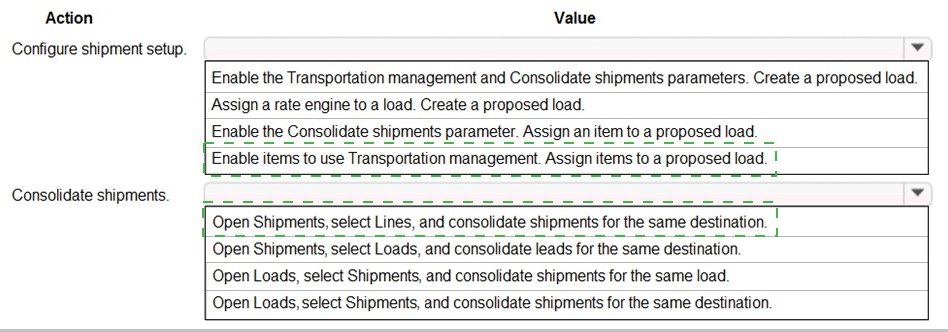
To consolidate orders and rate shop shipments, you must first enable the system's core transportation features to allow automatic consolidation. Then, you use the load planning workbench to manually or automatically group shipments with the same destination into a single load for optimized rating and shipping.
Correct Option:
Configure shipment setup → Enable Transportation management and Consolidate shipments parameters. Create a proposed load: This is the foundational system configuration.
Enable Transportation management:
Activates the entire TMS module.
Enable Consolidate shipments:
Allows the system to automatically group shipments into loads based on rules.
Create a proposed load:
This is the operational result of the configuration; the system generates a preliminary load plan for consolidated shipments, which is then ready for rate shopping.
Consolidate shipments → Open Loads, select Shipments, and consolidate shipments for the same destination: This describes the correct user action in the Load planning workbench.
You open the Loads workspace.
You work with the Shipments assigned to those loads.
The logical consolidation rule is for shipments going to the same destination, which minimizes freight cost.
Incorrect Option:
Other setup values:
Options mentioning only one parameter (like just "Consolidate shipments") or unrelated steps like "Assign an item to a proposed load" are incomplete or incorrect. The full setup requires both key parameters to be enabled to automate consolidation and planning.
Other consolidation actions:
Options like "Open Shipments, select Lines..." or "Open Shipments, select Loads..." do not follow the standard TMS workflow. Consolidation is performed from the Load planning perspective (Open Loads), not from the Shipments form. "Consolidate shipments for the same load" is illogical, as consolidation happens before a final load is built.
Reference:
Microsoft Learn: "Configure transportation management" and "Consolidate shipments into loads." The documentation specifies enabling both Transportation management and Consolidate shipments parameters in Transportation management parameters. The Load planning workbench is then used to build and consolidate loads by destination for optimal carrier selection and rating.
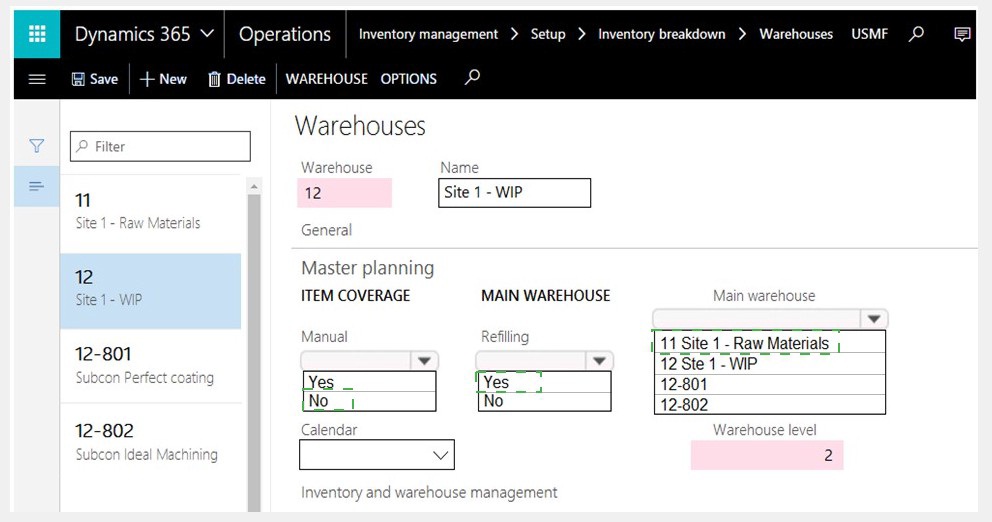
You need to configure automatic warehouse inventory replenishment for items.
How should you complete the setup? To answer, select the appropriate options in the answer area.
NOTE: Each correct selection is worth one point.
Explanation:
To configure min/max replenishment, you must define the warehouse hierarchy for replenishment flow. The Main Warehouse is the central supply source, Warehouse Level positions the warehouse in that hierarchy, and Refilling = Yes enables automatic transfer orders from the main warehouse when inventory falls below the minimum threshold.
Correct Option:
Main Warehouse:
12 Site 1 - WIP: The Main Warehouse is the source warehouse that will replenish its dependent warehouses. In a min/max setup, the WIP warehouse is a typical central storage point that supplies production floor locations (like 12-801, 12-802). Setting it as the main warehouse establishes the replenishment source.
Warehouse Level:
2: This defines the warehouse's position in the replenishment hierarchy. Level 1 is typically the highest or primary warehouse. Level 2 warehouses are replenished by a Level 1 warehouse. Setting it to 2 correctly indicates it is a dependent warehouse that receives stock from a higher-level source (even if not explicitly shown here as Level 1).
Refilling:
Yes: This parameter must be set to Yes to enable the automatic creation of transfer orders for replenishment based on the minimum quantity defined in the item's warehouse-specific coverage settings. "No" would disable the automatic replenishment feature.
Incorrect Option:
Main Warehouse:
Other values (11, 12-801, 12-802): Warehouse 11 is for Raw Materials, which is a different storage type and not the logical immediate source for WIP locations. Warehouses 12-801 and 12-802 are subcontractor/service locations, not central inventory hubs. They would be replenished by the main WIP warehouse, not act as the source themselves.
Warehouse Level:
Not 2: For a WIP warehouse that supplies production bays, Level 1 would imply it is the top of the hierarchy with no replenishment source, which is atypical. Level 2 correctly positions it as an intermediate hub.
Refilling:
No: This would disable the very automatic replenishment process you are trying to configure, defeating the purpose.
Reference:
Microsoft Learn: "Set up warehouse replenishment" for min/max. The setup requires defining a warehouse hierarchy with main/sub warehouses and setting Refilling = Yes on the receiving warehouse. The system then automatically generates transfer orders from the main warehouse when the inventory level in the dependent warehouse falls below its defined minimum.
Employee 1 needs to set up the new items for the product line.
Which two actions should Employee1 perform? Each correct answer presents part of the solution.
NOTE Each correct selection is worth one point.
A. Create new finished goods and release to the legal entity
B. Create new raw materials and release to the legal entity.
C. Create new finished goods with predefined variants and release to the legal entity.
D. Create new finished goods and release to the legal entity. Raw material products are not required for these items.
E. Create new raw materials with variants and release to the legal entity
Explanation:
For a new product line like pottery or perfume, both the final sellable items (finished goods) and their component materials (raw materials) often have variations. Setting up both with their respective variant structures is essential for accurate production planning (BOMs) and inventory management before manufacturing and sales can begin.
Correct Option:
C. Create new finished goods with predefined variants:
Finished goods (e.g., a ceramic mug) are the end products sold to customers. They often have variants based on dimensions like Size and Color. Creating them as product masters with predefined variants ensures all sellable combinations are systematically set up.
E. Create new raw materials with variants:
Raw materials (e.g., clay, glaze) may also have variants, such as Color or Grade. Creating these with variants is crucial for accurate Bills of Materials (BOMs) and production orders, ensuring the correct material variant (e.g., Blue Glaze) is specified for each finished good variant (e.g., Blue Mug).
Incorrect Option:
A. Create new finished goods and release... / B. Create new raw materials and release...:
These options are too vague and incomplete. They do not specify the use of variants, which is a core requirement for a configurable product line. Creating simple "non-variant" products would not support the necessary product structure.
D. Create new finished goods... Raw material products are not required:
This is incorrect. Any manufactured item requires a Bill of Materials (BOM) listing its components. Therefore, raw material products are absolutely required in the system to define the product's cost and production process.
Reference:
Microsoft Learn: "Product information overview" and "Product masters and product variants." The setup process for a manufactured product line involves creating both finished goods and raw materials in the system. When these products have different characteristics, they should be set up using the product master and variant framework to manage the distinct types efficiently.
Employed needs to schedule deliveries.
How should Employee? plan for a carrier to deliver goods to Store2? To answer, select the appropriate options In the answer area.
NOTE: Each correct selection is worth one point.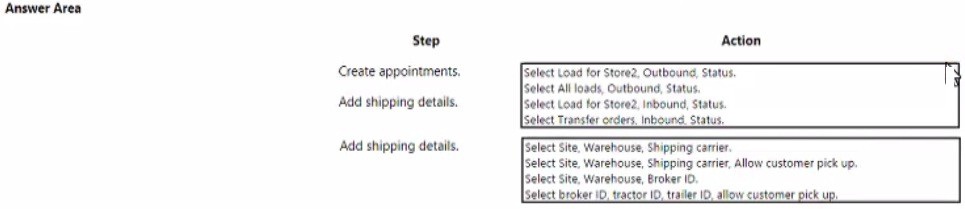
Explanation:
To schedule a carrier delivery, you must first create a dock appointment for the outbound load from your facility. Then, you configure the shipping details on that load, specifying the carrier and delivery options like customer pickup for the destination store.
Correct Option:
Create appointments → Select Load for Store2, Outbound, Status:
Appointments are scheduled at the warehouse dock for specific loads. Since goods are being delivered to Store2, the relevant load is an Outbound load from your distribution center. You filter for loads destined for Store2 with a relevant status (e.g., Confirmed) to create its shipment appointment.
Add shipping details → Select Site, Warehouse, Shipping carrier, Allow customer pick up:
Shipping details are added to the load or shipment. You must specify the origin (Site, Warehouse), the assigned Shipping carrier, and relevant delivery instructions. Allow customer pick up is a logical flag for a retail store (Store2), indicating the carrier may allow store personnel to receive the goods directly.
Incorrect Option:
Other appointment actions:
Select All loads... is too broad and inefficient.
Select Load for Store2, Inbound... is incorrect because the load is leaving your facility (Outbound) from your perspective. "Inbound" would be from the store's perspective.
Select Transfer orders... is the source document, but appointments are created for the resulting Load.
Other shipping detail actions:
Options without Shipping carrier are incorrect, as assigning a carrier is the primary purpose of this step.
Select broker ID, tractor ID... includes overly granular transportation asset details that are typically added after a carrier is assigned, not as the primary shipping details.
Select Site, Warehouse, Broker ID is wrong because a Broker is used for freight forwarding, not for direct carrier delivery to a store.
Reference:
Microsoft Learn: "Transportation management" processes for "Create appointments" and "Configure loads." Appointments are created for outbound loads at the shipping warehouse. Shipping details on a load include mandatory fields like the shipping carrier and service, along with delivery options.
Employee! must set up the new BOM.
Which three actions should Employee! perform' Each correct answer presents part of the solution.
NOTE Each correct selection is worth one point.
A. Activate the BOM.
B. Create a new BOM for Store1, Store2, and Store3.
C. Create a new BOM for Site! only.
D. Add the raw materials to the BOM and approve it.
E. Add the raw mandate to the BOM and approve the BOM version
Explanation:
A Bill of Materials (BOM) must be created, populated with its components, approved for use, and then activated. Since the requirement implies distribution to multiple stores, the BOM should be created at a scope (like a site or company) that supplies all three stores, not restricted to a single site.
Correct Option:
A. Activate the BOM:
This is a mandatory final step. A BOM must be Activated to be available for use in production orders or for costing calculations. An approved but inactive BOM cannot be used.
B. Create a new BOM for Store1, Store2, and Store3:
This indicates creating a BOM at an appropriate scope (e.g., at the company or site level) that can supply all three stores. Creating separate BOMs per store is inefficient unless the product recipe differs by location.
D. Add the raw materials to the BOM and approve it: These are two core steps in BOM setup.
Add raw materials: Define all component items and their quantities.
Approve it: Formal approval is required before a BOM can be activated and used, ensuring accuracy and controlling changes.
Incorrect Option:
C. Create a new BOM for Site1 only:
This is too restrictive. If the product is standard and supplied to multiple stores (Store1, Store2, Store3), the BOM should be created at a higher level (e.g., company-wide) to avoid unnecessary duplication. A site-specific BOM would only be valid for production at that site.
E. Add the raw mandate to the BOM and approve the BOM version:
"Raw mandate" is a typo or non-standard term (likely meant "raw material"). The phrasing "approve the BOM version" is less precise than the standard action of approving the BOM itself. The standard workflow is to approve the BOM, which creates an approved version.
Reference:
Microsoft Learn: "Bill of materials (BOM)" and "Work with BOM versions." The key steps are: Create a BOM, Add lines (items/quantities), Approve the BOM (which creates an approved version), and finally Activate it for use. The BOM's scope (site/company) determines where it can be used.
You need to configure inventory levels for the retail stores.
Which two actions should you perform? Each correct answer presents part of the solution.
NOTE: Each correct selection is worth one point.
A. Enter a manual forecast for the initial stock levels at the retail stores.
B. After the first month of face mask sales, look at the warehouse sales orders for the past 30 days to generate a demand forecast.
C. After the first month of face mask sales, review store sales for the past 30 days to generate a demand forecast.
D. After the first month of face mask sales, create a forecast for the warehouse and a second forecast for the retail stores.
E. After the first month of face mask sales, create a manual forecast for the warehouse and automatically generate a demand forecast for the stores
Explanation:
Configuring inventory for new retail stores involves two phases: setting an initial baseline before any sales history exists, and then establishing a data-driven replenishment process after historical sales data is available. This approach is practical and follows standard retail inventory management principles.
Correct Option:
A. Enter a manual forecast for the initial stock levels:
For a new product launch with no sales history, you must set initial on-hand quantities manually at each store. This "manual forecast" serves as the seed stock to begin sales and generate the historical data needed for future automated forecasting.
C. After the first month... review store sales for the past 30 days to generate a demand forecast:
Once a month of sales data is available at the store level, you should use this actual point-of-sale data to generate a statistical demand forecast. This store-level forecast will be far more accurate for setting future replenishment parameters than using warehouse-level data.
Incorrect Option:
B. ...look at warehouse sales orders...:
This is incorrect. Warehouse sales orders reflect store replenishment requests, not end-customer demand. This data is a derivative of store needs and can be distorted by stockouts or bulk transfers. True demand forecasting must be based on store sales (sell-through).
D. ...create a forecast for the warehouse and a second forecast for the retail stores:
This is inefficient and duplicative. The warehouse exists to supply stores. Therefore, a single, accurate store-level forecast should drive warehouse replenishment. Creating separate forecasts adds complexity without value.
E. ...create a manual forecast for the warehouse...:
The warehouse forecast should be derived automatically from the aggregated store-level forecasts (or replenishment needs). Manually forecasting the warehouse is unnecessary and prone to error, as warehouse demand is dependent on store demand.
Reference:
Microsoft Learn: "Demand forecasting" best practices. Forecasting should be based on the most granular level of actual demand history—in a retail scenario, this is the point-of-sale data from the stores. For new items/locations without history, manual estimates (baseline forecasts) are used initially.
You need to complete the shipments.
What should you do?
A. Create work for printing shipping documents and send an ASN.
B. Confirm the load, generate picking lists, and send an ASN.
C. Confirm the load and generate packing dips and bills of lading.
D. Confirm shipments and generate picking lists and bills of lading
Explanation:
Completing a shipment involves finalizing the outbound logistics process. The logical sequence is to first officially confirm the planned load, then generate the internal instructions for warehouse workers to pick the items, and finally notify the customer or carrier about the upcoming delivery with an Advanced Shipping Notice (ASN).
Correct Option:
B. Confirm the load, generate picking lists, and send an ASN: This is the standard outbound fulfillment workflow.
Confirm the load: Finalizes the load plan and makes it ready for execution.
Generate picking lists: Creates the warehouse work to physically pick the items from inventory.
Send an ASN: Electronically notifies the customer (Store2) of the shipment details (contents, carrier, ETA), which is a common retail requirement for efficient receiving.
Incorrect Option:
A. Create work for printing shipping documents and send an ASN:
This skips the crucial step of confirming the load, which officially releases it for processing. "Printing shipping documents" is often a result of later steps, not an initial action.
C. Confirm the load and generate packing slips and bills of lading:
While confirming the load is correct, packing slips and bills of lading are final shipping documents typically generated after the items have been picked and packed, not immediately after load confirmation. This option omits the critical picking step.
D. Confirm shipments and generate picking lists and bills of lading:
"Confirm shipments" is similar to confirming the load, but the bill of lading is a carrier document usually created after the load is built and tendered to the carrier, not concurrently with picking lists. It also misses sending the ASN, which is a key requirement in modern supply chains.
Reference:
Microsoft Learn: "Outbound load planning" and "Advanced Shipping Notice (ASN)." The standard process flow is to Confirm the load to release it, which can then generate warehouse picking work. Once the load is staged, you update the load with shipping details and can then send an ASN to inform the customer.
You need to segregate inventory for the brakes that are in inventory.
Which two actions should you perform? Each correct answer presents part of the solution.
NOTE: Each correct selection is worth one point.
A. Assign a blocked status to the inbound purchase order from VendorA.
B. Create a disposition code.
C. Set default inventory status on the item.
D. Assign an item filter code.
E. Assign a blocked status to the inbound purchase order from VendorB
Explanation:
Segregating potentially faulty inventory from Vendor A requires two key actions: preventing new stock from Vendor A from entering usable inventory, and creating a method to identify and move the existing faulty stock. This isolates both future receipts and current inventory.
Correct Option:
A. Assign a blocked status to the inbound purchase order from VendorA:
This action prevents the future receipt of brakes from the problematic vendor (Vendor A) from being posted into available inventory. When the purchase order line is marked as "Blocked," the received quantity will automatically be given a quarantine or blocked inventory status.
B. Create a disposition code:
A disposition code is used during quality order processing or inventory adjustment to specify what should happen to the segregated items (e.g., "Return to Vendor," "Scrap," "Rework"). Creating a specific code (e.g., "Vendor A Hold") is essential for tracking and managing the existing, potentially faulty inventory already in the warehouse.
Incorrect Option:
C. Set default inventory status on the item:
This sets a status (e.g., Available, Blocked) for all new receipts of the item, regardless of vendor. This is too broad, as it would incorrectly block receipts from the good vendor (Vendor B) as well.
D. Assign an item filter code:
Item filter codes are used for reporting and filtering items in lists and reports. They do not functionally block or segregate inventory in the warehouse management system.
E. Assign a blocked status to the inbound purchase order from VendorB:
This is incorrect and counterproductive. Vendor B is the good vendor. Blocking their PO would stop the flow of good inventory, which is not the goal. The segregation is targeted specifically at Vendor A.
Reference:
Microsoft Learn: "Inventory blocking" and "Disposition codes." You can block inventory at the purchase order line level. Disposition codes are used in quality management and inventory adjustment processes to define the action for non-conforming or suspect inventory, enabling proper segregation and tracking.
Negotiations with the vendor are complete.
You need to set up the new price for tires.
What should you configure to meet the business requirements? To answer, select the appropriate options in the area.
NOTE: Each correct selection is worth one point.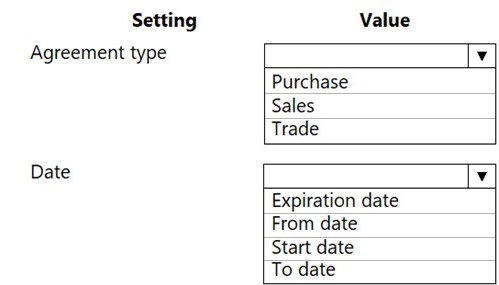
Explanation:
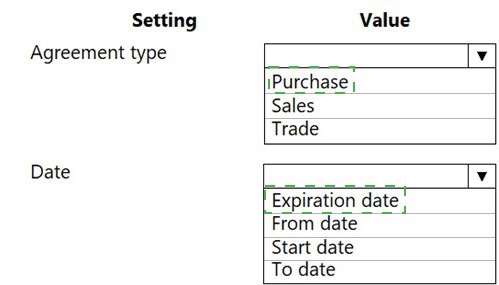
To set up a new, time-bound price negotiated with a vendor, you must create a Purchase trade agreement. This agreement type is used to record vendor-specific prices. The agreement must have defined effective dates to specify the period during which the price is valid.
Correct Option:
Agreement Type: Purchase:
A Purchase agreement is the correct trade agreement type for recording prices, discounts, or rebates negotiated with a vendor for items you buy. "Sales" agreements are for customers, and "Trade" is a broad category; the specific type for vendor pricing is "Purchase."
Date: From date and To date:
A time-bound price agreement requires both a From date (the effective start date) and a To date (the expiration or end date) to define the exact validity period. "Expiration date" is less common as a standalone field, and "Start date" is typically called "From date" in this context.
Incorrect Option:
Agreement Type (Other):
Sales: This is for setting prices charged to customers, not prices paid to vendors.
Trade: While "Trade agreements" is the module name, the specific type for vendor pricing is "Purchase." Selecting just "Trade" is too vague.
Date (Other):
Expiration date: This is often a single field that implies the end date. However, standard setup requires both a start and an end (From and To dates) for precise control.
Start date: This is essentially the "From date," but the standard paired fields are "From date" and "To date." Using only one is insufficient.
Reference:
Microsoft Learn: "Create purchase trade agreements." Purchase trade agreements are used to maintain specific purchase prices, discounts, or rebates for items per vendor. When creating a new trade agreement line, you must specify the From date and To date to define the period during which the agreement is valid.
You need to set up testing for brakes to meet the operations requirements.
Which two actions should you perform? Each correct answer presents part of the solution.
NOTE: Each correct selection is worth one point.
A. Set execution to after product receipt.
B. Set per updated quantity to yes.
C. Set execution to before product receipt.
D. Set per updated quantity to no.
Explanation:
To meet operational requirements for testing purchased brakes (likely for safety/quality), the test must occur after the goods are physically received into inventory, and it must be performed on the full received quantity, not just on a variable sample based on what was updated in the system.
Correct Option:
A. Set execution to after product receipt:
This ensures the quality inspection (test) is triggered after the item has been received into inventory via the Product receipt posting. This is standard for incoming quality control, where goods are received, placed in a quarantine or inspection location, and then tested before being released to available stock.
D. Set per updated quantity to no:
When set to No, the system creates the quality order for the entire received quantity specified on the purchase order line. This is crucial for critical items like brakes, where you likely want to test 100% of the batch or lot, not just a percentage of what was posted.
Incorrect Option:
B. Set per updated quantity to yes:
Setting this to Yes means the quality order quantity will adjust dynamically if the posted receipt quantity changes. For critical testing, you want the test to be based on the original, planned quantity (e.g., the full PO line), making No the correct choice for ensuring comprehensive inspection.
C. Set execution to before product receipt:
This is typically used for inspections before goods are formally received into company inventory, such as at a vendor's site or at the dock. For standard incoming quality control in your own warehouse, testing happens after the goods are received into your system but before they are made available for use.
Reference:
Microsoft Learn: "Set up and use quality management for inventory and warehouse management." The Test execution setting determines when a quality order is created (e.g., After product receipt). The Per updated quantity parameter controls whether the test quantity is fixed to the original order line or varies with partial receipts.
You need to include the items from the purchase order in the Intrastat journal.
What should you do?
A. Transfer the Product Receipt form to the Intrastat journal.
B. Create a free text invoice.
C. Transfer the invoice to the Intrastat journal.
D. Create a manual Intrastat journal transaction.
Explanation:
Intrastat reporting within the EU is based on the value of goods for statistical purposes. This value is officially established when the vendor's invoice is received and posted, creating the final financial liability. The invoice amount, not the preliminary product receipt value, must be reported to authorities.
Correct Option:
C. Transfer the invoice to the Intrastat journal:
This is the standard, automated process. When you post a vendor invoice for an intra-community purchase (procurement), the system automatically creates a transaction in the Intrastat journal. The invoice contains the final agreed price, currency, and commodity code needed for accurate declaration. You then review and submit this journal.
Incorrect Option:
A. Transfer the Product Receipt form:
The Product receipt records the physical arrival of goods but represents a provisional, often estimated, value. The final value for Intrastat is the invoice value. Transferring the product receipt would report incorrect data.
B. Create a free text invoice:
A free text invoice is used for sales or services not tied to an order (like a fee). It is not used for recording purchased goods from a purchase order and is unrelated to the Intrastat reporting for procurement.
D. Create a manual Intrastat journal transaction:
While possible, this is an error-prone, inefficient workaround. The system is designed to automatically generate Intrastat lines from posted invoices. Manual entry should only be used for corrections, not for standard PO-based transactions.
Reference:
Microsoft Learn: "Intrastat overview" and "Set up Intrastat." The documentation specifies that Intrastat transactions are generated automatically from posted documents, primarily invoices for trade. For purchases, the vendor invoice posting is the triggering event that creates the Intrastat line with the correct statistical value.
| Page 2 out of 34 Pages |
| Previous |