
Topic 1: Fourth Coffee Case Study
Case study
This is a case study. Case studies are not timed separately. You can use as much exam
time as you would like to complete each case. However, there may be additional case
studies and sections on this exam. You must manage your time to ensure that you are able
to complete all questions included on this exam in the time provided.
To answer the questions included in a case study, you will need to reference information
that is provided in the case study. Case studies might contain exhibits and other resources
that provide more information about the scenario that is described in the case study. Each
question is independent of the other questions in this case study.
At the end of this case study, a review screen will appear. This screen allows you to review
your answers and to make changes before you move to the next section of the exam. After
you begin a new section, you cannot return to this section.
To start the case study
To display the first question in this case study, click the Next button. Use the buttons in the
left pane to explore the content of the case study before you answer the questions. Clicking
these buttons displays information such as business requirements, existing environment,
and problem statements. If the case study has an All Information tab, note that the
information displayed is identical to the information displayed on the subsequent tabs.
When you are ready to answer a question, click the Question button to return to the
question.
Background
Fourth Coffee is a coffee and supplies manufacturer based in Seattle. The company
recently purchased CompanyA, based in the United States, and CompanyB, based in
Canada, in order to increase production of their award-winning espresso machine and
distribution of their dark roast coffee beans, respectively.
Fourth Coffee has set up CompanyA and CompanyB in their Dynamics 365 Finance
environment to gain better visibility into the companies' profitability. CompanyA and
CompanyB will continue to operate as subsidiaries of Fourth Coffee, but all operational
companies will be consolidated under Fourth Coffee Holding Company in US dollars (USD)
for reporting purposes.
The current organizational chart is shown below:

You need to view the results of Fourth Coffee Holding Company's consolidation
D18912E1457D5D1DDCBD40AB3BF70D5D
Which three places show the results of financial consolidation? Each correct answer presents a complete solution.
NOTE: Each correct selection is worth one point.
A. a financial report run against the company Fourth Coffee
B. a trial balance in the Fourth Coffee Holding Company
C. a trial balance in the company Fourth Coffee
D. a financial report run against the Fourth Coffee Holding Company
E. the consolidations form in Fourth Coffee Holding Company
Explanation:
After running a financial consolidation, the aggregated data resides within the holding company that performed the consolidation. The results are not visible in the individual subsidiary company's ledgers. You can view them in reports and inquiries scoped to the holding company or within the consolidation module itself.
Correct Option:
B. a trial balance in the Fourth Coffee Holding Company:
The consolidated trial balance is generated within the holding company's legal entity, showing the summed balances from all included subsidiaries.
D. a financial report run against the Fourth Coffee Holding Company:
Financial reports (using Management Reporter or Financial Reporting) must be configured for the holding company's data source to display the consolidated results.
E. the consolidations form in Fourth Coffee Holding Company:
The primary consolidation module provides forms (like "Consolidated trials" or inquiry pages) specifically designed to review, adjust, and analyze the results of the consolidation process.
Incorrect Option:
A. a financial report run against the company Fourth Coffee:
This would only show the financials for the "Fourth Coffee" subsidiary company in isolation, not the consolidated results of the holding group.
C. a trial balance in the company Fourth Coffee:
Similarly, this shows the standalone trial balance for the subsidiary ("Fourth Coffee"), not the aggregated results of the consolidation.
Reference:
Microsoft Learn, "Consolidate online": The documentation explains that after running an online consolidation, you can view the results by generating a trial balance for the destination legal entity (the holding company) or by using the Consolidate module to view the consolidation trials.
You need to troubleshoot the reporting issue for User7.
Why are some transactions being excluded?
A. User7 is running the report in CompanyB.
B. User7 is running the report in CompanyA.
C. The report is correctly excluding CustomerY transactions.
D. The report is correctly excluding CustomerZ transactions.
Explanation:
This is a troubleshooting scenario. The core issue is that User7 cannot see all expected transactions in a report. In Dynamics 365 Finance, data visibility is often controlled by organization hierarchies and security policies. If a user is associated with a security role that has an organization filter, the system will automatically and correctly exclude data outside that user's permitted organizational scope.
Correct Option:
C. The report is correctly excluding CustomerY transactions.
This is correct because the scenario implies User7's security role or an explicit organization filter is configured to restrict access to data for CustomerY. The system is functioning as designed by filtering out transactions based on the user's permissions, which is why it appears as a "correct" exclusion, not an error.
Incorrect Option:
A. User7 is running the report in CompanyB. & B. User7 is running the report in CompanyA.
The company context alone is not the definitive reason here. While important, the answer focuses on the correctness of the exclusion, pointing to a configured security policy, not merely the company from which the report is run.
D. The report is correctly excluding CustomerZ transactions.
This is incorrect because the premise of the question and the correct answer specify that the exclusion pertains to CustomerY. If CustomerZ were excluded, it would be due to a different filter rule not relevant to User7's specific issue.
Reference:
Microsoft Learn, "Organization hierarchies and security": This documentation explains how data security policies can be applied to security roles based on organization hierarchies, automatically filtering report data to only show records from operating units (like customers) assigned to the user.
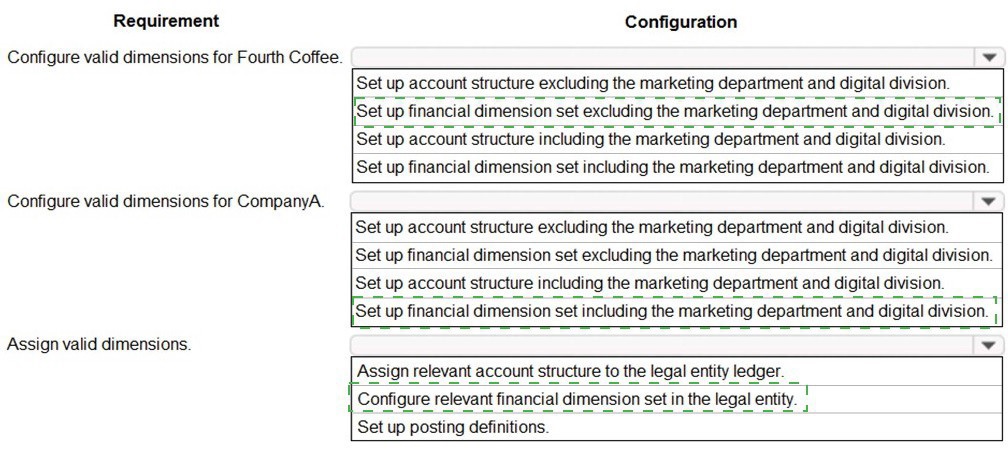
You need to prevent a reoccurrence of User2’s issue.
How should you configure the system? To answer, select the appropriate options in the answer area. NOTE: Each correct selection is worth one point.
Explanation:
The requirement is to configure valid dimensions for CompanyA, which is part of Fourth Coffee. User2’s issue likely involved posting transactions with unauthorized dimensions (marketing department or digital division). To prevent this, you must define account structures and financial dimension sets that explicitly exclude these dimensions, thereby enforcing validation rules at the ledger level.
Correct Configuration Reasoning:
Account Structure (excluding):
The account structure attached to the ledger defines the required and allowed dimension combinations for main accounts. By excluding the marketing department and digital division here, the system will block any transaction that tries to use them.
Financial Dimension Set (excluding):
Dimension sets are used across modules (like projects or fixed assets) to control which dimensions are available for entry. A set that excludes these dimensions ensures they cannot be selected in source documents, preventing the issue upstream.
Incorrect Configuration Reasoning:
Set up account structure including... / Set up financial dimension set including...: These options would explicitly allow the problematic dimensions, which contradicts the requirement to prevent their use and would cause User2’s issue to recur.
Reference:
Microsoft Learn, "Configure account structures" and "Financial dimension sets" – explains how account structures validate dimension combinations for posting, and how dimension sets control available dimensions for data entry to maintain consistency and prevent invalid postings.
You need to ensure that User9's purchase is appropriately recorded.
Which three steps should you perform? Each correct answer presents part of the solution.
NOTE: Each correct selection is worth one point.
A. Select a fixed asset group at the line level.
B. Set the new fixed asset toggle to yes at the line level.
C. Enter three purchase order lines, enter quantity of 1.
D. Enter one purchase order line, enter quantity of 3.
E. Select a financial dimension at the line level.
Explanation:
To record the purchase of a new fixed asset, the purchase order must be configured to trigger fixed asset creation. This involves specifying that the item is a new asset, assigning it to the correct classification group, and ensuring each discrete asset is recorded separately for individual tracking and depreciation.
Correct Option:
A. Select a fixed asset group at the line level:
The fixed asset group determines the default posting profiles, depreciation profiles, and depreciation conventions. This is mandatory for the system to create the fixed asset record and account for it properly.
B. Set the new fixed asset toggle to yes at the line level:
This flag is the primary instruction to the system that this purchase line should generate a new fixed asset record. Without this, the item would be posted to expense or inventory.
C. Enter three purchase order lines, enter quantity of 1:
Since fixed assets are individual, capitalized items, each must be created as a separate line (even if identical) to generate distinct fixed asset numbers and records. A single line with a quantity of 3 would incorrectly create only one asset record.
Incorrect Option:
D. Enter one purchase order line, enter quantity of 3:
This is incorrect for fixed assets. The system creates one fixed asset record per purchase order line. A quantity of 3 would result in only one asset being recorded, making the accounting and physical tracking inaccurate.
E. Select a financial dimension at the line level:
While dimensions can be assigned to the fixed asset later or potentially inherited from the group, specifying them at the PO line is not a required step for the fundamental task of creating the asset. The core requirement is to trigger asset creation (A, B, C).
Reference:
Microsoft Learn, "Procure fixed assets" - The documented procedure explicitly states to create a separate purchase order line for each asset, set the New fixed asset? option to Yes, and select a Fixed asset group to ensure the asset is created and capitalized correctly.
You need to configure settings to resolve User1’s issue.
Which settings should you use? To answer, select the appropriate options in the answer area.
NOTE: Each correct selection is worth one point.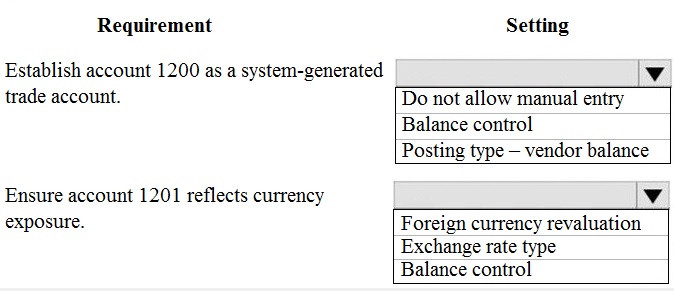
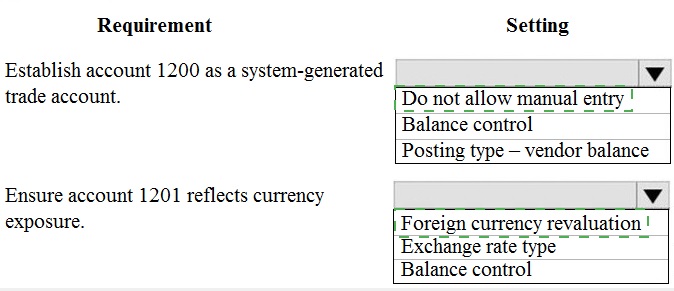
Explanation:
User1's issue likely involves either manual errors on an automated account or incorrect currency valuation. Configuring these settings enforces system control and ensures accurate foreign currency reporting.
Correct Configuration Reasoning:
Account 1200:
The requirement is to establish it as a system-generated trade account. This means transactions should only come from subledger integration (like vendor invoices), not manual journals.
Do not allow manual entry:
Prevents users from manually posting to this account, ensuring it only reflects system-generated vendor balances.
Posting type – vendor balance:
This crucial setting links the main account to the vendor subledger. It ensures the system automatically updates this account with summarized vendor transactions.
Account 1201:
The requirement is for it to reflect currency exposure, meaning it holds transactions in foreign currencies that must be revalued.
Foreign currency revaluation:
This setting must be set to Yes to include the account in the periodic foreign currency revaluation process, adjusting its balance to reflect current exchange rates.
Exchange rate type:
Must be configured (e.g., Current, Average) to define which rate to use for revaluation and reporting.
Incorrect Configuration Reasoning:
Balance control for both accounts:
While sometimes used, it is not the primary setting for these specific requirements. It prevents a ledger from having a debit/credit balance and is not directly related to system-generation or currency revaluation.
Omitting Posting type for 1200 would break the automatic link to vendors.
Omitting Exchange rate type for 1201 would make the "Foreign currency revaluation" setting ineffective.
Reference:
Microsoft Learn, "Main account setup" and "Foreign currency revaluation for ledger accounts": The documentation specifies that a Posting type (e.g., Vendor balance) defines the account's purpose, and the Foreign currency revaluation and Exchange rate type settings are mandatory for proper currency translation.
You need to configure settings to resolve User8’s issue.
What should you select?
A. a main account in the sales tax payable field
B. a main account in the settlement account field
C. the Conditional sales tax checkbox
D. the Standard sales tax checkbox
Explanation:
User8's issue likely involves discrepancies when settling sales tax payments, such as small rounding differences or adjustments from cash discounts. A sales tax settlement period is configured to define how and when tax is reported and paid. The "Settlement account" field within this setup is specifically designed to post these minor variances.
Correct Option:
B. a main account in the settlement account field:
This is correct. The settlement account is a key configuration in a sales tax settlement period. It is used to post automatic balancing adjustments (like rounding differences or cash discount adjustments) that occur when the calculated tax payable does not exactly match the sum of the taxable transactions. This resolves variances without manual journals.
Incorrect Option:
A. a main account in the sales tax payable field:
This is the primary liability account where the main sales tax amount is posted. Configuring this does not resolve settlement variances; it's the standard required setup.
C. the Conditional sales tax checkbox: & D. the Standard sales tax checkbox:
These options relate to the sales tax code setup, defining the tax calculation method (conditional vs. standard percentage). They control how tax is calculated on transactions, not how settlement differences are handled during payment reconciliation.
Reference:
Microsoft Learn, "Set up sales tax settlement periods": The documentation specifies that for each settlement period, you must define a Settlement account. This account is used "to post differences from cash discounts or rounding" when you settle and post sales tax.
You need to configure the system to resolve User8's issue.
What should you select?
A. the Standard sales tax checkbox
B. the Conditional sales tax checkbox
C. a main account in the settlement account field
D. a main account in the sales tax payable field
Explanation:
User8's issue almost certainly involves small discrepancies (like rounding differences or cash discount adjustments) when settling and paying sales tax liabilities. To automate the posting of these variances, the system requires a specific clearing account configured in the tax settlement setup. This prevents out-of-balance situations or manual journal entries during the tax settlement process.
Correct Option:
C. a main account in the settlement account field:
This is the precise solution. The settlement account, defined within the Sales tax settlement periods, is designated to absorb automatic balancing postings. When the sum of detailed tax transaction amounts does not perfectly equal the total liability due to rounding or discounts, the system posts the difference to this account, resolving the issue automatically.
Incorrect Option:
A. the Standard sales tax checkbox:
This defines a sales tax code that applies a fixed percentage rate. It governs calculation, not settlement reconciliation.
B. the Conditional sales tax checkbox:
This defines a tax code with tiered rates based on conditions (e.g., different rates for different invoice amounts). Like option A, it controls calculation logic, not payment variance handling.
D. a main account in the sales tax payable field:
This is the primary liability account (e.g., "Sales Tax Payable") where the calculated tax amount is posted. It is a mandatory configuration but does not solve settlement discrepancies; it is where the main liability is recorded.
Reference:
Microsoft Learn, "Set up sales tax settlement periods": The documentation explicitly states that a Settlement account must be specified. This account is used to post rounding differences or adjustments from cash discounts when you settle sales tax, ensuring the ledger balances.
You need to assist User3 with generating a deposit slip to meet Fourth Coffee's
requirement.
Which five actions should you perform in sequence? To answer, move the appropriate actions from the list of actions to the answer area and arrange them in the correct order.
NOTE: More than one order of answer choices is correct. You will receive credit for any of the correct orders you select.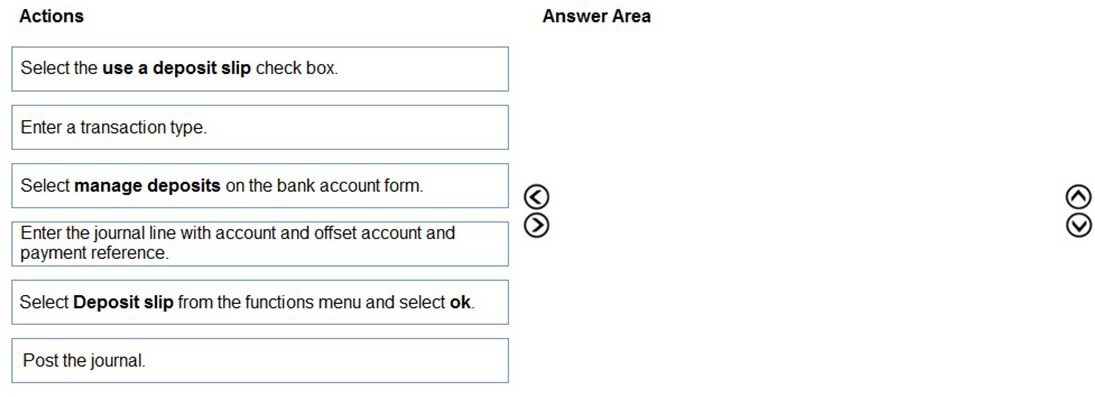
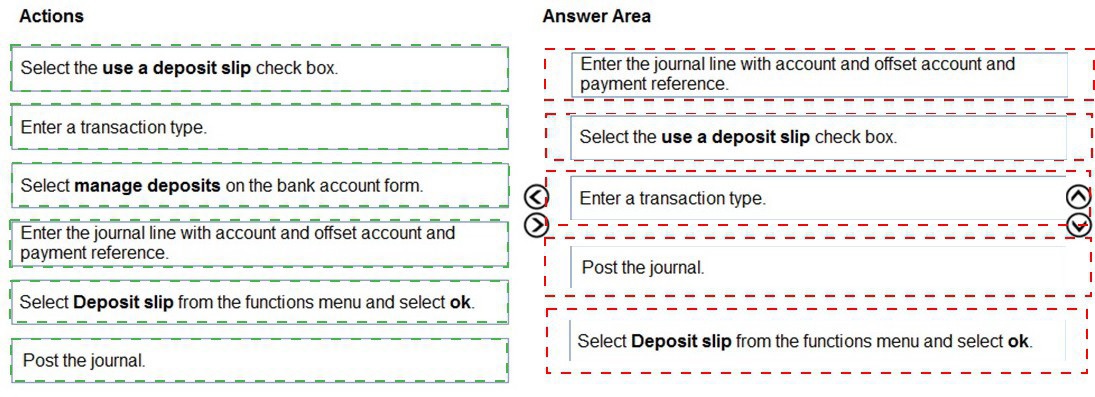
Explanation:
The process begins by configuring the bank account to use deposit slips, then creating a deposit transaction within the dedicated management workspace. You define the transaction, add the payment lines with proper accounting, and finally post to generate the formal deposit slip document. This sequence ensures the transaction is properly accounted for before the slip is finalized.
Why This Order is Logical:
You must first navigate to the correct tool (Manage deposits).
You ensure the feature is enabled for the account (Use a deposit slip).
You start a new deposit transaction and define its nature (Transaction type).
You record the financial details of the payments being deposited (Journal line).
You finalize and create the official record (Post the journal). Printing the slip occurs after posting.
Key Exclusion:
"Select Deposit slip from the functions menu and select ok." This action is typically performed after posting to view, print, or generate a report of the slip. It is not part of the creation and posting sequence, making it step 6 or later.
Reference:
Microsoft Learn, "Deposit slips overview": The workflow described in the documentation follows this logical sequence: configure the bank account, create a deposit transaction, add payments to it, and then post to generate the slip.
You need to determine why CustomerX is unable to confirm another sales order.
What are two possible reasons? Each answer is a complete solution.
NOTE: Each correct selection is worth one point.
A. The credit limit parameter is set to Balance + All.
B. The credit limit is set to 0.
C. An inventory item is out of stock.
D. The inventory safety stock is set to 0
Explanation:
A sales order confirmation can be blocked by several system-enforced business rules. The most common are credit limit violations, which prevent orders that would put a customer over their approved limit, and inventory shortages, which prevent confirming orders for items that are not available to promise.
Correct Option:
A. The credit limit parameter is set to Balance + All:
This is the most restrictive credit limit calculation method. It includes the customer's open balance plus the value of all open orders (even unconfirmed ones). If CustomerX has other pending orders, this setting would block a new order from being confirmed because it appears to immediately exceed their credit limit.
C. An inventory item is out of stock:
This is a direct availability constraint. If an item on the sales order has no on-hand quantity and no scheduled receipts, the system cannot confirm the order because it cannot promise delivery. This would prevent the order confirmation process from completing.
Incorrect Option:
B. The credit limit is set to 0:
While a credit limit of $0 would block all orders, the question asks for a possible reason why CustomerX cannot confirm another order. A limit of $0 would have blocked the first order as well, so it is not a likely new reason for a subsequent block.
D. The inventory safety stock is set to 0:
Safety stock is a replenishment threshold, not a hard reservation block. A setting of 0 means no buffer stock is maintained, but it does not prevent order confirmation. The system will confirm orders as long as on-hand inventory is available, regardless of the safety stock level.
Reference:
Microsoft Learn, "Credit limits" (describes the Balance + All parameter's restrictive nature) and "Set up inventory availability policies" (explains how out-of-stock conditions can block order confirmation and fulfillment).
The posting configuration for a purchase order is shown as follows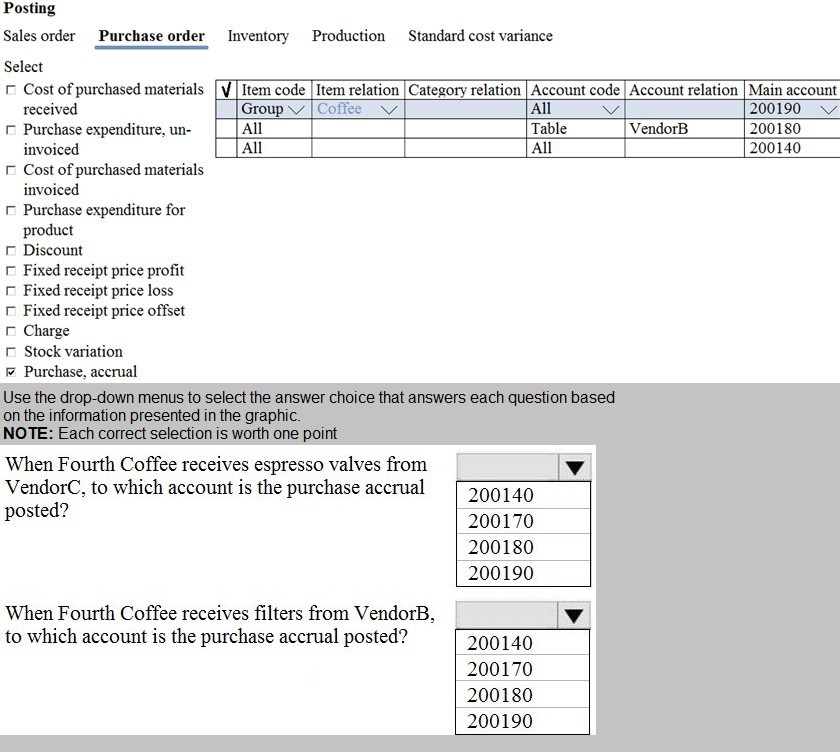
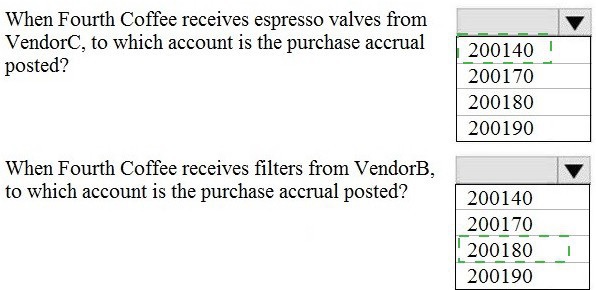
Explanation:
The posting configuration in Dynamics 365 Finance uses a hierarchical search logic to determine which main account to use for a transaction. This hierarchy ensures that the system finds the most specific match first, moving from the individual record level to broader group levels, and finally to a "catch-all" default. For purchase orders, the system evaluates both the Item code (the product side) and the Account code (the vendor side) to find a matching rule in the Inventory Posting Profile.
Correct Option:
The system follows a specific sequence to find the correct ledger account, often summarized as Table > Group > All.
Hierarchy Priority:
The system first searches for a match where the Item code and Account code are both set to Table (specific item and specific vendor).
Sequential Search:
If no specific "Table" match exists, it moves to Group relations (e.g., Item Group or Vendor Group) and finally looks for the All selection as a default.
Incorrect Option:
Broad to Specific:
It is incorrect to assume the system starts with the "All" account and then refines it; doing so would ignore specific business rules for unique items or vendors.
Manual Overrides:
The system does not allow users to manually override these ledger accounts at the transaction level for purchase orders; it must rely on the predefined posting profile.
Skipping Levels:
The system never skips a level in the hierarchy (e.g., jumping from Table to All without checking Group) unless no configuration exists for that middle level.
Reference:
Microsoft Learn:Posting profiles overview
You need to correct the sales tax setup to resolve User5's issue.
Which three actions should you perform? Each correct answer presents part of the solution.NOTE: Each correct selection is worth one point.
A. Populate the sales tax code on the sales order line.
B. Assign the sales tax group to CustomerY.
C. Assign the relevant sales tax code to both the sales tax and item sales tax groups.
D. Populate the item sales tax group field on the sales order line.
E. Populate the sales tax group field on the sales order line.
Explanation:
For sales tax to calculate automatically on a transaction, the system must identify the applicable tax rate (code). This is done by combining two key elements: the Item Sales Tax Group (what is being sold) and the Sales Tax Group (who it is being sold to and from where). If either is missing or incorrectly mapped, tax will not calculate.
Correct Option:
C. Assign the relevant sales tax code to both the sales tax and item sales tax groups:
This is the core configuration. A specific Sales Tax Code (e.g., 10% VAT) must be linked to the intersection of the specific Item Sales Tax Group (e.g., Services) and Sales Tax Group (e.g., CustomerY, WA) in the Sales Tax Rates setup.
D. Populate the item sales tax group field on the sales order line:
The item's tax classification (e.g., standard taxable goods, non-taxable services) must be specified on the transaction line, typically inherited from the released product.
E. Populate the sales tax group field on the sales order line:
The customer's tax obligation and the warehouse/ship-from location's tax jurisdiction must be specified, usually inherited from the customer or site master data.
Incorrect Option:
A. Populate the sales tax code on the sales order line:
This is incorrect and would be a workaround, not a correction. The sales tax code should be determined automatically by the system based on the combination of the Item and Sales Tax Groups. Manually populating it bypasses the tax engine and is not a sustainable fix.
B. Assign the sales tax group to CustomerY:
While this is a necessary master data setup, it is only one part of the solution. The question asks for actions to correct the issue on the sales order. Assigning the group to the customer ensures it defaults onto the order header, but you must still ensure the fields are populated (D & E) and the codes are mapped (C).
Reference:
Microsoft Learn, "Set up sales tax codes" and "Sales tax overview": The documentation explains that the applicable sales tax code is determined by the combination of an Item sales tax group and a Sales tax group. These groups must be assigned to the transaction lines and header, respectively, for the tax calculation to occur.
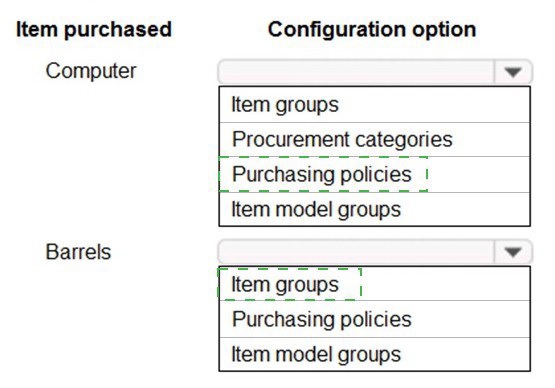
You need to determine the root cause for User1’s issue.
Which configuration options should you check? To answer, select the appropriate options
in the answer area.
NOTE: Each correct selection is worth one point
Explanation:
To diagnose a procurement issue, you must verify the settings that govern purchasing rules and inventory behavior. Item groups define the main accounts for posting. Procurement categories are mandatory for purchase requisitions and categorize spending. Item model groups control critical inventory policies like physical and financial tracking. Purchasing policies apply to vendors or legal entities, not directly to items, making them less likely to be the root cause for a specific item issue.
Correct Configuration Reasoning:
Item Groups:
This is fundamental. It determines the ledger accounts (Inventory, COGS, etc.) used when posting transactions for the item. An incorrect setup here causes posting errors.
Procurement Categories:
Required for creating purchase requisitions. If a "Computer" is missing an assigned procurement category, User1 would be unable to create a purchase requisition for it.
Item Model Groups:
This is critical. It controls whether an item is tracked in inventory (Stocked vs. Non-stocked), how it is costed, and whether physical or financial negative inventory is allowed. An incorrect model group is a common root cause for procurement or inventory issues.
Incorrect Configuration Reasoning:
Purchasing Policies:
These are higher-level rules set at the legal entity or vendor level (e.g., trade agreements, pricing). While they can affect purchasing, they are not typically the first configuration to check for a root cause related to a specific item's basic procurement capability. Item-specific settings (groups, categories, model groups) are more directly responsible.
Reference:
Microsoft Learn, "Set up item groups," "Procurement catalogs overview," and "Item model groups": The documentation establishes that Item groups define posting, Procurement categories organize purchasing, and Item model groups are a primary setting for inventory management—all are essential for an item to be purchased correctly.
| Page 1 out of 19 Pages |