
Topic 2: Munson�s Pickles and Preserves Farm
You need to recommend a solution to prevent User3's issue from recurring.
What should you recommend?
A. Configure automatic charge codes.
B. Create a service item.
C. Configure a sales order template.
D. Create a procurement category.
D18912E1457D5D1DDCBD40AB3BF70D5D
Explanation:
User3's issue likely involves recurring, manual entry of standard fees (like shipping, handling, or restocking charges) on sales orders, leading to errors, inconsistency, or forgotten charges. The solution is to automate the application of these fees based on predefined rules, ensuring they are added correctly every time relevant conditions are met.
Correct Option:
A. Configure automatic charge codes:
This is the precise recommendation. Automatic charges can be set up to apply fees automatically to sales orders, purchase orders, or transfer orders based on triggers like the customer group, item group, mode of delivery, or order value. This eliminates manual effort and ensures the charge is never missed, directly preventing the recurrence of User3's issue.
Incorrect Option:
B. Create a service item:
While you could create a service item for the fee and manually add it to each order line, this does not prevent the issue—it still relies on User3 remembering to add it. It is a manual workaround, not an automated solution.
C. Configure a sales order template:
A template can pre-populate header details or lines, but it is static. It would only include the charge if it was manually added to the template for a specific customer/scenario. It does not dynamically apply charges based on conditions across all relevant orders.
D. Create a procurement category:
This is related to classifying purchases for internal requisitions, not for automating fees on sales orders to customers. It is irrelevant to a sales process issue.
Reference:
Microsoft Learn, "Automatic charges overview": The documentation explains that automatic charges automate the calculation and assignment of trade expenses (like freight and insurance) to documents. They are defined by charge codes and applied based on setup in the Auto charges form, ensuring consistency and accuracy.
You need to identify the root cause for the error that User5 is experiencing.
What should you check?
A. Fixed asset rules
B. Fixed asset determination rules
C. Fixed asset posting profiles
D. Fixed asset books
E. Fixed asset depreciation profiles
Explanation:
When a user encounters an error during the acquisition or posting of a fixed asset (e.g., the system not creating an asset from a purchase order or journal, or posting to incorrect accounts), the most common root cause lies in the configuration that tells the system how to recognize and account for the transaction as a fixed asset.
Correct Option:
B. Fixed asset determination rules:
This is the core configuration that maps specific transaction types (like Acquisition from Purchasing, Acquisition from Accounts Payable, or Acquisition Adjustment) to the corresponding Fixed asset posting profile and Fixed asset book. If these rules are incorrectly configured or missing, the system will not know how to process the transaction as a fixed asset, resulting in an error.
Incorrect Option:
A. Fixed asset rules:
This is a broad, non-specific term not used as a primary configuration node in Dynamics 365 Finance. The precise term is "Fixed asset determination rules."
C. Fixed asset posting profiles:
While posting profiles define the ledger accounts (like the fixed asset acquisition account and the depreciation expense account), an error is more fundamentally caused by the determination rules that select which posting profile to use. Checking the posting profile alone doesn't reveal if the wrong one was triggered.
D. Fixed asset books:
Books define the depreciation conventions (e.g., 200% reducing balance). An error might occur if a required book is missing, but the primary link from a transaction to a book is established via the determination rules.
E. Fixed asset depreciation profiles:
These define the depreciation method and intervals. Errors related to depreciation calculation would occur after the asset is successfully created and capitalized. User5's error is likely happening during the acquisition posting itself.
Reference:
Microsoft Learn, "Fixed asset determination rules": The documentation states that determination rules "are used to identify fixed assets during invoice posting" and to assign the correct posting profile and book. Incorrect setup here is a primary cause for fixed assets not being created or posted correctly from source documents.
You need to process expense allocations.
Which features should you use? To answer, drag the appropriate features to the correct requirements. Each feature may be used once, more than once, or net at all. You may need to drag the split bar between panes or scroll to view content.
NOTE: Each correct selection is worth one point.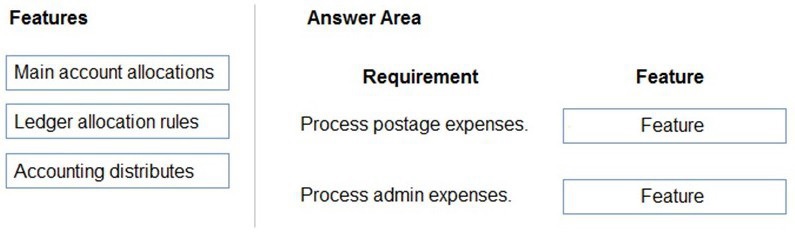
Explanation:
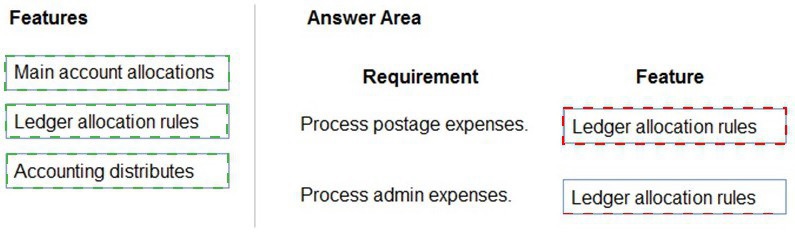
The choice depends on the source and complexity of the allocation. Ledger allocation rules are best for periodic, formula-based allocations from a single source account to multiple destinations. Accounting distributes (accounting distributions) is the method for allocating a single transaction line (like an AP invoice) across multiple dimensions or accounts at the time of entry.
Correct Feature Reasoning:
For Postage Expenses (Ledger Allocation Rules):
Postage is often a centralized cost (e.g., a monthly bulk bill in a single GL account) that needs to be periodically allocated to various departments or cost centers based on a fixed metric (like headcount or mail volume). Ledger allocation rules are designed for this exact purpose—running a periodic journal to redistribute balances from a source account using a defined basis.
For Admin Expenses (Accounting Distributes):
Administrative expenses (like a consulting invoice or software license) are typically processed through accounts payable. When entering the invoice, you need to split the cost across multiple departments, projects, or cost centers directly on the invoice line. Accounting distributes is the feature used on source documents (AP invoices, purchase orders) to allocate a line amount across different financial dimensions or main accounts before posting.
Incorrect/Alternative Feature Reasoning:
Main account allocations:
This feature is used for simple, fixed-percentage allocations within a single journal entry (e.g., always splitting 70% to Account A and 30% to Account B). It is less dynamic than ledger allocation rules and not typically used for document-level splitting like accounting distributions.
Using Ledger allocation rules for admin expenses would be inefficient, as it would require posting the full invoice to a suspense account first and then running a separate allocation process.
Using Accounting distributes for postage would be manual and repetitive if dealing with a consolidated monthly expense, rather than an automated, periodic rule.
Reference:
Microsoft Learn, "Ledger allocation rules" (for periodic, automated allocation of ledger balances) and "Accounting distributions and subledger journal entries for vendor invoices" (for allocating source document amounts at the time of entry).
You need to configure system functionality for pickle type reporting.
What should you use?
A. item model groups
B. item groups
C. procurement category hierarchies
D. financial dimensions
E. procurement categories
Explanation:
"Pickle type reporting" implies a need to categorize and report on items (like different types of pickles) based on their product type or sales category. The system requires a method to group items with similar characteristics for summary reporting, profitability analysis (like gross margin by product line), and sales tracking.
Correct Option:
B. Item groups:
This is the primary classification for grouping items that share similar characteristics and, most importantly for reporting, the same main accounts for posting sales, cost of goods sold, and inventory. Reporting on sales or profit by Item group is a standard and powerful way to analyze performance by product type or category, making it ideal for "pickle type" reporting.
Incorrect Option:
A. Item model groups:
These control inventory policies (tracking, reservations, costing) and physical/financial stock behavior, not reporting categories. They are operational, not financial reporting, structures.
C. Procurement category hierarchies:
These organize items for internal purchasing and requisitioning. They are designed for procurement analysis and spend control, not for sales or profitability reporting for product types.
D. Financial dimensions:
While you could use a custom dimension like "ProductType," the question asks for core system functionality. Item groups are the standard, out-of-the-box method for product category reporting and are directly tied to the chart of accounts.
E. Procurement categories:
Similar to (C), these are for classifying what is bought, not what is sold. They are used on purchase orders and requisitions, not for sales item reporting.
Reference:
Microsoft Learn, "Item groups": The documentation states that item groups determine the main accounts used for posting sales, inventory, and cost of goods sold, and that they are a key dimension for sales and inventory reporting. This directly links the product classification to financial statement reporting.
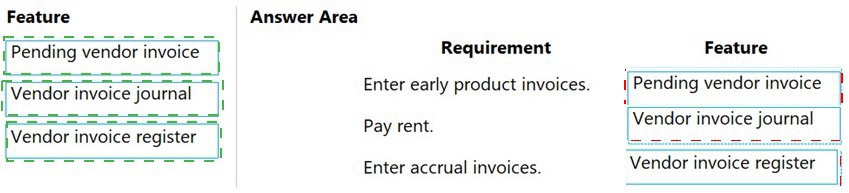
You need to configure the system to meet invoicing requirement.
Which features should you use? To answer, drag the appropriate features to the correct requirements. Each feature may be used once, more than once, or not at all. You may need to drag the split bar between panes or scroll to view content.
NOTE: Each correct selection is worth one point.
Explanation:
Each feature serves a distinct purpose in the accounts payable process. Pending vendor invoices are for matching to purchase orders before final approval. Vendor invoice journals are for direct, non-inventory expenses without a PO. The Vendor invoice register is a holding area for invoices that need to be accrued before matching.
Correct Feature Reasoning:
Enter early product invoices (Pending vendor invoice):
"Early" invoices typically arrive before the goods are received. The Pending vendor invoice workflow is designed for this. It allows you to enter and match the invoice to a purchase order, but it remains in a pending state (not posted to GL) until the product is received, ensuring a 3-way match.
Pay rent (Vendor invoice journal):
Rent is a recurring, non-inventory expense with no associated purchase order or goods receipt. The most efficient method is to use a Vendor invoice journal to directly post the invoice expense and liability, bypassing the matching and approval workflows.
Enter accrual invoices (Vendor invoice register):
Accrual invoices are for expenses incurred in a period where the formal invoice is received later. The Vendor invoice register is used to record the invoice for approval and to create an interim accrued liability (credit to the vendor). It can later be transferred to a final vendor invoice for payment after matching.
Incorrect/Alternative Feature Reasoning:
Using the Vendor invoice journal for early product invoices would bypass the crucial purchase order matching control.
Using the Pending vendor invoice for rent would create unnecessary steps for a simple, direct expense.
Using the Pending vendor invoice for accruals is possible but less standard than the register, which is specifically designed for accrual accounting and approval workflows before final posting.
Reference:
Microsoft Learn documentation on vendor invoice workflows: "Pending vendor invoices" are for PO matching, "Vendor invoice journals" are for non-PO expenses, and the "Invoice register" is used to record invoices for approval and accrual before final posting.
You need to prevent the issue from reoccurring for User5.
What should you do?
A. Use the audit list search query type.
B. Set up the aggregate query type for entertainment expenses.
C. Set up the sampling query type for entertainment expenses.
D. Add more keywords to the audit policy.
Explanation:
User5's issue likely involves entertainment expense reports that violate company policy but are not being flagged by the current audit system. The audit policy uses keywords and rules to automatically identify suspicious transactions for review. If the policy is missing relevant keywords, violations can go undetected.
Correct Option:
D. Add more keywords to the audit policy:
This is the direct solution. If the policy failed to catch a non-compliant entertainment expense (e.g., for a specific venue or type of expense), the most effective action is to enhance the policy's detection criteria by adding additional relevant keywords (like specific restaurant names, "bar," "alcohol," etc.) to its rule set. This broadens the net for future audits.
Incorrect Option:
A. Use the audit list search query type:
The "Audit list search" is a query type used to manually find transactions that match specific criteria for investigation. It is a reactive troubleshooting tool, not a proactive configuration to prevent issues. It doesn't change what the automated policy catches.
B. Set up the aggregate query type for entertainment expenses: & C. Set up the sampling query type for entertainment expenses:
These query types determine how the system selects transactions for the audit once they are already flagged by the policy rules.
Aggregate looks for totals exceeding a threshold (e.g., total monthly entertainment > $500).
Sampling randomly selects a percentage of transactions.
Changing the query type does not fix the core problem of the policy failing to identify the non-compliant transactions in the first place. The issue is with the detection keywords, not the selection method.
Reference:
Microsoft Learn, "Audit policies": The documentation explains that audit policies are defined by rules containing keywords and conditions. To improve detection, you must modify these rules by adding or refining the keywords and amounts that trigger an audit.
The Canadian franchise purchases excess ski equipment from the US franchise. Two sets of skis are purchased totaling USD1,000.
When the purchase invoice is prepared, USD10,000 is keyed in by mistake.
Which configuration determines the result for this intercompany trade scenario?
A. Post invoices with discrepancies is set to require approval.
B. Match invoice totals is set to yes.
C. Three-way match policy is configured.
D. Two-way match policy is configured.
E. Post invoices with discrepancies is set to allow with warning.
Explanation:
The scenario involves a $1,000 purchase order (PO) and a mistakenly entered $10,000 invoice—a 10x discrepancy. The system needs a configuration robust enough to block such a significant error automatically, requiring intervention before posting.
Correct Option:
C. Three-way match policy is configured:
This is the strongest control. A three-way match requires the invoice amount to match both the purchase order and the product receipt quantity. The $10,000 invoice would fail this match against the $1,000 PO and the receipt for two skis. The system would block the invoice from being posted, forcing a correction. This is the configuration that directly "determines the result" of rejection.
Incorrect Option:
A. Post invoices with discrepancies is set to require approval:
This is a weaker control than a three-way match policy. While it may flag the discrepancy for approval, it often allows the invoice to be entered and then routed for approval. The policy might have tolerance percentages that could still allow a 10x error to proceed for approval, rather than blocking it outright at the matching stage.
B. Match invoice totals is set to yes:
This typically enables two-way matching (invoice to PO), not three-way. While it would catch the price variance, a two-way match policy may have higher tolerances and might not consider the physical receipt of goods, making it less stringent than a three-way match.
D. Two-way match policy is configured:
Similar to (B), this only matches the invoice to the purchase order. It might flag the variance but could still allow posting within tolerances or with a warning. It does not involve the critical check against the product receipt quantity.
E. Post invoices with discrepancies is set to allow with warning:
This is the weakest control. It would allow the $10,000 invoice to be posted immediately, merely generating a warning that the user could ignore. This would not prevent the error.
Reference:
Microsoft Learn, "Three-way matching policies": The documentation explains that a three-way matching policy is the most complete control, as it compares the invoice to both the purchase order price and the product receipt quantity, preventing payment for quantities not received or for inflated prices.
You need to adjust the sales tax configuration to resolve the issue for User3.
What should you do?
A. Create multiple settlement periods and assign them to the US tax vendor.
B. Create multiple sales tax remittance vendors and assign them to the settlement period.
C. Run the payment proposal to generate the sales tax liability payments.
D. Create a state-specific settlement period and assign the US tax vendor to the settlement period.
Explanation:
User3's issue likely involves sales tax being calculated correctly but the liability being owed to the wrong tax authority or being unable to generate a proper payment for a specific state. A settlement period links a specific sales tax authority (a vendor) to a specific jurisdiction and defines the payment schedule. To pay tax to a specific state, you need a period configured for that state.
Correct Option:
D. Create a state-specific settlement period and assign the US tax vendor to the settlement period:
This is the precise configuration action. A settlement period is defined for a specific jurisdiction (e.g., Washington State). You then assign the Sales tax authority (configured as a vendor) for that state to the period. This ensures all sales tax collected for that jurisdiction is aggregated in that period and can be paid to the correct vendor.
Incorrect Option:
A. Create multiple settlement periods and assign them to the US tax vendor:
This has the logic backwards. You do not assign multiple periods to a vendor. You assign a specific vendor (tax authority) to a specific settlement period. Furthermore, just creating multiple periods without tying them to specific jurisdictions won't resolve the issue.
B. Create multiple sales tax remittance vendors and assign them to the settlement period:
While you may need multiple vendors (one per tax authority), the core action is to create the state-specific settlement period first and then assign the correct vendor to it. This option puts the focus on creating vendors, which is a prerequisite, but not the direct configuration step to resolve a jurisdictional payment issue.
C. Run the payment proposal to generate the sales tax liability payments:
This is an action, not a configuration. You run the payment proposal after the settlement periods and vendors are correctly configured. If the configuration is wrong, running the proposal will not resolve the underlying issue.
Reference:
Microsoft Learn, "Set up sales tax settlement periods": The procedure specifies that you create a settlement period for each jurisdiction and reporting frequency, and then in the Sales tax authorities fastTab, you add the vendor that represents the tax authority for that jurisdiction. This ensures tax liabilities are directed to the correct payer.
You need to configure ledger allocations to meet the requirements.
What should you configure? To answer, drag the appropriate setups to the correct requirements. Each setup may be used once, more than once, or not at all. You may need to drag the split bar between panes or scroll to view content.

Explanation:
The choice of allocation method depends on whether there is a measurable, variable driver for the cost (a Basis) or if the cost should be split uniformly.
Correct Option Reasoning:
Advertising Expenses (Basis): Advertising costs are often allocated to departments or cost centers based on a variable, measurable driver that reflects benefit received. Examples include:
Revenue: Allocate based on each department's percentage of total revenue.
Headcount: Allocate based on the number of employees in each department.
Square Footage: Allocate based on office space used.
The Basis method allows you to define this dynamic driver (from financial dimensions or fixed values) to calculate variable allocation percentages each period.
Administration Expenses (Equally):
General administrative overhead (like executive salaries, building security, or corporate insurance) that benefits all departments equally is often split Equally. This method divides the total expense by the number of destination units (e.g., all cost centers) so each one bears the same flat amount. It's used when there is no clear, variable driver that differentiates the benefit.
Incorrect/Alternative Option Reasoning:
Fixed Percentage:
Useful for a static, pre-defined split (e.g., 60% to Division A, 40% to Division B) that does not change period-to-period. This is less common for typical advertising or admin expenses which might need to reflect operational changes.
Fixed Weight:
Similar to fixed percentage but uses weights (e.g., weights of 3 and 2) that the system converts into percentages. It is also a static allocation, not a dynamic one based on a driver.
Using Equally for advertising would be inaccurate if some departments benefit more from advertising than others.
Using Basis for administration is possible but often unnecessary if the goal is a simple, uniform split.
Reference:
Microsoft Learn, "Ledger allocation rules": The documentation describes the allocation methods: Fixed percentage for static splits, Basis for allocations that use a dynamic driver (like sales amounts), and Equally for splitting an amount evenly among defined destinations.
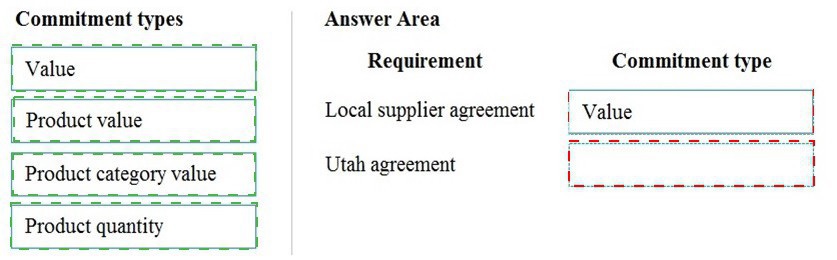
You need to configure the system to for existing purchasing contracts.
Which commitment types should you use? To answer, drag the appropriate commitment types to the correct requirements. Each commitment type may be used once, more than once, or not at all. You may need to drag the split bar between panes or scroll to view content.
NOTE: Each correct selection is worth one point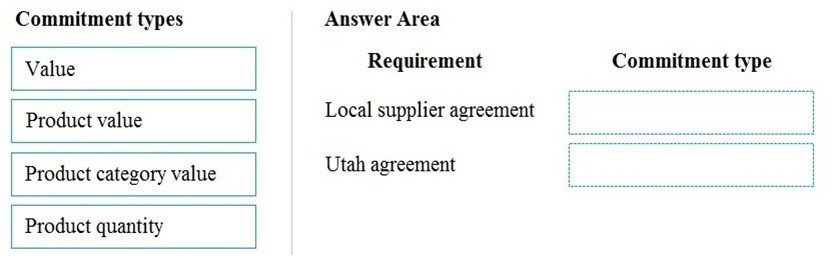
Explanation:
The choice of commitment type depends on whether the contract is based on a monetary spending limit or on a specific quantity of items to be purchased.
Correct Commitment Type Reasoning:
Local supplier agreement (Value):
A broad "local supplier agreement" often sets a total monetary spending limit (e.g., "up to $50,000 of various goods and services"). The Value commitment type is used for this purpose. It tracks the cumulative value of all purchase orders released against the agreement, ensuring the total does not exceed the agreed monetary amount, regardless of what specific items are purchased.
Utah agreement (Product quantity):
An agreement named for a specific location ("Utah") strongly suggests it is for a specific product needed at that site (e.g., "500 units of Item X for the Utah warehouse"). The Product quantity commitment type is used when the contract specifies a precise quantity of a specific item to be purchased. It tracks the quantity of that specific item ordered via POs against the agreement, ensuring the total ordered quantity does not exceed the contractually agreed amount.
Incorrect/Alternative Commitment Type Reasoning:
Product value:
This commitment type is for controlling the monetary value of orders for a specific product. It's a mix of the other two. It's less common than a pure quantity commitment for a specific product or a pure value commitment for a supplier.
Product category value:
This controls the monetary value for a category of products (from the procurement category hierarchy). It's useful for category management but is more specific than a general supplier value agreement and less specific than a single-product quantity agreement.
Using Product quantity for the local supplier agreement would be too restrictive, as it would tie the agreement to specific items.
Using Value for the Utah agreement would not enforce the purchase of a specific required quantity.
Reference:
Microsoft Learn, "Purchase agreement commitment types": The documentation defines the four types. Value agreements control the total monetary amount. Product quantity agreements control the total quantity of a specific item. Product value controls the monetary amount for a specific item, and Product category value controls the monetary amount for a category.
You need to configure the system to meet the budget preparation requirements.
What should you do? To answer, select the appropriate options in the answer area. NOTE: Each correct selection is worth one point.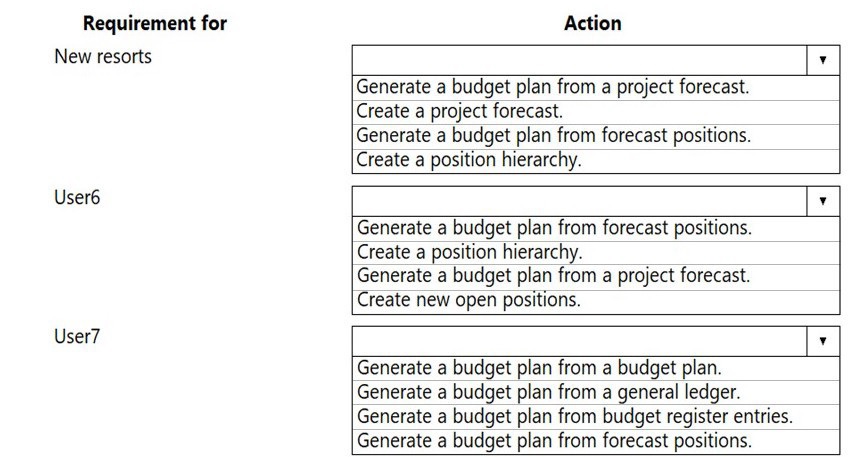
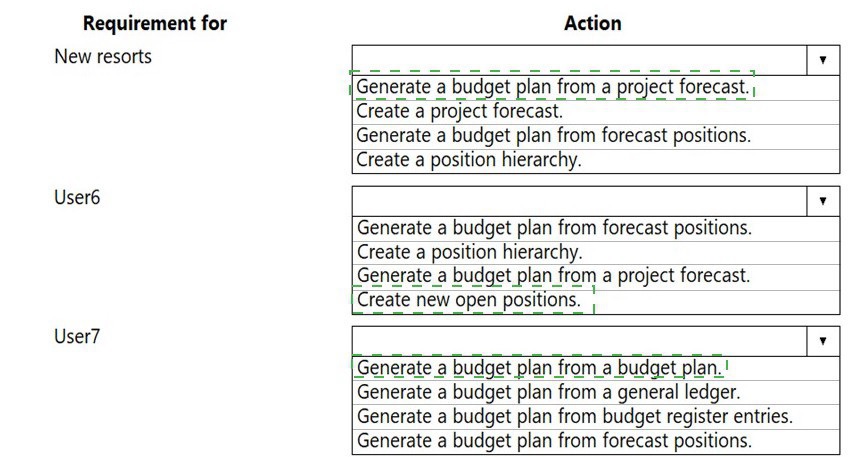
Explanation:
Budget planning can originate from different source data depending on the business need. The correct first action is the one that creates the foundational data that will later be imported into a budget plan.
Correct Action Reasoning:
New resorts (Create a project forecast):
Budgeting for new capital projects (like resorts) is typically driven by project estimates. The logical first step is to create a project forecast within the Project management and accounting module, detailing expected costs and revenues. This forecast data can then be transferred into a budget plan using the "Generate a budget plan from a project forecast" action listed.
User6 (Create new open positions):
User6's associated actions revolve around positions and hierarchies. The prerequisite for generating a budget from forecast positions is to first have the positions defined in the system. Therefore, the initial action is to create new open positions in Human resources. Once positions exist, you can forecast their costs and generate a budget plan from them.
User7 (Generate a budget plan from a general ledger):
User7's actions are all about generating a budget plan from various sources. The most common starting point for operational or departmental budgeting is to base it on historical actuals. The action "Generate a budget plan from a general ledger" allows you to pull historical ledger balances into a new budget plan as a baseline, which can then be adjusted.
Incorrect Action Reasoning:
For New resorts, "Generate a budget plan from a project forecast" is the next step, but you must first create the forecast.
For User6, "Generate a budget plan from forecast positions" or "Create a position hierarchy" are subsequent steps that require positions to exist first.
For User7, other options like generating from "budget register entries" or "a budget plan" are for creating subsequent budget plan versions or adjustments, not for the initial creation from historical data.
Reference:
Microsoft Learn, "Budget planning overview": The documentation details the various data sources for budget plans, including General ledger (for historical data), Projects (for project forecasts), and Forecast positions (for HR planning). The process begins by creating the source data (forecasts, positions) before it can be imported.
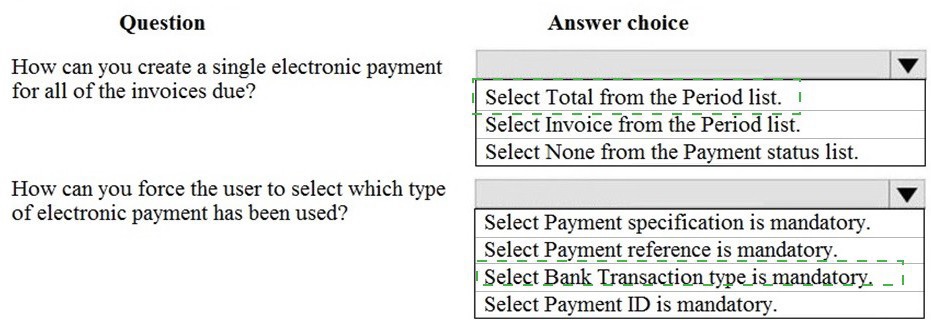
A client needs to configure Accounts payment vendor methods of payment to meet the following business requirements:
Configure the electronic method of payment to create one electronic payment for all of the invoices due. Configure the system to ensure that all payments made with an electronic method of payment also forces the user to select which payment has been used.
You display the Methods of payment setup screen.
Explanation:
The configuration is done in the Methods of payment form for vendors. The Period field controls payment consolidation, and checkboxes under a specific format (like PAYROLL_CK) enforce data entry requirements on the payment proposal.
Correct Configuration Reasoning:
Creating a single payment (Period = Invoice): The Period field in the payment setup determines how payments are grouped.
Setting it to Invoice means the system will create one lump-sum electronic payment that includes the total amount of all selected invoices due for a vendor when you run the payment proposal. This meets the requirement for "a single electronic payment for all invoices due."
Total would create one payment for the total balance of all vendor transactions (including open and non-due), which is broader than requested.
Forcing selection of payment type (Bank Transaction type is mandatory): The checkboxes in the PAYROLL_CK or similar format section control which fields are required on the payment proposal screen before generating the file.
Bank Transaction type is mandatory forces the user to explicitly select the specific electronic payment type (e.g., ACH Credit, Wire Transfer) from a list when submitting the payment proposal. This directly meets the requirement to "force the user to select which payment has been used."
Other mandatory fields like Payment ID or Payment reference are for internal tracking or communication with the vendor, not for specifying the type of electronic funds transfer.
Incorrect Option Reasoning:
Period = Total: This is too broad and would pay the vendor's total outstanding balance, not just the "invoices due" as specified.
Period = None: This is not a standard option for the Period field in this context.
Select Payment specification is mandatory / Payment reference is mandatory / Payment ID is mandatory: These fields are for adding references or notes to the payment file. They do not force the user to specify the type of electronic payment (the bank transaction method).
Reference:
Microsoft Learn, "Methods of payment for vendors" and "Set up method of payment": The documentation explains that the Period field set to "Invoice" creates a single payment per vendor for selected invoices. The Bank transaction type field on the payment proposal is used to specify the electronic payment method, and making it mandatory ensures it is always selected.
| Page 2 out of 19 Pages |
| Previous |