
You are asked to set up SSL proxy in SRX Series devices. An SSL proxy profile is already defined for you.
Which two steps are required to complete the setup? (Choose two.)
A. Enable host-inbound-traffic HTTPS in the security zone in which SSL proxy is referenced.
B. Reference the SSL proxy profile in a security zone.
C. Reference the SSL proxy profile in a security policy.
D. Enable any Layer 7 services in the security policy in which SSL proxy is referenced.
Explanation:
After an SSL proxy profile is defined, it must be activated by associating it with traffic flows. This is accomplished by referencing the profile within a security policy, which dictates the traffic to be inspected. Additionally, you must enable the necessary Layer 7 application services within the same policy so the device can properly process the decrypted traffic for advanced security features.
Correct Option:
C. Reference the SSL proxy profile in a security policy.
The SSL proxy profile is applied as an "application-service" within the then permit action of a security policy. This step is essential, as policies are the primary mechanism for applying services to permitted traffic.
D. Enable any Layer 7 services in the security policy in which SSL proxy is referenced.
After the policy permits traffic and applies the SSL proxy, enabling Layer 7 services (like UTM or AppSecure) allows the device to inspect the decrypted content and perform advanced threat prevention or application identification.
Incorrect Option:
A. Enable host-inbound-traffic HTTPS in the security zone in which SSL proxy is referenced.
host-inbound-traffic controls traffic destined to the SRX's own interfaces (e.g., for management). SSL proxy processes transit traffic (e.g., from Trust to Untrust zones), so this setting is not required for its operation.
B. Reference the SSL proxy profile in a security zone.
SSL proxy profiles are applied at the policy level, not the zone level. Security zones define trust boundaries and interface memberships but do not directly invoke features like SSL proxy.
Reference:
Juniper Networks Documentation: The profile is applied to the security policy as application-services.
Juniper Networks Documentation: Security policies use ssl-proxy under permit application-services to define the inspection action.
Which two steps are necessary to prepare the Active Directory domain for a JIMS installation? (Choose two.)
A. Create two limited access user accounts.
B. Create three limited access user accounts.
C. Add one full access user account to Active Directory groups.
D. Add limited access user accounts to Active Directory groups.
Explanation:
Preparing an Active Directory domain for Juniper Identity Management Service (JIMS) requires creating dedicated service accounts with the least privileges necessary for security. The standard configuration involves creating two specific, limited-access user accounts, which are then added to predefined Active Directory groups to grant them the precise permissions they need for their respective functions.
Correct Option:
A. Create two limited access user accounts.
The Juniper documentation explicitly guides you to create two limited-permission user accounts for JIMS . One is for reading event logs (JIMS-EventLogRemoteAccess), and the other is for PC probing (JIMS-PC-Probe) .
D. Add limited access user accounts to Active Directory groups.
After creating the accounts, you must add them to specific Active Directory groups. For example, the event log account is added to the Event Log Readers group, and the PC Probe account is added to groups like Distributed COM Users and Remote Management Users .
Incorrect Option:
B. Create three limited access user accounts.
The documented procedure requires two separate limited-access accounts for JIMS functions, not three . A third "full access" account is not part of the JIMS preparation process.
C. Add one full access user account to Active Directory groups.
The setup principle is to grant least privilege. It uses two limited access accounts rather than a single full access account, and the service accounts are added to groups based on their specific roles .
Reference:
Juniper Networks Documentation: JIMS Configuration - Prerequisites .
When using Adaptive Threat Profiling, which two deployment modes are available on SRX Series devices? (Choose two.)
A. bridge
B. inline
C. tap
D. promiscuous
Explanation:
Adaptive Threat Profiling on SRX firewalls supports two flexible deployment architectures: inline and tap . In an inline deployment, the SRX actively enforces policies by blocking or permitting traffic in real-time . In a tap deployment, the SRX acts as a passive sensor, identifying threats and sharing intelligence with other in-line devices without impacting the traffic flow itself .
Correct Option:
B. inline.
In this mode, the SRX Series device is placed directly in the data path and can enforce security policies. It can perform detection and, more importantly, take immediate enforcement actions like blocking the traffic it identifies as a threat .
C. tap.
In this mode, the SRX Series device operates as a passive sensor. It receives a copy of the traffic to analyze for threats and add IPs to threat feeds, but it does not affect the original traffic flow. This is useful for detecting and sharing threat intelligence without introducing a point of failure in the network path .
Incorrect Option:
A. bridge.
While SRX devices support transparent or bridge mode for other features, Adaptive Threat Profiling is not explicitly classified by the deployment modes of "bridge" versus "tap" or "inline." The official documentation lists the deployment choices as detection (passive) or enforcement (active) solutions .
D. promiscuous.
This term is commonly used for network taps or IDS sensors that monitor all traffic. However, the Juniper documentation specifically refers to the passive deployment option for Adaptive Threat Profiling as a "tap" mode .
Reference:
Juniper Networks Documentation: Configure and Deploy Adaptive Threat Profiling .
Juniper Networks Solution Brief: Adaptive Threat Profiling Brings Unique Security Capabilities to the Threat-Aware Network .
Juniper Networks Press Release: Adaptive Threat Profiling feature for Juniper ATP Cloud .
What are two properties negotiated during IKE Phase 2? (Choose two.)
A. routing protocol
B. tunneling protocol
C. aggressive mode
D. Perfect Forward Secrecy
Explanation:
IKE Phase 2, also known as Quick Mode, negotiates the parameters for the actual IPsec Security Association (SA) used to encrypt user data . Its primary purpose is to establish the data tunnel by negotiating the tunneling protocol and related cryptographic keys. A key security feature often negotiated in this phase is Perfect Forward Secrecy (PFS) .
Correct Option:
B. tunneling protocol.
IKE Phase 2 establishes the IPsec SA, which defines how user traffic will be protected in the data tunnel. This includes negotiating the specific tunneling protocol to be used, which can be ESP (Encapsulating Security Payload) or AH (Authentication Header), as well as the associated encryption and authentication algorithms for the data flow .
D. Perfect Forward Secrecy.
PFS is an optional but important parameter negotiated during IKE Phase 2 . When enabled, it forces a new, independent Diffie-Hellman key exchange for each Phase 2 SA . This ensures that if a long-term key is compromised, it cannot be used to decrypt past or future session traffic .
Incorrect Option:
A. routing protocol.
Routing protocols (like OSPF or BGP) are not negotiated during IKE Phase 2. While routing can determine which traffic uses a VPN tunnel, the parameters of the tunnel itself are independent of any dynamic routing protocol negotiation.
C. aggressive mode.
Aggressive mode is an IKE Phase 1 negotiation mode, not a property of Phase 2 . It is used to establish the initial secure IKE control channel. Phase 2 uses "Quick Mode" for its negotiation process .
Reference:
Juniper Networks Documentation: Implicit IPsec proposal parameters for dynamic negotiations .
Juniper Networks Documentation: show security ipsec security-associations command output details .
Which two statements are correct about cluster components? (Choose two.)
A. Cluster ID values range from 1 through 255.
B. Node ID values are either 0 or 1.
C. Cluster ID values are either 0 or 1.
D. Node ID values range from 1 through 255.
Explanation:
In Juniper SRX chassis clustering, two numeric identifiers are crucial. The Cluster ID uniquely identifies the cluster and must match on both devices, ranging from 1 to 255 . The Node ID uniquely identifies each device within the cluster and is limited to either 0 or 1 . Setting a cluster ID to 0 disables clustering .
Correct Option:
A. Cluster ID values range from 1 through 255.
A chassis cluster is identified by its cluster-id . The valid range for this ID is from 1 to 255 . This ID must be identical on both nodes (node 0 and node 1) for them to form a single cluster .
B. Node ID values are either 0 or 1. A node's node-id is a number between 0 and 1 .
These are the only possible values, as a chassis cluster supports a maximum of two devices . Each device in the cluster must have a unique Node ID, one assigned 0 and the other 1 .
Incorrect Option:
C. Cluster ID values are either 0 or 1.
This is incorrect; it confuses the range of a Cluster ID with that of a Node ID. A Cluster ID can be any number from 1 to 255 and must be unique per cluster in a Layer 2 network . A Cluster ID of 0 is not valid and is used to disable the cluster .
D. Node ID values range from 1 through 255.
This is incorrect; it incorrectly applies the range for a Cluster ID to the Node ID . Node IDs are strictly binary (0 or 1) because a cluster can only contain two devices .
Reference:
Juniper Networks Documentation: "A cluster is identified by a cluster ID (cluster-id) specified as a number from 1 through 255" and "A cluster node is identified by a node ID (node) specified as a number from 0 through 1" .
Juniper Networks Documentation: "The chassis cluster can contain a maximum of two devices"
Using Junos Space Security Director, you want to configure a unique firewall policy for a specific SRX Series device.
Which firewall policy rules would satisfy the requirement?
A. all devices policy prerules
B. group policy prerules
C. device policy rules
D. all devices policy postrules
Explanation:
In Junos Space Security Director, firewall policies are classified into two main types: group policies and device policies . A device policy is specifically designed for a single, unique device . This is the correct method to enforce a configuration that applies to only one specific SRX device. Options involving 'all devices' or 'group policies' are designed for broader application and would not isolate the configuration.
Correct Option:
C. device policy rules.
A device policy is a type of firewall policy that is created per device . It is used specifically when you want to push a unique firewall policy configuration to a particular device , satisfying the requirement for a unique policy for a specific SRX.
Incorrect Option:
A. all devices policy prerules.
'All devices policy' rules apply globally across all devices and do not provide a means to create a unique configuration for a single specific SRX device .
B. group policy prerules.
Group policies are shared policies that can be applied to multiple devices . While they can be placed before device-specific policies as 'prerules', they cannot provide a unique configuration for a single specific SRX device .
D. all devices policy postrules.
Similar to prerules, 'all devices policy' rules apply globally. 'Postrules' specify their order of application relative to device-specific rules but still apply to all devices, not a single specific one .
Reference:
Juniper Networks Documentation: "Device Policy—Type of firewall policy that is created per device. This type of policy is used when you want to push a unique firewall policy configuration per device" .
Juniper Networks Documentation: The policy ordering overview clarifies that 'all devices policy' rules are global and 'group policies' are shared, unlike 'device-specific policies' which are unique to a device .
You have configured a new site-to-site VPN tunnel. The exhibit shows the security IPsec statistics output for the specific tunnel index from one of the tunnel-end devices.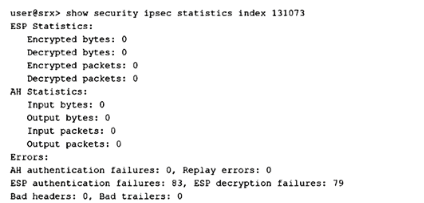
Which two statements are correct in this scenario? (Choose two.)
A. AH is incorrectly configured.
B. The far-end tunnel device is rebooting.
C. The ESP configuration is not set up correctly.
D. No traffic passes through this tunnel.
Explanation:
The output shows ESP authentication failures (83) and decryption failures (79), indicating that the ESP configuration (encryption/authentication algorithms or keys) does not match between the two tunnel endpoints. Additionally, encrypted/decrypted byte and packet counters are all zero, confirming that no user traffic has successfully traversed this tunnel.
Correct Option:
C. The ESP configuration is not set up correctly.
The ESP authentication failures (83) and decryption failures (79) are clear indicators of a mismatch. This typically occurs when the two peers have different ESP proposals—for example, different encryption algorithms (AES-128 vs. AES-256), different authentication algorithms (SHA-1 vs. SHA-256), or mismatched pre-shared keys.
D. No traffic passes through this tunnel.
The statistics show that Encrypted packets, Decrypted packets, Encrypted bytes, and Decrypted bytes are all zero. This confirms that while IKE Phase 1 and Phase 2 may have established the SAs (since the tunnel index exists), no actual user data has been successfully encrypted, transmitted, decrypted, or received through this tunnel.
Incorrect Option:
A. AH is incorrectly configured.
The AH statistics show all zeros for input/output bytes and packets, with zero authentication failures. This does not indicate a misconfiguration; rather, it simply means that AH is not being used for this tunnel (which is normal, as ESP is the more common choice). Since no AH traffic is attempted, no failures occur.
B. The far-end tunnel device is rebooting.
There is no evidence in the statistical counters to support this conclusion. If the far-end device were rebooting, you would typically see IKE negotiation failures or SA down notifications. The presence of ESP failures suggests a persistent configuration mismatch rather than a transient state like a reboot.
Reference:
Juniper Networks Documentation: show security ipsec statistics command reference.
Juniper Networks Documentation: Troubleshooting IPsec VPNs—ESP authentication/decryption failures indicate proposal mismatches.
Which two statements are correct about Juniper ATP Cloud malware analysis? (Choose two.)
A. If no match exists in cache, the remaining analysis features are processed with the cumulative threat score transmitted to the SRX Series device.
B. If a match exists in cache, that threat score is sent to the SRX Series device and the analysis continues.
C. If a match exists in cache, that threat score is sent to the SRX Series device and the analysis stops.
D. If no match exists in cache, the first analysis feature to generate a threat score is transmitted to the SRX Series device.
Explanation:
Juniper ATP Cloud employs a pipeline architecture for malware analysis. When a file is submitted, the first step is a cache lookup to check if the file has been analyzed previously. If there is a cache match, the threat score is immediately sent to the SRX Series device, and the analysis stops to save resources. If no cache match exists, the file proceeds through the remaining analysis pipeline, and a cumulative threat score is transmitted to the SRX Series device.
Correct Option:
A. If no match exists in cache, the remaining analysis features are processed with the cumulative threat score transmitted to the SRX Series device.
The analysis pipeline uses a progressive approach, where each analysis feature contributes to a cumulative threat score. If the cache lookup does not yield a result, the file proceeds through the rest of the pipeline (e.g., antivirus scanning, static analysis, dynamic analysis), and the final combined verdict is sent to the SRX.
C. If a match exists in cache, that threat score is sent to the SRX Series device and the analysis stops.
A cache lookup is the first and fastest step in the analysis pipeline. If a hash match is found in the cloud's database, the cached verdict is immediately returned to the SRX. The analysis process then stops because the file is already known, and there is no need to re-analyze it.
Incorrect Option:
B. If a match exists in cache, that threat score is sent to the SRX Series device and the analysis continues.
This is incorrect because continuing analysis after a cache hit would be inefficient. The purpose of a cache is to short-circuit the analysis pipeline for already-known files, providing an immediate answer.
D. If no match exists in cache, the first analysis feature to generate a threat score is transmitted to the SRX Series device.
This describes a non-cumulative, first-to-finish approach. The ATP Cloud does not send an individual feature's score to the SRX; instead, it runs the file through multiple analysis techniques and combines the results into a single, cumulative threat score before sending the final verdict.
Reference:
Juniper Networks Documentation: The analysis pipeline uses a "progressive" model where values are combined for a more accurate verdict; cache lookup short-circuits the process.
Which three actions does Junos Space Security Director perform during the device discovery process? (Choose three.)
A. It imports the device’s active device configuration.
B. it reboots the device.
C. It imports device status information
D. It adds a local superuser account to the device configuration.
E. It connects to the device using SSH.
Explanation:
During the device discovery process in Junos Space Security Director, the system establishes a secure connection to the target device, retrieves its current operational status, and imports its active configuration into the Junos Space database . The process uses SSH for secure communication and does not reboot the device or modify its local user accounts.
Correct Option:
A. It imports the device's active device configuration.
Security Director imports the firewall policy and other configuration elements from the discovered device into its database . After discovery, the imported policies are available for management.
C. It imports device status information.
The discovery process gathers device status and other operational information as part of the import . This includes connection status and management information.
E. It connects to the device using SSH.
The discovery profile requires credentials for authentication, and the system connects to the device using SSH for management . This is a prerequisite for importing configuration.
Incorrect Option:
B. It reboots the device.
The discovery process does not involve rebooting the device. Rebooting would disrupt network operations and is not a step in importing configuration or adding a device to management.
D. It adds a local superuser account to the device configuration.
The discovery process uses credentials provided in the discovery profile; it does not create new user accounts on the target device .
Reference:
Juniper Networks Documentation: Device discovery uses profiles with credentials and connects via SSH .
Using Junos Space Security Director, you want to configure a unique firewall policy for a specific SRX Series device.
Which firewall policy rule would satisfy the requirement?
A. all devices policy prerules
B. group policy prerules
C. device policy rules
D. all devices policy postrules
Explanation:
In Junos Space Security Director, firewall policies are classified into types based on their scope of application. A device policy is specifically designed to apply to a single, unique SRX Series device. This satisfies the requirement of configuring a unique firewall policy for a specific device. Other policy types like 'all devices' or 'group policies' apply globally or to multiple devices.
Correct Option:
C. device policy rules.
A device policy is a firewall policy created per device. It is used when you want to push a unique firewall policy configuration to a particular device, which directly meets the requirement.
Incorrect Option:
A. all devices policy prerules.
These are global policies applied to all devices. They cannot provide a unique configuration for a single specific SRX device.
B. group policy prerules.
Group policies are shared policies that can be applied to multiple devices. They are not unique to a single device.
D. all devices policy postrules.
Similar to other 'all devices' policies, these apply globally and cannot isolate a configuration to one specific device.
Reference:
Juniper Networks Documentation: "Device Policy—Type of firewall policy that is created per device. This type of policy is used when you want to push a unique firewall policy configuration per device".
How does the SSL proxy service identify SSL traffic?
A. by examining the URL
B. by using AppID results
C. by examining the destination port
D. by reading the server certificate
Explanation:
The SSL proxy service relies on the Application Identification (AppID) engine to dynamically detect if a particular session is SSL-encrypted . The proxy only initiates its functionality after AppID identifies the traffic as SSL/TLS, as indicated by a session being marked as "Encrypted=Yes" in the application system cache . Relying on destination port alone is unreliable, as SSL traffic can run on non-standard ports .
Correct Option:
B. by using AppID results.
SSL proxy uses application identification services to determine if a session is SSL encrypted . This process is dynamic and part of AppSecure, allowing the proxy to be enabled as an application service within a security policy after the traffic is identified . This method ensures the proxy correctly handles traffic even when it uses non-standard ports .
Incorrect Option:
A. by examining the URL.
While SSL proxy can log URL categories from the Server Name Indication (SNI) or certificate fields for whitelisting purposes, URL examination is not the primary mechanism used to identify SSL traffic for proxy initiation . AppID is the core technology for this identification.
C. by examining the destination port.
This is a traditional method that is not used by Juniper's SSL proxy. The proxy is designed to work dynamically using AppID, which means it can correctly identify SSL traffic regardless of the port number . Relying only on destination port would fail for non-standard SSL configurations.
D. by reading the server certificate.
While the server certificate is used for establishing secure connections and can be inspected for whitelisting and logging, it is not the mechanism used to identify the traffic as SSL in the first place . AppID is the tool used to make this initial determination before the proxy engages.
Reference:
Juniper Networks Documentation: SSL Proxy Overview - How SSL Proxy Works with Dynamic Application Identification .
Juniper Networks Documentation: Application Identification (AppID) support for SSL Proxy .
Juniper Networks Documentation: SSL Proxy in an Application Firewall .
Which protocol does the SRX Series Firewall use to communicate with a Windows domain controller?
A. SSH
B. LDAP
C. DNS
D. NETCONF
Explanation:
The SRX Series firewall communicates with a Windows domain controller using the Lightweight Directory Access Protocol (LDAP) to retrieve user and group mapping information for integrated user firewall features. In a typical scenario, the Windows domain controller acts as the LDAP server. The SRX downloads user and group lists, and queries the LDAP server for updates .
Correct Option:
B. LDAP.
The SRX Series device uses LDAP to access the Active Directory domain controller as an LDAP server . This is configured under the user-group-mapping hierarchy using the ldap keyword, which is the required protocol for this function . For security, LDAP can be encrypted using SSL (LDAPS) on port 636 .
Incorrect Option:
A. SSH.
SSH is used for secure command-line management of the SRX device, not for querying user and group information from a Windows domain controller.
C. DNS.
DNS is used for name resolution on the network and is not the protocol used by the SRX to directly query user-group mappings from the domain controller.
D. NETCONF.
NETCONF is a network management protocol used to install, manipulate, and delete the configuration of network devices. It is not used to communicate with a domain controller for user identity services.
Reference:
Juniper Networks Documentation: The SRX Series Firewall acts as an LDAP client communicating with an LDAP server. In a common implementation scenario, the domain controller acts as the LDAP server .
Juniper Networks Documentation: The LDAP server provides user-to-group mappings to the SRX Series, with the domain controller acting as the LDAP server in typical customer scenarios
| Page 1 out of 6 Pages |
| 12 |
Real-World Scenario Mastery: Our JN0-336 practice exam don't just test definitions. They present you with the same complex, scenario-based problems you'll encounter on the actual exam.
Strategic Weakness Identification: Each practice session reveals exactly where you stand. Discover which domains need more attention, before Security, Specialist (JNCIS-SEC) exam day arrives.
Confidence Through Familiarity: There's no substitute for knowing what to expect. When you've worked through our comprehensive JN0-336 practice exam questions pool covering all topics, the real exam feels like just another practice session.
Copyright © All Rights Reserved