
Which two producer exceptions are examples of the class RetriableException? (Select two.)
A. LeaderNotAvailableException
B. RecordTooLargeException
C. AuthorizationException
D. NotEnoughReplicasException
Explanation:
✅ Correct Answer Justification:
These exceptions extend RetriableException, signaling transient issues that may resolve shortly:
A.LeaderNotAvailableException:
Occurs when the partition leader is temporarily unavailable. Kafka may be re-electing a leader, and retrying the request after a short delay often succeeds. → Retriable because the cluster may stabilize soon.
D.NotEnoughReplicasException:
Thrown when the number of in-sync replicas is below the configured min.insync.replicas. This can happen during broker failures or network partitions. → Retriable because replicas may come back online shortly.
❌ Incorrect Answer Analysis
B. RecordTooLargeException:
This is not retriable. It occurs when the record size exceeds the broker’s message.max.bytes or the topic’s max.message.bytes. → Retrying won’t help unless the record is resized.
C. AuthorizationException:
This is not retriable. It indicates the client lacks permission to perform the operation (e.g., produce to a topic). → Retrying without fixing ACLs or credentials will always fail.
🧠 Key Concepts and Terminology
RetriableException: A subclass of KafkaException indicating that the error is transient and the operation may succeed if retried.
Producer Retry Logic:
Controlled by retries, retry.backoff.ms, and delivery.timeout.ms. Kafka producers automatically retry retriable exceptions.
Leader Election:
Kafka uses ZooKeeper or KRaft to elect a leader for each partition. During transitions, producers may temporarily fail.
In-Sync Replicas (ISR):
Brokers that have fully replicated the leader’s log. If ISR count drops below min. insync. replicas, Kafka rejects writes.
🌍 Real-World Application
Leader Not Available Exception:
Common during broker restarts or rolling upgrades. Producers retry and succeed once the leader is re-elected.
Not EnoughReplicas Exception:
Seen in high-availability setups when brokers go down. Retry logic ensures durability without manual intervention.
📚 References and Resources
Apache Kafka Producer Exceptions
Confluent Docs – Producer Configs
CCDAK Exam Guide
📊 Visual Aids
Consider a flowchart showing:
Code
Producer → Broker → Exception Thrown
↘ Retriable? → Retry Logic
Or a diagram of:
Partition with no leader → Leader Not Available Exception
ISR count below threshold → Not Enough Replicas Exception
⚠️ Common Mistakes
Assuming all exceptions are retriable: Only transient issues qualify. Authorization and record size errors are permanent until fixed.
Misunderstanding ISR behavior: ISR is dynamic. Brokers rejoin ISR automatically, making NotEnoughReplicasException retriable.
🧭 Cross-Reference to Exam Domains
Kafka Fundamentals: Partition leadership, ISR
Producer API: Exception handling, retry logic
Confluent Platform Features: Reliability and fault tolerance
🧾 Summary
The correct answers are A and D because they represent transient, recoverable conditions. Kafka producers can retry these operations safely. Understanding which exceptions are retriable is critical for building resilient, fault-tolerant Kafka applications.
Let me know if you want to walk through retry configuration or simulate these exceptions in a test cluster.
You create a producer that writes messages about bank account transactions from
tens of thousands of different customers into a topic.
Your consumers must process these messages with low latency and minimize
consumer lag
Processing takes ~6x longer than producing
Transactions for each bank account must be processedin orderWhich strategy
should you use?
A. Use the timestamp of the message's arrival as its key.
B. Use the bank account number found in the message as the message key.
C. Use a combination of the bank account number and the transaction timestamp as the message key.
D. Use a unique identifier such as a universally unique identifier (UUID) as the message key.
Explanation:
Correct Answer Justification:
B. Use the bank account number found in the message as the message key.
Justification:
This answer perfectly satisfies both critical requirements: ordering and parallelism.
Guarantees Per-Key Ordering:
In Kafka, messages with the same key are guaranteed to be written to the same partition. Furthermore, within a single partition, Kafka provides strict ordering. By using the bank account number as the key, you guarantee that all transactions for account #12345 will always go to, for example, Partition 4, and will be read by consumers in the exact order they were produced.
Enables Horizontal Scaling for Consumers:
The requirement for low latency despite slow processing (~6x longer than producing) means you must parallelize the work across multiple consumer instances. This is achieved using a Consumer Group. In a consumer group, each partition is assigned to exactly one consumer instance. By using the account number as the key, you distribute the messages across all partitions of the topic based on a hash of the account number. This allows many consumer instances to work simultaneously, each processing a subset of the accounts, thus minimizing overall consumer lag.
Incorrect Answer Analysis
A. Use the timestamp of the message's arrival as its key.
Why it's wrong:
This is perhaps the worst choice. If every message has a unique or nearly-unique timestamp as its key, the producer will effectively round-robin the messages across all partitions. This completely destroys the ordering guarantee for bank accounts, as transactions for the same account will be scattered across different partitions and processed by different consumers in an unpredictable order. It also may not help with parallelism in a meaningful way beyond a random distribution.
C. Use a combination of the bank account number and the transaction timestamp as the message key.
Why it's wrong:
While this includes the account number, adding the timestamp makes every key unique. The result is the same as using a UUID (Option D). Each message would have a unique key, leading to a random distribution across partitions. This fails the ordering requirement because two transactions for account #12345 would have different keys ("12345-10:00:00" vs. "12345-10:00:01") and could end up in different partitions.
D. Use a unique identifier such as a universally unique identifier (UUID) as the message key.
Why it's wrong:
This strategy is useful when you need to uniquely identify every message and ordering across all messages is not important. However, in this scenario, it directly violates the ordering requirement. By giving every message a unique key, you randomize their assignment to partitions. Transactions for the same account will be processed out of order by different consumers. While it does allow for maximum parallelism (work is spread evenly), it does so at the cost of correctness.
Key Concepts and Terminology
Message Key: An optional property of a Kafka message that influences which partition the message is written to. The partition is determined by hash(key) % number_of_partitions.
Partition:
The unit of parallelism in Kafka. Topics are split into partitions, which can be consumed in parallel.
Consumer Group:
A set of consumers that cooperate to consume data from a topic. Each partition is consumed by only one member of the group at any time.
Ordering Guarantee:
Kafka guarantees order of delivery only within a single partition.
Consumer Lag:
The difference between the last message produced to a partition and the last message consumed by the consumer group. Minimizing lag is critical for real-time systems.
Real-World Application
This pattern is ubiquitous in event-driven systems where order matters within a context, but the overall workload needs to be scaled out.
E-commerce:
Orders for a specific customer must be processed in sequence (e.g., Create Order -> Add Payment -> Ship Order). The Customer ID would be the perfect key.
IoT: Sensor readings from a specific device must be processed in timestamp order to detect trends. The Device ID would be the key.
Financial Trading:
All actions on a specific stock symbol (e.g., MSFT) must be sequenced correctly. The Stock Symbol would be the key.
In our bank example, using the account number ensures that a sequence like Deposit $100 -> Withdraw $50 is processed correctly. If these events were processed out of order (Withdraw $50 first), it could lead to an overdraft fee due to insufficient funds, even though the deposit had already been made.
References and Resources
Confluent Documentation:
Introduction to Kafka Topics (See section on partitioning)
Apache Kafka Documentation:
The Producer Configs (The key is part of the ProducerRecord)
CCDAK Exam Guide:
This question maps directly to Domain 2.0 (Producer API), specifically understanding how keys affect partitioning.
Visual Aids (if applicable)
Diagram: Impact of Key Choice on Partitioning and Ordering
text
Scenario: Topic with 3 Partitions (P0, P1, P2)
Producer with Key=Account_Number (e.g., "ACC-123")
-> Hash("ACC-123") % 3 = P1
-> All transactions for ACC-123 go to P1 -> CONSUMER 1 processes them IN ORDER.
Producer with Key=UUID (Unique for each message)
-> Message 1 for ACC-123: Hash("UUID-abc") % 3 = P0 -> CONSUMER 2 processes it.
-> Message 2 for ACC-123: Hash("UUID-xyz") % 3 = P2 -> CONSUMER 3 processes it.
-> Messages are processed OUT OF ORDER.
Common Mistakes
Assuming Kafka provides total order: The biggest misconception is that Kafka guarantees order across an entire topic. It only guarantees order per partition.
Equating "unique key" with "efficient parallelism":
While a unique key distributes messages evenly, it is often the wrong choice when order within a logical group (like an account) is required. The goal is to choose a key that creates the right granularity of parallelism—in this case, at the account level, not the transaction level.
Over-engineering the key:
Option C is a classic example of over-engineering. It seems logical to include the timestamp, but it breaks the fundamental requirement. Simplicity (Option B) wins.
Cross-Reference to Exam Domains
Domain 2.0:
Producer API (Primary Domain): Core concept of message keys and their role in partitioning.
Domain 3.0: Consumer API: Understanding how partitioning relates to consumer groups and parallelism to minimize lag.
Domain 1.0: Kafka Fundamentals:
Understanding partitions and the ordering guarantee.
Summary
The correct answer is B because using the bank account number as the message key is the only strategy that simultaneously satisfies the two conflicting goals:
1.Strict Ordering:
It ensures all transactions for a single account are written to the same Kafka partition, thus preserving their order.
2.Maximized Parallelism:
It distributes the load across all topic partitions (and therefore all consumers in the group) based on account, allowing the system to scale horizontally to keep consumer lag low, even with slow processing.
This schema excerpt is an example of which schema format?
package com.mycorp.mynamespace;
message SampleRecord {
int32 Stock = 1;
double Price = 2;
string Product_Name = 3;
}
A. Avro
B. Protobuf
C. JSON Schema
D. YAML
Explanation:
✅ Correct Answer Justification
B. Protobuf
This is a Protocol Buffers (Protobuf) schema. Key indicators:
package and message keywords are unique to Protobuf.
Field declarations use typed syntax (int32, double, string) with numbered tags (= 1, = 2, = 3).
Protobuf schemas are defined in .proto files and compiled into language-specific classes.
Kafka supports Protobuf via Confluent Schema Registry, enabling compact binary serialization and schema evolution.
❌ Incorrect Answer Analysis
A. Avro: Avro schemas are written in JSON, not typed syntax. Example:
json
{
"type": "record",
"name": "SampleRecord",
"fields": [
{"name": "Stock", "type": "int"},
{"name": "Price", "type": "double"},
{"name": "Product_Name", "type": "string"}
]
}
C. JSON Schema:
Also JSON-based. Used for validating JSON documents, not binary serialization. No field numbering or typed syntax.
D. YAML:
YAML is a human-readable data format, not a schema definition language for Kafka serialization. It lacks typed declarations and field tags.
Key Concepts and Terminology
Protobuf:
Efficient binary serialization format. Fields are numbered for compact encoding and backward compatibility.
Schema Registry:
Confluent’s service for managing schemas across Kafka topics. Supports Avro, Protobuf, and JSON Schema.
Field Tags:
Protobuf uses numeric tags (= 1) to identify fields in the binary format.
🌍 Real-World Application
Kafka + Protobuf: Used in microservices and event-driven systems where payload size and performance matter. Example: A Kafka topic carrying product updates with Protobuf-encoded messages for low-latency processing.
📚 References and Resources
Confluent Docs – Protobuf Support
Apache Kafka – Schema Registry
CCDAK Exam Guide
📊 Visual Aids
A diagram showing:
Code
Protobuf Schema (.proto) → Schema Registry → Kafka Producer → Kafka Topic → Kafka Consumer
Highlighting how Protobuf schemas are registered and enforced.
⚠️ Common Mistakes
Confusing Protobuf with Avro: Avro uses JSON, not typed syntax.
Ignoring field numbers: Field tags are mandatory in Protobuf and critical for compatibility.
🧭 Cross-Reference to Exam Domains
Schema Registry
Kafka Fundamentals
Producer API
Confluent Platform Features
🧾 Summary
The schema excerpt is Protobuf, not Avro, JSON Schema, or YAML. Its typed syntax and field numbering are definitive. Understanding schema formats is essential for CCDAK success and real-world Kafka deployments.
Which statement describes the storage location for a sink connector’s offsets?
A. The __consumer_offsets topic, like any other consumer
B. The topic specified in the offsets.storage.topic configuration parameter
C. In a file specified by the offset.storage.file.filename configuration parameter
D. In memory which is then periodically flushed to a RocksDB instance
Explanation:
Correct Answer Justification
A. The __consumer_offsets topic, like any other consumer.
Justification:
Kafka Connect is designed to be a resilient and scalable framework for integrating Kafka with other systems. A core part of this design is leveraging Kafka itself for durability and fault tolerance.
Sink Connector as a Consumer:
A sink connector is essentially a specialized consumer client (or a framework for managing many consumer clients). Its job is to read messages from Kafka topics and write them to an external system. To avoid data loss or duplication, it must track how far it has read—this is the purpose of offsets.
Use of the Internal Offset Topic:
By default, Kafka consumers store their offsets in the internal, compacted topic named __consumer_offsets. Kafka Connect sink connectors follow this same pattern. When a sink connector task starts or restarts, it reads its last committed offset from this topic to know where to resume processing.
Fault Tolerance:
Storing offsets in Kafka makes the entire Connect framework highly available. If a Connect worker node fails, the connectors and tasks running on it can be restarted on another worker. The new worker will simply read the latest offsets from __consumer_offsets and continue processing seamlessly from the correct position.
Incorrect Answer Analysis
B. The topic specified in the offsets.storage.topic configuration parameter.
Why it's wrong:
This is a distractor based on a deprecated or non-existent configuration. There is no standard configuration parameter for Kafka Connect named offsets.storage.topic. The storage mechanism is an internal implementation detail, not something configured via a topic name. This parameter might be confused with similar-sounding configurations in other systems.
C. In a file specified by the offset.storage.file.filename configuration parameter.
Why it's wrong:
This was the storage method for the standalone mode of Kafka Connect in very early versions. Standalone mode (a single process) used a local file to store offsets, state, and configurations. However, the CCDAK exam focuses on distributed mode, which is the production-standard deployment. In distributed mode, file-based storage is not used because it is not fault-tolerant—if the worker node dies, the file is lost. All modern, production-grade Connect clusters use distributed mode and store offsets in Kafka.
D. In memory which is then periodically flushed to a RocksDB instance.
Why it's wrong:
This describes the storage mechanism for Kafka Streams' local state stores. Kafka Streams uses RocksDB (or an in-memory store) on local disk to maintain table-like state for operations like aggregations and joins. This is fundamentally different from the consumer offset tracking performed by a sink connector. While a sink connector might use memory to cache offsets before committing them, the final, durable storage location is Kafka's __consumer_offsets topic, not a local RocksDB instance.
Key Concepts and Terminology
Kafka Connect:
A framework and tool for scalably and reliably streaming data between Apache Kafka and other data systems (e.g., databases, cloud services, HDFS).
Sink Connector:
A type of connector that consumes data from Kafka topics and writes it to an external system (e.g., Amazon S3, Elasticsearch, a database).
Offset:
A unique integer identifier for a record within a Kafka partition. Consumers use offsets to track their position.
_consumer_offsets:
A special, internal, compacted Kafka topic where consumer groups (including sink connectors) store their commit offsets.
Distributed Mode:
The recommended production deployment for Kafka Connect, where multiple worker processes form a cluster, providing scalability and fault tolerance.
Real-World Application
Imagine a sink connector that loads data from a Kafka topic into Amazon S3.
The connector reads 1000 messages from a topic partition and successfully writes them to S3.
It then commits an offset of 1000 to the __consumer_offsets topic.
Suddenly, the EC2 instance running the Connect worker crashes.
The Connect framework detects the failure and automatically rebalances the failed connector tasks to other healthy workers in the cluster.
V
The new worker starts the task, which reads the last committed offset (1000) from the __consumer_offsets topic.
The connector resumes reading from offset 1001, ensuring exactly-once (or at-least-once) delivery semantics without data loss or duplication.
This fault-tolerant recovery is only possible because the offset state is stored durably in Kafka, not in a local file or memory.
6. References and Resources
Confluent Documentation: Kafka Connect Key Concepts - This explains the architecture, including how connectors are managed in distributed mode.
Confluent Documentation:
Configuring Kafka Connect - Distributed Mode - The configuration docs implicitly confirm that internal topics are used for storage.
CCDAK Exam Guide:
This question falls under Domain 6.0 (Kafka Connect) and tests the understanding of Connect's internal mechanics.
Visual Aids (if applicable)
Diagram: Sink Connector Offset Management
text
[ Kafka Cluster ]
|
|--- Topic: `sales-data` (Partitions 0, 1, 2)
|
|--- Topic: `__consumer_offsets` (Internal)
|--> Stores: "Connector-S3-Sink, topic=sales-data, partition=0" -> offset=10500
|--> Stores: "Connector-S3-Sink, topic=sales-data, partition=1" -> offset=9820
|
|
[ Kafka Connect Cluster (Distributed) ]
|
|--- Worker 1: Sink Connector Task for `sales-data` partition 0
| * Reads from `sales-data` partition 0, last offset 10500.
| * Writes to S3.
| * Commits new offset to `__consumer_offsets`.
|
|--- Worker 2: Sink Connector Task for `sales-data` partition 1
* Reads from `sales-data` partition 1, last offset 9820.
* Writes to S3.
* Commits new offset to `__consumer_offsets`.
8. Common Mistakes
Confusing Connect with Standalone Mode: Test-takers who have only used Connect in simple, single-node standalone mode might incorrectly think offsets are stored in a file (Option C). The exam assumes knowledge of production-grade, distributed mode.
Confusing Sink Connectors with Kafka Streams: Both are Kafka clients, but they serve different purposes and manage state differently. A common error is to attribute Kafka Streams' state store behavior (RocksDB - Option D) to sink connectors.
Assuming External Configuration: Overthinking and looking for an advanced configuration parameter (Option B) is a trap. The default, standard behavior is to use the internal topic.
Cross-Reference to Exam Domains
Primary Domain: Domain 6.0 (Kafka Connect)
6.1: Understand the purpose and use cases for Kafka Connect.
6.2: Configure connectors (understanding the underlying infrastructure like offset storage is key to configuration).
Secondary Domain: Domain 3.0 (Consumer API)
Understanding how offset committing works is fundamental, and Connect builds directly upon this consumer contract.
Summary
The correct answer is A because Kafka Connect, when run in distributed mode (the production standard), is designed to be a fault-tolerant system. It achieves this by using Kafka itself as the source of truth. Sink connectors, like any other Kafka consumer, commit their offsets to the internal __consumer_offsets topic. This ensures that in the event of a worker failure, connector tasks can be restarted on a new worker and resume processing from the last committed offset without data loss. The other options describe storage mechanisms for different scenarios (standalone mode, Kafka Streams) or are simply non-existent.
Match each configuration parameter with the correct deployment step in installing a
Kafka connector.
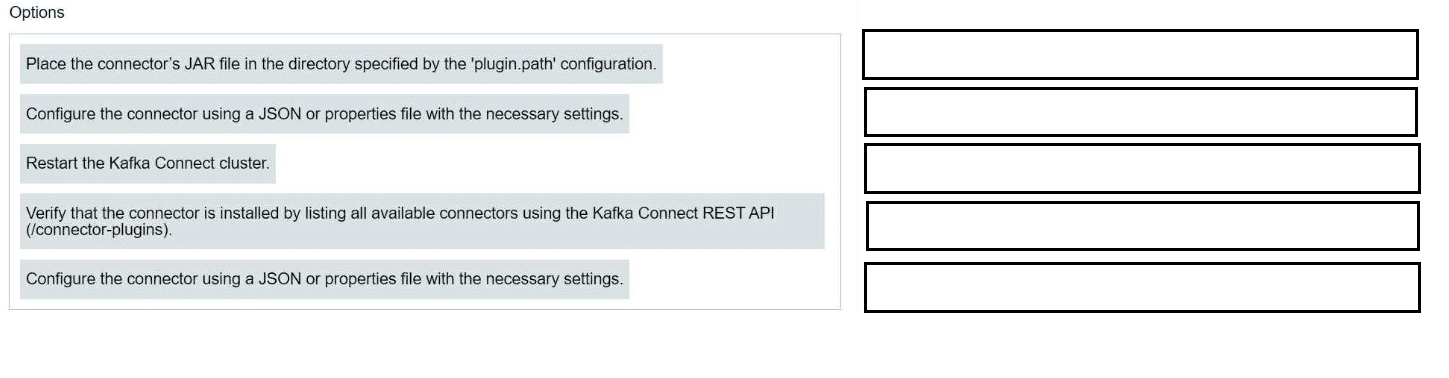
A.
B.
C.
D.
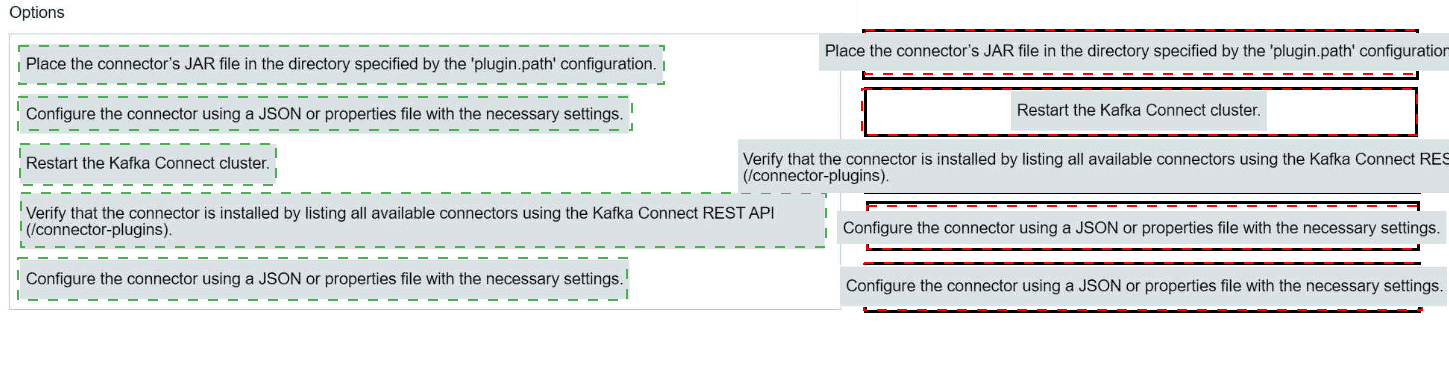
🔄 Deployment Steps and Matching Configuration Parameters
1.Place the connector’s JAR file in the directory specified by the plugin.path configuration.
→ Configuration Parameter: plugin.path This tells Kafka Connect where to look for connector plugins. It’s a comma-separated list of directories.
2.Restart the Kafka Connect cluster.
→ No direct configuration parameter, but this step is required for Connect to reload plugins from the updated plugin.path.
3.Verify that the connector is installed by listing all available connectors using the Kafka Connect REST API (connector-plugins).
→ Indirectly tied to plugin.path, but operationally validated via:
Code
GET /connector-plugins
Configure the connector using a JSON or properties file with the necessary settings.
→ Configuration Parameters: connector-specific settings, such as:
name
connector.class
topics (for source/sink)
tasks.max
Destination/source-specific configs (e.g., JDBC URL, Elasticsearch host)
Submit the configuration to Kafka Connect via REST API or CLI. → No config parameter, but operationally done via:
Code
POST /connectors
Key Concepts
plugin.path: Directory path(s) where Kafka Connect looks for connector JARs.
connector.class: Fully qualified class name of the connector.
tasks.max: Max number of tasks to run for the connector.
REST API: Used to manage connectors dynamically.
⚠️ Common Mistakes
Forgetting to restart Kafka Connect after updating plugin.path.
Misplacing the JAR file outside the configured plugin directory.
Using incorrect connector class names or missing required fields in the config.
Summary
To install a Kafka connector:
Drop the JAR in the plugin.path directory.
Restart Kafka Connect.
Verify installation via GET /connector-plugins.
Create a config file with connector settings.
Submit it via REST API.
You need to correctly join data from two Kafka topics. Which two scenarios will allow for co-partitioning? (Select two.)
A. Both topics have the same number of partitions
B. Both topics have the same key and partitioning strategy
C. Both topics have the same value schema.
D. Both topics have the same retention time.
Explanation:
1. Correct Answer Justification
Co-partitioning is a mandatory prerequisite for certain types of joins (like windowed or foreign-key joins) in Kafka Streams. It ensures that related records from both topics are located on the same "task," allowing for deterministic and efficient processing.
A. Both topics have the same number of partitions.
This is the foundational requirement. Kafka Streams assigns one task per topic partition. If the two topics have a different number of partitions (e.g., Topic A has 3 partitions, Topic B has 4), there is no straightforward, deterministic way to map the tasks for Topic A to the tasks for Topic B. A 1:1 mapping of tasks is only possible if the partition counts are identical.
for B. Both topics have the same key and partitioning strategy.
This is the logical requirement that makes co-partitioning meaningful. Even if two topics have the same number of partitions (satisfying condition A), a join is only correct if records with the same join key (e.g., the same user_id) reside in the same partition number in both topics.
This is achieved by ensuring that the producer for each topic uses the same key for related records and the same partitioning strategy (which, by default, is murmur2(key) % numPartitions). If one topic uses the user_id as the key and the other uses a different key or a custom partitioner, records for user_id=123 might end up in partition 1 of the first topic but partition 3 of the second, making a correct join impossible within the same task.
2.Incorrect Answer Analysis
C. Both topics have the same value schema.
Why it's wrong: The structure of the value (the data payload) is irrelevant to partitioning. The join operation certainly needs to understand the schemas to extract the join key and the data to be merged, but this is handled by the Kafka Streams API and the Schema Registry, not by the physical partitioning of the topics. Co-partitioning is solely about the physical distribution of data across brokers and tasks.
D. Both topics have the same retention time.
Why it's wrong:
Retention policy (retention.ms) governs how long data is kept in a topic. It has no impact on which partition a record is assigned to. While it might be a good practice for joined topics to have similar retention policies to ensure joined data is available for a consistent time window, it is not a requirement for co-partitioning itself. A join can work perfectly between a topic with 7-day retention and another with 30-day retention, as long as the data being joined is present within the shorter retention period.
3.Key Concepts and Terminology
Co-partitioning: The state where two or more topics are partitioned in such a way that records with the same key are located in the same partition number across all topics. This is a physical-level concept.
Partition:
The unit of parallelism and ordering in Kafka. A topic is split into partitions.
The algorithm that determines which partition a message is sent to. The default strategy is: partition = hash(key) % number_of_partitions.
Kafka Streams Task:
The basic unit of parallelism in Kafka Streams. Each task is assigned a subset of the input topic partitions. For a join to be processed by a task, the corresponding partitions from all input topics must be assigned to that same task.
4. Real-World Application
Scenario: Joining User Clicks with User Profiles
Topic 1: user-clicks (Key: user_id, Value: {timestamp, page_url})
Topic 2: user-profiles (Key: user_id, Value: {name, country})
To correctly join these streams in Kafka Streams:
Ensure Same Number of Partitions (Condition A): When creating the topics, both user-clicks and user-profiles must be created with, for example, 6 partitions.
Ensure Same Key & Partitioning (Condition B): The producers writing to these topics must use the same user_id as the message key and rely on the default partitioner. This guarantees that an event for user_id=500 in the user-clicks topic and the update for user_id=500 in the user-profiles topic will both be hashed to the same partition number (e.g., partition 2) in their respective topics.
Result: The Kafka Streams task responsible for partition 2 will receive all records for user_id=500 from both topics, allowing it to accurately perform the join.
5. References and Resources
Confluent Documentation: [Kafka Streams Developer Guide: Joining] - Explicitly discusses the co-partitioning requirement.
Apache Kafka Documentation: Kafka Streams Architecture: Parallelism Model - Explains the relationship between partitions and tasks.
CCDAK Exam Guide: This question maps to Domain 4.0 (Kafka Streams), specifically understanding the prerequisites for stream-table and stream-stream joins.
6. Visual Aids (if applicable)
Diagram: Co-partitioning for a Join
text
Topic: user-clicks (3 Partitions) Topic: user-profiles (3 Partitions)
Key: user_id Key: user_id
| |
|-- Partition 0: user_id=100, 400... |-- Partition 0: user_id=100, 400...
|-- Partition 1: user_id=200, 500... |-- Partition 1: user_id=200, 500...
|-- Partition 2: user_id=300, 600... |-- Partition 2: user_id=300, 600...
| |
| |
V V
Kafka Streams Application (Consumer Group)
|
|-- Task 0: Assigned to click-p0, profile-p0 -> Can join user 100, 400
|-- Task 1: Assigned to click-p1, profile-p1 -> Can join user 200, 500
|-- Task 2: Assigned to click-p2, profile-p2 -> Can join user 300, 600
The diagram shows how identical partition counts and the same key ensure related data is processed by the same task.
7. Common Mistakes
A very common error is to think that the data structure (schema) influences how data is partitioned. Partitioning is determined exclusively by the key and the partitioner logic.
Assuming Partition Count is the Only Requirement:
While critical, having the same number of partitions is not sufficient. If the keys are different, the join will fail silently or produce incorrect results because related records won't be co-located.
Overlooking the Default Partitioner:
Test-takers might think a custom partitioner is always needed. In most cases, using the same business key with the default partitioner is sufficient to achieve co-partitioning.
8. Cross-Reference to Exam Domains
Primary Domain: Domain 4.0 (Kafka Streams)
4.2: Implement processing topology (joins are a key part of topology design).
4.3: Apply the Concepts of the Processor API (understanding tasks, state stores, and their dependency on partitioning).
9. Summary
The correct answers are A and B. Co-partitioning requires:
The same number of partitions (A) to enable a 1:1 mapping of tasks.
The same key and partitioning strategy (B) to guarantee that records with the same join key are routed to the corresponding partition number in each topic.
The producer code below features a Callback class with a method called
onCompletion().
When will the onCompletion() method be invoked?
A. When a consumer sends an acknowledgement to the producer
B. When the producer puts the message into its socket buffer
C. When the producer batches the message
D. When the producer receives the acknowledgment from the broker
Explanation:
1. ✅ Correct Answer Justification
D. When the producer receives the acknowledgment from the broker
The onCompletion() method is triggered after the broker acknowledges the receipt of the message. This happens asynchronously once the record is successfully written to the Kafka topic (or fails due to an error). The method signature is:
java
void onCompletion(RecordMetadata metadata, Exception exception);
If exception is null, the message was successfully acknowledged.
If exception is non-null, it indicates a failure (e.g., timeout, serialization error).
This callback mechanism allows producers to implement custom logic like logging, metrics, or retry handling.
2. ❌ Incorrect Answer Analysis
A. When a consumer sends an acknowledgement to the producer ❌ Incorrect:
Kafka consumers never acknowledge producers. Acknowledgment is strictly between producer and broker.
B. When the producer puts the message into its socket buffer ❌ Incorrect:
This is an internal step before the message is sent. No acknowledgment has occurred yet.
C. When the producer batches the message ❌ Incorrect:
Batching is part of the producer’s optimization process. onCompletion() is not triggered until the broker responds.
3. 🧠 Key Concepts and Terminology
Producer Callback: A user-defined class implementing Callback to handle post-send logic.
Acknowledgment: Broker response indicating success or failure of a message write.
Asynchronous Send: Kafka producers send messages asynchronously. The callback is invoked once the broker responds.
4. 🌍 Real-World Application
Logging delivery success/failure: Use onCompletion() to log metadata or errors.
Metrics collection: Track latency, throughput, or error rates using callback hooks.
Retry logic: Retry failed sends based on exception type.
5. 📚 References and Resources
Apache Kafka Producer API
Confluent Docs – Producer Callbacks
CCDAK Exam Guide
6. 📊 Visual Aids
A flow diagram:
Code
Producer → Send Record → Broker
↘ Callback.onCompletion() ← Broker Acknowledgment
7. ⚠️ Common Mistakes
Confusing consumer acknowledgments with broker acknowledgments
Assuming batching or buffering triggers callbacks
Ignoring exception handling in the callback
8. 🧭 Cross-Reference to Exam Domains
Producer API
Kafka Fundamentals
Confluent Platform Features
9. 🧾 Summary
The onCompletion() method is invoked only when the broker acknowledges the message. This enables robust post-send handling in Kafka producer applications. The correct answer is D, and understanding this flow is essential for building reliable, observable Kafka producers.
You are writing a producer application and need to ensure proper delivery. You configure the producer with acks=all.
Which two actions should you take to ensure proper error handling?
(Select two.)
A. Use a callback argument in producer.send() where you check delivery status
B. Check that producer.send() returned a RecordMetadata object and is not null.
C. Surround the call of producer.send() with a try/catch block to catch KafkaException.
D. Check the value of ProducerRecord.status()
Explanation:
1. ✅ Correct Answer Justification:
✅ A. Use a callback argument in producer.send() where you check delivery status
This is best practice for asynchronous sends.
The Callback.onCompletion() method lets you inspect RecordMetadata and Exception to determine success or failure.
It’s essential for logging, metrics, and retry logic.
✅ C. Surround the call of producer.send()
with a try/catch block to catch KafkaException
Even with a callback, certain exceptions (e.g., serialization errors, illegal configs) are thrown synchronously.
Wrapping send() in a try/catch ensures you catch these immediately.
2. ❌ Incorrect Answer Analysis
❌ B. Check that producer.send() returned a RecordMetadata object and is not null
This only applies if you call .get() on the returned Future
In asynchronous mode, send() returns immediately and RecordMetadata is not available until the callback fires.
Also, null is not a valid return value—Kafka throws exceptions instead.
❌ D. Check the value of ProducerRecord.status()
This method does not exist in the Kafka API.
ProducerRecord is a simple data holder; it doesn’t track delivery status.
3. 🧠 Key Concepts and Terminology
acks=all: Ensures the leader and all in-sync replicas acknowledge the write before success is reported. → Strongest durability guarantee.
Callback: Used for asynchronous delivery confirmation.
KafkaException: Base class for all Kafka-related exceptions. Can be thrown synchronously during send().
4. 🌍 Real-World Application
Mission-critical systems (e.g., financial transactions, audit logs) use acks=all with callbacks and try/catch to ensure no silent failures.
Example:
A payment service logs every transaction to Kafka and retries failed sends using the callback.
5. 📚 References and Resources
Apache Kafka Producer Configs
Confluent Docs – Producer Error Handling
CCDAK Exam Guide
7. 📊 Visual Aids
A flow diagram:
Code
Producer.send(record, callback)
↓
Try/Catch → KafkaException
↓
Callback.onCompletion(metadata, exception)
7. ⚠️ Common Mistakes
Ignoring exceptions thrown by send()
Assuming RecordMetadata is immediately available
Using nonexistent methods like ProducerRecord.status()
8. 🧭 Cross-Reference to Exam Domains
Producer API
Kafka Fundamentals
Confluent Platform Features
9. 🧾 Summary
To ensure proper error handling with acks=all, use both a callback to inspect delivery status and a try/catch block to catch synchronous exceptions. These two mechanisms together provide robust fault tolerance in Kafka producer applications.
Which configuration determines how many bytes of data are collected before sending messages to the Kafka broker?
A. batch.size
B. max.block.size
C. buffer.memory
D. send.buffer.bytes
Explanation:
1. ✅ Correct Answer Justification:
batch.size
batch.size defines the maximum number of bytes that the producer will attempt to batch together per partition before sending.
Batching improves throughput by reducing the number of requests sent to the broker.
If the batch fills up before linger.ms expires, it is sent immediately. Otherwise, it waits up to linger.ms to accumulate more records.
This setting is critical for optimizing performance in high-throughput Kafka applications.
2. ❌ Incorrect Answer Analysis
B. max.block.ms
❌ Controls how long send() will block if buffer.memory is exhausted. → Unrelated to batching size.
C. buffer.memory
❌ Sets the total memory available to the producer for buffering records before they are sent. → Global memory pool, not per-batch size.
D. send.buffer.bytes
❌ Refers to the TCP socket buffer size, not Kafka batching. → Network-level setting, not message batching.
3. 🧠 Key Concepts and Terminology
batch.size: Max bytes per partition batch. Impacts latency and throughput.
linger.ms: Time to wait before sending a batch, allowing more records to accumulate.
Producer Batching: Kafka producers group records by partition and send them in batches to reduce overhead.
4. 🌍 Real-World Application
In a log aggregation system, increasing batch.size allows more log entries to be sent in a single request, improving throughput and reducing broker load.
In IoT telemetry, tuning batch.size and linger.ms balances latency vs. efficiency.
5. 📚 References and Resources
Apache Kafka Producer Configs
Confluent Docs – Producer Tuning
CCDAK Exam Guide
6. 📊 Visual Aids
A diagram showing:
Code
Producer → Partition → Batch (up to batch.size) → Broker
With linger.ms controlling timing and batch.size controlling byte threshold.
7. ⚠️ Common Mistakes
Confusing buffer.memory with batch.size → One is global memory, the other is per-partition batch size.
Assuming send.buffer.bytes affects Kafka batching → It’s a TCP-level setting.
8. 🧭 Cross-Reference to Exam Domains
Producer API
Kafka Fundamentals
Confluent Platform Features
9. 🧾 Summary
The correct answer is A. batch.size, which controls how many bytes are collected per partition before sending to the broker. It’s a key tuning parameter for optimizing Kafka producer performance.
You are working on a Kafka cluster with three nodes. You create a topic named
orders with:
replication.factor = 3
min.insync.replicas = 2
acks = allWhat exception will be generated if two brokers are down due to network
delay?
A. NotEnoughReplicasException
B. NetworkException
C. NotCoordinatorException
D. NotLeaderForPartitionException
Explanation:
1. ✅ Correct Answer Justification
A. NotEnoughReplicasException
This exception is thrown when the number of in-sync replicas (ISR) falls below the configured min.insync.replicas, and the producer is using acks=all.
With replication.factor = 3, the topic has 3 replicas per partition.
min.insync.replicas = 2 means at least 2 replicas must acknowledge the write.
If two brokers are down, only one replica remains in-sync, which violates the min.insync.replicas constraint.
Since acks=all requires all in-sync replicas to acknowledge, the broker rejects the write and the producer receives NotEnoughReplicasException.
2. ❌ Incorrect Answer Analysis
B. NetworkException
❌ This is thrown for client-side network issues, not when brokers fail to meet ISR requirements.
C. NotCoordinatorException
❌ Applies to Kafka group coordination, such as consumer groups or transactions—not producer writes.
D. NotLeaderForPartitionException
❌ Thrown when the producer sends data to a broker that is not the leader for the partition. → In this scenario, the leader is still present; the issue is insufficient ISR.
3. 🧠 Key Concepts and Terminology
In-Sync Replicas (ISR): Brokers that have fully caught up with the leader’s log.
min.insync.replicas: Minimum number of ISR required to acknowledge a write when acks=all.
acks=all: Producer requires acknowledgment from all ISR, not just the leader.
NotEnoughReplicasException: Broker-side exception indicating ISR count is too low to satisfy min.insync.replicas.
4. 🌍 Real-World Application
In a high-availability system, this configuration ensures durability but may reject writes during partial outages.
Example:
A financial service using Kafka for transaction logs would prefer rejecting writes over risking data loss.
5. 📚 References and Resources
Apache Kafka Producer Configs
Confluent Docs – ISR and min.insync.replicas
CCDAK Exam Guide
6. 📊 Visual Aids
A diagram showing:
Code
Partition with 3 Replicas
↓
2 Brokers Down → Only 1 ISR
↓
min.insync.replicas = 2 → Write Rejected
↓
Producer Receives → NotEnoughReplicasException
7. ⚠️ Common Mistakes
Confusing ISR with replication factor
Assuming acks=all means all replicas, not all ISR
Expecting client-side exceptions for broker-side constraints
8. 🧭 Cross-Reference to Exam Domains
Kafka Fundamentals
Producer API
Fault Tolerance and Reliability
9. 🧾 Summary
The correct answer is A. NotEnoughReplicasException. With acks=all and min.insync.replicas = 2, the producer requires at least two ISR to acknowledge the write. If only one ISR remains due to broker failures, the broker rejects the write and throws this exception.
Your company has three Kafka clusters: Development, Testing, and Production. The Production cluster is running out of storage, so you add a new node. Which two statements about the new node are true? (Select two.)
A. A node ID will be assigned to the new node automatically.
B. A newly added node will have KRaft controller role by default
C. A new node will not have any partitions assigned to it unless a new topic is created or reassignment occurs.
D. A new node can be added without stopping existing cluster nodes
Explanation:
1. ✅ Correct Answer Justification
✅ C. A new node will not have any partitions assigned to it unless a new topic is created or reassignment occurs
Kafka does not automatically rebalance partitions across brokers when a new node is added.
Existing partitions remain on their current brokers unless you:
Create new topics (which may assign partitions to the new broker)
Manually trigger a partition reassignment using the Kafka kafka-reassign-partitions tool or the Admin API.
✅ D. A new node can be added without stopping existing cluster nodes
Kafka supports rolling expansion.
You can add brokers dynamically without downtime, provided the new broker is properly configured and registered with ZooKeeper (or KRaft if using Kafka 3.5+ in KRaft mode).
2. ❌ Incorrect Answer Analysis
❌ A. A node ID will be assigned to the new node automatically
Incorrect: You must explicitly assign a broker ID in the server.properties file using broker.id (ZooKeeper mode) or node.id (KRaft mode).
Kafka does not auto-assign IDs.
❌ B. A newly added node will have KRaft controller role by default
Incorrect: In KRaft mode, controller roles are explicitly assigned via process.roles=broker,controller and controller.quorum.voters.
A new broker does not become a controller unless configured to do so.
3. 🧠 Key Concepts and Terminology
Broker ID / Node ID: Unique identifier for each Kafka broker.
Partition Reassignment: Manual or automated process to redistribute partitions across brokers.
KRaft Mode: Kafka’s newer mode replacing ZooKeeper, with explicit controller configuration.
Rolling Expansion: Adding brokers without downtime.
4. 🌍 Real-World Application
In production, adding a broker helps scale storage and throughput.
After adding, use the Kafka Admin API or CLI tools to rebalance partitions for optimal resource usage.
5. 📚 References and Resources
Apache Kafka – Cluster Expansion
Confluent Docs – Partition Reassignment
CCDAK Exam Guide
6. 📊 Visual Aids
A diagram showing:
Code
Existing Brokers → Partitions
↓
Add New Broker
↓
No Partitions Assigned
↓
Manual Reassignment or New Topic Creation
7. ⚠️ Common Mistakes
Assuming automatic partition rebalancing
Expecting broker ID to be auto-assigned
Misunderstanding KRaft controller roles
8. 🧭 Cross-Reference to Exam Domains
Kafka Fundamentals
Kafka Cluster Operations
Confluent Platform Features
9. 🧾 Summary
The correct answers are C and D. Kafka allows dynamic broker addition without downtime, but does not auto-assign partitions or broker IDs. Understanding these mechanics is essential for scaling Kafka clusters effectively.
You are building a system for a retail store selling products to customers. Which three datasets should you model as a GlobalKTable? (Select three.)
A. Inventory of products at a warehouse
B. All purchases at a retail store occurring in real time
C. Customer profile information
D. Log of payment transactions
E. Catalog of products
Explanation:
1. ✅ Correct Answer Justification
✅ A. Inventory of products at a warehouse
Typically a lookup table used to enrich purchase or shipment events.
Doesn’t change frequently and is needed across all tasks.
✅ C. Customer profile information
Used to enrich events like purchases or support interactions.
Small and stable enough to replicate globally.
✅ E. Catalog of products
Contains metadata like product names, categories, prices.
Ideal for enriching purchase or inventory events.
2. ❌ Incorrect Answer Analysis
❌ B. All purchases at a retail store occurring in real time
This is a high-volume, append-only event stream.
Should be modeled as a KStream, not a GlobalKTable.
❌ D. Log of payment transactions
Also a high-throughput event stream, not suitable for replication.
Use KStream for processing and joining with reference data.
3. 🧠 Key Concepts and Terminology
GlobalKTable: A fully replicated, read-only table available to all stream tasks. Ideal for reference data.
KStream: Represents an unbounded stream of events. Used for real-time processing.
Join Patterns: KStream–GlobalKTable joins are efficient for enriching events with static data.
4. 🌍 Real-World Application
Retail Purchase Enrichment: Join a KStream of purchases with a GlobalKTable of customer profiles and product catalog to generate enriched invoices.
Inventory Checks: Use a GlobalKTable of warehouse inventory to validate stock availability during order processing.
6. 📚 References and Resources
Confluent Docs – Kafka Streams: GlobalKTable
Apache Kafka Streams Concepts
CCDAK Exam Guide
6. 📊 Visual Aids
A diagram showing:
Code
KStream: Purchases
↓
Join with GlobalKTable: Customer Profiles
↓
Join with GlobalKTable: Product Catalog
↓
→ Enriched Purchase Event
7. ⚠️ Common Mistakes
Modeling high-volume event logs as GlobalKTables
Ignoring memory footprint of replicated tables
Using GlobalKTable for mutable or large datasets
8. 🧭 Cross-Reference to Exam Domains
Kafka Streams
Kafka Fundamentals
Confluent Platform Features
9. 🧾 Summary
The correct GlobalKTable candidates are A, C, and E—they’re static, small, and ideal for enrichment. Streaming datasets like purchases and payments should be modeled as KStreams. Understanding this distinction is key to building performant Kafka Streams applications.
| Page 1 out of 6 Pages |
| 12 |
Real-World Scenario Mastery: Our CCDAK practice exam don't just test definitions. They present you with the same complex, scenario-based problems you'll encounter on the actual exam.
Strategic Weakness Identification: Each practice session reveals exactly where you stand. Discover which domains need more attention, before exam day arrives.
Confidence Through Familiarity: There's no substitute for knowing what to expect. When you've worked through our comprehensive CCDAK practice exam questions pool covering all topics, the real exam feels like just another practice session.
Copyright © All Rights Reserved