
Topic 5: Misc. Questions
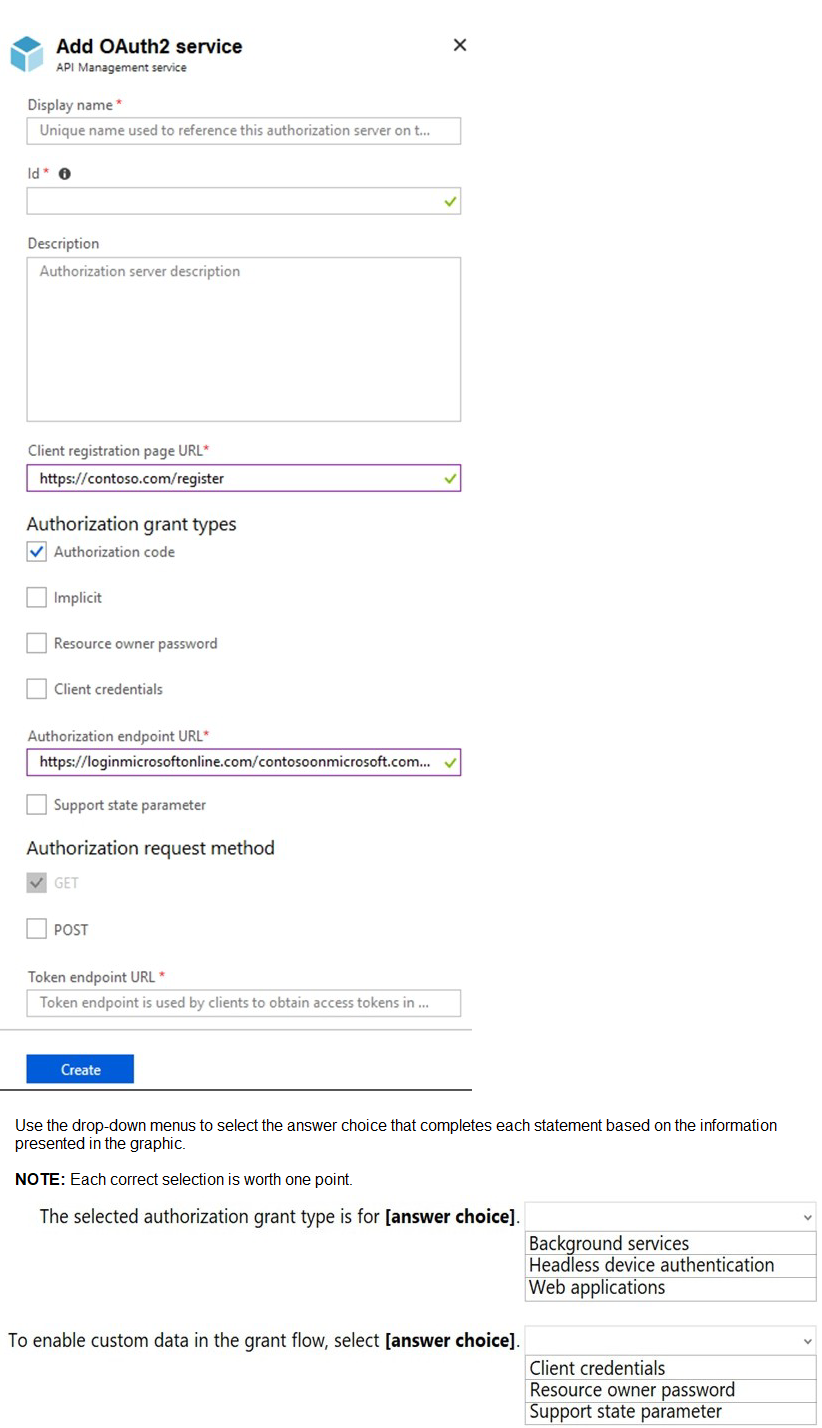
You configure OAuth2 authorization in API Management as shown in the following exhibit.
Summary
The configuration shows an OAuth2 authorization server in API Management. The critical details are that the Authorization code grant type is selected, and the Support state parameter checkbox is available but not selected. The Authorization Code grant type is the standard, most secure flow for web applications that have a server-side component to securely store a client secret. The "state" parameter is a security feature used to maintain state between the request and callback, helping to mitigate cross-site request forgery (CSRF) attacks.
Answers:
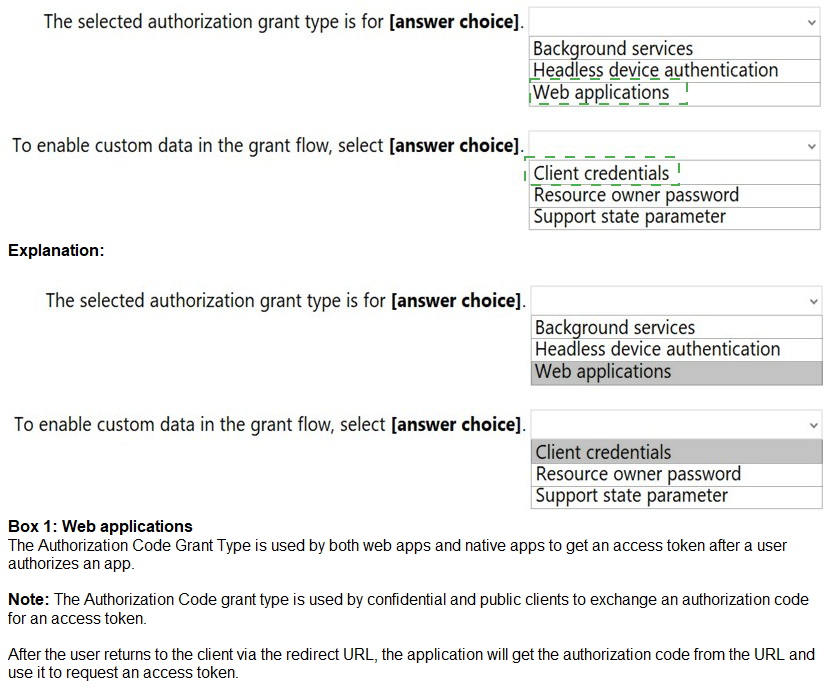
The selected authorization grant type is for: Web applications
To enable custom data in the grant flow, select: Support state parameter
Correct Option Justification:
Web applications:
The Authorization code grant type is specifically designed for web applications that run on a server. In this flow, the user's browser is redirected to the authorization server to log in. After authentication, the authorization server redirects back to the web application with a short-lived authorization code. The web application's server then exchanges this code for an access token, without exposing the token to the user's browser. This is the correct and most common flow for server-side web applications.
Support state parameter:
The state parameter is an opaque value used by the client (the web application) to maintain state between the authorization request and the callback (redirect). It is a critical security feature used to prevent CSRF attacks. Furthermore, it is the standard mechanism for including any custom data (like a session ID or a return URL) in the authorization grant flow. When the "Support state parameter" box is checked, API Management will expect and validate this parameter.
Incorrect Option Explanations
For the grant type:
Background services:
This describes the Client credentials grant type, which is used for machine-to-machine (M2M) authentication where a specific user is not involved. The application authenticates with its own credentials (client ID and secret) to get an access token.
Headless device authentication:
This typically describes the Device authorization grant (a variation of the device flow), which is not shown in the exhibit. The Resource owner password grant (which is also not selected) is sometimes used for legacy or headless scenarios, but it is highly discouraged for modern applications due to security risks.
For enabling custom data:
Client credentials:
This is an entirely different grant type, not a parameter. It is used for non-interactive authentication and does not relate to adding custom data to the authorization flow.
Resource owner password:
This is another grant type where the application collects the user's password and sends it directly to the authorization server. It is also not a parameter and is considered an insecure, legacy flow.
Reference:
Microsoft Learn, "OAuth 2.0 authorization code flow in Azure Active Directory B2C": https://learn.microsoft.com/en-us/azure/active-directory-b2c/authorization-code-flow
Microsoft Identity Platform documentation, "State parameter": https://learn.microsoft.com/en-us/azure/active-directory/develop/v2-oauth2-auth-code-flow#request-an-authorization-code (Note: This link points to the general concept as documented for the Microsoft Identity Platform, which aligns with the OAuth2 standard implemented in API Management).
You are planning an Azure Storage solution for sensitive data. The data will be accessed daily. The data set is less than 10 GB.
You need to recommend a storage solution that meets the following requirements:
• All the data written to storage must be retained for five years.
• Once the data is written, the data can only be read. Modifications and deletion must be prevented.
• After five years, the data can be deleted, but never modified.
• Data access charges must be minimized
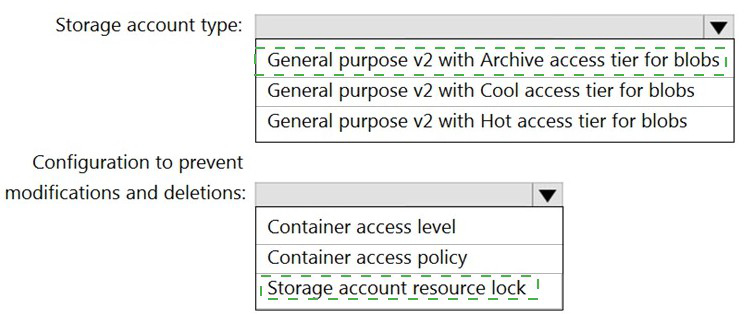
What should you recommend? To answer, select the appropriate options in the answer area.
NOTE: Each correct selection is worth one point.
Summary:
The core requirements are immutable storage for a fixed five-year period, read-only access during that time, and minimized costs for data that is accessed daily. The "Hot" access tier is optimized for frequently accessed data with low access costs, which aligns with daily access. To enforce immutability, a legal hold or time-based retention policy on a blob version (enabled by immutable storage) is the correct mechanism. This prevents modification and deletion for the specified duration. A storage account resource lock only protects the account-level configuration from deletion, not the individual blobs from being modified or deleted.
Answers:
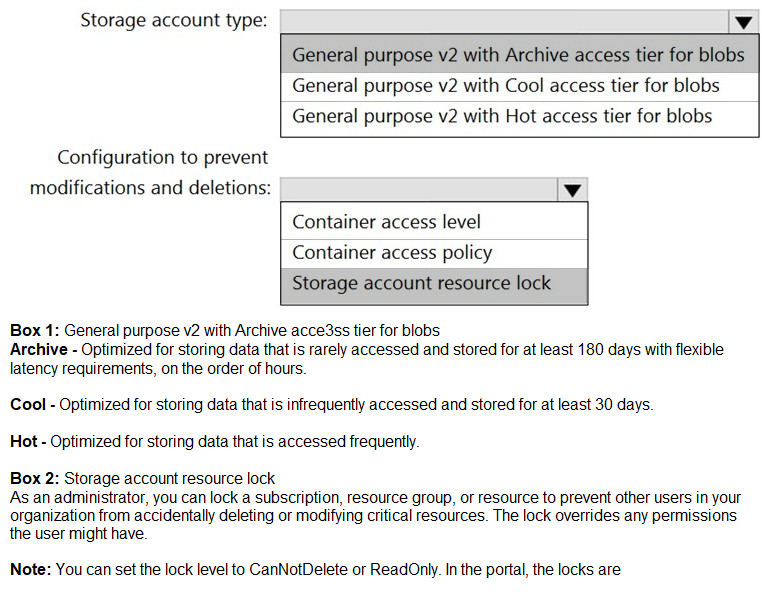
Storage account type: General purpose v2 with Hot access tier for blobs
Configuration to prevent modifications and deletions: Container access policy
Correct Option Justification:
General purpose v2 with Hot access tier for blobs
The data is accessed daily, making the Hot tier the most cost-effective choice. The Hot tier has lower access charges (read/write operations) compared to the Cool and Archive tiers. While its storage cost is slightly higher than Cool, the savings on daily access transactions will result in the lowest overall cost, meeting the requirement to "minimize data access charges."
Container access policy
This refers to the configuration of an immutable storage policy (specifically a time-based retention policy) at the container level. This feature, known as Blob Storage immutability, is the only correct option that meets the requirement to make data read-only for a fixed period. You can set a time-based retention policy of five years on the container. Once a blob is written, it becomes non-erasable and non-modifiable (WORM - Write Once, Read Many) until the five-year period elapses. This directly prevents modifications and deletions as required.
Incorrect Option Explanations
For Storage Account Type:
General purpose v2 with Cool access tier for blobs:
The Cool tier is for data accessed infrequently (less than once per month). Since the data is accessed daily, the higher transaction costs of the Cool tier would make it significantly more expensive than the Hot tier, violating the cost-minimization requirement.
General purpose v2 with Archive access tier for blobs:
The Archive tier is for data that is rarely accessed and can tolerate several hours of retrieval latency. It has the highest rehydration and access costs and is completely unsuitable for data that needs to be available for daily reading.
For Configuration to Prevent Modifications:
Container access level:
This setting (Private, Blob, Container) controls the public read access to the blobs within a container. It does nothing to prevent a user with the account key or SAS token from modifying or deleting the data. It is unrelated to data immutability.
Storage account resource lock:
A resource lock (CanNotDelete/ReadOnly) is applied at the Azure Resource Manager level. A ReadOnly lock can prevent the storage account itself from being deleted or its configuration from being changed, but it does not prevent the blobs and containers within the account from being modified, overwritten, or deleted by users or applications with the correct credentials.
Reference:
Microsoft Learn, "Store business-critical blob data with immutable storage": https://learn.microsoft.com/en-us/azure/storage/blobs/immutable-time-based-retention-policy-overview
Microsoft Learn, "Access tiers for blob data - Hot, Cool, and Archive": https://learn.microsoft.com/en-us/azure/storage/blobs/access-tiers-overview
Note: This question is part of a series of questions that present the same scenario.
Each question in the series contains a unique solution that might meet the stated goals. Some question sets might have more than one correct solution, while others might not have a correct solution. After you answer a question in this section, you will NOT be able to return to it. As a result, these questions will not appear in the review screen. Your company deploys several virtual machines on-premises and to Azure. ExpressRoute is being deployed and configured for on-premises to Azure connectivity. Several virtual machines exhibit network connectivity issues. You need to analyze the network traffic to identify whether packets are being allowed or denied to the virtual machines.
Solution: Use Azure Traffic Analytics in Azure Network Watcher to analyze the network traffic.
Does this meet the goal?
A.
Yes
B.
No
No
Summary
The goal is to analyze network traffic to determine if packets are being allowed or denied to specific VMs. Azure Traffic Analytics is a feature within Azure Network Watcher that processes NSG flow logs. However, it is designed for aggregate traffic analysis and provides insights into traffic patterns and network topology. It is not the correct tool for real-time or granular packet-level inspection to definitively confirm if individual packets are being allowed or denied by NSG rules for troubleshooting a specific connectivity issue.
Correct Option
B. No
Explanation
Azure Traffic Analytics is a high-level monitoring and analytics tool. It analyzes aggregated flow data to provide insights into general traffic flow, top talkers, and potential network anomalies. It is excellent for understanding broad patterns and optimizing your network.
The requirement is to identify whether packets are being allowed or denied to troubleshoot connectivity issues on several virtual machines. The correct, granular tool for this specific task is IP Flow Verify (to check if a specific packet is allowed/denied) or NSG Flow Logs (to see a log of all allowed and denied flows for an NSG). While Traffic Analytics uses NSG Flow Logs as a data source, it processes this data for high-level reporting and does not provide the direct, per-flow "allow/deny" status needed for immediate troubleshooting of connectivity problems.
Reference
Microsoft Learn, "Introduction to Traffic Analytics": https://learn.microsoft.com/en-us/azure/network-watcher/traffic-analytics - This document explains that Traffic Analytics provides visibility into user and application activity, not real-time packet-level allow/deny status.
Microsoft Learn, "Introduction to flow logging for network security groups": https://learn.microsoft.com/en-us/azure/network-watcher/network-watcher-nsg-flow-logging-overview - This is the underlying data source that would be needed, but Traffic Analytics is an aggregated view of it, not the raw logs.
You have an Azure subscription that contains an Azure SQL database.
You plan to use Azure reservations on the Azure SQL database.
To which resource type will the reservation discount be applied?
A. vCore compute
B. DTU compute
C. Storage
D. License
Summary
Azure Reservations offer significant cost savings for committed, predictable workloads by pre-paying for one or three years of resource usage. For Azure SQL Database, the reservation model applies to the compute tier, not storage or licensing. Specifically, when you purchase a reservation for Azure SQL Database, you are reserving and receiving a discount on the vCore-based compute costs. This applies to both provisioned compute tiers (where you specify a fixed number of vCores) and serverless configurations.
Correct Option
A. vCore compute
Azure SQL Database reservations are designed to discount the compute costs. In the modern purchasing model, compute is measured and sold based on vCores. When you buy a reservation, you are committing to a specific vCore count in a specific region for a one or three-year term. The reservation discount is then automatically applied to the vCore-based compute usage of your deployed databases that match the reservation's specifications, leading to reduced hourly compute charges.
Incorrect Options
B. DTU compute
The DTU (Database Transaction Unit) purchasing model is an older, bundled model that combines compute, storage, and I/O into a single metric. Reservations are not sold for the DTU model itself. To use a reservation with a database currently in the DTU model, you must first migrate it to the vCore-based purchasing model.
C. Storage
Storage costs for Azure SQL Database are billed separately from compute. Reservations do not apply to storage; you pay for provisioned storage (and backup storage) at standard pay-as-you-go rates. The reservation discount is exclusively for the compute component.
D. License
The license cost is included in the selection of the pricing tier. When you choose a tier that includes a license (e.g., the General Purpose or Business Critical service tiers), the cost is part of the overall vCore price. The reservation discount applies to this total vCore price, but it is not a separate "license" discount. If you are using the Azure Hybrid Benefit to bring your own SQL Server license, you get a reduced compute rate, and the reservation discount applies to that reduced rate.
Reference
Microsoft Learn, "Prepay for SQL Database compute resources with Azure SQL Database reserved capacity": https://learn.microsoft.com/en-us/azure/azure-sql/database/reserved-capacity-overview - This document explicitly states that with reserved capacity, you pre-pay for SQL Database compute costs for one or three years and get a discount on the compute costs.
You have an Azure virtual machine named VM1 that runs Windows Server 2019 and contains 500 GB of data files. You are designing a solution that will use Azure Data Factory to transform the data files, and then load the files to Azure Data Lake Storage. What should you deploy on VM1 to support the design?
A. the self-hosted integration runtime
B. the Azure Pipelines agent
C. the On-premises data gateway
D. the Azure File Sync agent
Summary:
Azure Data Factory (ADF) is the cloud-based integration service, but it needs a component to connect to data sources that are not publicly accessible, such as a private virtual machine within a virtual network. The self-hosted integration runtime (SHIR) is a client agent installed on an on-premises machine or an Azure VM that enables this secure connectivity. It acts as a bridge, allowing ADF to dispatch data movement and activity execution tasks to the VM1, which can then access its local data files and transform them as part of the pipeline.
Correct Option:
A. the self-hosted integration runtime
The self-hosted integration runtime (SHIR) is the required component to enable communication between Azure Data Factory and data sources located in a private network, which includes an Azure VM. By installing the SHIR on VM1, you provide ADF with a secure channel to access the 500 GB of data files stored locally on that VM. The SHIR agent will handle the data transfer, executing the transformation tasks defined in the Data Factory pipeline and then loading the resulting files to the designated Azure Data Lake Storage account.
Incorrect Options:
B. the Azure Pipelines agent
The Azure Pipelines agent is part of Azure DevOps and is used for Continuous Integration and Continuous Deployment (CI/CD) tasks, such as building, testing, and deploying application code. It is not designed for data integration or for connecting Azure Data Factory to a data source. Its purpose is software development lifecycle automation, not data movement and transformation.
C. the On-premises data gateway
This is a very strong distractor because the "On-premises data gateway" is essentially the same product as the self-hosted integration runtime, but it is often referenced in the context of Power BI and Logic Apps. In the specific context of Azure Data Factory, the component is officially and exclusively named the self-hosted integration runtime. While the underlying technology is similar, for the AZ-305 exam and ADF-specific scenarios, "self-hosted integration runtime" is the correct term.
D. the Azure File Sync agent
The Azure File Sync agent is used to synchronize files from a Windows Server to an Azure File Share. It is a file replication and cloud tiering tool, not a data integration component. It does not provide an interface for Azure Data Factory to execute data transformation workflows or connect to the VM as a data source.
Reference
Microsoft Learn, "Create and configure a self-hosted integration runtime": https://learn.microsoft.com/en-us/azure/data-factory/create-self-hosted-integration-runtime - This document explains that the self-hosted integration runtime can be used to access data sources in a private network, including Azure virtual machines.
You are developing a multi-tier app named App1 that will be hosted on Azure virtual machines. The peak utilization periods for App1 will be from 8 AM to 9 AM and 4 PM to 5PM on weekdays.
You need to deploy the infrastructure for App1. The solution must meet the following requirements:
• Support virtual machines deployed to four availability zones across two Azure regions.
• Minimize costs by accumulating CPU credits during periods of low utilization.
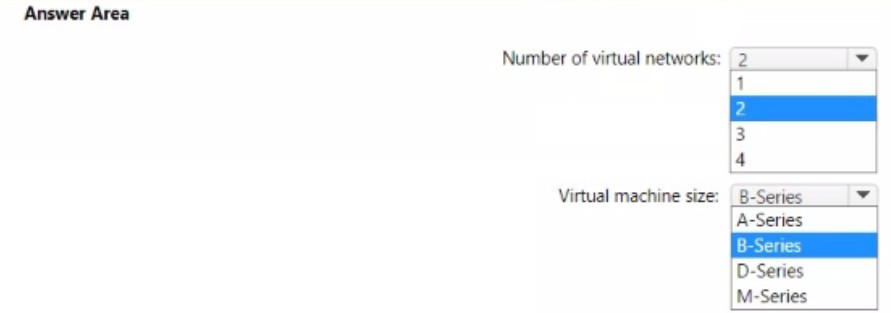
What is the minimum number of virtual networks you should deploy, and which virtual machine size should you use? To answer, select the appropriate options in the answer area.
NOTE: Each correct selection is worth one point.
 Summary
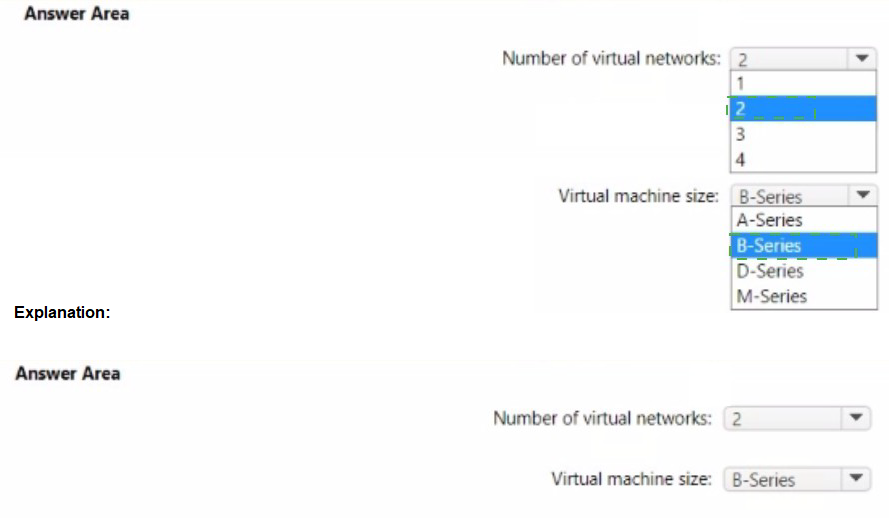
The requirement to support VMs in four availability zones across two Azure regions means you need a virtual network (vNet) in each region because vNets are regional resources. Therefore, the minimum number is two vNets. To minimize cost by accumulating CPU credits during low utilization, you must use a B-Series VM. The B-Series is the only VM family in Azure specifically designed with a baseline performance and the ability to build up CPU credits when usage is below the baseline, which are then consumed during peak bursts (like the 8-9 AM and 4-5 PM peaks).
Answers
Number of virtual networks: 2
Virtual machine size: B-Series
Correct Option Justification
Number of virtual networks: 2
An Azure virtual network (vNet) is a regional resource. It cannot span across multiple regions. Since the solution must deploy VMs across two Azure regions, you are required to create at least one vNet in each region, resulting in a minimum of two virtual networks. The requirement for four availability zones is handled within each region's vNet.
Virtual machine size: B-Series
The B-Series (Burstable Series) is explicitly designed for workloads that have low to moderate CPU utilization on average but need to burst to significantly higher CPU usage periodically. These VMs accumulate CPU credits when they are using less than their baseline performance. These saved credits are then used to burst above the baseline during peak utilization periods (like the specified 8-9 AM and 4-5 PM windows), perfectly aligning with the requirement to "minimize costs by accumulating CPU credits during periods of low utilization."
Incorrect Option Explanations
For Number of virtual networks:
1:
A single vNet is confined to one Azure region and cannot host resources in another region.
3 / 4:
There is no technical requirement for three or four vNets. The requirement is for two regions, which necessitates only two vNets. More vNets would add unnecessary complexity and cost.
For Virtual machine size:
A-Series:
This is a basic, cost-effective series for entry-level workloads, but it does not have a bursting capability or a CPU credit system. It cannot accumulate credits during low usage.
D-Series:
This is a general-purpose series designed for consistent, higher CPU performance. It does not have a bursting mechanism based on CPU credits and would run at its full, allocated capacity continuously, which would be more expensive for this bursty workload.
M-Series:
This is a memory-optimized series for very large in-memory datasets. It is one of the most expensive series and is completely unsuitable for a cost-saving, burstable workload. It does not use a CPU credit model.
Reference
Microsoft Learn, "Azure virtual network": https://learn.microsoft.com/en-us/azure/virtual-network/virtual-networks-overview (A VNet is scoped to a single region).
Microsoft Learn, "B-series burstable virtual machine sizes": https://learn.microsoft.com/en-us/azure/virtual-machines/sizes-b-series-burstable (Explains the CPU credit system for cost savings on burstable workloads).
You have the Azure resources shown in the following table.

You need to deploy a new Azure Firewall policy that will contain mandatory rules for all Azure Firewall deployments. The new policy will be configured as a parent policy for the existing policies. What is the minimum number of additional Azure Firewall policies you should create?
A.
0
B.
1
C.
2
D.
3
1
Summary:
Azure Firewall Manager supports a hierarchical policy structure where a base policy (parent) can be created to contain global, mandatory rules. This base policy is then associated as the parent of existing child policies, which can contain their own location or application-specific rules. The existing three regional policies (US-Central-Firewall-policy, US-East-Firewall-policy, EU-Firewall-policy) can all inherit from a single, new parent policy. Therefore, you only need to create one additional base policy to serve as the mandatory parent for all existing deployments.
Correct Option:
B. 1:
Explanation:
The requirement is to have a set of mandatory rules for all Azure Firewall deployments. In Azure Firewall Manager, this is achieved by creating a single, centralized base policy (the parent).
You do not need to create a new policy for each region. The existing regional policies (US-Central-Firewall-policy, US-East-Firewall-policy, EU-Firewall-policy) can be configured to inherit from this single new base policy. The firewall policy inheritance chain allows one parent to have multiple children.
The firewalls themselves (USEastfirewall, USWestfirewall, EUFirewall) are already associated with their respective regional child policies. Once the child policies inherit from the new base policy, the rules from the base policy will be enforced on all firewalls, achieving the goal with minimal administrative effort and only one new policy.
Incorrect Options:
A. 0:
You cannot achieve this with zero new policies because you need a dedicated policy to act as the parent containing the mandatory rules. The existing policies are already deployed as standalone child policies.
C. 2:
Creating two policies is unnecessary. A single base policy can be the parent for all three existing child policies.
D. 3:
Creating three new policies (e.g., one for each region) would defeat the purpose of having a single set of mandatory rules. It would create redundancy and management overhead, as you would have to duplicate the mandatory rules in three places.
Reference:
Microsoft Learn, "Azure Firewall policy hierarchical rule handling": https://learn.microsoft.com/en-us/azure/firewall-manager/policy-hierarchical-rules - This document explains the parent-child relationship in firewall policies, where a base policy provides inherited rules to one or more child policies.
You are designing a cost-optimized solution that uses Azure Batch to run two types of jobs on Linux nodes. The first job type will consist of short-running tasks for a development environment. The second job type will consist of long-running Message Passing Interface (MPI) applications for a production environment that requires timely job completion.
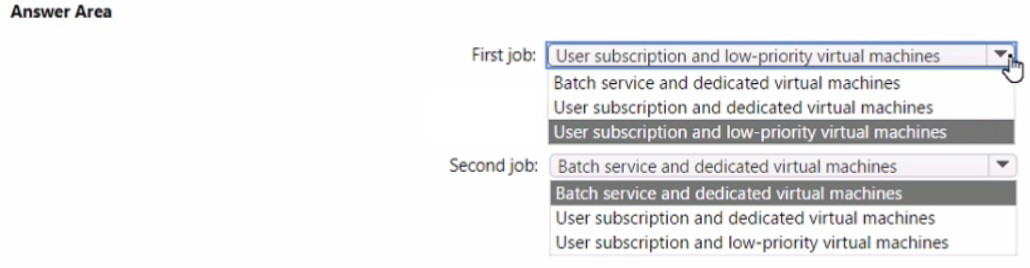
You need to recommend the pool type and node type for each job type. The solution must minimize compute charges and leverage Azure Hybrid Benefit whenever possible.
What should you recommend? To answer, select the appropriate options in the answer area.
NOTE: Each correct selection is worth one point.
Summary
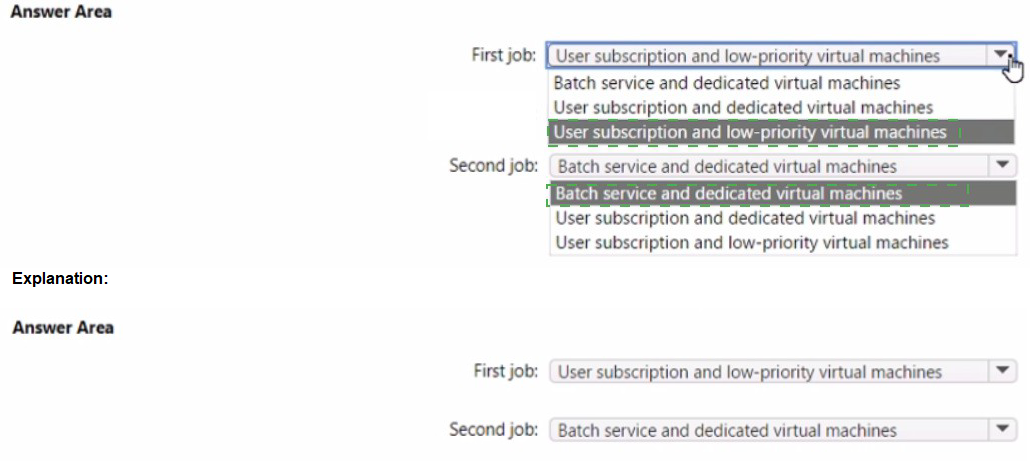
The requirement is to minimize cost while meeting performance needs. For the development job with short-running tasks, cost is the primary driver. Using low-priority VMs provides a significant discount but with the risk of pre-emption. This is acceptable for a dev environment. The User subscription pool mode allows the Batch pool to run directly under your subscription, which is a prerequisite for using Azure Hybrid Benefit to reduce costs further by bringing your own Linux OS license.
For the production MPI job requiring timely completion, pre-emption is unacceptable. Therefore, dedicated VMs must be used to guarantee resources. The User subscription pool mode is again used to enable Azure Hybrid Benefit for cost savings on these long-running nodes.
Answers
First job (Development): User subscription and low-priority virtual machines
Second job (Production MPI): User subscription and dedicated virtual machines
Correct Option Justification
First job:
User subscription and low-priority virtual machines
Low-priority VMs are available at a significantly reduced cost (up to 60-80% less than dedicated VMs) but can be preempted by Azure with short notice. This is perfectly acceptable for a short-running development environment where immediate job completion is not critical, aligning with the goal to "minimize compute charges."
User subscription pool mode is required to leverage Azure Hybrid Benefit. This mode allows the Batch pool to be deployed directly under your subscription's quota, enabling you to apply your own Linux OS licenses and avoid the platform charge, further reducing costs.
Second job:
User subscription and dedicated virtual machines
Dedicated VMs are fully allocated for your Batch pool and are not subject to preemption. This is mandatory for the long-running production MPI applications that "require timely job completion," as an interruption from a low-priority node being reclaimed would be catastrophic.
User subscription pool mode is again selected to enable Azure Hybrid Benefit on these dedicated, long-running nodes. Applying your own licenses provides the maximum cost savings for this production workload while ensuring reliability.
Incorrect Option Explanations
Batch service and dedicated/low-priority virtual machines:
The Batch service pool mode (now often referred to as the "Classic" mode in newer contexts) does not support Azure Hybrid Benefit. In this mode, nodes are created under a Microsoft-managed subscription, and you cannot apply your own licenses. Since the requirement is to "leverage Azure Hybrid Benefit whenever possible," the User Subscription mode is the only correct choice for both scenarios.
Reference:
Microsoft Learn, "Use Low-priority VMs with Batch": https://learn.microsoft.com/en-us/azure/batch/batch-low-pri-vms - Discusses cost savings and preemption for low-priority VMs.
Microsoft Learn, "Azure Hybrid Benefit for Linux": https://learn.microsoft.com/en-us/azure/virtual-machines/linux/azure-hybrid-benefit-linux - Explains how to use your existing Linux subscriptions to save on Azure.
Microsoft Learn, "Batch accounts and quotas": https://learn.microsoft.com/en-us/azure/batch/batch-quota-limit - Mentions the pool allocation modes (UserSubscription vs BatchService).
You are designing a solution that will include containerized applications running in an Azure Kubernetes Service (AKS) cluster.
You need to recommend a load balancing solution for HTTPS traffic. The solution must meet the following requirements:
Automatically configure load balancing rules as the applications are deployed to the cluster.
Support Azure Web Application Firewall (WAF).
Support cookie-based affinity.
Support URL routing.
What should you include the recommendation?
A.
an NGINX ingress controller
B.
Application Gateway Ingress Controller (AGIC)
C.
an HTTP application routing ingress controller
D.
the Kubernetes load balancer service
Application Gateway Ingress Controller (AGIC)
Much like the most popular Kubernetes Ingress Controllers, the Application Gateway Ingress Controller provides several features, leveraging Azure’s native Application Gateway L7 load balancer. To name a few:
URL routing
Cookie-based affinity
Secure Sockets Layer (SSL) termination
End-to-end SSL
Support for public, private, and hybrid web sites
Integrated support of Azure web application firewall
Application Gateway redirection support isn't limited to HTTP to HTTPS redirection alone. This is a generic redirection mechanism, so you can redirect from and to any port you define using rules. It also supports redirection to an external site as well.
Reference:
https://docs.microsoft.com/en-us/azure/application-gateway/features
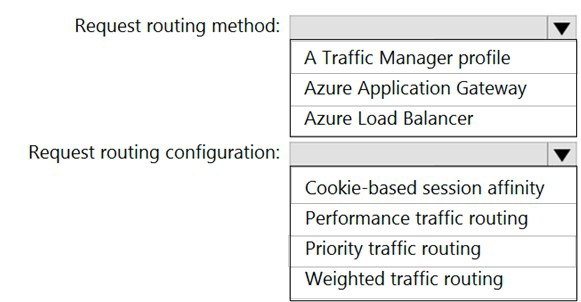
You are designing an Azure web app.
You plan to deploy the web app to the North Europe Azure region and the West Europe Azure region. You need to recommend a solution for the web app. The solution must meet the following requirements:
Users must always access the web app from the North Europe region, unless the region fails.
The web app must be available to users if an Azure region is unavailable. Deployment costs must be minimized.
What should you include in the recommendation? To answer, select the appropriate options in the answer area.
NOTE: Each correct selection is worth one point.
Summary
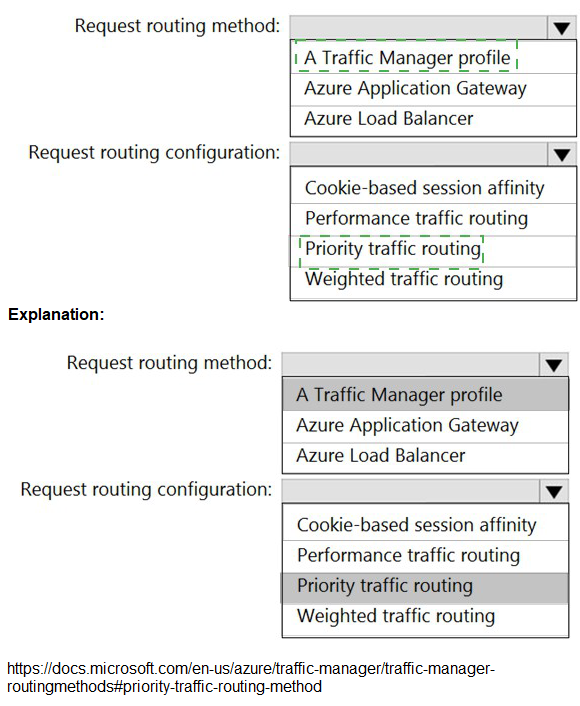
The requirements are for a cross-region failover solution where North Europe is the primary and West Europe is the secondary, with minimal cost. Azure Traffic Manager is a DNS-based global load balancer designed specifically for this purpose. It routes users to the optimal endpoint based on a chosen method. The Priority routing method allows you to set North Europe as the primary (priority 1) and West Europe as the secondary (priority 2). Users are always directed to the primary unless it becomes unhealthy, at which point Traffic Manager automatically fails over to the secondary. This is a cost-effective solution as you only pay for the DNS queries and endpoint health checks.
Answers
Request routing method: A Traffic Manager profile
Request routing configuration: Priority traffic routing
Correct Option Justification
A Traffic Manager profile
Azure Traffic Manager is a DNS-based traffic load balancer that enables you to distribute traffic optimally to services across global Azure regions. It is the correct service for ensuring high availability by failing over to a secondary region when the primary becomes unavailable. It meets the requirement to have users access North Europe unless it fails and is a low-cost solution compared to running active-active infrastructure.
Priority traffic routing
The Priority traffic-routing method is designed for active-passive failover scenarios. You assign a priority (e.g., 1 for North Europe, 2 for West Europe) to each endpoint. Traffic Manager's DNS queries will always return the primary (highest priority) endpoint as long as it is healthy. If a health check determines the primary region is unavailable, it automatically starts returning the IP address of the secondary endpoint. This perfectly fulfills the requirement: "Users must always access the web app from the North Europe region, unless the region fails."
Incorrect Option Explanations
For Request routing method:
Azure Application Gateway:
This is a Layer-7 load balancer for applications within a single region. It cannot route traffic between different Azure regions like North Europe and West Europe. It is used for microservices routing, SSL offloading, and WAF within a regional deployment.
Azure Load Balancer:
This is a Layer-4 load balancer for distributing traffic within a single region, such as across VMs in a virtual network. It has no capability for cross-region failover.
For Request routing configuration:
Cookie-based session affinity:
This is a feature of Application Gateway, not Traffic Manager. It is used to keep a user session on the same backend server within a region, not for failing over between regions.
Performance traffic routing:
This method routes users to the "closest" endpoint in terms of network latency. It would distribute users between North Europe and West Europe based on their location, not prioritize North Europe as required. This creates an active-active, not an active-passive, setup.
Weighted traffic routing:
This method distributes traffic based on assigned weights (e.g., 70% to one region, 30% to another). It also creates an active-active distribution and does not guarantee that all users will be directed to North Europe while it is healthy.
Reference
Microsoft Learn, "Azure Traffic Manager": https://learn.microsoft.com/en-us/azure/traffic-manager/traffic-manager-overview
Microsoft Learn, "Traffic Manager routing methods - Priority": https://learn.microsoft.com/en-us/azure/traffic-manager/traffic-manager-routing-methods#priority-traffic-routing-method
You plan to deploy multiple instances of an Azure web app across several Azure regions.
You need to design an access solution for the app. The solution must meet the following replication requirements;
• Support rate limiting.
• Balance requests between all instances.
• Ensure that users can access the app in the event of a regional outage.
Solution: You use Azure Traffic Manager to provide access to the app.
Does this meet the goal?
A. Yes
B. No
Summary
The solution proposes using Azure Traffic Manager. Traffic Manager is a DNS-based traffic load balancer that works at the domain level. It is excellent for ensuring high availability by failing over to a healthy region during an outage, and it can use routing methods like "Weighted" to distribute requests across regions. However, it does not support rate limiting. Rate limiting is a feature of Layer 7 (application layer) services like Azure Front Door or an Application Gateway with WAF, which can inspect and throttle HTTP/S requests based on rules. Therefore, while Traffic Manager meets two of the three requirements, it fails on the critical requirement for rate limiting.
Correct Option
B. No
Explanation
Supports rate limiting: ❌ No. Azure Traffic Manager operates at the DNS layer (Layer 4). It directs users to an endpoint but does not inspect the HTTP/S traffic and therefore cannot perform application-level functions like rate limiting or throttling requests.
Balance requests between all instances: ✅ Yes. Using the Weighted routing method, Traffic Manager can distribute DNS queries across multiple endpoints in different regions, effectively balancing the initial user connection load.
Ensure users can access the app in the event of a regional outage: ✅ Yes. This is a core strength of Traffic Manager. By using the Priority routing method and configuring health checks, it can automatically fail over DNS queries from an unhealthy primary region to a healthy secondary region.
Because the solution fails to meet one of the three stated requirements (rate limiting), it does not meet the goal. A service like Azure Front Door would be a more suitable solution as it provides global HTTP load balancing, automatic failover, and integrated rate limiting via its WAF policy.
Reference
Microsoft Learn, "Azure Traffic Manager": https://learn.microsoft.com/en-us/azure/traffic-manager/traffic-manager-overview - Explains that Traffic Manager uses DNS to route traffic and does not see individual HTTP requests.
Microsoft Learn, "What is Azure Front Door?" - https://learn.microsoft.com/en-us/azure/frontdoor/front-door-overview - Details how Front Door provides Layer 7 load balancing with features like rate limiting.
Note: This question is part of a series of questions that present the same scenario. Each question in the series contains a unique solution that might meet the stated goals. Some question sets might have more than one correct solution, while others might not have a correct solution.
After you answer a question in this section, you will NOT be able to return to it. As a result, these questions will not appear in the review screen. You need to deploy resources to host a stateless web app in an Azure subscription. The solution must meet the following requirements:
Provide access to the full .NET framework.
Provide redundancy if an Azure region fails.
Grant administrators access to the operating system to install custom application dependencies.
Solution: You deploy two Azure virtual machines to two Azure regions, and you create a Traffic Manager profile.
Does this meet the goal?
A. Yes
B. No
Summary
The solution proposes deploying two Azure VMs across two regions with a Traffic Manager profile. This setup meets several key requirements: it provides access to the full .NET framework (via Windows Server on the VMs), grants OS-level access for administrators to install dependencies, and uses Traffic Manager for cross-region redundancy in case of a failure. However, the critical flaw is that deploying only one VM per region does not provide redundancy within each region. A failure of the single VM in the primary region would still cause an outage for users routed there, even if the other region is healthy. True high availability requires multiple VMs in an availability set or zone within each region.
Correct Option
B. No
Explanation
Provide access to the full .NET framework: ✅ Yes. Deploying Azure Virtual Machines with Windows Server allows for the installation and use of the full .NET Framework.
Provide redundancy if an Azure region fails: ❌ Partially, but not fully. While Traffic Manager can route traffic away from a failed region, the solution is not redundant within a region. If the single VM in the active region fails, the application becomes unavailable for all users routed to that region until Traffic Manager's health probe detects the failure and fails over to the other region. This creates a single point of failure within each region.
Grant administrators access to the OS: ✅ Yes. Azure VMs provide full administrative access to the operating system, allowing for the installation of any custom dependencies.
The solution fails because it does not provide adequate redundancy. A correct solution would deploy a minimum of two VMs in each region, placed in an Availability Set or across Availability Zones, to ensure redundancy both within and across regions.
Reference:
Microsoft Learn, "What are Availability Zones in Azure?": https://learn.microsoft.com/en-us/azure/availability-zones/az-overview
Microsoft Learn, "Manage the availability of Windows virtual machines in Azure": https://learn.microsoft.com/en-us/azure/virtual-machines/availability
| Page 1 out of 30 Pages |
| 123456789 |
Real-World Scenario Mastery: Our AZ-305 practice exam don't just test definitions. They present you with the same complex, scenario-based problems you'll encounter on the actual exam.
Strategic Weakness Identification: Each practice session reveals exactly where you stand. Discover which domains need more attention, before Designing Microsoft Azure Infrastructure Solutions exam day arrives.
Confidence Through Familiarity: There's no substitute for knowing what to expect. When you've worked through our comprehensive AZ-305 practice exam questions pool covering all topics, the real exam feels like just another practice session.
Copyright © All Rights Reserved