
Topic 5: Misc. Questions
You plan to automate the deployment of resources to Azure subscriptions.
What is a difference between using Azure Blueprints and Azure Resource Manager templates?
A. Azure Resource Manager templates remain connected to the deployed resources.
B. Only Azure Resource Manager templates can contain policy definitions.
C. Azure Blueprints remain connected to the deployed resources.
D. Only Azure Blueprints can contain policy definitions.
Summary
The fundamental difference lies in the lifecycle and relationship with deployed resources. An Azure Resource Manager (ARM) template is a one-time deployment. Once it deploys a set of resources, the connection is severed; there is no ongoing link between the template and the resource group. In contrast, Azure Blueprints maintain a persistent connection (an "artifact link") to the deployed resources. This link allows the blueprint to govern the environment over time, track assignments, and even re-apply policies and templates if the deployed resources drift from their intended state.
Correct Option
C. Azure Blueprints remain connected to the deployed resources.
Explanation
C. Azure Blueprints remain connected to the deployed resources.
This is the defining characteristic of Azure Blueprints. When you assign a blueprint, it creates a persistent relationship with the deployed resources. This allows the blueprint to:
Track which resources were deployed by which blueprint version.
Manage the state and compliance of the entire deployed package (the "blueprinted" environment).
Perform operations like updating an assignment or repairing drift, which is not possible with a standalone ARM template deployment.
Incorrect Options:
A. Azure Resource Manager templates remain connected to the deployed resources.
This is incorrect. An ARM template is a declarative file used for a single deployment. Once the deployment is complete, the template itself has no ongoing connection to, or control over, the resources it created. It is a "fire-and-forget" mechanism.
B. Only Azure Resource Manager templates can contain policy definitions.
This is incorrect. While ARM templates can deploy Azure Policy definitions, they are not the only service that can do so. Azure Blueprints are specifically designed to package and deploy policy definitions as one of their core artifacts, along with role assignments, ARM templates, and resource groups.
D. Only Azure Blueprints can contain policy definitions.
This is incorrect. Azure Policy definitions can be deployed and assigned independently of Blueprints, either through the portal, PowerShell, CLI, or via an ARM template. Blueprints provide a way to bundle a policy definition with other required resources for a cohesive environment setup, but they do not have an exclusive capability to contain them.
Reference
Microsoft Learn, "Compare Azure Blueprints and Azure Resource Manager templates": https://learn.microsoft.com/en-us/azure/governance/blueprints/compare-resource-manager-templates#comparing-azure-blueprints-and-azure-resource-manager-templates - This document explicitly states: "The blueprint resource... remains connected to the deployed resources. This connection supports improved tracking and auditing."
You manage a database environment for a Microsoft Volume Licensing customer named Contoso, Ltd. Contoso uses License Mobility through Software Assurance. You need to deploy 50 databases. The solution must meet the following requirements:
Support automatic scaling.
Minimize Microsoft SQL Server licensing costs.
What should you include in the solution? To answer, select the appropriate options in the answer area.
NOTE: Each correct selection is worth one point.

Summary
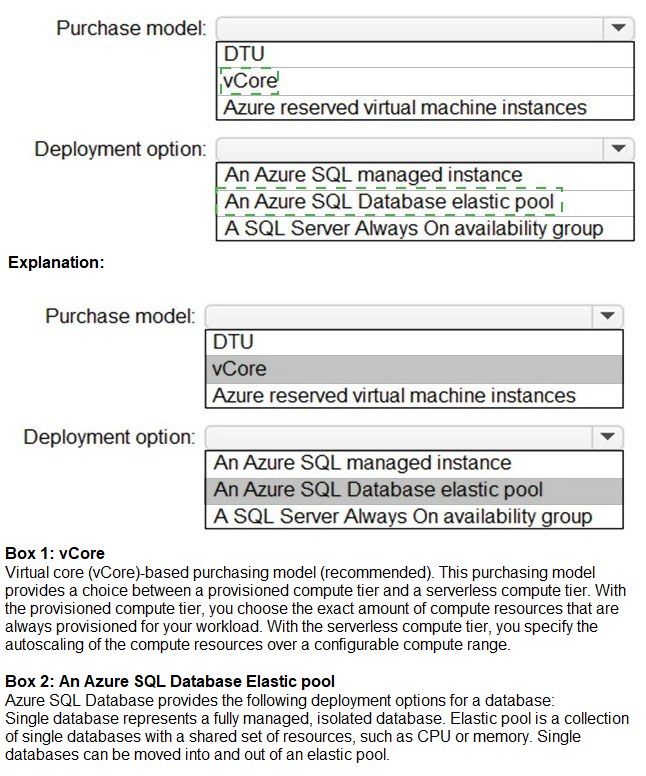
The key requirements are to support automatic scaling for 50 databases and to minimize SQL Server licensing costs. The vCore purchase model is required to use the Azure Hybrid Benefit, which allows Contoso to apply their existing SQL Server licenses with Software Assurance to Azure, drastically reducing compute costs. For automatic scaling across 50 databases, an Azure SQL Database elastic pool is the ideal deployment option. It allows multiple databases to share a pool of resources (vCores), and it automatically scales the resources for the entire pool, providing a cost-effective and manageable solution for many databases with variable usage patterns.
Answers
Purchase model: vCore
Deployment option: An Azure SQL Database elastic pool
Correct Option Justification
Purchase model: vCore
The vCore-based purchase model is a prerequisite for using the Azure Hybrid Benefit (AHB) for SQL Server. AHB allows Contoso to use their existing on-premises SQL Server licenses with Software Assurance in Azure, significantly reducing the compute cost of the SQL service. The older DTU model does not support this benefit and would require paying the full, included license price.
Deployment option: An Azure SQL Database elastic pool
An elastic pool is a collection of single Azure SQL Databases that share a set of resources (vCores and storage). It is specifically designed for scenarios with multiple databases that have variable and unpredictable usage patterns. The pool provides automatic scaling at the pool level, allowing databases to burst into unused resources as needed, which fulfills the "support automatic scaling" requirement in a highly cost-effective way for 50 databases.
Incorrect Option Explanations
For Purchase model:
DTU:
The DTU (Database Transaction Unit) model bundles compute, storage, and I/O into a single metric. It does not support the Azure Hybrid Benefit, making it more expensive for a customer like Contoso that has licenses to bring. It is also less flexible for scaling and performance tuning compared to the vCore model.
Azure reserved virtual machine instances:
This is a discount program for pre-paying for Azure VMs, not a database purchase model. While you could run SQL Server on a VM and use reservations to save, the requirement is for a managed database service (implied by the other options), and the question asks for the database purchase model itself.
For Deployment option:
An Azure SQL managed instance:
Managed Instance is a deployment option for a single instance that can host multiple databases. While it supports the vCore model and AHB, it is not designed for automatic scaling of individual databases in the same way an elastic pool is. It is better for full SQL Server feature compatibility and lift-and-shift of entire instances, not for cost-effective, automatic scaling of 50 individual databases.
A SQL Server Always On availability group:
This is a high-availability and disaster recovery feature for SQL Server running on virtual machines (IaaS), not a deployment option for the Azure platform services (PaaS) like Azure SQL Database. It does not provide the same level of automated, platform-managed scaling.
Reference
Microsoft Learn, "Azure Hybrid Benefit": https://learn.microsoft.com/en-us/azure/azure-sql/azure-hybrid-benefit - Explains how to use existing SQL Server licenses to save on vCore-based SQL Database and Managed Instance.
Microsoft Learn, "Elastic pools help you manage and scale multiple databases in Azure SQL Database": https://learn.microsoft.com/en-us/azure/azure-sql/database/elastic-pool-overview - Details how elastic pools provide a simple, cost-effective solution for managing and scaling multiple databases with unpredictable usage demands.
You plan to archive 10 TB of on-premises data files to Azure.
You need to recommend a data archival solution. The solution must minimize the cost of storing the data files.
Which Azure Storage account type should you include in the recommendation?
A. Standard StorageV2 (general purpose v2)
B. Standard Storage (general purpose v1)
C. Premium StorageV2 (general purpose v2)
D. Premium Storage (general purpose v1
Summary:
The requirement is to archive 10 TB of data at the lowest possible cost. Archival data is rarely accessed and can tolerate a retrieval latency of several hours. The Archive access tier in Azure Blob Storage offers the lowest storage cost per GB of any Azure storage option but has higher costs and delays for data retrieval. This tier is not a separate account type but is a feature of a Standard General Purpose v2 (StorageV2) storage account. Therefore, the correct recommendation is to create a GPv2 account and move the blobs to the Archive tier.
Correct Option:
A. Standard StorageV2 (general purpose v2)
Explanation:
Standard StorageV2 (general purpose v2) is the recommended and most feature-complete storage account kind. It supports all access tiers: Hot (for frequently accessed data), Cool (for infrequently accessed data), and Archive (for rarely accessed data that can tolerate retrieval latencies). By creating a GPv2 account and setting the blob tier to Archive, you achieve the absolute minimum storage cost for the 10 TB of archival data. The Archive tier is significantly cheaper than the Hot or Cool tiers and is the definitive choice for long-term data archiving.
Incorrect Options:
B. Standard Storage (general purpose v1):
While this is a lower-cost account type than premium storage, it is a legacy account kind that does not support the Archive access tier. You would be limited to the Hot and Cool tiers, which are more expensive for long-term archival than the Archive tier available in v2 accounts.
C. Premium StorageV2 (general purpose v2) & D. Premium Storage (general purpose v1):
Premium storage accounts are designed for high-performance scenarios that require low-latency access, such as running virtual machine disks. They use high-performance SSDs and are the most expensive storage option. They do not support access tiers (Hot, Cool, Archive) and would be the worst possible choice for minimizing the cost of archival data.
Reference:
Microsoft Learn, "Access tiers for Azure Blob Storage - hot, cool, and archive": https://learn.microsoft.com/en-us/azure/storage/blobs/access-tiers-overview - This document explains the cost and access characteristics of each tier, stating that the archive tier offers the lowest storage cost and the highest data retrieval cost.
Microsoft Learn, "Storage account overview": https://learn.microsoft.com/en-us/azure/storage/common/storage-account-overview - Confirms that General Purpose v2 accounts support all access tiers and are recommended for most scenarios.
Your organization has developed and deployed several Azure App Service Web and API applications. The applications use Azure Key Vault to store several authentication, storage account, and data encryption keys. Several departments have the following requests to support the applications:

Summary
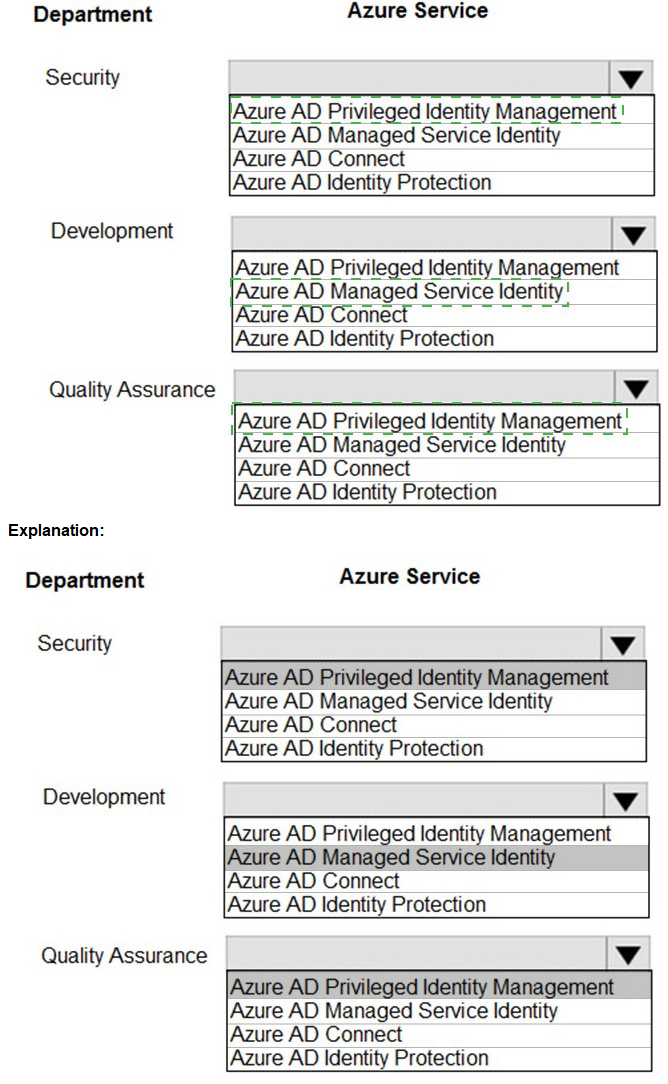
The Security team's request to review administrative role membership, get alerts on changes, and see a history of activation is a core function of Azure AD Privileged Identity Management (PIM), which provides just-in-time and time-bound privileged access. The Development team's need for applications to access Azure Key Vault securely in code is perfectly addressed by Azure AD Managed Service Identity (MSI), which provides an automatically managed identity for Azure resources. The Quality Assurance team's request for temporary administrator access is also fulfilled by Azure AD PIM, which can grant time-bound, approved elevation of privileges.
Correct Option Justification
Security: Azure AD Privileged Identity Management
Azure AD Privileged Identity Management (PIM) is specifically designed for managing, controlling, and monitoring access to privileged roles in Azure AD and Azure resources. Its features directly map to the Security team's requests:
Access reviews allow for periodic review of administrative role membership with justifications.
Alerts and audit history provide notifications and a detailed log of role activations and changes administrators make, creating a full history of administrator activity.
Development: Azure AD Managed Service Identity
Azure AD Managed Service Identity (MSI) (now part of the broader "managed identities" feature) is the solution for allowing Azure services (like App Service) to have an automatically managed identity in Azure AD. This identity can be used to authenticate to any service that supports Azure AD authentication, such as Azure Key Vault. This allows developers to access keys and secrets in code without having to manage any credentials, fulfilling the requirement to "retrieve keys online in code" securely.
Quality Assurance: Azure AD Privileged Identity Management
The Quality Assurance team needs temporary administrator access.This is the exact use case for PIM's role activation. PIM allows eligible users (like QA testers) to request time-bound, approved elevation to a privileged role (e.g., Application Administrator) for a specific duration (e.g., 8 hours). This provides the access they need to configure test applications while minimizing the risk of standing administrative privileges.
Incorrect Option Explanations
Azure AD Connect:
This is a tool for synchronizing on-premises Active Directory identities with Azure AD. It is unrelated to access reviews, application identities, or temporary privilege elevation.
Azure AD Identity Protection:
This is a tool that uses machine learning to detect and remediate identity-based risks, such as suspicious sign-ins or leaked credentials. It is a security monitoring and policy enforcement tool, not a mechanism for granting or reviewing privileged access or providing application identities.
Reference
Microsoft Learn, "What is Azure AD Privileged Identity Management?": https://learn.microsoft.com/en-us/azure/active-directory/privileged-identity-management/pim-configure
Microsoft Learn, "What are managed identities for Azure resources?": https://learn.microsoft.com/en-us/azure/active-directory/managed-identities-azure-resources/overview
A company plans to implement an HTTP-based API to support a web app. The web app allows customers to check the status of their orders.
The API must meet the following requirements:
Implement Azure Functions Provide public read-only operations Do not allow write operations
You need to recommend configuration options.
What should you recommend? To answer, configure the appropriate options in the dialog box in the answer area.
NOTE: Each correct selection is worth one point.
Summary:
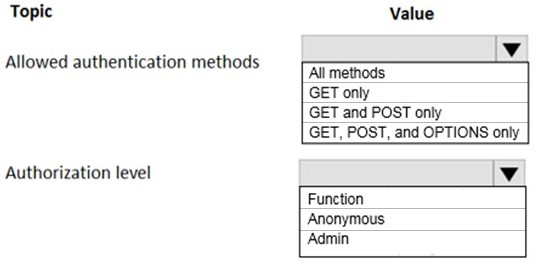
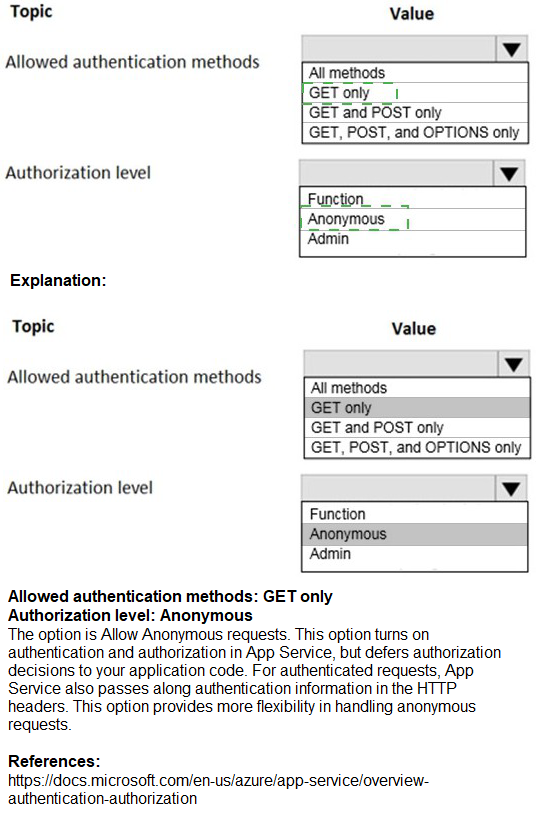
The requirements are for a public, read-only API. To enforce "read-only operations" and "do not allow write operations," the function must be restricted to the GET HTTP method, which is the standard method for retrieving data. Since the API is public and does not require user authentication for order status checks, the authorization level should be set to Anonymous, which removes the requirement for an API key and allows public access.
Correct Option Justification:
Allowed authentication methods: GET only
The requirement is for a "public read-only" API that "do[es] not allow write operations." The GET HTTP method is used to retrieve (read) data. By restricting the allowed methods to GET only, you explicitly block all other methods (such as POST, PUT, DELETE) that are used for creating, updating, or deleting data. This configuration at the function app level enforces the read-only requirement.
Authorization level: Anonymous
The requirement states the API must be "public." In Azure Functions, the Anonymous authorization level means that no API key is required to call the function endpoint. Any request, from any source, will be accepted and processed (subject to the HTTP method restriction). This is the correct level for a publicly accessible, unauthenticated API.
Incorrect Option Explanations
For Allowed authentication methods:
All methods:
This would allow write operations (POST, PUT, DELETE), which directly violates the requirement to be "read-only" and "not allow write operations."
GET and POST only:
While this blocks methods like PUT and DELETE, it still allows the POST method, which is commonly used for operations that create or update data. This is not read-only.
GET, POST, and OPTIONS only:
This also allows the POST method, violating the read-only requirement. The OPTIONS method is used for CORS pre-flight requests and is generally harmless, but allowing POST makes this configuration non-compliant.
For Authorization level:
Function:
This authorization level requires a specific function-level API key to be included in the request. This is used to restrict access on a per-function basis and is not suitable for a public API.
Admin:
This authorization level requires the master host key for the function app. This key grants broad administrative permissions and should never be used for public client access as it would give users full control over the function app.
Reference
Microsoft Learn, "Azure Functions HTTP trigger": https://learn.microsoft.com/en-us/azure/azure-functions/functions-bindings-http-webhook-trigger - This document explains the methods property to define supported HTTP methods and the authLevel property to set the authorization level.
You have an Azure subscription that contains a storage account. An application sometimes writes duplicate files to the storage account. You have a PowerShell script that identifies and deletes duplicate files in the storage account. Currently, the script is run manually after approval from the operations manager. You need to recommend a serverless solution that performs the following actions:
Runs the script once an hour to identify whether duplicate files exist Sends an email notification to the operations manager requesting approval to delete the duplicate files Processes an email response from the operations manager specifying whether the deletion was approved Runs the script if the deletion was approved
What should you include in the recommendation?
A. Azure Logic Apps and Azure Functions
B. Azure Pipelines and Azure Service Fabric
C. Azure Logic Apps and Azure Event Grid
D. Azure Functions and Azure Batch
Summary:
The requirement is for a serverless, event-driven workflow that orchestrates a multi-step, conditional process involving scheduling, email approval, and script execution. Azure Logic Apps is the ideal service for creating such workflows with built-in connectors for scheduling, sending/receiving emails, and handling human approval workflows. Azure Functions is the perfect companion to run the existing PowerShell script code in a serverless environment. The Logic App can be triggered on a schedule, call the Azure Function to check for duplicates, send an approval email, wait for the response, and then conditionally call the Azure Function again to perform the deletion.
Correct Option
A. Azure Logic Apps and Azure Functions
Explanation:
Azure Logic Apps and Azure Functions together provide a complete serverless solution:
Azure Logic Apps is an integration and workflow service. It can be triggered by a recurrence trigger to run once an hour. It can then call an Azure Function to identify duplicate files. Using the Office 365 Outlook approval connector, it can send an email to the operations manager and pause the workflow, waiting for a response. Based on the manager's approved/denied response, the Logic App can make a conditional decision to call a second Azure Function (or the same one with a different parameter) to run the deletion script.
Azure Functions is a serverless compute service ideal for running the existing PowerShell script. The script logic can be packaged into a function, which is called by the Logic App. This separates the custom code execution from the workflow orchestration, following a best-practice architecture.
Incorrect Options:
B. Azure Pipelines and Azure Service Fabric:
Azure Pipelines is a CI/CD service for building, testing, and deploying applications, not for running scheduled operational scripts with human interaction. Azure Service Fabric is a distributed systems platform for packaging and running microservices and is overkill and not serverless for this simple script and workflow.
C. Azure Logic Apps and Azure Event Grid:
Azure Event Grid is an event routing service that reacts to events from Azure services (like a blob being uploaded). It is not designed to run on a fixed schedule (like once an hour) or to handle the long-running, human-in-the-loop approval workflow that is central to this requirement. While a Logic App could be triggered by Event Grid, the hourly schedule and approval process make Event Grid an unsuitable primary component here.
D. Azure Functions and Azure Batch:
Azure Functions can handle scheduling with timer triggers and could run the script. However, building the entire approval workflow (sending email, waiting for a response, parsing the response) would require complex, custom code within the function, including setting up its own email handling. Azure Batch is designed for large-scale parallel and high-performance computing (HPC) jobs, which is not needed for this simple script. This combination lacks the built-in, low-code workflow and approval capabilities of Logic Apps, making it a much more complex and less efficient solution.
Reference
Microsoft Learn, "What is Azure Logic Apps?": https://learn.microsoft.com/en-us/azure/logic-apps/logic-apps-overview
Microsoft Learn, "Create automated tasks, processes, and workflows with Azure Logic Apps": https://learn.microsoft.com/en-us/azure/logic-apps/tutorial-process-email-attachments-workflow (Demonstrates concepts like triggers, conditions, and approvals).
You have the resources shown in the following table.
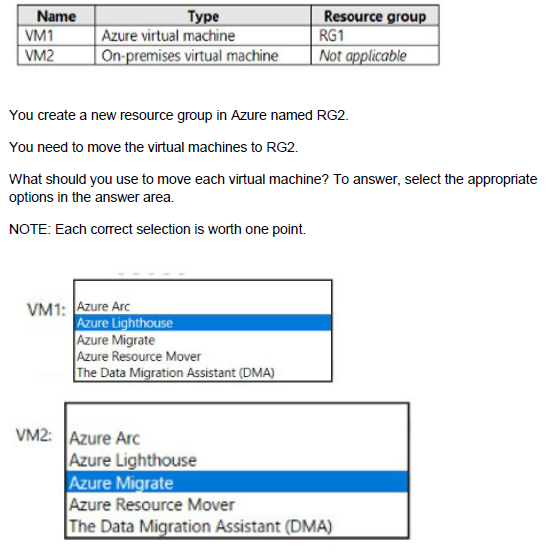
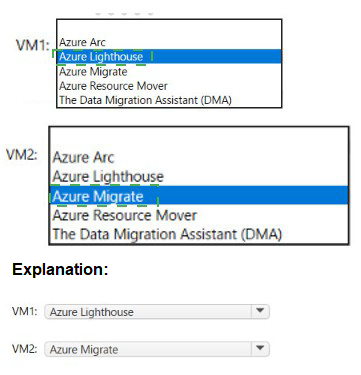
Summary
The question involves moving two different types of resources: an Azure VM (VM1) and an on-premises VM (VM2) into a new Azure resource group (RG2). For the Azure VM (VM1), you use the standard Azure resource management feature to move a resource between resource groups. For the on-premises VM (VM2), you must first make it a manageable Azure resource, which is the primary function of Azure Arc. Azure Arc allows you to project on-premises servers into Azure Resource Manager, enabling you to manage them as if they were Azure resources, including moving them between resource groups.
Answers
VM1: Azure Resource Mover
VM2: Azure Arc
Correct Option Justification
VM1: Azure Resource Mover
Azure Resource Mover is a service within Azure designed specifically to move Azure resources between regions, resource groups, and subscriptions. It helps coordinate the move, checks dependencies, and provides a guided process. While you can also move a VM directly through the portal, PowerShell, or CLI, Azure Resource Mover is the dedicated, recommended service for this task and is the correct formal answer among the options provided.
VM2: Azure Arc
Azure Arc is designed to extend Azure's management capabilities to non-Azure resources, including on-premises virtual machines. By installing the Azure Arc agent on the on-premises VM2, it becomes a connected machine that is represented as a resource in Azure Resource Manager. Once it is an "Azure Arc-enabled server" resource in a resource group (like RG1), you can then use standard Azure management tools, including Azure Resource Mover, to move it to another resource group (RG2). Azure Arc is the essential first step to make the on-premises VM manageable within the Azure control plane.
Incorrect Option Explanations:
Azure Lighthouse:
This is a service for managing Azure delegated resources across multiple tenants. It is used for service providers or corporate IT to manage resources in other customers' or departments' tenants. It is not used for moving resources.
Azure Migrate:
This is a service for migrating on-premises servers (like VM2) into Azure as Azure Virtual Machines. It is used for a physical lift-and-shift of the workload, not for simply managing an existing on-premises VM from Azure or moving it between resource groups.
The Data Migration Assistant (DMA):
This is a tool for assessing and migrating on-premises SQL Server databases to Azure SQL Database or a SQL Server on an Azure VM. It is a database schema and data migration tool and is completely unrelated to moving virtual machine resources.
Reference:
Microsoft Learn, "Move Azure resources across regions, subscriptions, and resource groups with Azure Resource Mover": https://learn.microsoft.com/en-us/azure/resource-mover/move-region-availability
Microsoft Learn, "What is Azure Arc-enabled servers?": https://learn.microsoft.com/en-us/azure/azure-arc/servers/overview
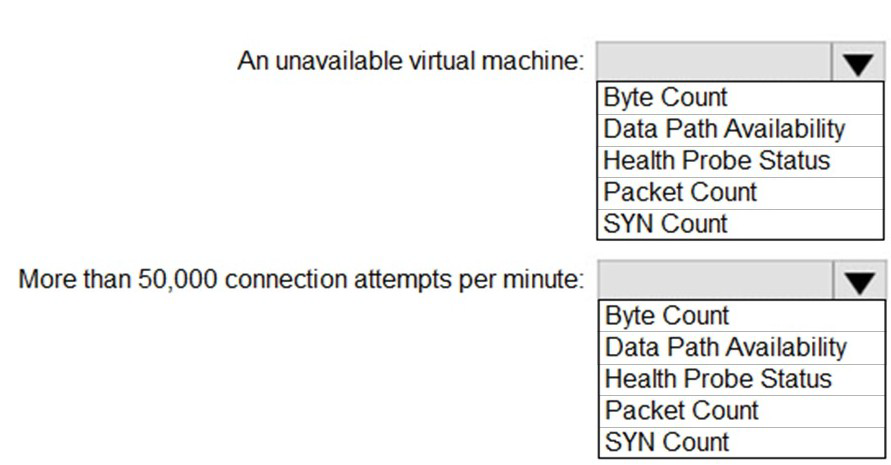
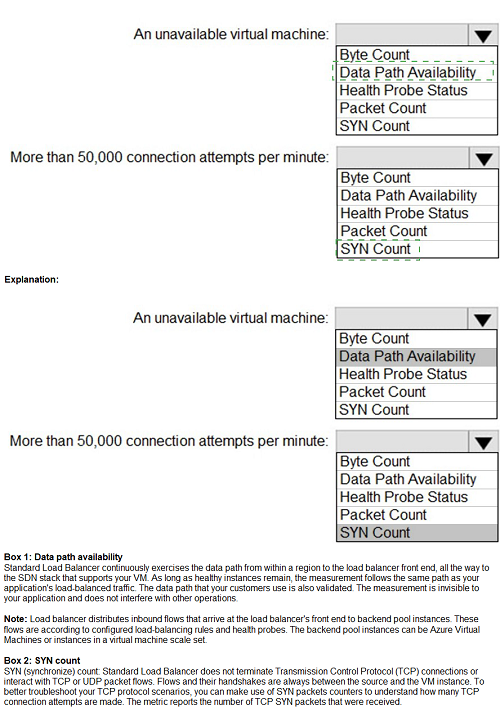
You have an Azure Load Balancer named LB1 that balances requests to five Azure virtual machines.
You need to develop a monitoring solution for LB1. The solution must generate an alert when any of the following conditions are met:
A virtual machine is unavailable.
Connection attempts exceed 50,000 per minute.
Which signal should you include in the solution for each condition? To answer, select the appropriate options in the answer area.
NOTE: Each correct selection is worth one point.
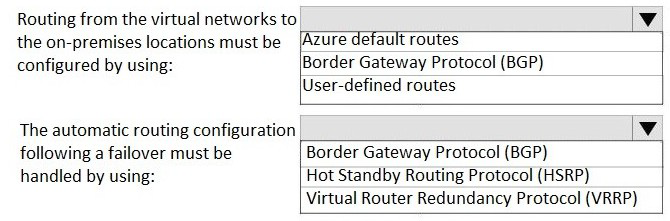
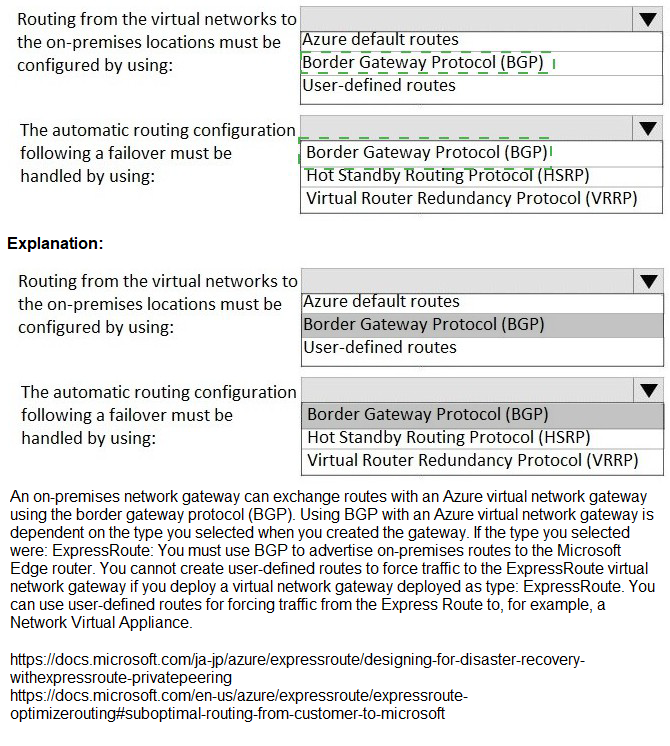
Your company has two on-premises sites in New York and Los Angeles and Azure virtual networks in the East US Azure region and the West US Azure region. Each on-premises site has Azure ExpressRoute circuits to both regions. You need to recommend a solution that meets the following requirements:
Outbound traffic to the Internet from workloads hosted on the virtual networks must be routed through the closest available on-premises site.
If an on-premises site fails, traffic from the workloads on the virtual networks to the Internet must reroute automatically to the other site.
What should you include in the recommendation? To answer, select the appropriate options in the answer area.
NOTE: Each correct selection is worth one point.
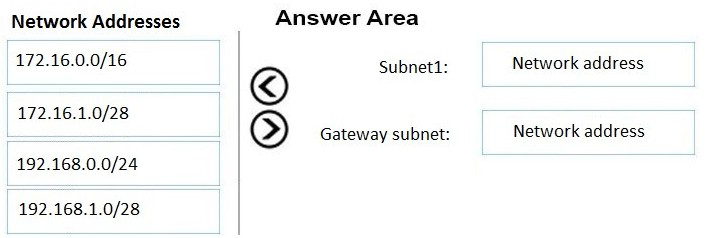
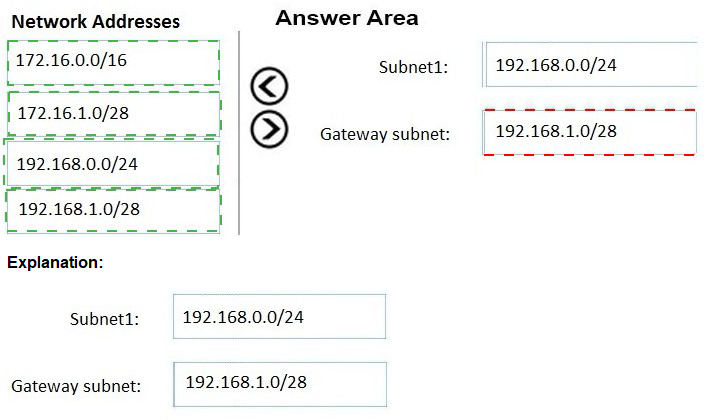
You have an on-premises network that uses on IP address space of 172.16.0.0/16.
You plan to deploy 25 virtual machines to a new azure subscription.
You identity the following technical requirements.
All Azure virtual machines must be placed on the same subnet subnet1.
All the Azure virtual machines must be able to communicate with all on premises severs.
The servers must be able to communicate between the on-premises network and Azure by using a site to site VPN.
You need to recommend a subnet design that meets the technical requirements.
What should you include in the recommendation? To answer, drag the appropriate network addresses to the correct subnet. Each network address may be used once, more than once or not at all. You may need to drag the split bar between panes or scroll to view content.
NOTE: Each correct selection is worth one point.
You are designing an application that will aggregate content for users.
You need to recommend a database solution for the application. The solution must meet the following requirements:
Support SQL commands.
Support multi-master writes.
Guarantee low latency read operations.
What should you include in the recommendation?
A.
Azure Cosmos DB SQL API
B.
Azure SQL Database that uses active geo-replication
C.
Azure SQL Database Hyperscale
D.
Azure Database for PostgreSQL
Azure Cosmos DB SQL API
Explanation:
The application requires a globally distributed database capable of handling writes in multiple regions simultaneously (multi-master) to ensure high availability and performance. While traditional relational databases (RDBMS) typically use a single-primary model for writes, Azure Cosmos DB is designed specifically for horizontal scale-out and multi-region write capabilities. By using the SQL (NoSQL) API, the application can leverage familiar SQL-like syntax for querying JSON documents while benefiting from the low-latency guarantees and global distribution inherent to the Cosmos DB platform.
Correct Option:
A. Azure Cosmos DB SQL API:
This is the correct choice because Azure Cosmos DB is the only service listed that natively supports multi-master writes (also known as "multi-region writes"). This feature allows every replica region to be writable, providing 99.999% availability for both reads and writes. Furthermore, Cosmos DB provides a Service Level Agreement (SLA) that guarantees less than 10-millisecond latency for both read and write operations at the 99th percentile, which directly satisfies the requirement for low-latency read operations.
Incorrect Option:
B. Azure SQL Database (Active Geo-Replication):
Active geo-replication in Azure SQL Database creates readable secondary replicas in different regions. However, it follows a single-master model where only the primary database is writable. If a write is needed in a secondary region, the application must route it to the primary, which introduces latency and does not meet the multi-master requirement.
C. Azure SQL Database Hyperscale:
Hyperscale is designed for high-performance relational workloads and can scale storage up to 100 TB. While it supports multiple "read-scale" replicas, it does not support multi-master writes. All write operations are still serialized through a single primary compute node, making it unsuitable for a scenario requiring distributed write access across multiple regions.
D. Azure Database for PostgreSQL:
Standard managed PostgreSQL in Azure operates on a single-server or flexible-server model with a single primary write node. Even when using "distributed" variants like Citus (Citus is now integrated as Azure Cosmos DB for PostgreSQL), it typically utilizes a coordinator node architecture that does not provide the same turnkey multi-master write functionality and global low-latency SLAs as the Cosmos DB SQL API.
Reference:
Multi-region writes in Azure Cosmos DB
You ate designing a SQL database solution. The solution will include 20 databases that will be 20 GB each and have varying usage patterns. You need to recommend a database platform to host the databases. The solution must meet the following requirements:
• The compute resources allocated to the databases must scale dynamically.
• The solution must meet an SLA of 99.99% uptime.
• The solution must have reserved capacity.
• Compute charges must be minimized.
What should you include in the recommendation?
A.
20 databases on a Microsoft SQL server that runs on an Azure virtual machine
B.
20 instances of Azure SQL Database serverless
C.
20 databases on a Microsoft SQL server that runs on an Azure virtual machine in an availability set
D.
an elastic pool that contains 20 Azure SQL databases
an elastic pool that contains 20 Azure SQL databases
Explanation:
The core challenge in this scenario is managing 20 databases with varying usage patterns while minimizing costs. If each database were provisioned independently, you would have to pay for the peak capacity of each one, leading to significant wasted resources during idle periods. An Elastic Pool allows these databases to share a single set of compute resources (vCores or eDTUs). When one database has a usage spike, it can borrow the unused capacity from others in the pool. This "family plan" approach ensures that you only pay for the collective requirements of the group, which is significantly cheaper than 20 separate instances.
Correct Option:
D. An elastic pool that contains 20 Azure SQL databases:
Dynamic Scaling:
Elastic pools automatically manage the distribution of compute resources across databases based on demand within the set pool limits.
99.99% SLA:
As a PaaS offering, Azure SQL Database provides a built-in availability SLA of 99.99% without requiring manual high-availability configuration.
Reserved Capacity:
Elastic pools support the vCore purchasing model, which allows you to purchase Azure Reserved Capacity (1-year or 3-year commitments) to save up to 33% (or up to 80% with Azure Hybrid Benefit) on compute charges.
Cost Minimization:
By aggregating 20 databases into one pool, you eliminate the "idle cost" associated with 20 individual database allocations.
Incorrect Option:
A & C. SQL Server on Azure Virtual Machines:
These are IaaS (Infrastructure as a Service) solutions. While they support reserved instances (VM reservations), they require manual management of scaling and high availability (like Always On Availability Groups) to reach a 99.99% SLA. This adds significant administrative overhead and typically higher costs compared to a managed PaaS pool.
B. 20 instances of Azure SQL Database serverless:
While serverless provides per-database auto-scaling and an auto-pause feature, managing 20 independent serverless databases is generally more expensive than a single elastic pool when those databases can share a common resource boundary. Additionally, serverless compute does not support Reserved Capacity pricing, which is a specific requirement in this scenario to minimize charges.
Reference:
Azure SQL Database Elastic Pools Overview
| Page 2 out of 30 Pages |
| 123456789 |
| AZ-305 Practice Test Home |
Real-World Scenario Mastery: Our AZ-305 practice exam don't just test definitions. They present you with the same complex, scenario-based problems you'll encounter on the actual exam.
Strategic Weakness Identification: Each practice session reveals exactly where you stand. Discover which domains need more attention, before Designing Microsoft Azure Infrastructure Solutions exam day arrives.
Confidence Through Familiarity: There's no substitute for knowing what to expect. When you've worked through our comprehensive AZ-305 practice exam questions pool covering all topics, the real exam feels like just another practice session.
Copyright © All Rights Reserved