
Topic 1: Windows Server 2016 virtual machine
Case study
This is a case study. Case studies are not timed separately. You can use as much
exam time as you would like to complete each case. However, there may be additional
case studies and sections on this exam. You must manage your time to ensure that you
are able to complete all questions included on this exam in the time provided.
To answer the questions included in a case study, you will need to reference information
that is provided in the case study. Case studies might contain exhibits and other resources
that provide more information about the scenario that is described in the case study. Each
question is independent of the other questions in this case study.
At the end of this case study, a review screen will appear. This screen allows you to review
your answers and to make changes before you move to the next section of the exam. After
you begin a new section, you cannot return to this section.
To start the case study
To display the first question in this case study, click the Next button. Use the buttons in the
left pane to explore the content of the case study before you answer the questions. Clicking
these buttons displays information such as business requirements, existing environment,
and problem statements. If the case study has an All Information tab, note that the
information displayed is identical to the information displayed on the subsequent tabs.
When you are ready to answer a question, click the Question button to return to the
question.
Current environment
Windows Server 2016 virtual machine
The virtual machine (VM) runs BizTalk Server 2016. The VM runs the following workflows:
Ocean Transport – This workflow gathers and validates container information
including container contents and arrival notices at various shipping ports.
Inland Transport – This workflow gathers and validates trucking information
including fuel usage, number of stops, and routes.
The VM supports the following REST API calls:
Container API – This API provides container information including weight,
contents, and other attributes.
Location API – This API provides location information regarding shipping ports of
call and tracking stops.
Shipping REST API – This API provides shipping information for use and display
on the shipping website.
Shipping Data
The application uses MongoDB JSON document storage database for all container and
transport information.
Shipping Web Site
The site displays shipping container tracking information and container contents. The site is
located at http://shipping.wideworldimporters.com/
Proposed solution
The on-premises shipping application must be moved to Azure. The VM has been migrated
to a new Standard_D16s_v3 Azure VM by using Azure Site Recovery and must remain
running in Azure to complete the BizTalk component migrations. You create a
Standard_D16s_v3 Azure VM to host BizTalk Server. The Azure architecture diagram for
the proposed solution is shown below:

Requirements
Shipping Logic app
The Shipping Logic app must meet the following requirements:
Support the ocean transport and inland transport workflows by using a Logic App.
Support industry-standard protocol X12 message format for various messages
including vessel content details and arrival notices.
Secure resources to the corporate VNet and use dedicated storage resources with
a fixed costing model.
Maintain on-premises connectivity to support legacy applications and final BizTalk
migrations.
Shipping Function app
Implement secure function endpoints by using app-level security and include Azure Active
Directory (Azure AD).
REST APIs
The REST API’s that support the solution must meet the following requirements:
Secure resources to the corporate VNet.
Allow deployment to a testing location within Azure while not incurring additional
costs.
Automatically scale to double capacity during peak shipping times while not
causing application downtime.
Minimize costs when selecting an Azure payment model.
Shipping data
Data migration from on-premises to Azure must minimize costs and downtime.
Shipping website
Use Azure Content Delivery Network (CDN) and ensure maximum performance for
dynamic content while minimizing latency and costs.
Issues
Windows Server 2016 VM
The VM shows high network latency, jitter, and high CPU utilization. The VM is critical and
has not been backed up in the past. The VM must enable a quick restore from a 7-day
snapshot to include in-place restore of disks in case of failure.
Shipping website and REST APIs
The following error message displays while you are testing the website:
Failed to load http://test-shippingapi.wideworldimporters.com/: No 'Access-Control-Allow-
Origin' header is present on the requested resource. Origin
'http://test.wideworldimporters.com/' is therefore not allowed access.
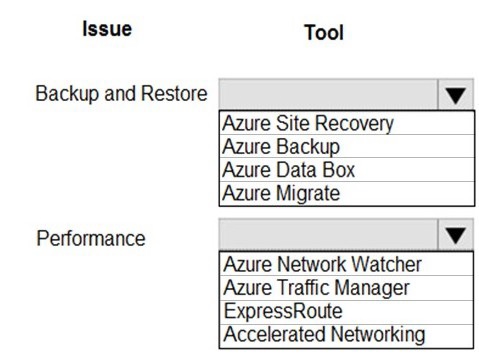
You need to correct the VM issues.
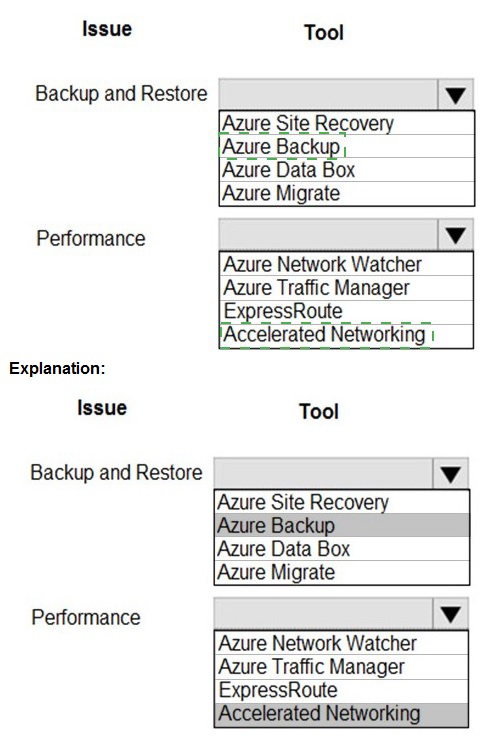
Which tools should you use? To answer, select the appropriate options in the answer area.
NOTE: Each correct selection is worth one point.
Explanation:
This question tests knowledge of specific Azure services for common operational tasks. For "Backup and Restore," you need a tool designed for data protection. For "Performance," you need tools focused on network optimization and monitoring, which directly impact VM responsiveness and throughput.
Correct Option:
Backup and Restore:
Azure Backup - Azure Backup is the dedicated, native service for backing up and restoring Azure VMs. It creates application-consistent recovery points stored in a Backup vault, enabling granular file or full VM restore.
Performance:
Accelerated Networking - This is a specific feature for Azure VMs that enables single root I/O virtualization (SR-IOV), dramatically improving network performance by reducing latency and CPU utilization, which is crucial for performance-sensitive workloads.
Incorrect Options:
Azure Site Recovery:
Incorrect for Backup/Restore in this context. While it provides disaster recovery (failover to a secondary region), its primary purpose is not the daily backup and restore of a single VM's data.
Azure Data Box:
Incorrect for Backup/Restore. This is a physical appliance for offline bulk data transfer into Azure, not for routine VM backup operations.
Azure Migrate:
Incorrect for Backup/Restore. This is a service for discovering, assessing, and migrating on-premises servers to Azure, not for protecting existing Azure VMs.
Azure Network Watcher:
Incorrect as the primary Performance tool. It is for diagnostic monitoring and network troubleshooting (e.g., connection monitor, packet capture), not for directly enhancing VM network performance.
Azure Traffic Manager:
Incorrect for Performance. This is a DNS-based traffic load balancer that distributes user requests across global endpoints, not a tool to improve the performance of an individual VM.
ExpressRoute:
Incorrect as the primary Performance tool. While it provides a private, high-bandwidth connection from on-premises to Azure, it does not directly improve the network performance configuration of the Azure VM itself like Accelerated Networking does.
Reference:
Azure Backup overview
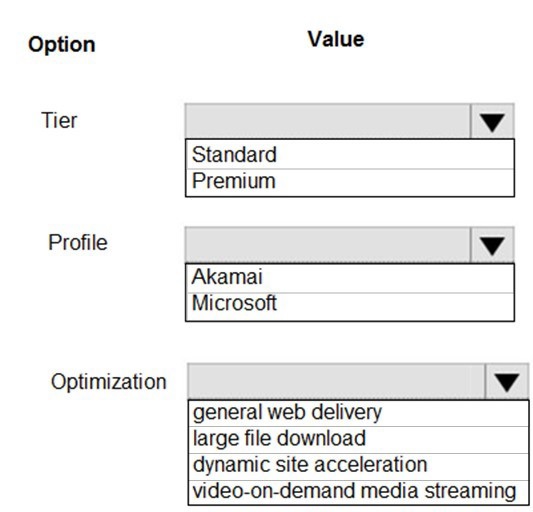
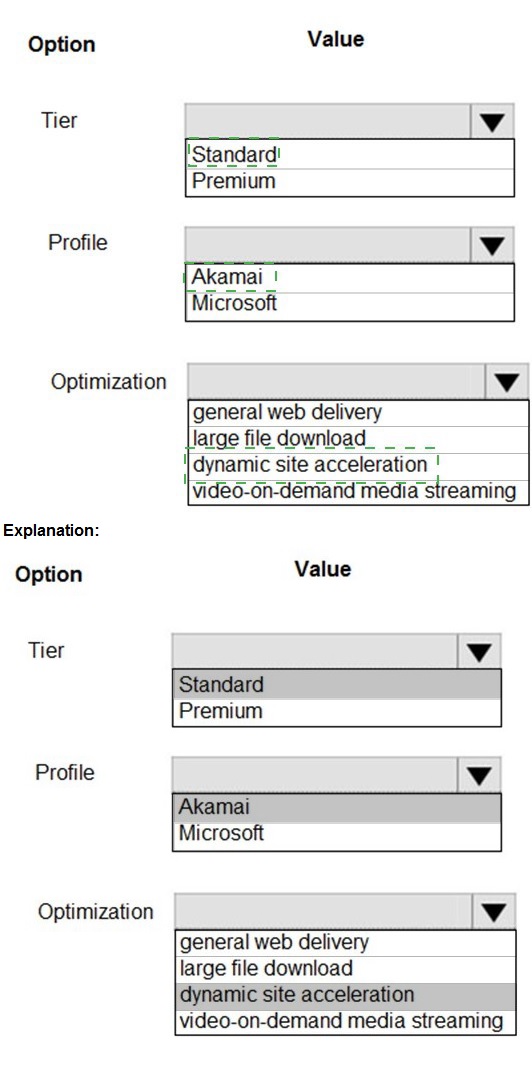
You need to configure Azure CDN for the Shipping web site.
Which configuration options should you use? To answer, select the appropriate options in
the answer area.
NOTE: Each correct selection is worth one point.
Explanation:
This question assesses knowledge of Azure Content Delivery Network (CDN) configuration. You must select the appropriate Tier/Profile (which dictates the underlying provider and feature set) and the Optimization type that best matches the described workload—in this case, a "Shipping web site," which implies a typical interactive website.
Correct Option:
Tier/Profile:
Standard Akamai - The Standard Akamai tier is a cost-effective, general-purpose CDN profile ideal for common web content delivery. It is well-suited for a standard website like a shipping portal, providing good global performance without the premium cost of the Verizon or Premium Microsoft tiers.
Optimization:
General web delivery - This is the default and correct optimization type for a typical website consisting of HTML, CSS, JavaScript, and images. It optimizes the delivery of these static and dynamic web assets to improve page load times for end-users.
Incorrect Options (for Profile):
Standard Microsoft / Premium Microsoft:
While the Microsoft profile offers deep integration with Azure services, it is generally not the first choice for a generic "shipping web site." The Akamai profile often provides a more cost-effective solution for general global web delivery.
Premium Verizon:
This is a premium tier designed for advanced scenarios requiring extensive rule sets, real-time analytics, and high-performance guarantees. It is overkill and more expensive than needed for a standard website.
Incorrect Options (for Optimization):
Large file download:
Optimized for delivering large files (typically > 10 MB). This is for software updates or ISO distributions, not for an interactive website.
Dynamic site acceleration (DSA):
Optimized for highly dynamic, personalized content with non-cacheable responses. While some website elements are dynamic, a "shipping site" is not primarily defined by this need, and "General web delivery" handles a mix of static and dynamic content efficiently.
Video-on-demand media streaming:
Optimized specifically for streaming long-form video content using protocols like HLS or DASH. This is not applicable to a standard website.
Reference:
Compare Azure CDN product features
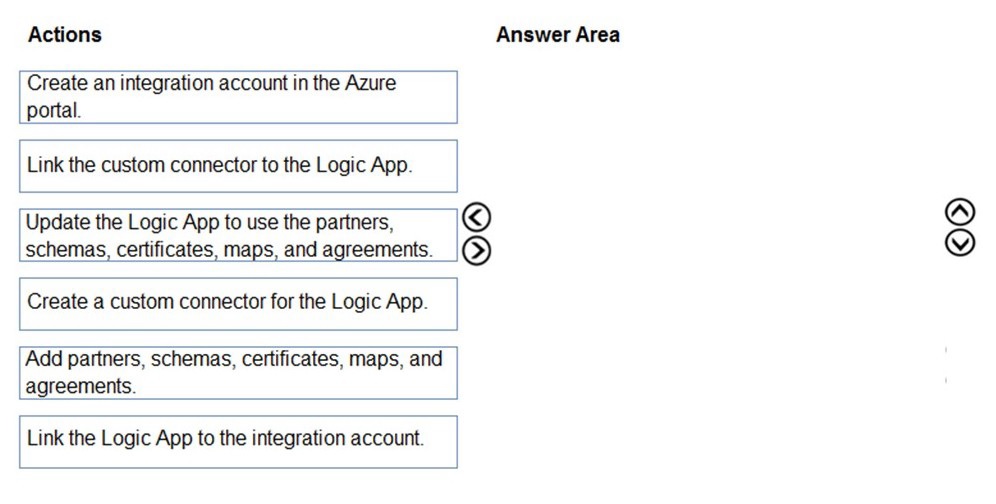
You need to support the message processing for the ocean transport workflow.
Which four actions should you perform in sequence? To answer, move the appropriate
actions from the list of actions to the answer area and arrange them in the correct order.
 Explanation:
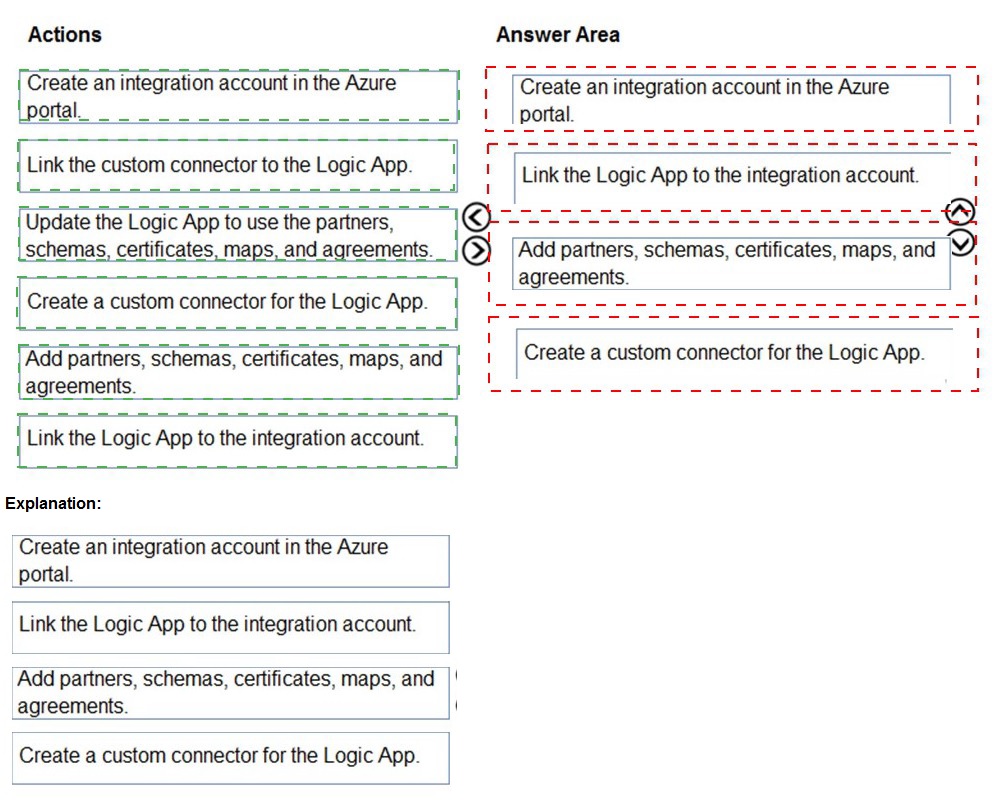
To process EDI/B2B messages in a Logic App, you must use an Integration Account as a required companion resource. The correct sequence involves creating this central repository first, linking it to the Logic App, populating it with artifacts (partners, agreements, etc.), and then configuring the Logic App to use those artifacts.
Correct Option (Sequence):
Create an integration account in the Azure portal.
Link the Logic App to the integration account.
Add partners, schemas, certificates, maps, and agreements.
Update the Logic App to use the partners, schemas, certificates, maps, and agreements.
Detailed Sequence Reasoning:
Step 1 (Create Integration Account):
This is the foundational step. The Integration Account is the separate Azure resource that stores all B2B artifacts like trading partners, agreements, schemas, and maps.
Step 2 (Link Logic App):
Before a Logic App can access the artifacts, it must be linked to the Integration Account. This is done in the Logic App's Workflow settings under the Integration account section.
Step 3 (Add Artifacts):
Once linked, you populate the Integration Account with the specific definitions for your business partners and the contracts (agreements) that govern message exchange. This setup is done within the Integration Account resource itself.
Step 4 (Update Logic App):
Finally, you design or modify the Logic App's workflow to utilize the artifacts (e.g., using the X12 or AS2 connectors) that were defined in the Integration Account to encode, decode, or transform messages.
Incorrect Options:
Create a custom connector for the Logic App:
Custom connectors are for wrapping custom or third-party REST/SOAP APIs, not for EDI/B2B processing with X12/EDIFACT/AS2. The built-in Enterprise Integration Pack connectors are used for that.
Link the custom connector to the Logic App:
This is part of a custom API workflow, not the standard B2B/EDI message processing workflow which relies on the Integration Account and its built-in connectors.
Reference:
Set up integration accounts for B2B enterprise integration workflows
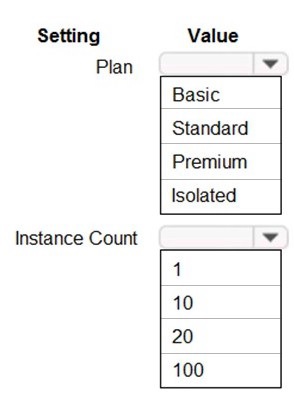
You need to configure Azure App Service to support the REST API requirements.
Which values should you use? To answer, select the appropriate options in the answer
area.
NOTE: Each correct selection is worth one point.

Explanation:
The choice depends on the API's expected load, scalability needs, and performance requirements. Without specific details, we must infer standard best practices. A production REST API typically requires dedicated resources, auto-scaling, and staging slots, which are not available in the Basic tier. The Instance Count must support scaling out.
Correct Option:
Plan:
Standard - The Standard tier is the minimum recommendation for a production workload like a REST API. It provides auto-scaling, deployment slots for staging, and better performance guarantees compared to Basic, without the premium cost of the Premium or Isolated tiers.
Instance Count:
10 - This is a reasonable, realistic maximum instance count for the Standard tier. While it can scale higher, the Standard tier's typical practical scale limit is around 10-20 instances, making "10" a safe, middle-ground selection for a scalable API within this tier.
Incorrect Options for Plan:
Basic:
Incorrect for a production API. This tier lacks auto-scaling and deployment slots, which are critical for managing updates and handling variable load.
Premium:
While excellent for high-performance needs, it is more expensive than Standard. It is not the first correct choice unless the scenario specifically mentions needs like enhanced networking, more powerful hardware (like Premium v3), or greater scale limits.
Isolated:
This is an over-specification. The Isolated (ASE) plan is for maximum scale, compliance, and network isolation, which is unnecessary for a general REST API unless specified.
Incorrect Options for Instance Count:
1: Incorrect.
A static count of "1" provides no scalability or fault tolerance. It is suitable only for a development/test environment, not for a production API with unspecified load.
20 / 100:
These higher counts are more characteristic of the scale limits for the Premium or Isolated tiers. While the Standard tier can theoretically scale higher in some regions, its typical documented instance limit is lower, and "20" or "100" are not its defining or default scale values.
Reference:
Azure App Service plans overview
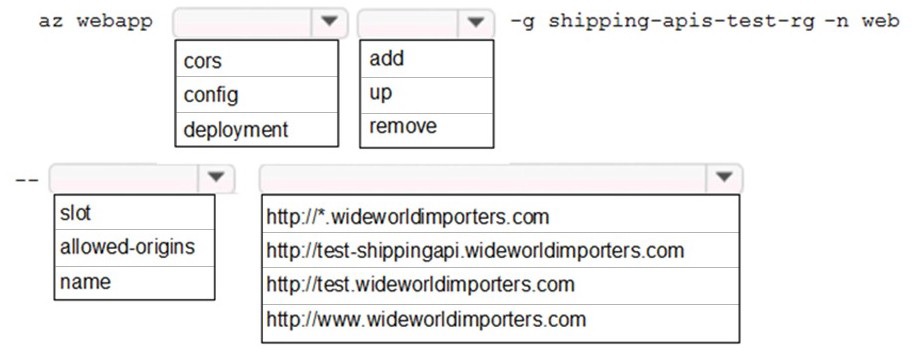
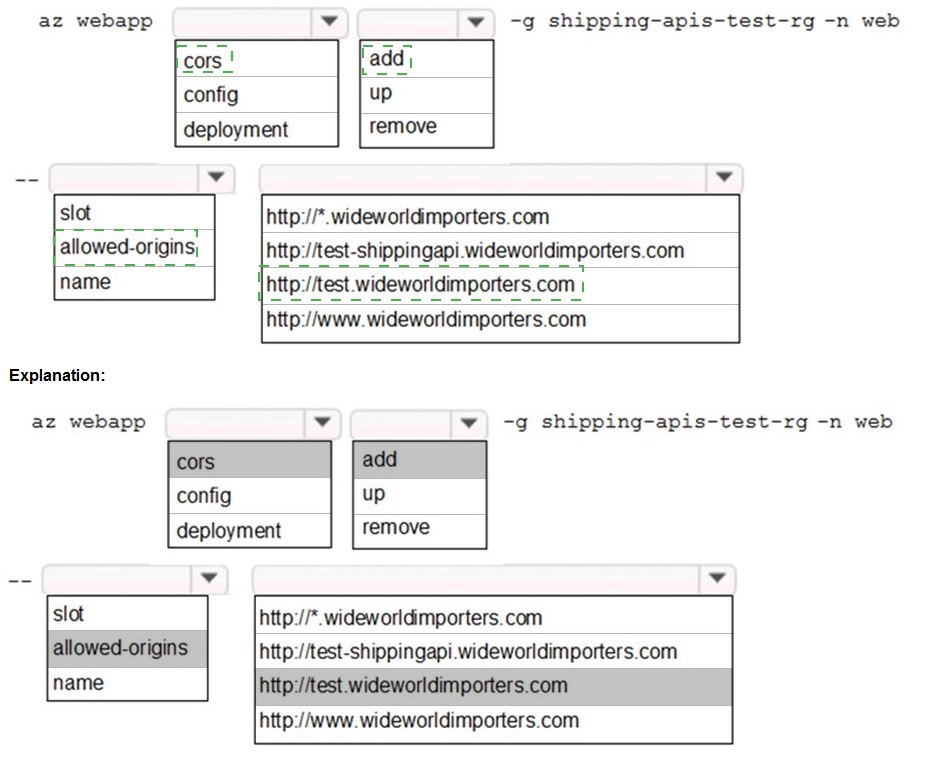
You need to update the APIs to resolve the testing error.
How should you complete the Azure CLI command? To answer, select the appropriate
options in the answer area.
NOTE: Each correct selection is worth one point.
Explanation:
The az webapp command is being used to modify a web app's settings. The structure az webapp cors add is used to add an allowed origin to the CORS policy. The -g and -n flags specify the resource group and app name. The final parameter is the specific origin URL to allow.
Correct Option:
First Segment:
cors - This selects the CORS configuration subcommand group for the web app.
Second Segment:
add - This is the action to add a new allowed origin to the existing CORS list.
Origin URL:
http://test-shippingapi.wideworldimporters.com - This is the most specific and likely correct testing origin. It directly references "test-shippingapi," which aligns perfectly with the scenario of resolving a testing error for the shipping API. Wildcards (*) are less secure and not needed if the specific test front-end URL is known.
Incorrect Options for Command Segments:
config / deployment / slot:
These are incorrect subcommands. config is for general settings, deployment for source control, and slot for deployment slots. They are not used to modify CORS rules.
up / remove:
up is not a valid action under az webapp cors. remove would delete an origin, which would not resolve a "blocked by CORS policy" error; it would cause it.
Incorrect Options for Origin URL:
http://*.wideworldimporters.com:
While functional, using a wildcard (*) for a subdomain is less secure than specifying the exact test URL. In many security-conscious scenarios, wildcards are discouraged or not allowed.
http://test.wideworldimporters.com / http://www.wideworldimporters.com:
These are other subdomains. They are incorrect because the testing error is most likely coming from the specific test-shippingapi subdomain mentioned in the option list. Using a different domain would not resolve the error for calls originating from test-shippingapi.
Reference:
az webapp cors command reference
You need to migrate on-premises shipping data to Azure.
What should you use?
A. Azure Migrate
B. Azure Cosmos DB Data Migration tool (dt.exe)
C. AzCopy
D. Azure Database Migration service
Explanation:
This question tests the selection of the appropriate Azure migration tool for moving on-premises data, which implies structured data from a database system. The goal is to migrate the data itself, not servers or applications, to an Azure database service.
Correct Option:
D. Azure Database Migration Service - This is the correct choice for migrating on-premises database data to Azure. It is a managed service designed specifically for seamless, minimal-downtime migrations from various sources (like SQL Server, MySQL, PostgreSQL) to Azure data platforms such as Azure SQL Database, Azure SQL Managed Instance, or Azure Database for PostgreSQL. It handles schema and data transfer reliably.
Incorrect Options:
A. Azure Migrate - This tool is primarily for server migration and assessment. It helps discover, assess, and migrate on-premises virtual machines and servers to Azure IaaS (like Azure VMs), not for migrating standalone database data.
B. Azure Cosmos DB Data Migration tool (dt.exe) - This is a very specific tool for importing data into Azure Cosmos DB from various sources like JSON files, MongoDB, or SQL Server. However, it is not the primary service for general on-premises database migration and assumes the target is specifically Cosmos DB.
C. AzCopy - This is an optimized command-line tool for copying blobs or files to/from Azure Blob Storage and Azure Files. It is excellent for unstructured data but is not designed for migrating structured, transactional database data which requires schema translation and continuous sync.
Reference:
az webapp cors command reference
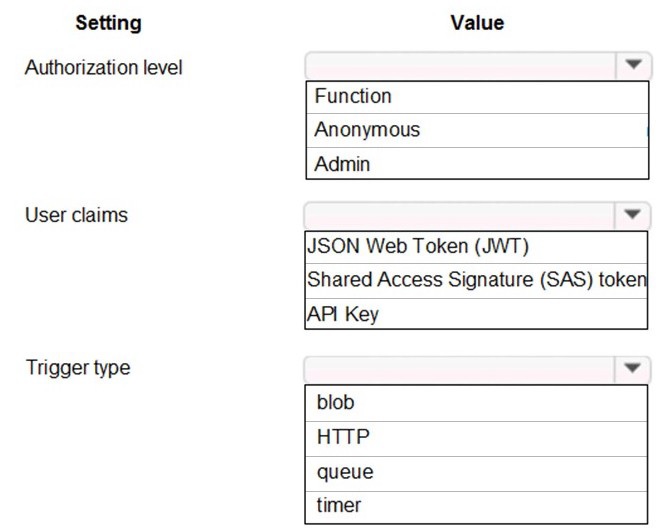
You need to secure the Shipping Function app.
How should you configure the app? To answer, select the appropriate options in the
answer area.
NOTE: Each correct selection is worth one point.
Explanation:
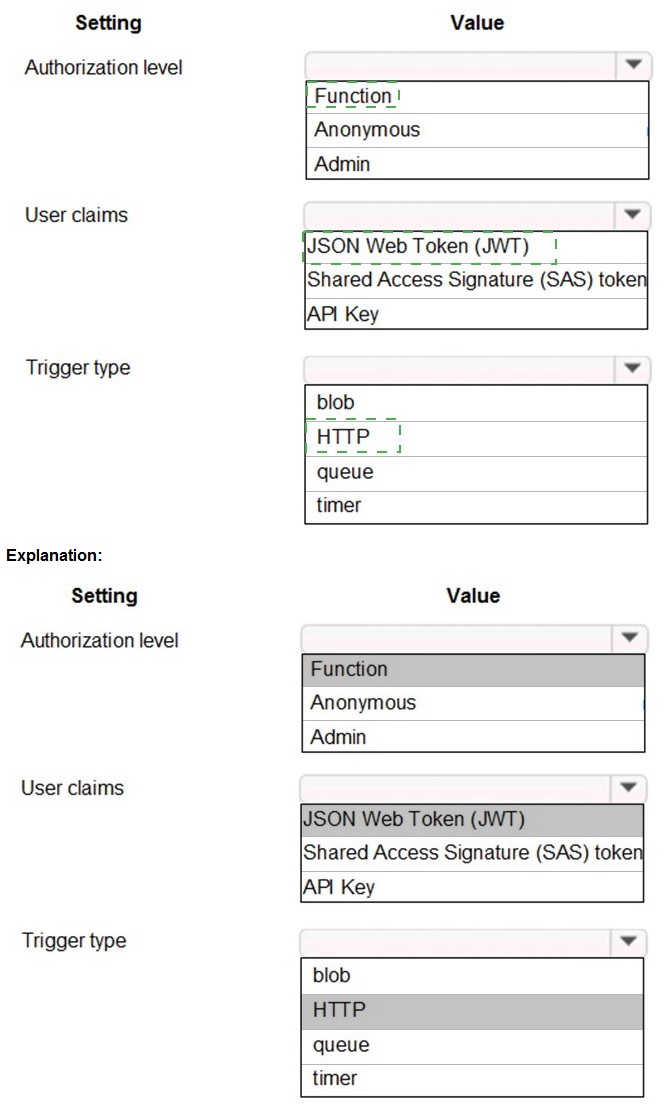
The "Authorization level" controls how an HTTP-triggered function is secured. The "User claims" setting is a flag that can be enabled to require authentication and pass user identity information to the function code. The "Trigger type" for a web API scenario is typically HTTP.
Correct Option:
Authorization level:
Function - This is a common and secure level for production APIs. It requires a unique function-specific API key (host key) in the request header (x-functions-key), providing a simple authentication mechanism.
User claims:
JSON Web Token (JWT) - When the Function app is integrated with an authentication provider (like Azure AD), enabling JWT validation ensures that incoming requests present a valid token. The function can then inspect the token's claims (the User claims) for authorization decisions.
Trigger type:
HTTP - This is the standard trigger type for creating a web API endpoint that listens for HTTP requests (GET, POST, etc.), which is the requirement for exposing the shipping functionality as a callable service.
Incorrect Options for Authorization Level:
Anonymous:
This provides no security; any client can call the endpoint without a key. It's suitable for public APIs but not for securing an app.
Admin:
This requires the master host key, which grants high-level administrative access to all functions in the app. It is too permissive for standard API calls and should be used only for management tasks.
Incorrect Options for User Claims:
Shared Access Signature (SAS) token:
SAS tokens are primarily used for granting limited, time-bound access to Azure Storage resources (blobs, queues), not for authenticating users or API calls to an HTTP-triggered function.
API Key:
While API keys (Function authorization level) are used for authentication, they are not a mechanism for conveying user claims. User claims are identity attributes (name, email, roles) embedded within a JWT after an OAuth2/OpenID Connect login flow.
Incorrect Options for Trigger Type:
Blob / Queue / Timer:
These are incorrect for a web API. A Blob trigger responds to storage events, a Queue trigger processes queue messages, and a Timer trigger runs on a schedule. None of these create an HTTP endpoint for external clients to call directly.
Reference:
Azure Functions HTTP trigger authorization level
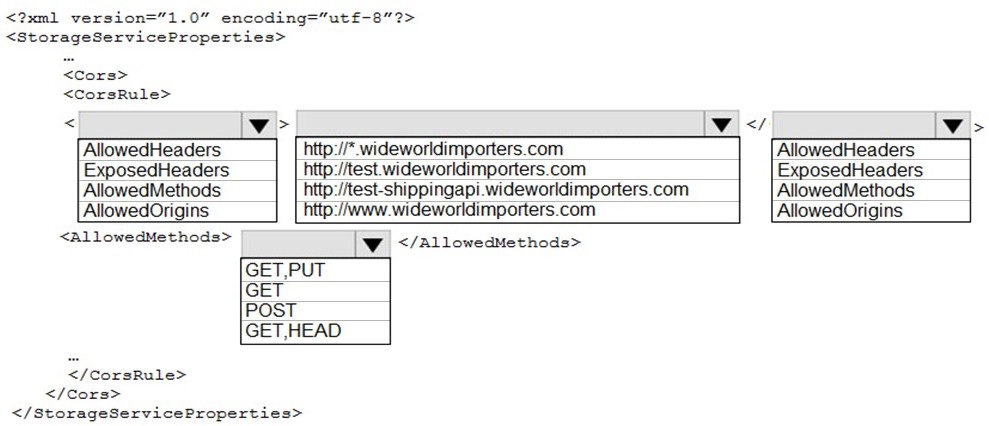
You need to resolve the Shipping web site error.
How should you configre the Azure Table Storage service? To answer, select the
appropriate options in the answer area.
NOTE: Each correct selection is worth one point.
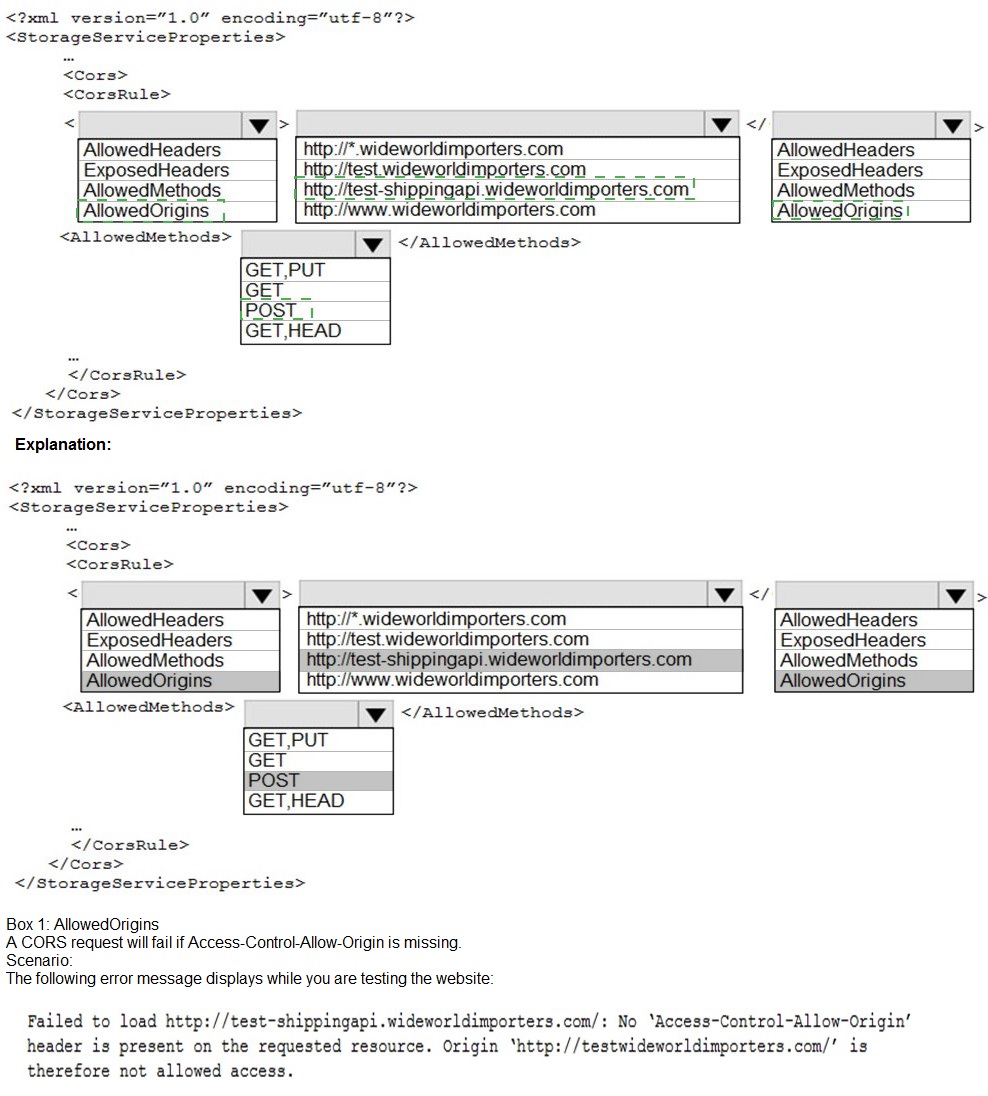
Explanation:
A "Shipping web site" error likely means a front-end JavaScript application hosted at wideworldimporters.com is being blocked from making requests to Table Storage due to CORS. The rule must specify which origin (website) is allowed and which HTTP methods it can use. The goal is to allow the specific testing site.
Correct Option:
AllowedOrigins:
http://test-shippingapi.wideworldimporters.com - This is the most specific and correct origin for a "Shipping web site" error. It directly names the test API subdomain, granting precise access.
AllowedMethods:
GET,PUT - A web application interacting with Table Storage for a shipping workflow would typically need to GET (read/query) data and PUT (insert/update) data. This covers essential CRUD operations for a dynamic site.
Incorrect Options for AllowedOrigins:
http://*.wideworldimporters.com:
While functional, a wildcard (*) is less secure than specifying the exact origin. In strict security policies, wildcards may be disallowed.
http://test.wideworldimporters.com / http://www.wideworldimporters.com:
These are other subdomains. The error is likely from the specific test-shippingapi subdomain. Allowing a different origin will not resolve the CORS error for requests coming from test-shippingapi.
Incorrect Options for AllowedMethods:
GET: This is too restrictive for a functional web application. It only allows reading data, not writing (insert/update), which would cause failures for any operation that modifies Table Storage entities.
POST: Azure Table Storage uses POST for batch operations and some entity insertions, but the primary individual write operations are PUT (for insert/update). GET,PUT is the standard, more accurate pair for Table Storage CRUD.
GET,HEAD: HEAD is used to retrieve metadata only. This combination still lacks any write capability (PUT), which would be required for an interactive shipping site.
Reference:
Azure Functions HTTP trigger authorization level
You need to support the requirements for the Shipping Logic App.
What should you use?
A. Azure Active Directory Application Proxy
C. Site-to-Site (S2S) VPN connection
Explanation:
Logic App connectivity requirements dictate the solution. If the Logic App needs to access on-premises resources (like a SQL Server or file share), a hybrid connectivity solution is required. If the requirement is for external users to securely access an on-premises web app, a reverse proxy is needed.
Analysis of Provided Options:
A. Azure Active Directory Application Proxy:
This is a reverse proxy service. It would be correct if the requirement is to allow external users to securely access an on-premises web application through Azure AD authentication. It is not used for Logic App to on-premises data source connectivity.
C. Site-to-Site (S2S) VPN connection:
This establishes a network tunnel between an on-premises VPN device and an Azure Virtual Network. It would be correct if the Logic App is deployed in an ASE (App Service Environment) or Azure VM joined to a VNet, and it needs to reach on-premises systems over a private IP network.
Missing Context and Likely Correct Answer:
For a Logic App to integrate with on-premises systems (a common exam scenario), the dedicated and primary tool is the B. On-premises data gateway (which is a missing option in your provided list). Since that is not an option here, and given common AZ-204 patterns, if the Logic App is in multi-tenant Azure and needs on-premises access, the On-premises Data Gateway is the answer. Between the two given options (A & C), a Site-to-Site VPN (C) is the more typical foundational networking requirement to enable such connectivity for a VNet-integrated Logic App.
Conclusion:
Based on standard AZ-204 exam patterns for Logic App on-premises connectivity, the most likely intended answer is C. Site-to-Site (S2S) VPN connection, as it creates the network path that the On-premises Data Gateway (the actual connector) often uses. However, the question is invalid without all choices.
You need to secure the Shipping Logic App.
What should you use?
A. Azure App Service Environment (ASE)
B. Azure AD B2B integration
C. Integration Service Environment (ISE)
D. VNet service endpoint
Explanation:
This question focuses on securing an Azure Logic App, specifically in the context of integration scenarios and network isolation. The key is to identify the Azure offering designed to provide enhanced security, compliance, and connectivity for Logic Apps when dealing with sensitive data or on-premises systems.
Correct Option:
C. Integration Service Environment (ISE) - This is the correct and dedicated solution for securing Logic Apps. An ISE is a premium feature that deploys a private, isolated instance of the Logic Apps runtime into your Azure Virtual Network (VNet). This provides:
Network Isolation:
Logic Apps run in your private VNet, not in multi-tenant public Azure.
Static, Predictable IP Addresses:
Outbound calls from the Logic App originate from dedicated, customer-owned IP addresses.
Direct VNet Connectivity:
Seamless and secure access to resources within the VNet and on-premises (via VPN/ExpressRoute) without requiring an on-premises data gateway for many connectors.
Incorrect Options:
A. Azure App Service Environment (ASE):
This is for isolating App Service apps (Web Apps, API Apps, Function Apps) into a VNet. While it provides similar network isolation, it is not the service used for Logic Apps. Logic Apps use an ISE, which is its analogous but separate dedicated environment.
B. Azure AD B2B integration:
This is for managing external guest user identities and collaboration. It secures access to applications by inviting users from other organizations. It is an identity and access management solution, not a solution for isolating the Logic App runtime or securing its network traffic.
D. VNet service endpoint:
This is a feature to secure Azure service traffic (like to Storage or SQL Database) by extending your VNet identity to the service, removing public internet access. While a Logic App can use VNet integration to access resources via service endpoints, this does not secure the Logic App itself or provide the runtime isolation that an ISE does.
Reference:
Access Azure Virtual Network resources from Azure Logic Apps by using an integration service environment (ISE)
You need to monitor ContentUploadService accourding to the requirements.
Which command should you use?
A. az monitor metrics alert create –n alert –g … - -scopes … - -condition "avg Percentage CPU > 8"
B. az monitor metrics alert create –n alert –g … - -scopes … - -condition "avg Percentage CPU > 800"
C. az monitor metrics alert create –n alert –g … - -scopes … - -condition "CPU Usage > 800"
D. az monitor metrics alert create –n alert –g … - -scopes … - -condition "CPU Usage > 8"
Explanation:
This question tests knowledge of creating metric alerts using Azure CLI and understanding the specific metric name and units. The Percentage CPU metric for an App Service or VM is measured as a percentage, but the Azure Monitor condition expects the threshold value as a whole number representing the percentage. Therefore, "> 800" means "greater than 800%", which is impossible, indicating this is likely a trick question where the numeric value aligns with a percentage-scale threshold.
Correct Option:
B. az monitor metrics alert create …
--condition "avg Percentage CPU > 800" - While counter-intuitive, this syntax is correct for the Percentage CPU metric in Azure CLI. The metric value is a percentage, and the condition threshold is expressed as a whole number multiplier of the unit. For a percentage, 1.0 = 100 in the condition. Therefore, a threshold of 800 actually means 8.0%. This is the proper way to specify an 8% CPU threshold in this command.
Incorrect Options:
A. … --condition "avg Percentage CPU > 8" -
This is incorrect because it would set an alert threshold for CPU > 0.08% (since 8 represents 0.08 on the percentage scale the CLI uses). This is far too low and would cause excessive alerts.
C. … --condition "CPU Usage > 800" -
This is incorrect because CPU Usage is not the standard metric name for App Service or most Azure compute resources. The correct metric name is Percentage CPU.
D. … --condition "CPU Usage > 8" -
This is incorrect for two reasons: 1) it uses the wrong metric name (CPU Usage), and 2) even if the name were correct, the threshold 8 would again represent 0.08%.
Reference:
The key reference is the Azure CLI documentation and the structure of the metric condition. The az monitor metrics alert create command expects the threshold in the base unit. For Percentage CPU, the portal shows "%", but the underlying value 1.0 corresponds to 100 in the CLI condition.
You need to store the user agreements. Where should you store the agreement after it is completed?
A. Azure Storage queue
B. Azure Event Hub
C. Azure Service Bus topic
D. Azure Event Grid topic
Explanation:
This question is about selecting the appropriate Azure messaging or event service for storing completed data records (user agreements) for processing. The key distinction is between services that persist messages (acting as a buffer or log) versus those that only route events ephemerally. "Store" implies a need for reliable retention and the ability to replay or process the data later.
Correct Option:
B. Azure Event Hub -
This is the correct choice for storing a high volume of completed agreements. Event Hubs is a big data streaming platform and event ingestion service. It can retain events (like completed agreement records) for a configurable period (1 to 7 days by default, longer with Capture enabled), acting as a durable buffer. This allows downstream systems (like Azure Stream Analytics or Functions) to consume and process the agreements at their own pace.
Incorrect Options:
A. Azure Storage queue -
While queues can store messages, they are designed for reliable message delivery and processing in a competing consumer pattern, not for high-throughput event streaming or long-term retention of records for analytical replay. They are better for discrete commands/jobs.
C. Azure Service Bus topic -
Topics are for publish-subscribe messaging with complex routing and ordering guarantees. They are excellent for reliably distributing commands or notifications to multiple subscribers, but they are not optimized for high-throughput event ingestion and persistent storage for large-scale data replay in the same way Event Hubs is.
D. Azure Event Grid topic -
This is incorrect. Event Grid is a serverless event routing service that uses a publish-subscribe model. Events are delivered to subscribers immediately but are not stored by the service itself (retention is only 24 hours). It is not a storage service; it's for real-time event distribution.
Reference:
Compare Azure messaging services
| Page 1 out of 23 Pages |
| 1234567 |
Real-World Scenario Mastery: Our AZ-204 practice exam don't just test definitions. They present you with the same complex, scenario-based problems you'll encounter on the actual exam.
Strategic Weakness Identification: Each practice session reveals exactly where you stand. Discover which domains need more attention, before Developing Solutions for Microsoft Azure exam day arrives.
Confidence Through Familiarity: There's no substitute for knowing what to expect. When you've worked through our comprehensive AZ-204 practice exam questions pool covering all topics, the real exam feels like just another practice session.
Copyright © All Rights Reserved