
Topic 2, Contoso, Ltd
Case study
This is a case study. Case studies are not timed separately. You can use as much
exam time as you would like to complete each case. However, there may be additional ase studies and sections on this exam. You must manage your time to ensure that you
are able to complete all questions included on this exam in the time provided.
To answer the questions included in a case study, you will need to reference information
that is provided in the case study. Case studies might contain exhibits and other resources
that provide more information about the scenario that is described in the case study. Each
question is independent of the other questions in this case study.
At the end of this case study, a review screen will appear. This screen allows you to review
your answers and to make changes before you move to the next section of the exam. After
you begin a new section, you cannot return to this section.
To start the case study
To display the first question in this case study, click the Next button. Use the buttons in the
left pane to explore the content of the case study before you answer the questions. Clicking
these buttons displays information such as business requirements, existing environment,
and problem statements. When you are ready to answer a question, click the Question
button to return to the question.
Background
Overview
You are a developer for Contoso, Ltd. The company has a social networking website that is
developed as a Single Page Application (SPA). The main web application for the social
networking website loads user uploaded content from blob storage.
You are developing a solution to monitor uploaded data for inappropriate content. The
following process occurs when users upload content by using the SPA:
• Messages are sent to ContentUploadService.
• Content is processed by ContentAnalysisService.
• After processing is complete, the content is posted to the social network or a rejection
message is posted in its place.
The ContentAnalysisService is deployed with Azure Container Instances from a private
Azure Container Registry named contosoimages.
The solution will use eight CPU cores.
Azure Active Directory
Contoso, Ltd. uses Azure Active Directory (Azure AD) for both internal and guest accounts.
Requirements
ContentAnalysisService
The company’s data science group built ContentAnalysisService which accepts user
generated content as a string and returns a probable value for inappropriate content. Any
values over a specific threshold must be reviewed by an employee of Contoso, Ltd.
You must create an Azure Function named CheckUserContent to perform the content
checks.
Costs
You must minimize costs for all Azure services.
Manual review
To review content, the user must authenticate to the website portion of the
ContentAnalysisService using their Azure AD credentials. The website is built using React
and all pages and API endpoints require authentication. In order to review content a user
must be part of a ContentReviewer role. All completed reviews must include the reviewer’s
email address for auditing purposes.
High availability
All services must run in multiple regions. The failure of any service in a region must not
impact overall application availability.
Monitoring
An alert must be raised if the ContentUploadService uses more than 80 percent of
available CPU cores.
Security
You have the following security requirements:
Any web service accessible over the Internet must be protected from cross site
scripting attacks.
All websites and services must use SSL from a valid root certificate authority.
Azure Storage access keys must only be stored in memory and must be available
only to the service.
All Internal services must only be accessible from internal Virtual Networks
(VNets).
All parts of the system must support inbound and outbound traffic restrictions.
All service calls must be authenticated by using Azure AD.
User agreements
When a user submits content, they must agree to a user agreement. The agreement allows
employees of Contoso, Ltd. to review content, store cookies on user devices, and track
user’s IP addresses.
Information regarding agreements is used by multiple divisions within Contoso, Ltd.
User responses must not be lost and must be available to all parties regardless of
individual service uptime. The volume of agreements is expected to be in the millions per
hour.
Validation testing
When a new version of the ContentAnalysisService is available the previous seven days of
content must be processed with the new version to verify that the new version does not
significantly deviate from the old version.
Issues
Users of the ContentUploadService report that they occasionally see HTTP 502 responses
on specific pages.
Code
ContentUploadService

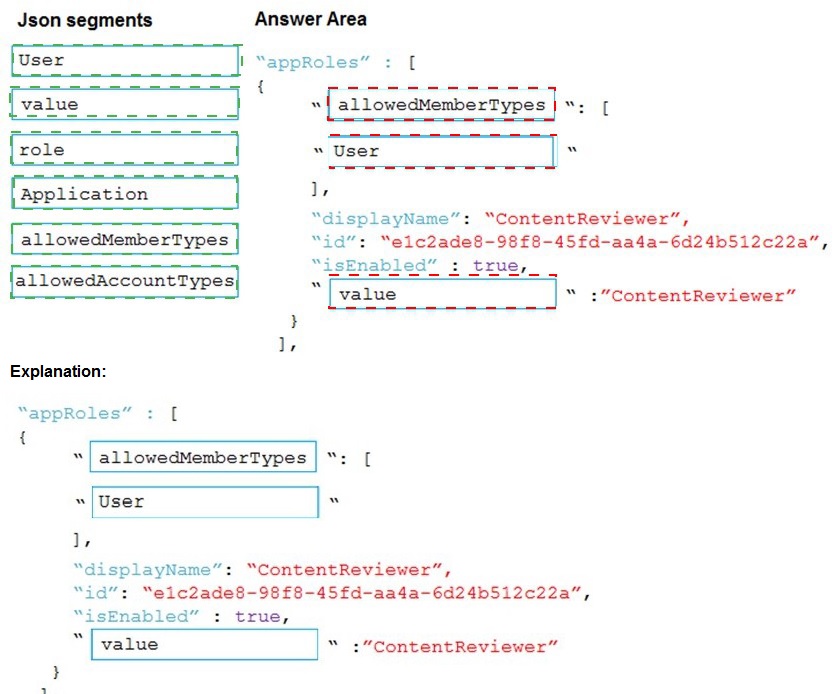
You need to add markup at line AM04 to implement the ContentReview role.
How should you complete the markup? To answer, drag the appropriate json segments to
the correct locations. Each json segment may be used once, more than once, or not at all.
You may need to drag the split bar between panes or scroll to view content.

 Explanation:
The Azure AD app manifest uses a specific JSON schema to define application roles (appRoles). Each role object must specify who can be assigned to the role (allowedMemberTypes), the internal value of the role (value), and a user-friendly name (displayName). The allowedMemberTypes array defines if the role can be assigned to "Users" or "Applications" (service principals).
Correct Option (Completed JSON):
First Blank (allowedMemberTypes):
Defines who can be assigned this role. For a role like "ContentReviewer," it is typically assigned to individual Users within the tenant. It could also include "Application" for daemon scenarios, but "User" is the standard and most logical first choice.
Second Blank (value):
This is the exact string identifier for the role used in authorization code (e.g., in tokens as roles claim). It must match the role name, so "ContentReviewer".
Third Blank (description):
This field provides a human-readable description of the role's purpose. The displayName is for the UI, but description is also a required field. It is logical to set it to the same string, "ContentReviewer".
Incorrect/Unused Json Segments:
role:
This is not a valid property in the appRoles schema. The correct property for the role's identifier is "value".
Application:
This is a possible value for the allowedMemberTypes array, indicating the role can be assigned to a service principal (for app-to-app permissions). While technically valid, the question context ("ContentReviewer" role) strongly implies a human user role, making "User" the primary correct selection for the first blank.
allowedAccountTypes:
This is not a valid property in the Azure AD app manifest. The correct property is allowedMemberTypes.
Reference:
Add app roles in Azure Active Directory application manifest
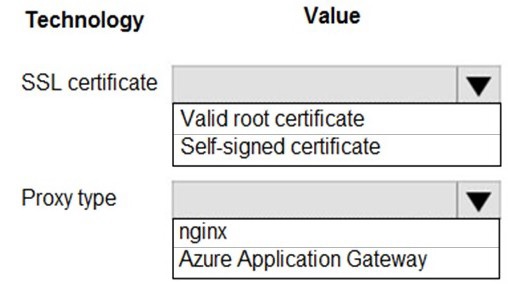
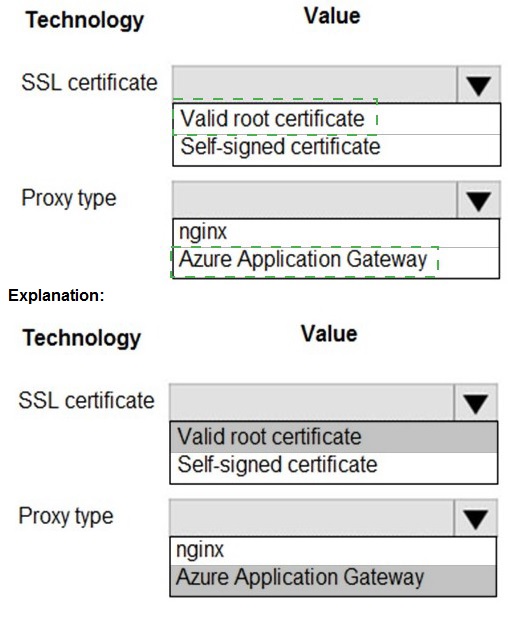
You need to ensure that network security policies are met.
How should you configure network security? To answer, select the appropriate options in
the answer area.
NOTE: Each correct selection is worth one point.
Explanation:
To meet enterprise network security policies, SSL/TLS termination at a trusted gateway is common. The gateway must present a certificate from a trusted authority to clients, and the gateway itself must be a managed, secure service. "Valid root certificate" implies a certificate from a public or internal Certificate Authority (CA) that is trusted by clients.
Correct Option:
SSL certificate: Valid root certificate -
A valid root certificate (from a trusted CA like DigiCert, Let's Encrypt, or an enterprise CA) is mandatory for a production, publicly accessible service. It ensures clients (browsers, apps) can verify the gateway's identity and establish a secure, trusted TLS connection. A self-signed certificate would cause trust errors for clients.
Proxy type: Azure Application Gateway -
This is the correct Azure service for this scenario. It is a Layer 7 load balancer that provides SSL termination as a core feature. It can offload TLS/SSL decryption from backend servers, use a valid CA-signed certificate for the frontend listener, and perform path-based routing, WAF protection, and other security functions. nginx is software you would configure on a VM, not a managed Azure service that inherently meets security policies.
Incorrect Options for SSL Certificate:
Self-signed certificate -
This is unacceptable for meeting standard network security policies in a production environment. Self-signed certificates are not issued by a trusted Certificate Authority and will cause browser warnings and connection failures for external clients, breaking trust and security.
Incorrect Options for Proxy Type:
nginx -
While nginx is a powerful software that can be configured as a reverse proxy with SSL termination, it is not a managed Azure service. Using it would require you to manage the underlying VM, networking, security patches, and configuration yourself, which is less secure and more operational overhead than using a platform service like Application Gateway designed for this purpose.
Reference:
Azure Application Gateway overview and features (see SSL termination)
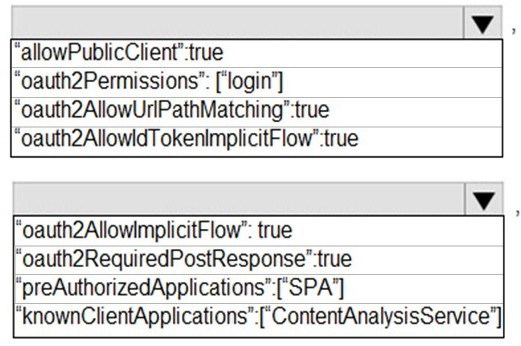
You need to add code at line AM09 to ensure that users can review content using
ContentAnalysisService.
How should you complete the code? To answer, select the appropriate options in the
answer area.
NOTE: Each correct selection is worth one point.
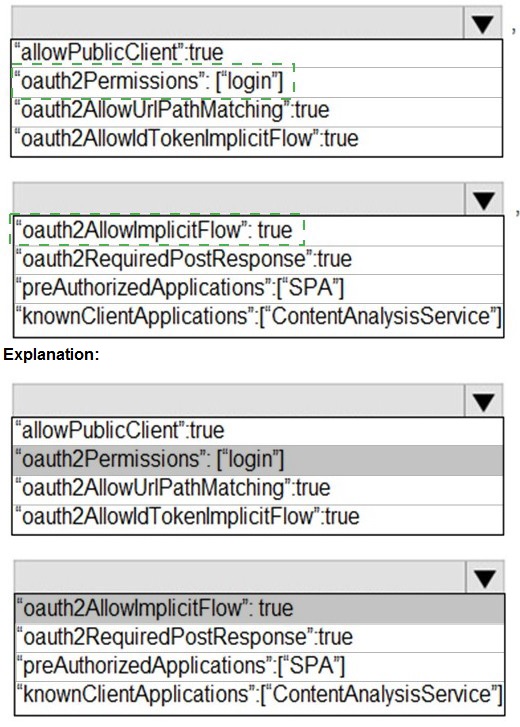
Explanation:
The code segment is from an Azure AD app manifest (likely for the SPA front-end app). To allow users to authenticate and obtain tokens to call the protected ContentAnalysisService API, the front-end app must be configured to use the OAuth 2.0 Implicit Grant flow (historically used by SPAs) and must declare its dependency on (or permission to call) the API app.
Correct Option:
Line 1: "oauth2AllowImplicitFlow": true - This setting must be set to true to enable the Implicit Grant flow, which allows the SPA (a public client) to receive ID tokens and access tokens directly from the Azure AD authorize endpoint without a backend server. This is the classic configuration for SPAs to authenticate users.
Line 2: "knownClientApplications": ["ContentAnalysisService"] - This setting is incorrect for this scenario. The knownClientApplications array is used in a multi-tier application (like a web API's manifest) to declaratively link a client app (like this SPA) to the API app for consent purposes. It should contain the Client ID of the client app (the SPA), not the API's name. Placing the API's name here is wrong. The correct way for the SPA to call the API is via API permissions (requiredResourceAccess in the manifest), not this field in the SPA's own manifest.
Analysis of Other Provided Segments:
"oauth2Permissions":["login"] - This is invalid syntax. oauth2Permissions defines the scopes/exposed by an API, not a client app's login.
"oauth2AllowUrlPathMatching":true - This is not a standard property in the Azure AD app manifest.
"oauth2AllowIdTokenImplicitFlow":true - This is a legacy property; the modern property controlling implicit flow is oauth2AllowImplicitFlow.
"oauth2RequiredPostResponse": true - This is related to the response_mode=form_post, not core to enabling SPA auth.
"preAuthorizedApplications":["SPA"] - This is used in API app manifests to pre-consent to a client, not configured in the client SPA's own manifest.
Conclusion for the Answer Area:
Based on standard SPA configuration, the first blank should be filled with "oauth2AllowImplicitFlow": true.
The second blank's intended purpose is to link to the API, but using "knownClientApplications" with the API's name is incorrect. However, given the exam's provided options and likely intent to link the apps, this might be the selected answer despite its technical flaw. A more correct approach in practice would be to use requiredResourceAccess.
Reference:
Azure AD app manifest reference
You need to implement the bindings for the CheckUserContent function.
How should you complete the code segment? To answer, select the appropriate options in
the answer area.
NOTE: Each correct selection is worth one point.
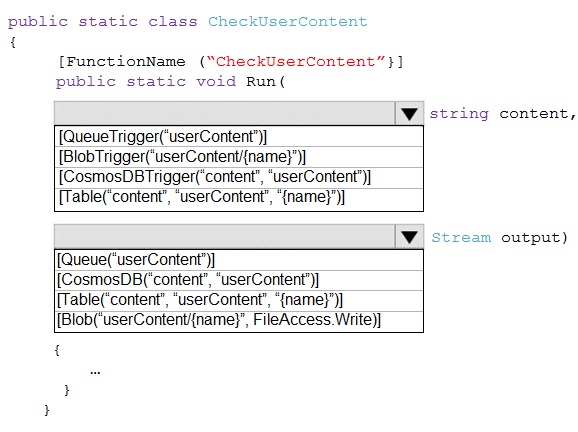
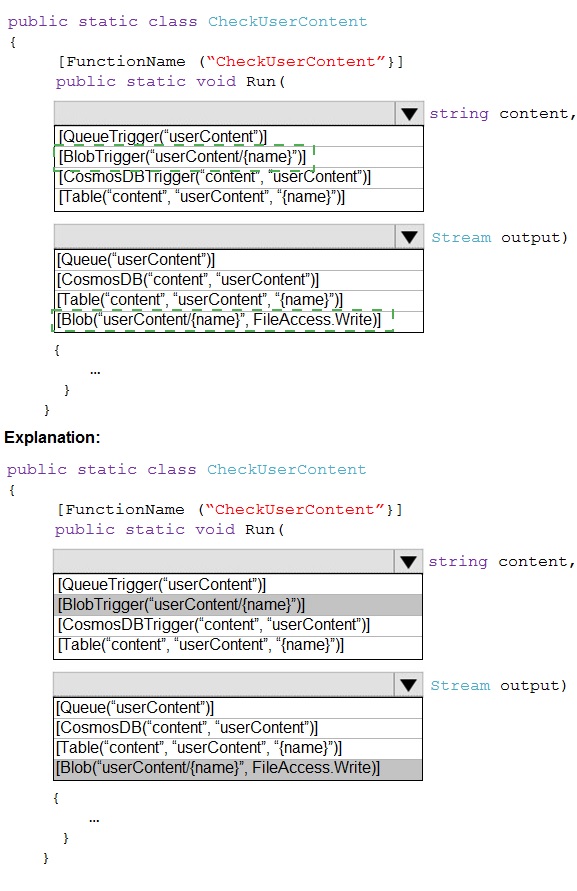
Explanation:
The trigger reads the name of a blob from a queue message and then binds to the actual blob content. The output binding writes the processed result back to a new blob. The {name} placeholder is key, as it's a common pattern for Queue-to-Blob processing.
Correct Option:
Trigger: [QueueTrigger("userContent")] string content - This is the correct trigger. The function is activated by a message arriving in the "userContent" queue. The message body (a string) is passed to the content parameter. This string is expected to be the blob name or path.
Input Binding: [Blob("userContent/{name}", FileAccess.Read)] Stream input - This line is missing from the code snippet but is logically what the string content (the blob name) would be used for. However, looking at the provided options, the trigger's second attribute should bind the blob content itself. The correct syntax for a blob input binding that uses the queue message as the blob path is: [Blob("userContent/{queueTrigger}", FileAccess.Read)] Stream input. Since the parameter is named content, a more complete signature would be: [Blob("userContent/{content}", FileAccess.Read)] Stream input.
Output Binding: [Blob("userContent/{name}", FileAccess.Write)] Stream output - This is the correct output binding. It takes the {name} placeholder (which should come from the trigger message) and creates or updates a blob in the "userContent" container, writing the data from the output Stream parameter.
Analyzing the Provided Incorrect Options in the Snippet:
The brackets [BbbTrigger...] and [Bbb(...)] are placeholders. The correct class names are:
BlobTrigger: Would trigger on a blob being created in a container, not on a queue message. Incorrect for this pattern.
CosmosDBTrigger / CosmosDB: Used for Cosmos DB change feed and output, not for blob storage operations.
Table: Used for Azure Table Storage entities, not blobs.
Queue (as output): Would put a message on a queue, not write blob data.
Reference:
Azure Functions Blob storage bindings
You need to configure the ContentUploadService deployment.
Which two actions should you perform? Each correct answer presents part of the solution.
NOTE: Each correct selection is worth one point.
A. Add the following markup to line CS23:
types: Private
B. Add the following markup to line CS24:
osType: Windows
C. Add the following markup to line CS24:
osType: Linux
D. Add the following markup to line CS23:
types: Public
Explanation:
The trigger reads the name of a blob from a queue message and then binds to the actual blob content. The output binding writes the processed result back to a new blob. The {name} placeholder is key, as it's a common pattern for Queue-to-Blob processing.
Correct Option:
Trigger: [QueueTrigger("userContent")] string content - This is the correct trigger. The function is activated by a message arriving in the "userContent" queue. The message body (a string) is passed to the content parameter. This string is expected to be the blob name or path.
Input Binding: [Blob("userContent/{name}", FileAccess.Read)] Stream input - This line is missing from the code snippet but is logically what the string content (the blob name) would be used for. However, looking at the provided options, the trigger's second attribute should bind the blob content itself. The correct syntax for a blob input binding that uses the queue message as the blob path is: [Blob("userContent/{queueTrigger}", FileAccess.Read)] Stream input. Since the parameter is named content, a more complete signature would be: [Blob("userContent/{content}", FileAccess.Read)] Stream input.
Output Binding: [Blob("userContent/{name}", FileAccess.Write)] Stream output - This is the correct output binding. It takes the {name} placeholder (which should come from the trigger message) and creates or updates a blob in the "userContent" container, writing the data from the output Stream parameter.
Analyzing the Provided Incorrect Options in the Snippet:
The brackets [BbbTrigger...] and [Bbb(...)] are placeholders. The correct class names are:
BlobTrigger: Would trigger on a blob being created in a container, not on a queue message. Incorrect for this pattern.
CosmosDBTrigger / CosmosDB: Used for Cosmos DB change feed and output, not for blob storage operations.
Table: Used for Azure Table Storage entities, not blobs.
Queue (as output): Would put a message on a queue, not write blob data.
Reference:
Azure Functions Blob storage bindings
You need to configure the integration for Azure Service Bus and Azure Event Grid.
How should you complete the CLI statement? To answer, select the appropriate options in
the answer area.
NOTE: Each correct selection is worth one point.
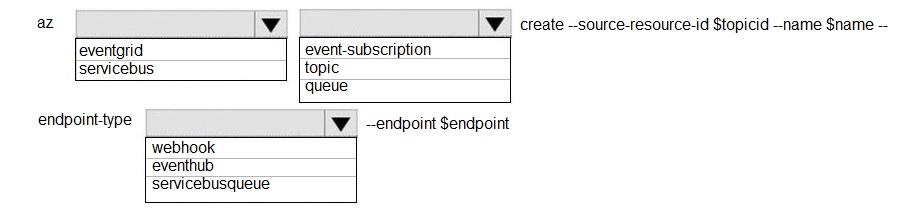
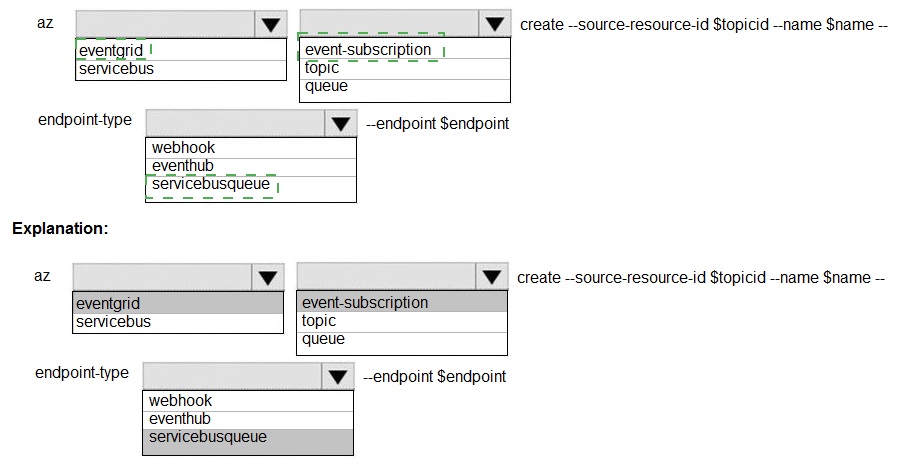 Explanation:
The command is az eventgrid event-subscription create. The --source-resource-id is the ID of the Event Grid topic or system topic publishing events. The --endpoint specifies where to send those events. Since the target is a Service Bus Queue, the endpoint type must be correctly specified.
Correct Option:
Command Group: eventgrid - This is the correct top-level command group for managing Event Grid resources, which includes creating event subscriptions.
Resource Type: event-subscription - This is the subcommand under eventgrid used to create and manage subscriptions.
Endpoint Type: servicebusqueue - This is the correct --endpoint-type value when the destination for events is an Azure Service Bus Queue. This tells Event Grid to format and deliver the events to that specific type of endpoint.
Endpoint Value (--endpoint): This should be the full Azure Resource Manager ID of the specific Service Bus Queue. It follows the format: /subscriptions/{sub-id}/resourceGroups/{rg-name}/providers/Microsoft.ServiceBus/namespaces/{namespace-name}/queues/{queue-name}.
Incorrect Options for Command Group/Resource Type:
servicebus - This is a different top-level command group for managing Service Bus resources (namespaces, queues, topics) directly. It is not used to create Event Grid subscriptions.
topic / queue - These are not valid subcommands under eventgrid. They are resource types managed under their own service groups (eventgrid topic, servicebus queue).
Incorrect Options for Endpoint Type:
webhook - This endpoint type is for generic HTTP endpoints (like a Logic App, Function App, or a custom web API). It is not the specific type for a Service Bus Queue.
eventhub - This endpoint type is for sending events to an Azure Event Hubs endpoint, not a Service Bus Queue.
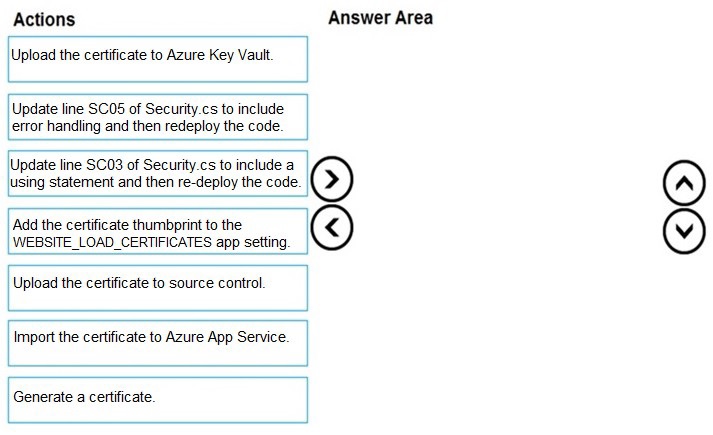
You need to correct the corporate website error.
Which four actions should you recommend be performed in sequence? To answer, move
the appropriate actions from the list of actions to the answer area and arrange them in the
correct order.
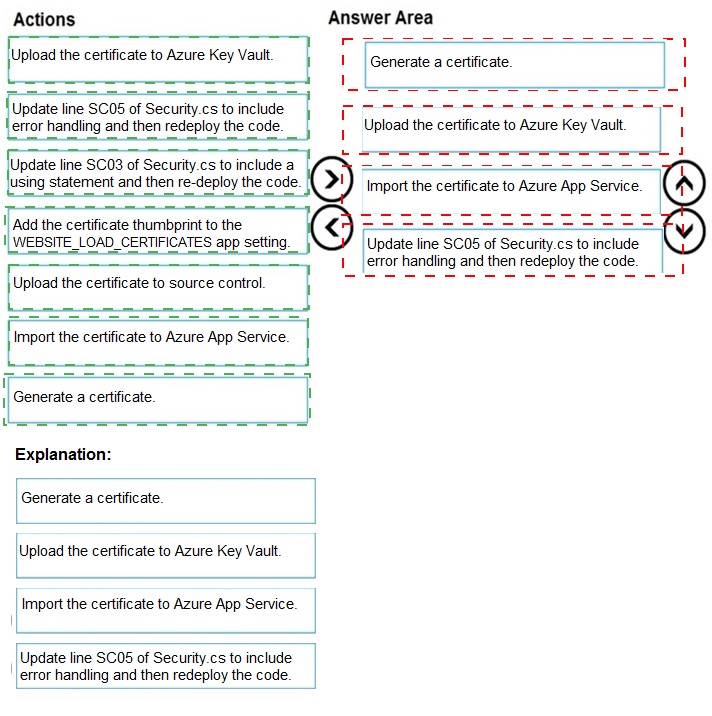
Explanation:
The correct sequence follows the pattern of securely managing and accessing a certificate from code running in Azure App Service. The certificate must first be created or obtained, stored securely in Key Vault, made accessible to the App Service, and then the code must be updated to properly retrieve and use it.
Correct Option (Sequence):
Generate a certificate.
Upload the certificate to Azure Key Vault.
Add the certificate thumbprint to the WEBSITE_LOAD_CERTIFICATES app setting.
Update line SC03 of Security.cs to include a using statement and then re-deploy the code.
Detailed Sequence Reasoning:
Generate a certificate:
You must first have the certificate (e.g., a client certificate for mutual TLS or signing). It can be created using tools like New-SelfSignedCertificate or obtained from a CA.
Upload the certificate to Azure Key Vault:
The secure, central location for storing secrets, keys, and certificates in Azure is Key Vault. This is where the certificate should be imported for secure management and access.
Add the certificate thumbprint to the WEBSITE_LOAD_CERTIFICATES app setting:
This is a critical App Service configuration. This application setting tells the App Service platform to load the certificate (by its thumbprint) from the Web Hosting store into the app's certificate store, making it accessible to your application code.
Update line SC03... to include a using statement:
The code error (SC03 likely referencing a line where KeyVaultClient or CertificateClient is used) is probably due to a missing using directive for the required Azure SDK namespace (e.g., using Azure.Security.KeyVault.Certificates;). Fixing this code and redeploying is the final step.
Incorrect/Actions Not in Sequence:
Upload the certificate to source control:
This is a major security anti-pattern. Certificates (especially private keys) should never be stored in source control.
Import the certificate to Azure App Service:
This is an alternative, less secure method where you upload the certificate directly via the App Service TLS/SSL settings blade. The question's context (mentioning Key Vault, code lines Security.cs) strongly points to the Key Vault method as the correct, more secure approach.
Update line SC05... to include error handling:
While good practice, this is not a prerequisite step for resolving the core certificate access error. The primary issue is likely the missing using statement and the certificate not being loaded, not a lack of error handling.
Reference:
Use a TLS/SSL certificate in your application code in Azure App Service
You need to correct the Request User Approval Function app error.
What should you do?
A. Update line RA13 to use the async keyword and return an HttpRequest object value.
B. Configure the Function app to use an App Service hosting plan. Enable the Always On setting of the hosting plan.
C. Update the function to be stateful by using Durable Functions to process the request payload.
D. Update the function Timeout property of the host.json project file to 15 minutes.
Explanation:
The core issue is likely related to the function execution timeout in a serverless Azure Function. The default timeout for a Consumption plan is 5 minutes. If the RequestUserApproval function involves a long-running process (e.g., waiting for human approval via email, waiting for an external API response), it will time out and fail. The error requires a solution that can handle long-running or asynchronous human interaction.
Correct Option:
C. Update the function to be stateful by using Durable Functions to process the request payload.
- This is the correct solution. Durable Functions are specifically designed for stateful workflows and long-running operations in a serverless environment. They solve the timeout problem by using the async/await pattern with orchestration functions. The function can send an approval request, then go to sleep (await an external event like a human response), and resume later, potentially for days, without timing out.
Incorrect Options:
A. Update line RA13 to use the async keyword and return an HttpRequest object value.
- This addresses coding style or return type but does not solve the fundamental timeout limitation of the Functions runtime. Making it async does not extend the maximum allowed execution duration.
B. Configure the Function app to use an App Service hosting plan. Enable the Always On setting of the App Service plan.
- While an App Service plan allows for longer timeouts (up to 30 minutes) and Always On prevents cold starts, it does not support waiting for asynchronous human events that could take hours or days. It also moves away from serverless and is not the most efficient solution for this approval pattern.
D. Update the functionTimeout property of the host.json project file to 15 minutes.
- This only works for Functions running on a Dedicated (App Service) plan. On a Consumption plan, the maximum timeout is fixed at 5 minutes and cannot be increased via host.json. Even if on a Dedicated plan, 15 minutes might still be insufficient for a human approval process, and this approach does not manage state.
Reference:
Durable Functions overview and patterns (specifically the Human Interaction pattern
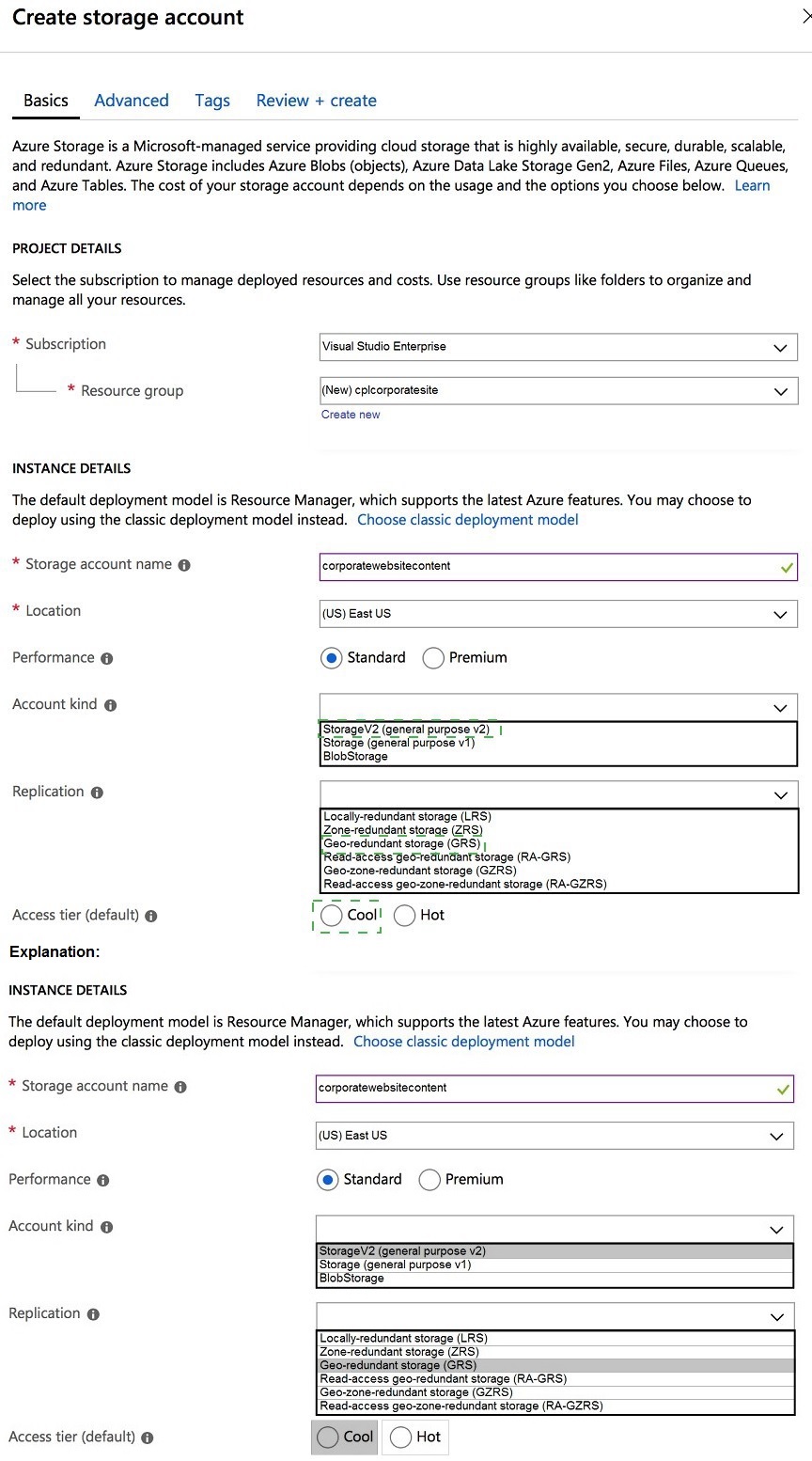
You need to configure the Account Kind, Replication, and Storage tier options for the
corporate website’s Azure Storage account.
How should you complete the configuration? To answer, select the appropriate options in
the dialog box in the answer area.
NOTE: Each correct selection is worth one point.
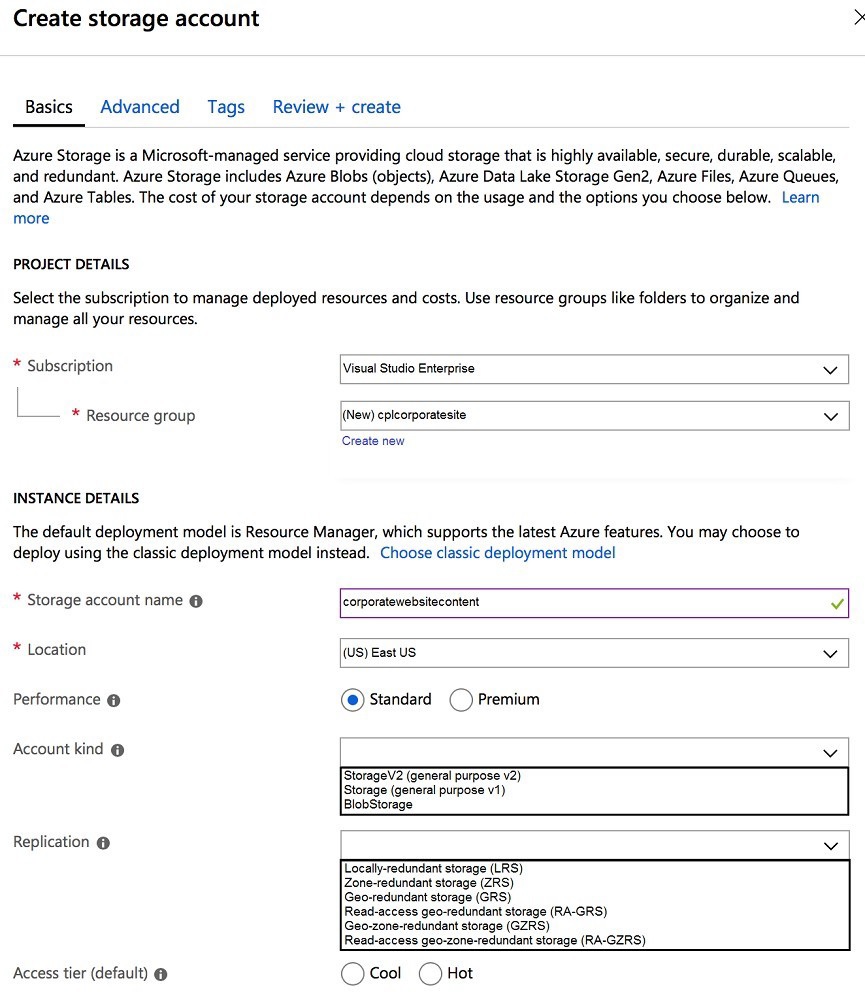
Explanation:
A corporate website primarily uses blob storage to serve static content (images, CSS, JavaScript). The configuration should be optimized for frequent read access (Hot tier), provide high availability, and use the most feature-rich account kind.
Correct Option:
Account Kind:
StorageV2 (general purpose v2) - This is the recommended and most feature-rich account type. It supports all storage services (blobs, files, queues, tables) and includes advanced features like lifecycle management and Azure Data Lake Storage Gen2 capabilities. It is the modern standard.
Replication:
Read-access geo-redundant storage (RA-GRS) - For a corporate website, ensuring high availability and disaster recovery is crucial. RA-GRS provides replication to a secondary region and read access to the data in that secondary region. This offers higher availability and the ability to read from the secondary location if the primary is unavailable, which is important for website uptime.
Access tier:
Hot - The Hot access tier is optimized for storing data that is accessed frequently (like website assets). It has higher storage costs but much lower access costs compared to the Cool tier, which is for infrequently accessed data. For an active website, Hot is the correct choice.
Incorrect Options for Account Kind:
Storage (general purpose v1):
This is the legacy account kind. It lacks many newer features (like hierarchical namespace) and often has higher transaction costs. Microsoft recommends using GPv2 for new storage accounts.
BlobStorage:
This is a specialized, legacy account kind that only supports block and append blobs (not file shares, queues, or tables). While it could technically store website content, it is more restrictive and not the general-purpose best choice. GPv2 is the standard.
Incorrect Options for Replication:
Locally-redundant storage (LRS):
Replicates data only three times within a single data center. It is the cheapest option but does not provide protection against a regional outage, which is a risk for a corporate website.
Geo-redundant storage (GRS):
Replicates to a secondary region but does not provide read access to the secondary. RA-GRS is superior because it provides read access, offering better availability during an outage.
Zone-redundant storage (ZRS) / Geo-zone-redundant storage (GZRS):
These are premium replication options (ZRS replicates across availability zones). While highly available, they are generally more expensive than RA-GRS and are typically specified if zone resilience is an explicit requirement, which is not indicated here.
Incorrect Option for Access Tier:
Cool:
This tier is for data accessed less than once per month. It has lower storage costs but significantly higher access/transaction costs. Using Cool for frequently accessed website content would result in very high operational costs and is incorrect.
Reference:
Azure Storage redundancy
You need to investigate the Azure Function app error message in the development environment. What should you do?
A. Connect Live Metrics Stream from Application Insights to the Azure Function app and filter the metrics.
B. Create a new Azure Log Analytics workspace and instrument the Azure Function app with Application Insights
C. Update the Azure Function app with extension methods from Microsoft. Extensions. Logging to log events by using the log instance.
D. Add a new diagnostic setting to the Azure Function app to send logs to Log Analytics.
Explanation:
The key phrase is "investigate the... error message in the development environment." This implies a need for immediate, real-time diagnostic data to debug a current, active issue. The solution should provide live telemetry with minimal setup delay, suitable for active development and troubleshooting.
Correct Option:
A. Connect Live Metrics Stream from Application Insights to the Azure Function app and filter the metrics.
- This is the correct and most direct action for real-time investigation in a dev environment. Live Metrics Stream provides a near-instantaneous view of requests, dependencies, exceptions, and custom traces as they happen, with a latency of about 1 second. It allows you to filter and watch for the specific error as you reproduce it, enabling immediate debugging.
Incorrect Options:
B. Create a new Azure Log Analytics workspace and instrument the Azure Function app with Application Insights
- This is a setup and configuration step, not an immediate investigation action. While Application Insights logs to a Log Analytics workspace, creating a new one and instrumenting the app takes time. Data ingestion and query availability also have a latency (several minutes), making it unsuitable for immediate investigation of a live error.
C. Update the Azure Function app with extension methods from Microsoft.Extensions.Logging to log events by using the log instance
- This is a code change to implement logging. If the app is already instrumented with Application Insights (which is implied by the presence of options A and B), the logging framework is already in place. If logging isn't implemented, this change would require redeploying the function, which is too slow for immediate investigation. It addresses a symptom (lack of logs) rather than providing a tool for investigation.
D. Add a new diagnostic setting to the Azure Function app to send logs to Log Analytics.
- This configures the platform logs (metrics, App Service logs) to be sent to Log Analytics. Like option B, this has a setup and data latency issue. More importantly, for debugging application-level errors and exceptions, Application Insights (which provides Live Metrics and detailed application traces) is far more powerful and appropriate than platform diagnostic settings alone.
Reference:
Live Metrics Stream: Monitor and diagnose with real-time metric
You need to authenticate the user to the corporate website as indicated by the architectural diagram. Which two values should you use? Each correct answer presents part of the solution.
NOTE: Each correct selection is worth one point.
A. ID token signature
B. ID token claims
C. HTTP response code
D. Azure AD endpoint URI
E. Azure AD tenant ID
Explanation:
This question is about the components required for token validation during user authentication with Azure Active Directory (Azure AD). When a web application (corporate website) uses Azure AD for authentication (e.g., OpenID Connect), it must validate the ID token sent by the user's browser after login to establish a trusted session. This validation requires cryptographic verification of the token's integrity and fetching the necessary public keys.
Correct Options:
A. ID token signature
- This is crucial for validation. The ID token is a JSON Web Token (JWT). The website must validate the token's signature using public keys from Azure AD to ensure the token was issued by a trusted issuer (your Azure AD tenant) and has not been tampered with. This is a core step in the authentication flow.
D. Azure AD endpoint URI
- This is essential. Specifically, the OpenID Connect metadata document endpoint (e.g., https://login.microsoftonline.com/{tenantId}/v2.0/.well-known/openid-configuration). The website uses this well-known endpoint to dynamically discover critical configuration, including the JWKS URI (the location of the public keys needed to verify the ID token signature) and other issuer details. Without this endpoint, the app cannot reliably fetch validation keys.
Incorrect Options:
B. ID token claims
- While the claims (like name, email) are the payload used after validation to identify the user and make authorization decisions, the claims themselves are not used to authenticate (verify the token's trustworthiness). You must first cryptographically validate the token using the signature and keys before you can trust the claims inside it.
C. HTTP response code
- HTTP status codes are part of the network communication protocol but are not direct values used in the cryptographic token validation process that establishes authentication. They indicate success or failure of requests but do not verify a token's issuer or integrity.
E. Azure AD tenant ID
- The tenant ID is important context and is often part of the issuer claim (iss) in the token and the endpoint URI. However, by itself, it is not the primary value used for validation. The endpoint URI (which may contain the tenant ID) is the actual address used to fetch validation keys. The tenant ID is a piece of data, while the endpoint URI is the actionable location.
Reference:
Microsoft identity platform and OpenID Connect protocol
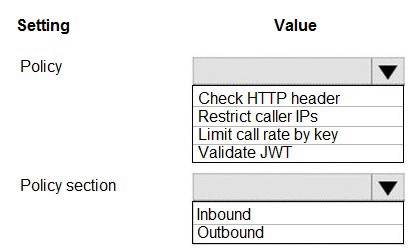
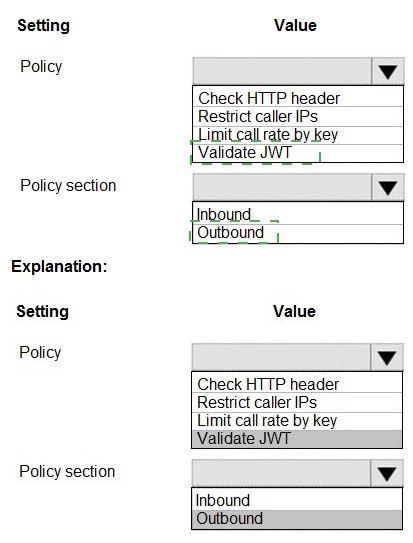
You need to configure API Management for authentication. Which policy values should you use? To answer, select the appropriate options in the answer area.
NOTE: Each correct selection is worth one point.
 Explanation:
APIM policies are XML snippets executed sequentially on the request or response. To enforce authentication, you need an Inbound policy that validates the caller's credentials before the request is forwarded to the backend API. The validate-jwt policy is the standard way to validate OAuth2/OpenID Connect bearer tokens (JWTs).
Correct Option:
Policy:
Validate JWT - This is the correct and primary policy for authentication in APIM. It validates the signature, issuer, audience, and expiration of a JSON Web Token (JWT) extracted from the HTTP Authorization header. It ensures that only requests with a valid token from a trusted identity provider (like Azure AD) are allowed.
Policy Section:
Inbound - Authentication policies must be placed in the
Incorrect Options for Policy:
Check HTTP header:
This is a generic policy (check-header) to enforce the existence or value of a specific header. While it could check for the presence of an Authorization header, it cannot validate the cryptographic signature or claims of a JWT. It is for basic governance, not authentication.
Restrict caller IPs:
This policy (ip-filter) is for authorization based on network location, not user/application authentication. It restricts access based on IP address ranges, which is a different security layer.
Limit call rate by key: This policy (rate-limit-by-key) is for throttling and rate limiting to prevent abuse, not for validating a user's identity or token.
Incorrect Option for Policy Section:
Outbound:
Policies in the
Reference:
API Management access restriction policies
| Page 2 out of 23 Pages |
| 1234567 |
| AZ-204 Practice Test Home |
Real-World Scenario Mastery: Our AZ-204 practice exam don't just test definitions. They present you with the same complex, scenario-based problems you'll encounter on the actual exam.
Strategic Weakness Identification: Each practice session reveals exactly where you stand. Discover which domains need more attention, before Developing Solutions for Microsoft Azure exam day arrives.
Confidence Through Familiarity: There's no substitute for knowing what to expect. When you've worked through our comprehensive AZ-204 practice exam questions pool covering all topics, the real exam feels like just another practice session.
Copyright © All Rights Reserved