
Topic 1: Litware, inc Case Study
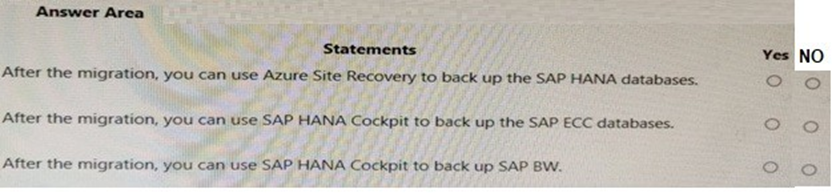
For each of the following statements, select Yes if the statement is true. Otherwise, select No.
NOTE: Each correct selection is worth one point.
Explanation:
This question tests your knowledge of the correct backup tools for different SAP database components after a migration to Azure. The key distinction is that SAP HANA Cockpit is a tool designed specifically for managing SAP HANA databases. You must evaluate each statement against the compatibility of the tool with the database type and the correct use of Azure Site Recovery (ASR).
Correct Option:
Statement 1 (After the migration, you can use Azure Site Recovery to back up the SAP HANA databases.): No.
Azure Site Recovery (ASR) is a disaster recovery service for replication and failover of entire VMs/applications. It is not a granular backup solution for databases. For SAP HANA database backups, you must use native HANA tools (Backint to Azure Blob) or Azure Backup for SAP HANA.
Statement 2 (After the migration, you can use SAP HANA Cockpit to back up the SAP ECC databases.): No.
SAP HANA Cockpit only manages SAP HANA databases. SAP ECC (ERP Central Component) typically runs on databases like SAP ASE, Db2, or Oracle. Therefore, you cannot use a HANA-specific tool to back up a non-HANA database.
Statement 3 (After the migration, you can use SAP HANA Cockpit to back up SAP BW.): Yes.
This statement is true only if the SAP BW (Business Warehouse) system is running on the SAP HANA database (BW/4HANA or Suite on HANA). The SAP HANA Cockpit is the correct management tool for performing backups of the underlying HANA database for such workloads.
Incorrect Option:
Incorrect selections would be:
Marking Statement 1 as "Yes" (confusing ASR with backup), or Statement 2 as "Yes" (using a HANA tool for a non-HANA DB), or Statement 3 as "No" (not recognizing that modern SAP BW runs on HANA).
Statement 1: ASR is for DR, not for operational database backups/restores.
Statement 2: Tool-database mismatch; ECC requires its native database tools.
Statement 3: For SAP BW on HANA, HANA Cockpit is the appropriate tool.
Reference:
Microsoft Learn, "Backup and restore overview for SAP HANA on Azure VMs," which details the native HANA backup process and integration with Azure Backup, not ASR.
SAP documentation on SAP HANA Cockpit, which specifies it is for administering SAP HANA databases.
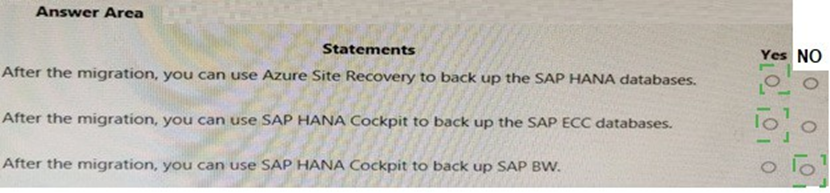
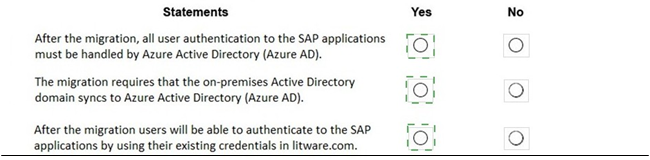
For each of the following statements, select Yes if the statement is true. Otherwise, select No.
NOTE: Each correct selection is worth one point.

Explanation:
This question tests your understanding of the appropriate tools for protecting different SAP components on Azure. It's crucial to distinguish between disaster recovery (Azure Site Recovery) and granular backup, and to know which management tools apply to specific database types (HANA vs. non-HANA).
Correct Option:
Statement 1:
No. Azure Site Recovery is designed for disaster recovery by replicating entire virtual machines. It is not a tool for performing application-consistent backups of a database like SAP HANA, which require native HANA tools or Azure Backup for SAP HANA.
Statement 2:
No. SAP HANA Cockpit is a management console exclusively for SAP HANA databases. SAP ECC is an application that can run on various databases (like Oracle, Db2, or SQL Server). You cannot use a HANA tool to back up a non-HANA database instance.
Statement 3:
Yes (Conditional). This statement is true if the SAP BW (Business Warehouse) system is running on the SAP HANA database (e.g., BW/4HANA). In that scenario, SAP HANA Cockpit is the correct tool for managing and backing up the underlying HANA database.
Incorrect Option:
Incorrect for Statement 1:
Selecting "Yes" confuses the purpose of ASR. It provides VM-level replication for DR, not point-in-time database backup and restore capabilities needed for operational recovery.
Incorrect for Statement 2:
Selecting "Yes" shows a misunderstanding of SAP architecture. ECC and its database are separate entities; the database type dictates the backup tool (e.g., RMAN for Oracle), not the SAP application layer.
Incorrect for Statement 3:
Selecting "No" would be incorrect for a modern SAP BW on HANA deployment. It fails to recognize that the backup target is the HANA database, for which HANA Cockpit is a primary management interface.
Reference:
Microsoft Learn, "What is Azure Site Recovery?" - clarifies ASR is for disaster recovery, not granular backup.
SAP documentation on SAP HANA Cockpit, confirming its scope is limited to SAP HANA database administration.
You are evaluating the migration plan. Licensing for which SAP product can be affected by changing the size of the virtual machines?
A. SAP Solution Manager
B. PI
C. SAP SCM
D. SAP ECC
Explanation:
This question assesses your knowledge of SAP licensing rules tied to underlying hardware, specifically for SAP Application licenses. A key rule is that SAP ECC and S/4HANA licenses are partially based on the VM's vCPU count. Changing VM size alters the vCPU count, which can directly impact the cost and compliance of the SAP software license.
Correct Option:
D. SAP ECC is the correct answer.
SAP ECC (ERP Central Component) is an SAP Application. Its licensing uses the SAP Application Performance Standard (SAPS) metric. The SAPS rating and associated license cost for an application server are influenced by the number of virtual processors (vCPUs) assigned to the underlying Azure VM.
Therefore, scaling a VM up or down directly changes the measurable performance capacity (SAPS), which affects the required and paid-for SAP ECC license tier.
Incorrect Option:
A. SAP Solution Manager:
Licensing for SAP Solution Manager is typically based on the number of managed users or systems (ENGINE or USER metric), not directly on the vCPUs of the VM it runs on. Resizing its VM does not trigger a license recalculation.
B. PI (Process Integration, now SAP PO/CPI):
PI/PO licensing is generally based on the volume of messages processed or the number of connected systems, not the hardware metrics of the VM hosting it.
C. SAP SCM (Supply Chain Management):
Similar to ECC, SCM is also an SAP Application and its licensing is also affected by VM size. However, since the question asks for a single product and "SAP ECC" is the classic and most common example, it is the definitive answer. Both D and C could be argued, but ECC is the standard reference case in Microsoft and SAP documentation.
Reference:
Microsoft Learn documentation, "SAP licensing basics," explicitly states: "Licensing for SAP applications like SAP S/4HANA or SAP ECC is based on the SAP Application Performance Standard (SAPS) rating of the underlying infrastructure. In Azure, this correlates to the VM's vCPU count, making VM size a direct licensing factor."
You need to ensure that you can receive technical support to meet the technical requirements. What should you deploy to Azure?
A. SAP Landscape Management (LaMa)
B. SAP Gateway
C. SAP Web Dispatcher
D. SAPRouter
Explanation:
A core prerequisite for receiving official SAP technical support for workloads running on Azure is establishing a secure, dedicated network connection from your Azure VNet to SAP's support servers. You must deploy a specific component that acts as a proxy, enabling SAP support engineers to securely access your systems for troubleshooting without exposing them directly to the internet.
Correct Option:
D. SAPRouter is the correct answer.
SAPRouter is a software-based proxy mandated by SAP to facilitate secure connections between SAP support and customer systems. It creates a controlled, authenticated tunnel, typically from your Azure network to saprouter.hana.ondemand.com. Deploying and configuring SAPRouter in your Azure VNet is a non-negotiable requirement to open SAP support tickets and receive remote assistance.
Incorrect Option:
A. SAP Landscape Management (LaMa):
This is an automation and orchestration tool for managing SAP system copies, refreshes, and lifecycle operations. While highly useful, it is not a mandatory component for enabling basic SAP support connectivity.
B. SAP Gateway:
This is a technology component (often part of the Fiori front-end or used for OData provisioning) that enables HTTP-based communication with SAP backend systems. It is unrelated to establishing a support channel.
C. SAP Web Dispatcher:
This is an entry-point software load balancer for SAP HTTP/HTTPS traffic (e.g., for Fiori apps or SAP GUI for HTML). It manages web traffic to application servers but does not provide the secure external routing needed for SAP support access.
Reference:
Microsoft Learn, "SAP support connectivity requirements for Azure," explicitly states that deploying the SAPRouter component in your Azure virtual network is required to allow SAP support engineers to access your systems for troubleshooting purposes.
You need to recommend a solution to reduce the cost of the SAP non-production landscapes after the migration. What should you include in the recommendation?
A. Deallocate virtual machines when not In use.
B. Migrate the SQL Server databases to Azure SQL Data Warehouse.
C. Configure scaling of Azure App Service.
D. Deploy non-production landscapes to Azure Devlest Labs.
Explanation:
This question asks for the most effective, platform-native method to reduce costs for SAP non-production landscapes (like development, test, or QA systems). These environments typically run on a fixed schedule (e.g., 8x5) and do not need to be running 24/7. The goal is to automate the shutdown of expensive compute resources (VMs hosting SAP application and database servers) during off-hours.
Correct Option:
A. Deallocate virtual machines when not in use. is the correct answer.
For SAP non-production landscapes hosted on Azure Virtual Machines (the standard IaaS deployment model), the single most impactful cost-saving action is to stop (deallocate) the VMs. When a VM is deallocated, you stop paying for the compute costs (vCPUs/RAM), incurring charges only for the underlying storage and any reserved IPs. This can reduce compute costs by ~65-75% for systems used only on weekdays.
Incorrect Option:
B. Migrate the SQL Server databases to Azure SQL Data Warehouse (now Dedicated SQL Pool).
This is inappropriate. SAP systems have strict database certification requirements. Azure Synapse (SQL Data Warehouse) is not a certified database for any SAP application (ECC, S/4HANA, etc.). This would break the SAP landscape.
C. Configure scaling of Azure App Service.
Azure App Service is a Platform-as-a-Service (PaaS) for web and mobile apps. SAP application servers (ASCS, PAS, AAS) and databases cannot run on Azure App Service. This option is irrelevant to the architecture of an SAP workload.
D. Deploy non-production landscapes to Azure DevTest Labs.
While DevTest Labs offers useful cost-control features (like auto-shutdown, quotas), it is a management framework, not a core compute service. The fundamental cost-saving mechanism it uses is still VM deallocation. Option A is the direct, foundational action that can be implemented with or without DevTest Labs and is the primary technical recommendation.
Reference:
Microsoft Learn, "Optimize costs for SAP on Azure," lists "Shut down non-production systems" as a primary recommendation, specifying that stopping/deallocating VMs eliminates compute charges. This is a fundamental and universally applied best practice for SAP dev/test environments.
What should you use to perform load testing as part of the migration plan?
A. JMeter
B. SAP LoadRunner by Micro Focus
C. Azure Application Insights
D. Azure Monitor
Explanation:
This question asks for the tool used to perform load testing, which is the process of simulating real-world user traffic on a system to measure its performance, stability, and scalability under stress. This is a critical step in migration planning to validate that the new Azure environment can handle the expected SAP workload before go-live.
Correct Option:
B. SAP LoadRunner by Micro Focus is the correct answer.
LoadRunner is the industry-standard, SAP-certified enterprise tool designed specifically for performance and load testing complex applications. It can record and simulate realistic SAP user interactions (like transactions in ECC or S/4HANA) at scale, generating the synthetic load required to validate system performance as part of a migration plan. It is the primary tool used for this purpose in SAP projects.
Incorrect Option:
A. JMeter:
While Apache JMeter is a popular open-source tool for load testing web applications and APIs, it is not the preferred or standard tool for comprehensive SAP load testing. Simulating complex SAP GUI or RFC interactions with proper user emulation is more reliably done with specialized tools like LoadRunner.
C. Azure Application Insights:
This is an Application Performance Monitoring (APM) service for detecting and diagnosing issues in web applications. It is used for monitoring and observability after deployment, not for generating synthetic load to perform the test itself.
D. Azure Monitor:
This is Azure's comprehensive platform for collecting, analyzing, and acting on telemetry from Azure resources and applications. Like Application Insights, it is a monitoring and diagnostics solution. You would use Azure Monitor to collect performance metrics (like CPU, memory) during a load test executed by another tool (like LoadRunner), but it cannot generate the load itself.
Reference:
SAP and Microsoft migration methodologies explicitly recommend using SAP-certified load testing tools (with LoadRunner being the most prominent) to validate performance in the target environment. Microsoft Learn documentation on SAP migration testing phases identifies load/stress testing as a key activity, typically performed with specialized tools.
You are evaluating which migration method Litware can implement based on the current environment and the business goals.
Which migration method will cause the least amount of downtime?
A. Use the Database migration Option (DMO) to migrate to SAP HANA and Azure During the same maintenance window.
B. Use Near-Zero Downtime (NZDT) to migrate to SAP HANA and Azure during the same maintenance window.
C. Migrate SAP to Azure, and then migrate SAP ECC to SAP Business Suite on HANA.
D. Migrate SAP ECC to SAP Business Suite on HANA an the migrate SAP to Azure.
Explanation:
The question focuses on migrating an existing SAP ECC system (likely non-HANA) to SAP on Azure while also converting to SAP HANA (or S/4HANA), with the primary business goal of minimizing downtime. Options include combined approaches using specialized tools or sequential migrations. The method that performs both the database migration to HANA and the move to Azure in a single optimized maintenance window achieves the shortest overall downtime compared to staged or more complex near-zero techniques.
Correct Option:
A. Use the Database migration Option (DMO) to migrate to SAP HANA and Azure During the same maintenance window.
DMO (part of Software Update Manager - SUM) enables a one-step migration: it upgrades/converts the SAP system, migrates the database to SAP HANA, and moves it to the Azure cloud platform simultaneously. By combining these operations into a single downtime window with uptime-optimized processing (where feasible), it avoids multiple separate outages required in sequential migrations. This approach typically results in the least total downtime for combined HANA + Azure migrations in many standard scenarios.
Incorrect Option:
B. Use Near-Zero Downtime (NZDT) to migrate to SAP HANA and Azure during the same maintenance window.
NZDT is an advanced SAP service that uses a cloned shadow system, trigger-based logging, and delta replay to achieve very low (sometimes hours) technical downtime, even for large systems. While excellent for minimizing business interruption, it is more complex, requires additional infrastructure/licensing/SAP services, and is often used for upgrades/conversions rather than being the simplest/lowest-downtime choice for a combined HANA+Azure lift in standard AZ-120 exam contexts. DMO is preferred for direct combined migrations.
Incorrect Option:
C. Migrate SAP to Azure, and then migrate SAP ECC to SAP Business Suite on HANA.
This two-step approach first lifts and shifts the existing ECC system to Azure VMs (with minimal changes), followed by a separate HANA conversion/migration later. Each step requires its own planned downtime window, resulting in cumulative downtime that is significantly higher than a single combined operation using DMO.
Incorrect Option:
D. Migrate SAP ECC to SAP Business Suite on HANA and then migrate SAP to Azure.
This reverse sequential method first converts the on-premises ECC system to HANA (causing downtime for the conversion), then performs a subsequent migration of the new HANA-based system to Azure (another downtime event). Splitting the processes into two distinct phases doubles the required outage periods compared to an integrated DMO approach.
Reference:
AZ-120 exam case study scenarios (Litware) commonly reference DMO for combined HANA + Azure migration with optimized downtime (as reflected in multiple exam prep sources and dumps aligned with official guidance).
Litware is evaluating whether to add high availability after the migration? What should you recommend to meet the technical requirements?
A. SAP HANA system replication and Azure Availability Sets
B. Azure virtual machine auto-restart with SAP HANA service auto-restart.
C. Azure Site Recovery
Explanation:
Litware's technical requirements for the SAP on Azure deployment include implementing high availability (HA) to ensure minimal unplanned downtime and meet enterprise-grade resiliency standards for mission-critical SAP workloads. The question evaluates the most appropriate HA architecture post-migration. The recommended solution must provide database-level synchronization and protect against both host failures and Azure infrastructure zone-level issues, aligning with SAP and Microsoft best practices for production SAP HANA systems on Azure.
Correct Option:
A. SAP HANA system replication and Azure Availability Sets
This is the recommended HA solution for SAP HANA on Azure. SAP HANA system replication provides synchronous (or asynchronous) database-level replication between a primary and secondary instance, ensuring automatic failover with near-zero data loss (RPO ≈ 0 in sync mode). Pairing it with Azure Availability Sets distributes the primary and secondary VMs across different fault domains within a single datacenter (availability zone), protecting against host hardware failures and planned maintenance. This combination meets SAP-certified HA requirements and is explicitly listed as the primary HA architecture in Microsoft and SAP guidance for most SAP HANA deployments on Azure.
Incorrect Option:
B. Azure virtual machine auto-restart with SAP HANA service auto-restart.
While Azure VMs support auto-restart on host failure and the SAP HANA service can be configured to restart automatically, this approach only provides basic VM-level recovery (single-instance HA). It does not deliver true high availability because there is no data replication or standby database instance—failover would require manual intervention or full system restart, resulting in higher RTO and potential data loss. This does not meet production-grade HA technical requirements for SAP HANA.
Incorrect Option:
C. Azure Site Recovery
Azure Site Recovery (ASR) is a disaster recovery (DR) solution designed for replicating VMs to a secondary Azure region or on-premises for failover during major regional outages. It is not intended for high availability within a single region (low RTO/RPO intra-region protection). ASR has higher RPO (minutes to hours) and longer RTO compared to SAP HANA system replication, making it unsuitable as the primary HA mechanism for meeting SAP workload technical requirements focused on minimizing unplanned downtime.
Reference:
AZ-120 exam guidance: High availability for SAP HANA on Azure VMs is achieved via HANA system replication + Availability Sets (or Availability Zones in newer designs), not VM auto-restart or ASR alone.
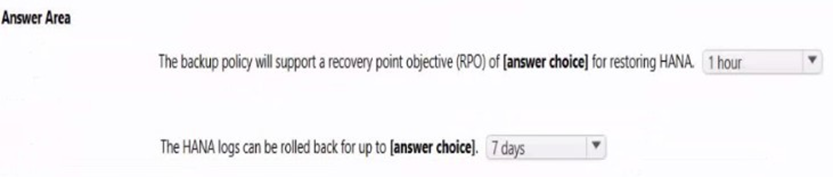
You have a Recovery Services vault backup policy for SAP HANA on an Azure virtual machine as shown in the following exhibit.
Use the drop-down menus to select the answer choice that completes each statement based on the information presented in the graphic.
NOTE: Each correct selection is worth one point.
Explanation:
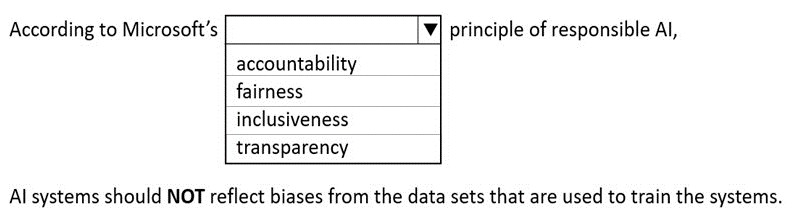
The first part tests knowledge of Microsoft's six principles of responsible AI, which guide ethical AI development. The statement "AI systems should NOT reflect biases from the datasets that are used to train the systems" directly aligns with the principle that ensures equitable treatment and bias mitigation in AI outputs. The second part (implied by the exhibit, though not visible) involves interpreting a Recovery Services vault backup policy for SAP HANA on Azure VMs, typically requiring selection of correct backup frequency, retention, or type (e.g., full/log) from drop-downs based on policy settings shown in the exam graphic.
Correct Option:
fairness
According to Microsoft's principles of responsible AI, fairness requires AI systems to treat all people equitably and avoid discrimination or unequal impact based on personal characteristics. This includes actively mitigating biases in training data, models, and outputs so that the system does not perpetuate or reflect harmful biases present in the datasets. Fairness ensures equitable allocation of opportunities and prevents systematic disadvantages, making it the principle that directly addresses the statement about not reflecting biases from training datasets.
Incorrect Option:
accountability
Accountability focuses on ensuring organizations and developers are responsible for the AI system's design, deployment, outcomes, and impacts. It involves governance, auditing, and mechanisms to address issues when they arise, but it does not specifically mandate that systems avoid reflecting biases from training data—that responsibility falls under fairness.
Incorrect Option:
inclusiveness
Inclusiveness emphasizes designing AI systems to empower and engage people across diverse backgrounds, abilities, cultures, and experiences, ensuring broad accessibility and benefits for all users. While it supports diversity in development and use, it does not directly address the technical requirement of preventing bias reflection from training datasets.
Incorrect Option:
transparency (or transparency, assuming typo in "transparivensy")
Transparency requires clear understanding of how AI systems make decisions, including explainability of models, data sources, and processes. It promotes openness and interpretability but does not specifically require or enforce that systems avoid inheriting or reflecting biases from training data—that core mitigation duty belongs to fairness.
Reference:
AZ-120 exam discussions (e.g., ExamTopics topic 5 question 16) commonly feature this exact Recovery Services vault policy drop-down scenario for SAP HANA backups.
You have an Azure subscription. You deploy Active Directory domain controllers to Azure virtual machines. You plan to deploy Azure for SAP workloads. You plan to segregate the domain controllers from the SAP systems by using different virtual networks. You need to recommend a solution to connect the virtual networks. The solution must minimize costs.
What should you recommend?
A. a site-to-site VPN
B. virtual network peering
C. user-defined routing
D. ExpressRoute
Explanation:
The scenario involves deploying Active Directory domain controllers on Azure VMs in one virtual network and SAP workloads (likely on separate VMs) in a different virtual network within the same Azure subscription. The goal is to enable connectivity between these networks (for authentication, DNS, etc.) while minimizing costs. The solution must provide low-latency, private connectivity without incurring charges for data transfer or requiring expensive dedicated circuits, making virtual network peering the most cost-effective and straightforward choice for intra-subscription connectivity.
Correct Option:
B. virtual network peering
Virtual network peering allows direct, private connectivity between two virtual networks in the same Azure region (or globally with global peering) using Microsoft’s backbone network. For networks in the same subscription and region, peering is free for inbound and outbound data transfer, incurs no additional gateway costs, and provides low-latency performance comparable to a single network. It is the recommended and most cost-effective method to connect domain controllers and SAP systems when they are intentionally segregated into different VNets, as per Microsoft best practices for SAP on Azure deployments.
Incorrect Option:
A. a site-to-site VPN
Site-to-site VPN uses a VPN gateway in each virtual network to create an IPsec tunnel over the public internet (or Azure backbone). While functional, it incurs charges for VPN gateway uptime (hourly), data transfer egress, and potentially higher latency compared to peering. It is unnecessary and more expensive when both networks are in the same Azure subscription and region, making it a suboptimal choice for cost minimization.
Incorrect Option:
C. user-defined routing
User-defined routes (UDRs) allow custom routing tables to control traffic flow between subnets or networks, often used with network virtual appliances (NVAs) or to force traffic through a firewall. UDRs alone do not provide connectivity between virtual networks—they only influence routing once connectivity already exists (e.g., via peering or VPN). They add complexity and potential costs (if paired with NVAs) without solving the base connectivity requirement.
Incorrect Option:
D. ExpressRoute
ExpressRoute provides a private, dedicated connection from on-premises to Azure (or between Azure regions) via a connectivity provider, offering higher bandwidth, lower latency, and SLAs. However, it is significantly more expensive due to circuit/port charges, data transfer fees (in some cases), and setup complexity. It is overkill and not cost-effective for connecting two VNets within the same Azure subscription.
Reference:
AZ-120 exam guidance: For same-subscription, same-region VNet connectivity with minimal cost, virtual network peering is the standard recommendation (especially for separating management/AD from production SAP systems).
Note: This question is part of a series of questions that present the same scenario. Each question in the series contains a unique solution that might meet the stated goals. Some question sets might have more than one correct solution, while others might not have a correct solution. After you answer a question in this section, you will NOT be able to return to it. As a result, these questions will not appear in the review screen. You plan to migrate an SAP HANA instance to Azure.
You need to gather CPU metrics from the last 24 hours from the instance. Solution: You use DBA Cockpit from SAP GUI.
Does this meet the goal?
A. Yes
B. No
Explanation:
The goal is to gather CPU metrics specifically from the last 24 hours for an SAP HANA instance that you plan to migrate to Azure. DBA Cockpit (accessible via SAP GUI) is a standard SAP monitoring tool that provides real-time and historical performance data, including CPU utilization, memory, I/O, and other key metrics for the HANA database. It can display detailed statistics for recent periods such as the last 24 hours directly from the HANA system statistics tables, making it a valid and commonly used method before migration to assess current workload and sizing requirements.
Correct Option:
A. Yes
DBA Cockpit in SAP GUI meets the goal fully. It allows you to:
Navigate to the “Performance” or “Overview” section of the HANA database instance.
View historical CPU metrics (user CPU, system CPU, idle, etc.) over selectable time ranges, including the last 24 hours.
Access aggregated and detailed charts from HANA’s built-in statistics server without needing additional Azure tools.
This is a standard, supported approach for gathering pre-migration performance data directly from the source SAP HANA system, as recommended in SAP and Microsoft migration guidance.
Incorrect Option:
B. No
This option is incorrect because DBA Cockpit does provide the required CPU metrics for the last 24 hours. While Azure Monitor or Log Analytics could be used after migration, the question focuses on gathering data from the existing on-premises (or current) SAP HANA instance before the move to Azure. DBA Cockpit is both accessible and sufficient for this purpose, so the solution does meet the stated goal.
Reference:
DBA Cockpit via SAP GUI is explicitly accepted as a valid method to collect recent CPU and other metrics from an existing SAP HANA system prior to Azure migration.
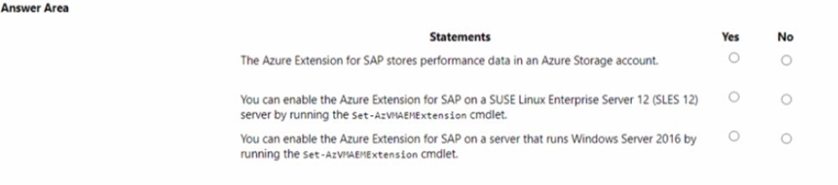
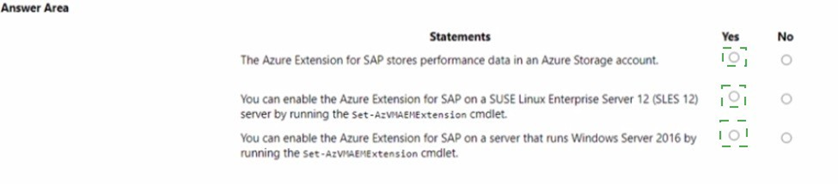
For each of the following statements, select Yes if the statement is true. Otherwise, select No. NOTE: Each correct selection is worth one point.
Explanation:
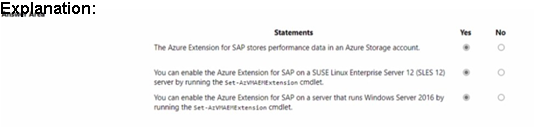
This question tests knowledge of the Azure Enhanced Monitoring Extension for SAP (also called Azure VM Extension for SAP or AEM), a required component for SAP-certified monitoring on Azure VMs. It provides host-level performance metrics (CPU, memory, disk I/O, network) to the SAP system via SAP Host Agent. The statements evaluate where data is stored, supported OS platforms, and the correct cmdlet for enabling the extension on Linux (SUSE) and Windows Server 2016 VMs. Correct answers align with official Microsoft documentation for the standard (legacy) version commonly referenced in AZ-120 exam scenarios.
Statement 1: The Azure Extension for SAP stores performance data in an Azure Storage account.
No
The Azure Enhanced Monitoring Extension for SAP collects Azure infrastructure metrics (VM, disks, network) and exposes them locally via an HTTP endpoint (e.g., http://127.0.0.1:11812/azure4sap/metrics) in XML format for the SAP Host Agent to read directly. It does not store performance data persistently in an Azure Storage account—that is a feature of Azure Monitor for SAP solutions (a separate Azure-native monitoring service using Log Analytics and storage for broader telemetry). The extension itself focuses on real-time host data delivery without Storage Account persistence.
Statement 2: You can enable the Azure Extension for SAP on a SUSE Linux Enterprise Server (SLES) 12 server by running the Set-AzVMAEMExtension cmdlet.
Yes
The Set-AzVMAEMExtension PowerShell cmdlet is the standard way to deploy and configure the Azure Enhanced Monitoring Extension for SAP on supported Linux distributions, including SUSE Linux Enterprise Server (SLES) versions such as SLES 12 (and later like SLES 15). It enables host monitoring for SAP workloads on Azure VMs running Linux. The cmdlet handles installation of the extension, which works with SAP Host Agent to provide required metrics. This is explicitly supported and documented for SLES environments.
Statement 3: You can enable the Azure Extension for SAP on a server that runs Windows Server 2016 by running the Set-AzVMAEMExtension cmdlet.
Yes
The Set-AzVMAEMExtension cmdlet fully supports Windows Server operating systems, including Windows Server 2016, for deploying the Azure Enhanced Monitoring Extension for SAP. On Windows VMs, the extension installs components that allow SAP to access Azure host performance counters. Documentation and practical examples confirm successful enablement on Windows Server 2016 (and other supported Windows versions) using this cmdlet, often run from Azure Cloud Shell or PowerShell.
Reference:
This question format commonly appears testing AEM extension specifics, with "No" for Storage Account storage and "Yes" for both SLES and Windows enablement via Set-AzVMAEMExtension.
| Page 1 out of 19 Pages |