
A VMware Cloud Foundation (VCF) Automation Administrator is tasked to enable VCF
Automation with the following requirements:
• All companies are hosted within a single private cloud.
• RBAC (role-based access control) is enforced.
• Resource governance within companies.
• Segregation between companies.
What two actions must the VCF Automation Administrator perform to satisfy the
requirements? (Choose two.)
A. Deploy a vCenter instance with a Supervisor cluster per company.
B. Ensure that the vCenter instance has a Supervisor cluster enabled.
C. Deploy a VCF Operations Orchestrator server to enable multi-tenancy.
D. Create and configure an AllApps Organization per company.
E. Create and configure a VMApps Organization per company.
Explanation:
In VMware Cloud Foundation (VCF) 9.0 Automation, achieving multi-tenancy within a single private cloud requires a combination of infrastructure readiness and logical platform partitioning. The integration of VMware Aria Automation with vSphere with Tanzu is the architectural standard for satisfying requirements regarding RBAC, resource governance, and tenant segregation.
Infrastructure Governance via Supervisor Clusters
Enabling a Supervisor cluster on the vCenter instance is the critical first step for resource governance. The Supervisor cluster transforms vSphere into a platform where Kubernetes-native objects and traditional VMs can coexist. By using vSphere Namespaces within the Supervisor cluster, administrators can define specific resource limits (CPU, memory, and storage) for each tenant. This ensures that while all companies share the same underlying hardware, their resource consumption is strictly governed and isolated at the hypervisor level. This satisfies the requirement for resource governance within companies by preventing "noisy neighbor" scenarios and ensuring predictable performance for each entity.
Logical Segregation via Organizations
While the Supervisor cluster handles the hardware layer, the Organization construct within the automation layer handles the identity and access layer. Creating a dedicated AllApps Organization per company provides the necessary segregation and RBAC enforcement.
Isolation: Each Organization acts as a secure container. Users assigned to "Company A" are restricted to the blueprints, catalogs, and deployments within their specific Organization.
Scope: An "AllApps" configuration is preferred in modern VCF environments because it supports a hybrid mix of traditional virtual machines and modern containerized applications managed via Tanzu.
RBAC: Role-based access is configured at the Organization level, allowing administrators to delegate "Project Supervisor" or "Cloud Administrator" roles to specific company personnel without granting them visibility into other companies' environments.
Analysis of Incorrect Options
A. Deploy a vCenter instance with a Supervisor cluster per company:
This contradicts the "single private cloud" requirement. VCF is designed for efficiency; deploying multiple vCenter instances for logical segregation creates unnecessary management overhead and resource fragmentation.
C. Deploy a VCF Operations Orchestrator server to enable multi-tenancy:
Aria Orchestrator is an extensibility tool used for workflow automation. It does not define the tenant boundaries or RBAC structure for the VCF Automation platform itself.
E. Create and configure a VMApps Organization per company:
This is a legacy approach. "VMApps" is more restrictive and often used for environments that do not leverage the advanced Kubernetes-based governance features of VCF 9.0. "AllApps" is the modern standard for comprehensive application lifecycle management.
References
VMware Cloud Foundation 9.0 Developer Documentation: Configuring Multi-Tenancy.
VMware Aria Automation Documentation: Managing Organizations and Identity.
vSphere with Tanzu Administration Guide: Supervisor Cluster Resource Management.
A customer created a workflow to execute during machine provisioning in a VMApps Organization within VMware Cloud Foundation (VCF) Automation 9. The workflow includes inputs that interact with the provisioning-payload data. When a machine is requested, provisioning completes successfully, but the workflow does not run. What is the cause of the workflow-execution failure?
A. The Event Broker Subscription is set to blocking.
B. The workflow is not signed.
C. The workflow is signed.
D. The Event Broker Subscription is set to non-blocking.
Explanation:
In VCF Automation 9 (vRealize Automation 8.x extensibility model), an Event Broker Subscription can be either blocking or non-blocking. When set to non-blocking, the subscribed workflow executes asynchronously and does not affect the provisioning transaction. This means:
The machine deployment proceeds and completes successfully regardless of whether the workflow runs, errors, or times out.
The workflow includes inputs from the provisioning payload. If that payload data is missing, malformed, or fails to map correctly, the workflow will silently fail or not trigger at all—but provisioning remains successful.
Therefore, the most likely cause is a non-blocking subscription combined with a workflow error (e.g., input mismatch, vRO connection issue) that goes unreported in the deployment status.
Why other options are incorrect:
A. The Event Broker Subscription is set to blocking
– Blocking subscriptions run synchronously. If the workflow fails or does not run, the provisioning itself would also fail or hang. Because provisioning completes successfully, the subscription cannot be blocking.
B. The workflow is not signed
– Workflow signing in vRO is a security control, but an unsigned workflow still executes. It may generate a warning or require administrator approval, but it will not prevent the workflow from running during provisioning.
C. The workflow is signed
– Signing a workflow does not inhibit execution. A signed workflow runs normally and would not cause the workflow to be skipped.
Reference
VMware Cloud Foundation Automation 9 Extensibility Guide – "Event Broker Subscriptions: Blocking vs. Non-Blocking" – Non-blocking subscriptions are asynchronous and do not impact deployment success.
VMware vRealize Automation 8.x Documentation – "Non-blocking event topics are triggered asynchronously. Failures in non-blocking workflows do not affect the parent deployment request."
An administrator is tasked to enable VMware Cloud Foundation (VCF) Automation to run ABX actions.
What must be configured?
A. Create a project in an AIIApps Organization.
B. Create a cloud account in the Organization Portal.
C. Create a region in an AIIApps Organization.
D. Create a cloud account in the Provider Management Portal.
Explanation:
In VMware Cloud Foundation (VCF) Automation 9, ABX (Action-Based Extensibility) actions are infrastructure-dependent and require a cloud account to execute against a target endpoint (e.g., vCenter, AWS, Azure). The cloud account provides the authentication, endpoint URL, and credential information that ABX needs to run actions such as VM power operations, provisioning, or custom scripts .
The Provider Management Portal is the correct location because:
Cloud accounts are infrastructure resources that must be configured by a provider administrator (superuser), not by organization or project users .
Once created in the Provider Management Portal, the cloud account becomes available for use across multiple projects within an organization .
ABX actions, when executed, reference a cloud account to determine which vCenter, AWS region, or other infrastructure endpoint to interact with .
Why other options are incorrect:
A. Create a project in an AllApps Organization
– Projects are logical containers for deployments, users, and resources within an organization. A project does not provide infrastructure connectivity. Without a cloud account, ABX actions have no target endpoint to execute against.
B. Create a cloud account in the Organization Portal
– The Organization Portal is for tenant-specific operations (managing users, catalogs, deployments). Cloud account creation is restricted to the Provider Management Portal for security and multi-tenancy isolation. Organization administrators cannot create cloud accounts .
C. Create a region in an AllApps Organization
– A region is a logical grouping of compute resources (e.g., a vCenter cluster or AWS region) and is defined after a cloud account is added. Regions are created within the context of an existing cloud account and do not themselves enable ABX execution.
Reference
Broadcom TechDocs – "Integrating VCF Automation with VCF Operations Orchestrator" – Provider administrator role required for infrastructure integrations
Broadcom TechDocs – "AWS Configuration Options in VCF Automation for VM Apps" – ABX actions require additional permissions configured at the cloud account level
An administrator is configuring RBAC policies in VMware Cloud Foundation (VCF)
Automation to delegate access across multiple clusters. The administrator must ensure
that:
• Cluster lifecycle operations (e.g., scaling) can only be performed by a designated
operations group.
• Security policies at the NSX project level remain restricted to network administrators'
group.
Which two role assignments meet these requirements? (Choose two.)
A. Assign the Organization Owner role to the network administrators group at the tenant organization level.
B. Assign the Security Administrator role in NSX to the network administrators group at the project scope.
C. Assign the Service Viewer role in VCF Automation to the operations group at the cluster scope.
D. Assign the Service User role in VCF Automation to the operations group at the cluster scope.
E. Assign the Cluster Administrator role in VCF Automation to the operations group at the cluster scope.
Explanation
The requirements demand two separate control planes: NSX security policies restricted to network administrators, and cluster lifecycle operations restricted to an operations group. These require distinct role assignments at appropriate scopes.
B. Security Administrator role in NSX at the project scope
– This satisfies the security policy restriction. In VCF Automation (vRealize Automation), NSX roles are assigned at the project scope to control network and security configurations. The Security Administrator role provides permissions to manage distributed firewall rules, gateway policies, and security groups within that specific project . Network administrators receive exactly the access they need without broader infrastructure privileges.
E. Cluster Administrator role in VCF Automation at the cluster scope
– This satisfies the cluster lifecycle operations requirement. Cluster Administrator is a service role that grants permissions to perform scaling operations, modify cluster configurations, and manage infrastructure resources at the cluster level . Limiting this role to the cluster scope (rather than project or organization scope) ensures the operations group cannot access unrelated clusters or modify project-level security policies.
Why other options are incorrect:
A. Organization Owner role to network administrators at tenant organization level
– This grants full administrative access across all services, projects, and infrastructure within the organization . This would violate the requirement that security policies remain restricted, as Organization Owners can modify projects, clusters, and bypass any project-scoped limitations.
C. Service Viewer role to operations group at cluster scope
– The Service Viewer role provides read-only access to view resources, deployments, and configurations . It explicitly does not permit write actions such as scaling clusters or performing lifecycle operations. This role cannot meet the cluster lifecycle requirement.
D. Service User role to operations group at cluster scope
– The Service User role allows requesting catalog items, deploying templates, and managing their own deployments . However, it does not grant permissions to perform cluster-level administrative operations like scaling or modifying cluster infrastructure. Service User is an end-user role, not an administrative one.
Reference
Broadcom TechDocs – "Assign Organization and Service Roles to the Groups" – Details Organization Owner, Service Viewer, and Cluster Administrator roles and their scope limitations
VMware Docs – "Service Broker User Roles" – Defines Service User, Service Viewer, and project-scoped role assignments for security administration
A development team submits the following requirements to the VMware Cloud Foundation
(VCF) Automation administrator:
• Three-tier inventory system (web, application, and database).
• All components deployed as virtual machines (VMs).
• Static IP addresses required.
• NAT and load balancing for external access.
• Network segmentation between DMZ and internal tiers.
• The team requests to use the platform's managed PostgreSQL database service instead
of maintaining their own database virtual machines.
Which organization type should the administrator configure to meet these requirements
with minimal complexity?
A. Kubernetes Apps Organization
B. AllApps Organization
C. Provider Organization
D. VMApps Organization
Explanation:
The development team's requirements demand a mix of traditional VM-based deployments (web/app/database VMs with static IPs, NAT, load balancing, network segmentation) AND a managed platform service (PostgreSQL database service). Only the AllApps Organization can fulfill both categories within a single organization type with minimal complexity.
Why other options are incorrect:
A. Kubernetes Apps Organization
– This is not a valid organization type in VCF Automation 9. The two valid types are AllApps and VMApps . A "Kubernetes Apps" organization does not exist.
C. Provider Organization
– There is no "Provider Organization" type. Providers create and manage organizations but do not consume services through an organization type .
D. VMApps Organization
– VMApps organizations are intended for existing VMware Aria Automation 8.x users transitioning to VCF Automation 9.0 with minimal disruption . They do not support IaaS services or managed database services. VMApps organizations require infrastructure management (cloud accounts, cloud zones, profiles, image mappings) to be contained within the organization itself and lack the built-in cloud services that AllApps provides.
Reference
Broadcom TechDocs – "Organization Management" – Defines AllApps and VMApps organization types and their capabilities
Broadcom TechDocs – "All Apps Organizations in VCF Automation" – Lists built-in cloud services including databases, VMs, and networking
Broadcom TechDocs– "Getting Started with the Tools for Building Applications" – Confirms VMApps organizations do not support IaaS services
A system administrator is tasked to create a region for use within an AIIApps organization. How would the administrator determine which vCenter Servers are available in the infrastructure?
A. Verify connections in the Organization portal.
B. Verify connections in the Provider Management portal.
C. Manually look up the UUID of the vCenter Server(s) in the VMware Kubernetes Service (VKS).
D. Manually look up the UUID of the vCenter Server(s) in the vSphere Client.
Explanation
In VMware Cloud Foundation (VCF) 9.0 Automation, the architecture distinguishes between the Provider layer (infrastructure management) and the Tenant layer (consumption). When creating a Region for an AllApps Organization, the administrator is performing a fabric-level task that requires visibility into the underlying compute resources.
Analysis of Incorrect Options
A. Verify connections in the Organization portal:
The Organization portal is a tenant-facing or project-level interface. While it shows resources already assigned to that organization, it does not show the global pool of available, unassigned infrastructure providers.
C. Manually look up the UUID of the vCenter Server(s) in the VMware Kubernetes Service (VKS):
While VKS interacts with vCenter for container orchestration, it is not the management interface used to identify or onboard vCenter instances for regional configuration. Using UUIDs in this context is an unnecessary manual step that bypasses the automation platform's built-in discovery.
D. Manually look up the UUID of the vCenter Server(s) in the vSphere Client:
The vSphere Client manages the individual vCenter operations but does not reflect the "Connected" or "Available" status within the VCF Automation framework. A vCenter may be running perfectly in the vSphere Client but remain unavailable to the automation engine if the cloud account has not been configured in the Provider Management portal.
References
VMware Cloud Foundation 9.0 Administration Guide: Managing Infrastructure Providers.
VMware Aria Automation Documentation: Setting up Cloud Accounts and Regions.
VCF Automation 9 Operations: Provider vs. Tenant Portal Functionality.
An Organization Administrator notices that their public assigned IPs are being used for
non-production workloads.
What should the administrator do to prevent further public IP addresses consumption?
A. Create an IP Quota and associate it with the non-production VPC.
B. Create an IP Quota and associate it with the non-production namespace.
C. Modify the default IP Quota that was shared by the provider.
D. Modify the existing VPC and remove the "External IPv4 blocks".
Explanation
In VCF Automation 9, IP quotas are the primary mechanism for controlling IP address consumption across Virtual Private Clouds (VPCs) within an organization . When public assigned IPs are being consumed by non-production workloads, the Organization Administrator can create an IP quota that specifically limits IP usage for that VPC.
IP quotas allow you to control several parameters:
Number of single IP addresses that can be allocated
Number of CIDR blocks permitted
Maximum size of subnets allowed
By creating an IP quota and associating it with the non-production VPC, the administrator restricts how many public IP addresses can be consumed within that specific VPC. This prevents further consumption without affecting production workloads in other VPCs.
Why other options are incorrect:
B. Create an IP Quota and associate it with the non-production namespace
– IP quotas are applied at the VPC level, not at the namespace level . Namespaces are resource pools for deployments like VMs and Kubernetes clusters, but they do not directly control external IP address consumption . An IP quota associated with a namespace would be ineffective because the quota system is designed for VPC scoping.
C. Modify the default IP Quota that was shared by the provider
– Default IP quotas are typically set by the Provider Administrator at the provider level . An Organization Administrator cannot modify provider-level quotas; they can only create their own organization-specific IP quotas . Additionally, modifying a shared default quota would affect all VPCs in the organization, not just non-production workloads.
D. Modify the existing VPC and remove the "External IPv4 blocks"
– Removing external IPv4 blocks from the VPC would completely break connectivity for any legitimate workloads requiring public IPs. This is an overly destructive action that does not provide granular control. The requirement is to prevent further consumption, not eliminate existing functionality.
Reference
Broadcom TechDocs– "Managing IP Address Blocks and IP Quotas in VCF Automation" – IP quotas control IP usage across VPCs; Organization Administrators can create IP quotas with External scope
Broadcom TechDocs – "Create a Virtual Private Cloud in VCF Automation" – IP quotas are selected and applied at the VPC level during creation
An organization uses VMware Cloud Foundation (VCF) and requires the following across
the private cloud environment:
• monitor IP space utilization.
• detect network anomalies.
• enforce consistent network policies.
What three capabilities are required? (Choose three.)
A. NSX Traceflows
B. Integrated Security with VCF Operations
C. vDefend
D. VCF Operations lifecycle management
E. NSX Subnetting
Explanation
The three requirements—monitoring IP space utilization, detecting network anomalies, and enforcing consistent network policies—map directly to specific NSX and VCF Operations capabilities within VMware Cloud Foundation.
A. NSX Traceflows
– Traceflow allows network administrators to inject packets into the overlay network and monitor their path in real-time. This capability is essential for detecting network anomalies, identifying bottlenecks, and pinpointing where packets are dropped or misrouted. Each entity reports packet processing, enabling precise troubleshooting of connectivity issues. Traceflow directly supports the requirement to detect network anomalies by providing visibility into packet flows across the NSX overlay.
B. Integrated Security with VCF Operations
– VCF Operations 9.0 includes Diagnostic Findings that correlate issues across infrastructure by scanning and evaluating signatures, highlighting active problems on the Active Findings page, and identifying security risks based on advisories (CVE and VMSAs). The Troubleshoot page provides anomaly detection with adjustable sensitivity levels (low, medium, high) and highlights entities identified with anomalies in red. This integrated security capability supports both monitoring IP space utilization and detecting network anomalies through automated scanning and correlation.
C. vDefend
– vDefend Distributed Firewall enables consistent network policy enforcement across the NSX environment. It provides a lifecycle approach to firewall rule configuration including planning, authoring, publishing, monitoring, troubleshooting, refinement, and retirement. vDefend supports enforcing consistent network policies by allowing groups to be defined using tags, segments, or VM names, and ensuring firewall rules apply uniformly across workloads. Security Intelligence integrated with vDefend provides deep traffic flow visibility for data-driven policy design.
Why other options are incorrect:
D. VCF Operations lifecycle management
– This refers to the operational management of the VCF platform itself (upgrades, patching, configuration management). While important for platform health, it does not directly address monitoring IP utilization, detecting network anomalies, or enforcing network policies. This is a platform administration capability, not a network monitoring or policy enforcement feature.
E. NSX Subnetting
– Subnetting is a basic IP address management function for defining network segments and allocating CIDR blocks. While IP space utilization monitoring relates to subnetting, the act of subnetting itself is a configuration activity, not a monitoring or anomaly detection capability. Subnetting alone cannot detect network anomalies or enforce consistent policies across the environment.
Reference
Broadcom TechDocs – "Traceflow" – Packet injection and monitoring for anomaly detection and path analysis
VMware Blogs – "How VMware Cloud Foundation 9 Simplifies Troubleshooting" – VCF Operations diagnostic findings and security risk identification
Which service provides the ability to backup and restore vSphere pods?
A. VKS
B. Contour
C. VM Service
D. ArgoCD
E. Velero
Explanation:
The Velero Plugin for vSphere is the designated backup and restore tool for workloads running as vSphere Pods within VMware Cloud Foundation 9.0. Official VMware documentation explicitly states:
"You cannot use Velero standalone with Restic to backup and restore vSphere Pods. You must use the Velero Plugin for vSphere installed on the Supervisor."
Velero Plugin for vSphere enables backup and restore of both stateless and stateful applications running on vSphere Pods. For stateful applications, the plugin creates snapshots of persistent volumes (PVs) alongside backing up Kubernetes metadata to an object store .
The backup workflow involves:
Running velero backup create
Uploading Kubernetes metadata to object storage
Creating volume snapshots asynchronously for persistent data
Why other options are incorrect:
A. VKS (vSphere Kubernetes Service) – VKS is the managed Kubernetes cluster service itself, not a backup tool. While VKS clusters can be backed up using Velero, VKS is not the backup service . VCF 9.0.1 introduced VKS Cluster Management (VKSM) for unified operations, but the actual backup capability still relies on Velero .
B. Contour – Contour is an ingress controller for Kubernetes, providing load balancing and traffic routing capabilities. It has no backup or restore functionality for vSphere Pods.
C. VM Service – The VM Service is used for provisioning and managing virtual machines on vSphere Supervisor clusters. It does not provide backup capabilities for Kubernetes pods .
D. ArgoCD – ArgoCD is a GitOps continuous delivery tool for Kubernetes applications. It manages application deployment and synchronization, not backup and restore operations.
Reference
Broadcom TechDocs – "Backup and Restore vSphere Pods Using the Velero Plugin for vSphere" – Explicitly documents Velero Plugin as the required tool for vSphere Pod backup
Broadcom TechDocs – "Install and Configure the Velero Plugin Version 1.8.x for vSphere" – Installation guide for the plugin on Supervisor
An administrator has been tasked with creating a Day 2 Operation which invokes vMotion migration on a virtual machine (VM). Which two steps are required? (Choose two.)
A. Drag and drop the User Interaction schema element.
B. Create a resource action.
C. Call the pre-defined Orchestrator workflow named Migrate virtual machine with vMotion.
D. Create an Orchestrator action.
E. Create an ABX action named Migrate virtual machine with vMotion.
Explanation
To create a Day 2 operation that invokes vMotion migration on a VM in VCF Automation 9, the administrator must define a resource action that executes the appropriate automation logic. VMware provides pre‑defined vRO (Orchestrator) workflows for common VM operations, including vMotion migration.
B. Create a resource action
– A resource action is the Day 2 operation that appears on a deployed resource (such as a VM) in the service catalog. It defines the workflow or action to run, the input parameters, and the resource types it applies to. Without a resource action, users cannot request the vMotion migration from the UI.
C. Call the pre-defined Orchestrator workflow named "Migrate virtual machine with vMotion"
– VCF Automation includes a library of built‑in vRO workflows. The workflow "Migrate virtual machine with vMotion" encapsulates all vCenter API calls needed to perform a live vMotion migration. The administrator configures the resource action to invoke this workflow, passing the target VM and destination host/cluster/ datastore as inputs. Using a pre‑defined workflow avoids the need to write custom code.
Why other options are incorrect:
A. Drag and drop the User Interaction schema element
– The User Interaction schema element is used when designing a custom vRO workflow to prompt users for input at runtime. It is not required when calling an existing pre‑defined workflow from a resource action. The pre‑defined vMotion workflow already handles inputs via the resource action's parameter form.
D. Create an Orchestrator action
– An Orchestrator action is a reusable script (JavaScript or other) that performs a discrete logic step within a workflow. Creating a new action is unnecessary because the pre‑defined vMotion workflow already contains all required logic. An action alone is not a Day 2 operation; it must be wrapped in a workflow and then a resource action.
E. Create an ABX action named "Migrate virtual machine with vMotion"
– ABX (Action‑Based Extensibility) actions are written in Python, Node.js, or PowerShell and run in a serverless container. While possible, ABX is not the standard method for vMotion migration. VMware provides a pre‑defined vRO workflow specifically for this use case, and ABX would require manually coding all vCenter API interactions, introducing unnecessary complexity and maintenance overhead.
Reference
Broadcom TechDocs – "Resource Actions" – Resource actions define Day 2 operations on deployments or resources
Broadcom TechDocs – "Add a Resource Action Using a vRealize Orchestrator Workflow" – Steps to create a resource action that calls a vRO workflow
In VMware Cloud Foundation (VCF) Automation, which construct within an AIIApps organization consists of one or more Supervisors and supplies compute, memory, storage, and network resources to the organization?
A. Region
B. Project
C. Cloud Zone
D. Cloud Account
Explanation:
Within an All Apps organization in VCF Automation 9, the construct that consists of one or more Supervisors and supplies compute, memory, storage, and network resources to the organization is the Region.
Official VMware documentation defines a Region as "a collection of compute, memory, storage, and networking resources that can span across vCenter instances" and explicitly states that "every All Apps Organization is mapped to one or more vSphere Supervisor via Regions" .
The hierarchy works as follows:
Organization → Maps to one or more Supervisor Clusters through Regions to provide resources available for assignment within vSphere Namespaces
Region → Consists of one or more Supervisor-enabled Clusters and aggregates compute, storage, memory, and networking resources from one or more zones
Provider administrators allocate infrastructure resources to All Apps organizations using regional quotas, while organization administrators distribute the allocated infrastructure to different projects using namespaces.
Why other options are incorrect:
B. Project
– A Project resides within an Organization and is used to manage users, resources, and access to IaaS services at scale. Projects do not consist of Supervisors; rather, they contain vSphere Namespaces that consume resources from the Region's Supervisor clusters.
C. Cloud Zone
– A zone represents one or multiple vSphere clusters that provide compute, memory, and storage resources. Zones are components within a Region, not the construct that supplies resources to an entire organization. A Region aggregates multiple zones.
D. Cloud Account
– A cloud account provides authentication and endpoint connectivity (e.g., to vCenter, AWS, Azure) for infrastructure access. It is not a resource-supplying construct within an All Apps organization. Cloud accounts are managed at the provider level and are not the mechanism that maps Supervisors to organizations.
Reference
Broadcom TechDocs – "Understanding VCF Automation All Apps Organization Multi Tenancy Model" – Defines Region as collection of Supervisor-enabled Clusters mapping Organizations to resources
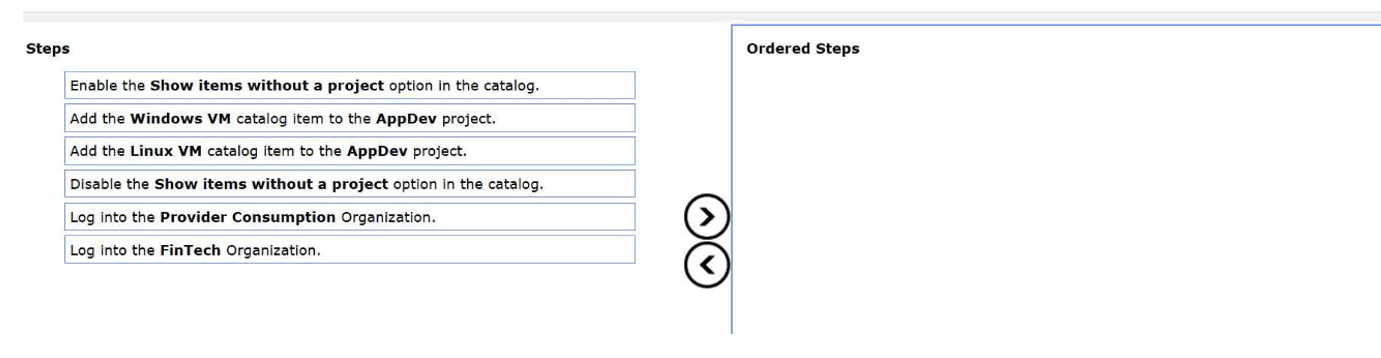
An administrator has been tasked with sharing a catalog item from the VMware Cloud
Foundation (VCF) Automation Provider Consumption Org (PCO) to the FinTech
organization.
The following information has been provided:
The are two catalog items, Linux VM and Windows VM
The Linux VM catalog item should be shared project called AppDev.
Drag and drop three steps from the Steps list to the Ordered Steps list on the right to
complete the objective. (Choose three.)
Explanation:
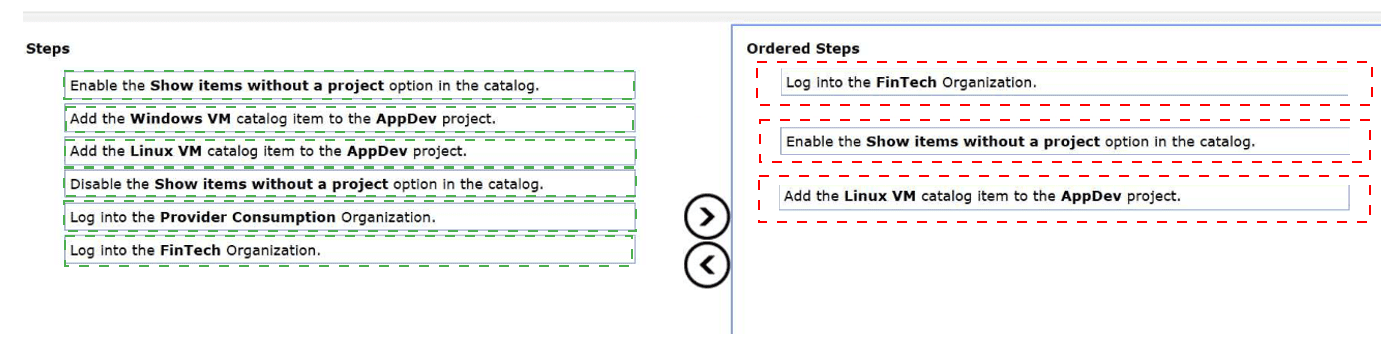
In a multi-tenant VCF Automation environment, sharing global resources from a Provider Consumption Organization (PCO) to a specific tenant organization (like FinTech) follows a structured entitlement process.
Step 1: Contextual Access
The administrator must first Log into the FinTech Organization. Configuration of catalog visibility and project entitlements is performed within the context of the tenant organization that will be consuming the resource. While the item originates from the PCO, the "sharing" or "assignment" of that item to a local project must happen where that project exists—in this case, within the FinTech tenant's workspace.
Step 2: Catalog Visibility
By default, the Service Broker catalog only displays items that are already associated with a project. When an item is shared from the PCO, it initially exists in the tenant organization as an unassigned resource. To see and interact with these shared resources, the administrator must Enable the "Show items without a project" option in the catalog settings. This exposes the "Linux VM" and "Windows VM" items that have been made available by the provider but are not yet entitled to any specific FinTech users.
Step 3: Project Entitlement
The final step is to create a functional entitlement by Adding the Linux VM catalog item to the AppDev project. Projects are the primary boundary for RBAC and resource consumption. By explicitly adding the catalog item to the AppDev project, the administrator ensures that only members of that project can see and deploy the Linux VM, fulfilling the requirement to restrict that specific item to that specific group.
Analysis of Incorrect Steps
Log into the Provider Consumption Organization:
While the provider shares the items to the tenants from here, the actual task of assigning those items to a local project (AppDev) is a tenant-level administrative task.
Add the Windows VM catalog item to the AppDev project:
The requirements explicitly state that the Linux VM should be shared with the AppDev project. Adding the Windows VM would violate the specific design intent provided in the prompt.
Disable the Show items without a project option:
Disabling this would hide the unassigned PCO items, making it impossible for the administrator to select them and add them to the AppDev project during the configuration phase.
References
VMware Cloud Foundation 9.0 Automation Guide: Service Broker Catalog Management.
VMware Aria Automation Documentation: Sharing Resources Across Organizations and Projects.
| Page 1 out of 6 Pages |
| 12 |
Real-World Scenario Mastery: Our 3V0-21.25 practice exam don't just test definitions. They present you with the same complex, scenario-based problems you'll encounter on the actual exam.
Strategic Weakness Identification: Each practice session reveals exactly where you stand. Discover which domains need more attention, before Advanced VMware Cloud Foundation 9.0 Automation exam day arrives.
Confidence Through Familiarity: There's no substitute for knowing what to expect. When you've worked through our comprehensive 3V0-21.25 practice exam questions pool covering all topics, the real exam feels like just another practice session.
Copyright © All Rights Reserved