
Topic 2: Configuration
What is the result of specifying of QoS rule that has a rate limit that is greater than the maximum throughput of an interface?
A. The rate-limiting rule is disabled.
B. Matching traffic is not rate limited.
C. The system rate-limits all traffic.
D. The system repeatedly generates warnings.
Explanation
According to Cisco's official Firepower Management Center documentation, when configuring a QoS rule, if the specified rate limit is greater than the maximum throughput of the interface, the system does not rate limit matching traffic. The maximum throughput may depend on the hardware configuration and capabilities of the interface.
Why the Other Options Are Incorrect
A. The rate-limiting rule is disabled: The rule is not necessarily disabled. It can remain active and be evaluated, but it does not rate limit matching traffic because the configured limit exceeds the interface's maximum throughput.
C. The system rate-limits all traffic: This is incorrect. In this scenario, the system does not rate limit matching traffic, let alone all traffic.
D. The system repeatedly generates warnings: Cisco's documentation does not specify repeated warnings as the result of this configuration. The documented behavior is that matching traffic is not rate limited.
Reference
Cisco Firepower Management Center Configuration Guide — QoS Rule Components: If you specify a limit greater than the maximum throughput of an interface, the system does not rate limit matching traffic.
Which command must be run to generate troubleshooting files on an FTD?
A. system support view-files
B. sudo sf_troubleshoot.pl
C. system generate-troubleshoot all
D. show tech-support
Explanation
According to Cisco's official documentation, to generate a troubleshooting file on a Firepower Threat Defense (FTD) device through the CLI, use the command system generate-troubleshoot all. This command runs in the FTD CLI and produces a troubleshooting file containing logs, configuration data, and command output for analysis by Cisco Technical Assistance Center (TAC).
The command syntax is system generate-troubleshoot option1 optionN, where options can include ALL, SNT, PER, SYS, NET, and others. Specifying all collects all available troubleshooting data. After execution, the file is saved to a location such as /ngfw/var/common/results-xxxxx.tar.gz or /var/common/xxxxxx.tar.gz, depending on the platform and software version.
Why the Other Options Are Incorrect
A. system support view-files: This is not the documented FTD CLI command for generating troubleshooting files.
B. sudo sf_troubleshoot.pl: This command is used on the Firepower Management Center (FMC), not on the FTD device itself. Cisco documentation distinguishes the FMC command sudo sf_troubleshoot.pl from the FTD command system generate-troubleshoot all.
D. show tech-support: This command is associated with diagnostic collection in environments such as FXOS, the chassis operating system on platforms like Firepower 4100/9300. It is not the standard FTD CLI command for generating the troubleshooting archive described in the question.
Reference
Cisco Firepower Threat Defense Command Reference: system generate-troubleshoot is documented as the command to generate troubleshooting data for analysis by Cisco Technical Support, with ALL as an option to run all available data collection types.
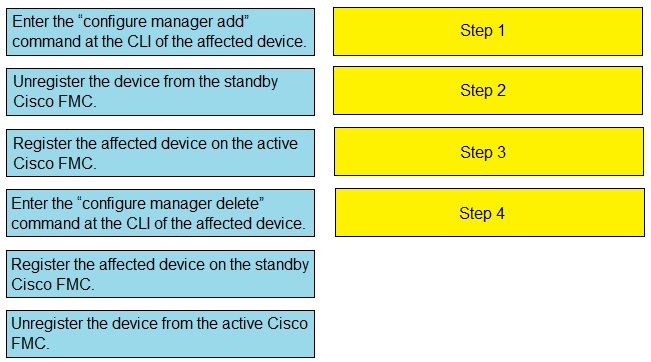
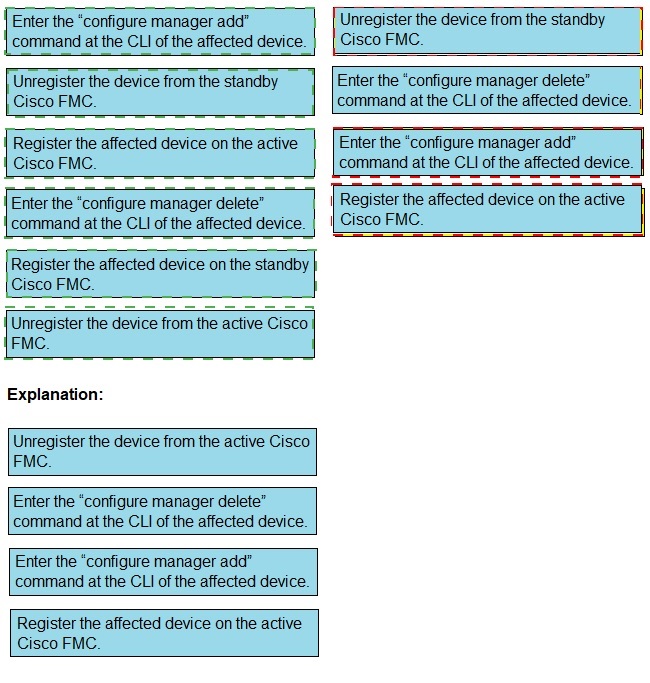
Drag and drop the steps to restore an automatic device registration failure on the standby
Cisco FMC from the left into the correct order on the right. Not all options are used.
Which two statements about deleting and re-adding a device to Cisco FMC are true? (Choose two.)
A. An option to re-apply NAT and VPN policies during registration is available, so users do not need to re- apply the policies after registration is completed.
B. Before re-adding the device in Cisco FMC, you must add the manager back in the device.
C. No option to delete and re-add a device is available in the Cisco FMC web interface.
D. The Cisco FMC web interface prompts users to re-apply access control policies.
E. No option to re-apply NAT and VPN policies during registration is available, so users need to re-apply the policies after registration is completed
Explanation
When re-adding a device that was deleted from Cisco FMC, the device must first be configured to identify FMC as its manager. This is done from the device CLI using the configure manager add command, which establishes the management connection prerequisites. After management connectivity is restored and the device is successfully registered, any previously configured NAT and VPN policies must be manually re-applied because the registration workflow does not automatically restore these settings.
Why the Other Options Are Incorrect
A. An option to re-apply NAT and VPN policies during registration is available: This is incorrect. The registration workflow does not provide an option to automatically restore NAT and VPN policies. These settings must be re-applied after the device is registered.
C. No option to delete and re-add a device is available in the Cisco FMC web interface: This is incorrect. FMC provides a Delete option on the Device Management page, and the device can subsequently be added again through the standard Add Device workflow.
D. The Cisco FMC web interface prompts users to re-apply access control policies: Although FMC may prompt users to assign an access control policy during registration, this does not address the specific limitation described in the question. The key issue is that NAT and VPN policies are not automatically restored and must be re-applied manually.
Reference
Cisco Firepower Management Center Configuration Guide — Device Management Basics: Device re-registration requires configuring the FTD manager using configure manager add and then adding the device in FMC. Previously configured NAT and VPN policies are not automatically restored during registration and must be re-applied afterward.
Which two packet captures does the FTD LINA engine support? (Choose two.)
A. Layer 7 network ID
B. source IP
C. application ID
D. dynamic firewall importing
E. protocol
Explanation
According to Cisco's documentation for FTD LINA engine captures, packet captures can use match criteria such as source IP address and protocol. For example, a capture can match ICMP traffic from source IP 192.168.103.1 to destination IP 192.168.101.1. The FMC capture wizard also provides Protocol as a basic match criterion, with support limited to basic IP protocols.
Why the Other Options Are Incorrect
A. Layer 7 network ID: LINA engine captures operate at the packet level and do not support Layer 7 application identification as a capture match criterion.
C. Application ID: Application identification is handled by the Snort engine, not the LINA engine. Therefore, LINA captures cannot filter packets directly by application ID.
D. Dynamic firewall importing: This is not a valid packet capture filter option in the LINA engine capture configuration.
Reference
Cisco Support Documentation — Working with Firepower Threat Defense (FTD) Captures and Packet-Tracer: The documented LINA capture example uses match icmp host 192.168.103.1 host 192.168.101.1, demonstrating protocol and IP address matching. Cisco also notes that the FMC capture interface supports matching only basic IP protocols.
Which two statements about bridge-group interfaces in Cisco FTD are true? (Choose two.)
A. The BVI IP address must be in a separate subnet from the connected network.
B. Bridge groups are supported in both transparent and routed firewall modes.
C. Bridge groups are supported only in transparent firewall mode.
D. Bidirectional Forwarding Detection echo packets are allowed through the FTD when using bridge-group members.
E. Each directly connected network must be on the same subnet.
Explanation
Cisco documentation confirms that bridge groups are supported in both transparent and routed firewall modes. In transparent mode, bridge groups allow the FTD to pass traffic at Layer 2. In routed mode, they provide Layer 2 switching segments alongside routed interfaces.
A key requirement is that each directly connected network associated with a bridge group must be on the same subnet. The Bridge Virtual Interface (BVI) IP address must also belong to that subnet so the FTD can communicate with devices on the connected network.
Why the Other Options Are Incorrect
A. The BVI IP address must be in a separate subnet from the connected network: This is incorrect. The BVI IP address must be in the same subnet as the directly connected network associated with the bridge group.
C. Bridge groups are supported only in transparent firewall mode: This is incorrect. Cisco supports bridge groups in both transparent and routed firewall modes.
D. Bidirectional Forwarding Detection echo packets are allowed through the FTD when using bridge-group members: This is incorrect. BFD echo packets are not allowed through the FTD when using bridge-group member interfaces. They are dropped because their identical source and destination IP addresses can make them resemble a LAND attack.
Reference
Cisco Secure Firewall Management Center Configuration Guide: Bridge groups are supported in both transparent and routed firewall modes; each directly connected network must be on the same subnet; and BFD echo packets are not allowed through the FTD when using bridge-group members.
Which CLI command is used to control special handling of ClientHello messages?
A. system support ssl-client-hello-tuning
B. system support ssl-client-hello-display
C. system support ssl-client-hello-force-reset
D. system support ssl-client-hello-enabled
Explanation
Cisco's official documentation identifies system support ssl-client-hello-tuning as the CLI command used to adjust how a managed device modifies ClientHello messages during SSL handshakes. This command allows administrators to fine-tune the cipher suites, elliptic curves, and extensions included in or removed from ClientHello messages. It provides granular control over the special handling of these messages.
Why the Other Options Are Incorrect
B. system support ssl-client-hello-display: This is not a documented command for displaying or configuring ClientHello handling settings.
C. system support ssl-client-hello-force-reset: This command resets ClientHello message handling to its default settings without requiring user confirmation. It does not provide granular control over cipher suites, elliptic curves, or extensions.
D. system support ssl-client-hello-enabled: This command acts as a master switch to enable or disable special ClientHello handling. However, it does not provide the detailed configuration options available through the tuning command.
Reference
Cisco Firepower Management Center Configuration Guide — Classic Device Command Line Reference: The ssl-client-hello-tuning section explains that this command refines how a managed device modifies ClientHello messages during SSL handshakes by allowing adjustments to the default lists of cipher suites, elliptic curves, and extensions.
Which Cisco Firepower feature is used to reduce the number of events received in a period of time?
A. rate-limiting
B. suspending
C. correlation
D. thresholding
Explanation
In Cisco Firepower, thresholding is the feature used to reduce the number of events generated and logged within a specified time period. Global rule thresholds allow administrators to control how frequently an intrusion policy logs events associated with a particular source or destination. This helps prevent administrators from being overwhelmed by excessive event notifications.
Thresholding supports three options: Limit, Threshold, and Both. These options control event logging based on a specified event count and time interval. By default, the system limits event generation for each rule to one event every 60 seconds for traffic going to the same destination.
Why the Other Options Are Incorrect
A. Rate-limiting: Rate-limiting controls traffic flow or bandwidth, such as through QoS policies. It is not the feature used to control how frequently an intrusion rule generates events.
B. Suspending: Suspending is not the appropriate feature for reducing intrusion event volume. Event suppression is a related but distinct feature that prevents events matching specified criteria, such as particular IP addresses, from being reported. Thresholding instead controls event frequency based on counts and time intervals.
C. Correlation: Correlation policies analyze and associate events to identify potential threats and trigger responses. They do not directly limit the number of events generated by individual intrusion rules.
Reference
Cisco Firepower Management Center Configuration Guide — Global Rule Thresholding Basics: Thresholds help prevent administrators from being overwhelmed by large numbers of events. The guide describes the Limit, Threshold, and Both options for controlling event logging based on specified counts and time periods.
A company has many Cisco FTD devices managed by a Cisco FMC. The security model requires that access control rule logs be collected for analysis. The security engineer is concerned that the Cisco FMC will not be able to process the volume of logging that will be generated. Which configuration addresses this concern?
A. Send Cisco FTD connection events and security events directly to SIEM system forstorage and analysis.
B. Send Cisco FTD connection events and security events to a cluster of Cisco FMC devices for storage and analysis.
C. Send Cisco FTD connection events and security events to Cisco FMC and configure it to forward logs to SIEM for storage and analysis.
D. Send Cisco FTD connection events directly to a SIEM system and forward security events from Cisco FMC to the SIEM system for storage and analysis.
Explanation
The main concern is that Cisco Firepower Management Center (FMC) may not have sufficient storage and processing capacity to handle a massive volume of connection events. To reduce the load on FMC, Cisco FTD can be configured to send connection event syslog messages directly to an external SIEM system, such as Splunk, bypassing FMC for connection event storage and processing.
Cisco documentation explains that FMC does not have adequate storage capacity to accommodate large volumes of connection event information. In the typical SIEM integration configuration, FTD is the default event source for connection events, while FMC is the default source for intrusion events. Keeping intrusion events flowing through FMC allows it to perform correlation analysis and enrich events with additional metadata, such as impact flags, before forwarding them to the SIEM.
This approach allows FMC to focus on policy management and security event analysis while the external SIEM handles the large volume of connection event data.
Why the Other Options Are Incorrect
B. Send Cisco FTD connection events and security events directly to the SIEM system for storage and analysis: Sending connection events directly to the SIEM is appropriate, but sending all security events directly from FTD can omit important metadata. For example, intrusion events sent directly from FTD do not include impact flags that FMC adds through correlation analysis.
C. Send Cisco FTD connection events and security events to a cluster of Cisco FMC devices for storage and analysis: FMC clustering is not a supported solution for distributing event storage across multiple FMC devices. This approach does not address the storage limitation associated with large volumes of connection events.
D. Send Cisco FTD connection events directly to a SIEM system and forward security events from Cisco FMC to the SIEM system for storage and analysis: This describes the same general architecture as the recommended approach in option A: connection events are sent directly from FTD, while security events are forwarded through FMC. If both options appear exactly as described, they are functionally equivalent, so the question wording or answer key would need to be checked to distinguish them reliably.
Reference
Cisco Secure Firewall Management Center documentation explains that FMC lacks sufficient storage provision for large volumes of connection event data. Cisco's Splunk integration documentation identifies FTD as the default source for connection events and FMC as the default source for intrusion events.
Which CLI command is used to generate firewall debug messages on a Cisco Firepower?
A. system support firewall-engine-debug
B. system support ssl-debug
C. system support platform
D. system support dump-table
Explanation
The system support firewall-engine-debug command is used on Cisco Firepower Threat Defense (FTD) devices to generate debug messages from the firewall engine. It helps engineers troubleshoot access control policy issues by tracing traffic processing and identifying which rules match specific traffic flows.
When executed, the command prompts for optional filters, such as IP protocol, client IP address, and server IP address, allowing administrators to narrow the debug output to the traffic being investigated. This makes it useful for diagnosing policy-matching problems and is functionally similar in purpose to the packet-tracer command on Cisco ASA.
Why the Other Options Are Incorrect
B. system support ssl-debug: This command is used to troubleshoot SSL/TLS-related issues, such as handshake failures and decryption problems. It does not provide general firewall policy-matching debug output.
C. system support platform: This command relates to platform-level diagnostics and system troubleshooting rather than tracing how the firewall engine processes traffic against access control policies.
D. system support dump-table: This command is not the standard command for generating firewall engine debug messages. Dumping internal tables may assist with specific troubleshooting tasks, but it does not provide the policy-matching output produced by firewall-engine-debug.
Reference
Cisco Live documentation and Cisco Community discussions identify system support firewall-engine-debug as the FTD command for generating firewall engine debug messages, with optional filters for protocol and IP addresses to investigate traffic processing.
What is a functionality of port objects in Cisco FMC?
A. to mix transport protocols when setting both source and destination port conditions in a rule
B. to represent protocols other than TCP, UDP, and ICMP
C. to represent all protocols in the same way
D. to add any protocol other than TCP or UDP for source port conditions in access control rules
Explanation
Cisco Firepower Management Center (FMC) port objects, also known as service objects, can represent more than TCP, UDP, and ICMP. According to Cisco documentation, a port object can also represent protocols that do not use port numbers.
When creating a port object, the Protocol field includes TCP, UDP, ICMP, IPv6-ICMP, and Other. Selecting Other allows administrators to choose additional IP protocols, such as GRE, ESP, and OSPF. This enables access control policies to match protocols that do not use conventional TCP or UDP ports.
Why the Other Options Are Incorrect
A. To mix transport protocols when setting both source and destination port conditions in a rule: This is incorrect. Cisco FMC does not allow transport protocols to be mixed when configuring both source and destination port conditions in an access control rule.
C. To represent all protocols in the same way: This is incorrect. Different protocols are represented according to their characteristics. TCP and UDP use port numbers, ICMP uses message types and codes, and other IP protocols are identified by their protocol numbers rather than port numbers.
D. To add any protocol other than TCP or UDP for source port conditions in access control rules: This is incorrect. Source port conditions in access control rules support TCP and UDP, not arbitrary IP protocols. The option describes a restriction rather than the purpose of supporting additional protocols in port objects.
Reference
Cisco Firepower Management Center Configuration Guide — Port Objects: Cisco documents that port objects can represent protocols that do not use ports. The configuration guidelines also describe restrictions on mixing transport protocols and configuring source port conditions.
An administrator is creating interface objects to better segment their network but is having trouble adding interfaces to the objects. What is the reason for this failure?
A. The interfaces are being used for NAT for multiple networks.
B. The administrator is adding interfaces of multiple types.
C. The administrator is adding an interface that is in multiple zones.
D. The interfaces belong to multiple interface groups.
Explanation
An interface object configuration can fail when an interface is already used in NAT configurations involving multiple networks. Before adding the interface to an interface object, administrators should review its existing NAT usage and the applicable FMC configuration restrictions to identify potential conflicts.
Why the Other Options Are Incorrect
B. The administrator is adding interfaces of multiple types: This is not necessarily a cause of failure. Depending on the interface object type and the supported configuration, FMC can support different interface types, such as physical interfaces and subinterfaces.
C. The administrator is adding an interface that is in multiple zones: A single interface cannot belong to multiple security zones simultaneously. However, interfaces can be associated with multiple interface groups where supported, so the distinction between security zones and interface groups is important.
D. The interfaces belong to multiple interface groups: This is not inherently a configuration error. FMC can allow an interface to belong to multiple interface groups, subject to the applicable configuration restrictions.
Reference
Cisco Secure Firewall Management Center Configuration Guide — Interface Objects and NAT Configuration: Review the interface-object membership rules and existing NAT configurations when troubleshooting an interface that cannot be added. The exact restriction should be verified against the FMC version and the type of interface object being configured.
| Page 4 out of 35 Pages |
| 1234567891011 |
| 300-710 Practice Test Home |
Real-World Scenario Mastery: Our 300-710 practice exam don't just test definitions. They present you with the same complex, scenario-based problems you'll encounter on the actual exam.
Strategic Weakness Identification: Each practice session reveals exactly where you stand. Discover which domains need more attention, before Securing Networks with Cisco Firepower (300-710 SNCF) exam day arrives.
Confidence Through Familiarity: There's no substitute for knowing what to expect. When you've worked through our comprehensive 300-710 practice exam questions pool covering all topics, the real exam feels like just another practice session.
Copyright © All Rights Reserved