
Topic 1: Deployment
A network administrator cannot select the link to be used for failover when configuring an active/passive HA Cisco FTD pair. Which configuration must be changed before setting up the high availability pair?
A. An IP address in the same subnet must be added to each Cisco FTD on the interface.
B. The interface name must be removed from the interface on each Cisco FTD.
C. The name Failover must be configured manually on the interface on each cisco FTD.
D. The interface must be configured as part of a LACP Active/Active EtherChannel
Explanation
When setting up High Availability (Active/Passive) between two Cisco FTD devices, you must select a dedicated interface to act as the failover link. However, the FMC will only allow you to select a physical interface that is currently unconfigured (or has no name assigned to it).
In Cisco FTD, naming an interface (e.g., "inside" or "outside") effectively activates it and brings it into the configuration. If an interface already has a name, it is considered a "regular" interface and cannot be selected as the failover link. To use an interface for failover, you must first remove the name from the interface on both FTD devices, which makes it a "Not Configured" interface. Once unconfigured, you can select it as the failover link during the HA setup.
Why the Other Options Are Incorrect
A. An IP address in the same subnet must be added to each Cisco FTD on the interface: The failover link requires a dedicated IP address, but this is configured during the HA setup. The initial blocker preventing the selection is the interface name.
C. The name Failover must be configured manually on the interface on each Cisco FTD: The interface must be unnamed (unconfigured) before you can select it in the HA wizard. You do not manually name it "Failover" beforehand.
D. The interface must be configured as part of a LACP Active/Active EtherChannel: While an EtherChannel can be used as a failover link, it is not a mandatory requirement. A single unconfigured physical interface can be used.
Reference
Cisco Documentation: "Cisco Firepower Management Center Configuration Guide" – Section on FTD High Availability, which states that the failover link must be a physical interface that does not have a name configured.
Which two considerations must be made when deleting and re-adding devices while managing them via Cisco FMC (Choose two).
A. Before re-adding the device In Cisco FMC, the manager must be added back.
B. The Cisco FMC web interface prompts users to re-apply access control policies
C. Once a device has been deleted, It must be reconfigured before it is re-added to the Cisco FMC.
D. An option to re-apply NAT and VPN policies during registration is available, so users do not need to re-apply the polices after registration is completed
E. There is no option to re-apply NAT and VPN policies during registration is available, so users need to re-apply the policies after registration is completed.
Explanation
When you delete a device from the Cisco Firepower Management Center (FMC) and want to re-add it, there are specific considerations regarding the device's state and policy application:
A. Before re-adding the device in Cisco FMC, the manager must be added back: When a device is deleted from the FMC, the FMC removes its management connection from the device. To re-register the device, you must first add the FMC back to the device (using the configure manager add CLI command on the FTD) so that a successful connection can be established between the two.
E. There is no option to re-apply NAT and VPN policies during registration is available, so users need to re-apply the policies after registration is completed: When you re-register an FTD device to the FMC, the FMC does not automatically push the previously configured NAT and VPN policies during the initial registration process. There is no checkbox or prompt to "re-apply" these specific policies at that moment. After the registration is complete, the administrator must manually deploy the configuration to re-apply the NAT and VPN policies to the device.
Why the Other Options Are Incorrect
B. The Cisco FMC web interface prompts users to re-apply access control policies: While the FMC may prompt you to deploy the configuration after adding a device, it does not specifically prompt you to "re-apply access control policies" as a mandatory step during the re-add process.
C. Once a device has been deleted, it must be reconfigured before it is re-added to the Cisco FMC: You do not need to completely reconfigure the device. The device retains its configuration, and you only need to re-establish the management connection (as stated in option A).
D. An option to re-apply NAT and VPN policies during registration is available: This is false. As stated in option E, there is no such option during registration; policies must be deployed after registration.
Reference
Cisco Documentation: "Cisco Firepower Management Center Configuration Guide" – Section on Device Management and Registration, which details the process of deleting and re-adding devices, including the need to re-add the manager on the device and manually deploy policies afterward.
What is an advantage of adding multiple inline interface pairs to the same inline interface set when deploying an asynchronous routing configuration?
A. Allows the IPS to identify inbound and outbound traffic as part of the same traffic flow.
B. The interfaces disable autonegotiation and interface speed is hard coded set to 1000 Mbps.
C. Allows traffic inspection to continue without interruption during the Snort process restart
D. The interfaces are automatically configured as a media-independent interface crossover
Explanation
In an asynchronous routing scenario (where the return path of the traffic goes through a different device or interface than the forward path), traffic might be split across multiple physical links. By adding multiple inline interface pairs to the same inline interface set, the Cisco FTD (or IPS) treats all the pairs within that set as part of a single logical traffic flow.
This is crucial because it allows the Snort engine to correlate the inbound and outbound packets (or bidirectional flows) correctly, even if they arrive on different physical interfaces. Without grouping them into the same inline set, the device would treat the traffic as separate, disconnected flows, which would break stateful inspection, TCP stream reassembly, and proper intrusion detection.
Why the Other Options Are Incorrect
B. The interfaces disable autonegotiation and interface speed is hard coded set to 1000 Mbps: This is not an advantage of grouping interfaces into an inline set; interface speed and duplex are independent configuration settings.
C. Allows traffic inspection to continue without interruption during the Snort process restart: Snort restarts (e.g., during policy deployment or MTU changes) interrupt inspection temporarily regardless of inline set configuration. This is not an advantage of multiple inline pairs.
D. The interfaces are automatically configured as a media-independent interface crossover: Auto-MDIX is a physical layer feature that handles cable pinouts. It is not related to inline set grouping.
Reference
Cisco Documentation: "Cisco Firepower Management Center Configuration Guide" – Section on Inline Sets, which explains that multiple inline pairs in the same set allow the device to treat traffic as a single flow for stateful inspection and asynchronous routing.
Refer to the exhibit.
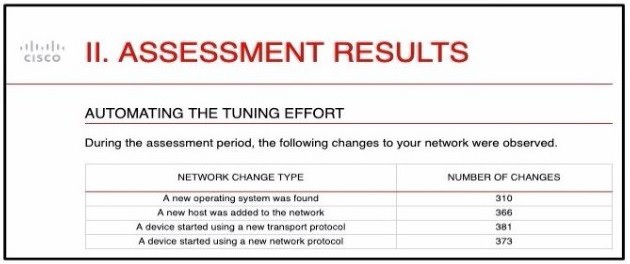
And engineer is analyzing the Attacks Risk Report and finds that there are over 300
instances of new operating systems being seen on the network How is the Firepower
configuration updated to protect these new operating systems?
A.
Cisco Firepower automatically updates the policies.
B.
The administrator requests a Remediation Recommendation Report from Cisco
Firepower
C.
Cisco Firepower gives recommendations to update the policies.
D.
The administrator manually updates the policies
The administrator requests a Remediation Recommendation Report from Cisco
Firepower
Explanation
Exhibit mein "Automating the Tuning Effort" ke under network changes dikhaye gaye hain, jaise ke 310 naye operating systems detect hue hain. Jab Cisco Firepower ko naye operating systems ya vulnerabilities network par milte hain, to administrator ko manually policies dhoondhne ki zaroorat nahi hoti.
Firepower Management Center (FMC) mein Remediation Recommendation Report generate karne ka feature hota hai. Ye report analyze karti hai ke newly discovered hosts/operating systems ke liye kaun se intrusion rules enable karne chahiye taake unhe protect kiya ja sake. Ye report administrator ko recommendations deti hai, jisse woh efficiently apni policies update kar sakta hai aur naye threats se network ko bacha sakta hai.
Why the Other Options Are Incorrect
A. Cisco Firepower automatically updates the policies: Firepower automatic tuning nahi karta. Usse explicitly report request karni padti hai taake recommendations mil sakein aur policies apply ki ja sakein.
C. Cisco Firepower gives recommendations to update the policies: Ye option B ke qareeb hai lekin sahi procedure ye hai ke administrator ko Remediation Recommendation Report request karni hoti hai. Sirf "gives recommendations" kehna poora process explain nahi karta.
D. The administrator manually updates the policies: Naye operating systems ke liye saare rules manually dhoondhna bahut mushkil aur time-consuming hoga. Firepower ka Remediation Recommendation Report feature is manual effort ko automate karta hai.
Reference
Cisco Documentation: "Cisco Firepower Management Center Configuration Guide" – Section on Remediation Recommendations, which explains how to generate a report to identify and enable the appropriate intrusion rules for newly discovered hosts and operating systems.
An engineer has been tasked with providing disaster recovery for an organization's primary Cisco FMC. What must be done on the primary and secondary Cisco FMCs to ensure that a copy of the original corporate policy is available if the primary Cisco FMC fails?
A. Restore the primary Cisco FMC backup configuration to the secondary Cisco FMC device when the primary device fails.
B. Configure high-availability in both the primary and secondary Cisco FMCs.
C. Connect the primary and secondary Cisco FMC devices with Category 6 cables of not more than 10 meters in length.
D. Place the active Cisco FMC device on the same trusted management network as the standby device.
Explanation
To provide disaster recovery (DR) for a primary Cisco Firepower Management Center (FMC), the most reliable and automated method is to configure FMC High Availability (HA). By pairing a primary (active) FMC with a secondary (standby) FMC, the system continuously synchronizes the configuration, including all policies (Access Control, Intrusion, NAT, VPN, etc.), event data, and system settings. If the primary FMC fails, the secondary FMC automatically takes over the management of the managed devices, ensuring that the organization's policies remain available and enforced with minimal downtime.
Why the Other Options Are Incorrect
A. Restore the primary Cisco FMC backup configuration to the secondary Cisco FMC device when the primary device fails: While restoring a backup is a valid disaster recovery method, it requires manual intervention and takes time. The requirement is to ensure the policy is available if the primary fails; configuring HA provides automatic, near-instant failover without the need for manual restoration.
C. Connect the primary and secondary Cisco FMC devices with Category 6 cables of not more than 10 meters in length: Physical cabling length is not the determining factor for disaster recovery. HA can be configured across different locations (as long as latency requirements are met). The key requirement is the HA configuration itself, not the cable length.
D. Place the active Cisco FMC device on the same trusted management network as the standby device: While network connectivity between the FMCs is required for HA synchronization, simply placing them on the same network does not configure the HA relationship or provide the automatic failover and policy synchronization needed for disaster recovery.
Reference
Cisco Documentation: "Cisco Firepower Management Center High Availability Configuration Guide" – Section on FMC High Availability, which explains how HA provides automatic failover and continuous synchronization of policies for disaster recovery.
Which two routing options are valid with Cisco FTD? (Choose Two)
A. BGPv6
B. ECMP with up to three equal cost paths across multiple interfaces
C. ECMP with up to three equal cost paths across a single interface
D. BGPv4 in transparent firewall mode
E. BGPv4 with nonstop forwarding
Explanation
Cisco Firepower Threat Defense (FTD) supports multiple routing protocols and load-balancing mechanisms, but with specific platform limitations.
A. BGPv6: FTD supports BGP for both IPv4 and IPv6 address families. You can configure BGP IPv6 peers and exchange IPv6 routes, making this a valid routing option.
C. ECMP with up to three equal cost paths across a single interface: FTD supports Equal-Cost Multi-Path (ECMP) routing and allows up to 8 equal-cost paths. However, a valid ECMP configuration can consist of up to three equal-cost paths pointing to different next-hop gateways out of a single interface. This is a supported scenario for load balancing traffic.
Why the Other Options Are Incorrect
B. ECMP with up to three equal cost paths across multiple interfaces: While FTD does support ECMP across multiple interfaces, the limit is 8 interfaces/paths per ECMP zone, not three. The specific limit of "three" makes this option inaccurate.
D. BGPv4 in transparent firewall mode: Cisco documentation explicitly states that BGP is not supported in transparent firewall mode. Dynamic routing (BGP) is only supported in routed mode.
E. BGPv4 with nonstop forwarding: While FTD supports BGP Graceful Restart (a form of nonstop forwarding), the exact phrase "BGPv4 with nonstop forwarding" as a distinct, standard routing capability is not the primary valid option highlighted in the standard configuration guides compared to BGPv6 and ECMP. (Additionally, older ASA/FTD platforms had specific limitations, and this option is a distractor).
Reference
Cisco Documentation: "Cisco Firepower Management Center Configuration Guide" – Section on Routing, confirming BGP IPv6 support and ECMP capabilities (up to 8 paths).
A network administrator needs to create a policy on Cisco Firepower to fast-path traffic to avoid Layer 7 inspection. The rate at which traffic is inspected must be optimized. What must be done to achieve this goal?
A. Enable lhe FXOS for multi-instance.
B. Configure a prefilter policy
C. Configure modular policy framework
D. Disable TCP inspection
Explanation
In Cisco Firepower (FMC/FTD), a Prefilter Policy is used to process traffic before it reaches the main Access Control Policy and the deep inspection engines (like Snort). By configuring Fastpath rules within a prefilter policy, the administrator can quickly match specific traffic (based on Layer 3/4 criteria or specific applications) and explicitly allow it to bypass Layer 7 (Snort) inspection. This "fast-paths" the traffic, significantly optimizing the inspection rate and reducing the load on the device's CPU, which is exactly what the scenario requires.
Why the Other Options Are Incorrect
A. Enable the FXOS for multi-instance: Multi-instance is used to create separate virtual FTD devices on a single hardware appliance for tenant segmentation. It does not provide a mechanism to fast-path specific traffic around Layer 7 inspection.
C. Configure modular policy framework: MPF (Modular Policy Framework) is a Cisco ASA configuration concept. While FTD is built on some ASA foundations, the modern, GUI-driven way to achieve early traffic classification and bypass is through Prefilter policies.
D. Disable TCP inspection: Disabling TCP inspection is a dangerous practice that would break stateful tracking and security, and it is not the correct method for selectively optimizing traffic inspection rates.
Reference
Cisco Documentation: "Cisco Firepower Management Center Configuration Guide" – Section on Prefilter Policies, which explains how Fastpath rules can be used to bypass Snort inspection and optimize performance.
A security engineer must configure a Cisco FTD appliance to inspect traffic coming from the internet. The Internet traffic will be mirrored from the Cisco Catalyst 9300 Switch. Which configuration accomplishes the task?
A. Set interface configuration mode to none.
B. Set the firewall mode to transparent
C. Set the firewall mode to routed.
D. Set interface configuration mode to passive
Explanation
When traffic is mirrored (SPAN/RSPAN) from a switch (like the Cisco Catalyst 9300) to a Cisco FTD appliance for inspection, the FTD is not physically inline with the traffic flow. It is only receiving a copy of the packets.
To configure the FTD to receive and analyze this mirrored traffic without attempting to forward it (since it's not in the actual path), the interface must be set to Passive mode. In passive mode (often used in IPS-only deployments), the interface receives traffic unconditionally for analysis by the Snort engine, but it does not transmit the traffic back out.
Why the Other Options Are Incorrect
A. Set interface configuration mode to none: "None" is not a valid interface mode for receiving and inspecting traffic in FTD.
B. Set the firewall mode to transparent: Transparent mode means the FTD acts as a Layer 2 bridge (bump-in-the-wire) and is physically inline with the traffic. If the traffic is mirrored, the FTD isn't inline, so transparent mode is not the correct deployment method.
C. Set the firewall mode to routed: Routed mode requires the FTD to act as a Layer 3 gateway with IP addresses on its interfaces. Mirrored traffic has no return path through the FTD, making routed mode inappropriate for this scenario.
Reference
Cisco Documentation: "Cisco Firepower Management Center Configuration Guide" – Section on Passive Interfaces, which explains how to configure an interface to receive mirrored/SPAN traffic for intrusion detection without disrupting the network.
What is the role of the casebook feature in Cisco Threat Response?
A. sharing threat analysts
B. pulling data via the browser extension
C. triage automaton with alerting
D. alert prioritization
Explanation
The Casebook feature in Cisco Threat Response is a collaborative workspace designed for threat investigations. Its primary role is to allow security analysts to record, organize, and share sets of observables (such as IP addresses, domains, file hashes) and investigation notes. When multiple analysts are working on an incident, the Casebook provides a centralized place to save their findings and share them with other team members, enabling efficient collaboration during threat analysis.
Why the Other Options Are Incorrect
B. Pulling data via the browser extension: While a browser extension exists that can interact with Threat Response and Casebooks, the Casebook itself is a cloud-based investigation tool. Its role is not limited to data extraction via a browser extension.
C. Triage automation with alerting: Casebooks are used for manual investigation and documentation. They do not automatically triage alerts. Automation and orchestration in Threat Response are handled through other features like Workflows.
D. Alert prioritization: Alert prioritization is typically a function of the incident management or alerting system. The Casebook is focused on documenting and sharing the investigation of observables, not on prioritizing the initial alerts.
Reference
Cisco Documentation: "Integrating with Cisco Threat Response" – States that the Casebook is used to "record, organize, and share sets of observables of interest primarily during an investigation and threat analysis."
An engineer is working on a LAN switch and has noticed that its network connection to the mime Cisco IPS has gone down Upon troubleshooting it is determined that the switch is working as expected What must have been implemented for this failure to occur?
A. The upstream router has a misconfigured routing protocol
B. Link-state propagation is enabled
C. The Cisco IPS has been configured to be in fail-open mode
D. The Cisco IPS is configured in detection mode
Explanation
Inline Link-State Propagation is a feature designed to maintain network integrity in inline deployments. When a Cisco IPS/FTD is placed inline (as a bump in the wire), if one side of the inline pair loses its link (e.g., the connection to the LAN switch goes down), the device will automatically bring down the link on the other side of the pair as well.
In this scenario, the switch's network connection to the IPS has gone down. If link-state propagation is enabled, the IPS will propagate this link failure to the switch on the other side, effectively bringing down that switch's connection too. This prevents traffic from being black-holed (where the upstream router still sends traffic to the IPS, but the IPS has no path to forward it). The fact that the switch's connection went down while the switch itself is working perfectly indicates that the IPS intentionally brought the link down to propagate the failure.
Why the Other Options Are Incorrect
A. The upstream router has a misconfigured routing protocol: A routing protocol issue on the upstream router would not cause the direct physical link between the switch and the IPS to go down.
C. The Cisco IPS has been configured to be in fail-open mode: Fail-open mode means that if the IPS fails or loses power, it physically bridges the traffic so the network keeps running. It does not intentionally bring down the switch's link.
D. The Cisco IPS is configured in detection mode: In detection mode (passive/IDS), the IPS does not sit inline and drop the link; it only monitors a copy of the traffic. If it were in detection mode, the link would not go down due to the IPS.
Reference
Cisco Documentation: "Cisco Firepower Management Center Configuration Guide" – Section on Inline Sets and Link-State Propagation, which explains how link-state propagation brings down the paired interface to prevent traffic black-holing during a link failure.
An engineer must build redundancy into the network and traffic must continuously flow if a redundant switch in front of the firewall goes down. What must be configured to accomplish this task?
A. redundant interfaces on the firewall cluster mode and switches
B. redundant interfaces on the firewall noncluster mode and switches
C. vPC on the switches to the interface mode on the firewall duster
D. vPC on the switches to the span EtherChannel on the firewall cluster
Explanation
To ensure traffic continuously flows if a redundant switch fails, you must configure a link aggregation technology that spans both switches and connects to the firewall.
vPC (virtual PortChannel) on the Cisco Nexus switches allows two separate switches to appear as a single logical switch to the connected device, providing active-active redundancy. On the firewall side, configuring a Span EtherChannel (in firewall cluster mode) bonds multiple physical firewall interfaces into a single logical EtherChannel.
When the vPC on the switches is connected to the Span EtherChannel on the firewall cluster, traffic can flow seamlessly. If one switch goes down, the vPC peer link and the remaining switch keep the logical channel alive. Similarly, if one firewall in the cluster fails, the Span EtherChannel remains up through the other cluster member.
Why the Other Options Are Incorrect
A. Redundant interfaces on the firewall cluster mode and switches: "Redundant interfaces" is a specific Cisco ASA/FTD feature (Active/Standby pairs of interfaces). While they provide redundancy, they don't provide the multi-switch active-active bandwidth efficiency that vPC does, and they are not the standard pairing for a vPC switch environment.
B. Redundant interfaces on the firewall noncluster mode and switches: Similar to A, this does not utilize vPC and does not provide the optimal redundancy for a switch failure in front of a clustered firewall.
C. vPC on the switches to the interface mode on the firewall cluster: This is incomplete. You must use a Span EtherChannel on the firewall to properly bond the connections coming from the two separate vPC switches. Just "interface mode" does not provide the required logical bundling for the cluster.
Reference
Cisco Documentation: "Cisco Firepower Threat Defense Clustering Guide" – Section on Span EtherChannels and their deployment with vPC on Cisco Nexus switches.
A security engineer is deploying a pair of primary and secondary Cisco FMC devices. The secondary must also receive updates from Cisco Talos. Which action achieves this goal?
A. Force failover for the secondary Cisco FMC to synchronize the rule updates from the primary.
B. Configure the secondary Cisco FMC so that it receives updates from Cisco Talos
C. Manually import rule updates onto the secondary Cisco FMC device
D. Configure the primary Cisco FMC so that the rules are updated
Explanation
In a Cisco Firepower Management Center (FMC) High Availability (HA) pair, the primary (active) and secondary (standby) FMCs operate as a synchronized unit. The secondary FMC does not independently download updates from Cisco Talos. Instead, all intelligence updates (such as intrusion rule updates, VDB updates, and geolocation updates) must be configured on the primary FMC.
When the primary FMC downloads and installs these updates, it automatically synchronizes the updated configurations and database files to the secondary FMC. This ensures that both devices remain identical. If a failover occurs, the secondary unit will already have the latest rules and be ready to take over immediately.
Why the Other Options Are Incorrect
A. Force failover for the secondary Cisco FMC to synchronize the rule updates from the primary: Forcing a failover is disruptive and unnecessary. Synchronization happens automatically when the primary downloads the updates; failover is not required to sync rules.
B. Configure the secondary Cisco FMC so that it receives updates from Cisco Talos: The secondary FMC does not download updates directly from Talos in an HA pair. It receives them via synchronization from the primary.
C. Manually import rule updates onto the secondary Cisco FMC device: Manual imports are not needed and could cause inconsistencies. The HA synchronization process handles this automatically.
Reference
Cisco Documentation: "Cisco Firepower Management Center High Availability Configuration Guide" – Section on Update Synchronization, which states that the primary FMC downloads and installs updates, and the secondary FMC receives them through synchronization.
| Page 14 out of 35 Pages |
| 910111213141516171819 |
| 300-710 Practice Test Home |
Real-World Scenario Mastery: Our 300-710 practice exam don't just test definitions. They present you with the same complex, scenario-based problems you'll encounter on the actual exam.
Strategic Weakness Identification: Each practice session reveals exactly where you stand. Discover which domains need more attention, before Securing Networks with Cisco Firepower (300-710 SNCF) exam day arrives.
Confidence Through Familiarity: There's no substitute for knowing what to expect. When you've worked through our comprehensive 300-710 practice exam questions pool covering all topics, the real exam feels like just another practice session.
Copyright © All Rights Reserved