
Topic 1: Deployment
An engineer is attempting to create a new dashboard within the Cisco FMC to have a single view with widgets from many of the other dashboards. The goal is to have a mixture of threat and security related widgets along with Cisco Firepower device health information. Which two widgets must be configured to provide this information? (Choose two).
A. Intrusion Events
B. Correlation Information
C. Appliance Status
D. Current Sessions
E. Network Compliance
Explanation
To build a single dashboard that combines threat and security information with device health, the engineer should select widgets that directly represent those two domains.
Intrusion Events is the correct choice for the threat and security side. This widget displays data about intrusion events detected by the system, giving a view of security threats and attacks that have occurred.
Appliance Status is the correct choice for the Cisco Firepower device health information. This widget indicates the health of the appliance and any appliances it is managing, allowing the administrator to see the status and overall health of the deployment at a glance.
Why the Other Options Are Incorrect
B. Correlation Information: The Correlation Events widget displays correlation event statistics, such as events per second by priority. While security-related, it is a specialized event-rate view and does not provide the broader threat/security overview or the device health information required.
D. Current Sessions: This widget shows which users are currently logged into the appliance, not threat data or device health.
E. Network Compliance: This widget relates to network compliance status, not the specific combination of threat/security events and device health requested.
Reference
Cisco Documentation: "Firepower Management Center Configuration Guide" – Section on Dashboards and Predefined Widgets, including Intrusion Events and Appliance Status.
A network administrator notices that inspection has been interrupted on all non-managed interfaces of a device. What is the cause of this?
A. The value of the highest MTU assigned to any non-management interface was changed
B. The value of the highest MSS assigned to any non-management interface was changed
C. A passive interface was associated with a security zone
D. Multiple inline interface pairs were added to the same inline interface
Explanation
In Cisco Firepower Threat Defense (FTD), if you change the MTU (Maximum Transmission Unit) value on any non-management interface, the device must restart its Snort inspection engine to apply the new MTU settings. When this happens, inspection is temporarily interrupted on all non-management interfaces, and the system will show a message such as "Inspection has been interrupted on all non-management interfaces."
This behavior is by design: because the Snort engine processes packets across all data interfaces, changing the MTU on one interface requires a global restart of the inspection process to ensure consistency. The inspection resumes automatically after the restart is complete.
Why the Other Options Are Incorrect
B. The value of the highest MSS assigned to any non-management interface was changed: MSS (Maximum Segment Size) is a TCP parameter and is typically derived from the MTU. Changing MSS alone does not trigger a global Snort restart like an MTU change does. The specific trigger is the MTU value change.
C. A passive interface was associated with a security zone: Associating a passive interface with a security zone is a normal configuration step and does not cause inspection to be interrupted on all non-management interfaces.
D. Multiple inline interface pairs were added to the same inline interface: Adding inline interface pairs is a configuration action, but it does not cause a global interruption of inspection on all non-management interfaces. It would only affect the newly configured inline pair.
Reference
Cisco Documentation: "Cisco Firepower Management Center Configuration Guide" – Section on Interface Settings and MTU, which notes that changing the MTU on any data interface triggers a restart of the Snort inspection engine and temporarily interrupts inspection on all non-management interfaces.
A network administrator discovers that a user connected to a file server and downloaded a malware file. The Cisc FMC generated an alert for the malware event, however the user still remained connected. Which Cisco APM file rule action within the Cisco FMC must be set to resolve this issue?
A. Detect Files
B. Malware Cloud Lookup
C. Local Malware Analysis
D. Reset Connection
Explanation
In Cisco Firepower Management Center (FMC), when an Advanced Malware Protection (AMP) file rule detects malware, the configured action determines how the firewall responds. If the user remains connected and continues to download the file after the alert is generated, it means the rule action only detected the file (or logged it) but did not actively terminate the session.
To immediately stop the user from downloading the malware and terminate the connection, the file rule action must be set to Reset Connection (often paired with Block Malware or a similar blocking action). The Reset Connection action sends a TCP reset (RST) to both the client and the server, immediately tearing down the session and preventing any further data transfer of the malicious file.
Why the Other Options Are Incorrect
A. Detect Files: This action only detects and logs the file transfer without blocking it. The user would remain connected, which matches the problem described.
B. Malware Cloud Lookup: This action queries the Cisco AMP cloud for a file's disposition (reputation) but does not necessarily block or reset the connection. It is often used with a subsequent action (like Block Malware), but on its own, it does not terminate the session.
C. Local Malware Analysis: This action analyzes the file locally on the FTD to determine if it is malicious, but it does not actively block or reset the connection by itself. It is an analysis action, not a remediation action.
Reference
Cisco Documentation: "Cisco Firepower Management Center Configuration Guide" – Section on File Rule Actions, including Reset Connection, which terminates the TCP session when malware is detected.
A network engineer must provide redundancy between two Cisco FTD devices. The redundancy configuration must include automatic configuration, translation, and connection updates. After the initial configuration of the two appliances, which two steps must be taken to proceed with the redundancy configuration? (Choose two.)
A. Configure the virtual MAC address on the failover link
B. Disable hellos on the inside interface
C. Configure the standby IP addresses
D. Ensure the high availability license is enabled
E. Configure the failover link with stateful properties
Explanation
To set up High Availability (HA) redundancy between two Cisco FTD appliances—requiring automatic configuration replication, translation updates, and connection state sharing—you must configure the failover link with stateful properties and configure standby IP addresses.
C. Configure the standby IP addresses: For each data interface, the two FTD units must be configured with an active and a standby IP address within the same subnet. The standby IP is used by the standby unit for management and for failover communication purposes. Without the standby IPs, the HA pair cannot fully synchronize or take over traffic seamlessly.
E. Configure the failover link with stateful properties: To achieve connection and translation updates (stateful failover), the failover link must be configured to pass stateful failover traffic. This link carries the synchronization of connection states, NAT translations, and other dynamic data from the active unit to the standby unit. When a failover occurs, the standby unit already has the state table and can continue existing sessions without interruption.
Why the Other Options Are Incorrect
A. Configure the virtual MAC address on the failover link: Virtual MAC addresses are configured on the data interfaces, not the failover link. The failover link uses its own dedicated physical interfaces and MAC addresses.
B. Disable hellos on the inside interface: Disabling hellos is not a standard HA configuration step. HA uses hello messages on the failover link to monitor the health of the peer.
D. Ensure the high availability license is enabled: While HA requires proper licensing (which is typically included in base FTD licenses), "enabling the high availability license" is not a standard step in the FTD HA configuration workflow. The initial configuration steps focus on the failover link and standby IPs.
Reference
Cisco Documentation: "Cisco Firepower Management Center Configuration Guide" – Section on Firepower Threat Defense High Availability, which details configuring the failover link, standby IP addresses, and stateful failover properties.
An engineer installs a Cisco FTD device and wants to inspect traffic within the same subnet passing through a firewall and inspect traffic destined to the internet. Which configuration will meet this requirement?
A. transparent firewall mode with IRB only
B. routed firewall mode with BVI and routed interfaces
C. transparent firewall mode with multiple BVIs
D. routed firewall mode with routed interfaces only
Explanation
To meet both requirements—inspecting traffic within the same subnet and inspecting traffic destined to the internet—the FTD must be able to perform both Layer 2 bridging and Layer 3 routing. In Cisco FTD, this is achieved by configuring routed firewall mode and utilizing Integrated Routing and Bridging (IRB).
By placing the interfaces that connect to the same subnet into a Bridge Group and assigning a Bridge Virtual Interface (BVI) with an IP address, the FTD can inspect traffic between devices on that same subnet (Layer 2 switching). At the same time, you can configure a separate routed interface for the internet connection. The FTD will then route traffic from the BVI out to the internet-facing routed interface, allowing it to inspect both local and internet-bound traffic simultaneously.
Why the Other Options Are Incorrect
A. transparent firewall mode with IRB only: In transparent mode, the FTD acts purely as a Layer 2 bridge and does not perform Layer 3 routing. It cannot route traffic to the internet on its own, which fails the second requirement.
C. transparent firewall mode with multiple BVIs: Similar to option A, transparent mode lacks Layer 3 routing capabilities. Multiple BVIs would only allow bridging across different subnets, not routing to an external network like the internet.
D. routed firewall mode with routed interfaces only: If you only use routed interfaces, you cannot inspect traffic within the same subnet. Routed interfaces require devices to be on different subnets to communicate through the FTD. To inspect same-subnet traffic, a BVI is required to bridge those interfaces.
Reference
Cisco Documentation: "Cisco Firepower Management Center Configuration Guide" – Section on Bridge Virtual Interfaces (BVI) and Integrated Routing and Bridging (IRB) in Routed mode.
An organization is setting up two new Cisco FTD devices to replace their current firewalls and cannot have any network downtime During the setup process, the synchronization between the two devices is failing What action is needed to resolve this issue?
A. Confirm that both devices have the same port-channel numbering
B. Confirm that both devices are running the same software version
C. Confirm that both devices are configured with the same types of interfaces
D. Confirm that both devices have the same flash memory sizes
Explanation
When setting up two Cisco Firepower Threat Defense (FTD) devices in a High Availability (HA) configuration, one of the strict requirements is that both devices must be running the exact same software version (and be on the same patch level). If there is a version mismatch, the HA synchronization process will fail, and the pair will not form correctly.
To ensure a zero-downtime replacement of their current firewalls, the organization must ensure both FTD devices are identical in software before proceeding with the HA configuration.
Why the Other Options Are Incorrect
A. Confirm that both devices have the same port-channel numbering: While interface configurations (including port-channels) should match, mismatched port-channel numbering does not cause the initial HA stateful synchronization to fail (though it can cause traffic issues). The primary blocker for HA sync is a software version mismatch.
C. Confirm that both devices are configured with the same types of interfaces: While the hardware/interface layout needs to be compatible, the synchronization failure during setup is typically due to software version mismatch. Interface types can vary slightly as long as the HA link and data interfaces are correctly mapped.
D. Confirm that both devices have the same flash memory sizes: Flash memory size can differ between appliances (as long as there is enough space to store the configuration and software). It is not a requirement for HA synchronization.
Reference
Cisco Documentation: "Cisco Firepower Management Center Configuration Guide" – Section on Firepower Threat Defense High Availability Requirements, which explicitly states that both units must be the same model and run the same software version and patch.
An engineer must investigate a connectivity issue and decides to use the packet capture feature on Cisco FTD. The goal is to see the real packet going through the Cisco FTD device and see the Snort detection actions as a part of the output. After the capture-traffic command is issued, only the packets are displayed. Which action resolves this issue?
A. Use the verbose option as a part of the capture-traffic command
B. Use the capture command and specify the trace option to get the required information
C. Specify the trace using the -T option after the capture-traffic command
D. Perform the trace within the Cisco FMC GUI instead of the Cisco FTD CLI.
Explanation
On a Cisco FTD device, there are two distinct packet capture methods available from the CLI:
1. capture-traffic: This is a tcpdump-based tool that captures raw packets on an interface. It is useful for seeing the actual data on the wire, but it does not show what the Snort inspection engine decides to do with those packets.
2. capture: This is a built-in FTD command that captures packets at the data plane level and integrates with the trace feature. By using the capture command with the trace option, the FTD will include metadata showing how the packet was processed, including the Snort detection actions (e.g., whether Snort allowed, blocked, or dropped the packet).
To see the Snort actions alongside the packet, the engineer must use the capture command with the trace functionality enabled.
Why the Other Options Are Incorrect
A. Use the verbose option as a part of the capture-traffic command: The capture-traffic command (tcpdump) does not have a verbose option that will output Snort action metadata. It only shows packet headers and payloads.
C. Specify the trace using the -T option after the capture-traffic command: The -T option is not a standard parameter for the capture-traffic command to show Snort traces. The trace feature is integrated into the capture command, not capture-traffic.
D. Perform the trace within the Cisco FMC GUI instead of the Cisco FTD CLI: While the FMC GUI does have a packet capture and trace feature, the question specifically asks what to do after using the CLI capture-traffic command. The direct CLI solution is to use the capture command with the trace option.
Reference
Cisco Documentation: "Cisco Firepower Threat Defense Command Reference" – Section on the capture command and its trace keyword, which displays Snort verdicts and actions.
An administrator is attempting to add a new FTD device to their FMC behind a NAT device with a NAT ID of NAT001 and a password of Cisco0420l06525. The private IP address of the FMC server is 192.168.45.45. which is being translated to the public IP address of 209.165.200.225/27. Which command set must be used in order to accomplish this task?
A. configure manager add 209.165.200.225
B. configure manager add 192.168.45,45
C. configure manager add 209.165.200.225 255.255.255.224
D. configure manager add 209.165.200.225/27
Explanation
When registering a Cisco Firepower Threat Defense (FTD) device to a Firepower Management Center (FMC) that is located behind a NAT device, the FTD must be pointed to the public (translated) IP address of the FMC. Additionally, because NAT breaks the default hostname/IP resolution, you must provide a NAT ID to uniquely identify the FMC and ensure the registration binds correctly.
The correct CLI syntax on the FTD is:
configure manager add {FMC_Public_IP} {Registration_Key} {NAT_ID}
In this scenario:
- FMC Public IP: 209.165.200.225 (The FTD uses this address to reach the FMC over the internet).
- Password/Registration Key: Cisco0420l06525
- NAT ID: NAT001
Therefore, the complete command must be:
configure manager add 209.165.200.225 Cisco0420l06525 NAT001
Why the Other Options Are Incorrect
B. configure manager add 192.168.45.45: This is the private IP of the FMC. Since the FTD is on the outside of the NAT device, it cannot route to this private address. It must use the public translated IP.
C. configure manager add 209.165.200.225 255.255.255.224: This attempts to use the subnet mask (/27) as an argument. The configure manager add command does not take a subnet mask.
D. configure manager add 209.165.200.225/27: This attempts to append the CIDR notation to the IP address. The command expects a standalone IP address, registration key, and NAT ID; it does not accept CIDR format in this argument.
Reference
Cisco Documentation: "Cisco Firepower Threat Defense Command Reference" – configure manager add syntax for FMC behind NAT.
An organization must be able to ingest NetFlow traffic from their Cisco FTD device to Cisco Stealthwatch for behavioral analysis. What must be configured on the Cisco FTD to meet this requirement?
A. flexconfig object for NetFlow
B. interface object to export NetFlow
C. security intelligence object for NetFlow
D. variable set object for NetFlow
Explanation
When registering a Cisco Firepower Threat Defense (FTD) device to a Firepower Management Center (FMC) that is located behind a NAT device, the FTD must be pointed to the public (translated) IP address of the FMC. Additionally, because NAT breaks the default hostname/IP resolution, you must provide a NAT ID to uniquely identify the FMC and ensure the registration binds correctly.
The correct CLI syntax on the FTD is:
configure manager add {FMC_Public_IP} {Registration_Key} {NAT_ID}
In this scenario:
- FMC Public IP: 209.165.200.225 (The FTD uses this address to reach the FMC over the internet).
- Password/Registration Key: Cisco0420l06525
- NAT ID: NAT001
Therefore, the complete command must be:
configure manager add 209.165.200.225 Cisco0420l06525 NAT001
Why the Other Options Are Incorrect
B. configure manager add 192.168.45.45: This is the private IP of the FMC. Since the FTD is on the outside of the NAT device, it cannot route to this private address. It must use the public translated IP.
C. configure manager add 209.165.200.225 255.255.255.224: This attempts to use the subnet mask (/27) as an argument. The configure manager add command does not take a subnet mask.
D. configure manager add 209.165.200.225/27: This attempts to append the CIDR notation to the IP address. The command expects a standalone IP address, registration key, and NAT ID; it does not accept CIDR format in this argument.
Reference
Cisco Documentation: "Cisco Firepower Threat Defense Command Reference" – configure manager add syntax for FMC behind NAT.
An engineer is configuring Cisco FMC and wants to limit the time allowed for processing packets through the interface However if the time is exceeded the configuration must allow packets to bypass detection What must be configured on the Cisco FMC to accomplish this task?
A. Fast-Path Rules Bypass
B. Cisco ISE Security Group Tag
C. Inspect Local Traffic Bypass
D. Automatic Application Bypass
Explanation
Automatic Application Bypass (AAB) in Cisco Firepower Management Center (FMC) is a feature designed to protect network availability. If the Snort inspection engine takes too long to process packets (exceeding a configured latency threshold), AAB automatically places the device into a bypass mode. During this bypass, packets are forwarded without deep inspection to ensure traffic continues to flow and prevent a network outage. Once the latency returns to normal levels, inspection resumes automatically.
This perfectly matches the requirement to limit packet processing time while allowing packets to bypass detection if that time is exceeded.
Why the Other Options Are Incorrect
A. Fast-Path Rules Bypass: Fast-path rules (in prefilter policies) are used to quickly allow or block traffic based on simple criteria before deeper inspection. They do not dynamically monitor processing time or automatically trigger a bypass based on latency.
B. Cisco ISE Security Group Tag: SGT is used for identity-based access control (TrustSec). It has no function in monitoring packet processing time or bypassing inspection.
C. Inspect Local Traffic Bypass: This is not a standard feature name in FMC for latency-based bypass. Traffic destined to the device itself is handled separately, but this does not address the dynamic time-based bypass requirement.
Reference
Cisco Documentation: "Cisco Firepower Management Center Configuration Guide" – Section on Automatic Application Bypass, which explains how to configure latency thresholds and bypass behavior.
An engineer is troubleshooting a device that cannot connect to a web server. The
connection is initiated from the Cisco FTD inside interface and attempting to reach
10.0.1.100 over the non-standard port of 9443 The host the engineer is attempting the
connection from is at the IP address of 10.20.10.20. In order to determine what is
happening to the packets on the network, the engineer decides to use the FTD packet
capture tool Which capture configuration should be used to gather the information needed
to troubleshoot this issue?

A. Option A
B. Option B
C. Option C
D. Option D
Explanation
The correct answer is C. Option C.
Exhibit ko carefully analyze karein:
1. Connection Initiation & Interface: Question mein likha hai "The connection is initiated from the Cisco FTD inside interface." Iska matlab traffic FTD ke inside interface se originate ho raha hai. Lekin jab FTD khud kisi connection ko initiate karta hai (jaise FTD CLI se ping ya telnet test karna), to us traffic ko capture karne ke liye diagnostic interface select karna hota hai. Data interfaces (Inside/Outside) par sirf transit traffic capture hoti hai, locally generated FTD traffic nahi. Isi liye Option A aur B (jo Inside interface use kar rahe hain) galat hain.
2. Source and Destination IPs:
- Host IP (jahan se connection initiate ho raha hai) = 10.20.10.20 (Source)
- Web Server IP (destination) = 10.0.1.100 (Destination)
3. Direction: Traffic source (10.20.10.20) se destination (10.0.1.100) ki taraf ja raha hai.
Option C mein:
- Interface: diagnostic (FTD-originated traffic ke liye sahi)
- Source Host: 10.20.10.20 (Sahi)
- Destination Host: 10.0.1.100 (Sahi)
Why the Other Options Are Incorrect
A. Option A: Interface "Inside" hai (FTD-originated traffic ke liye galat) aur source/destination IPs bhi reversed hain (Source server hai, dest host hai).
B. Option B: Interface "Inside" hai. Agar traffic FTD khud generate kar raha hai, to Inside interface par ye transit traffic ke tor par nahi dikhegi, is liye capture miss ho jayegi. FTD-originated traffic ke liye diagnostic interface zaroori hai.
D. Option D: Interface "diagnostic" sahi hai, lekin Source aur Destination IPs reversed hain (Source server, dest host). Ye reply traffic ko capture karega, initial request ko nahi.
Reference
Cisco Documentation: "Cisco Firepower Management Center Configuration Guide" – Section on Packet Captures, which specifies using the diagnostic interface to capture traffic originating from the FTD device itself.
Refer to the exhibit.
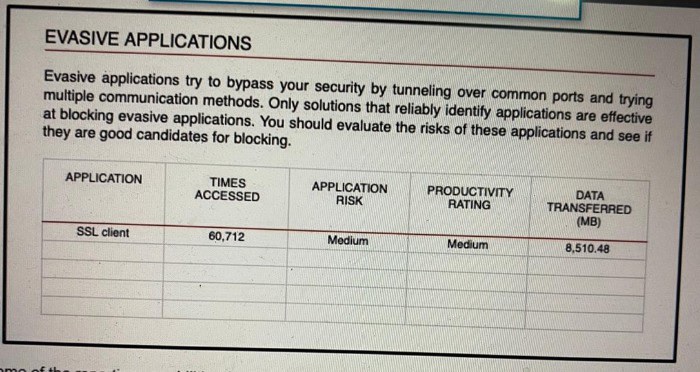
An administrator is looking at some of the reporting capabilities for Cisco Firepower and
noticed this section of the Network Risk report showing a lot of SSL activity that cloud be used for evasion. Which action will mitigate this risk?
A. Use SSL decryption to analyze the packets
B. Use encrypted traffic analytics to detect attacks
C. Use Cisco AMP for Endpoints to block all SSL connection
D. Use Cisco Tetration to track SSL connections to servers.
Explanation
The correct answer is A. Use SSL decryption to analyze the packets.
Exhibit mein "Evasive Applications" section dikhaya gaya hai jahan SSL client ka bahut zyada use (60,712 times) aur bada data transfer (8,510.48 MB) ho raha hai. Text mein clearly likha hai ke ye applications tunneling over common ports ke through security ko bypass karne ki koshish karti hain. Agar traffic encrypted (SSL/TLS) hai, to firewall (Snort engine) uske andar chhipi malicious activity ya data exfiltration ko nahi dekh sakta.
Is risk ko mitigate karne ka sabse effective tareeqa SSL Decryption Policy configure karna hai. SSL decryption ke through, FTD traffic ko decrypt karta hai, use Snort engine se inspect karta hai (IPS, malware, file policies), aur phir re-encrypt karke bhej deta hai. Is se encrypted channels ke andar hone wali evasion activities pakdi ja sakti hain.
Why the Other Options Are Incorrect
B. Use encrypted traffic analytics to detect attacks: ETA (Encrypted Traffic Analytics) bina decrypt kiye traffic ke metadata aur patterns se threats detect karta hai, lekin ye "evasive applications" ke andar chhipi file transfers ya specific payload-level threats ko reliably block nahi kar sakta. True inspection ke liye decryption zaroori hai.
C. Use Cisco AMP for Endpoints to block all SSL connection: AMP for Endpoints endpoint-level protection hai. Network par "all SSL connections" block karna business ko break kar dega (kyunki aaj kal har website HTTPS par hai). Ye network-level evasion risk ko mitigate karne ka sahi tareeqa nahi hai.
D. Use Cisco Tetration to track SSL connections to servers: Tetration (ab Cisco Secure Workload) application behavior aur flow visibility provide karta hai, lekin ye network firewall par traffic ko inspect ya block nahi karta. Ye sirf visibility tool hai, mitigation tool nahi.
Reference
Cisco Documentation: "Cisco Firepower Management Center Configuration Guide" – Section on SSL Policies and Decryption, which explains how decryption is required to inspect encrypted traffic and prevent evasion.
| Page 11 out of 35 Pages |
| 678910111213141516 |
| 300-710 Practice Test Home |
Real-World Scenario Mastery: Our 300-710 practice exam don't just test definitions. They present you with the same complex, scenario-based problems you'll encounter on the actual exam.
Strategic Weakness Identification: Each practice session reveals exactly where you stand. Discover which domains need more attention, before Securing Networks with Cisco Firepower (300-710 SNCF) exam day arrives.
Confidence Through Familiarity: There's no substitute for knowing what to expect. When you've worked through our comprehensive 300-710 practice exam questions pool covering all topics, the real exam feels like just another practice session.
Copyright © All Rights Reserved