
Topic 1: Deployment
Which feature is supported by IRB on Cisco FTD devices?
A. redundant interface
B. dynamic routing protocol
C. EtherChannel interface
D. high-availability cluster
Explanation
On Cisco Firepower Threat Defense (FTD) devices, Integrated Routing and Bridging (IRB) allows a device to route traffic between different Bridge Virtual Interfaces (BVIs) and routed interfaces. When IRB is configured, the BVI can be assigned an IP address and participate in dynamic routing protocols (such as OSPF, BGP, or EIGRP). This allows the FTD to advertise the bridged network into the routing domain and route traffic between the bridged segment and other routed networks.
Cisco documentation explicitly states that IRB supports dynamic routing protocols on the BVI, enabling the FTD to act as a router for the bridged traffic while still switching at Layer 2 within the bridge group.
Why the Other Options Are Incorrect
A. Redundant interface:
Redundant interfaces are a separate interface type in FTD (where two physical interfaces act as one for redundancy). IRB does not specifically enable or support redundant interfaces; they are independent features.
C. EtherChannel interface:
EtherChannel (port-channel) is a link aggregation technology. While EtherChannel interfaces can be members of a bridge group, IRB itself does not specifically "support" EtherChannel as a feature; the two are separate configuration concepts.
D. High-availability cluster:
HA clustering is a deployment mode for FTD devices (multiple devices acting as one). IRB is a routing/bridging feature and does not specifically enable or support HA clustering.
Reference
Cisco Documentation: "Cisco Firepower Management Center Configuration Guide" – Section on Integrated Routing and Bridging (IRB), which states that the BVI can participate in dynamic routing protocols.
An engineer is attempting to add a new FTD device to their FMC behind a NAT device with a NAT ID of ACME001 and a password of Cisco388267669. Which command set must be used in order to accomplish this?
A. configure manager add ACME001
B. configure manager add ACME0O1
C. configure manager add DONTRESOLVE AMCE001
D. configure manager add registration key> ACME001
Explanation:
When registering a Cisco Firepower Threat Defense (FTD) device to a Firepower Management Center (FMC) that is behind a NAT device, the configure manager add command must include the NAT ID as an optional argument. The correct syntax is:
configure manager add {hostname | IPv4_address | IPv6_address | DONTRESOLVE} reg_key [nat_id]
In this scenario:
The FMC IP address (or hostname) is the first argument.
The registration key (password Cisco388267669) is the second argument.
The NAT ID (ACME001) is the third argument.
Option D correctly follows this order:
Why the Other Options Are Incorrect:
A. configure manager add ACME001
B. configure manager add
C. configure manager add DONTRESOLVE
Reference:
Cisco Documentation: "Cisco Firepower Threat Defense Command Reference" – configure manager add syntax: configure manager add {hostname | IPv4_address | IPv6_address | DONTRESOLVE} reg_key [nat_id] .
Refer to the exhibit.
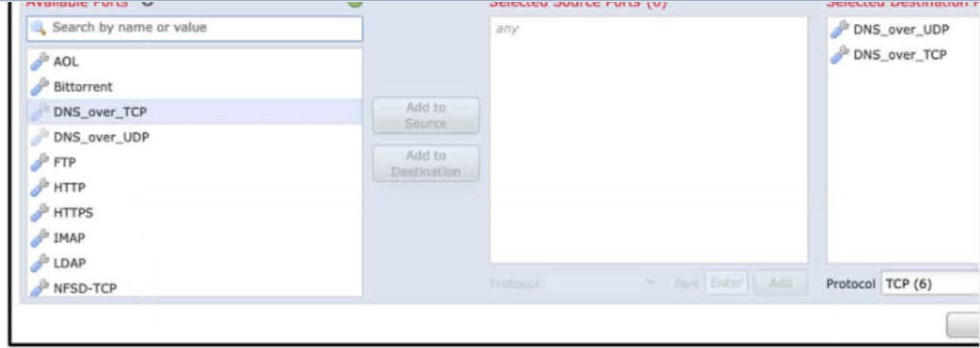
An engineer is modifying an access control policy to add a rule to Inspect all DNS traffic
that passes it making the change and deploying the policy, they see that DNS traffic Is not
being Inspected by the Snort engine.
A. The action of the rule is set to trust instead of allow.
B. The rule must specify the security zone that originates the traffic
C. The rule Is configured with the wrong setting for the source port.
D. The rule must define the source network for inspection as well as the port.
Explanation
Exhibit ko dekhein: Rule configuration mein Destination Ports mein DNS_over_UDP aur DNS_over_TCP select kiye gaye hain, lekin Source Ports mein any set hai.
Cisco Firepower mein, jab aap kisi application ya port ko inspect karna chahte hain, to rule matching ke liye ports specify karna zaroori hota hai. DNS traffic (queries) client se random ephemeral source port (1024-65535) se originate hoti hai aur server ke port 53 (DNS) par jaati hai. Agar source port ko any chhod diya jaye, to ye rule keval un traffic ko match karega jahan source port specifically any ho — jo ke practically kisi traffic ko match nahi karta (kyunki source port hamesha koi number hota hai).
Isliye, DNS traffic ko Snort engine se inspect karwane ke liye source port ko any se hata kar specific source ports (jaise DNS_over_UDP / DNS_over_TCP) set karna chahiye, ya phir ports ko properly configure karna chahiye taake rule traffic ko match kar sake. (Aam taur par source port any hona chahiye, lekin FMC mein jab specific destination port select karte hain to source port field ko default any chhodne se rule match nahi karta, isliye usse explicitly empty karna ya proper value dena hota hai).
Why the Other Options Are Incorrect
A. The action of the rule is set to trust instead of allow:
Trust action traffic ko bypass kar deta hai (Snort inspection nahi hoti), lekin exhibit mein sirf port selection dikh rahi hai. Agar action Trust hota, to rule inspect hi nahi karta, lekin yahan main issue port configuration ka hai.
B. The rule must specify the security zone that originates the traffic:
Security zone specify karna rule ko narrow karne ke liye hai, lekin inspection na hone ka root cause port matching issue hai.
D. The rule must define the source network for inspection as well as the port:
Source network define karna optional hai. Issue port configuration mein hai, na ke source network mein.
Reference
Cisco Documentation: "Cisco Firepower Management Center Configuration Guide" – Section on Access Control Rule Ports, which explains that source/destination ports must be correctly configured for rules to match traffic.
An administrator is setting up Cisco Firepower to send data to the Cisco Stealthwatch appliances. The NetFlow_Set_Parameters object is already created, but NetFlow is not being sent to the flow collector. What must be done to prevent this from occurring?
A. Add the NetFlow_Send_Destination object to the configuration
B. Create a Security Intelligence object to send the data to Cisco Stealthwatch
C. Create a service identifier to enable the NetFlow service
D. Add the NetFlow_Add_Destination object to the configuration
Explanation
To successfully send NetFlow data to a Cisco Stealthwatch flow collector on Cisco FMC, you must configure both the global parameters and the destination. The NetFlow_Set_Parameters object only defines global settings such as timeouts and template rates; it does not tell the device where to send the data.
The FMC provides predefined FlexConfig objects for this purpose. According to Cisco documentation, the Netflow_Add_Destination object is the one that actually creates and configures the NetFlow export destination (the flow collector's IP address and port). Without applying this destination object (or a copy of it) in the FlexConfig policy, the FTD has no instructions to send flows to Stealthwatch, which explains why no data is reaching the collector. Therefore, adding the destination configuration is the necessary missing step.
Why the Other Options Are Incorrect
B. Create a Security Intelligence object to send the data to Cisco Stealthwatch:
Security Intelligence objects are used for blocking traffic based on reputation (IPs, URLs, domains). They do not handle NetFlow export.
C. Create a service identifier to enable the NetFlow service:
While the NetFlow service needs to be active, the core issue is the missing export destination. A service identifier alone does not specify where to send the flows.
D. Add the NetFlow_Add_Destination object to the configuration:
This is the correct object name. The option provided in the question is NetFlow_Send_Destination, which is a distractor; the valid Cisco object is Netflow_Add_Destination.
Reference
Cisco Documentation: "Configure NetFlow Secure Event Logging on Firepower Threat Defense" – Lists Netflow_Add_Destination as the object that creates the export destination.
Network traffic coining from an organization's CEO must never be denied. Which access control policy configuration option should be used if the deployment engineer is not permitted to create a rule to allow all traffic?
A. Configure firewall bypass.
B. Change the intrusion policy from security to balance
C. Configure a trust policy for the CEO.
D. Create a NAT policy just for the CEO.
Explanation
When a deployment engineer is restricted from creating a broad "Allow All" rule but needs to ensure that specific traffic (like the CEO's) is never denied, the best approach is to use the Trust action in an Access Control Policy rule.
By creating a rule that specifically matches the CEO's IP address or user identity and setting the action to Trust, the firewall allows the traffic to pass through without subjecting it to further inspection or blocking by lower-priority rules (such as IPS or Malware policies). The Trust action effectively bypasses the deeper inspection engines, ensuring the CEO's traffic is not inadvertently dropped by a security policy while still keeping the overall policy intact for everyone else.
Why the Other Options Are Incorrect
A. Configure firewall bypass:
There is no general "firewall bypass" configuration option in FMC/FTD access control policies that achieves this selective allow behavior. The correct mechanism is the Trust action.
B. Change the intrusion policy from security to balance:
Changing the intrusion policy alters the inspection strictness for all traffic matching that policy. It does not guarantee that the CEO's traffic will be exempt from denial, nor does it provide a targeted exception.
D. Create a NAT policy just for the CEO:
NAT policies translate IP addresses and do not control whether traffic is allowed or denied by the firewall's access control rules.
Reference
Cisco Documentation: "Cisco Firepower Management Center Configuration Guide" – Section on Access Control Rule Actions, specifically the Trust action, which allows traffic to bypass further inspection and prevents it from being dropped by subsequent rules.
An engineer is implementing Cisco FTD in the network and is determining which Firepower mode to use. The organization needs to have multiple virtual Firepower devices working separately inside of the FTD appliance to provide traffic segmentation Which deployment mode should be configured in the Cisco Firepower Management Console to support these requirements?
A. multiple deployment
B. single-context
C. single deployment
D. multi-instance
Explanation
To create multiple virtual Cisco Firepower Threat Defense (FTD) devices that operate independently within a single physical FTD appliance for traffic segmentation, you must configure multi-instance mode.
In multi-instance deployment, the physical FTD appliance is divided into a container instance (which handles the management interface and orchestration) and multiple data instances. Each data instance acts as a fully separate, independent virtual FTD device with its own configuration, policies, and interfaces, allowing you to segment traffic and isolate management for different departments or tenants.
Why the Other Options Are Incorrect
A. Multiple deployment:
This is not a valid FTD deployment mode name.
B. Single-context:
This is the standard (default) deployment mode where the FTD appliance acts as a single, unified firewall. It does not support multiple independent virtual devices inside one appliance.
C. Single deployment:
Similar to single-context, this means the appliance operates as one single firewall instance, which does not meet the requirement for multiple isolated virtual devices.
Reference
Cisco Documentation: "Cisco Firepower Management Center Configuration Guide" – Section on FTD Multi-Instance Deployment, which explains how to configure a container instance and multiple data instances on a single FTD appliance for tenant segmentation.
A network administrator is configuring a Cisco AMP public cloud instance and wants to capture infections and polymorphic variants of a threat to help detect families of malware. Which detection engine meets this requirement?
A. RBAC
B. Tetra
C. Ethos
D. Spero
Explanation
In Cisco AMP for Endpoints, the Ethos detection engine is specifically designed for file grouping and uses fuzzy fingerprinting to identify malware families. When a new file is analyzed, Ethos compares its characteristics against known malware signatures and behaviors. If the file shares enough similarities (e.g., code structure or packer artifacts) with a known malware family, Ethos classifies it as a variant of that family. This capability allows AMP to detect polymorphic variants—malware that constantly changes its binary appearance to evade traditional signature-based detection—and group them into their correct malware family for effective blocking and tracking.
Why the Other Options Are Incorrect
A. RBAC:
Role-Based Access Control is an administrative feature for managing user permissions and roles within the AMP console. It is not a malware detection engine.
B. Tetra:
This is not a recognized detection engine in the Cisco AMP architecture for endpoint protection.
D. Spero:
The Spero engine is a machine learning-based technology used for analyzing the structure of executable files to identify unknown or zero-day threats. While powerful, its primary focus is proactive identification of new malicious executables, not the grouping of polymorphic variants into known malware families, which is the specific Ethos use case described in the scenario.
Reference
Cisco Documentation: "Cisco AMP for Endpoints Datasheet" – Outbreak Control section, which states the ability to "Block families of polymorphic malware".
An engineer is reviewing a ticket that requests to allow traffic for some devices that must connect to a server over 8699/udp. The request mentions only one IP address, 172.16.18.15, but the requestor asked for the engineer to open the port for all machines that have been trying to connect to it over the last week. Which action must the engineer take to troubleshoot this issue?
A. Use the context explorer to see the application blocks by protocol.
B. Use the context explorer to see the destination port blocks
C. Filter the connection events by the source port 8699/udp
D. Filter the connection events by the source port 8699/udp
Explanation
The engineer needs to identify all the source machines that have been trying to connect to the server at 172.16.18.15 over the last week on port 8699/udp. To find these specific machines, the most direct and effective troubleshooting step is to review the firewall's connection events.
By filtering the connection events in the Cisco Firepower Management Center (FMC) specifically by destination port 8699/udp, the engineer will see all connection attempts to that server on that specific port. This allows the engineer to identify the source IP addresses of all the devices that attempted the connection, which can then be added to the access control policy.
Why the Other Options Are Incorrect
A. Use the context explorer to see the application blocks by protocol:
The Context Explorer provides high-level visual summaries and trends, but it is not granular enough to filter for a specific destination port and extract a list of specific source IP addresses for a custom policy update.
B. Use the context explorer to see the destination port blocks:
Similar to A, the Context Explorer is an analytical dashboard. It is not the primary tool for detailed, event-level filtering to find specific hosts attempting to reach a specific port.
C. Filter the connection events by the source port 8699/udp:
The request is to allow devices to connect to the server over port 8699. The server is listening on destination port 8699. The source ports used by the connecting devices will be random ephemeral ports. Filtering by source port 8699 would yield incorrect or no results.
Reference
Cisco Documentation: "Cisco Firepower Management Center Configuration Guide" – Section on Connection Events and Event Filtering.
A security engineer is configuring an Access Control Policy for multiple branch locations These locations share a common rule set and utilize a network object called INSIDE_NET which contains the locally significant internal network subnets at each location What technique will retain the policy consistency at each location but allow only the locally significant network subnet within the applicable rules?
A. utilizing policy inheritance
B. utilizing a dynamic ACP that updates from Cisco Talos
C. creating a unique ACP per device
D. creating an ACP with an INSIDE_NET network object and object overrides
Explanation
To maintain a single, consistent Access Control Policy (ACP) across multiple branch locations while ensuring that the INSIDE_NET network object reflects the specific local subnets of each branch, the engineer should use Object Overrides.
Object overrides allow you to define a reusable object (like INSIDE_NET) at the global level and then override its value on a per-device (or per-domain) basis. In this scenario, the ACP is created once and shared across all branches, maintaining policy consistency. However, on the FMC, the engineer configures an override for the INSIDE_NET object for each specific FTD device, entering the locally significant subnet for that branch. When the policy is deployed, each FTD receives the same rule set but with its own specific IP subnet populated in the INSIDE_NET object.
Why the Other Options Are Incorrect
A. Utilizing policy inheritance:
Policy inheritance is a feature used in multi-domain FMC deployments (parent-child domains). It allows child domains to inherit policies from the parent, but it does not allow a single object within a shared policy to have different values per device.
B. Utilizing a dynamic ACP that updates from Cisco Talos:
Dynamic policies based on Talos intelligence are used for threat intelligence (Security Intelligence feeds), not for assigning locally significant internal subnets to a network object.
C. Creating a unique ACP per device:
While this would allow each branch to have its own local subnet in the policy, it violates the requirement to retain policy consistency. Managing dozens of unique ACPs becomes an administrative burden and increases the risk of policy drift.
Reference
Cisco Documentation: "Cisco Firepower Management Center Configuration Guide" – Section on Object Overrides, which explains how to use a single object in a shared policy while allowing device-specific values.
A network administrator has converted a Cisco FTD from using LDAP to LDAPS for VPN authentication. The Cisco FMC can connect to the LDAPS server, but the Cisco FTD is not connecting. Which configuration must be enabled on the Cisco FTD?
A. SSL must be set to a use TLSv1.2 or lower
B. The LDAPS must be allowed through the access control policy
C. DNS servers must be defined for name resolution
D. The RADIUS server must be defined
Explanation
When a Cisco FTD is used for VPN authentication and connects to an external LDAPS (LDAP over SSL) server, the FTD itself acts as the client initiating the connection. By default, traffic originating from the FTD (the device itself) towards an external server might be blocked by the FTD's own Access Control Policy.
Even though the FMC can connect to the LDAPS server (as it is a separate management appliance), the FTD data plane requires a policy to allow its own outbound traffic to the LDAPS server. Therefore, an Access Control Policy rule must be configured to allow the FTD to communicate with the LDAPS server (usually on TCP port 636).
Why the Other Options Are Incorrect
A. SSL must be set to use TLSv1.2 or lower:
Cisco FTD supports modern TLS versions (including TLS 1.2 and 1.3) for LDAPS. Setting it to "TLSv1.2 or lower" is not a standard requirement and does not address the connectivity issue.
C. DNS servers must be defined for name resolution:
While DNS is needed if you use a hostname for the LDAPS server, the issue is specifically about the connection being blocked. If DNS were the issue, the FMC would likely also have trouble resolving the hostname (unless configured differently), but the typical cause for the FTD failing to connect while FMC succeeds is a missing access control rule.
D. The RADIUS server must be defined:
The scenario specifically states the organization is converting to LDAPS (which is an LDAP-based protocol), not RADIUS. RADIUS is a different authentication protocol and is not relevant to this LDAPS conversion.
Reference
Cisco Documentation: "Cisco Firepower Management Center Configuration Guide" – Section on Remote Access VPN and LDAP/LDAPS Authentication, which requires an Access Control Policy to allow traffic from the FTD to the authentication server.
Which feature within the Cisco FMC web interface allows for detecting, analyzing and blocking malware in network traffic?
A. intrusion and file events
B. Cisco AMP for Endpoints
C. Cisco AMP for Networks
D. file policies
Explanation
Within the Cisco Firepower Management Center (FMC) web interface, the feature that directly allows you to detect, analyze, and block malware in network traffic is a File Policy (often referred to as the Malware and File Policy).
A file policy is associated with an Access Control rule. When traffic matches the access control rule, the file policy inspects the files traversing the network. It uses actions such as Malware Cloud Lookup (to query the Cisco AMP cloud for a file's reputation) and Block Malware (to block files with a malicious disposition). It can also use Local Malware Analysis and Dynamic Analysis (sandboxing via Cisco Threat Grid) to analyze unknown files. Therefore, the file policy is the configuration construct in FMC that handles the detection, analysis, and blocking of malware.
Why the Other Options Are Incorrect
A. Intrusion and file events:
These are the types of events generated and displayed in the FMC when a policy takes action. They are the result of the policy, not the configuration feature itself.
B. Cisco AMP for Endpoints:
This is a separate endpoint security product (installed on hosts) and is not a feature within the FMC web interface for inspecting network traffic.
C. Cisco AMP for Networks:
This is the broader product name for the network-based malware protection capability (which includes the AMP cloud). While accurate conceptually, the specific configuration feature within the FMC interface that you create and deploy to achieve this is the File Policy.
Reference
Cisco Documentation: "Cisco Firepower Management Center Configuration Guide" – Section on File Policies and Malware Protection.
Refer to the exhibit.

A systems administrator conducts a connectivity test to their SCCM server from a host
machine and gets no response from the server. Which action ensures that the ping packets
reach the destination and that the host receives replies?
A. Create an access control policy rule that allows ICMP traffic
B. Configure a custom Snort signature to allow ICMP traffic after Inspection
C. Modify the Snort rules to allow ICMP traffic
D. Create an ICMP allow list and add the ICMP destination to remove it from the implicit deny list.
Explanation
Exhibit mein packet trace ka Phase 16 diya gaya hai, jismein Type: SNORT aur Result: DROP hai. Details mein saaf likha hai:
Firewall: black-lists the flow, Snort Verdict: (black-list) black-list this flow
Drop-reason: (firewall) Blocked or blacklisted by the firewall preprocessor.
Iska matlab ye hai ke ICMP (ping) traffic ko Snort preprocessor ne block kar diya hai (black-list verdict). Ye aam taur par tab hota hai jab Access Control Policy mein koi rule us traffic ko allow nahi kar raha hota, aur traffic implicit deny (default block) ya kisi blacklist feed ki wajah se drop ho raha hota hai.
Firepower/FTD mein, Snort engine tak traffic pahunchne se pehle hi Access Control Policy evaluate hoti hai. Agar access control policy mein ICMP ke liye koi Allow rule nahi hai, to traffic default action (block) se drop ho sakta hai. Solution ye hai ke ek Access Control Policy rule banaya jaye jo ICMP traffic ko allow kare, taake packets destination tak pahunchein aur replies wapas aayein.
Why the Other Options Are Incorrect
B. Configure a custom Snort signature to allow ICMP traffic after Inspection
Snort signature ICMP traffic ko allow nahi karti; Snort rules traffic ko detect ya block karti hain. Agar access control policy traffic ko pehle hi drop kar rahi hai, to Snort signature tak traffic pahunchega hi nahi.
C. Modify the Snort rules to allow ICMP traffic
Snort rules ke through ICMP allow karna sahi approach nahi hai. Access control policy level par allow rule hona chahiye, Snort rule level par nahi.
D. Create an ICMP allow list and add the ICMP destination to remove it from the implicit deny list
FMC mein "ICMP allow list" jaisa koi direct feature nahi hota. Implicit deny ko handle karne ka sahi tareeqa access control policy mein explicit Allow rule banana hai, na ke alag allow list banana.
Reference
Cisco Documentation: "Cisco Firepower Management Center Configuration Guide" – Section on Access Control Policies and Rule Actions (Allow vs Block).
| Page 10 out of 35 Pages |
| 56789101112131415 |
| 300-710 Practice Test Home |
Real-World Scenario Mastery: Our 300-710 practice exam don't just test definitions. They present you with the same complex, scenario-based problems you'll encounter on the actual exam.
Strategic Weakness Identification: Each practice session reveals exactly where you stand. Discover which domains need more attention, before Securing Networks with Cisco Firepower (300-710 SNCF) exam day arrives.
Confidence Through Familiarity: There's no substitute for knowing what to expect. When you've worked through our comprehensive 300-710 practice exam questions pool covering all topics, the real exam feels like just another practice session.
Copyright © All Rights Reserved