
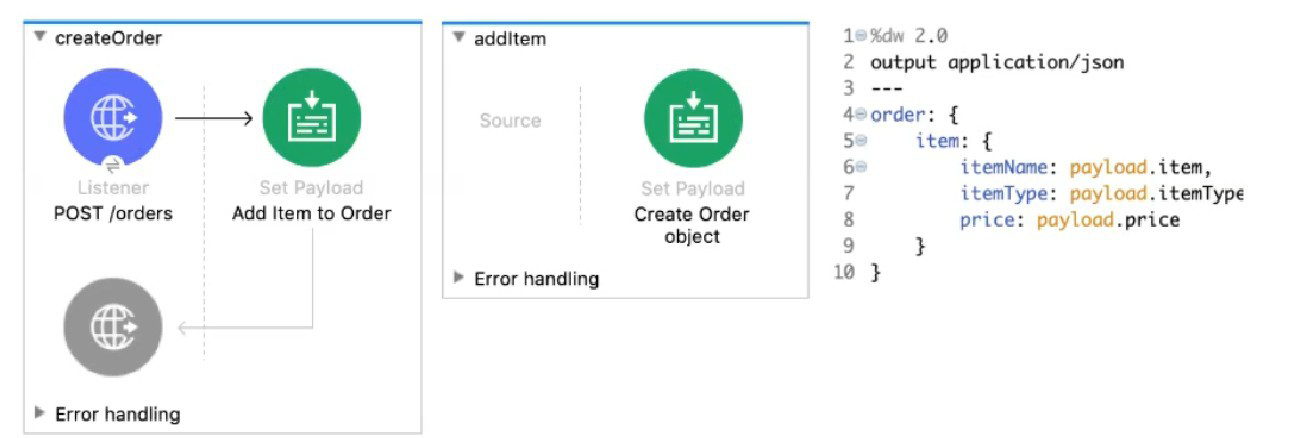
Refer to the exhibits. The Set Payload transformer in the addltem child flow uses DataWeave to create an order object.
What is the correct DataWeave code for the Set Payload transformer in the createOrder flow to use the addltem child flow to add a router call with the price of 100 to the order?
A. lookup( "addltern", { price: "100", item: "router", itemType: "cable" } )
B. addltem( { payload: { price: "100", item: "router", itemType: "cable" > } )
C. lookup( "addltem", { payload: { price: "100", item: "router", itemType: "cable" } > )
D. addltem( { price: "100", item: "router", itemType: "cable" } )
Explanation:
Understanding the Flow Structure:
createOrder is the main flow
addItem is a child flow (likely a subflow)
The Set Payload in addItem creates an order object using fields from the input payload
Calling Child Flows:
In Mule 4, to call another flow (subflow), you use the lookup() function
Syntax: lookup("flowName", parameters)
The parameters become the payload in the called flow
DataWeave in addItem:
order: {
item: {
itemName: payload.item,
itemType: payload.itemType,
price: payload.price
}
}
This expects payload to have: item, itemType, price
Correct Call from createOrder:
Use lookup() with flow name "addItem"
Pass a payload object with the required fields
Correct syntax: lookup("addItem", { price: "100", item: "router", itemType: "cable" })
Note: There's a typo in option A: "addltern" should be "addItem", but among the options, A has the correct structure.
Key Concepts Tested:
Using lookup() function to call subflows/flows
Passing parameters to called flows
DataWeave function syntax
Understanding flow-to-flow communication in Mule 4
Reference:
MuleSoft Documentation: The lookup() function executes another flow and returns its result.
Analysis of Other Options:
B. addltem( { payload: { price: "100", item: "router", itemType: "cable" > } ): Incorrect. addItem is not a DataWeave function; you must use lookup() to call flows.
C. lookup( "addltem", { payload: { price: "100", item: "router", itemType: "cable" } > ): Incorrect. You don't need to wrap parameters in a payload key; the object passed becomes the payload directly.
D. addltem( { price: "100", item: "router", itemType: "cable" } ): Incorrect. Again, addItem is not a DataWeave function; must use lookup().
Which Mule component provides a real-time, graphical representation of the APIs and mule applications that are running and discoverable?
A. API Notebook
B. Runtime Manager
C. Anypoint Visualizer
D. API Manager
Explanation:
Anypoint Visualizer is a powerful tool within MuleSoft’s Anypoint Platform that helps architects and developers visualize the structure and behavior of their application network. It automatically maps out:
Running Mule applications
Deployed APIs
Proxies and policies
Third-party systems invoked by Mule apps
The visualization is dynamic and real-time, meaning it updates as applications are deployed, modified, or removed. It supports multiple views:
Layer View – Shows APIs grouped by Experience, Process, and System layers.
Policy View – Highlights which APIs have policies applied.
Troubleshooting View – Helps identify performance bottlenecks and connectivity issues.
This tool is essential for:
Architectural reviews
Security audits
Operational monitoring
Dependency tracking
❌ Why the Other Options Are Incorrect
A. API Notebook
Deprecated tool used for interactive API documentation and testing. It does not provide graphical network views.
B. Runtime Manager
Used for deploying, monitoring, and managing Mule applications, but it does not offer a visual network map.
D. API Manager
Used to apply policies, manage SLAs, and control access to APIs. It does not provide graphical visualization of the application network.
📚 References
MuleSoft Docs – Anypoint Visualizer
MuleSoft Blog – Getting to Know Anypoint Visualizer
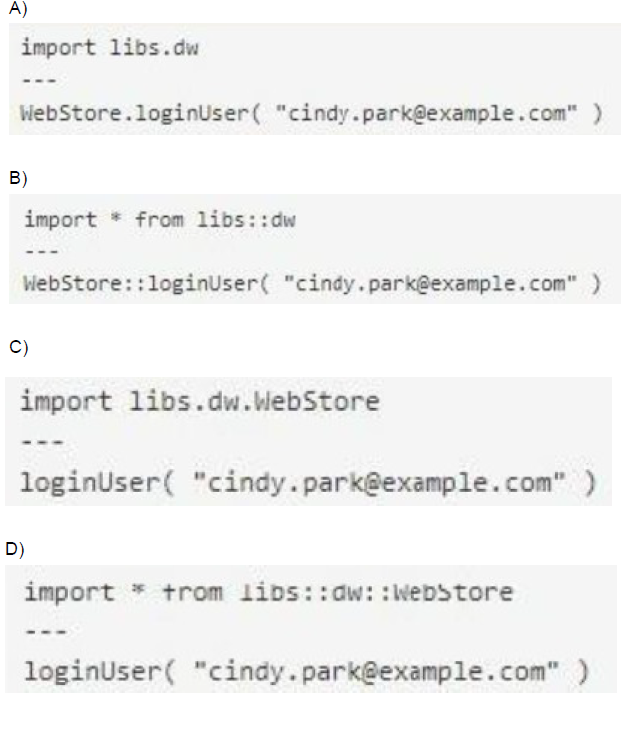
A Mule project contains a DataWeave module file WebStore dvA that defines a function named loginUser The module file is located in the projects src/main/resources/libs/dw folder
What is correct DataWeave code to import all of the WebStore.dwl file's functions and then call the loginUser function for the login "cindy.park@example.com"?
A. Option A
B. Option B
C. Option C
D. Option D
Explanation:
Let's analyze the correct DataWeave import syntax:
Module Location: src/main/resources/libs/dw/WebStore.dwl
This creates a module namespace: libs::dw::WebStore
Import All Functions Syntax:
import * from libs::dw::WebStore
This imports all functions from the WebStore module located in the libs::dw namespace.
Function Call:
After import, call the function directly: loginUser("cindy.park@example.com")
Option D shows exactly this:
import * from libs::dw::WebStore
---
loginUser("cindy.park@example.com")
Key Concepts Tested:
DataWeave module import syntax
Namespace structure based on directory path
Wildcard imports vs. specific function imports
Correct separator (::) for namespace paths
Reference:
DataWeave Documentation: Modules are imported using import * from namespace::moduleName syntax.
Analysis of Other Options:
Option A: Uses libs.dw (dot notation) instead of libs::dw (double colon). Also imports entire dw namespace instead of specific WebStore module.
Option B: Uses import * from libs:dw (single colon) with incorrect separator and imports wrong namespace level.
Option C: Uses import libs.dw.WebStore which imports the module but doesn't use wildcard *, and the syntax is incorrect for wildcard imports.
Which of the below functionality is provided by zip operator in DataWeave?
A. Merges elements of two lists (arrays) into a single list
B. Used for sending attachments
C. Minimize the size of long text using encoding.
D. All of the above
Explanation:
The zip operator (or function: dw::Core::zip()) in DataWeave is a fundamental array operation:
1. Functionality: It takes two arrays as input and combines them element-by-element, based on their position (index), into a single new array.
2. Output Structure: The resulting array contains sub-arrays (or pairs), where the $i$-th sub-array contains the $i$-th element of the first input array and the $i$-th element of the second input array.
3. Example: If you zip the array ["a", "b"] with the array [1, 2], the result is [["a", 1], ["b", 2]].
4. Size: The resulting array's size is equal to the size of the smallest input array; any trailing elements in the longer array are ignored.
This perfectly matches the description in Option A.
❌ Incorrect Answers
B. Used for sending attachments: This functionality is handled by specialized connectors, such as the Email Connector, or by processing multipart/form-data MIME types, which is entirely separate from DataWeave's core transformation logic.
C. Minimize the size of long text using encoding: This describes compression (like GZIP) or encoding (like Base64). Mule applications use the Compression Module for creating compressed files (like .zip files), which is a component/module, not the DataWeave zip operator.
D. All of the above: Incorrect since options B and C are false.
📚 References
DataWeave zip Function: The official MuleSoft documentation for the dw::Core module states that the zip function "Merges elements from two arrays into an array of arrays. The first sub-array in the output array contains the first indices of the input sub-arrays... and so on".
A web client submits a request to http://localhost:8081?accountType=personal. The query parameter is captured using a Set Variable transformer to a variable named accountType.
What is the correct DataWeave expression to log accountType?
A. Account Type: #[flowVars.accountType]
B. Account Type: #[message.inboundProperties.accountType]
C. Account Type: # [attributes.accountType]
D. Account Type: #[vars.accountType]
Explanation:
In Mule 4:
Flow variables are stored in the vars scope
After using a Set Variable transformer to capture the query parameter to variable accountType, you access it using vars.accountType
The Logger message can mix static text with DataWeave expressions using #[...] syntax
Correct syntax: Account Type: #[vars.accountType]
Key Concepts Tested:
- Mule 4 variable scope (vars vs Mule 3's flowVars)
- Accessing flow variables in DataWeave expressions
- Logger message syntax with mixed static/dynamic content
Analysis of Other Options:
A. Account Type: #[flowVars.accountType]: Incorrect. flowVars was used in Mule 3, replaced by vars in Mule 4.
B. Account Type: #[message.inboundProperties.accountType]: Incorrect. inboundProperties was Mule 3 syntax for accessing headers/parameters. In Mule 4, query parameters are in attributes.queryParams.
C. Account Type: #[attributes.accountType]: Incorrect. attributes contains message metadata (headers, query params, URI params), but once captured to a flow variable, you should use vars.accountType. Also, query params would be in attributes.queryParams.accountType, not directly in attributes.
Additional Note:
To directly access the query parameter without using Set Variable, you could use #[attributes.queryParams.accountType], but the question states it was already captured to a variable, so vars.accountType is correct.
An API has been created in Design Center. What is the next step to make the API discoverable?
A. Publish the API to Anypoint Exchange
B. Publish the API from inside flow designer
C. Deploy the API to a Maven repository
D. Enable autodiscovery in API Manager
Explanation:
The process of making an API specification (like a RAML or OAS definition) available for consumption, sharing, and documentation follows this sequence:
Design: API is created/edited in Design Center.
Discoverability: The next step is to Publish the API specification (the contract) to Anypoint Exchange.
Anypoint Exchange acts as the central hub or marketplace for all reusable assets, including API definitions. Once published, it becomes discoverable to other internal teams (via the organization's private Exchange) or external partners.
Implementation & Management: After publishing to Exchange, it can be implemented in Anypoint Studio and then managed in API Manager.
❌ Incorrect Answers
B. Publish the API from inside flow designer: Flow Designer is the web-based implementation tool; publishing the contract for discovery is done from the Design Center interface to Exchange.
C. Deploy the API to a Maven repository: This is a technical step for deploying the implemented Mule application code, not the step for making the API contract discoverable on the Anypoint Platform.
D. Enable autodiscovery in API Manager: Autodiscovery is done after the API implementation is built and deployed, and its purpose is to link the running Mule application instance to its corresponding API definition in API Manager for runtime management (policies, security), not for initial discovery of the contract.
📚 References
API Lifecycle (Design Phase): The MuleSoft API lifecycle dictates that following the design phase (Design Center), the contract is published to Exchange for sharing and discovery.
An On Table Row Database listener retrieves data from a table that contains record_id, an increasing numerical column. How should the listener be configured so it retrieves new rows at most one time?
A. Set the target to store the last retrieved record_id value
B. Set the ObjectStore to store the last retrieved record_id value
C. Set the target to the record_id column
D. Set the watermark column to the record id column
Explanation:
The On Table Row listener in Mule uses a watermark column to ensure that only new rows (rows with a value greater than the last processed watermark) are retrieved each time it polls the database.
Since the table has record_id as an increasing numeric column, setting:
watermarkColumn = record_id
ensures:
Only rows with record_id greater than the previously processed one are fetched.
Each row is retrieved once and only once.
This is the exact mechanism MuleSoft provides for avoiding duplicate row processing.
❌ Why the other options are wrong
A. Set the target to store the last retrieved record_id value
The target just stores output into a variable; it does not control polling behavior.
B. Set the ObjectStore to store the last retrieved record_id value
While ObjectStore is used behind the scenes to track watermarks, you should not configure it manually. Mule manages this internally when watermarkColumn is set.
C. Set the target to the record_id column
Again, the target attribute does not determine how rows are selected. It simply stores the output payload somewhere else.
✔ Final Answer: D. Set the watermark column to the record id column
A web client submits a request to http://localhost:8081/books/0471767840. The value "0471767840" is captured by a Set Variable transformer to a variable named booklSBN.
What is the DataWeave expression to access booklSBN later in the flow?
A. booklSBN
B. attributes.booklSBN
C. flowVars.booklSBN
D. vars. booklSBN
Explanation:
This is essentially the same concept as Question 1: accessing a value that has been explicitly stored in the Mule Event's variable scope.
Variable Storage: The Set Variable component stores data in the Variables scope.
Accessing Variables: In Mule 4 DataWeave, the keyword vars is used to access this scope.
Access Expression: To retrieve the value of the variable named booklSBN, the expression is vars.booklSBN.
❌ Incorrect Answers
A. booklSBN: This is an invalid DataWeave expression for accessing a variable; you must specify the scope (e.g., vars.). If not scoped, DataWeave attempts to resolve it as a payload field or global function.
B. attributes.booklSBN: The attributes scope holds data from the inbound request (like the URI parameter that initially held the ISBN), but once it is stored in a flow variable, it should be accessed via the vars scope.
C. flowVars.booklSBN: This is the deprecated Mule 3 syntax for accessing flow variables.
📚 References
Mule 4 Event Structure: Mule 4 uses the vars keyword to access flow variables.
Refer to the exhibit.
A. Option A
B. Option B
C. Option C
D. Option D
Explanation:
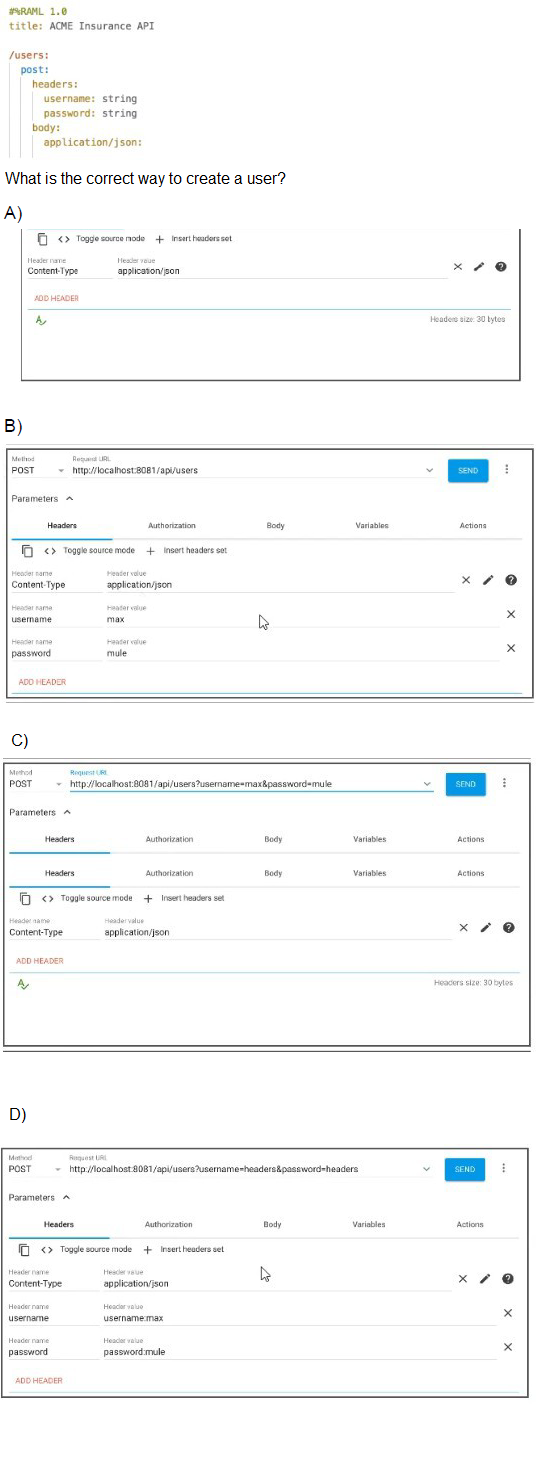
Looking at the RAML specification:
POST /users requires:
Headers: username (string) and password (string)
Body: application/json (content type specified)
Analysis of Options:
Option A: Only sets Content-Type: application/json header, missing the required username and password headers.
Option B: Correctly sets:
Content-Type: application/json (for the JSON body)
username header with a value
password header with a value
This matches the RAML requirements exactly
Option C: Attempts to pass credentials in the URL path (/api/users/username=max&password=mule), which is incorrect. Headers should be in the Headers section, not the URL. Also only sets Content-Type header.
Option D: Similar to C, tries to put credentials in URL (/api/users?username=headers&password=headers), not in headers as required. Although it does add username and password headers, the URL approach is wrong and redundant.
Key Concepts Tested:
Understanding RAML specification requirements
Difference between headers, query parameters, and path parameters
Proper way to pass authentication credentials in headers
REST API testing best practices
Reference:
REST API Design: Headers vs. query parameters usage
RAML Specification: Header requirements in method definitions
Note:
Option B correctly places username and password in the Headers section as required by the RAML spec, while also setting the proper Content-Type for the JSON body.
Refer to the exhibit.
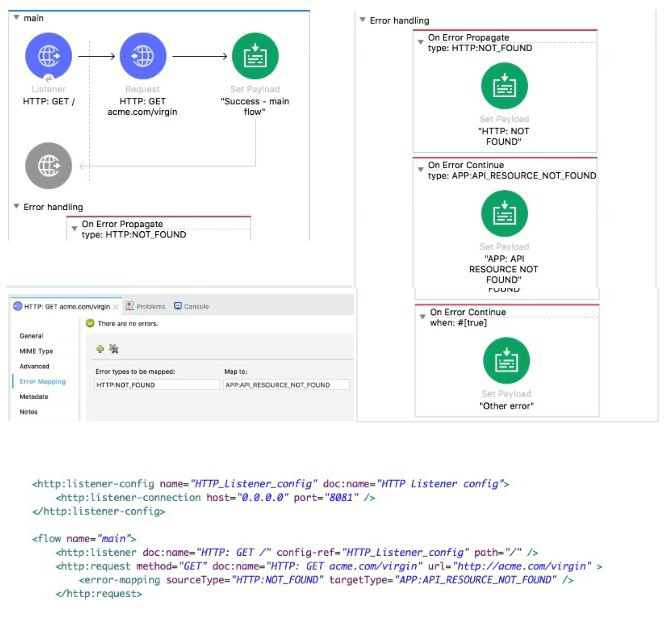
The main flow is configured with their error handlers. A web client submit a request to the HTTP Listener and the HTTP Request throws an HTTP:NOT_FOUND error.
What response message is returned?’’
What response message is returned?
A. APP: API RESOURCE NOT FOUND
B. HTTP: NOT FOUND
C. other error
D. success - main flow
Explanation:
Let's trace through the error handling:
HTTP Request throws HTTP:NOT_FOUND error.
Error Mapping in the HTTP Request:
Has an error mapping: HTTP:NOT_FOUND → APP:API_RESOURCE_NOT_FOUND
This means the HTTP:NOT_FOUND error is re-mapped to APP:API_RESOURCE_NOT_FOUND before reaching the flow's error handler.
Flow Error Handler:
Has an On Error Propagate for HTTP:NOT_FOUND → but this won't trigger because error was already re-mapped
Has an On Error Propagate for APP:API_RESOURCE_NOT_FOUND → This WILL trigger
This error handler sets payload to "APP:API_RESOURCE_NOT_FOUND"
Key Point:
Error mappings in processors (like HTTP Request) happen before the flow's error handlers
The re-mapped error (APP:API_RESOURCE_NOT_FOUND) propagates up
The matching error handler for APP:API_RESOURCE_NOT_FOUND executes and sets the payload
Why not other options:
B. HTTP:NOT_FOUND: Would be if error mapping didn't exist or didn't work
C. other error: Would be if error didn't match any specific handlers and went to the On Error Continue with when: #[true], but APP:API_RESOURCE_NOT_FOUND has a specific handler
D. success: Clearly not, since an error occurred
Key Concepts Tested:
Error mapping in processors vs. flow error handlers
Order of error processing (mapping first, then error handlers)
Error propagation behavior
Reference:
MuleSoft Documentation: Error mappings in processors transform error types before they reach flow error handlers.
Refer to the exhibits.
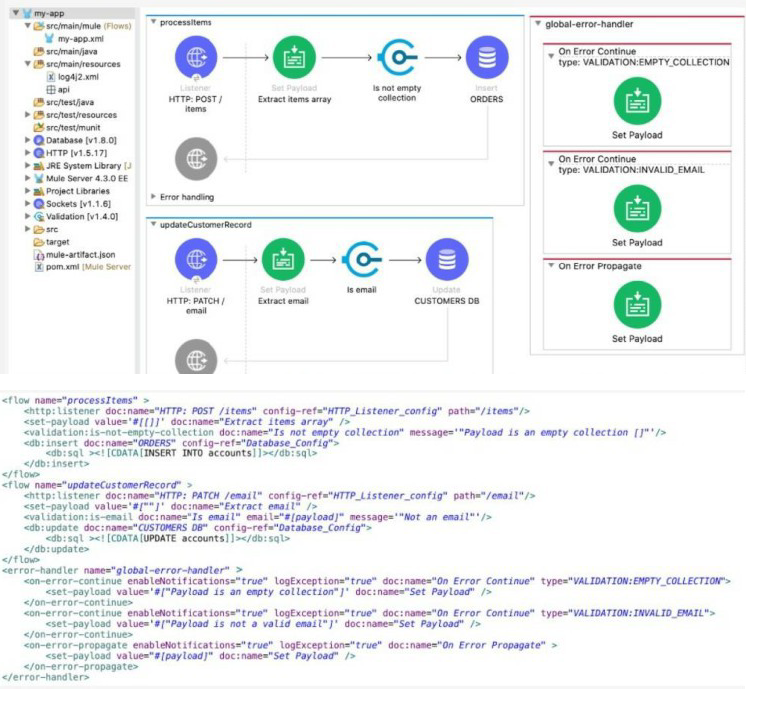
The my-app xml file contains an Error Handier scope named "global-error-handler"
The Error Handler scope needs to be set to be the default error handler for every flow in the Mule application
Where and how should the value "global-error-handler" be added in the Mule project so that the Error Handler scope is the default error handler of the Mule application?
A. In the mule-artifact json file, as the value of a key-value pair
B. In the Validation folder as the value of a global element in the error-handling yaml file
C. In the pom.xml file, as the value of a global element
D. In the my-app.xml file, as an attribute of a configuration element
Explanation of Correct Answer
To set a named error handler (like global-error-handler) as the default exception strategy for all flows within a Mule application, you must configure the configuration element.
Configuration Element: The configuration element is a global element in a Mule configuration XML file (like my-app.xml).
Default Error Handler Attribute: You set the defaultExceptionHandler-ref attribute of the configuration element to the name of the desired error handler.
By placing this configuration in my-app.xml (the file where the flows and error handler are defined), any flow that does not have its own local
❌ Incorrect Answers
A. In the mule-artifact json file, as the value of a key-value pair: The mule-artifact.json file is used for configuration related to deployment and classloading (e.g., domain artifact configuration, required Mule versions). It is not used to define the application's default error handler.
B. In the Validation folder as the value of a global element in the error-handling yaml file: Mule configuration is typically defined in XML files, not YAML files specifically for error handling. Furthermore, the location "Validation folder" is not a standard configuration location for this purpose.
C. In the pom.xml file, as the value of a global element: The pom.xml file is for Maven build management (dependencies, packaging, plugins). It is not used for defining Mule application runtime configuration like the default error handler.
📚 References
Global Default Exception Strategy: The official MuleSoft documentation explains that the defaultExceptionHandler-ref attribute on the
Mule Project Structure: Documentation confirms the distinct roles of mule-artifact.json (deployment metadata) and pom.xml (Maven build configuration).
Refer to the exhibits.
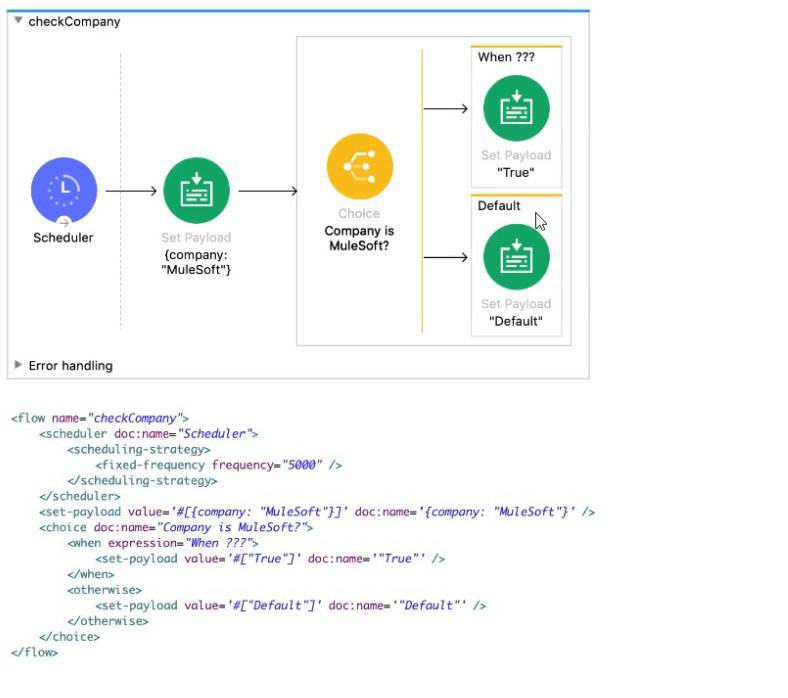
The
What is a valid
A. #['MuleSoft' == paytoad.company]
B. #[ company = "MuleSoft" ]
C. #[ if( company = "MuleSoft") ]
D. #[ if( 'MuleSoff == payload.company) ]
Explanation:
The Choice router's when expression must be a valid DataWeave expression that evaluates to a Boolean (true or false).
Accessing the Payload: The company name is stored as the key company within the current payload. To access it, the expression must use payload.company.
Comparison: The goal is to check if this value is equal to the string literal "MuleSoft". DataWeave uses the double equals sign (==) for equality comparison.
Full Expression: The entire valid DataWeave expression is:
#[’MuleSoft’==payload.company]
| Page 4 out of 20 Pages |
| Previous |