
Cloud Kicks has tasked its Loyalty Consultant with setting up its new Loyalty Management platform. The business requirement is to create personalized experiences across its customer journey.
Which solution should the Loyalty Consultant utilize to create personalized customer experiences?
A. Salesforce Sales Cloud
B. Salesforce Marketing Cloud
C. Salesforce Slack
D. Salesforce Order Management System
Explanation:
Creating truly personalized customer experiences means delivering the right offer, message, or reward at the right moment across email, SMS, app, web, and ads — all driven by the member’s loyalty tier, points balance, purchase history, and behavior. Only Salesforce Marketing Cloud has the native tools (Personalization, Journey Builder, Einstein) and deep bi-directional integration with Loyalty Management to make this happen at scale.
✅ Correct Option: B – Salesforce Marketing Cloud
Seamlessly consumes real-time Loyalty data (tier changes, points earned/spent, vouchers, etc.) via Marketing Cloud Connect.
Uses Einstein to score and segment members, then triggers personalized journeys (e.g., “You’re 200 points from Gold — here’s a double-points weekend”).
Delivers 1:1 content across every channel — exactly what “personalized experiences across the customer journey” demands.
❌ Incorrect Option: A – Salesforce Sales Cloud
This might feel tempting because it holds customer data, but Sales Cloud is built for sales reps and B2B account management, not for mass-scale, automated, cross-channel marketing personalization.
It has no journey orchestration, no Einstein-powered 1:1 content delivery at scale, and no native loyalty triggers for emails/SMS/ads.
Using only Sales Cloud would leave the business unable to send automated, personalized loyalty communications to thousands or millions of consumers.
❌ Incorrect Option: C – Salesforce Slack
Slack is strictly an internal team collaboration and chat platform.
It has zero capability to send customer-facing messages, zero integration with loyalty events, and no personalization or journey-building features.
Choosing Slack would be completely irrelevant and leave the personalization requirement 100% unfulfilled.
❌ Incorrect Option: D – Salesforce Order Management System
Order Management focuses on order fulfillment, inventory allocation, shipping, and returns processing — operational tasks that happen after a purchase.
It does not store loyalty points, tiers, or behavioral data in a way that can drive personalized marketing.
It cannot trigger or deliver personalized offers across the customer journey; selecting this would create no personalization capability whatsoever.
Reference:
Salesforce Help: Loyalty Management + Marketing Cloud Integration
Trailhead Module: Personalize Customer Journeys with Loyalty & Marketing Cloud
What three types of vouchers can be configured in Loyalty Management?
A. Promo Code
B. Discount Percentage
C. Fixed Value
D. Gift Card
E. Product or Service
Explanation
In Salesforce Loyalty Management, vouchers are redeemable benefits issued to members as part of promotions, tier benefits, or reward actions. Only three specific voucher types are natively supported for configuration, allowing businesses to offer percentage discounts, fixed monetary value, or free products/services. These types integrate seamlessly with the redemption process and member transaction history.
Correct Answers: B, C, E
✅ B. Discount Percentage
Gives members a percentage off the qualifying purchase amount (e.g., 15% off apparel). The discount scales with the cart value, making it attractive for higher spends. Admins set the exact percentage, applicable products or categories, minimum purchase requirements, and maximum discount cap during voucher definition setup.
✅ C. Fixed Value
Provides a specific currency amount off (e.g., $50 off any order above $100). It’s straightforward for members to understand and use. Configuration includes defining the fixed amount, currency, usage limits (one-time or multiple partial redemptions), and expiration rules directly in the Voucher Definition object.
✅ E. Product or Service
Awards a free or discounted specific product or service (e.g., free coffee or complimentary spa session). Great for experiential rewards and inventory management. Setup involves linking the voucher to catalog products/services, specifying quantity, and defining fulfillment methods like in-store pickup or digital delivery.
❌ A. Promo Code
Promo codes are generic marketing codes, not a dedicated voucher type in Loyalty Management. While vouchers generate unique codes for tracking, “Promo Code” itself isn’t a configurable voucher category and lacks the member-specific balance and expiration controls that true loyalty vouchers have.
❌ D. Gift Card
Gift cards are treated as stored-value instruments outside the native voucher framework. Loyalty Management doesn’t offer “Gift Card” as a built-in voucher type; fixed-value vouchers can simulate gift-card-like behavior, but actual gift card issuance and balance management require separate integrations or Financial Services Cloud.
Reference:
Salesforce Help: Voucher Definitions and Types
Trailhead: Create Vouchers and Promotions
Northern Trail, outfitters (NTO) needs to process tier assessment rules on its member’s anniversary date NTO wants to set up a Data Process Engine that transforms the data that is available in Salesforce and writes back the transformation results as new or updated
records.
Which Kind of permission Set is required to enable the Data Processing Engine definitions?
A. CLA Analytics Base Admin
B. Data Pipelines Base User
C. Rule Engine Designer
D. Loyalty Analytics admin
Explanation:
The Data Processing Engine (DPE) in Salesforce Loyalty Management is used to transform, cleanse, and write back processed data for loyalty operations such as tier assessments. To create or modify these DPE definitions, Salesforce requires a specific permission set tied to Data Pipelines functionality. Only users with this permission can build, activate, and manage these data transformations inside the Loyalty program architecture.
✅ Correct Option
🟢 B. Data Pipelines Base User
This permission set grants access to create, configure, and run Data Processing Engine (DPE) definitions. It provides the foundational capabilities required to design dataflows, manipulate Salesforce data, and write back results. Without this permission, users cannot enable or manage DPE pipelines, which are essential for automated loyalty processes such as anniversary tier assessments.
❌ Incorrect Options
🔴 A. CLA Analytics Base Admin
This permission set is associated with Customer Loyalty Analytics (CLA), which focuses on reporting and insights using Tableau CRM. It does not provide access to Data Processing Engine configurations, making it unsuitable for building data transformation definitions within Loyalty Management.
🔴 C. Rule Engine Designer
Rule Engine Designer permissions allow users to configure and manage rulesets related to loyalty earning, redemption, and tier evaluation logic. However, this does not include the ability to build or manage DPE pipelines, which operate at the data processing level rather than rule execution.
🔴 D. Loyalty Analytics Admin
This permission supports administrative access for Loyalty Analytics dashboards and datasets. It does not grant rights to create Data Processing Engine definitions, as analytics permissions focus on insights, not data transformation pipelines.
📚 Reference:
Salesforce Official Documentation — Data Pipelines & Data Processing Engine Requirements
https://developer.salesforce.com/docs/
(Salesforce Help → Loyalty Management → Data Processing Engine)
Northern Trail Outfitters wants to show member information in its member portal hosted outside of Salesforce.
What is a prerequisite for using Loyalty APIs to fetch the member information?
A. Create custom objects in Loyalty
B. Create a Connected App in Platform
C. Create customer integration code
D. Create Data Processing jobs
Explanation:
To securely connect an external member portal to Salesforce and fetch loyalty data via APIs, a specific authentication setup is required. The Loyalty Management APIs use standard Salesforce API protocols, which mandate a secure, server-to-server authentication method. This ensures that only authorized external systems can access sensitive member information.
Correct Option:
B. Create a Connected App in Platform ✅:
A Connected App is the fundamental prerequisite. It enables OAuth 2.0 authentication (specifically the Client Credentials flow), allowing the external portal to securely identify itself to Salesforce. This app provides the necessary Client ID and Secret, which are used to obtain an access token for making API calls to retrieve member data.
Incorrect Option:
A. Create custom objects in Loyalty ❌:
While custom objects can store data, they are not an authentication mechanism. The APIs can fetch data from both standard and custom objects, but creating them does not enable the API connection itself.
C. Create customer integration code ❌:
While custom code will eventually be written in the portal to call the APIs, the prerequisite is the configuration within Salesforce to allow those calls. The Connected App must be created first to provide the credentials for the code.
D. Create Data Processing jobs ❌:
Data Processing jobs are part of the Loyalty Analytics or Rule Engine for transforming data internally. They are not related to the external authentication required for the Loyalty Management Member APIs.
Reference:
This process is defined in the official Salesforce Loyalty Management Implementation Guide, specifically in the sections covering API integration and the use of the Client Credentials OAuth flow for system-to-system authentication.
A loyalty Program would like to set up a new process where a push notification or email will be sent to the client immediately after a voucher is added to their member account within Salesforce Marketing Cloud.
The notification message will require the “first name” and the “membership number” to personalize the message and, a custom object named
“voucher issued” with the necessary data attributes.
Which option for the entry event should be selected as the preferred implementation approach that can meet the requirements with the least amount of development effort?
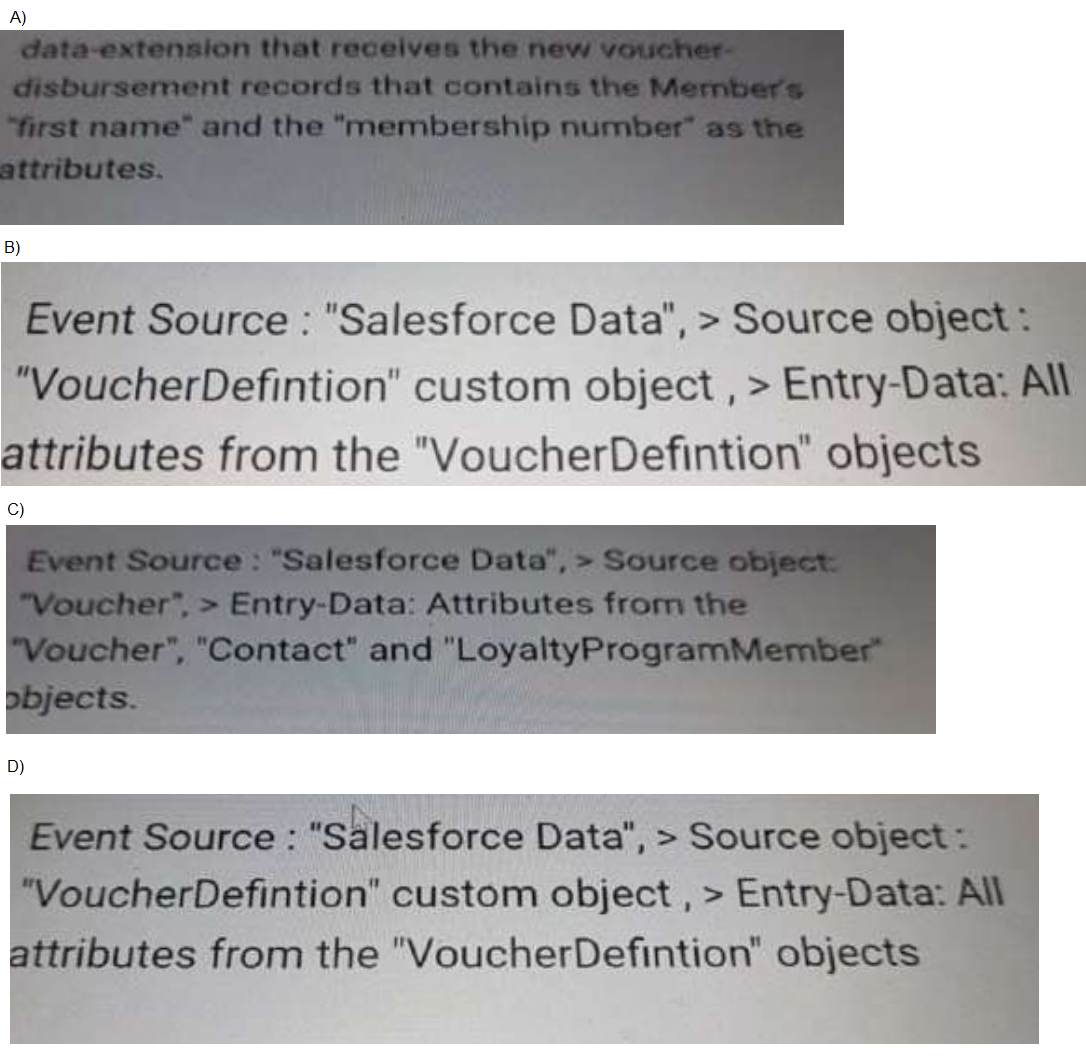
A. Option A
B. Option B
C. Option C
D. Option D
Explanation:
To trigger a push notification or email immediately after a voucher is added to a member’s account, the entry event must bring all required personalization attributes directly from Salesforce. Since the message needs first name, membership number, and attributes from the custom object Voucher Issued, the entry source must include the related Voucher, Contact, and LoyaltyProgramMember records with the least development effort. This ensures complete data without extra queries or data extensions.
✅ Correct Option
🟢 Option C
Option C uses Salesforce Data with the Voucher object as the source and includes Voucher, Contact, and LoyaltyProgramMember attributes. This provides everything needed out-of-the-box—member details (first name, membership number) and voucher information—so Marketing Cloud can trigger the journey without writing additional Apex, external services, or custom integrations. This is the cleanest, lowest-effort solution.
❌ Incorrect Options
🔴 Option A
Option A relies on a Marketing Cloud Data Extension to receive records. While it could work, it requires additional development to push Salesforce data to MC, map fields, maintain syncing logic, and handle data extension updates. It does not automatically pull Contact or Loyalty Program Member details needed for personalization.
🔴 Option B
This option uses the VoucherDefinition object, which represents the template of a voucher, not actual issued vouchers tied to a member. It does not contain member attributes like first name or membership number, making it unsuitable for triggering personalized communications.
🔴 Option D
Option D is essentially a repetition of Option B (same object, same attributes). Since VoucherDefinition does not represent member-issued vouchers and lacks contact/member data, it cannot provide the required personalization fields without custom development.
📚 Reference:
Salesforce Official Documentation — Marketing Cloud Journey Builder → Salesforce Data Entry Source
https://developer.salesforce.com/docs/
Salesforce Loyalty Management Guide — Voucher, LoyaltyProgramMember, and Contact object relationships
Universal Containers implemented a Loyalty Program six months ago. The Loyalty Program Manager noticed a recent decrease in program efficiency. Now the Manager wants to incorporate a targeted strategy.
Which two benefits should the Administrator expect as a result of running the strategy?
A. Personalized digital marketing
B. Transaction journey data is automatically archived
C. Customers are rewarded based on their tiers
D. Data-based segmentation strategy
Explanation
Universal Containers' loyalty program is facing efficiency dips after six months, prompting a shift to targeted strategies in Salesforce Loyalty Management. These strategies analyze member data to refine promotions and engagements, countering issues like low redemptions or churn. By focusing on high-value segments and behaviors, admins can expect outcomes that boost relevance and retention without overhauling the entire setup.
Correct Answers: A, D
✅ A. Personalized digital marketing
Targeted strategies enable admins to craft digital campaigns—like emails or app pushes—that use member data for tailoring content, offers, and timing. This drives higher open rates and conversions by addressing individual preferences, such as recommending vouchers based on past purchases, ultimately lifting engagement and program ROI through relevant, one-to-one interactions.
✅ D. Data-based segmentation strategy
Running a targeted strategy segments members using transaction history, demographics, and behavior data, creating precise groups for customized rewards or promotions. This data-driven approach uncovers patterns, like lapsed buyers, allowing admins to deploy focused interventions that improve efficiency and member satisfaction with minimal manual effort.
❌ B. Transaction journey data is automatically archived
Archiving transaction data is a standard data management feature in Loyalty Management, not tied to running targeted strategies. These strategies focus on analysis and action, not storage automation, so this benefit would occur regardless and doesn't address efficiency declines through targeting.
❌ C. Customers are rewarded based on their tiers
Tier-based rewards are a core setup in loyalty programs from launch, assigning benefits like bonus points by level. Targeted strategies enhance this with dynamic, behavior-specific tweaks but don't introduce tier rewards as a new outcome—it's already expected, not a fresh efficiency gain.
Reference:
Salesforce Help: About Loyalty Management Strategies
Trailhead: Enhance Loyalty with Targeted Promotions
Which Loyalty Management Key Component should be used to quickly aggregate a high volume of data spread across many Loyalty Management objects?
A. Batch Management
B. Decision Table
C. Quick Actions
D. Data Processing Engine
Explanation:
When dealing with large-scale data aggregation across multiple loyalty objects, you need a component specifically designed for high-performance data transformation. Standard Salesforce processing may be too slow for these complex, volume-intensive operations, which require specialized ETL (Extract, Transform, Load) capabilities to efficiently combine and prepare data for analysis or rule processing.
Correct Option:
D. Data Processing Engine ✅:
The Data Processing Engine (DPE) is specifically designed for this purpose. It efficiently transforms and aggregates large volumes of data from multiple sources using scalable data pipelines. The DPE can process millions of records by performing complex joins, filters, and calculations across various Loyalty Management objects, making it ideal for handling high-volume data aggregation tasks that would be too slow with standard processing methods.
Incorrect Option:
A. Batch Management ❌:
Batch Management handles the grouping and processing of loyalty transactions but focuses on operational workflows rather than large-scale data aggregation. It manages transaction lifecycles but lacks the specialized ETL capabilities needed for high-volume data transformation across multiple objects.
B. Decision Table ❌:
Decision Tables are used for configuring specific business rules and outcomes within loyalty programs. They evaluate conditions to determine results but do not perform data aggregation or transformation across large datasets from multiple objects.
C. Quick Actions ❌:
Quick Actions provide convenient UI shortcuts for common tasks but are completely unrelated to data processing or aggregation. They represent user interface elements rather than data processing capabilities.
Reference:
According to the official Salesforce Loyalty Management documentation, the Data Processing Engine is specifically designed for "complex data transformations and aggregations" and can process "millions of records by performing complex joins, filters, and calculations across various Loyalty Management objects."
A company has recently rolled out a Loyalty Program with three tiers. The company decided to offer personalized benefits based on customer behavior.
How will the personalized benefits be display for each Loyalty Program member?
A. On the Loyalty Member Tier Benefit Related List, linked to Loyalty Program Member
B. On the Member Benefit Related List, linked to Loyalty Program Member
C. On the Transaction Journal Related List, Linked to Loyalty Program Member
D. On the Voucher Related List, linked to Loyalty Program member
Explanation:
In a tier-based loyalty program, personalized benefits must be displayed at the member level, reflecting what each individual member is entitled to based on their specific tier and behavior. Salesforce Loyalty Management stores these benefits in a dedicated object that directly links to the Loyalty Program Member record. This ensures the UI clearly presents customized entitlements without mixing them with vouchers, transactions, or generic tier setup data.
✅ Correct Option
🟢 B. On the Member Benefit Related List, linked to Loyalty Program Member
The Member Benefit related list shows all personalized benefits assigned to an individual member. These benefits are generated based on rules, tier level, or customer behavior, and they appear directly on the Loyalty Program Member record. This is the correct and intended location for displaying personalized benefits in Salesforce Loyalty Management.
❌ Incorrect Options
🔴 A. Loyalty Member Tier Benefit Related List
Tier Benefits define standard benefits per tier, not personalized benefits. This list shows what the tier offers in general, but it does not reflect member-specific or behavior-based benefits assigned individually. Therefore, it does not meet the requirement for personalized benefit visibility.
🔴 C. Transaction Journal Related List
The transaction journal tracks earning, burning, and adjustments of points. It does not store or display any benefits—personalized or otherwise. Using this object for benefit display would be misaligned with its operational purpose.
🔴 D. Voucher Related List
The Voucher related list displays redeemed or assigned vouchers, not loyalty benefits. While benefits may eventually generate a voucher, this list does not represent a member’s personalized benefits and cannot meet the personalization requirement.
📚 Reference:
Salesforce Official Documentation — Loyalty Management → Member Benefits
https://developer.salesforce.com/docs/
A company's Marketing Team needs to set up a promotion and use Promotion Market Segments where members of a specific age range and with expressed preferences will benefit from this promotion.
What is the recommended solution for the team to set up the Promotion Market Segments?
A. Custom coded solution
B. Salesforce Marketing Cloud
C. Salesforce Reports and Dashboards
D. Salesforce Customer Data Platform
Explanation
Salesforce Loyalty Management utilizes the power of Salesforce Customer Data Platform (CDP) (now known as Data Cloud) for advanced, multi-dimensional segmentation. The requirement for filtering based on a demographic field (age range) and a behavioral/preference field (expressed preferences) necessitates unifying data from potentially disparate sources into a Single Customer View. CDP is the tool specifically designed to ingest, unify, segment, and activate this complex, cross-channel customer data for highly personalized promotions and communications.
Correct Option: ✅
D. Salesforce Customer Data Platform:
This is the correct tool because it specializes in data unification and advanced segmentation.
Unified Profile: CDP aggregates data from all sources (Sales Cloud, Service Cloud, Marketing Cloud, website, etc.) to create a single, unified member profile, which is essential for accurate segmentation.
Complex Attributes: It allows the Marketing Team to build complex segments, such as "Loyalty Members aged 30-45 who have expressed a preference for Product Category X," which combines demographic and preference data.
Activation: These rich segments are then activated and made available to Salesforce Loyalty Management for use as a Promotion Market Segment when defining promotion eligibility.
Incorrect Option: ❌
A. Custom Coded Solution:
This is generally not the recommended approach in a standard Salesforce architecture. While possible, it would be expensive, time-consuming to build, difficult to maintain, and would duplicate functionality already available off-the-shelf with Customer Data Platform. It goes against the principle of using declarative tools where possible.
B. Salesforce Marketing Cloud:
Marketing Cloud's primary strength is communication orchestration (journeys, email, SMS) and basic segmentation within its own data stores. While it can receive segments from CDP, it lacks the core data unification and identity resolution capabilities needed to build a segment based on age and cross-channel preferences pulled from multiple sources into a single, comprehensive profile.
C. Salesforce Reports and Dashboards:
Reports and Dashboards are designed for analysis and visualization of existing data, not for dynamically creating and publishing segments that can be activated as eligibility criteria for promotions. They show who is in a segment but cannot directly apply that segment to a Loyalty Promotion.
Reference: 🔗
The official Salesforce documentation highlights the synergy between Loyalty Management and Data Cloud (CDP).
The Management team at Cloud Kicks is required to analyze what earning activities are available in the Loyalty Program. What type of user access does the Management Team need to have this information visible in the reports?
A. Read, Edit access on Journal Type, Loyalty Member Promotions, and Loyalty Member Benefits Objects
B. Read. Create access on Journal Type, Loyalty Member Currencies, and Partner Products Objects
C. Read, View access on Journal Type, Partner Products, and Loyalty Ledgers Objects
D. Read, View All access on Journal Type, Journal Subtype, and Transaction Journal Objects
Explanation
Earning activities in Salesforce Loyalty Management are defined through transaction journals, which log member actions like purchases or referrals that accrue points. To analyze these in reports, the management team needs visibility into the structures categorizing these activities—Journal Type for broad categories (e.g., accrual), Journal Subtype for specifics, and Transaction Journal for actual records. "Read, View All" ensures comprehensive access to all records for accurate, org-wide reporting without needing edit rights.
Correct Answer: D
✅ D. Read, View All access on Journal Type, Journal Subtype, and Transaction Journal Objects
This permission set grants the team read access to object definitions and View All to see every record across the org, perfect for querying and reporting on all earning activities. Journal Type outlines accrual categories, Subtype adds details like purchase types, and Transaction Journal captures the events—enabling detailed analysis of available activities, point earnings, and trends without data gaps or manual exports.
❌ A. Read, Edit access on Journal Type, Loyalty Member Promotions, and Loyalty Member Benefits Objects
Edit access allows modifications, which isn't needed for analysis and risks accidental changes to program rules. Promotions and Benefits focus on reward delivery, not earning setups, so reports would miss core transaction data, leading to incomplete views of activities like what qualifies for points accrual.
❌ B. Read, Create access on Journal Type, Loyalty Member Currencies, and Partner Products Objects
Create access supports adding new records but exceeds read-only needs for reporting, potentially causing over-permissioning. Currencies track point balances, and Partner Products handle external redemptions—not the earning activities themselves, resulting in reports skewed toward post-earn metrics rather than activity availability.
❌ C. Read, View access on Journal Type, Partner Products, and Loyalty Ledgers Objects
"View" likely means basic record visibility, but without "View All," access might be limited to owned records, hindering org-wide reports. Partner Products and Ledgers deal with collaborations and balances, not defining or logging earning events, so the team couldn't fully analyze activity types or historical accruals.
Reference:
Salesforce Help: Loyalty Management Permission Sets
Developer Guide: TransactionJournal
Cloud kicks wants to identify specific tier members to be used for a journey within Marketing Cloud. The company wants to encourage Loyalty Tier B customers to become Loyalty Tier A customers.
What objects must be synchronized into Marketing Cloud to achieve the segmentation for this audience.
A. Contact, Account, and Opportunity
B. Contact, Member Rewards Tier, and Loyalty Member Tier and Campaign
C. Voucher Definition, products, and Loyalty Member Tier
D. Contact Loyalty Program Member, and Loyalty Member Tier
Explanation:
To identify specific tier members for a Marketing Cloud journey, you must synchronize objects that connect customer identities with their current loyalty tier status. This requires a combination of core customer data and specialized loyalty program objects to enable accurate segmentation and targeting for your marketing campaigns.
Correct Option:
D. Contact, Loyalty Program Member, and Loyalty Member Tier ✅:
These three objects provide the complete data chain needed. The Contact object contains customer identity and email information for communication. The Loyalty Program Member object links the contact to specific loyalty programs. The Loyalty Member Tier object stores the current tier assignment (Tier A or B) that enables the precise segmentation required for the Marketing Cloud journey.
Incorrect Option:
A. Contact, Account, and Opportunity ❌:
These are standard Sales Cloud objects that don't contain loyalty-specific tier information. While Contact is useful, Account and Opportunity focus on sales processes rather than loyalty program membership and tier status.
B. Contact, Member Rewards Tier, and Loyalty Member Tier and Campaign ❌:
This combination includes incorrect objects. "Member Rewards Tier" isn't the proper object for tracking tier membership, and Campaign is unrelated to storing core loyalty program tier data needed for segmentation.
C. Voucher Definition, products, and Loyalty Member Tier ❌:
While Loyalty Member Tier is relevant, Voucher Definition and products objects relate to reward fulfillment and inventory management rather than customer-tier relationships and identity information needed for Marketing Cloud targeting.
Reference:
According to the official Salesforce Loyalty Management documentation, synchronizing Contact, Loyalty Program Member, and Loyalty Member Tier objects is essential for creating targeted marketing segments based on tier status in Marketing Cloud.
Using extensive Data Processing Engine jobs to modify Salesforce data at scale, which two limits should be monitored?
A. Record Storage Limits
B. Batch Limit in Bulk Api
C. Data Pipeline Limits
D. Apex Governor Limits
Explanation:
Data Processing Engine (DPE) jobs are designed to handle large-scale Salesforce data transformations. Since these operations can process millions of records, it is important to monitor limits directly tied to bulk data movement and pipeline execution capacity. DPE relies on Data Pipelines and underlying Bulk API operations, so monitoring these limits ensures stable, uninterrupted processing without overconsumption of system resources.
✅ Correct Options
🟢 B. Batch Limit in Bulk API
DPE uses Bulk API under the hood to write back transformed data. Bulk API has strict limits—for example, batch size, number of batches per 24 hours, and maximum records per batch. If these limits are exceeded, DPE jobs may fail or pause. Monitoring Bulk API usage is essential in high-volume data processing scenarios.
🟢 C. Data Pipeline Limits
DPE jobs run within Salesforce Data Pipelines, which have runtime, memory, and concurrency limits. These include the number of pipelines per org, number of runs per day, and maximum data volume per job. Keeping track of Data Pipeline limits helps prevent job failures and ensures efficient execution of large transformations.
❌ Incorrect Options
🔴 A. Record Storage Limits
While record storage is important for overall org health, it is not a primary operational limit for DPE. DPE job performance does not depend on storage availability unless the org is already near its maximum capacity. This limit is not specifically tied to DPE execution.
🔴 D. Apex Governor Limits
DPE jobs do not execute Apex logic. They run independently using Data Pipelines infrastructure and Bulk API. Therefore, Apex limits such as CPU time, DML rows, or SOQL limits are not relevant and do not affect DPE execution.
📚 Reference:
Salesforce Official Documentation —Data Pipelines Limits & Considerations
| Page 3 out of 9 Pages |
| Previous |