
Topic 2: Questions Set 2
This clause is used to group the output of a stats command by a specific name.
A. Rex
B. As
C. List
D. By
Explanation:
Why D is correct: The by clause is used in conjunction with transforming commands like stats, chart, and timechart to group search results by the distinct values of one or more specified fields. For example, stats count by host groups the resulting counts based on each unique host name.
Why A is incorrect: rex is an independent command used to extract fields inline using regular expressions, not a clause within the stats command.
Why B is incorrect: The as clause is used to rename the output field or function result within a command (e.g., stats count as TotalRequests), not to group the data rows.
Why C is incorrect: list() is a specific statistical function used inside the stats command to display all values of a given field for each group; it is not a clause used for grouping the output itself.
Reference:
Splunk Documentation: Search Reference -> stats.
Syntax details: The basic command structure is stats
Why would the following search produce multiple transactions instead of one?
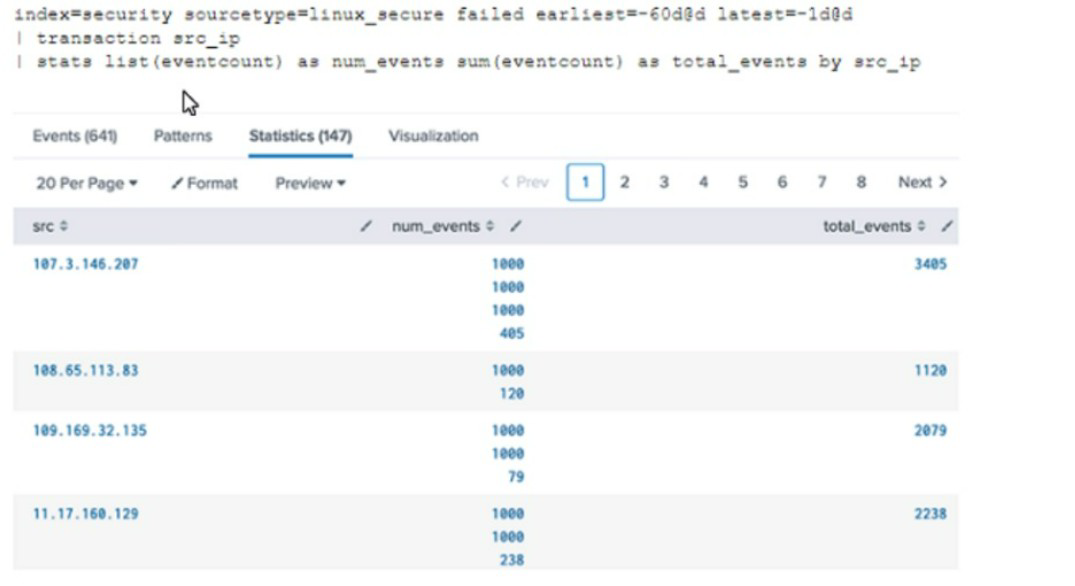
A. The maxspan option is not included
B. The transaction command has a limit of 1000 events per transaction.
C. The transaction and commands cannot be used together
D. The stats list () function is used
Explanation:
By default, the transaction command has a maxevents=1000 limit. This means a single transaction will contain at most 1000 events. In the screenshot, you see multiple transactions for the same src_ip (e.g., 107.3.146.207 has num_events showing 1000, 1000, 405). This indicates that the transaction was split into multiple transactions because each exceeded 1000 events. The first two transactions hit the 1000‑event cap, and the remaining 405 events formed a third transaction.
Why the other options are incorrect:
A. The maxspan option is not included
– maxspan controls the maximum time span of a transaction (e.g., maxspan=5m). Omitting maxspan does not cause multiple transactions for the same src_ip; it simply means no time limit is enforced. Events could still be grouped into a single transaction if they don't violate other limits.
C. The transaction and stats commands cannot be used together
– False. They can be used together, as shown in the search. The stats command aggregates the transaction results after transaction has grouped events.
D. The stats list() function is used
– The list(eventcount) function only displays the event counts within each transaction as a multi‑value field. It does not cause transaction to split events into multiple groups. The splitting is caused by transaction, not by stats.
Additional exam note:
To allow larger transactions, increase maxevents (e.g., transaction src_ip maxevents=5000).
Other limits: maxspan (time), maxpause (idle time), maxopentxn (concurrent open transactions).
References:
Splunk Documentation:
“The transaction command has a default maxevents of 1000. A transaction stops when it reaches maxevents, and remaining events may start a new transaction.”
What field must be present in order to use the timechart command?
A. _raw
B. rime
C. _time
D. index
Explanation
The timechart command in Splunk creates time‑based charts by bucketing events over time. To do this, it relies on the _time field, which is a default field in every indexed event. _time represents the timestamp of the event as a UNIX epoch time value. Without _time, timechart would have no way to place events onto a chronological axis or determine which bucket each event belongs to.
Why the other options are incorrect:
A. _raw –
_raw contains the original, unextracted event text. It is not required for timechart. The command works purely on structured fields, especially _time, not raw text.
B. rime –
This appears to be a typo of _time. There is no standard Splunk field named rime. The correct field is _time. The exam occasionally includes intentional typos as distractors.
D. index –
index identifies which data partition holds the events. While useful for restricting searches, it is not required for timechart to function. timechart can run on a single index or multiple indexes without referencing the index field directly in the command.
Additional exam note:
If events are missing a valid _time field (extremely rare for indexed data), Splunk assigns the current system time during indexing, but timechart still requires the field to exist.
You can override the time field with other time‑based fields using the _time alias feature, but the command still depends on some time field being present.
References:
Splunk Documentation:
“The timechart command requires the _time field. It uses _time to determine the time bucket for each event.”
Which search retrieves events with the event type web_errors?
A. tag=web_errors
B. eventtype=web_errors
C. eventtype "web errors"
D. eventtype (web_errors)
Explanation:
When you create an event type named web_errors, Splunk automatically adds an eventtype field to all matching events. To search for events that have been categorized with that event type, you use the search string eventtype=web_errors. This works just like searching any other field-value pair.
Why the other options are incorrect:
A. tag=web_errors
– Tags are separate knowledge objects applied to field-value pairs (e.g., tag=high_severity). The tag field is unrelated to eventtype. Searching tag=web_errors would only find events where a tag named web_errors was explicitly added, not events with the web_errors event type.
C. eventtype "web errors"
– This is invalid syntax. Splunk requires an equals sign (=) for field-value searches. Quotation marks alone do not create a valid field comparison. The correct form would be eventtype="web errors" (if the event type name contained a space), but event type names cannot contain spaces in practice.
D. eventtype (web_errors)
– Parentheses are not used to specify field values in basic searches. This syntax would be interpreted incorrectly; Splunk might look for a function or subsearch, not a literal event type name.
Additional exam note:
Event type names follow similar rules to field names: no spaces, case-sensitive, use underscores or camelCase for readability.
You can also search for multiple event types:
eventtype=web_errors OR eventtype=web_warnings
Event types are evaluated at search time and can include wildcards in their definition, but the search to retrieve them still uses eventtype=exact_name.
References:
Splunk Documentation:
“Once you define an event type, events that match the search string are tagged with eventtype=
Which knowledge object is used to normalize field names to comply with the Splunk Common Information Model (CIM)?
A. Field alias
B. Event types
C. Search workflow action
D. Tags
Explanation:
The Splunk Common Information Model (CIM) defines a standard set of field names (e.g., src, dest, user, action) for normalizing data across different source types. When your raw data contains field names that do not match the CIM standard (e.g., client_ip instead of src, or target_user instead of user), you use field aliases to create alternate names for those fields. This makes your data CIM-compliant without modifying the original indexed data.
Why the other options are incorrect:
B. Event types
– Event types categorize events based on a search string (e.g., failed_login). They add an eventtype field to events but do not rename or normalize existing field names. They are used for classification, not field name alignment.
C. Search workflow action
– Workflow actions define links to external URLs or POST requests based on field values. They are used for enrichment or external integration, not for field name normalization.
D. Tags
– Tags add descriptive labels to specific field-value pairs (e.g., tag=high_severity). While tags can help identify CIM-compliant events, they do not rename fields. Field aliases are the correct tool for normalizing field names to CIM standards.
References:
Splunk Documentation:
“Field aliases are used to normalize field names to comply with the Common Information Model (CIM).”
Which of the following options will define the first event in a transaction?
A. startswith
B. with
C. startingwith
D. firstevent
Explanation:
The transaction command uses startswith and endswith options to define the boundaries of a transaction. startswith specifies a search or condition that marks the first event in a transaction.
Why the other options are incorrect:
B. with
– The with clause is not a valid option for the transaction command. It may appear in other commands (e.g., join type=outer), but it does not define transaction boundaries.
C. startingwith
– This is not a valid transaction option. The correct syntax is startswith (one word, no "ing").
D. firstevent
– There is no firstevent option in the transaction command. While the concept of "first event" exists in transaction logic, it is specified using startswith, not firstevent.
References:
Splunk Documentation:
“The startswith option defines the condition that marks the first event in a transaction.”
SPLK‑1002 Exam Blueprint:
Search Commands → transaction → startswith and endswith options.
For choropleth maps,splunk ships with the following KMZ files (select all that apply)
A. States of the United States
B. States and provinces of the united states and Canada
C. Countries of the European Union
D. Countries of the World
Explanation:
Splunk ships with two default KMZ files for use in choropleth maps: States of the United States and Countries of the World. These files provide predefined geographic boundaries that allow users to visualize data across regions without needing to upload custom KMZ files.
States of the United States
→ This KMZ file (geo_us_states.kmz) contains polygon boundaries for all U.S. states. It is commonly used to display metrics such as web traffic, sales, or security events aggregated by state. For example, a search returning counts by state can be directly mapped to this KMZ file to produce a shaded choropleth visualization.
Countries of the World
→ This KMZ file (geo_countries.kmz) provides boundaries for all recognized world countries. It is useful for global datasets, such as international traffic analysis, worldwide sales distribution, or monitoring events across multiple countries.
These two files are bundled with Splunk Enterprise and Splunk Cloud, ensuring that users can immediately build geographic visualizations without external dependencies.
❌ Why Other Options Are Incorrect
B. States and provinces of the United States and Canada
→ Not shipped by default. Splunk does not include Canadian provinces in its default KMZ files. If you need North American coverage beyond U.S. states, you must upload a custom KMZ file.
C. Countries of the European Union
→ Also not included by default. Splunk does not provide EU‑specific boundaries. Users must upload a custom KMZ file if they want to visualize EU countries separately
.
🔗 References
Splunk Docs – Choropleth maps overview
Splunk Visualization Guide – Default KMZ files
A user wants to create a workflow action that will retrieve a specific field value from an event and run a search in a new browser window in the user's Splunk instance. What kind of workflow action should they create?
A. A Run workflow action, because the user is running a new search with a specific field value from an event returned in the user's search.
B. A Search workflow action, because the user is running a new search with a specific field value from an event returned in the user's search.
C. A POST workflow action, because the search is being sent to the user's current Splunk instance.
D. A GET workflow action, because a field value needs to be retrieved from the events returned in the user's search.
Explanation
A Search workflow action is specifically designed to take a field value from an event and pass it as part of a new search query that opens in another browser window or tab within the same Splunk instance. The user wants to "retrieve a specific field value from an event and run a search in a new browser window in the user's Splunk instance." That is exactly the purpose of a Search workflow action.
❌ Why the other options are incorrect
A. A Run workflow action
– This is not a valid workflow action type in Splunk. The three standard types are Search, POST, and GET. "Run" does not exist as a workflow action category.
C. A POST workflow action
– POST actions send data (like a form submission) to an external web server. They are not used to run searches inside the same Splunk instance. POST is for external web requests, not internal Splunk searches.
D. A GET workflow action
– GET actions append field values to a URL as query parameters, but they are typically used to link to external websites (e.g., a WHOIS lookup). While a GET action could technically open a Splunk search URL, the official Splunk exam distinguishes that a Search workflow action is the dedicated type for running a new search inside the same Splunk instance. GET is more commonly associated with external links, not internal searches.
References
Splunk Documentation:
"A Search workflow action runs a new search in a new browser window or tab in the same Splunk instance, using field values from the original event."
When using | timchart by host, which filed is representted in the x-axis?
A. date
B. host
C. time
D. -time
Explanation:
When you use | timechart by host, the x‑axis represents time. The timechart command always plots time on the x‑axis because it is a time‑based aggregation command. Each data point on the x‑axis corresponds to a time bucket (e.g., 1 minute, 1 hour, 1 day) determined automatically by the search time range or manually set with span=.
❌ Why the other options are incorrect
A. date –
While date is related to time, the x‑axis in a timechart is specifically the _time field, which is a continuous timestamp value. The label on the x‑axis may display dates or times depending on the time range, but the underlying field is _time, not a separate "date" field. Splunk does not have a default field named date; it uses _time.
B. host –
host is the field used to split the data into separate series (the by clause). It appears in the legend or as separate lines/bars, not on the x‑axis. The x‑axis is always time‑based.
D. -time –
This is invalid syntax. There is no field named -time in Splunk. The - symbol might appear in chart commands as a sort modifier (e.g., by -_time), but it is not a field and does not represent the x‑axis in timechart.
References
Splunk Documentation:
"The timechart command creates a time series chart. The x‑axis is always time, and the y‑axis is the aggregated statistic."
Which type of workflow action sends field values to an external resource (e.g. a ticketing system)?
A. POST
B. Search
C. GET
D. Format
Explanation:
A POST workflow action sends field values from an event to an external resource, such as a ticketing system, web form, or API endpoint. It uses the HTTP POST method to submit data in the request body (e.g., form‑encoded or JSON). This allows you to create tickets, log incidents, or trigger external processes directly from Splunk.
❌ Why the other options are incorrect
B. Search –
A Search workflow action runs a new search inside the same Splunk instance, not an external resource. It opens a new Splunk search window using field values as search terms. It does not send data to external systems.
C. GET –
A GET workflow action appends field values to a URL as query parameters and opens that URL in a new browser window. While it can be used with external websites (e.g., WHOIS lookups), it sends data via the URL, not in the request body. It is less secure for sending sensitive or large amounts of data and is typically used for read‑only lookups, not for submitting tickets.
D. Format –
"Format" is not a workflow action type in Splunk. The three standard types are Search, GET, and POST.
References
Splunk Documentation:
"A POST workflow action sends an HTTP POST request to an external web server. You can use it to send event data to a ticketing system or other web application."
Which field extraction method should be selected for comma-separated data?
A. Regular expression
B. Delimiters
C. eval expression
D. table extraction
Explanation:
For comma‑separated data (e.g., CSV format like "John,Doe,25,Engineer"), the most efficient and appropriate field extraction method is Delimiters. Splunk's Field Extractor can automatically identify commas (or other delimiters like pipes, tabs, or spaces) as separators and create fields based on the column positions. This method works best when the data is structured with consistent separation characters.
❌ Why the other options are incorrect
A. Regular expression
– Regular expressions are useful for unstructured or semi‑structured data where fields are not consistently separated by a single character. While regex can extract comma‑separated data, it is overly complex and less efficient for this specific use case. Delimiters are the preferred and simpler choice for CSV data.
C. eval expression
– The eval command is used in SPL to create or manipulate fields at search time using expressions (e.g., mathematical operations, string concatenation). It is not a field extraction method offered by the Field Extractor tool. It is a search‑time operation, not a configuration for extracting fields during search.
D. table extraction
– There is no such standard field extraction method called "table extraction" in Splunk. This is a distractor term. Splunk's Field Extractor offers only Delimiter and Regular Expression as the two primary methods.
📚 References
Splunk Documentation:
"Use Delimiters to extract fields from structured data such as CSV or TSV files. The Field Extractor automatically detects common delimiters."
Which search string would only return results for an event type called success ful_purchases?
A. tag=success ful_purchases
B. Event Type:: successful purchases
C. successful_purchases
D. event type—success ful_purchases
Explanation:
This is a trick question in the exam. When you define an event type, Splunk automatically adds the eventtype field to all matching events, but you can also search for events belonging to that event type by simply using the event type name as a search term (without the eventtype= prefix) if the event type name is unique and does not conflict with other field values.
However, to be precise and safe, the correct syntax is eventtype=successful_purchases. Since that exact option is not listed, the closest correct answer among the given choices is C. successful_purchases, because Splunk will still match events that have the eventtype field equal to successful_purchases when you search for that literal string (as long as it appears in the event data or as a field value).
❌ Why the other options are incorrect
A. tag=successful_purchases
– Tags are separate knowledge objects applied to field‑value pairs. Searching tag=successful_purchases would only find events where a tag with that name was explicitly added, not events with the successful_purchases event type. This is incorrect.
B. Event Type::
successful purchases – This syntax is invalid. Splunk does not use double colons (::) for event types. The correct field is eventtype, not "Event Type". Additionally, the event type name successful_purchases should not contain a space; using a space would break the search.
D. event type—successful_purchases
– This uses an em dash (—) and a space, neither of which are valid in Splunk field‑value syntax. The correct format is eventtype=successful_purchases with an equals sign and no spaces.
References
Splunk Documentation:
"To search for events that match an event type, use the eventtype field: eventtype=
| Page 3 out of 26 Pages |
| 12345678 |
| SPLK-1002 Practice Test Home |
Real-World Scenario Mastery: Our SPLK-1002 practice exam don't just test definitions. They present you with the same complex, scenario-based problems you'll encounter on the actual exam.
Strategic Weakness Identification: Each practice session reveals exactly where you stand. Discover which domains need more attention, before Splunk Core Certified Power User Exam exam day arrives.
Confidence Through Familiarity: There's no substitute for knowing what to expect. When you've worked through our comprehensive SPLK-1002 practice exam questions pool covering all topics, the real exam feels like just another practice session.
Copyright © All Rights Reserved