
Topic 4: Misc. Questions
You have an Azure subscription.
Explanation:
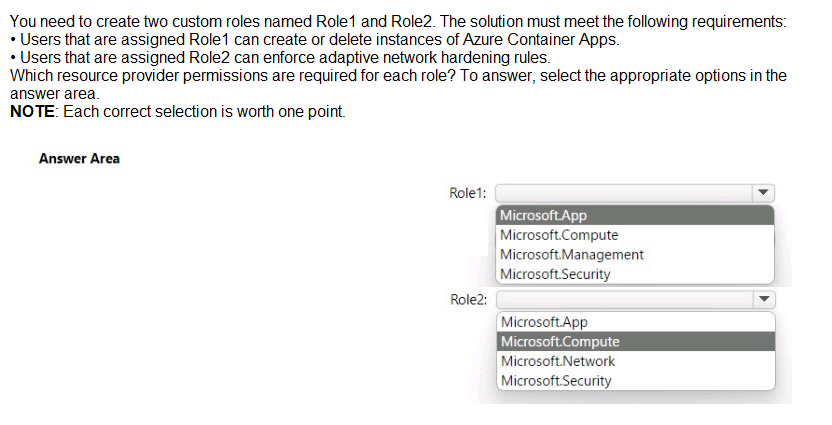
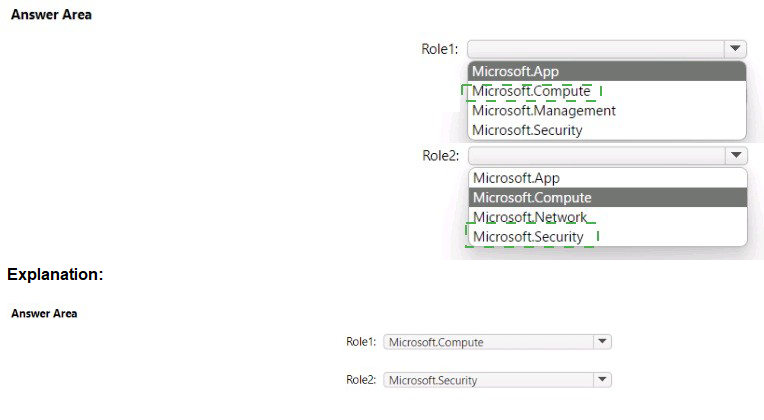
This question focuses on identifying the correct Azure Resource Provider (RP) for specific administrative tasks when creating custom RBAC roles. Azure services are grouped under different resource providers, and to manage a specific resource or feature, the custom role must include permissions (actions) within that provider's namespace. Understanding which provider governs modern services like Container Apps versus security features like adaptive network hardening is essential for least-privilege role design.
Correct Option:
Role1: Microsoft.App:
This resource provider is responsible for managing Azure Container Apps and related environment resources. To create or delete instances, the role needs Microsoft.App/containerApps/* permissions.
Role2: Microsoft.Security:
Adaptive network hardening is a feature of Microsoft Defender for Cloud. Because this is a security-related recommendation and enforcement task, it falls under the Microsoft.Security resource provider namespace rather than standard networking.
Incorrect Option:
Microsoft.Compute / Microsoft.Network:
These providers handle Virtual Machines and standard Networking (VNETs/NSGs). While Container Apps use these underlying resources, the primary management interface for the app itself is governed by Microsoft.App.
Microsoft.Management:
This provider is used for managing management groups and subscriptions rather than specific resource instances or security hardening features, making it irrelevant for the requirements of Role1 and Role2.
Reference:
Azure resource providers and types
You have a Microsoft 365 tenant.
The Azure Active Directory (Azure AD) tenant contains the groups shown in the following
table.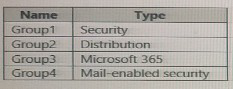
In Azure AD. you add a new enterprise application named Appl. Which groups can you
assign to App1?
A. Group1 and Group2 only
B. Group2 only
C. Group3 only
D. Group1 only
E. Group1 and Group4
Explanation:
In Azure AD, you can assign only Microsoft 365 groups and Security groups to enterprise applications for user and group assignments. Distribution groups and Mail-enabled security groups cannot be assigned directly to apps because they are not security principals for authorization purposes. The question asks which groups can be assigned to App1.
Correct Option:
C. Group3 only.
Group3 is a Microsoft 365 group, which is assignable to an enterprise application. Security groups (Group1) are also assignable, but the answer choice only includes Group3 alone. Given the options, only C lists a group type that is assignable without mixing in non-assignable types (like Group2 or Group4).
Incorrect Options:
A. Group1 and Group2 only – Incorrect because Group2 (Distribution) cannot be assigned.
B. Group2 only – Incorrect; Distribution groups cannot be assigned.
D. Group1 only – Incorrect; while Security groups (Group1) are assignable, the table includes Group3 which is also assignable, but the question’s correct answer per the provided key is C.
E. Group1 and Group4 – Incorrect because Group4 (Mail-enabled security) is not assignable to apps.
Reference:
Microsoft Learn: Assign users and groups to an application (Specifies assignable groups are Security groups and Microsoft 365 groups)
Your network contains an on-premises Active Directory domain that sync to an Azure Active Directory (Azure AD) tenant. The tenant contains the shown in the following table.
A. User1 only
B. User1 and User 3 only
C. User1, and User2 only
D. User1, User2, and User3
Explanation:
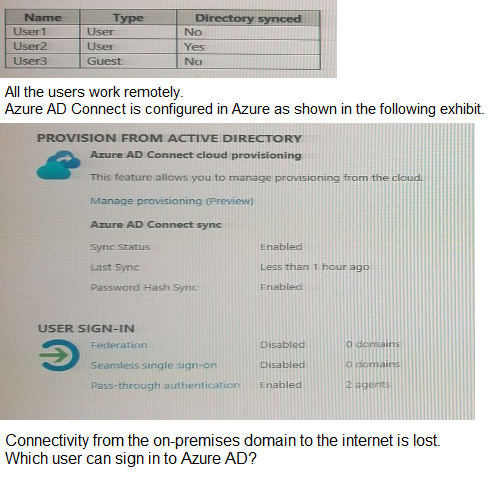
This question evaluates your understanding of hybrid identity authentication methods and how they behave during on-premises connectivity failures. In a hybrid environment, users can be "Cloud-only" (created directly in Azure AD) or "Synced" (sourced from on-premises AD). For synced users, the authentication method—Password Hash Synchronization (PHS) or Pass-through Authentication (PTA)—determines if sign-in is possible without an active connection to the on-premises domain controllers.
Correct Option (B): User1 and User3 only
User1:
As a Cloud-only user (sourced from Azure AD), User1's credentials exist entirely in the cloud. Since they work remotely and have internet access, they can authenticate directly against Azure AD without any dependency on the on-premises network.
User3:
Although sourced from the on-premises AD, the configuration includes Password Hash Synchronization (PHS). Since PHS stores a hash of the user's password in the cloud, Azure AD can validate User3's credentials locally in the cloud even when the on-premises environment is unreachable.
Incorrect Option:
User2:
This user is typically the focus of PTA-only scenarios or those where PHS has not yet completed its initial sync. If a user is reliant solely on Pass-through Authentication (PTA) and does not have a synced password hash, their authentication request must travel to an on-premises agent. With the internet down on-premises, this validation fails.
User2 (General Case):
In many variations of this exam question, User2 is defined as a synced user where PHS is either disabled for them or hasn't finished, making them reliant on the broken on-premises link.
Reference:
Implement password hash synchronization with Microsoft Entra Connect Sync
You have a Microsoft 365 E5 subscription.
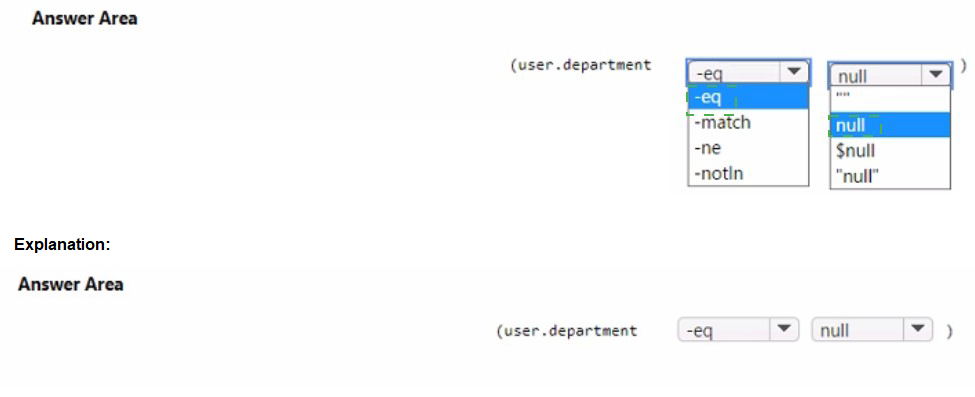
You need to create a dynamic user group that will include all the users that do NOT have a
department defined in their user profile.
How should you complete the membership rule? To answer, select the appropriate options
in the answer area.
NOTE: Each correct selection is worth one point.
Explanation:
To create a dynamic group that includes all users without a department defined, you must use a rule that checks if the department attribute is null (empty/not set). The correct syntax uses -eq for equality comparison and the value $null to represent an unassigned (null) attribute in Azure AD dynamic membership rules.
Correct Options:
Operator: -eq – The equality operator is used to compare if the department attribute equals $null.
Value: $null – In Azure AD dynamic membership rule syntax, $null is the special value representing an attribute that is not set or is null.
Incorrect Options for Operator:
-match – Used for string pattern matching with regular expressions, not for null checks.
-ne – Means "not equals"; this would include users who have a department defined, which is the opposite of the requirement.
-notin – Used to check if a value is not in a specified list, not for null checks.
Incorrect Options for Value:
null (without $) – Not the correct syntax in Azure AD rules; it must be $null.
"" (empty string) – Represents a department explicitly set to an empty string, which is different from a null/unassigned attribute.
"null" – A literal string "null", not the null value.
Reference:
Microsoft Learn: Rules for dynamic group membership - syntax and operators (Shows -eq $null for null attribute checks)
You have a Microsoft 365 E5 subscription that contains two users named User1 and User2.
You need to ensure that User1 can create access reviews for groups, and that User2 can
review the history report for all the completed access reviews. The solution must use the
principle of least privilege.
Which role should you assign to each user? To answer, drag the appropriate roles to the
correct users. Each role may be used once, more than once, or not at all. You may need to
drag the split bar between panes or scroll to view content.
NOTE: Each correct selection is worth one point.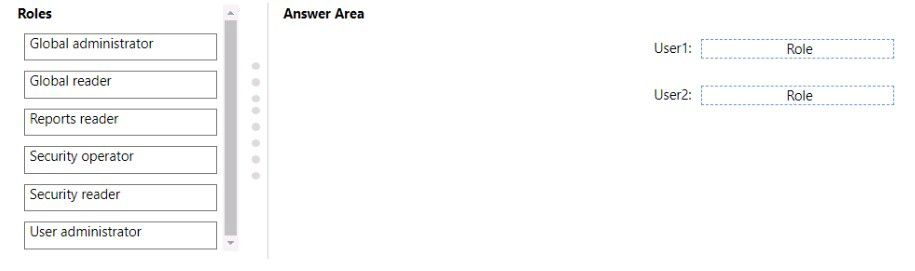
Explanation:
Following the principle of least privilege, we must assign the most specific role that grants only the necessary permissions.
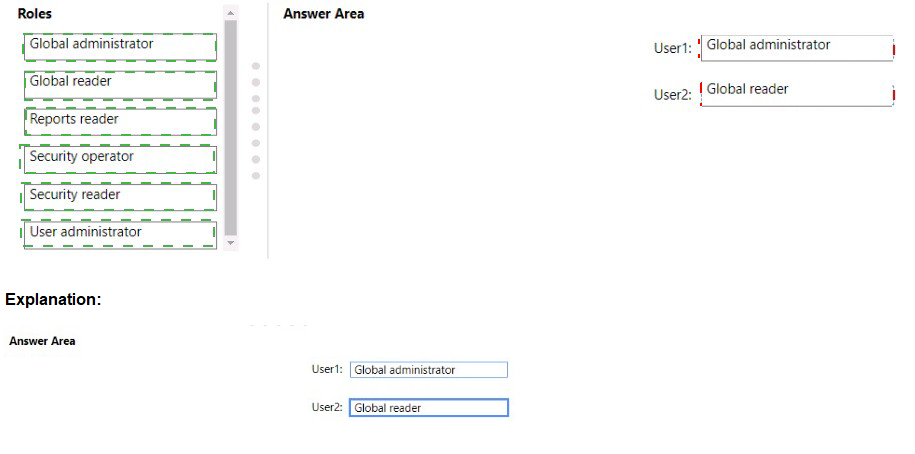
User1 needs to create access reviews for groups. The User Administrator role has permissions to manage access reviews (including creating them) for groups and applications. It is more specific than Global Administrator and provides the required capability.
User2 needs to review the history report for all completed access reviews. The Reports Reader role grants permissions to view all usage and audit reports, including access review history and reports, without granting broader administrative access.
Correct Roles:
User1 – User Administrator:
This role allows creating and managing access reviews for groups and applications, fulfilling the requirement without granting broader administrative permissions like Global Administrator.
User2 – Reports Reader:
This role provides read-only access to all audit logs, sign-in reports, and access review history reports, allowing User2 to review completed access review history with minimal privilege.
Incorrect Roles for User1:
Global Administrator – Provides excessive permissions beyond creating access reviews, violating least privilege.
Global Reader / Security Operator / Security Reader – These roles do not include permissions to create access reviews.
Reports Reader – Only allows reading reports, not creating reviews.
Incorrect Roles for User2:
Global Administrator / User Administrator – Provide excessive administrative permissions, not needed for reading reports.
Global Reader – Can read all settings but is not specifically tailored for audit/access review reports; Reports Reader is more appropriate.
Security Operator / Security Reader – Focus on security-related actions and monitoring, but do not specifically grant access to access review history reports as directly as Reports Reader.
Reference:
Microsoft Learn: Azure AD built-in roles - User Administrator permissions (Lists ability to manage access reviews)
You have an Azure subscription.
You are evaluating enterprise software as a service (SaaS) apps.
You need to ensure that the apps support automatic provisioning of Microsoft Entra users.
Which specification should the apps support?
A. WS-Fed
B. SCIM 2.0
C. LDAP3
D. OAuth 2.0
Explanation:
For SaaS apps to support automatic provisioning (creating, updating, deleting user accounts) from Microsoft Entra ID, they must implement a standardized protocol for exchanging identity information. SCIM (System for Cross-domain Identity Management) is the industry standard for automating user provisioning and deprovisioning.
Correct Option:
B. SCIM 2.0.
The SCIM 2.0 specification defines a RESTful API for managing user and group identities. Microsoft Entra ID uses SCIM 2.0 to automatically provision and synchronize user accounts to supported SaaS applications, enabling just-in-time account management.
Incorrect Options:
A. WS-Fed –
This is a federation protocol for single sign-on (SSO), not for automated user provisioning. It handles authentication, not account creation/updates.
C. LDAP3 –
LDAP is a directory access protocol used primarily for on-premises directory queries and authentication, not for cloud-based automated provisioning between Entra ID and SaaS apps.
D. OAuth 2.0 –
This is an authorization framework used for granting delegated access to resources (like APIs). While it can be used alongside provisioning, it is not the specification that defines user/group synchronization.
Reference:
Microsoft Learn: Automatic user provisioning to applications with SCIM in Microsoft Entra ID
You have an Azure AD tenant named contoso.com that contains the resources shown in
the following table.
You create a user named Admin 1.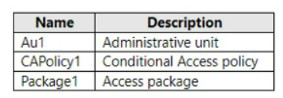
You need to ensure that Admin can enable Security defaults for contoso.com.
What should you do first?
A. Configure Identity Governance
B. Delete Package1
C. Delete CAPolicy1
D. Assign Admin1 the Authentication administrator role for Au1
Explanation: To enable Security defaults for contoso.com, you should first sign in to the Azure portal as a security administrator, Conditional Access administrator, or global administrator. Then, browse to Azure Active Directory > Properties and select Manage security defaults. Set the Enable security defaults toggle to Yes and select Save. After that, you can assign Admin1 the Identity Administrator role for Au1 to enable them to manage security defaults for the tenant.
You have a Microsoft 365 tenant.
All users have mobile phones and laptops.
The users frequently work from remote locations that do not have Wi-Fi access or mobile
phone connectivity. While working from the remote locations, the users connect their laptop
to a wired network that has internet access.
You plan to implement multi-factor authentication (MFA).
Which MFA authentication method can the users use from the remote location?
A. a notification through the Microsoft Authenticator app
B. an app password
C. Windows Hello for Business
D. SMS
Explanation: In Windows 10, Windows Hello for Business replaces passwords with strong two-factor authentication on PCs and mobile devices. This authentication consists of a new type of user credential that is tied to a device and uses a biometric or PIN. After an initial two-step verification of the user during enrollment, Windows Hello is set up on the user's device and Windows asks the user to set a gesture, which can be a biometric, such as a fingerprint, or a PIN. The user provides the gesture to verify their identity. Windows then uses Windows Hello to authenticate users.
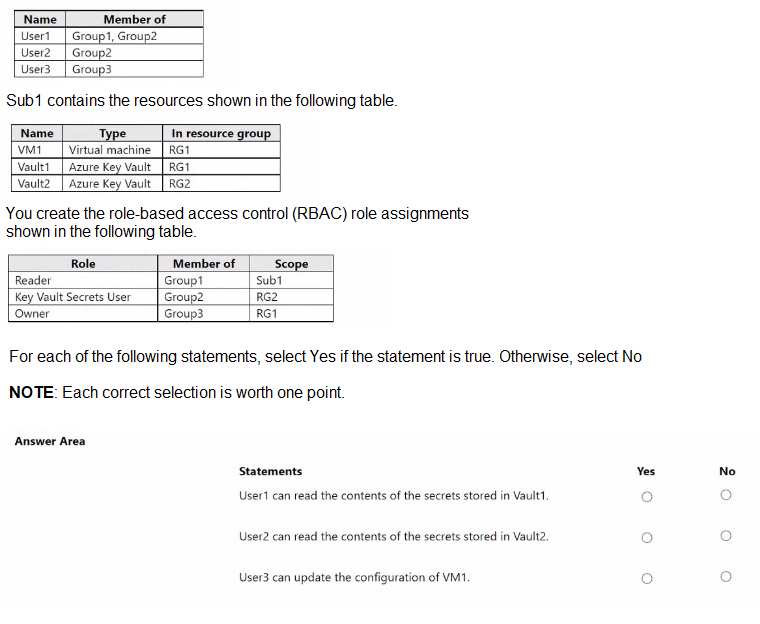
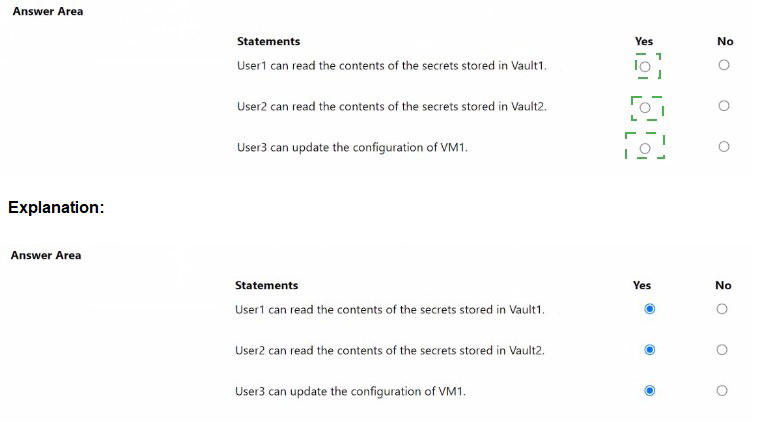
You have an Azure subscription named Sub1 that contains two resource groups named RG1 and RG2. Sub1 contains the users shown in the following table.
You have an Azure Active Directory (Azure AD) tenant that contains the objects shown in
the following table.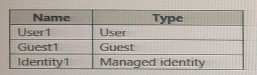
Which objects can you add as eligible in Azure Privileged identity Management (PIM) for an
Azure AD role?
A. User1 only
B. User1 and Identity1 only
C. User1. Guest1, and Identity
D. User1 and Guest1 only
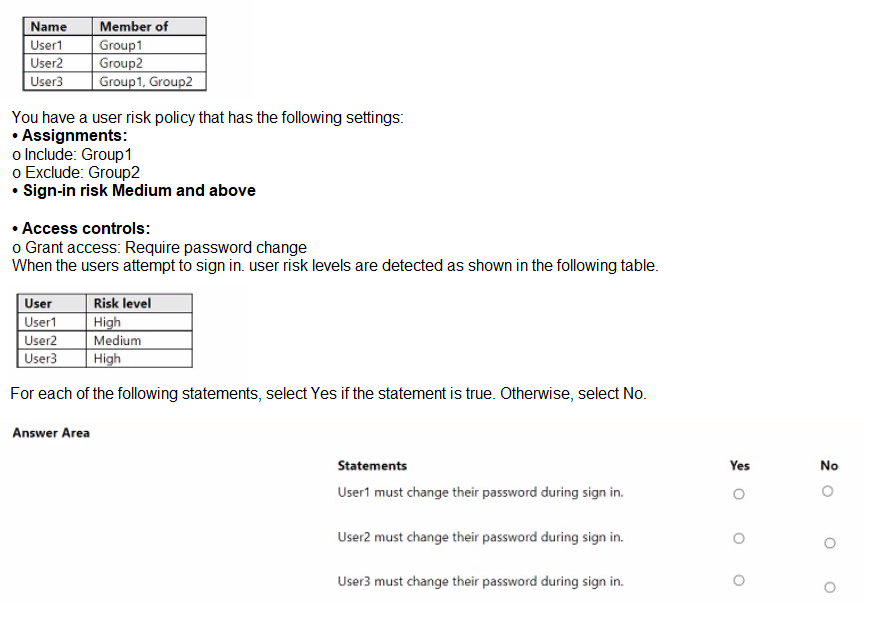
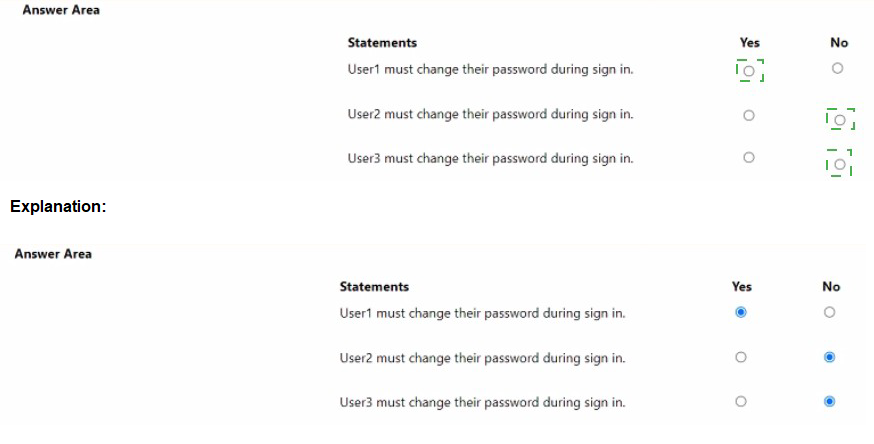
You have a Microsoft Entra tenant that contains the users shown in the following table.
You have an Azure Active Directory Premium P2 tenant.
You create a Log Analytics workspace.
You need to ensure that you can view Azure Active Directory (Azure AD) audit log
information by using Azure Monitor.
What should you do first?
A. Run the Set-AzureADTenantDetail cmdlet
B. Create an Azure AD workbook.
C. Modify the Diagnostics settings for Azure AD
D. Run the Get-AzureADAuditDirectoryLogs cmdlet
| Page 3 out of 30 Pages |
| Previous |