
Topic 4: Misc. Questions
You have an Azure Active Directory (Azure AD) tenant named contoso.com.
You implement entitlement management to provide resource access to users at a company
named Fabrikam, Inc. Fabrikam uses a domain named fabrikam.com.
Fabrikam users must be removed automatically from the tenant when access is no longer
required.
You need to configure the following settings:
Block external user from signing in to this directory: No
Remove external user: Yes
Number of days before removing external user from this directory: 90
What should you configure on the Identity Governance blade?
A. Access packages
B. Entitlement management settings
C. Terms of use
D. Access reviews setting
Explanation:
The settings you need to configure ("Remove external user," "Number of days before removing...") are global settings that govern the behavior for all external users who are invited to your tenant via Azure AD Entitlement Management.
Here is the exact path and purpose:
1.Navigate to:
Azure AD portal > Identity Governance > Entitlement management.
2.Locate the Settings:
On the Entitlement management overview blade, select Settings.
3.Configure the Lifecycle:
In the settings, you will find the options for managing the lifecycle of external users:
Block external users from signing in to this directory: Set this to No to allow them to sign in while they have active assignments.
Remove external user:
Set this to Yes to enable automatic cleanup.
Number of days before removing external user from this directory: Set this to 90. This timer starts when the user's last access package assignment expires.
This configuration ensures that Fabrikam users are automatically removed from your contoso.com tenant 90 days after they no longer have any active resource assignments, which meets the requirement for automatic removal.
Why the Other Options Are Not Correct
A. Access packages:
While access packages are the mechanism through which Fabrikam users get access, the configuration for automatically removing them after they lose all access is a tenant-wide setting for Entitlement Management. You configure this global behavior in the Entitlement Management settings, not within an individual access package.
C. Terms of use:
This feature is for presenting legal or compliance documents that users must accept before gaining access to resources. It has no functionality related to the automatic removal of external users from the directory.
D. Access reviews setting:
Access reviews are used to periodically certify if users still need access. While an access review can be configured to remove users, it is a manual or semi-automated review process, not an automatic, time-based removal policy based on assignment expiration. The question describes an automatic process, not a periodic review.
Reference:
Microsoft Learn: Configure entitlement management settings for external users
This document explicitly outlines these settings: "For external users who accepted an access package assignment invitation but then had all their assignments removed, you can specify whether to block their sign-in to this directory and when to remove their user account from this directory."
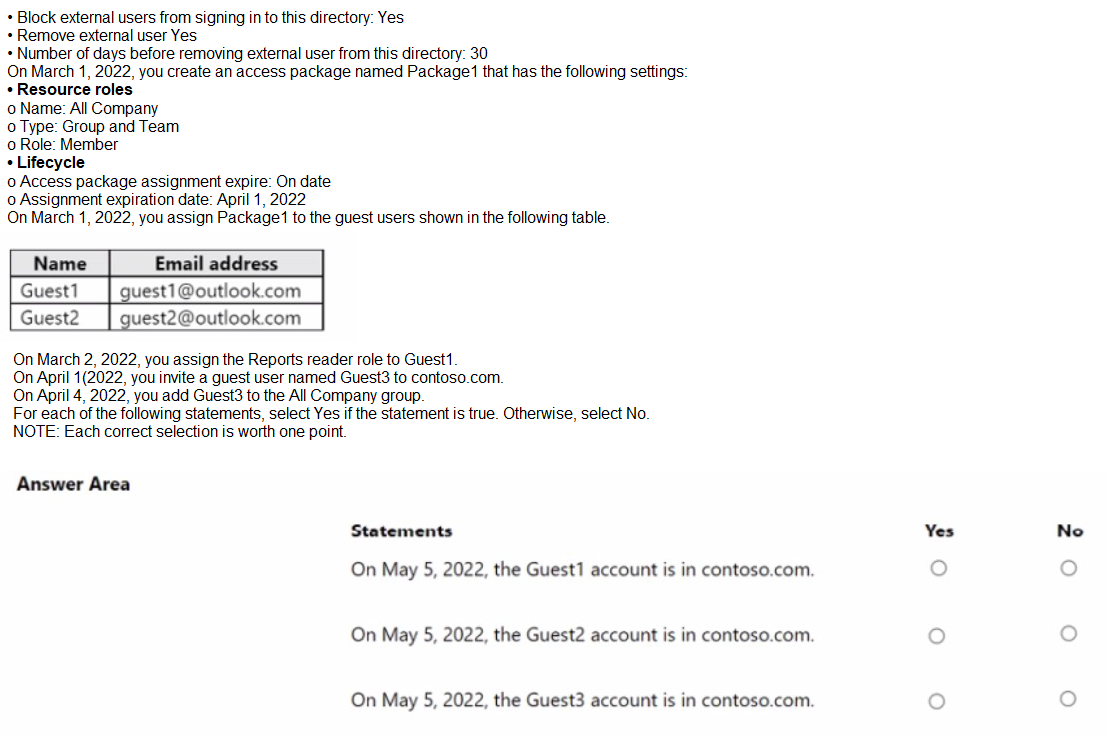
You have an Azure AD tenant named contoso.com that contains a group named All Company and has the following Identity Governance settings:
Explanation:
This SC-300 exam question involves understanding Azure AD Identity Governance settings, access package assignments, and the lifecycle management of guest users in a tenant named contoso.com. Let’s analyze the scenario step by step:
Scenario Details:
Azure AD Settings:
Block external users from signing in to this directory: Yes
Remove external user: Yes
Number of days before removing external user from this directory: 30
These settings mean that external users (e.g., guest users) are blocked from signing in, and if they are removed or their access expires, they will be deleted from the tenant after 30 days.
Access Package (Package1) Settings:
Name: All Company
Type: Group and Team
Role: Member
Access package assignment expire: On date
Assignment expiration date: April 1, 2022
Package1 grants membership to the "All Company" group and team, with access expiring on April 1, 2022.
Guest User Assignments:
On March 1, 2022, Package1 is assigned to Guest1 (guest1@outlook.com), Guest2
(guest2@outlook.com), and Guest3 (not yet invited).
On March 2, 2022, the Reports reader role is assigned to Guest1.
On April 1, 2022, Guest3 is invited to contoso.com.
On April 4, 2022, Guest3 is added to the All Company group.
Evaluation Date: The question asks about the status of guest accounts on May 5, 2022.
Analysis:
Guest1 and Guest2:
Both Guest1 and Guest2 were assigned Package1 on March 1, 2022, with an expiration date of April 1, 2022.
Since the access package assignment expires on April 1, 2022, their membership in the "All Company" group and team would end on that date.
The setting "Remove external user" is enabled with a 30-day grace period. After April 1, 2022, Guest1 and Guest2 are no longer active users, and they would be removed from the tenant 30 days later, i.e., by May 1, 2022.
On May 5, 2022 (4 days after the removal deadline), Guest1 and Guest2 are no longer in the contoso.com tenant because they have been deleted due to the expiration and removal policy.
The additional assignment of the Reports reader role to Guest1 on March 2, 2022, does not extend the access package expiration and is also subject to the same removal policy after expiration.
Guest3:
Guest3 was invited on April 1, 2022, and added to the All Company group on April 4, 2022.
However, the question does not specify that Guest3 was assigned Package1 or any access package with an expiration date.
Since Guest3 is a guest user added to a group manually (or via a separate process) and no expiration is mentioned, the user remains active in the tenant unless manually removed.
The setting "Block external users from signing in" applies to new sign-ins, but Guest3’s existing presence in the tenant (added on April 4) is not affected unless their account is revoked.
On May 5, 2022, Guest3 is still in the contoso.com tenant because no expiration or removal trigger applies to this user based on the provided information.
Conclusion:
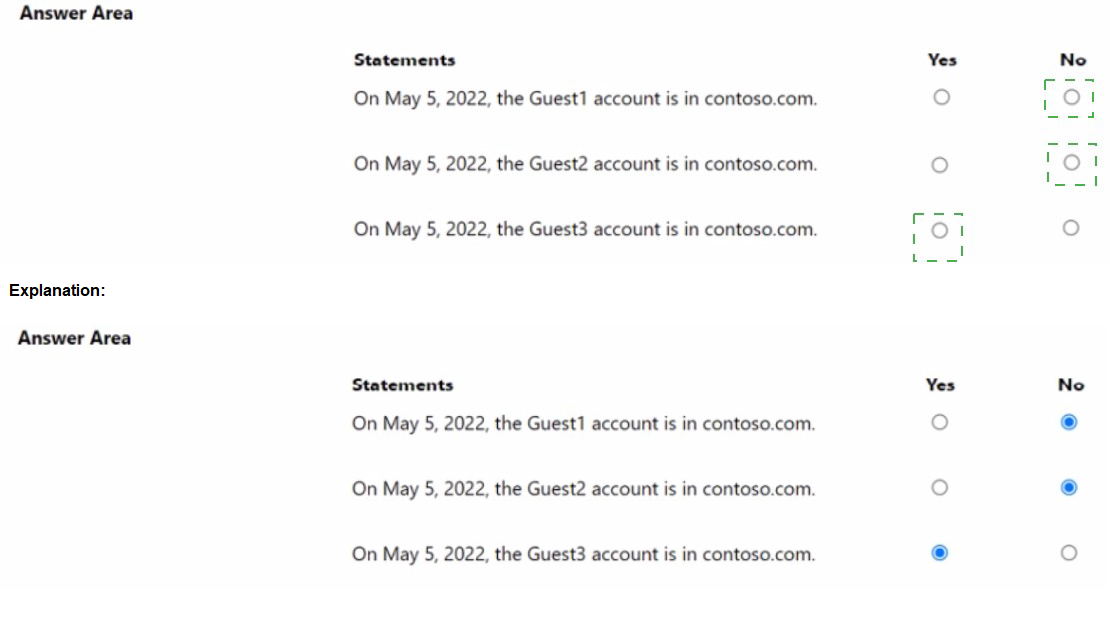
On May 5, 2022, the Guest1 account is in contoso.com: No (removed after 30 days from April 1, 2022, expiration).
On May 5, 2022, the Guest2 account is in contoso.com: No (removed after 30 days from April 1, 2022, expiration).
On May 5, 2022, the Guest3 account is in contoso.com: Yes (no expiration or removal triggered).
References:
Microsoft Documentation: Manage guest access with Azure AD access reviews
Microsoft Documentation: Configure external collaboration settings
Microsoft Learn: Govern access with Microsoft Entra ID
You have an Azure Active Directory (Azure AD) tenant that contains three users named
User1, User1, and User3.
You create a group named Group1. You add User2 and User3 to Group1.
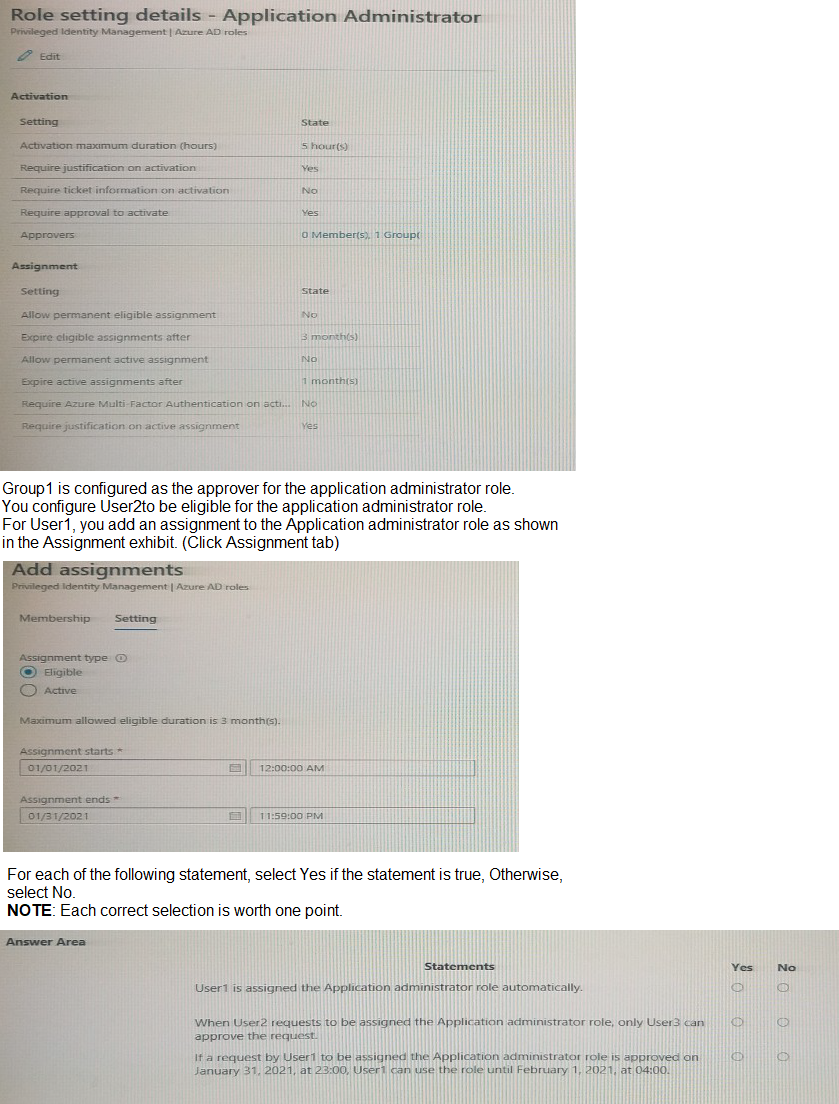
You configure a role in Azure AD Privileged identity Management (PIM) as shown in the
application administrator exhibit. (Click the application Administrator tab.)
Explanation:
Role Settings Overview
From the exhibit:
Activation maximum duration: 5 hours
Require approval to activate: Yes
Approvers: Group1 (contains User2 and User3)
Assignment duration: 1 month
Eligible assignment maximum duration: 3 months
You configured:
User2 → Eligible for the role (requires activation + approval).
User1 → Assigned directly (active assignment from Jan 1–Jan 31).
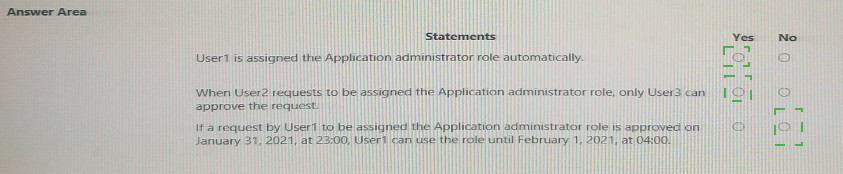
Statement 1:
User1 is assigned the Application Administrator role automatically.
✅ Yes
User1 has an active assignment from Jan 1, 2021, to Jan 31, 2021, so the role is automatically assigned and active during that period — no activation or approval needed.
Statement 2:
When User2 requests to be assigned the Application Administrator role, only User3 can approve the request.
✅ Yes
Approvers are members of Group1, which contains User2 and User3.
A user cannot approve their own request, so User3 is the only valid approver for User2’s activation request.
Statement 3:
If a request by User1 to be assigned the Application Administrator role is approved on January 31, 2021, at 23:00, User1 can use the role until February 1, 2021, at 04:00.
✅ Yes
The activation duration is 5 hours.
If approved at 23:00 on Jan 31, the role remains active until 04:00 on Feb 1.
This matches the configured activation maximum duration (5 hours).
Reference:
Microsoft Learn – Configure Azure AD roles in Privileged Identity Management
Microsoft Learn – Approve or deny requests for Azure AD roles in PIM
You have an Azure subscription named Sub1 that contains a resource group named RG1.
RG1 contains an Azure Cosmos DB database named DB1 and an Azure Kubernetes
Service (AKS) cluster named AKS1. AKS1 uses a managed identity.
You need to ensure that AKS1 can access DB1. The solution must meet the following
requirements:
• Ensure that AKS1 uses the managed identity to access DB1.
• Follow the principle of least privilege.
Which role should you assign to the managed identity of AKS1.
A. For R61, assign the Azure Cosmos DB Data Reader Role role.
B. For Sub1. assign the Owner role.
C. For RG1, assign the Reader role.
D. For DB1, assign the Azure Cosmos DB Account Reader Role role.
Explanation:
To allow AKS1 to access DB1 using its system-assigned managed identity, and to follow the principle of least privilege, you must assign the Azure Cosmos DB Data Reader Role at the resource group level (RG1). This role allows reading data from containers and documents in Cosmos DB without granting write or administrative permissions. It is specifically designed for applications that need to query Cosmos DB securely.
Assigning the role at the RG1 scope ensures AKS1 can access DB1 without gaining access to other resources outside RG1. This satisfies both requirements: scoped access and minimal privilege.
Why other options are incorrect:
B. For Sub1, assign the Owner role
This grants full control over all resources in the subscription, including the ability to delete resources and assign roles. It violates least privilege and is excessive for a read-only data access requirement.
C. For RG1, assign the Reader role
The Reader role allows viewing resource metadata (e.g., configuration, tags), but it does not permit reading actual data from Cosmos DB. It’s insufficient for application-level data access.
D. For DB1, assign the Azure Cosmos DB Account Reader Role
This role allows reading account-level metadata such as connection strings and keys, but does not allow reading the contents of the database. It’s useful for diagnostics or monitoring, not for accessing data.
🔗 References:
Microsoft Learn: Built-in roles for Azure Cosmos DB
Microsoft Learn: Use managed identity with AKS
Microsoft Learn: Azure RBAC for Cosmos DB
You have an Azure AD tenant that contains the users shown in The following table.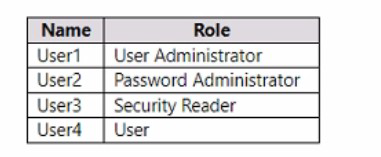
You enable self-service password reset (SSPR) for all the users and configure SSPR to
require security questions as the only authentication method.
Which users must use security questions when resetting their password?
A. User4 only
B. User3and User4only
C. User1 and User4only
D. User1, User3, and User4 only
E. User1, User2, User3. and User4
Explanation:
In Azure AD, certain highly privileged administrative roles are exempt from SSPR policies by default. This is a critical security feature to prevent an attacker who has compromised a powerful account from being able to change its password and lock out legitimate administrators.
The roles that are exempt from SSPR are:
Global Administrator
User Administrator
Helpdesk Administrator
Password Administrator
Authentication Administrator
Privileged Role Administrator
Analysis of the Users:
User1 (User Administrator): This role is exempt from SSPR. User1 cannot use SSPR and must have their password reset by another administrator.
User2 (Password Administrator): This role is exempt from SSPR. User2 cannot use SSPR and must have their password reset by another administrator.
User3 (Security Reader): This is a read-only role. It is not one of the exempt roles. Therefore, User3 is subject to the SSPR policy.
User4 (User): This standard, non-admin user is subject to the SSPR policy.
Conclusion:
Only the users who are not exempt from the SSPR policy will be required to use the configured authentication method (security questions) when they attempt to reset their password.
User1 and User2 are exempt and cannot use SSPR at all.
User3 and User4 are subject to the policy.
However, the question asks "Which users must use security questions when resetting their password?" Since User3 is a Security Reader, they are subject to the policy, but the question is about who is forced to use it. The key point is that non-admin users (User4) and non-exempt admins (User3) must use the configured method if they use SSPR. But looking at the options, the one that correctly identifies that the exempt admins (User1, User2) are NOT using SSPR, and the non-exempt users (User3, User4) are, is A. User4 only? Let's double-check.
Wait, let's re-analyze. The Security Reader role (User3) is NOT exempt. Therefore, both User3 and User4 must use security questions. The correct answer should be User3 and User4 only.
Let me verify the official list. The exempt roles are: Global Administrator, User Administrator, Privileged Role Administrator, Authentication Administrator, and Helpdesk Administrator. Password Administrator is also exempt.
Security Reader is NOT exempt.
Therefore, the users who must use security questions are the non-exempt users: User3 and User4.
Final Correct Answer: B. User3 and User4 only
Why the Other Options Are Incorrect
A. User4 only: Incorrect, because User3 (Security Reader) is not an exempt role and must also use SSPR.
C. User1 and User4 only:
Incorrect, because User1 (User Administrator) is exempt and does not use SSPR.
D. User1, User3, and User4 only:
Incorrect, because User1 is exempt.
E. User1, User2, User3, and User4:
Incorrect, because User1 and User2 are exempt.
Reference
Microsoft Learn: How it works:
Azure AD self-service password reset - Administrator reset policy
This document explicitly states: "A strong default two-gate password reset policy is enabled for any of the following Azure AD administrator roles: Global Administrator, User Administrator, Privileged Role Administrator, Authentication Administrator, and Helpdesk Administrator... These administrators can't use security questions as a method to reset their password."
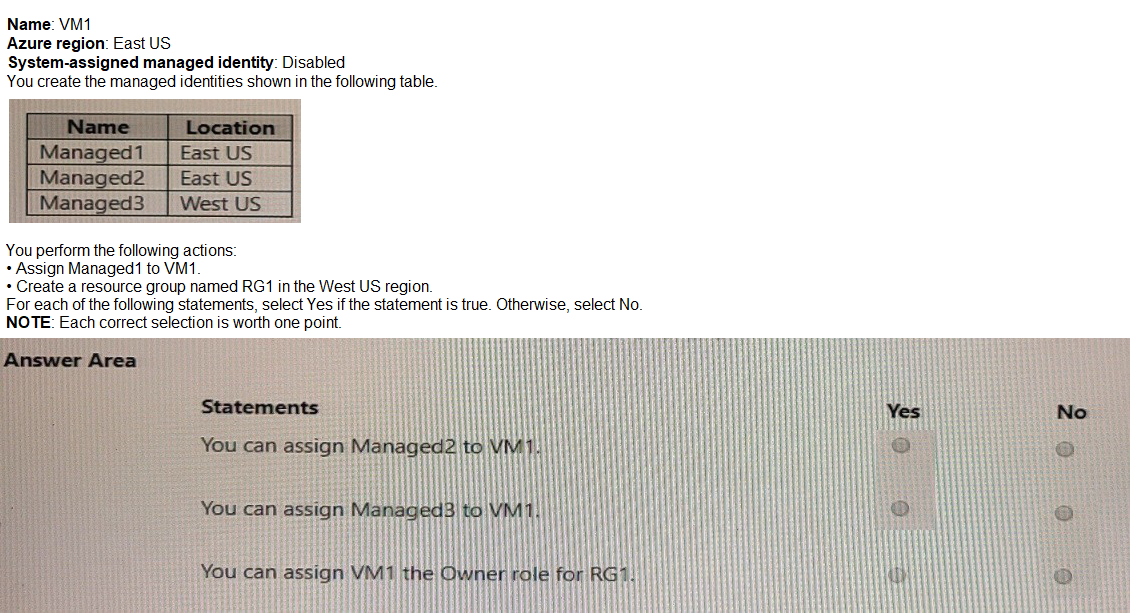
You have an Azure subscription that contains the following virtual machine.
Explanation:
Analysis of Each Statement
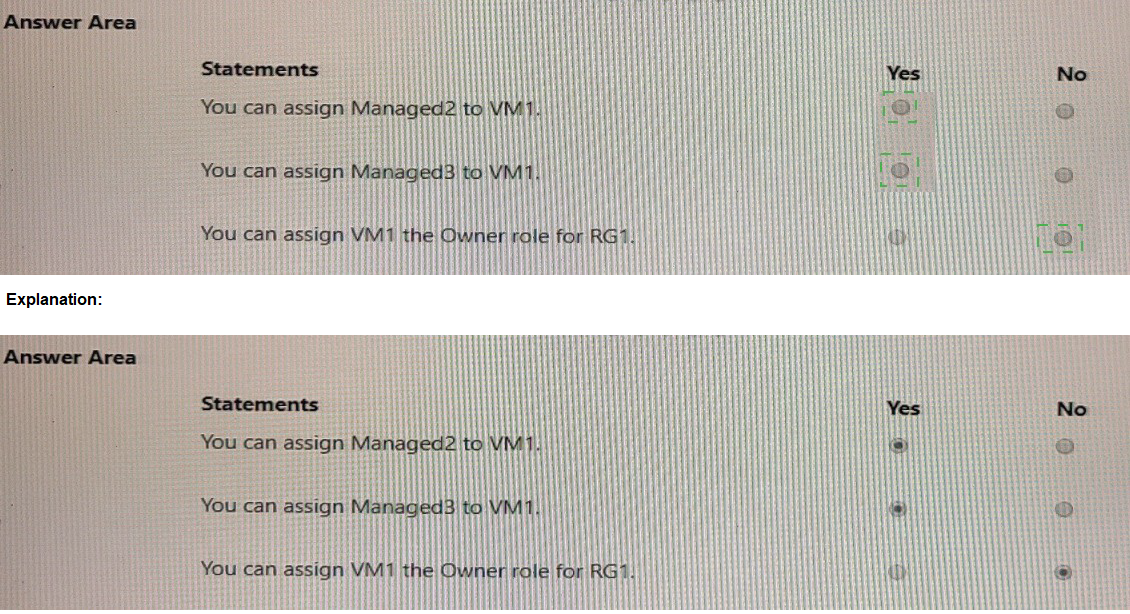
Statement 1: You can assign Managed2 to VM1.
Explanation: VM1 already has Managed1 assigned. An Azure resource (like a VM) can have multiple User-Assigned Managed Identities assigned to it simultaneously. There is a limit (currently over 20), but we are well within that limit. Therefore, assigning Managed2 to VM1 is allowed.
Answer: Yes
Statement 2: You can assign Managed3 to VM1.
Explanation: As established, the region of a User-Assigned Managed Identity does not prevent it from being assigned to a resource in another region. Managed3 is in West US, and VM1 is in East US. This is a supported configuration.
Answer: Yes
Statement 3: You can assign VM1 the Owner role for RG1.
Explanation: This statement is subtly incorrect in its phrasing. You do not assign a role to the VM (VM1); you assign a role to its managed identity.
VM1 has a system-assigned managed identity which is Disabled. Therefore, it has no system-assigned identity to which a role can be granted.
VM1 does have Managed1 assigned, which is a user-assigned identity. You can assign the Owner role for RG1 to the Managed1 identity. This would effectively give VM1 (when using that identity) Owner permissions on RG1.
However, the statement says "assign VM1 the Owner role," which is technically not how it works. The role is assigned to the identity principal. Since the system-assigned identity is off and the statement doesn't specify using the user-assigned identity, the most accurate interpretation is that the statement as written is false.
Answer: No
Reference
Microsoft Learn: How to use user-assigned managed identities
This document confirms that a single resource can have multiple user-assigned identities and that there are no regional restrictions for assignment.
You have a Microsoft 365 tenant.
All users have mobile phones and laptops.
The users frequently work from remote locations that do not have Wi-Fi access or mobile
phone connectivity. While working from the remote locations, the users connect their laptop
to a wired network that has internet access.
You plan to implement multi-factor authentication (MFA).
Which MFA authentication method can the users use from the remote location?
A. a notification through the Microsoft Authenticator app
B. email
C. security questions
D. a verification code from the Microsoft Authenticator app
Explanation:
To support users working remotely without Wi-Fi or mobile connectivity, the only viable multi-factor authentication (MFA) method is a verification code from the Microsoft Authenticator app. This method uses time-based one-time passwords (TOTP) generated locally on the device. It does not require internet or cellular service, making it ideal for offline environments where users connect via wired networks.
The Authenticator app continuously generates 6-digit codes that refresh every 30 seconds. During sign-in, users enter this code as their second factor. This satisfies MFA requirements without relying on push notifications, calls, or mobile data.
Why other options are incorrect:
A. Notification through the Microsoft Authenticator app
This method requires internet or mobile connectivity to receive push notifications. In remote locations without Wi-Fi or mobile signal, users cannot receive these prompts, making this method unusable.
B. Email
Microsoft Entra ID does not support email as a valid second factor for MFA. It lacks the security guarantees required for strong authentication and is not listed among supported MFA methods.
C. Security questions Security
questions are not supported as an MFA method in Microsoft 365. They are considered weak and vulnerable to social engineering, and Microsoft explicitly excludes them from MFA configurations.
🔗 References:
Microsoft Authenticator app overview
Authentication methods in Microsoft Entra ID
Configure MFA settings in Microsoft 365
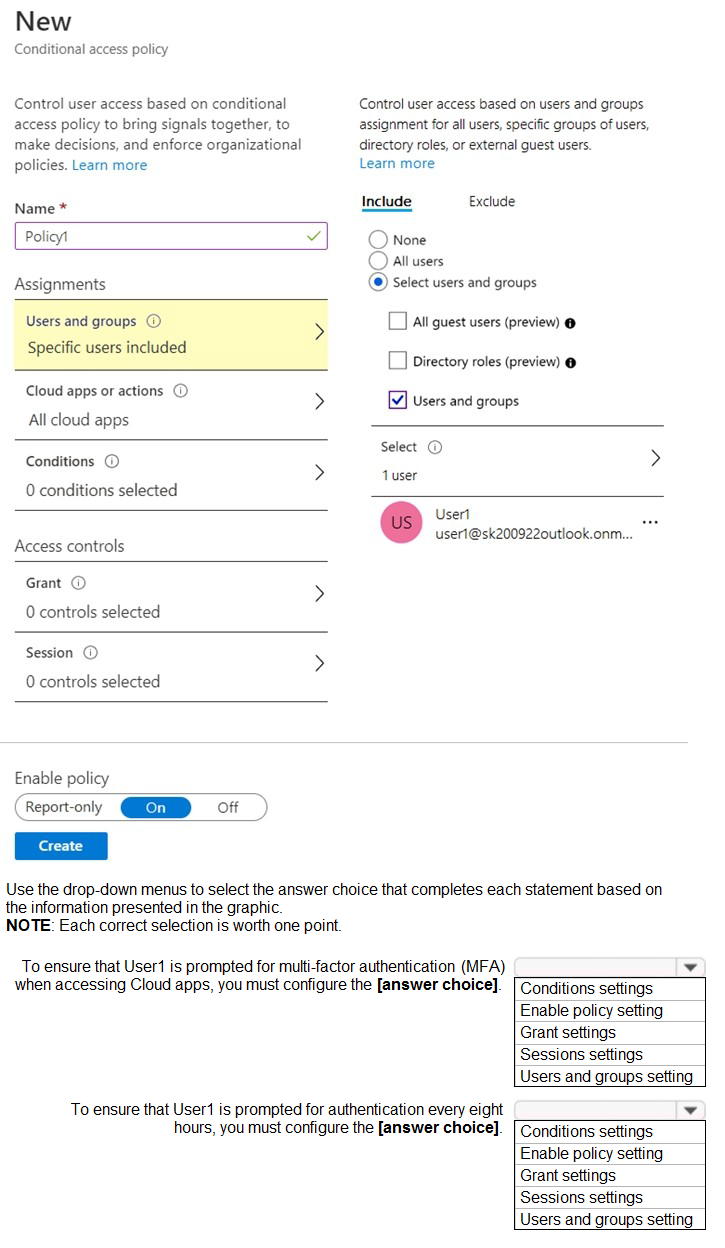
You have an Azure Active Directory (Azure AD) tenant that has Security defaults disabled. You are creating a conditional access policy as shown in the following exhibit.
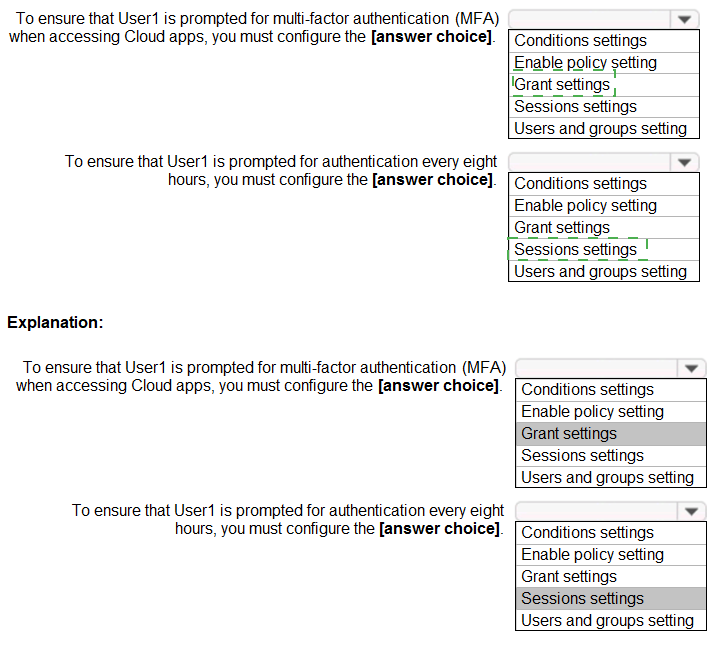
Explanation:
A Conditional Access policy follows an "IF-THEN" logic: IF the assignments and conditions are met, THEN apply these access controls.
First Statement: Prompt for MFA
Explanation: The requirement to perform Multi-Factor Authentication is an access control that grants access only if a specific condition (successful MFA) is met. This is configured in the Grant section of the policy. You would select "Grant access" and then check the box for "Require multi-factor authentication." This is the "THEN" action that forces the MFA prompt.
Second Statement: Prompt every 8 hours
Explanation: The requirement to re-authenticate after a specific time period governs the user's session after they have been initially granted access. This is a Session control. You would configure the Sign-in frequency session control and set the value to 8 hours. This ensures that even if a user has a valid session, they will be forced to re-authenticate (which may include MFA again, depending on other policies) every 8 hours.
Reference
Microsoft Learn: Conditional Access - Grant
Describes how Grant controls are used to block or grant access based on certain requirements, with MFA being a primary example.
Microsoft Learn: Conditional Access - Session controls
Explicitly lists "Sign-in frequency" as a type of session control used to "Define the time period before a user is asked to sign in again when attempting to access a resource."
You have a Microsoft 365 tenant.
All users must use the Microsoft Authenticator app for multi-factor authentication (MFA) when accessing Microsoft 365 services.
Some users report that they received an MFA prompt on their Microsoft Authenticator app
without initiating a sign-in request.
You need to block the users automatically when they report an MFA request that they did
not Initiate.
Solution: From the Azure portal, you configure the Account lockout settings for multi-factor
authentication (MFA).
Does this meet the goal?
A. Yes
B. No
Explanation:
The goal is to automatically block users when they report a suspicious, unsolicited MFA prompt (a potential "MFA fatigue" attack). The "Account lockout threshold" setting in the MFA server settings (now legacy) only controls the number of consecutive failed MFA attempts allowed. It does not create an automated process to block a user based on their self-reported fraud notification.
Correct Option:
B. No.
Configuring MFA account lockout settings does not meet the goal. These legacy settings prevent sign-in after repeated MFA failures but do not trigger an automatic block from a user-reported fraud alert. For this specific goal, you should enable and configure Fraud Alert within the Microsoft Authenticator method policies in Azure AD Conditional Access. This feature allows users to report fraud directly from the app notification, which can then be configured to automatically block the user.
Incorrect Option:
A. Yes.
This is incorrect. While a lockout policy is a security control, it is not the correct mechanism to achieve this automated response. The described scenario requires leveraging the dedicated Fraud Alert capability, which creates the necessary link between the user's "Report Fraud" action in the app and an automated administrative action (like blocking).
Reference:
Microsoft Learn: Manage fraud alerts in Microsoft Entra ID
You have two Microsoft Entra tenants named contoso.com and fabrikam.com.
Contoso.com contains the identities shown in the following table.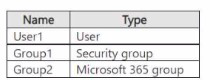
You configure cross-tenant synchronization from contoso.com to fabrikam.com. Which
identities will sync with fabrikam.com?
A. User1 only
B. User1 and Group1 only
C. User 1 and Gtoup2 only
D. User1, Group1, and Group2
Explanation:
Cross-tenant synchronization in Microsoft Entra ID is designed to synchronize user objects only. It does not synchronize groups, even if they are security groups or Microsoft 365 groups. The purpose is to enable B2B collaboration by automating the creation of B2B users in the target tenant, not to replicate groups.
Correct Option:
A. User1 only.
Cross-tenant synchronization provisions only users from the source tenant (contoso.com) to the target tenant (fabrikam.com). Groups of any type are not synced through this feature. User1, being a user object, will be synced.
Incorrect Options:
B. User1 and Group1 only
– Incorrect because Group1 is a security group, and groups are not synchronized via cross-tenant sync.
C. User1 and Group2 only
– Incorrect because Group2 is a Microsoft 365 group, which is also not synchronized by this feature.
D. User1, Group1, and Group2
– Incorrect as it includes groups; only User1 will be synchronized.
Reference:
Microsoft Learn: Cross-tenant synchronization overview (States synchronization is for users, not groups)
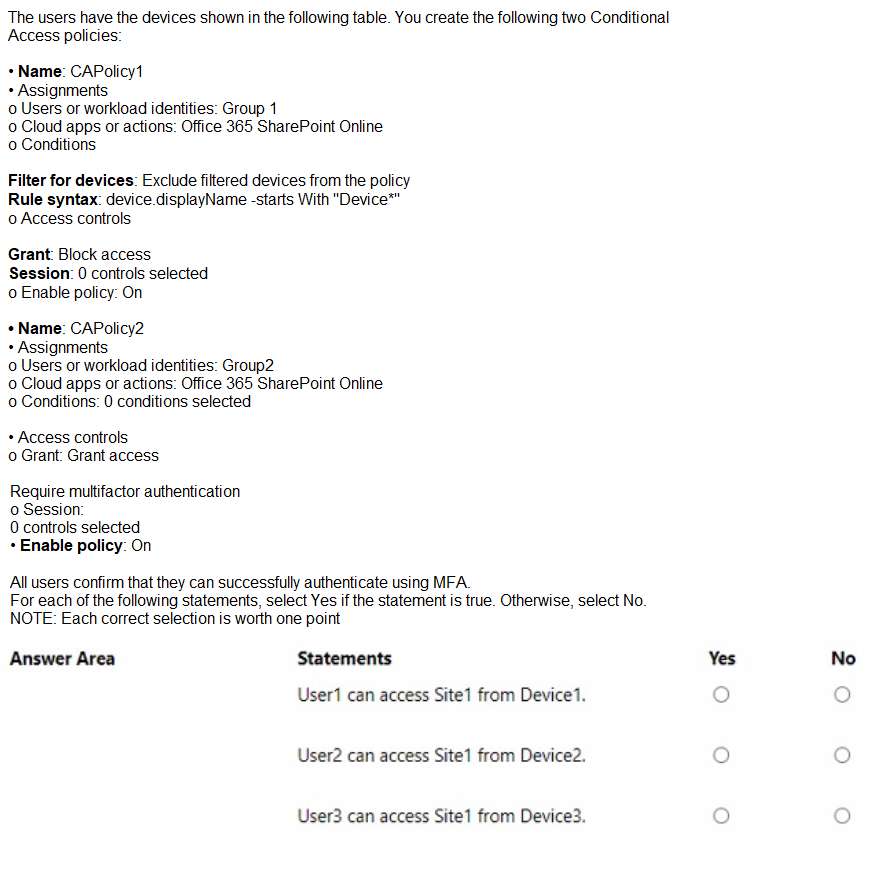
You have a Microsoft 365 E5 subscription that contains a Microsoft SharePoint Online site named Site1 and the users shown in the following table.
Explanation:
This scenario tests your understanding of Microsoft Entra Conditional Access (CA), specifically the Filter for devices condition. When a policy is set to "Exclude" filtered devices, any device matching the rule is bypassed by that specific policy. However, a critical rule in Entra ID is that unregistered devices do not have directory attributes (like displayName) populated during the evaluation. Therefore, if a device is not registered in the directory, it cannot match a "startsWith" filter and will not be excluded, resulting in the "Block" action being applied.
Correct Option:
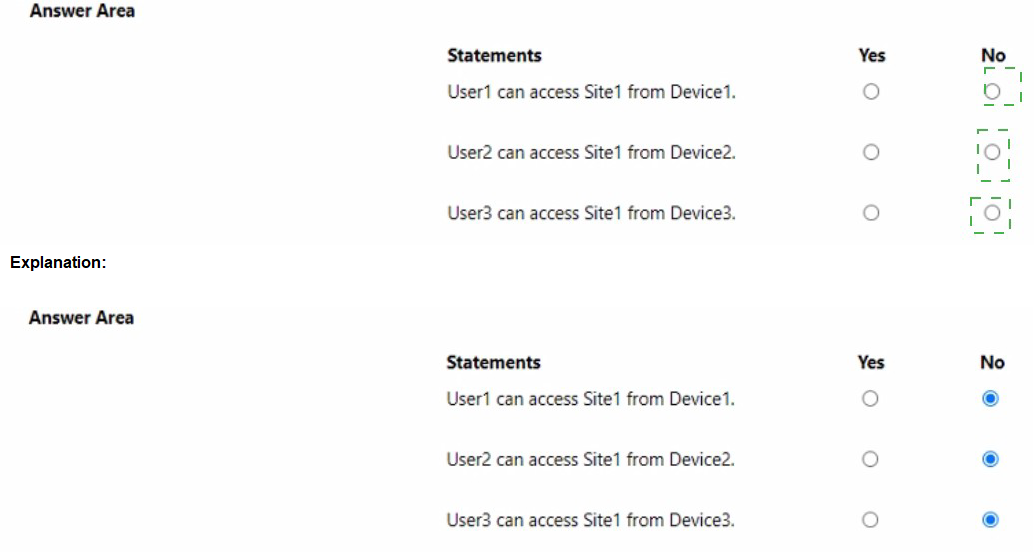
User1 cannot access Site1 from Device1:
Since Device1 is unregistered, the device filter in CAPolicy1 cannot identify its display name. Consequently, Device1 is not excluded from the policy. As a member of Group1, User1 is subject to the "Block access" control.
User2 can access Site1 from Device2:
User2 is only in Group2. CAPolicy1 does not apply to them. CAPolicy2 requires MFA, which User2 can provide, granting them access.
User3 can access Site1 from Device3:
User3 is in both groups. For CAPolicy1, Device3 is joined and its name starts with "Device," so it is successfully excluded (bypassing the block). For CAPolicy2, User3 must perform MFA, which they can do.
Incorrect Option:
User1 can access Site1 from Device1:
This is incorrect because an unregistered device returns a null value for device.displayName. It fails the "Exclude" rule, meaning the "Block" assignment remains active for User1.
User3 is blocked by CAPolicy1:
This is incorrect because Device3 is a registered/joined device. The Entra ID engine can verify its display name, match it to the "Device*" rule, and correctly apply the exclusion, preventing the block.
Reference:
Filter for devices as a condition in Conditional Access policy - Microsoft Entra ID
You have an Azure subscription that contains the resources shown in the following table.
Explanation:
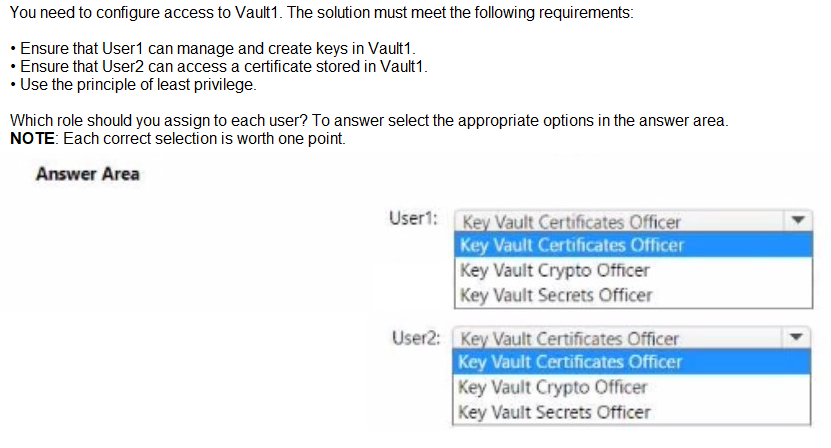
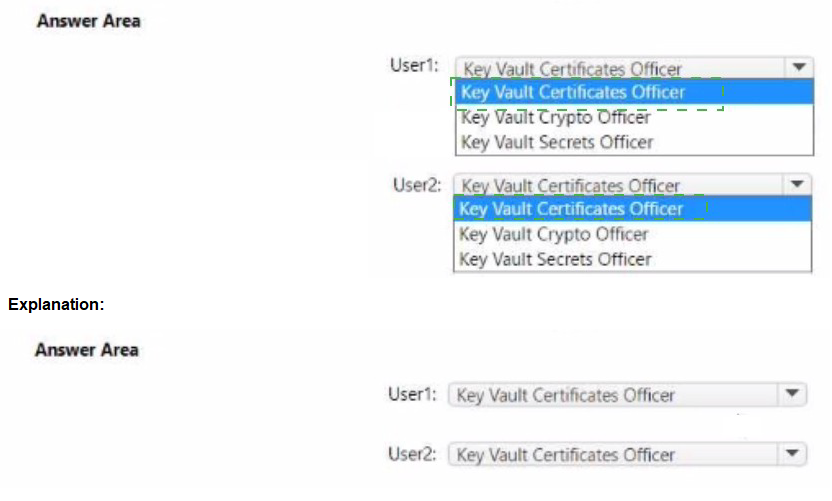
The goal is to assign roles following the principle of least privilege. For User1 to "manage and create keys," the correct role is Key Vault Crypto Officer, which grants full management permissions for keys but not for certificates or secrets. For User2 to "access a certificate," the role needed is Key Vault Certificates Officer, which allows certificate management operations, including get/list.
Correct Options:
User1 – Key Vault Crypto Officer:
This role provides permissions to create, import, update, manage, and delete keys in the vault. It aligns precisely with the requirement to "manage and create keys" without granting unnecessary permissions for certificates or secrets.
User2 – Key Vault Certificates Officer:
This role grants permissions to manage certificates, including get and list operations, allowing User2 to access a stored certificate. It does not grant permissions for keys or secrets, adhering to least privilege.
User1:
Key Vault Certificates Officer / Key Vault Secrets Officer: These roles do not grant permissions for key management. Assigning them would not allow User1 to create or manage keys.
Any role other than Crypto Officer for keys would violate the least privilege principle for the key management task.
User2:
Key Vault Crypto Officer / Key Vault Secrets Officer: These roles are for keys and secrets, respectively, not certificates. Assigning them would grant excessive permissions and fail the "access a certificate" requirement under least privilege.
Reference:
Microsoft Learn: Azure built-in roles for Key Vault
| Page 2 out of 30 Pages |
| Previous |