
Topic 2: Litware, inc. Case Study 2
Overview
Litware, inc. is a financial services company that has main offices in New York and San
Francisco. litware has 30 branch offices and remote employees across the United States.
The remote employees connect to the main offices by using a VPN.
Litware has grown significantly during the last two years due to mergers and acquisitions.
The acquisitions include several companies based in France.
Existing Environment
Litware has an Azure Active Directory (Azure AD) tenant that syncs with an Active
Directory Domain Services (AD D%) forest named Utvvare.com and is linked to 20 Azure
subscriptions. Azure AD Connect is used to implement pass-through authentication.
Password hash synchronization is disabled, and password writeback is enabled. All Litware
users have Microsoft 365 E5 licenses.
The environment also includes several AD DS forests, Azure AD tenants, and hundreds of
Azure subscriptions that belong to the subsidiaries of Litware.
Planned Changes
Litware plans to implement the following changes:
• Create a management group hierarchy for each Azure AD tenant.
• Design a landing zone strategy to refactor the existing Azure environment of Litware and
deploy all future Azure workloads.
• Implement Azure AD Application Proxy to provide secure access to internal applications
that are currently accessed by using the VPN.
Business Requirements
Litware identifies the following business requirements:
• Minimize any additional on-premises infrastructure.
• Minimize the operational costs associated with administrative overhead.
Hybrid Requirements
Litware identifies the following hybrid cloud requirements:
• Enable the management of on-premises resources from Azure, including the following:
• Use Azure Policy for enforcement and compliance evaluation.
• Provide change tracking and asset inventory.
• Implement patch management.
• Provide centralized, cross-tenant subscription management without the overhead of
maintaining guest accounts.
Microsoft Sentinel Requirements
Litware plans to leverage the security information and event management (SIEM) and
security orchestration automated response (SOAK) capabilities of Microsoft Sentinel. The
company wants to centralize Security Operations Center (SOQ by using Microsoft Sentinel.
Identity Requirements
Litware identifies the following identity requirements:
• Detect brute force attacks that directly target AD DS user accounts.
• Implement leaked credential detection in the Azure AD tenant of Litware.
• Prevent AD DS user accounts from being locked out by brute force attacks that target
Azure AD user accounts.
• Implement delegated management of users and groups in the Azure AD tenant of
Litware, including support for.
• The management of group properties, membership, and licensing « The management of
user properties, passwords, and licensing
• The delegation of user management based on business units.
Regulatory Compliance Requirements
Litware identifies the following regulatory compliance requirements:
• insure data residency compliance when collecting logs, telemetry, and data owned by
each United States- and France-based subsidiary.
• Leverage built-in Azure Policy definitions to evaluate regulatory compliance across the
entire managed environment.
• Use the principle of least privilege.
Azure Landing Zone Requirements
Litware identifies the following landing zone requirements:
• Route all internet-bound traffic from landing zones through Azure Firewall in a dedicated
Azure subscription.
• Provide a secure score scoped to the landing zone.
• Ensure that the Azure virtual machines in each landing zone communicate with Azure
App Service web apps in the same zone over the Microsoft backbone network, rather than
over public endpoints.
• Minimize the possibility of data exfiltration.
• Maximize network bandwidth.
The landing zone architecture will include the dedicated subscription, which will serve as
the hub for internet and hybrid connectivity. Each landing zone will have the following
characteristics:
• Be created in a dedicated subscription.
• Use a DNS namespace of litware.com.
Application Security Requirements
Litware identifies the following application security requirements:
• Identify internal applications that will support single sign-on (SSO) by using Azure AD
Application Proxy.
• Monitor and control access to Microsoft SharePoint Online and Exchange Online data in
real time.
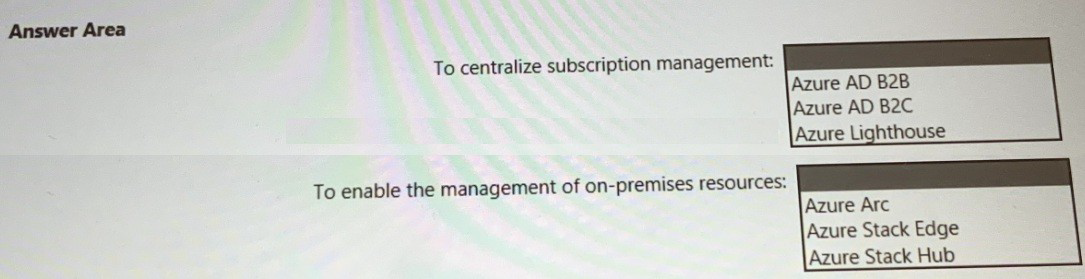
You need to recommend a multi-tenant and hybrid security solution that meets to the
business requirements and the hybrid requirements. What should you recommend? To
answer, select the appropriate options in the answer area.
NOTE: Each correct selection is
worth one point.
Explanation:
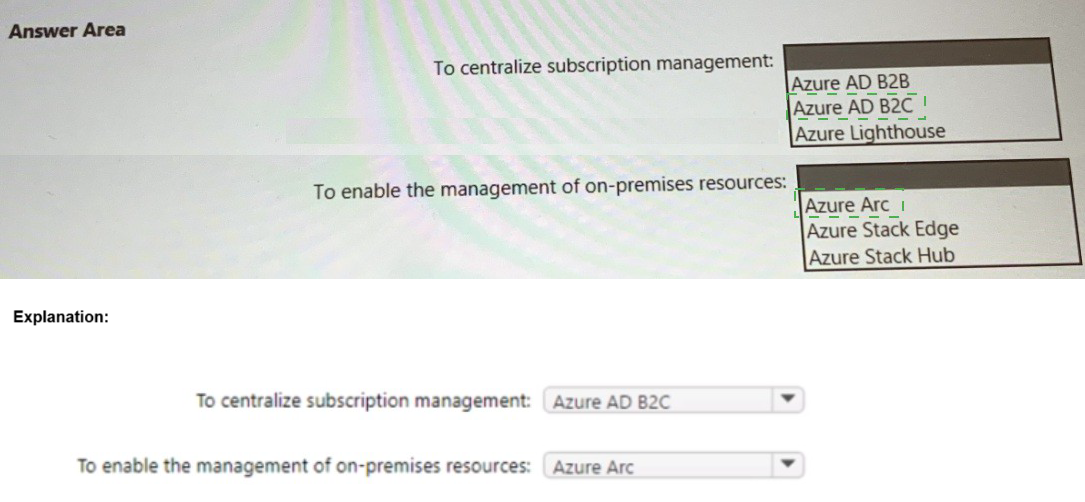
1. To centralize subscription management: Azure Lighthouse
Reasoning:
The requirement is for a multi-tenant solution to manage subscriptions. Azure Lighthouse is specifically designed for this purpose, enabling cross-tenant management and delegated administration.
How it works:
A service provider or a central IT team (managing tenant) can use Azure Lighthouse to securely access and manage resources in customer or business unit (managed) tenants. This allows for centralized security governance, policy enforcement, and management across multiple Azure AD tenants from a single control plane.
Why others are incorrect:
This is for collaborating with external users by inviting them as guests into your single tenant. It does not provide centralized management of the other tenant's Azure subscriptions and resources.
Azure AD B2C:
This is a customer identity and access management solution for public-facing applications. It is completely unrelated to managing Azure subscriptions.
2. To enable the management of on-premises resources: Azure Arc
Reasoning:
The requirement is for a hybrid solution to manage resources located outside of Azure, such as on-premises servers. Azure Arc is the primary service for this, extending Azure's management and security capabilities to any infrastructure.
How it works:
By onboarding servers (or Kubernetes clusters) to Azure Arc, you can manage them as if they were Azure resources. This allows you to use Azure Policy for governance, deploy extensions (like the Log Analytics agent for Defender for Cloud), and view them alongside your native Azure resources in a single pane of glass.
Why others are incorrect:
Azure Stack Edge:
This is a physical appliance focused on bringing compute, storage, and AI capabilities to the edge, primarily for data processing. It is not a general-purpose management solution for existing on-premises virtual or physical servers.
Azure Stack Hub:
This is an extension of Azure that allows you to run Azure services in your own datacenter. It is for hosting cloud-native applications on-premises, not for managing your existing, traditional on-premises server estate. Azure Arc is the tool for managing those existing servers.
Reference:
Microsoft Learn - What is Azure Lighthouse?:
Microsoft Learn - What is Azure Arc?:
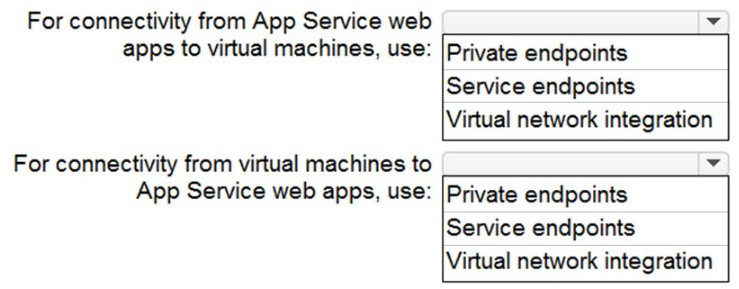
You need to recommend a strategy for App Service web app connectivity. The solution
must meet the landing zone requirements. What should you recommend? To answer,
select the appropriate options in the answer area.
NOTE Each correct selection is worth
one point.
Explanation:
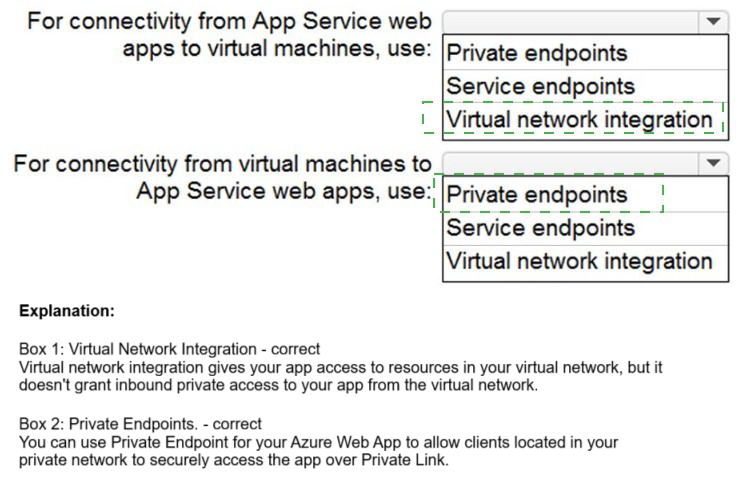
✅ For connectivity from App Service web apps to virtual machines
Correct answer: Virtual network integration
Virtual network integration allows App Service web apps to access resources inside an Azure VNet, such as virtual machines, databases, or private endpoints.
This is the correct method when the web app needs to initiate outbound traffic to VMs or other services in the VNet.
It supports secure, private communication and is a key component of Enterprise-Scale Landing Zones.
✅ For connectivity from virtual machines to App Service web apps
Correct answer: Private endpoints
Private endpoints expose the App Service web app via a private IP address inside the VNet.
This allows virtual machines to access the web app privately, without traversing the public internet.
It’s ideal for inbound traffic from VMs to App Services and meets Zero Trust and network isolation requirements.
📚 References:
App Service VNet integration
Private endpoints for App Service
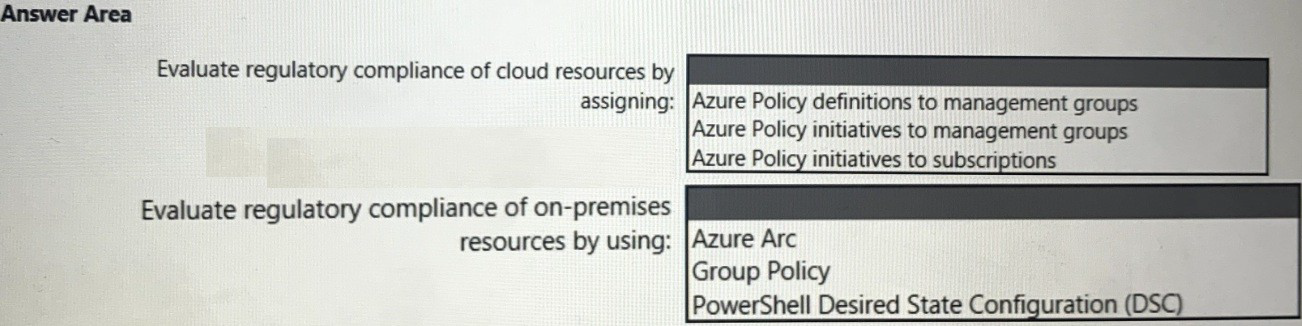
You need to recommend a solution to evaluate regulatory compliance across the entire
managed environment. The solution must meet the regulatory compliance requirements
and the business requirements.
What should you recommend? To answer, select the appropriate options in the answer
area.
NOTE: Each correct selection is worth one point.
Explanation:
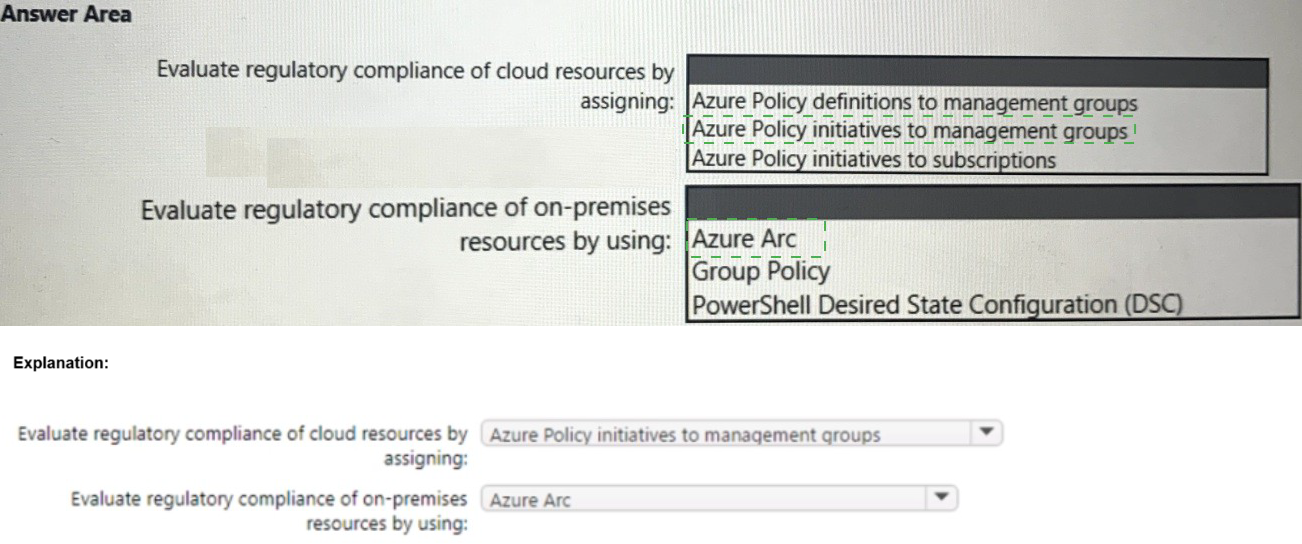
1. Evaluate regulatory compliance of cloud resources by assigning:
Azure Policy initiatives to management groups
Reasoning:
Regulatory compliance standards (like NIST, ISO, CIS) are complex and require a set of many individual policies. An Azure Policy initiative is a group of related policy definitions packaged together to target a specific standard or goal.
Assigning to Management Groups:
To ensure compliance is evaluated across the entire cloud environment, the initiative must be assigned at the highest possible scope. A management group sits above subscriptions, allowing you to assign a compliance initiative once and have it automatically apply to all subscriptions beneath it. This is the most efficient and consistent method for enterprise-wide governance.
Why others are incorrect:
Azure Policy definitions to management groups:
While possible, this is inefficient. A regulatory standard requires dozens of policies. Assigning them individually is error-prone and difficult to manage. An initiative bundles them correctly.
Azure Policy initiatives to subscriptions:
This would only evaluate compliance for a single subscription. The requirement is for the "entire managed environment," which implies multiple subscriptions, making a management group the correct scope.
2. Evaluate regulatory compliance of on-premises resources by using: Azure Arc
Reasoning:
The requirement is to extend compliance evaluation to on-premises servers. Azure Arc is the service that enables this by allowing you to manage non-Azure resources (like on-premises Windows/Linux servers) from within Azure.
How it works:
Once a server is onboarded to Azure Arc, you can assign the same Azure Policy initiatives to the resource group or subscription containing the Arc-enabled servers. The Guest Configuration extension will then audit the on-premises machines against the desired state defined in the policy (e.g., checking for specific settings, installed software, or security configurations), providing a unified compliance dashboard for both cloud and on-premises resources in Microsoft Defender for Cloud.
Why others are incorrect:
Group Policy:
This is a traditional on-premises Active Directory tool. It cannot report its compliance status back to a central Azure dashboard, and it is not part of a unified cloud-based compliance solution.
PowerShell Desired State Configuration (DSC):
While a powerful configuration management tool, standalone DSC lacks the centralized reporting and integration with Azure's compliance framework. Azure Automation State Configuration (which uses DSC) can be used for this, but it is integrated via Azure Arc. The question asks for the solution to enable this management, and Azure Arc is the foundational service that makes it possible.
Reference:
Microsoft Learn - What are Azure Policy initiatives?:
Microsoft Learn - Deploy Azure Policy to Azure Arc-enabled machines:
You need to recommend a strategy for securing the litware.com forest. The solution must
meet the identity requirements. What should you include in the recommendation? To
answer, select the appropriate options in the answer area.
NOTE; Each correct selection is
worth one point.
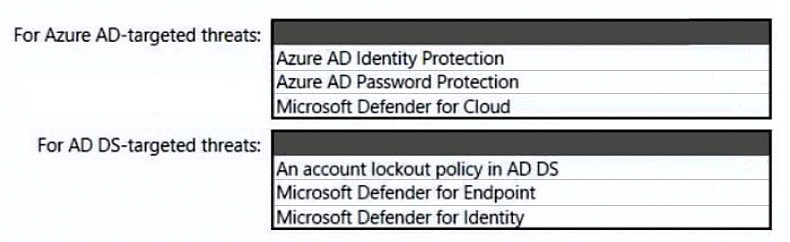
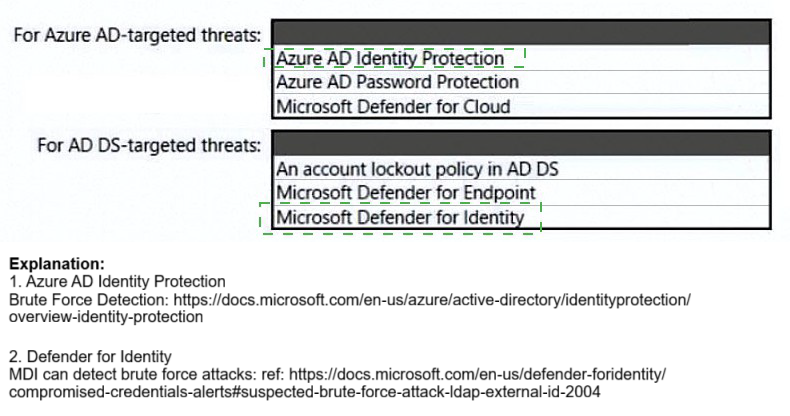
✅ For Azure AD-targeted threats
Include:
Azure AD Identity Protection: Detects and responds to risky sign-ins and user behavior using machine learning.
Azure AD Password Protection: Prevents weak or commonly used passwords in Azure AD and optionally in on-prem AD DS.
Microsoft Defender for Cloud: Provides security posture management and threat protection across cloud workloads, including identity-related insights.
✅ For AD DS-targeted threats
Include:
Microsoft Defender for Identity: Monitors on-prem AD DS for suspicious activities like lateral movement, credential theft, and domain dominance.
Microsoft Defender for Endpoint: Provides endpoint detection and response, which complements Defender for Identity by correlating device-level threats.
Account lockout policy in AD DS: Prevents brute-force attacks by locking accounts after repeated failed login attempts.
📚 References:
Microsoft Defender for Identity
Azure AD Identity Protection
Password Protection for Azure AD and AD DS
Defender for Cloud overview
You need to design a strategy for securing the SharePoint Online and Exchange Online data. The solution must meet the application security requirements. Which two services should you leverage in the strategy? Each correct answer presents part of the solution. NOTE; Each correct selection is worth one point.
A. Azure AD Conditional Access
B. Microsoft Defender for Cloud Apps
C. Microsoft Defender for Cloud
D. Microsoft Defender for Endpoint
E. Access reviews in Azure AD
Explanation:
The requirement is to secure data within SharePoint Online and Exchange Online. These are Microsoft 365 SaaS applications. The correct strategy must provide granular control over access to these apps and protect the data within them from sophisticated threats.
A. Azure AD Conditional Access:
This is the foundational service for controlling access to SharePoint Online and Exchange Online. It allows you to create policies that enforce security requirements before a user can reach the data. Examples include:
Blocking access from non-compliant devices.
Requiring Multi-Factor Authentication (MFA) when accessing from an untrusted network.
Blocking legacy authentication protocols that are vulnerable to attacks.
This directly secures the entry point to the applications and their data.
B. Microsoft Defender for Cloud Apps:
This is a Cloud Access Security Broker (CASB) that provides deep visibility and control after a user is authenticated. It is critical for securing data within the applications themselves. Key capabilities include:
Discovering and controlling Shadow IT.
Detecting anomalous user behavior (like impossible travel, mass download, or ransomware activity in SharePoint).
Applying real-time session controls to block actions like download, cut, copy, and paste based on user, location, or device.
Identifying and protecting sensitive information across your cloud apps.
Together, Conditional Access acts as the gatekeeper, while Defender for Cloud Apps provides continuous monitoring and control inside the environment, creating a comprehensive defense-in-depth strategy for SaaS applications.
Why the Other Options Are Incorrect:
C. Microsoft Defender for Cloud:
This service is primarily for securing Azure resources like VMs, SQL databases, storage accounts, and container environments (IaaS/PaaS). It is not designed to protect SaaS applications like SharePoint Online and Exchange Online.
D. Microsoft Defender for Endpoint:
This is an Endpoint Detection and Response (EDR) solution focused on securing devices (Windows, macOS, etc.). While it can integrate with other Defender products for a broader security story, it does not directly secure data within SharePoint or Exchange.
E. Access reviews in Azure AD:
This is a governance and identity governance feature used to periodically review and certify user access to applications and groups. It is important for compliance and reducing stale access, but it is a periodic, administrative control, not a real-time security control for actively protecting data from threats.
Reference:
Microsoft Learn - What is Conditional Access?: https:
Microsoft Learn - What is Microsoft Defender for Cloud Apps?:
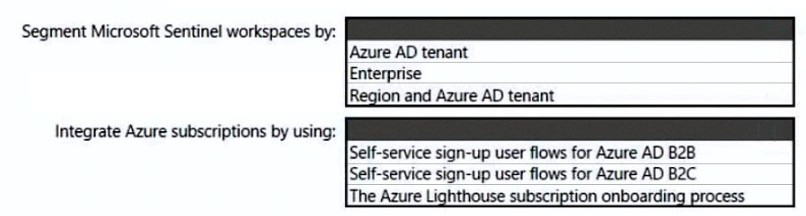
You need to recommend a SIEM and SOAR strategy that meets the hybrid requirements,
the Microsoft Sentinel requirements, and the regulatory compliance requirements.
What should you recommend? To answer, select the appropriate options in the answer
area.
NOTE: Each correct selection is worth one point.
Explanation:
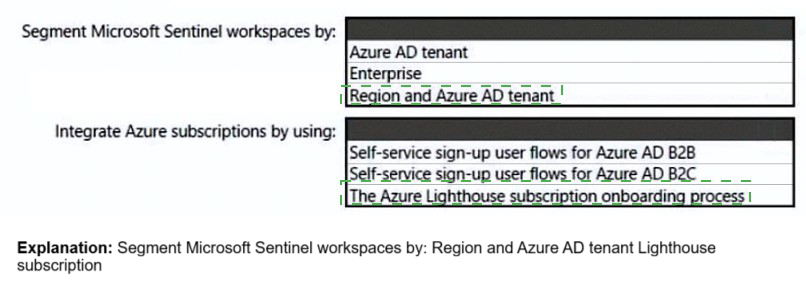
1. Segment Microsoft Sentinel workspaces by:
Region and Azure AD tenant
Reasoning:
This approach addresses both the regulatory compliance requirements and the multi-tenant Microsoft Sentinel requirements.
Region:
Many regulatory standards (like GDPR, data residency laws) require that data is stored and processed within specific geographic boundaries. Segmenting workspaces by region ensures that log data from a particular country or region is collected and retained within a compliant geographic location.
Azure AD Tenant:
In a multi-tenant organization (e.g., a parent company and subsidiaries, or a service provider and its customers), each tenant is a separate security and management boundary. Creating separate Sentinel workspaces per tenant ensures data isolation, tenant-level access control, and clear cost allocation. Combining both factors provides the highest level of compliance and governance.
Why others are incorrect:
Azure AD tenant: While correct for isolation, it does not address data residency requirements that may necessitate segmentation by geographic region.
Enterprise:
This is too vague and does not define a clear, enforceable segmentation strategy based on concrete security or compliance boundaries.
2. Integrate Azure subscriptions by using:
The Azure Lighthouse subscription onboarding process
Reasoning:
The requirement is to integrate subscriptions into the SIEM strategy, which implies a multi-tenant scenario where a central security team needs to manage Microsoft Sentinel across multiple Azure AD tenants (e.g., customer tenants).
Azure Lighthouse is the definitive solution for cross-tenant management. It allows a service provider or central IT team (in the managing tenant) to access and manage resources, including Microsoft Sentinel workspaces, in other Azure AD tenants (the managed tenants). This enables a centralized team to deploy and manage Sentinel, create analytics rules, and investigate incidents across all customer or business unit subscriptions from a single pane of glass, without needing separate log forwarding.
Why others are incorrect:
Self-service sign-up user flows for Azure AD B2B:
This is for inviting external users as guests into your own tenant to collaborate. It does not grant the ability to manage resources like Sentinel in the external user's home tenant.
Self-service sign-up user flows for Azure AD B2C:
This is a customer identity and access management platform for public-facing applications. It is completely unrelated to managing Azure subscriptions or SIEM integration.
Reference:
Microsoft Learn - Microsoft Sentinel workspace architecture best practices:
This document discusses design considerations, including multi-workspace and multi-tenant strategies.
Link:
Microsoft Sentinel workspace architecture
Microsoft Learn - Azure Lighthouse and Microsoft Sentinel:
This document explains how to use Azure Lighthouse to manage Microsoft Sentinel across tenants.
To meet the application security requirements, which two authentication methods must the
applications support? Each correct answer presents a complete solution.
NOTE: Each correct selection is worth one point.
A. Security Assertion Markup Language (SAML)
B. NTLMv2
C. certificate-based authentication
D. Kerberos
Explanation:
To meet modern application security requirements, especially in cloud and hybrid environments, Microsoft recommends authentication methods that support federation, strong identity assurance, and interoperability. Here's why the correct answers apply:
✅ A. Security Assertion Markup Language (SAML)
SAML is a federated authentication protocol widely used for single sign-on (SSO) in enterprise applications.
It enables identity federation between Azure AD and third-party apps, meeting cloud-first and hybrid identity requirements.
Supported by Azure AD for SaaS apps, custom apps, and legacy systems needing SSO.
✅ C. Certificate-based authentication
Provides strong, phishing-resistant authentication using client certificates.
Commonly used in high-security environments, mobile device access, and conditional access policies.
Azure AD supports certificate-based authentication for user sign-in, especially in scenarios requiring passwordless or multi-factor authentication.
❌ Why the other options are incorrect:
B. NTLMv2:
Legacy Windows authentication protocol. Not recommended for modern cloud apps due to security limitations and lack of federation support.
D. Kerberos:
Used in on-prem AD environments, but not suitable for cloud-native apps or federated identity scenarios. Azure AD does not use Kerberos for app authentication.
📚 References:
Azure AD SAML integration
Certificate-based authentication in Azure AD
Your company has an office in Seattle.
The company has two Azure virtual machine scale sets hosted on different virtual
networks.
The company plans to contract developers in India.
You need to recommend a solution provide the developers with the ability to connect to the
virtual machines over SSL from the Azure portal. The solution must meet the following
requirements:
• Prevent exposing the public IP addresses of the virtual machines.
• Provide the ability to connect without using a VPN.
• Minimize costs.
Which two actions should you perform? Each correct answer presents part of the solution.
NOTE: Each correct selection is worth one point.
A. Deploy Azure Bastion to one virtual network.
B. Deploy Azure Bastion to each virtual network.
C. Enable just-in-time VM access on the virtual machines.
D. Create a hub and spoke network by using virtual network peering.
E. Create NAT rules and network rules in Azure Firewall.
Explanation:
The solution must enable secure developer access from India to VMs in two different Azure virtual networks without public IP exposure, VPN, or excessive cost.
A. Deploy Azure Bastion to one virtual network:
Azure Bastion provides secure RDP/SSH connectivity directly through the Azure portal over SSL (port 443), eliminating the need for public IPs on VMs. Deploying it to one network minimizes costs while providing the core service.
D. Create a hub and spoke network using VNet peering:
This enables the single Bastion host in the "hub" VNet to connect to VMs in both "spoke" VNets. VNet peering creates private connections between networks, allowing Bastion to route traffic to all VMs while maintaining a single, cost-effective deployment.
Why This Works:
No Public IPs: Bastion connects privately via the Azure backbone
No VPN: Uses native Azure networking
Portal Access: Direct SSL connection via Azure portal
Cost Optimization: Single Bastion deployment serves multiple networks
Security: All traffic remains within Azure's trusted network
Why Other Options Fail:
B. Deploy Azure Bastion to each virtual network:
While functional, this violates the "minimize costs" requirement by duplicating Bastion services unnecessarily.
C. Enable just-in-time VM access:
JIT still requires opening RDP/SSH ports and typically uses public IPs. It doesn't provide the Azure portal-based SSL connection that Bastion offers.
E. Create NAT and network rules in Azure Firewall:
This introduces unnecessary complexity and cost. It would require public IPs on the firewall and doesn't provide the seamless Azure portal integration that Bastion delivers natively.
References:
Microsoft Learn - What is Azure Bastion:
Explains how Bastion provides secure VM connectivity without public IPs
Microsoft Learn - Virtual Network Peering:
Details how VNet peering enables cross-network connectivity
Microsoft Learn - Just-in-time VM Access:
Clarifies that JIT manages port access but doesn't eliminate need for public endpoints
You have a Microsoft 365 subscription that syncs with Active Directory Domain Services (AD DS). You need to define the recovery steps for a ransomware attack that encrypted data in the subscription The solution must follow Microsoft Security Best Practices.
What is the first step in the recovery plan?
A. Disable Microsoft OneDnve sync and Exchange ActiveSync.
B. Recover files to a cleaned computer or device.
C. Contact law enforcement.
D. From Microsoft Defender for Endpoint perform a security scan.
Explanation:
In a ransomware attack impacting a Microsoft 365 environment, the immediate priority is to contain the attack and prevent it from spreading to other devices or syncing encrypted files to the cloud. Following the incident response phases (Preparation, Detection, Containment, Eradication, Recovery, Lessons Learned), containment is a critical first action to limit damage.
Correct Option:
A. Disable Microsoft OneDrive sync and Exchange ActiveSync.
This is the correct first step for containment. It immediately prevents the ransomware from propagating encrypted or malicious files from the infected endpoint to your cloud storage (OneDrive) and email services (via Exchange ActiveSync). This action isolates the infection and stops the synchronization of potentially encrypted data, protecting your cloud-based backup and recovery points.
Incorrect Options:
B. Recover files to a cleaned computer or device.
This is a critical step, but it occurs later in the Recovery phase. You cannot begin safe recovery until you have first contained the threat and eradicated the malware from the environment to prevent re-infection.
C. Contact law enforcement.
While contacting relevant authorities may be part of an organization's incident response plan, it is not the first technical recovery step. The immediate technical priority is containment to minimize operational damage.
D. From Microsoft Defender for Endpoint, perform a security scan.
This action falls under the Detection and Analysis or Eradication phases. While crucial for identifying and removing the threat, the first step after detection is typically rapid Containment to stop ongoing damage before moving to deeper investigation and eradication.
Reference:
Microsoft's ransomware response best practices emphasize the "Contain" phase first. The official guidance in the Microsoft Security blog on ransomware recovery lists steps like "Disable end-user cloud sync clients" as an immediate containment action to prevent synchronization of infected files.
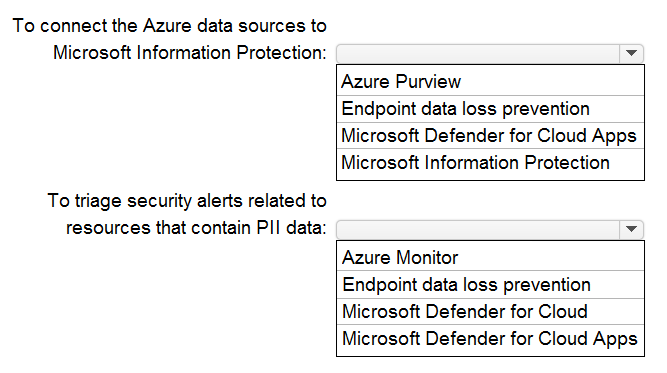
Your company is migrating data to Azure. The data contains Personally Identifiable
Information (Pll). The company plans to use Microsoft Information Protection for the Pll
data store in Azure. You need to recommend a solution to discover Pll data at risk in the
Azure resources.
What should you include in the recommendation? To answer, select the appropriate
options in the answer area.
NOTE: Each correct selection is worth one point.
Explanation:
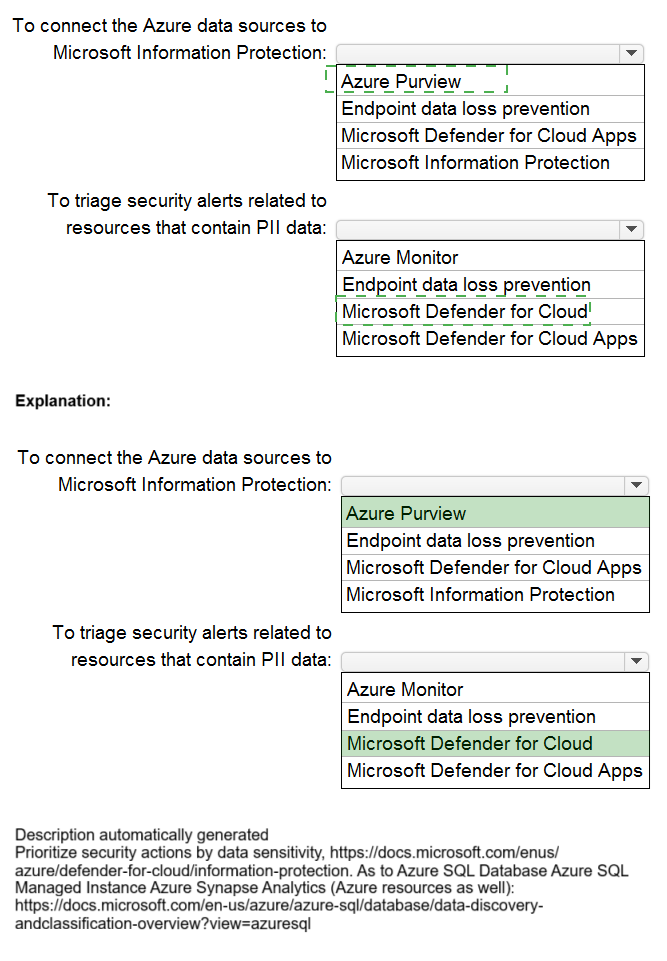
The question asks for a solution to discover PII data at risk in Azure resources. This requires two integrated capabilities: 1) A data governance service to scan, classify, and label data across Azure data sources, and 2) A security posture management tool to assess the security configuration of those resources and generate alerts.
Correct Options:
Azure Purview:
This is Microsoft's unified data governance service. It is specifically designed to connect to Azure data sources (like Azure SQL, Storage, Cosmos DB), scan them to automatically discover and classify sensitive information like PII, and apply sensitivity labels from Microsoft Information Protection. It creates a data map and provides the foundational discovery of where your PII resides.
Microsoft Defender for Cloud:
This is the central tool for cloud security posture management (CSPM) and threat protection. Once Purview identifies PII, Defender for Cloud assesses the security configuration of the underlying Azure resources (e.g., storage accounts, databases) containing that data. It provides security recommendations and generates security alerts for misconfigurations or threats that put that sensitive data at risk, allowing you to prioritize and triage alerts effectively.
Incorrect Options:
Endpoint data loss prevention:
This component is part of Microsoft Purview (formerly Microsoft 365) DLP and is focused on protecting data on Windows 10/11 devices and apps, not on discovering data within Azure resources like storage accounts or databases.
Microsoft Defender for Cloud Apps:
This is a Cloud Access Security Broker (CASB) used to discover, investigate, and govern SaaS applications (like Salesforce, Dropbox). While it can integrate with Azure Purview and has some Azure resource visibility, its primary strength is not in scanning native Azure PaaS/IaaS data sources for PII classification or managing their security posture, which is the core of this scenario.
Microsoft Information Protection:
This is the overarching framework and labeling service for classifying and protecting data. While Purview uses its labels, MIP itself does not "connect to Azure data sources" to scan and discover PII; that is the role of a data scanner like Azure Purview.
Azure Monitor:
This is a service for collecting, analyzing, and acting on telemetry and logs. It is not a dedicated tool for discovering PII data within data stores or for triaging security posture alerts related to specific sensitive data classifications.
Your company uses Azure Pipelines and Azure Repos to implement continuous integration
and continuous deployment (CI/CD) workflows for the deployment of applications to Azure.
You are updating the deployment process to align with DevSecOps controls guidance in
the Microsoft Cloud Adoption Framework for Azure.
You need to recommend a solution to ensure that all code changes are submitted by using
pull requests before being deployed by the CI/CD workflow.
What should you include in the recommendation?
A. custom roles in Azure Pipelines
B. branch policies in Azure Repos
C. Azure policies
D. custom Azure roles
Explanation:
This question focuses on enforcing DevSecOps controls within the development process before code reaches the CI/CD pipeline. The requirement is to mandate that all code changes are reviewed via a pull request (PR) before they can be merged and subsequently deployed. This is a source control and collaboration policy that must be enforced at the repository level.
Correct Option:
B. Branch policies in Azure Repos
This is the direct and correct solution. Branch policies are a feature of Git repositories in Azure Repos. You can configure policies (like requiring a minimum number of reviewers, requiring linked work items, or build validation) on critical branches like main or release. By enabling the "Require a minimum number of reviewers" and "Check for linked work items" policies, you enforce that all changes must go through a pull request meeting those criteria before they can be merged, satisfying the requirement.
Incorrect Options:
A. Custom roles in Azure Pipelines & D. Custom Azure roles
These are authorization tools, not workflow enforcement tools. Custom roles in Azure Pipelines or Azure RBAC control who can perform certain actions (e.g., trigger a pipeline, manage resources). They cannot enforce how code changes are submitted (via PR) before reaching the pipeline. A user with the right permissions could still push directly to a branch, bypassing PR.
C. Azure policies
Azure Policy is a governance tool for enforcing rules and effects on Azure resources (like VMs, storage). It operates at the Azure subscription/resource group level to ensure compliance with security, cost, or configuration standards. It cannot govern the workflow within a source code repository like Azure Repos.
Reference:
The Microsoft Cloud Adoption Framework for Azure's DevSecOps guidance explicitly recommends using branch policies to enforce code quality and review gates. The article "Enforce policies with Azure Repos" details how branch policies are the primary mechanism for requiring pull requests and reviews to protect important branches.
You have an Active Directory Domain Services (AD DS) domain that contains a virtual
desktop infrastructure (VDI). The VDI uses non-persistent images and cloned virtual
machine templates. VDI devices are members of the domain.
You have an Azure subscription that contains an Azure Virtual Desktop environment. The
environment contains host pools that use a custom golden image. All the Azure Virtual
Desktop deployments are members of a single Azure Active Directory Domain Services
(Azure AD DS) domain.
You need to recommend a solution to deploy Microsoft Defender for Endpoint to the hosts.
The solution must meet the following requirements:
• Ensure that the hosts are onboarded to Defender for Endpoint during the first startup
sequence.
• Ensure that the Microsoft Defender 365 portal contains a single entry for each deployed
VDI host.
• Minimize administrative effort.
What should you recommend? To answer, select the appropriate options in the answer
area.
NOTE: Each correct selection is worth one point.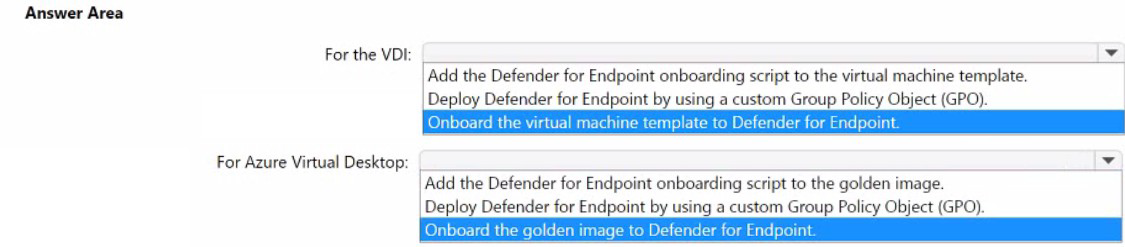
Explanation:
The goal is to onboard non-persistent hosts to Defender for Endpoint at first startup with a single portal entry per host while minimizing effort. The key is to embed the onboarding configuration directly into the master image or template before cloning, so every new virtual machine (VM) instance is automatically onboarded with a unique device identity when it first boots.
Correct Options:
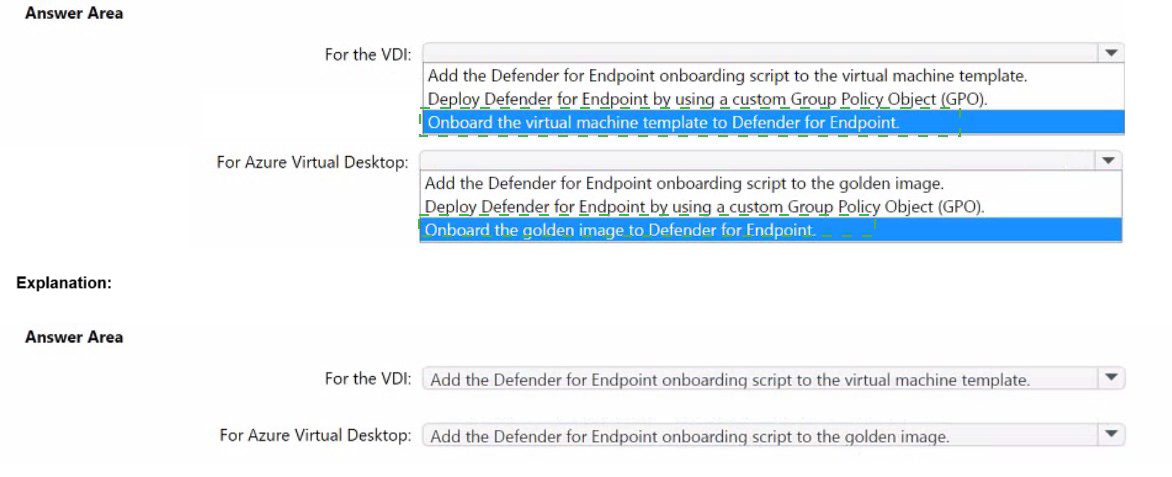
For the VDI: Add the Defender for Endpoint onboarding script to the virtual machine template.
For on-premises, non-persistent VDI using cloned templates, the most efficient method is to inject the onboarding script/package into the VM template's startup sequence (e.g., via Unattend.xml or a startup script). This ensures onboarding occurs at first boot of each cloned VM, creating a unique device record. Using a GPO would be less reliable for first-boot onboarding on non-persistent, constantly recreated VMs.
For Azure Virtual Desktop: Add the Defender for Endpoint onboarding script to the golden image.
For Azure Virtual Desktop host pools using a shared golden image, the prescribed best practice is to install the Defender for Endpoint agent and embed the onboarding script directly into the golden image itself. When new session hosts are provisioned from this image, they automatically run the script on startup, ensuring immediate onboarding.
Incorrect Options:
Deploy Defender for Endpoint by using a custom Group Policy Object (GPO).
This method is less suitable for first startup sequence onboarding, especially for non-persistent VMs. GPOs apply during periodic policy refresh cycles, which may cause a delay or failure in onboarding a short-lived VM before it is deleted. It does not guarantee immediate onboarding at first boot, which is a core requirement.
Onboard the virtual machine template / golden image to Defender for Endpoint.
You should never onboard the template/image itself. Onboarding the master image creates a single, static device identity in the Defender portal. When you clone from it, all VMs will share that same identity, causing duplicate alerts and a single entry for all deployed hosts instead of one per host. This violates the requirement for a unique entry per host and is a documented anti-pattern.
Reference:
Microsoft's official guidance for deploying Microsoft Defender for Endpoint on non-persistent VDI environments explicitly states: "Onboarding must be done in the context of the VM instance, not the image." It recommends methods like adding the onboarding script to the template for on-premises VDI and integrating it into the golden image for Azure Virtual Desktop to ensure automatic, per-device onboarding. The documentation warns against onboarding the image itself, as it leads to device duplication in the portal.
| Page 2 out of 15 Pages |
| Previous |