
Topic 1: Understand the business value of Power Platform
A company plans to implement Power Platform apps. The company does not plan to use any development tools or plug-ins.
Which actions can you perform?
For each of the following statements, select Yes if the statement is true. Otherwise, select No.
NOTE: Each correct selection is worth one point.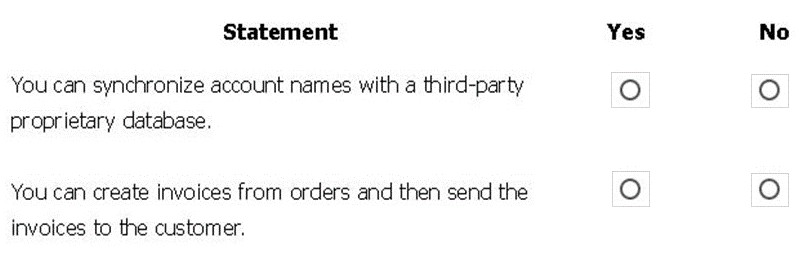
Explanation:
This question tests understanding of Microsoft Dataverse's out-of-the-box capabilities versus those requiring custom development. The Power Platform is designed for low-code/no-code solutions, but some integrations and automations require additional tools or code.
Correct Option:
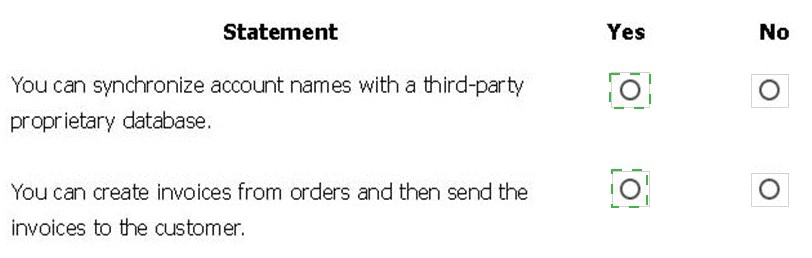
First Statement (Synchronize account names):
No. Synchronizing data with a proprietary third-party database typically requires custom connectors, Azure services, or development tools (like Power Automate desktop or custom code), which are excluded in this scenario.
Second Statement (Create and send invoices):
Yes. This is a standard business process automation achievable within Power Apps and Power Automate using native Dataverse tables (like Orders and Invoices) and the out-of-the-box email capability or Power Automate flows, requiring no plug-ins.
Incorrect Option:
The incorrect selections would be "Yes" for the first statement or "No" for the second. The first statement describes an integration that exceeds no-code boundaries, while the second describes a core, declarative platform capability.
Reference:
Microsoft Learn: "Introduction to Microsoft Dataverse" describes standard tables and no-code automation. Connectors are covered in "Connect to data in Power Apps," noting that proprietary systems often require custom development.
A rapidly growing company wants to empower users to build apps, automate business processes, and analyze data without requiring I expertise or development skills and without increasing IT expenses and dependencies.
You need to recommend tools so that users can accomplish specific tasks.
Which tools should you recommend? To answer, select the appropriate options in the answer area.
NOTE: Each correct selection is worth one point.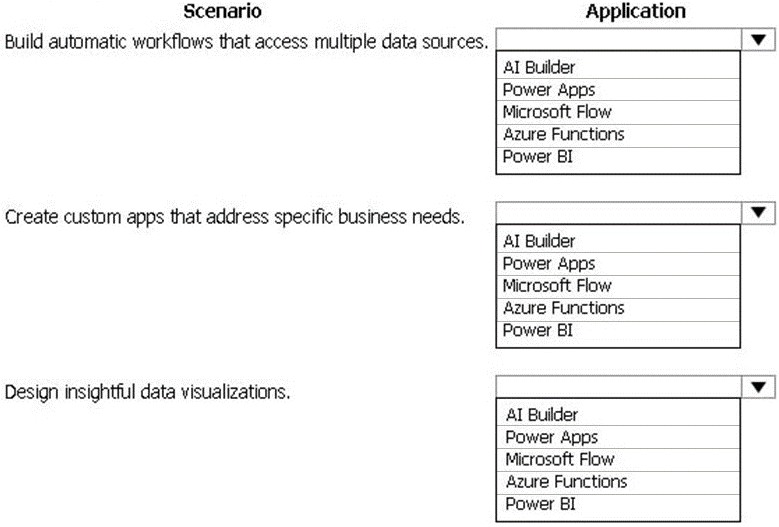
Explanation:
This question assesses the fundamental purpose of each core Power Platform component. The scenario emphasizes a low-code/no-code approach for business users to build solutions independently, without deep IT skills or increasing IT overhead.
Correct Option:
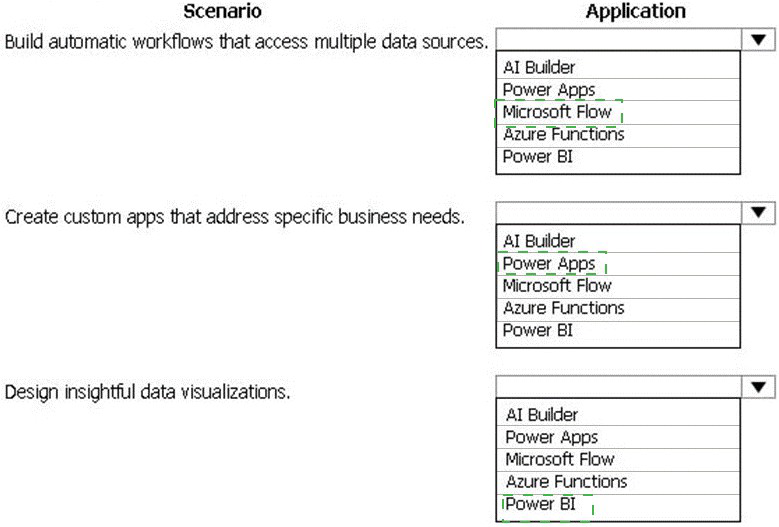
Build automatic workflows:
Microsoft Flow (now Power Automate). This is the primary low-code tool for creating automated workflows that connect to hundreds of data sources and services.
Create custom apps:
Power Apps. This is the core low-code application platform for building custom canvas or model-driven apps to address specific business needs.
Design insightful data visualizations:
Power BI. This is the dedicated business analytics service for creating interactive reports, dashboards, and data visualizations.
Incorrect Options:
AI Builder:
Incorrect for all three. While it adds AI capabilities to apps, flows, or reports, it is not the primary tool for building workflows, apps, or visualizations from scratch.
Azure Functions:
Incorrect for all three. This is a pro-code, serverless compute service requiring development skills, contradicting the "no development skills" requirement.
Using Power Apps for workflows, Power BI for apps, etc., would also be incorrect as it misapplies each tool's primary function.
Reference:
Microsoft Learn PL-900: "Describe the business value of Power Platform services," which defines the core purpose of Power Apps (build apps), Power Automate (automate processes), and Power BI (analyze data).
A distribution company has multiple warehouses.
Tax rates charged on sales orders need to be calculated based on locality and region.
You need to recommend a cost-effective solution that can be implemented quickly.
What should you recommend?
A. Check AppSource for a tax add-on.
B. Create alerts in Dynamics 365 Finance for tax table changes.
C. Implement the Common Data Model.
D. Run a Power BI report.
E. Write scripts and code tax updates.
Explanation:
The question requires a quick, cost-effective Power Platform solution to calculate dynamic tax rates based on location for sales orders. The goal is to avoid custom coding and leverage low-code services.
Correct Option:
C. Implement the Common Data Model.
The Common Data Model (CDM) within Dataverse provides standardized, extensible data schemas, including for finance and operations.
You can quickly create a Tax Rate table with columns for locality, region, and rate, then relate it to your sales order data.
A Power App or automated Power Automate flow can use this table to perform the lookup and calculation without code, meeting the "quick and cost-effective" requirement.
Incorrect Options:
A. Check AppSource for a tax add-on:
While possible, it may not be "cost-effective" (could require purchase/subscription) and is not the primary low-code solution to build.
B. Create alerts in Dynamics 365 Finance:
This addresses notification of changes but not the core problem of calculating taxes. It also assumes use of Dynamics 365 Finance, which isn't specified.
D. Run a Power BI report:
Power BI is for analysis and visualization, not for operational calculation and enforcement of tax rates during the sales order process.
E. Write scripts and code tax updates:
This contradicts "cost-effective" and "quick," as custom code requires developer skills, time, and ongoing maintenance.
Reference:
Microsoft Learn: "Introduction to Microsoft Dataverse" explains how the Common Data Model provides standard and custom tables to build business solutions rapidly without code.
A company plans to use Power Platform to build apps which address specific business challenges.
You need to recommend the appropriate types of Power Apps to use.
What should you recommend? To answer, select the appropriate option in the answer area.
NOTE: Each correct selection is worth one point.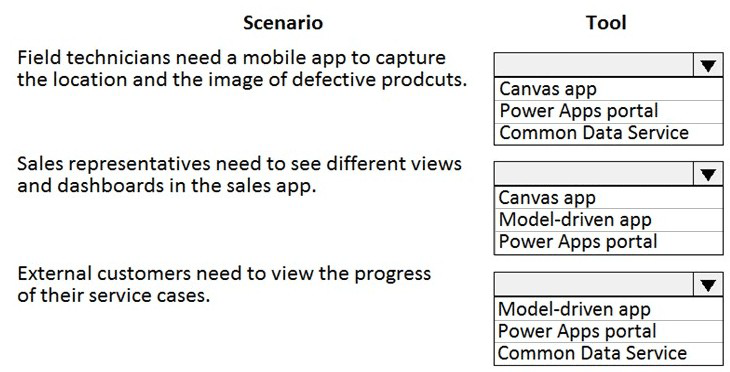
Explanation:
This question tests understanding of the three main Power Apps project types: Canvas apps, Model-driven apps, and Power Apps portals. Each is designed for different user experiences, audiences, and development approaches.
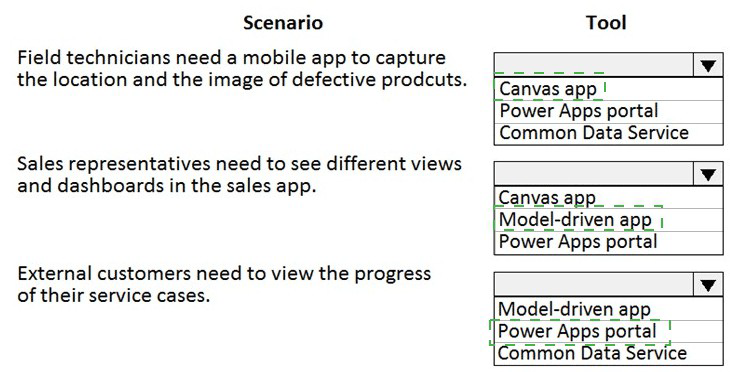
Correct Option:
Field technicians (mobile, location/image):
Canvas app. Canvas apps are ideal for task-specific, pixel-perfect mobile interfaces. You can easily add a camera control and location sensor for capturing images and GPS data.
Sales reps (views/dashboards in sales app):
Model-driven app. Model-driven apps are built on Dataverse and provide a rich, forms-views-dashboards interface by default, perfect for complex business data like sales.
External customers (view case progress):
Power Apps portal. Portals are designed to create external-facing websites where anonymous or authenticated external users (like customers) can interact with Dataverse data, such as viewing their service cases.
Incorrect Options:
Power Apps portal for internal field techs or sales reps is incorrect; portals are for external users.
Model-driven app for the field techs is too heavy and not optimized for a simple, custom camera/LOCATION capture task.
Canvas app for sales reps or external customers is incorrect. Sales reps need the structured, data-rich environment of a model-driven app. Customers need an external website (portal), not an internal canvas app.
Common Data Service (now Dataverse) is a data platform, not an app type, so it is incorrect for any scenario requiring an application.
Reference:
Microsoft Learn PL-900: "Describe Power Apps" module, which distinguishes use cases for canvas, model-driven, and portal apps.
You manage the support team at a rapidly growing company.
Customers and support technicians need a better experience when logging and responding to support requests. You need more visibility into what the support technicians are doing every week.
You need to recommend tools to help the company's needs.
Which tools should you recommend? To answer, drag the appropriate tools to the correct requirements. Each tool may be used once, more than once, or not at all. You may need to drag the split bar between panes or scroll to view content.
NOTE: Each correct selection is worth one point.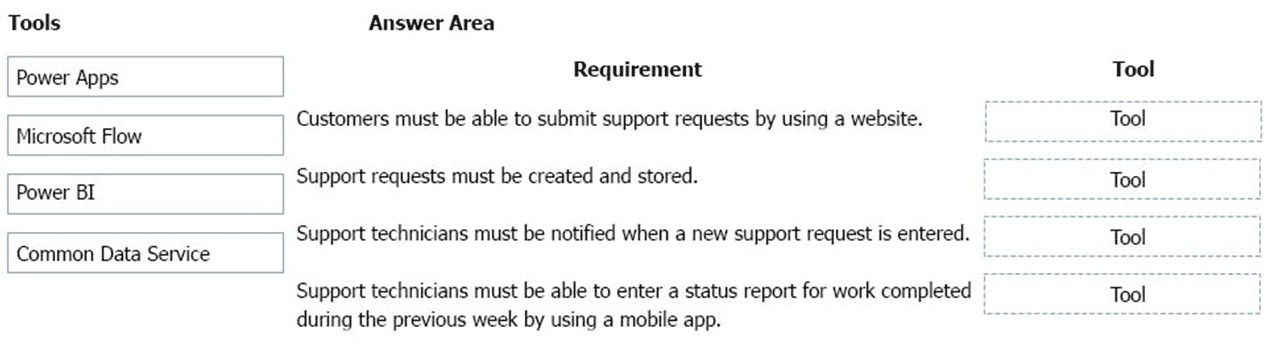
Explanation:
This is a drag-and-drop question mapping Power Platform tools to specific business requirements. The solution requires selecting the component that best fulfills each need, using the core Power Platform services: Power Apps, Power Automate (Microsoft Flow), Power BI, and Dataverse (Common Data Service).
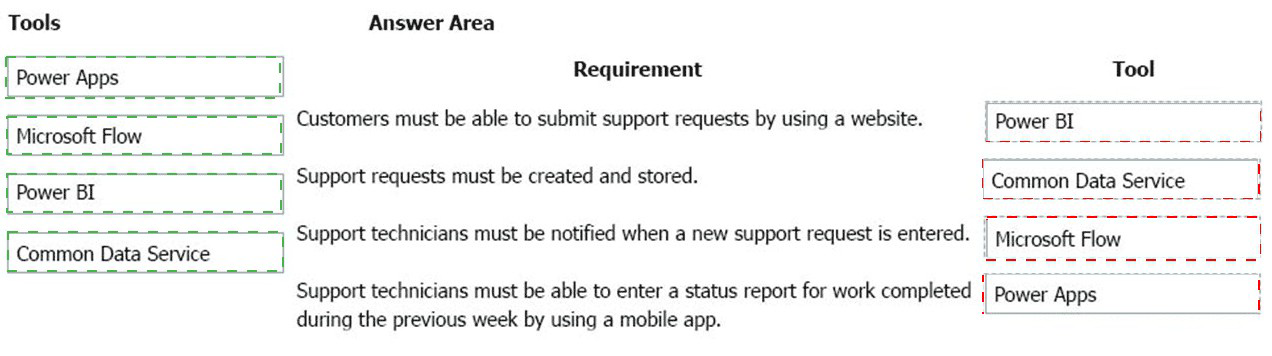
Correct Option:
Customers must be able to submit support requests by using a website: Power Apps (specifically, a Power Apps portal). Portals create external-facing websites for customers to interact with Dataverse data, such as submitting a new support ticket.
Support requests must be created and stored: Common Data Service (now Dataverse). This is the centralized, secure data platform where the support request records (data) are stored and managed.
Support technicians must be notified when a new support request is entered: Microsoft Flow (now Power Automate). This is the automation tool used to create a workflow that triggers (e.g., when a new row is created in Dataverse) and sends a notification (e.g., email, Teams message) to a technician.
Support technicians must be able to enter a status report... by using a mobile app: Power Apps (specifically, a canvas app). Canvas apps are ideal for building custom, mobile-optimized interfaces for tasks like data entry by field or support technicians.
Incorrect Options:
Power BI would be incorrect for any requirement. It is for data visualization and reporting, not for data entry, storage, notifications, or building customer websites.
Using Common Data Service for the website or notification is incorrect. It's the backend data service, not the front-end application (portal) or the automation engine (Flow).
Using Microsoft Flow for the mobile app or website is incorrect. Flow automates processes between services; it does not build user-facing applications.
Reference:
Microsoft Learn PL-900: "Describe the business value of Power Platform services," which defines the core purpose of Power Apps (build apps/portals), Power Automate (automate processes), Power BI (analyze data), and Dataverse (store and manage data).
A large retail company implements Power Apps, Microsoft Flow, and the Common Data Service.
The board of directors is asking whether users are finding value in the technology. The company would like to measure and report usage of the software.
You need to recommend a tool to determine software usage.
What should you recommend?
A. Microsoft Intune
B. Azure Stream Analytics
C. Power Platform Analytics
D. Dynamics 365 Product Insights
Explanation:
The question asks for a tool within the Power Platform ecosystem to measure and report on the usage of Power Apps, Power Automate (Flow), and Dataverse. The goal is internal analytics and value assessment, not device management or advanced telemetry.
Correct Option:
C. Power Platform Analytics.
Power Platform Analytics is the native, admin-focused analytics solution within the Power Platform Admin Center.
It provides ready-to-use dashboards and reports showing detailed usage metrics for Power Apps (app launches, users), Power Automate (flow runs), and Dataverse, directly addressing the board's question about user adoption and value.
Incorrect Options:
A. Microsoft Intune:
This is a cloud-based endpoint management tool for managing mobile devices and apps. It is not designed for reporting software usage analytics within the Power Platform.
B. Azure Stream Analytics:
This is a complex event-processing service for analyzing high-volume real-time data streams from devices or applications. It is overkill and not the built-in tool for Power Platform admin reporting.
D. Dynamics 365 Product Insights:
This is a specific tool for analyzing usage telemetry and feedback for Dynamics 365 applications to improve product features, not for reporting on general Power Platform adoption.
Reference:
Microsoft Learn: "Administer Power Platform" modules reference the Power Platform Admin Center, where Power Platform Analytics provides adoption and usage insights for administrators.
A company uses Power Apps.
You need to perform administrative tasks for the company.
Which admin centers should you use? To answer, drag the appropriate admin centers to the correct requirements. Each admin center may be used once, more than once, or not at all. You may need to drag the split bar between panes or scroll to view content.
NOTE: Each correct selection is worth one point.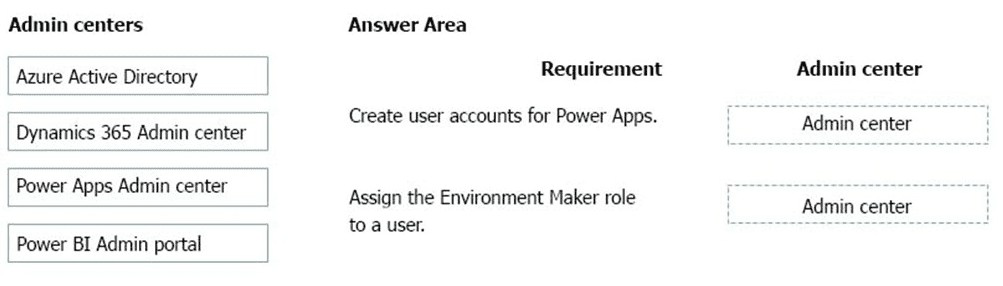
Explanation:
This question tests knowledge of the administrative boundaries and responsibilities within the Microsoft cloud ecosystem, specifically for managing Power Platform users and their permissions.
Correct Option:
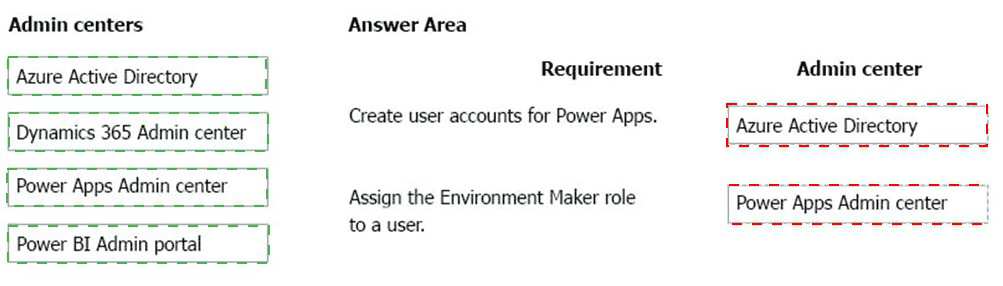
Create user accounts for Power Apps: Azure Active Directory.
User identities (accounts) for all Microsoft cloud services, including Power Apps, are created and managed centrally in Azure Active Directory (Azure AD). The Power Platform admin centers do not create user objects.
Assign the Environment Maker role to a user:Power Apps Admin center (or Power Platform Admin center).
The Environment Maker role is a specific security role within a Power Platform environment. This role is assigned inside an environment's settings, which are managed via the Power Apps Admin center (now part of the unified Power Platform Admin center).
Incorrect Options:
Dynamics 365 Admin center:
Used for managing Dynamics 365 applications and licenses, not for core Power Platform user management or environment roles.
Power BI Admin portal:
Used for managing Power BI tenant settings, capacity, and usage metrics, not for Power Apps user accounts or environment security roles.
Using the Power Apps Admin center to create user accounts is incorrect; it can only assign roles to users who already exist in Azure AD.
Reference:
Microsoft Learn PL-900: "Administer Power Platform" explains that user identities come from Azure AD, while environment permissions are managed within the Power Platform Admin Center. The "Environment Maker" role is defined in the "Describe how to manage environments" learning path
You are building Power Apps apps that use both Dynamics 365 Sales and Microsoft 365.
For each of the following statements, select Yes if the statement is true. Otherwise, select
No.
NOTE: Each correct selection is worth one point.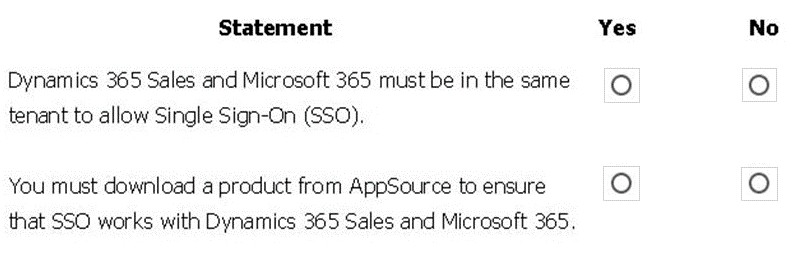
Explanation:
This question tests understanding of Single Sign-On (SSO) fundamentals in the Microsoft cloud ecosystem, focusing on the relationship between Dynamics 365, Microsoft 365, and Power Apps.
Correct Option:
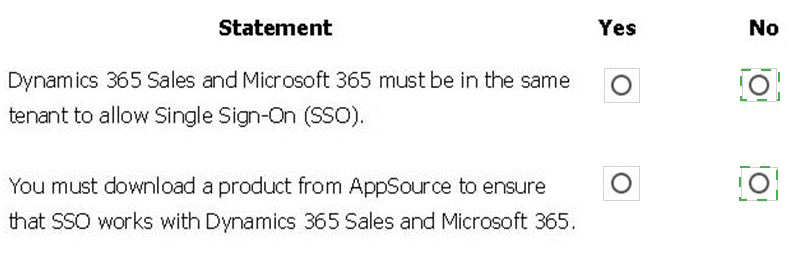
Statement 1 (Same tenant required for SSO): Yes.
Dynamics 365 Sales, Microsoft 365, and Power Apps all rely on Azure Active Directory (Azure AD) for identity. For seamless SSO to work, all these services must be provisioned within the same Azure AD tenant. This provides a unified identity across applications.
Statement 2 (Must download from AppSource for SSO): No.
SSO is not enabled by a downloadable product. It is an inherent feature of the Azure AD platform when services share the same tenant. Integration between Dynamics 365 and Microsoft 365 uses built-in connectors and standard Azure AD authentication; no AppSource add-on is required for core SSO functionality.
Incorrect Option:
Selecting "No" for the first statement would be incorrect, as SSO fundamentally depends on a shared identity provider (the same Azure AD tenant).
Selecting "Yes" for the second statement would be incorrect, as SSO is a platform capability, not a separately installed product from the marketplace.
Reference:
Microsoft Learn: "Authentication and identity" concepts explain that Azure AD provides SSO across Microsoft cloud services like Dynamics 365 and Microsoft 365 when they are in the same tenant. AppSource is for solutions and extensions, not core authentication infrastructure.
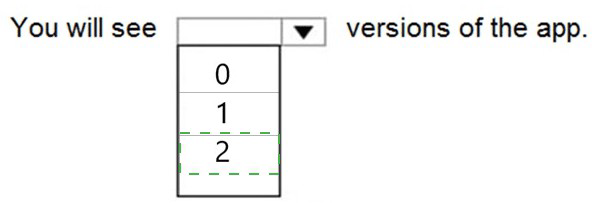
You have version 1.0.0.0 of a published Power Apps app. You create and publish version 2.0.0.0 of the app. A customer goes through the process of restoring the previous version of the app.
How many versions of the app are displayed in the Version tab for the app? To answer, select the appropriate option in the answer area.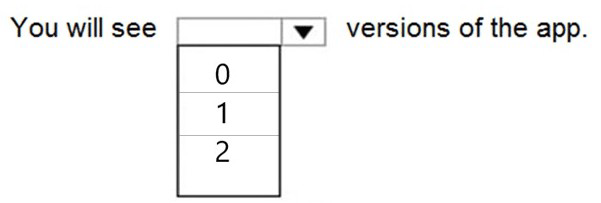
Explanation:
This question tests understanding of the Power Apps version history and restoration process. When an app is published, a new version is created and becomes the live version. The restoration process does not delete versions; it promotes a previous version to be the new live version.
Correct Option:
2
After restoring, the Version tab will display two versions: the newly restored version (now set as live, e.g., version 1.0.0.0) and the other saved version (e.g., version 2.0.0.0). Version history is retained, so both the original v1.0.0.0 and the v2.0.0.0 you created remain listed. The count does not increase to three; restoration changes the active version but does not create a new version entry.
Incorrect Options:
0: This is incorrect.
Version history is always maintained for published apps; the tab is never empty if a version has been published.
1: This is incorrect.
The version history retains all previously saved and published versions. Creating and publishing v2.0.0.0 ensures at least two versions exist, and restoring does not delete the other.
Reference:
Microsoft Learn: "Manage versions of your app in Power Apps" explains that each publish creates a version, and you can restore any previous version, which then becomes the current version. The version list shows all saved versions.
You create a user-owned custom entity by using Common Data Service.
For each of the following statements, select Yes if the statement is true. Otherwise, select No
NOTE: Each correct selection is worth one point.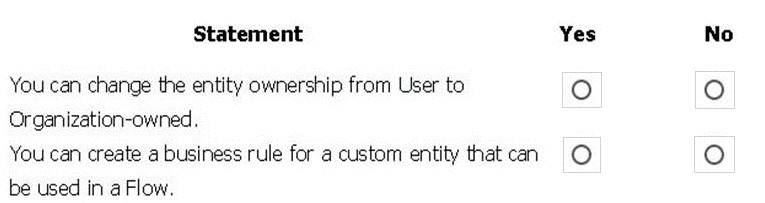
Explanation:
This question tests knowledge of Dataverse (Common Data Service) custom entity configuration and capabilities. Key concepts include entity ownership types and the application of business rules across Power Platform.
Correct Option:
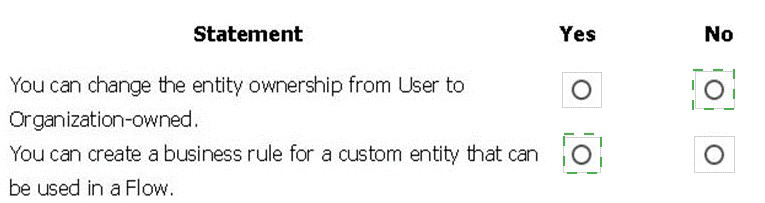
Statement 1:Change ownership from User to Organization-owned: No.
The ownership type (User/Team or Organization) of a Dataverse entity is set during creation and cannot be changed after the entity is created and saved. A new entity with the desired ownership must be created.
Statement 2:Create a business rule for a custom entity that can be used in a Flow: Yes.
Business rules are a no-code feature within Dataverse to apply logic and validation to entity forms. You can absolutely create business rules for custom entities. Furthermore, these rules can be invoked or their logic complemented by a Power Automate (Flow) trigger, such as when a record is created or updated.
Incorrect Option:
Selecting "Yes" for the first statement is incorrect because entity ownership is immutable after creation.
Selecting "No" for the second statement is incorrect; business rules are a core feature for custom entities and integrate with the automation layer (Flow).
Reference:
Microsoft Learn: "Create a custom table" documents that ownership is chosen at creation and cannot be modified. "Apply business logic with business rules" confirms they can be created for custom tables and work alongside Power Automate.
A travel company plans to use the Power Platform to create tools that help travel agents book customer travel.
You need to recommend solutions for the company.
What should you recommend? To answer, drag the appropriate tools to the correct requirements. Each tool may be used once, more than once, or not at all. You may need to drag the split bar between panes or scroll to view content.
NOTE: Each correct selection is worth one point.

You are a customer service manager.
You need to implement a Power Apps portal that allows customers to submit cases.
Which type of data source is used?
A. Dynamics 365 Connector
B. Microsoft SharePoint
C. Microsoft Azure Storage
D. Common Data Service
| Page 1 out of 5 Pages |