
Topic 3: Fabrikam, inc.
Case study
This is a case study. Case studies are not timed separately. You can use as much
exam time as you would like to complete each case. However, there may be additional
case studies and sections on this exam. You must manage your time to ensure that you
are able to complete all questions included on this exam in the time provided.
To answer the questions included in a case study, you will need to reference information
that is provided in the case study. Case studies might contain exhibits and other resources
that provide more information about the scenario that is described in the case study. Each
question is independent of the other questions in this case study.
At the end of this case study, a review screen will appear. This screen allows you to review
your answers and to make changes before you move to the next section of the exam. After
you begin a new section, you cannot return to this section.
To start the case study
To display the first question in this case study, click the Next button. Use the buttons in the
left pane to explore the content of the case study before you answer the questions. Clicking
these buttons displays information such as business requirements, existing environment,
and problem statements. If the case study has an All Information tab, note that the
information displayed is identical to the information displayed on the subsequent tabs.
When you are ready to answer a question, click the Question button to return to the
question.
Background
Fabrikam, Inc. manufactures industrial metal cutting machines. The company installs and
services the machines for customers.
Fabrikam has manufacturing plants in Canada, France, and China. The company also has
regional service organizations that are responsible for installation and maintenance of the
machines.
Current environment
Overview
Operations for the company are managed very informally. Only a small number of long term employees are aware of all manufacturing processes. The company has been
experiencing quality issues associated with its manufacturing operations and installations.
The company wants to implement a way to capture quality inspection results for each
machine produced. Current inspection checklists are stored in the Files section of a Teams
channel for inspectors. Inspectors commonly print the incorrect inspection checklist.
The company has specific inspection stations for certain inspection steps. Each station has
the gauges and equipment required for related inspection steps. There is often a backlog at
specific inspection stations. This results in delays in shipping machines to customers.
Accounting system
The current system does not handle shop floor or manufacturing planning
functionality.
Machines are assigned serial numbers and placed in stock until they are shipped
to customers.
Employee information is maintained only within the accounting system. Access to
the information is strictly controlled due to privacy regulations and company
policies.
Other systems
The company has an enterprise Microsoft 365 subscription. The company uses
Microsoft 365 only for sending and receiving email. The company uses photos of
employees to generate employee badges. Photos are uploaded into Microsoft 365
user profiles.
The company recently started using Dynamics 365 Field Service to manage and
maintain the machines that it installs for its customers. The app has not been
customized.
The company has added roles, skills, and certification proficiencies to Dynamics
365 Field Service resources to support both customer onsite inspections and final
manufacturing inspections.
Requirements
Quality inspection app
Fabrikam is evaluating Microsoft Power Platform to determine whether it can meet the
company’s requirements for a manufacturing defect and quality inspection solution. Each
machine produced must be subjected to a quality inspection at various points during
production. Each machine must undergo a more extensive quality inspection before the
machine can be shipped to the customer.
Inspection orders
Inspection orders must:
Inspectors must fill in findings comments and upload at least one photo for any
inspection step that is marked as failed.
Inspection standardization Standardized checklists must be stored in the solution for use by inspectors. A copy must
be created when a new inspection is initiated. The solution must:
Prevent an inspector from proceeding to the next step of the checklist until
required information for a step is entered.
Support the addition of steps to inspections to support custom features added to a
machine for a customer.
Support the direct input of measurements from testing gauges to avoid incorrect
readings being entered by inspectors.
Provide a visual representation of the testing measurement limits for each step.
Include an indication of how the measured value compares to measurement limits
and whether the measurement is within tolerance. Users must be able to configure
the visualizations to display the minimum value and maximum value, and whether
the reading is within the tolerance of a single targeted value. It must also be able
to be used for maintenance inspections once the machine has been installed.
Support the ability to store photo references within each inspection step to
document defects found during inspections.
Security
Users must be active employees of Fabrikam.
When a user signs into the inspection solution, the solution must display a picture
of the employee who has signed in.
Supervisors must be able to modify standard checklists. Other employees must be
prevented from modifying checklists.
You must prevent users from changing inspection order data once an inspection is
marked as final.
Analytics and reporting
The solution must:
Provide metrics including existing and upcoming demand by inspection station,
average time spent per user at a station, and average time a machine spends at
each inspection point.
Provide metrics per inspector including number of inspections performed by
month, and number of inspections per rating type (pass, fail).
Provide a printed quality certificate to be included with each machine.
Issues
During initial testing of the solution, testers report that they cannot see the photos taken
during a previously failed inspection.
You need to recommend the appropriate components to meet the inspection requirements.
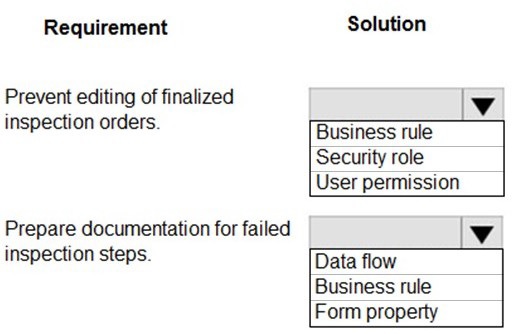
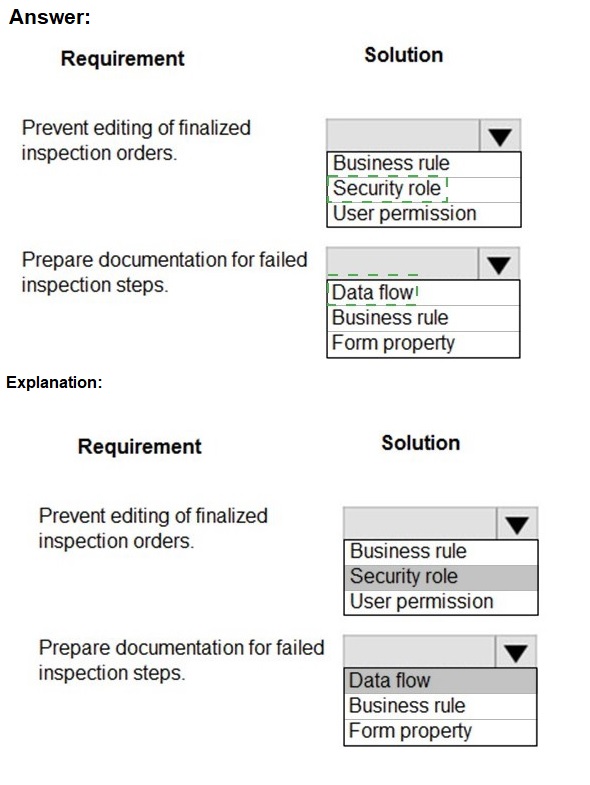
What should you recommend? To answer, select the appropriate options in the answer area.
NOTE: Each correct selection is worth one point.
Explanation:
The requirements need declarative (no-code) solutions that run within the context of a model-driven app form. The first is about enforcing a business rule based on record status. The second is about triggering an action (document creation) when a specific condition is met.
Correct Matching:
Requirement: Prevent editing of finalized inspection orders.
Solution from Group 1: Business rule
Explanation:
A Business Rule in Dataverse allows you to apply conditional logic to a form. You can create a rule that locks (disables) fields or the entire form when the record's status equals "Finalized." This is a client-side enforcement that provides immediate user feedback without requiring complex security restructuring.
Requirement: Prepare documentation for failed inspection steps.
Solution from Group 2: Business rule
Explanation:
While often used for UI logic, a Business Rule can also trigger real-time workflows. You can create a rule with a condition (e.g., "Inspection Step Status = Failed") and an action to start a Power Automate flow that generates and attaches the required documentation (e.g., a Word doc via template) to the record. This meets the "prepare" action requirement.
Why the Other Options Are Incorrect:
For Requirement 1 (Prevent Editing):
Security role / User permission: These control who can edit records at a broad entity level, not when a specific record can be edited based on its data (like a "Finalized" status). Using security for this would be overly complex and could prevent legitimate edits on non-finalized orders.
For Requirement 2 (Prepare Documentation):
Data flow: This is a Power Query-based tool for data transformation and bulk data movement between sources. It is not used for triggering document generation in real-time from a form action.
Form property: These control the UI behavior and layout of a form (e.g., visibility, labels). They cannot execute an action like generating a document.
Reference:
Microsoft Learn documentation on "Create business rules for model-driven apps" states that business rules can be used to "show error messages," "set field values," "lock fields," and "run real-time workflows," making them the versatile, declarative tool for both of these form-based logic requirements.
You need to recommend solutions to meet the integration requirements.
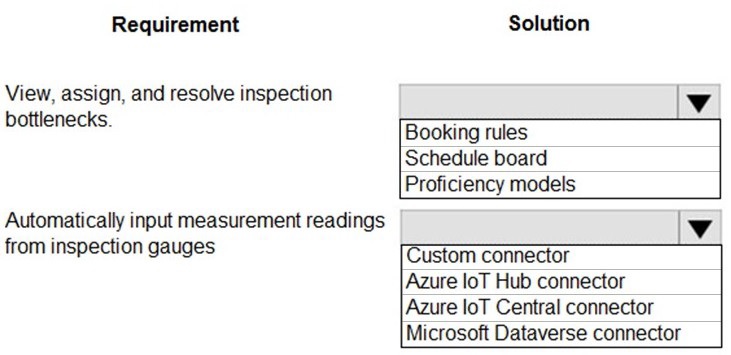
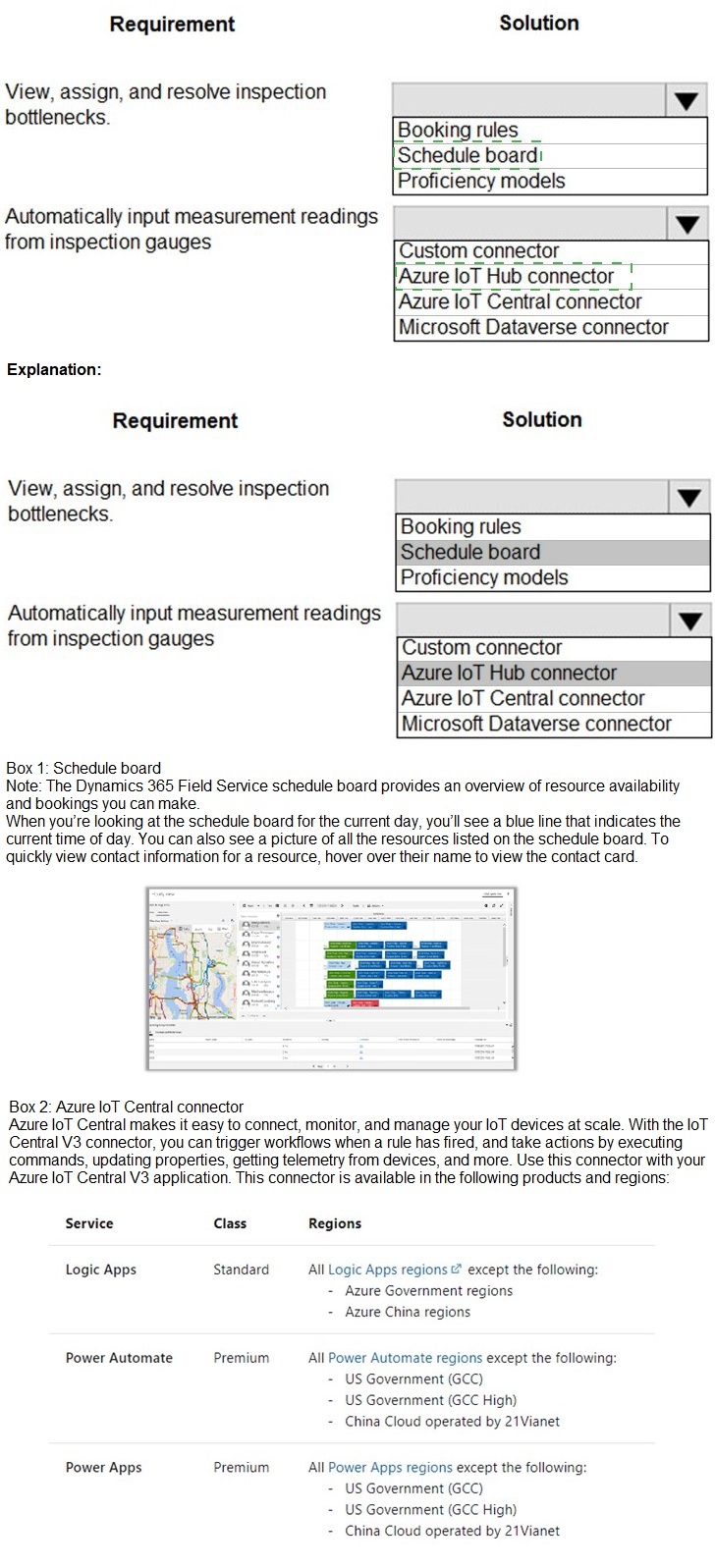
What should you recommend? To answer, select the appropriate options in the answer area.
NOTE: Each correct selection is worth one point.
Explanation:
The first requirement is about operational workforce management—visually managing and dispatching work to inspectors. The second is about technical data integration—automatically collecting telemetry from physical sensors (IoT devices). The solutions must be the specific Microsoft tools designed for these purposes.
Correct Matching:
Requirement: View, assign, and resolve inspection bottlenecks.
Recommended Solution: Schedule board
Explanation:
The Schedule Board is the primary visual dispatch and resource management tool in Dynamics 365 Field Service. It allows managers to view all inspectors' workloads (bottlenecks), assign inspection jobs based on location, skills, and availability, and track resolution status in real-time.
Requirement: Automatically input measurement readings from inspection gauges.
Recommended Solution: Azure IoT Hub connector
Explanation:
Inspection gauges are IoT devices. Azure IoT Hub is the core platform service for securely connecting, monitoring, and ingesting data from millions of IoT devices. The Azure IoT Hub connector in Power Automate enables building flows that automatically receive telemetry (measurement readings) from these devices and input that data into Dataverse or other business applications.
Why Other Key Options Are Incorrect:
For Scheduling (Requirement 1):
Booking rules / Proficiency models: These are configuration settings that define how the Schedule Board operates (scheduling constraints, skill requirements). They support the Schedule Board but are not the primary tool for the visual "view, assign, and resolve" action.
For IoT Integration (Requirement 2):
Custom connector: For connecting to a custom API, not optimized for raw, high-scale IoT device telemetry.
Azure IoT Central connector: IoT Central is a higher-level application built on IoT Hub. While valid, IoT Hub is the foundational, more common service for direct device connectivity in Power Platform integration scenarios.
Microsoft Dataverse connector: This connects to Dataverse from an external app. The flow needs to receive data from gauges first (via IoT Hub), then use the Dataverse connector to input it.
Reference:
Microsoft Learn documentation on "Use the schedule board" (Field Service) and "What is Azure IoT Hub?" defines these as the dedicated tools for resource scheduling/dispatching and IoT device connectivity/data ingestion, respectively.
You need to resolve the issue reported during testing.
What should you do?
A. Create an image data type within the Inspection Order table.
B. Create a relationship within the Inspection Order table to the originating inspection order
C. Create a Quick View form for the inspection order.
Explanation:
During testing of a Power Platform/Dataverse solution, issues often relate to missing data capture, incorrect navigation/relationships, or poor user experience on forms. Each option resolves a different type of problem.
If the correct answer is A:
Implied Issue:
Testers cannot attach or view photos/images related to an inspection order (e.g., photos of defects, compliance evidence).
Solution A (Create an image data type): Adding an Image column to the Inspection Order table allows users to upload and store pictures directly on the inspection record. This resolves the functional gap of missing image capture.
Why the other options would be correct for different issues:
B. Create a relationship... to the originating inspection order:
Implied Issue:
There is a need to track re-inspections, follow-ups, or a chain of related orders. Testers cannot see which order prompted a new one.
Solution B:
Creates a self-referential lookup (parent-child) on the same table, allowing one inspection order to be linked to its "parent" order. This solves a data lineage/tracking problem.
C. Create a Quick View form for the inspection order:
Implied Issue:
On a related form (e.g., an Asset form), users cannot see key details from the linked Inspection Order without clicking away. The issue is poor UX and inefficient data access.
Solution C:
A Quick View Form displays fields from a related record directly on the main form. This solves a usability issue by surfacing inspection data contextually.
Conclusion and Recommendation:
Option A is only correct if the reported issue was specifically about the inability to add images. Since the question stem is missing that critical context, please review the full scenario.
To choose correctly on the exam, identify:
Issue: "Users cannot attach photos of defects" → Answer A
Issue: "Cannot link a follow-up inspection to the original" → Answer B.
Issue: "Need to see inspection details on the asset screen without opening it" → Answer C.
You need to recommend a method for transferring machine information to Dynamics 365 Field Service.
What should you recommend?
A. Microsoft Dataverse connector
B. Dual-write
C. Lifecycle Services
Explanation:
"Transferring machine information" implies a need for a near real-time or on-demand data flow from an external source (likely a machine/asset management system) into Dynamics 365 Field Service's underlying Dataverse tables (like the Asset or Customer Asset table). The method must be reliable, support transactional consistency, and be usable within the Power Platform ecosystem.
Correct Option:
A. Microsoft Dataverse connector
The Microsoft Dataverse connector is the primary and most direct tool for transferring data into and out of Dataverse from Power Platform services. You would use this connector within Power Automate or a Power Apps canvas app to create a flow or logic that retrieves machine information from a source (e.g., an API, database, or file) and creates/updates corresponding records in Dataverse. It is the standard, flexible method for building such integrations.
Incorrect Option:
B. Dual-write:
This is a specific, pre-built, near real-time bidirectional sync between Dynamics 365 applications (like Finance & Operations or Supply Chain Management) and Dataverse. It is designed for deep, table-level integration between these specific enterprise systems. It is over-engineered and not the standard recommendation for a general "transfer machine information" requirement unless the source is explicitly one of those Dynamics 365 apps.
C. Lifecycle Services (LCS):
This is a project management and deployment portal for Dynamics 365 Finance, Supply Chain Management, and similar enterprise resource planning (ERP) implementations. It is used for environment management, code deployment, and monitoring—not for ongoing operational data transfer or integration.
Reference:
The Dataverse connector is documented as the core method for connecting "any service to Dataverse" within Power Automate and Power Apps. It is the go-to tool for building custom data import, export, and sync logic in the Power Platform. Dual-write has a very specific use case, and LCS is an ALM tool, not a data transfer mechanism.
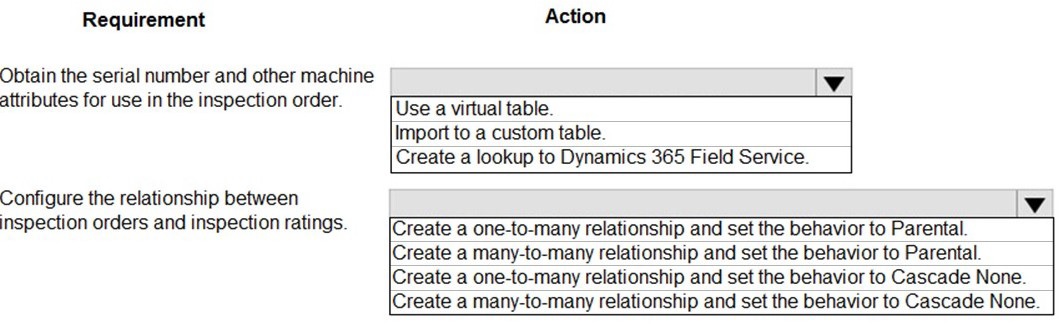
You need to design the quality inspection order data model.
What should you recommend? To answer, select the appropriate options in the answer area.
NOTE: Each correct selection is worth one point.
Explanation:
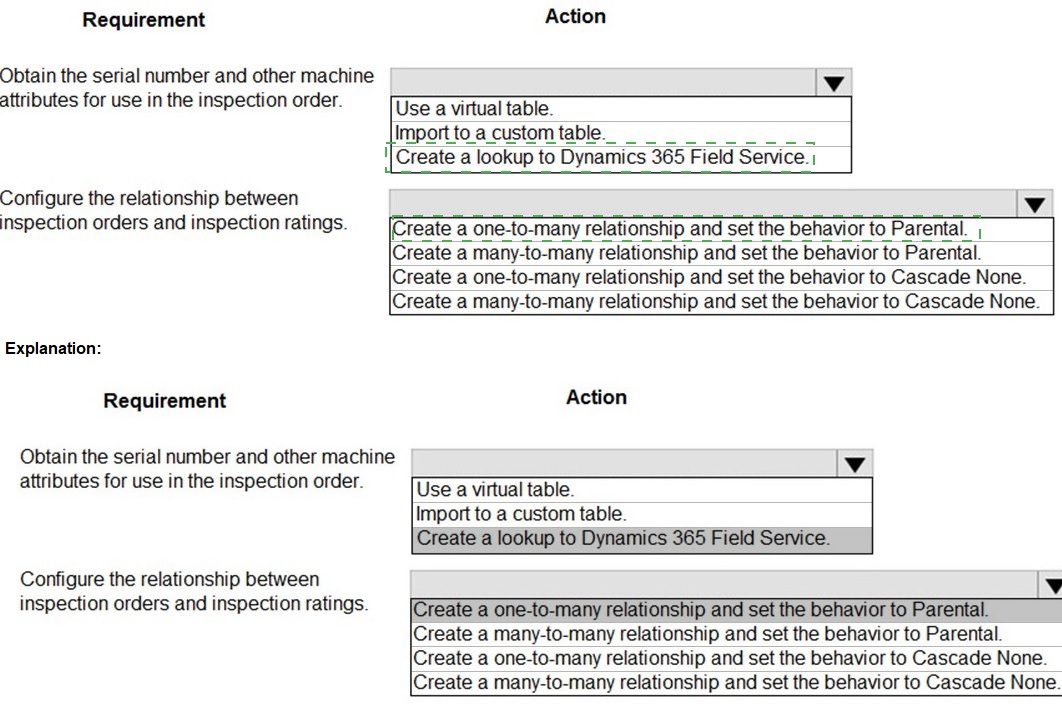
This tests two core data modeling concepts: 1) how to reference master data (machines) stored in another system or table, and 2) how to properly relate transactional records (orders) to their component parts (ratings) with the correct cascade behavior for data integrity.
Correct Matching:
Requirement: Obtain the serial number and other machine attributes for use in the inspection order.
Action: Create a lookup to Dynamics 365 Field Service.
Explanation:
Machine/Asset information (serial number, model, etc.) is master data that is typically managed within Dynamics 365 Field Service (in the Asset or Customer Asset table). The correct design is to create a Lookup (N:1) column on the Inspection Order table that references this existing, authoritative Asset table. This avoids data duplication and ensures consistency.
Requirement: Configure the relationship between inspection orders and inspection ratings.
Action: Create a one-to-many relationship and set the behavior to Parental.
Explanation:
Cardinality: One-to-Many (1:N). One Inspection Order will have many individual Inspection Ratings (e.g., one rating per checked criterion). The order is the parent; the ratings are its children.
Behavior: Parental. This is critical. Setting the Delete behavior to Parental means that if the parent Inspection Order is deleted, all its related child Inspection Rating records are also automatically deleted. This maintains referential integrity and prevents orphaned rating records, which is a standard requirement for compliance and data hygiene.
Why Other Key Options Are Incorrect:
For Requirement 1:
Use a virtual table: This is for when the machine data is in a completely separate, external system (not another Dataverse table like Field Service's Asset table). A virtual table makes it appear in Dataverse, but a direct lookup to an existing Dataverse table is simpler and more efficient.
Import to a custom table: This creates data duplication and a sync problem. Machine attributes should not be copied; they should be referenced from the single source of truth (Field Service).
For Requirement 2:
Many-to-many: This is used when many orders can be linked to many ratings, which is incorrect. A rating is specific to one order.
Cascade None: This would prevent the deletion of an Inspection Order if any ratings exist, which may be too restrictive. Parental cleanly deletes the child records, which is the desired behavior for components that have no meaning without their parent.
Reference:
Microsoft Learn documentation on "Create and edit relationships" explains the different relationship types and cascade behaviors. Parental is defined as the behavior where "all child records are deleted when the parent is deleted," which is appropriate for dependent records like inspection ratings.
You need to recommend a solution for creating the initial inspection checklists.
What should you recommend?
A. Power Apps Maker portal
B. Dataverse for Teams
C. Power Apps Studio
D. Data Migration utility
Explanation:
Creating the initial inspection checklists involves setting up master data in Dataverse. This is not an ongoing data entry task for end-users, nor is it building the app interface itself. It is a foundational data configuration activity that requires direct access to the Dataverse tables and their data, typically performed by a solution maker or administrator.
Correct Option:
A. Power Apps Maker portal
The Power Apps Maker portal (also known as make.powerapps.com) is the central administrative and development environment for the Power Platform. From here, a maker can navigate to the specific Dataverse table (e.g., "Checklist" or "Inspection Item") and use the "Edit data in Excel" feature or the data grid view to create, import, and manage the initial checklist records. This portal provides the direct data management tools needed for this setup task.
Incorrect Option:
B. Dataverse for Teams:
This is a lightweight version of Dataverse embedded within Microsoft Teams. It is designed for simple, team-scoped apps and lacks the full data management capabilities and scalability needed for a serious business application involving inspection checklists. It is not the recommended environment for a production solution.
C. Power Apps Studio:
This is the app development tool used to build the user interface of canvas apps. It is not a data management tool. You would use Power Apps Studio to build the app that uses the checklist data, but not to create the underlying data records themselves.
D. Data Migration utility:
This is a tool for bulk data imports/exports, often referring to the legacy Dynamics 365 Data Migration Manager or similar. While it could be used to import checklist data from a file, it is not the primary or simplest tool for creating the initial data. The Power Apps Maker portal provides more accessible and integrated tools for this purpose (like the data grid or "Edit in Excel").
Reference:
Microsoft Learn documentation on "Manage data in Dataverse" directs users to the Power Apps Maker portal to work with table data. The maker portal is the entry point for all solution management, including creating table schemas and managing the data within them.
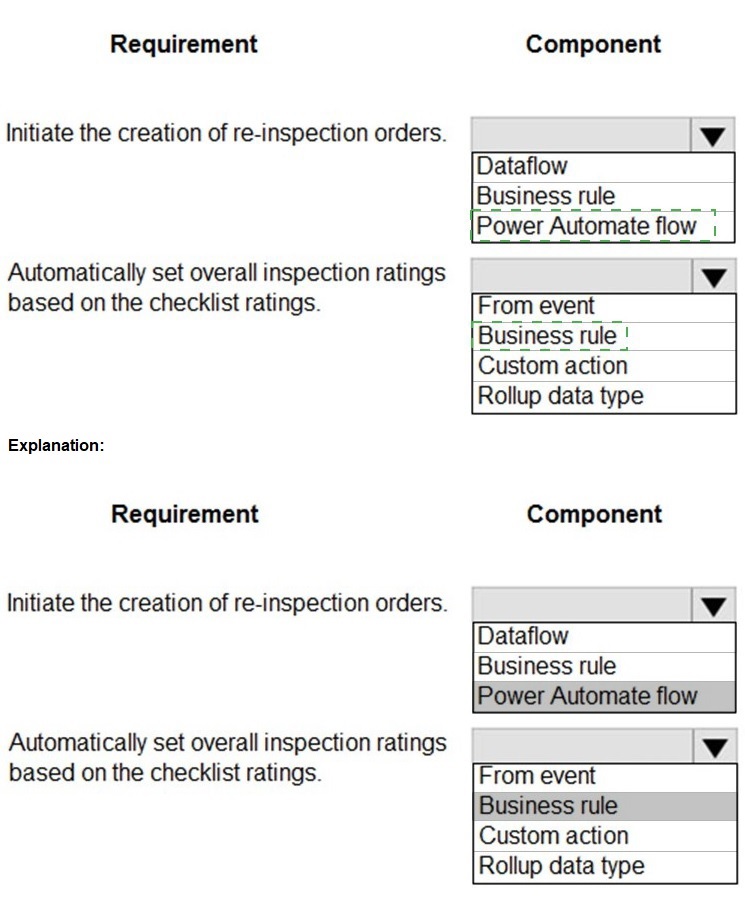
You need to recommend components to meet the re-inspection requirements.
Which components should you recommend? To answer, select the appropriate options in
the answer area.
NOTE: Each correct selection is worth one point.

Graphical user interface, text, application
Description automatically generated
Box 1: Power Automate flow
Scenario: Inspection orders must be automatically marked for re-inspection should a
machine fail inspection. The new inspection order must be created by using the originating
inspection order as a template.
Box 2: Business rule
By combining conditions and actions, you can do any of the following with
business rules:
Set column values
Clear column values
Set column requirement levels
Show or hide columns
Enable or disable columns
Validate data and show error messages
Create business recommendations based on business intelligence.
You need to recommend a solution to collect the information required to meet reporting
requirements.
What should you recommend?
A.
Business process flow
B.
Business rule
C.
Business event
D.
Business process modeler
Business rule
Business rule can create business recommendations based on business intelligence.
Scenario: Analytics and reporting
The solution must:
Provide metrics including existing and upcoming demand by inspection station,
average time spent per user at a station, and average time a machine spends at
each inspection point.
Provide metrics per inspector including number of inspections performed by
month, and number of inspections per rating type (pass, fail).
Provide a printed quality certificate to be included with each machine.
Reference:
https://docs.microsoft.com/en-us/learn/modules/define-create-business-rules/
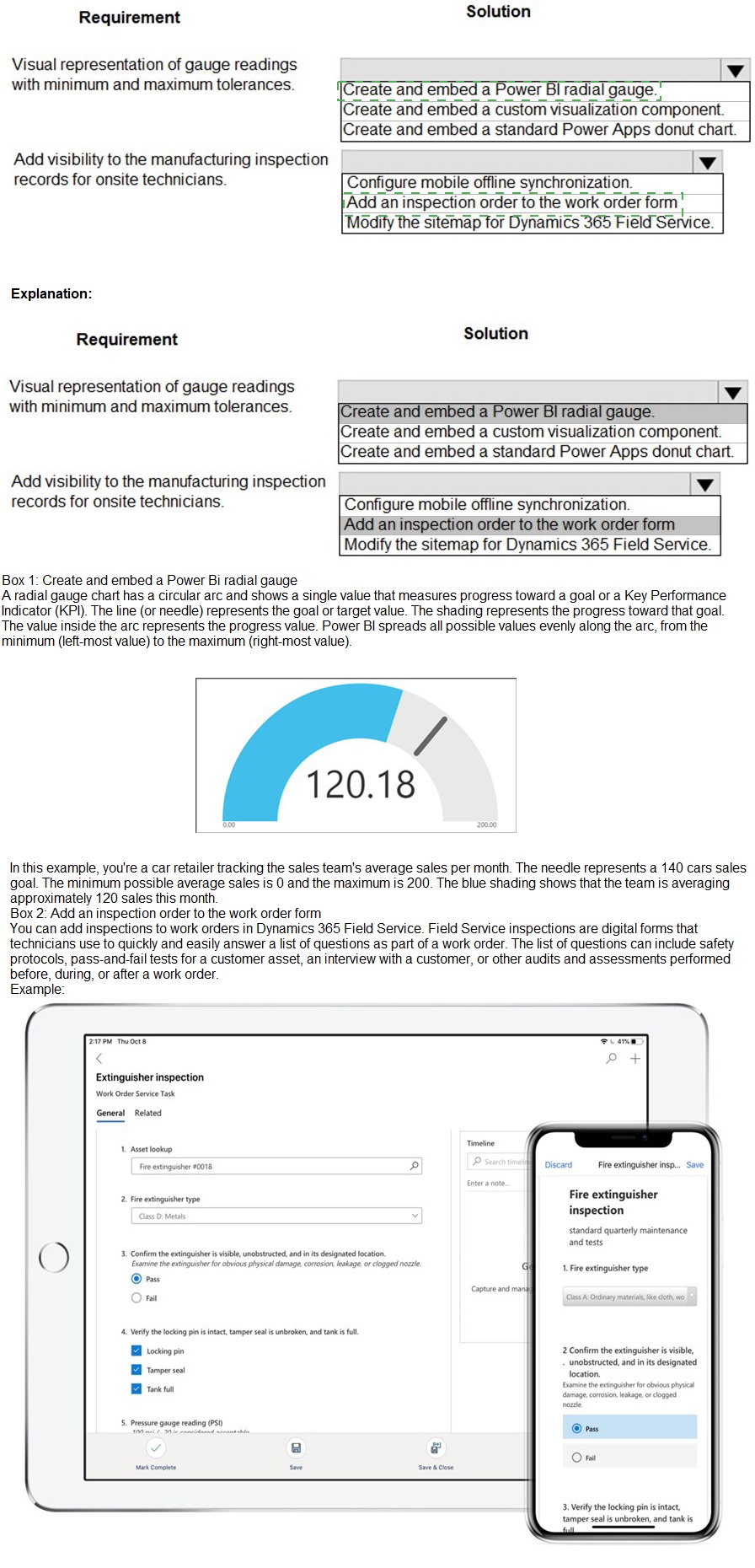
You need to recommend a solution to meet user interface requirements.
What should you recommend? To answer, select the appropriate options in the answer
area.
NOTE: Each correct selection is worth one point.

You need to manage user access to the app.
Which two connection types should you recommend? Each correct answer presents part of
the solution.
NOTE: Each correct selection is worth one point.
A.
Virtual table with a customer connector
B.
Office 365 Outlook connector
C.
Microsoft Dataverse connector
D.
Office 365 Users connector
Microsoft Dataverse connector
Office 365 Users connector
Office 365 Users lets you access user profiles in your organization using your Office 365 account. You can use the Use the connection in your Power Platform app.
Dataverse is part of the Microsoft 365 collaboration and productivity tools. Using federation,
applications can connect to Dataverse using the same system user identities and
credentials available in an Azure Active Directory based network.
Scenario:
Users must be active employees of Fabrikam.
Quality inspection app: Fabrikam is evaluating Microsoft Power Platform to
determine whether it can meet the company’s requirements for a manufacturing
defect and quality inspection solution. Each machine produced must be subjected
to a quality inspection at various points during production. Each machine must
undergo a more extensive quality inspection before the machine can be shipped to
the customer.
Reference:
https://docs.microsoft.com/en-us/powerapps/maker/canvas-apps/connections/connectionoffice365-
users
You are evaluating a solution design for a model-driven app that will have a large number
of complex forms.
Many of the forms take up to 10 seconds to load.
You need to recommend solution to speed up loading times for the forms.
Which two solutions should you recommend? Each correct answer presents a complete
solution.
NOTE: Each correct selection is worth one point.
A.
Consolidate and reduce scripts.
B.
Use synchronous JavaScript requests
C.
Move scripts into the OnLoad event.
D.
Remove unnecessary fields
Consolidate and reduce scripts.
Remove unnecessary fields
Controls that require extra data beyond the primary record produce the most strain on form
responsiveness and loading speed. These controls fetch data over the network and often
involve a waiting period (seen as progress indicators) because it can take time to transmit
the data.
Keep only the most frequently used of these controls on the default tab.
Reference:
https://docs.microsoft.com/en-us/powerapps/maker/model-driven-apps/design-performantforms
You are designing a Power Platform solution.
The company wants its development team to adopt the construction of repeatable
components for its
implementation team to reuse on different entities and forms.
You need to recommend a technology that meets these requirements.
Which technology would you recommend the developers adopt to assist the
implementation team?
A.
JavaScript
B.
Power Apps Component Framework control
C.
Web resource
D.
Canvas app
Power Apps Component Framework control
Power Apps component framework empowers professional developers and app makers to
create code components for model-driven and canvas apps (public preview) to provide
enhanced user experience for the users to work with data on forms, views, and
dashboards.
Reference:
https://docs.microsoft.com/en-us/powerapps/developer/component-framework/overview
| Page 3 out of 16 Pages |
| 12345 |
| PL-600 Practice Test Home |
Real-World Scenario Mastery: Our PL-600 practice exam don't just test definitions. They present you with the same complex, scenario-based problems you'll encounter on the actual exam.
Strategic Weakness Identification: Each practice session reveals exactly where you stand. Discover which domains need more attention, before Microsoft Power Platform Solution Architect exam day arrives.
Confidence Through Familiarity: There's no substitute for knowing what to expect. When you've worked through our comprehensive PL-600 practice exam questions pool covering all topics, the real exam feels like just another practice session.
Copyright © All Rights Reserved