
Topic 4, Misc. Questions
You are building a custom application in Azure to process resumes for the HR department.
The app must monitor submissions of resumes.
You need to parse the resumes and save contact and skills information into the Common Data Service. Which mechanism should you use?
A. Power Automate
B. Common Data Service plug-in
C. Web API
D. Custom workflow activity
Explanation:
The scenario describes an integration between an external Azure application (processing resumes) and the Common Data Service (Dataverse). The requirement is to parse resumes (an external process) and then save the extracted data into Dataverse. This is an automation and integration task best handled by a service that can receive data via an HTTP endpoint and then perform create/update operations in Dataverse using a connector.
Correct Option:
A. Power Automate
Power Automate is the optimal choice for this cloud integration. You can create a flow that is triggered by an HTTP request (when the Azure app finishes parsing a resume). The flow would receive the parsed contact and skills data in the request payload and then use the Common Data Service (current environment) connector to create or update the corresponding records (Contact, Skill, etc.) in Dataverse. This provides a low-code, managed, and reliable integration layer.
Incorrect Options:
B. Common Data Service plug-in
A plug-in is custom .NET code that runs within the Dataverse platform transaction, triggered by events on Dataverse records (Create, Update). It cannot be directly triggered by an external Azure application to ingest data. Plug-ins are for extending Dataverse's internal business logic, not for serving as an inbound integration endpoint.
C. Web API
This is technically possible but overly complex and less efficient. You would need to build, host, secure, and maintain a custom Web API to act as the intermediary. Power Automate provides this functionality out-of-the-box with its HTTP trigger and native Dataverse connector, eliminating the need for custom API development and infrastructure management.
D. Custom workflow activity
A custom workflow activity is a .NET class that can be called from a classic workflow within Dataverse. Like a plug-in, it runs inside Dataverse and is triggered by Dataverse events. It is not designed to be called directly by an external Azure application as an integration endpoint.
Reference:
Microsoft Learn: HTTP request trigger in Power Automate
Using the "When an HTTP request is received" trigger to create a callable endpoint for external systems is a standard integration pattern. Coupling this with the Dataverse connector to create records is a common, low-code solution for integrating external data sources, which aligns with the PL-400 focus on leveraging the Power Platform for integration scenarios.
A company has a Common Data Service (CDS) environment. The company creates modeldriven apps for different sets of users to allow them to manage and monitor projects.
Finance team users report that the current app does not include all the entities they require and that the existing project form is missing cost information. Cost information must be visible only to finance team users.
You create a security role for finance team users.
You need to create a new app for finance team users.
Which four actions should you perform in sequence? To answer, move the appropriate actions from the list of actions to the answer area and arrange them in the correct order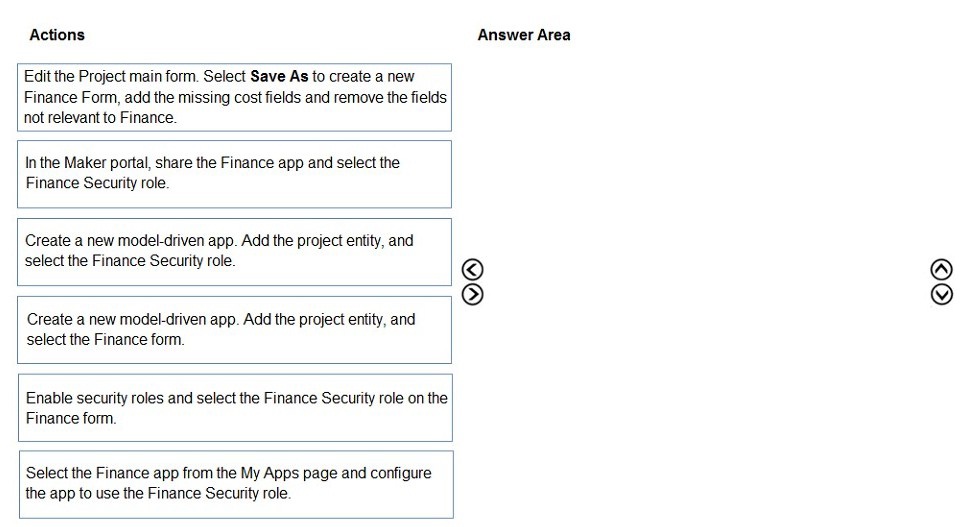
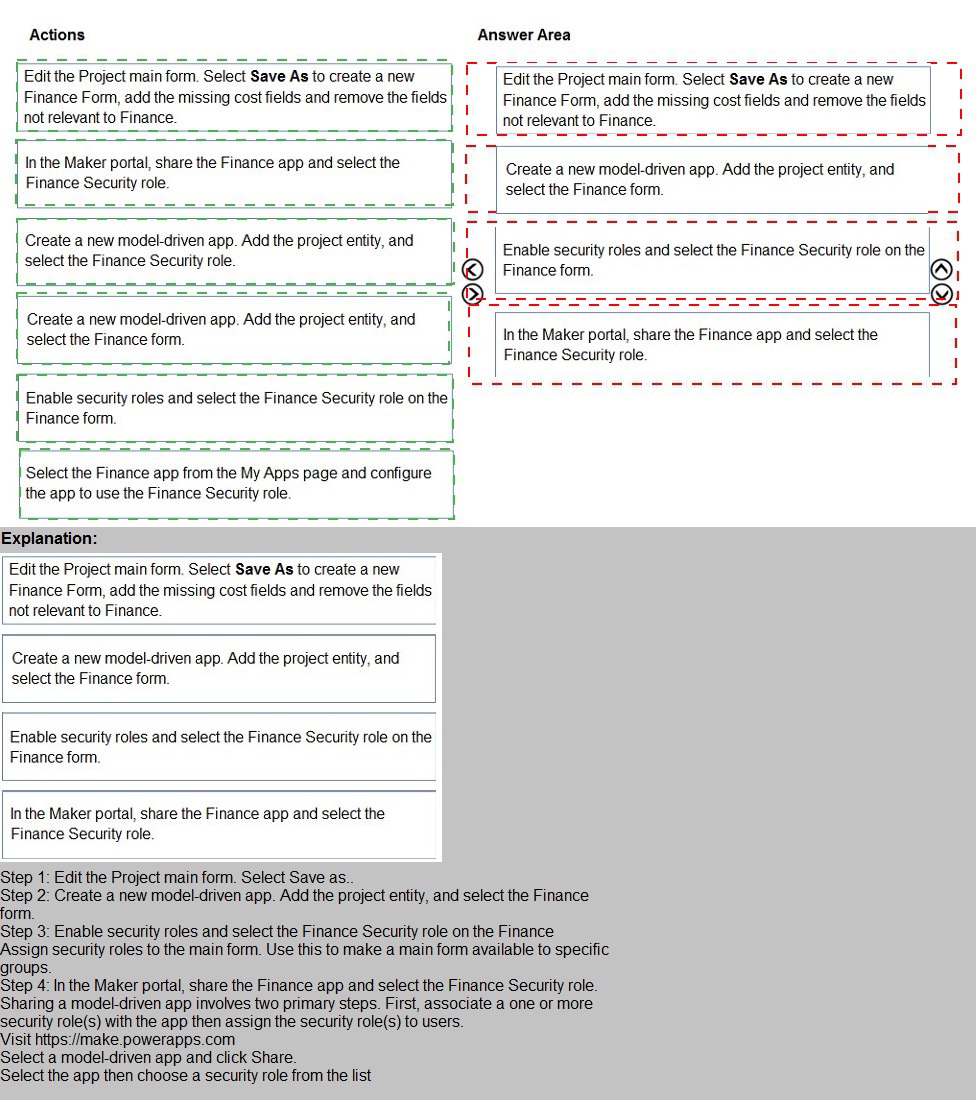
Step 1: Edit the Project main form. Select Save As to create a new Finance Form, add the missing cost fields and remove the fields not relevant to Finance.
(First, create the customized user interface (form) that contains the necessary cost fields and excludes irrelevant ones. This is done at the entity level before building the app.)
Step 2: Create a new model-driven app. Add the project entity, select the Finance form.
(Next, create the new app for the Finance team. Add the Project entity to the app's navigation and, critically, specify that it should use the newly created Finance Form as its default or only form.)
Step 3: Enable security roles and select the Finance Security role on the Finance form.
(Configure the form's security. This step ensures that the Finance Form itself is only visible to users who have the Finance Security role. This is a form-level security setting, not just app sharing.)
Step 4: In the Maker portal, share the Finance app and select the Finance Security role.
(Finally, publish and share the completed app with the appropriate audience. Sharing the app and assigning the Finance Security role to the Finance team users grants them access to the app and enforces the form-level security set in the previous step.)
Why the Other Actions Are Incorrect or Out of Sequence:
Create a new model-driven app. Add the project entity, and select the Finance Security role.
This is incorrect because you select the security role when sharing the app, not when creating the app's sitemap. The app creation step is about selecting components (entities, forms, views), not assigning users.
Select the Finance app from the My Apps page and configure the app to use the Finance Security role.
This describes configuring an app after it's already been accessed by a user, which is not the correct method. App security roles are assigned by an admin/maker in the maker portal (Power Apps studio or admin center), not from the user's "My Apps" page.
An organization implements Dynamics 36S Supply Chain Management.
You need to create a Microsoft Flow that runs daily.
What are two possible ways to achieve this goal? Each correct answer presents a complete solution. NOTE: Each correct selection is worth one point.
A. Create the flow and set the now frequency to daily and the interval to 1.
B. Create the flow and set the (low frequency to hourly and the value to 24.
C. Create the flow and set the flow frequency to hourly and the value to 1.
D. Create the flow and set the flow frequency to daily and the interval to 24.
Explanation:
This question is about configuring the Recurrence trigger in Power Automate to run a flow daily. The recurrence trigger has two key properties: frequency (the unit of time, like minute, hour, day, week, month) and interval (how many of those units to wait between runs). To run a flow once per day, you can set the frequency to "Day" with an interval of 1, or you can use a larger frequency unit with an interval that calculates to 24 hours.
Correct Options:
A. Create the flow and set the flow frequency to daily and the interval to 1.
This is the standard and most intuitive method. Setting frequency to Day and interval to 1 means the flow runs once every day.
D. Create the flow and set the flow frequency to hourly and the interval to 24.
This is a valid alternative method. Setting frequency to Hour and interval to 24 means the flow runs once every 24 hours, which is functionally equivalent to running daily.
Incorrect Options:
B. Create the flow and set the flow frequency to hourly and the value to 24.
This is essentially the same as option D but uses the non-standard term "value" instead of the correct parameter name "interval". In the Power Automate recurrence configuration, the field is officially named "Interval," not "value." Therefore, this is an incorrect description of the action.
C. Create the flow and set the flow frequency to hourly and the value to 1.
This would run the flow every hour (frequency=Hour, interval=1), not daily. This is incorrect for a daily requirement.
Reference:
Microsoft Learn: Recurrence trigger for Power Automate
The documentation for the Recurrence trigger outlines the frequency and interval parameters. A common example is "frequency": "Day", "interval": 1. The ability to use different frequency units (like hour) with appropriate intervals to achieve the same schedule is a fundamental feature.
A company uses five different shipping companies to deliver products to customers. Each shipping company has a separate service that quotes delivery fees for destination addresses.
You need to design a custom connector that retrieves the shipping fees from all the shipping companies by using their APIs.
Which three elements should you define for the custom connector? Each correct answer presents part of the solution.
NOTE: Each correct selection is worth one point.
A. Authentication model
B. Address parameter
C. OpenAPI definition
D. Fee parameter
E. Fee reference
Explanation:
The requirement is to create a custom connector that acts as a unified interface to five different shipping company APIs. The connector must accept an address, call multiple external services, and return fee quotes. When designing a custom connector, you must define its core structure, how it authenticates with the back-end services, and what parameters it accepts.
Correct Options:
A. Authentication model
This is a fundamental requirement. Each of the five shipping company APIs likely has its own authentication method (e.g., API Key, OAuth 2.0). The custom connector must define a consistent Authentication model that the connector will use, even if it means mapping a single connector secret to different credentials for each back-end call internally in an accompanying flow.
B. Address parameter
This is the primary input for the operation. The connector needs an Address parameter (or a set of parameters like Street, City, Postal Code) to pass to the underlying shipping APIs to request a quote for that specific destination.
C. OpenAPI definition
This is the core technical specification of the connector. The OpenAPI definition (formerly Swagger) defines the connector's operations, request/response schemas, parameters (like the address), and endpoints. It's the blueprint that describes what the connector does and how to call it.
Incorrect Options:
D. Fee parameter
This would be an input parameter, but the fee is the output (the result of the API call). The connector's operation does not take a "Fee" as an input; it returns a fee or a list of fees from the shipping companies.
E. Fee reference
This is vague and not a standard element of a custom connector definition. The response of the connector would likely define a schema that includes fee information (e.g., an array of results with shippingCompany and fee properties), but this is part of defining the response in the OpenAPI definition, not a separate top-level element called "Fee reference."
Reference:
Microsoft Learn: Create a custom connector from an OpenAPI definition
The process of creating a custom connector centers on providing an OpenAPI definition (which defines operations and parameters like the address) and configuring Authentication. These are the mandatory building blocks for any custom connector that interacts with an external API.
An organization plans to set up a secure connector for Power Apps. The App will capture tweets from Twitters about the organization’s upcoming product for sales follow-up.
You need to configure security for the app.Which authentication method should you use?
A. OAuth
B. API key
C. Windows authentication
D. Kerberos authentication
E. Basic authentication
Explanation:
The scenario involves creating a Power App that connects to Twitter to capture tweets. Twitter's API, like most modern SaaS and social media platforms, uses OAuth 2.0 as its standard and required authentication protocol for third-party applications to access user data on behalf of a user or app. This is a public cloud service integration, not an on-premises or internal system.
Correct Option:
A. OAuth
OAuth 2.0 is the industry-standard authorization framework for delegated access. When creating a custom connector for Twitter in Power Apps, you must configure OAuth 2.0 authentication. This method allows the app to obtain a secure access token from Twitter (after user consent or via app-only auth) to make authorized API calls to fetch tweets, without handling usernames and passwords directly.
Incorrect Options:
B. API key
While some APIs use simple API keys, Twitter's standard API for accessing tweets requires OAuth 2.0. An API key alone is insufficient for the required level of authorization. API keys are more common for simpler, less sensitive services or for identifying the application, not for granting secure, scoped access to user data.
C. Windows authentication
Windows Authentication (like NTLM or Kerberos) is used for authenticating users within a corporate Windows Active Directory network. It is completely irrelevant for authenticating to an external, public cloud service like Twitter.
D. Kerberos authentication
Kerberos is a network authentication protocol primarily used in on-premises enterprise Windows environments. Like Windows authentication, it is not supported or applicable for authenticating to Twitter's cloud-based REST API.
E. Basic authentication
Basic authentication sends a username and password in easily decodable plain text with each request. It is insecure for public internet APIs and is not supported by Twitter's modern API. OAuth was created to overcome the security limitations of Basic auth.
Reference:
Twitter Developer Documentation: Authentication overview
Twitter explicitly states that all API requests must be authenticated using OAuth 2.0 (either Bearer Token for app-only context or OAuth 1.0a for user context). This is a non-negotiable requirement when building any connector to Twitter, which is a key consideration for the PL-400 exam regarding external service authentication.
You must use an Azure Function to update the other system. The integration must send only newly created records to the other system. The solution must support scenarios where a component of the integration is unavailable for more than a few seconds to avoid data loss.
You need to design the integration solution.
Solution: Register a service endpoint in the Common Data Service that connects to an Azure Service Bus queue.
Register a step at the endpoint which runs asynchronously on the record’s Create message and in the portoperation stage
Configure the Azure Function to process records as they are added to the queue.
Does the solution meet the goal?
A. A. Yes
B. B. No
Explanation:
The goal is an integration that: 1) sends only newly created records, 2) uses an Azure Function to update the other system, and 3) is resilient to temporary outages (more than a few seconds) to avoid data loss. The proposed solution uses an Azure Service Bus queue as a reliable, durable messaging buffer between Dataverse and the Azure Function.
Correct Answer:
A. Yes
The solution meets all goals:
Sends only newly created records: The plug-in step is registered on the Create message, ensuring it only triggers for new records.
Uses an Azure Function: The Azure Function is configured to process records from the queue, which is the specified requirement.
Resilient to outages / avoids data loss: This is the key strength. Using an Azure Service Bus queue as a service endpoint decouples the systems.
When a record is created, the plug-in asynchronously posts a message to the Service Bus queue and immediately completes, not waiting for the external system.
The message is durably stored in the queue.
If the Azure Function or the target system is down, messages persist in the queue for days (based on configuration). Once the function is back online, it processes the backlog.
This design guarantees "at-least-once" delivery and prevents data loss during outages longer than a few seconds.
Why the Specifics Are Correct:
Service Endpoint (Azure Service Bus queue): The correct configuration for reliable, asynchronous messaging from a plug-in.
Asynchronous execution: Prevents the main Dataverse transaction from waiting or failing due to external system slowness/unavailability.
Post-operation stage: Ensures the record is successfully committed to the database before the integration message is sent.
Azure Function processes the queue: This is the standard serverless pattern for consuming messages from Service Bus.
This is a canonical, scalable, and resilient integration pattern for Dataverse.
Reference:
Microsoft Learn: Write a plug-in to post data to an Azure Service Bus queue
This documentation outlines the exact pattern: registering a Service Bus queue as a service endpoint, creating a plug-in that posts to it (often asynchronously), and having an external listener (like an Azure Function) process the messages. This pattern is specifically recommended for reliable, fire-and-forget integrations where the external system may be temporarily unavailable.
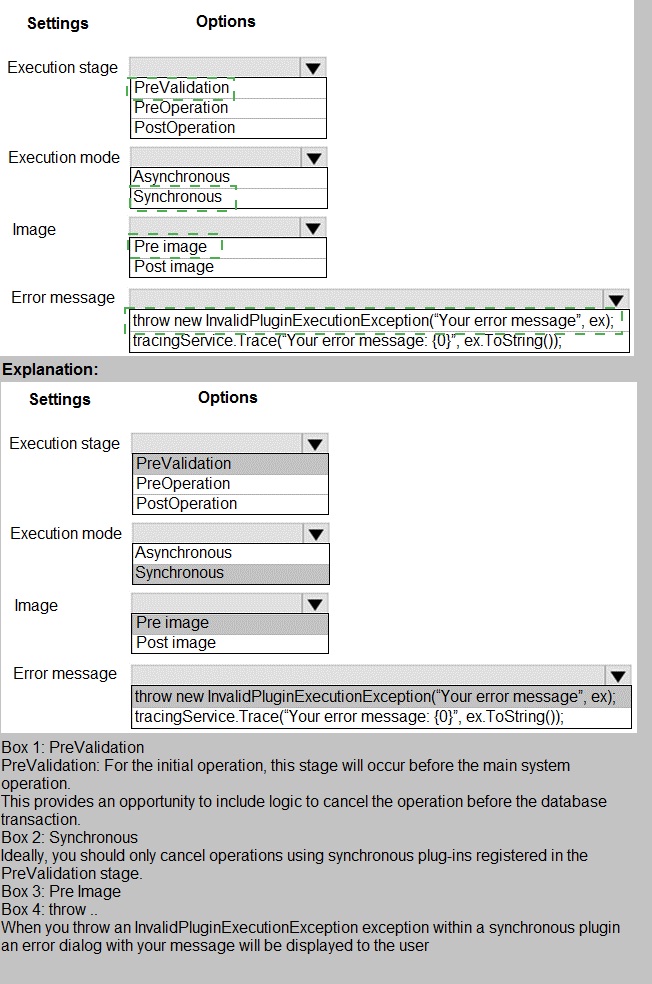
A manufacturing company takes online orders.
The company requires automatic validation of order changes. Requirements are as follows:
If validation is successful, the order is submitted. If exceptions are encountered, a message must be shown to the customerYou need to set up and deploy a plug-in that encapsulates the rules. Which options should you use? To answer, select the appropriate options in the answer
area. NOTE: Each correct selection is worth one point.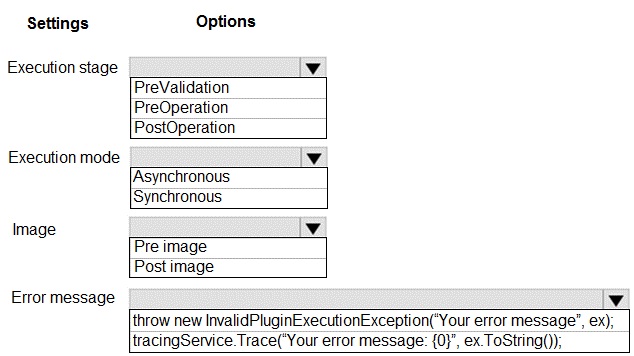
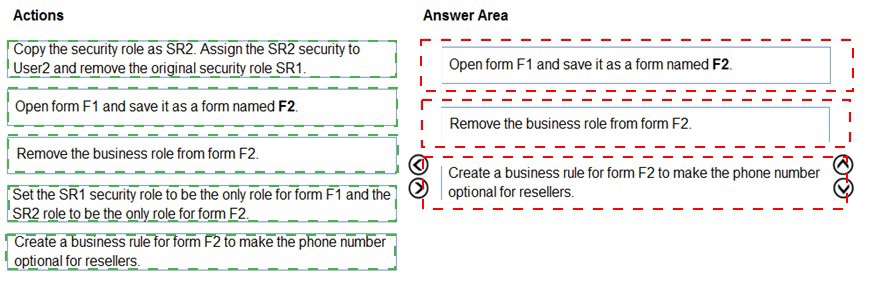
User1 and User2 use a form named F1 to enter account data. Both users have the same
security role, SR1, in the same business unit User1 has a business rule to make the main phone mandatory if the relationship type is
Reseller. User2 must occasionally create records of the Reseller type without having the
reseller’s phone number and is blocked by User1’s business rule.
You need to ensure that User2 can enter reseller data into the system.
Which three actions should perform in sequence? To answer, move the appropriate actions
from the list of actions to the answer area and arrange them in the correct order.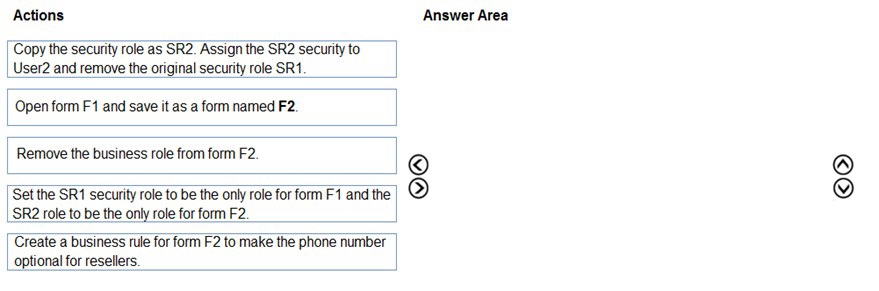
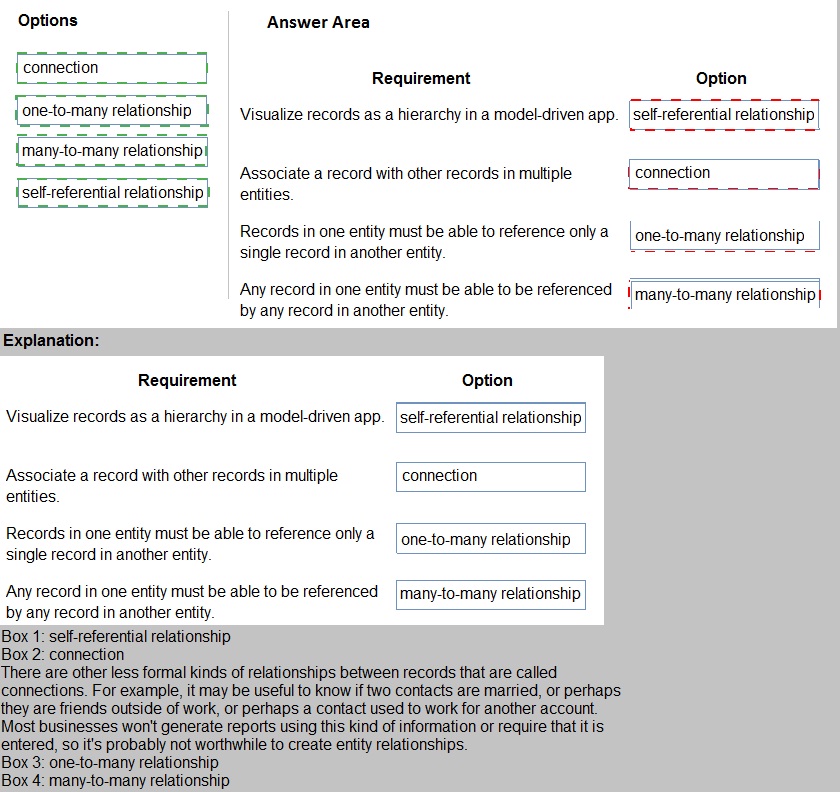
A company is creating a new system based on Common Data Service.
You need to select the features that meet the company’s requirements
Which options should you use? To answer, drag the appropriate options to the correct
requirements. Each option may be used once, more than once, or not at all. You may need
to drag the split bar between panes or scroll to view content.
NOTE: Each correct selection is worth one point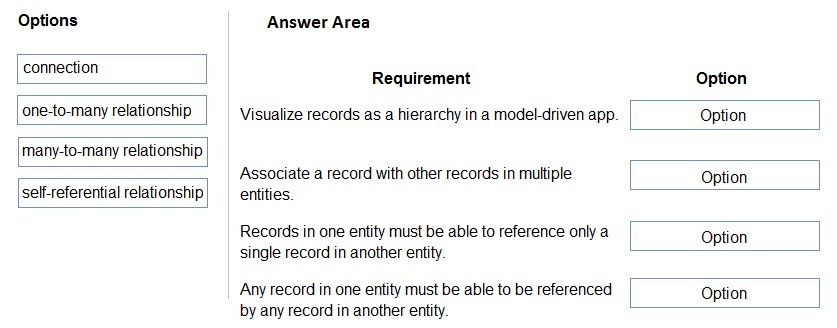
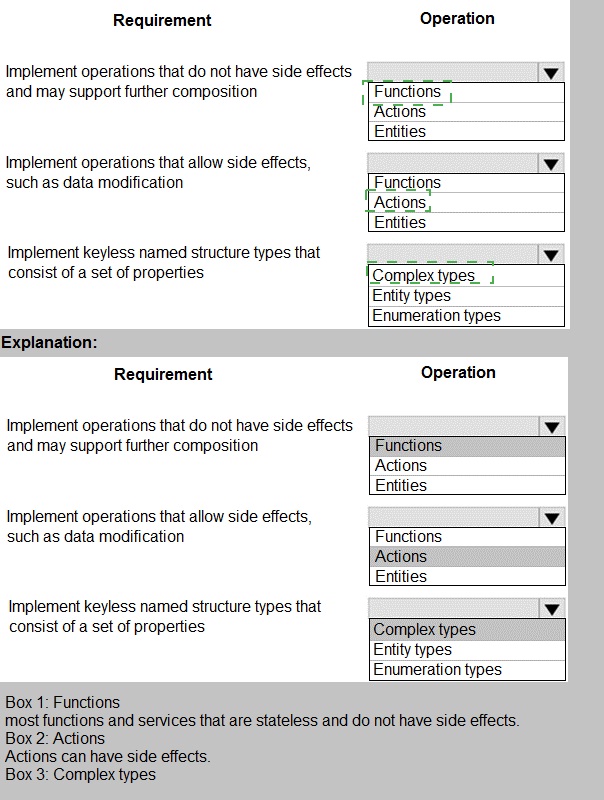
You need to develop a set of Web API’s for a company.
What should you implement? To answer, select the appropriate options in the answer area.
NOTE: Each correct selection is worth one point.
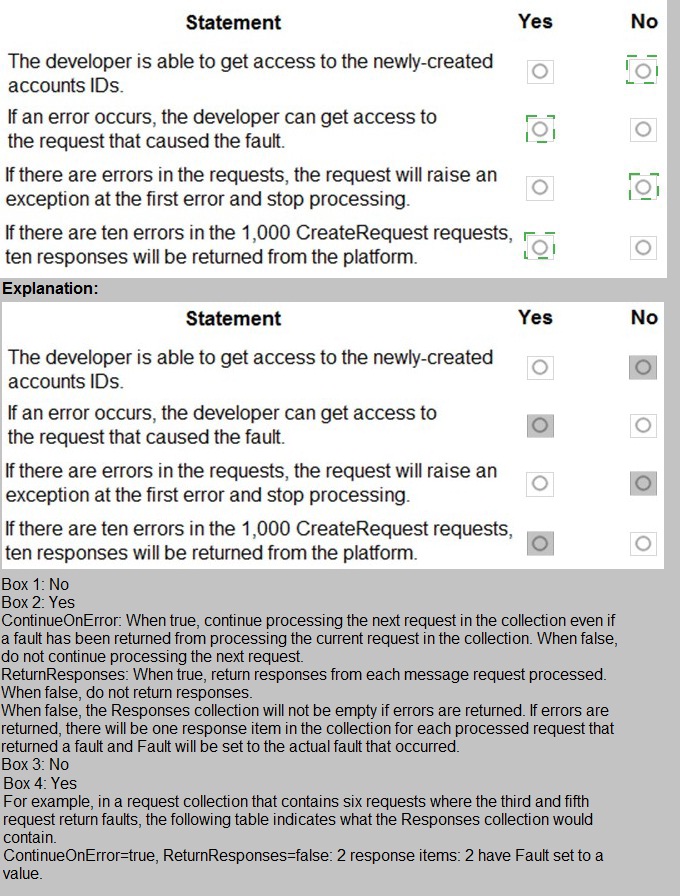
A company is preparing to go live with their Dynamics 365Sales solution, but first they need
to migrate data from a legacy system. The company is migrating accounts in batches of
1,000.
When the data is saved to Dynamics 365 Sales, the IDs for the new accounts must be
output to a log file.
You have the following code:
A company plans to replicate a Dynamics 365 Sales database into an Azure SQL
Database instance for reporting purposes. The data Export Service solution has been
installed.
You need to configure the Data service.
Which three actions should you perform? Each correct answer presents part of the
solution.
NOTE: Each correct selection is worth one point.
A.
Create an Azure SQL Database service in the same tenant as the Dynamics 365 Sales
environment.
B.
Enable auditing entities that must be replicated to Azure SQL database.
C.
Enable change tracking for all entities that must be replicated to Azure SQL Database.
D.
Set up server-based integration.
E.
Create an export profile that specifies all the entities that must be replicated
Create an Azure SQL Database service in the same tenant as the Dynamics 365 Sales
environment.
Enable change tracking for all entities that must be replicated to Azure SQL Database.
Create an export profile that specifies all the entities that must be replicated
https://docs.microsoft.com/en-us/power-platform/admin/replicate-data-microsoft-azure-sqldatabase
| Page 3 out of 17 Pages |
| 123456 |
| PL-400 Practice Test Home |
Real-World Scenario Mastery: Our PL-400 practice exam don't just test definitions. They present you with the same complex, scenario-based problems you'll encounter on the actual exam.
Strategic Weakness Identification: Each practice session reveals exactly where you stand. Discover which domains need more attention, before Microsoft Power Platform Developer exam day arrives.
Confidence Through Familiarity: There's no substitute for knowing what to expect. When you've worked through our comprehensive PL-400 practice exam questions pool covering all topics, the real exam feels like just another practice session.
Copyright © All Rights Reserved