
Topic 2: Misc. Questions
You are a Dynamics 365 for Customer Service administrator.
You must create a form for team members to use. The form must provide the ability to:
Lock a field on a form.
Trigger business logic based on a field value.
Use existing business information to enhance data entry.
You need to implement business rule components to create the form.
Which components should you use? To answer, drag the appropriate components to the correct requirements. Each component may be used once, more than once, or not at all.
You may need to drag the split bar between panes or scroll to view content.
NOTE: Each correct selection is worth one point.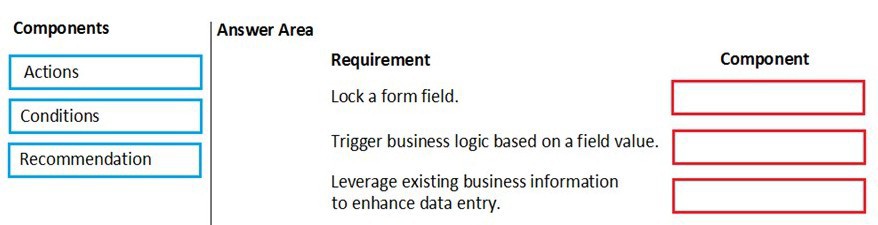
Explanation:
This question involves mapping the core components of a Dynamics 365 Business Rule to specific requirements. Business Rules provide client-side logic using a combination of Conditions (the "if") and Actions (the "then"). A Recommendation is a specialized type of guidance.
Correct Matches:
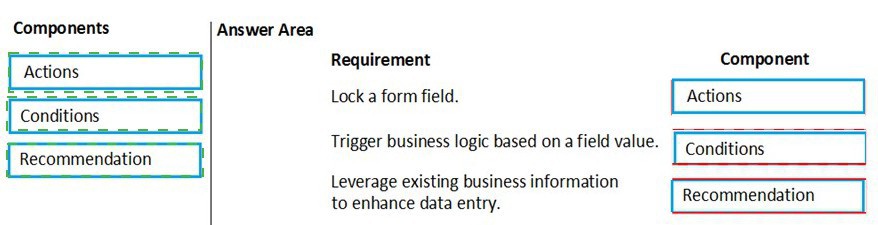
1. Requirement: Lock a form field.
Component: Actions
Locking (disabling) or hiding a field is an Action performed by a Business Rule. You would configure a rule with a condition and then add an action such as "Lock field" or "Disable field" on the target field.
2. Requirement: Trigger business logic based on a field value.
Component: Conditions
The Condition component is the "trigger" that evaluates field values. It defines the logical statement (e.g., "If Status Equals Active") that, when met, causes the associated Actions to execute. Conditions are the foundational trigger for all business logic within a Business Rule.
3. Requirement: Leverage existing business information to enhance data entry.
Component: Recommendation
A Recommendation is a specific Business Rule component that provides data entry guidance. It can suggest values for a field based on existing business information (e.g., based on a selected product category, recommend a specific price tier). It enhances data entry by offering intelligent suggestions without automatically setting the value.
Final Answer Area Mapping:
Lock a form field -> Actions
Trigger business logic based on a field value -> Conditions
Leverage existing business information to enhance data entry -> Recommendation
Why Other Components Are Not a Fit:
Actions are for doing something (set value, show error, lock field), not for triggering logic.
Conditions are for evaluating, not for providing guidance or suggestions.
Recommendations are specifically for providing suggestions, not for locking fields or acting as the primary trigger.
A company creates a Power Virtual Agents chatbot.
You need to determine when live agents are engaged to provide support.
Which metrics should you use? To answer, drag the appropriate metrics to the correct processes. Each metric may be used once, more than once, or not at all. You may need to drag the split bar between panes or scroll to view content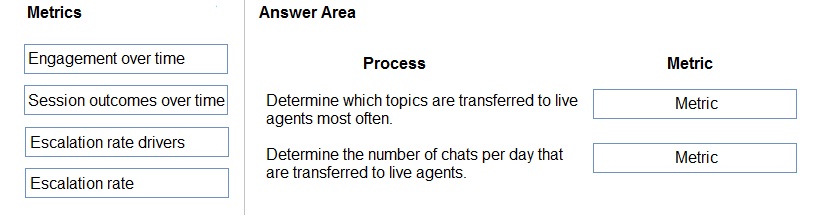
Explanation:
This question requires selecting the appropriate analytics metrics from Power Virtual Agents (PVA) to understand when and why conversations are escalated to human agents. PVA provides specific reports for analyzing bot performance and agent handoffs.
Correct Matches:
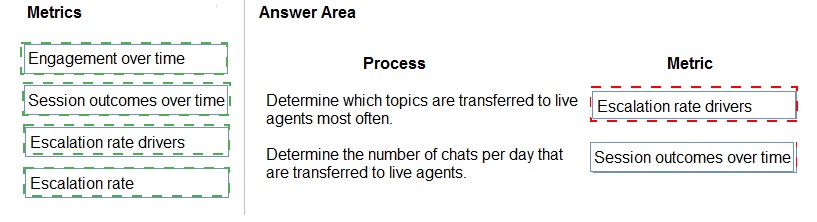
1. Process: Determine which topics are transferred to live agents most often.
Metric: Escalation rate drivers
The Escalation rate drivers report is specifically designed to show which topics have the highest rate of escalation to agents. It analyzes conversations that were transferred and breaks down the contributing topics, allowing you to identify problematic areas in the bot's knowledge.
2. Process: Determine the number of chats per day that are transferred to live agents.
Metric: Escalation rate
The Escalation rate metric shows the volume and percentage of conversations that were escalated over a selected time period (e.g., per day). This directly answers "how many" chats were transferred. The "Engagement over time" report shows total sessions, and the "Session outcomes over time" report includes escalations as a category, but the "Escalation rate" report is the most direct and focused metric for tracking the daily count of transfers.
Why Other Metrics Are Not a Fit:
Engagement over time:
This shows the total volume of conversations (sessions) over time, not specifically those that were escalated.
Session outcomes over time:
This provides a breakdown of how sessions ended (e.g., resolved, abandoned, escalated). It could be used to see the proportion of escalations, but the "Escalation rate" report is more precise for analyzing the number and trend of escalations specifically.
Final Answer Area Mapping:
Determine which topics are transferred to live agents most often -> Escalation rate drivers
Determine the number of chats per day that are transferred to live agents -> Escalation rate
You are a Dynamics 365 administrator.
You create a new app.
You need to create the site map for the app.
Which three actions should you perform in sequence? To answer, move the appropriate actions from the list of actions to the answer area and arrange them in the correct order.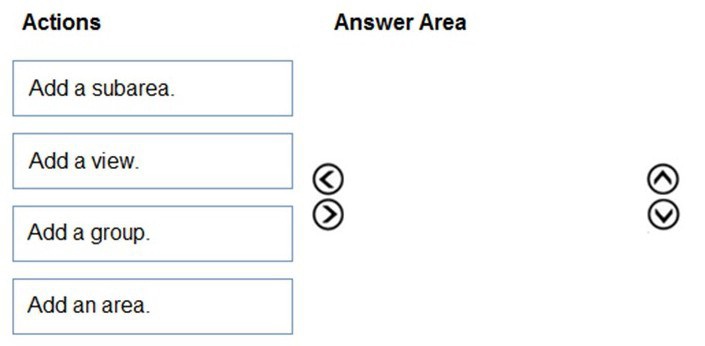
Explanation:
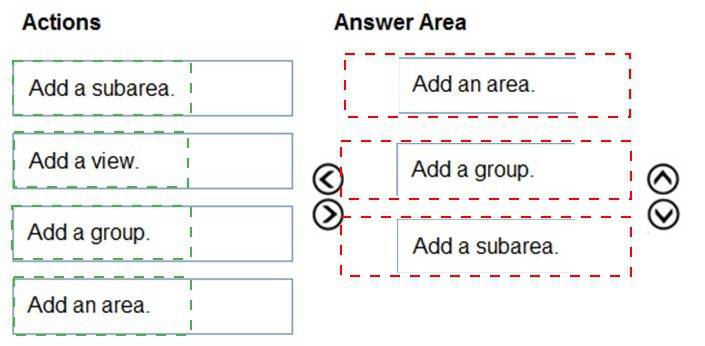
The question asks for the correct sequence of actions to create a sitemap for a new Dynamics 365 app. The sitemap defines the navigation structure (areas, groups, subareas) for the app. The hierarchy must be built logically from the top down.
Correct Sequence:
Add an area.
The Area is the top-level navigation container in a sitemap. It typically represents a major functional module (e.g., "Sales," "Service," "Marketing"). You must start by defining at least one area.
Add a group.
A Group is added within an Area. It organizes related entities or views under a common heading inside the area's navigation pane. For example, within the "Sales" area, you might have a "Customers" group.
Add a subarea.
A Subarea is added within a Group. It is the final navigational item that links to a specific entity, dashboard, or URL. For example, within the "Customers" group, you would add subareas for "Accounts," "Contacts," and "Leads."
Incorrect/Actions Not in Sequence:
Add a view: This is not a step in building the sitemap structure. A "View" is configured within an entity, not directly in the sitemap hierarchy. When you add a Subarea, you configure it to point to a specific entity and can select a default view for that entity, but "Add a view" is not a primary action in the sitemap designer's sequence.
Final Answer:
Add an area.
Add a group.
Add a subarea.
You are creating a new business process flow to qualify leads.
You create an action. The action is not available inside the Action Step.
You need to make the action available to the Action Step.
Which two steps must you perform? Each correct answer presents part of the solution.
NOTE Each correct selection is worth one point.
A. Activate the action
B. Select Run as an on-demand process
C. Add at least one step to the action.
D. Ensure that the entity for the action matches the corresponding entity for the business process flow stage.
Explanation:
This scenario involves making a custom action (a workflow process) available within a Business Process Flow (BPF) Action Step. For an action to be selectable in a BPF, it must be properly configured and associated with the correct context.
Correct Options:
C. Add at least one step to the action.
An Action is a type of Process in Dynamics 365. To be functional and selectable in a BPF step, the action must have at least one logical step defined within it (e.g., a "Create Record" or "Update Record" step). An empty action without any steps will not appear in the list of available actions for the BPF's Action Step.
D. Ensure that the entity for the action matches the corresponding entity for the business process flow stage.
The entity context is crucial. The custom action must be created for the same primary entity (e.g., Lead) as the Business Process Flow. An action created for the Account entity will not appear as an option in a BPF designed for the Lead entity. The BPF stage can only invoke actions that are scoped to its own entity.
Incorrect Options:
A. Activate the action
While an action must be activated to be usable in production, the question states the action is not available inside the Action Step. The primary reasons for unavailability are the action being empty or having the wrong entity scope. Once those are corrected, the action will appear in the dropdown list even in a draft state. Activating it is typically required for final use, but it is not the prerequisite for it to appear as an option.
B. Select Run as an on-demand process
This is a property of the Business Process Flow itself, not the action. "Run as an on-demand process" allows the entire BPF to be manually triggered from a command bar. It does not control whether a specific action is available as a step within a stage of the BPF.
Reference:
Microsoft Learn documentation on adding actions to business process flows states that to use a process in a BPF step, the process must be a "Child process" of the BPF's entity and must contain workflow steps. The entity association is a fundamental requirement.
A company uses Common Data Service to manage prospects. The company has a business process flow named BPFA that is associated with the Prospect entity to streamline the prospect management process.
You add a field named Category to the Prospect entity. You create additional business process flows. You apply the business process flows to Prospect records based on the selected category. Users can switch to any other newly configured business process flows but must not use BPFA.
You need to configure the solution.
What are two possible ways to achieve this goal? Each correct answer presents a complete solution.
NOTE Each correct selection is worth one point
A. Remove all of the privileges for BPFA.
B. Deactivate BPFA.
C. Use a business rule to prevent users from switching to BPFA.
D. Change the display order of the business process flows to move BPFA to the bottom of the list.
Explanation:
The goal is to prevent users from using a specific business process flow (BPFA) on Prospect records, while allowing them to use other flows and switch between those new flows. The solution must enforce this restriction.
Correct Options:
A. Remove all of the privileges for BPFA.
Business process flows have a dedicated security privilege ("bpflowcustomization") that controls if a user can use a specific BPF on a record. By removing this privilege for BPFA from all relevant security roles, you can effectively hide BPFA from users. It will not appear in the BPF selector dropdown on the Prospect form, making it impossible for them to select or switch to it. This is a security-based enforcement.
B. Deactivate BPFA.
Deactivating BPFA in the process designer changes its status from Activated to Draft. An inactive (draft) business process flow is not available for users to select on records. It will be removed from the BPF selector on the Prospect form, preventing users from switching to it. This is an administrative control.
Incorrect Options:
C. Use a business rule to prevent users from switching to BPFA.
Business rules cannot control the availability of business process flows in the BPF selector. Business rules operate on form fields and values, not on the navigation or availability of BPFs. There is no action in a business rule to hide or disable a business process flow.
D. Change the display order of the business process flows to move BPFA to the bottom of the list.
Changing the order only affects the sequence in which BPFs appear in the dropdown list. It does not prevent users from selecting BPFA. Users can still scroll and select it. This does not meet the requirement that users "must not use BPFA."
Reference:
Microsoft Learn documentation on business process flow security states that to make a BPF available, a user must have the "Run business process flows" privilege on the entity and the customization privilege for that specific BPF. Removing the specific privilege hides it. Furthermore, only Activated processes are available to end-users; deactivated (draft) processes are not selectable.
You are a Dynamics 365 Sales administrator for a software company. The sales team wants to attach a large number of supporting documents to customer records, but management does not want to incur the cost of additional storage.
The company does not have any Office 365 application integrations enabled.
You need to recommend a storage solution that keeps storage costs low.
Solution: Enable OneNote integration.
Does the solution meet the goal?
A. Yes
B. No
Explanation:
The goal is to provide a method for attaching a large volume of documents to customer records without increasing Dynamics 365 storage costs. The proposed solution is to enable OneNote integration.
Correct Option:
B. No
The solution does not meet the goal.
Why it Fails:
Enabling OneNote integration in Dynamics 365 requires and uses SharePoint Online as the underlying storage infrastructure. When you embed a OneNote notebook on a record (like an Account), that notebook is created and stored in a SharePoint document library associated with that record.
Storage Cost Impact:
While this offloads the binary file storage from Dynamics 365's finite database storage to SharePoint, SharePoint Online storage is not free and is part of the overall Microsoft 365 tenant storage pool. This merely transfers the storage cost from one service (Dynamics 365) to another (SharePoint Online). It does not achieve the goal of keeping storage costs low; it just changes which service incurs the cost.
The Correct Recommendation:
To keep storage costs low, you should recommend using an external cloud storage service like Microsoft OneDrive for Business or Azure Blob Storage without the native Dynamics 365 document management integration. You could store documents there and then attach links to those documents in Dynamics 365 notes or a custom field. This approach avoids consuming expensive Dynamics 365 database storage and utilizes the separate storage allowances of those services, which may be more cost-effective or already included in existing licenses.
Reference:
Dynamics 365 document management integrations (including Notes attachments, SharePoint, and OneNote) are designed to store files externally but within the Microsoft 365 ecosystem (SharePoint), which has its own storage limits and potential costs. The goal of avoiding "additional storage cost" implies a need to use storage outside the paid Microsoft 365/Dynamics 365 subscription plan.
A company has a canvas app that includes the following screens: Screen1 and Screen2.
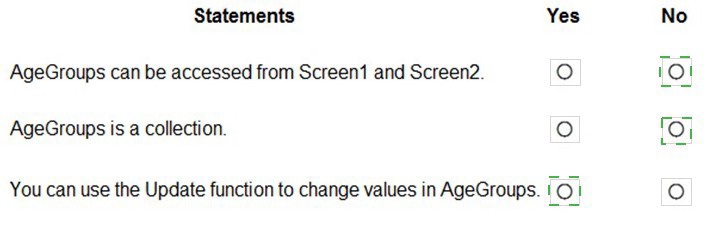
The OnVisible property for Screen1 contains the following expression.
Set(AgeGroups, ["1-25", "26-54", "55+"])
For each of the following statements, select Yes if the statement is true. Otherwise, select
No. NOTE: Each correct selection is worth one point.
You are a Dynamics 365 Customer Service system administrator
Your organization does not permit the use of custom code for solutions.
You need to create a view that can be viewed by all users in an organization.
Where should you create the view?
A.
Microsoft Excel template
B.
Entities component of a solution
C.
Microsoft Virtual Studio
D.
Templates area
Entities component of a solution
You are creating a business rule to implement new business logic.
You must apply the business logic to a canvas app that has a single screen named
Screen1.
You need to configure the scope for the business rule.
Which scope should you use?
A.
All Forms
B.
Entity
C.
Screen1
D.
Global
Entity
Explanation:
Note: Some terminology has changed. Entity is now Table. If you're building a Canvas app,
you must use table (entity) as the scope.
Reference:
https://docs.microsoft.com/en-us/powerapps/maker/common-data-service/data-platformcreate-
business-rule
On a Contact record, a user creates a Note record that contains the word running.
One week later, the user reports that they cannot find the Contact record associated with
the Note record.
You need to find the Note record.
Solution: Use Relevance Search to search for the word run.
Does the solution meet the goal?
A.
Yes
B.
No
Yes
You manage Dynamics 365 for a company.
You must prevent users from launching and using Power Automate.
You need to hide the Flows button on the user interface.
Which configuration setting should you change?
A.
the Customizations section of System Settings
B.
the Site Map
C.
the Buttons tab of Flow
D.
the Entity component of the default solution
the Customizations section of System Settings
https://www.inogic.com/blog/2018/10/show-or-hide-microsoft-flow-button-in-dynamics-365/
A customer tracks events by using a custom entity.
The custom entity includes a custom field for the venue of the events. The customer must
be able to display the events by venue in a calendar.
You need to ensure that all events display by venue in the calendar.
To which component should you add a control?
A.
Form
B.
view
C.
Field
D.
Chart
view
| Page 3 out of 9 Pages |
| Previous |