
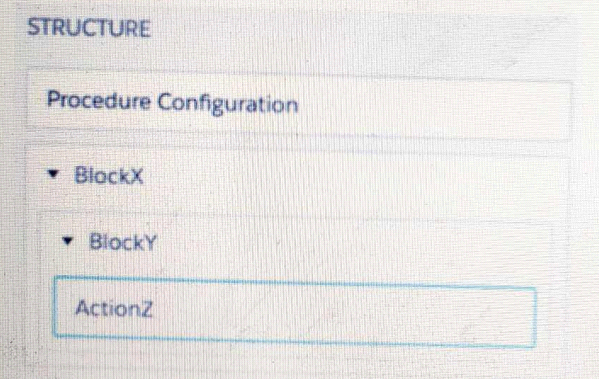
Refer to the exhibit below. In this Integration Procedure structure, what Send JSON Path would you use to send the output of the ActionZ element to a Response Action?
A. BlockX.BlockYActionZ
B. ActionZ:BlockY:BlockX
C. ActionZ:BlockY:BlockX
D. BlockX:BlockY:ActionAZ
Explanation:
In an Integration Procedure, the Send JSON Path is used to reference the output of a previous element so it can be used as input for a subsequent element (like a Response Action). The path is constructed using the names of the elements in the hierarchy, separated by colons :.
Let's break down the structure shown in the exhibit:
The top-level element is BlockX.
Nested inside BlockX is BlockY.
Nested inside BlockY is ActionZ.
To form the path to the output of ActionZ, you start from the outermost element and move inward, separating each element's name with a colon.
Therefore, the correct path is: BlockX:BlockY:ActionZ
Why the other options are incorrect:
A. BlockX.BlockYActionZ:
This uses a dot (.) as a separator, which is incorrect. Integration Procedures use colons : for the JSON path. Also, BlockYActionZ incorrectly concatenates the two names without a separator.
B. ActionZ:BlockY:BlockX:
This path is in the reverse order (inner element to outer element). The path must be constructed from the top down, not the bottom up.
C. ActionZ:BlockY:BlockX:
This is a duplicate of option B and is also incorrect for the same reason (reverse order).
The final option you listed as "D. BlockX:BlockY:ActionAZ" appears to have a typo (ActionAZ instead of ActionZ). If the element is truly named ActionZ, then this option would be incorrect. The correct name must be used.
Key Takeaway:
The standard format for a Send JSON Path in an Integration Procedure is OuterBlockName:NestedBlockName:ElementName.
Reference:
Salesforce OmniStudio Developer Guide, specifically the sections on "Integration Procedure Elements" and "Using the Send JSON Path".
A developer is configuring the API URL in an HTTP Action element within an Integration procedure. What is the merge code syntax for passing a Date node from an element named SetValues in the URL?
A. x%SetValues.Date%
B. (‘ Setvalues’] [ ‘Date’]
C. %SetValues Date
D. {(SetValues. Date)}
Summary
Within an Integration Procedure, data is passed between elements using a specific merge field syntax. This syntax allows you to reference the output of a previous action to dynamically build values, such as a URL in an HTTP Action. The correct syntax uses a specific set of delimiters and follows a structured path to identify the source element and the desired data node.
Correct Option
D. {(SetValues.Date)}
This is the correct merge field syntax for referencing data from a previous element within an Integration Procedure. The double curly braces {{...}} are the standard delimiters. SetValues is the name of the previous element, and Date is the specific node within that element's output that you want to insert into the URL.
Incorrect Option
A. x%SetValues.Date%
This syntax is incorrect. It uses percent signs % as delimiters, which is the syntax used for merge fields within an OmniScript's text elements, not for referencing data between actions within an Integration Procedure.
B. (‘ Setvalues’] [ ‘Date’]
This syntax is completely invalid and does not conform to any merge field pattern in OmniStudio. It uses square brackets and quotes incorrectly.
C. %SetValues Date
This is also incorrect. It uses the wrong delimiter (a single percent sign) and is missing the period . that separates the element name from the node name. The correct format requires double curly braces and proper dot notation.
Reference
Salesforce OmniStudio Developer Guide: Integration Procedure Data Pipelining
A developer is building an OmniScript and needs to save to Salesforce and to an AWS Order Management system.
Which OmniScriptelement could save all of this data?
A. DataRaptor Post Action
B. HTTP Action
C. Integration Procedure Action
D. Data Raptor Load Action
Summary
The requirement involves performing two distinct save operations: one to a Salesforce database and another to an external AWS system via an API call. This requires orchestrating multiple actions in sequence. The correct element must be capable of containing and executing these different types of actions as part of a single, coordinated process.
Correct Option
C. Integration Procedure Action
This is the correct element. An Integration Procedure is a container that can orchestrate multiple steps. The developer can build an Integration Procedure that contains:
A DataRaptor Load Action to save data to Salesforce.
An HTTP Action to send data to the AWS Order Management system's REST API.
The Integration Procedure Action within the OmniScript then calls this entire multi-step process, ensuring both save operations are executed.
Incorrect Option
A. DataRaptor Post Action
This is not a standard OmniStudio element. "DataRaptor Post" is likely a distractor. DataRaptors are categorized as Extract, Transform, or Load. A DataRaptor Load Action can only save data to Salesforce; it cannot call an external AWS API.
B. HTTP Action
An HTTP Action is designed specifically for calling external web services (like the AWS API). It cannot save data directly to Salesforce objects. Using it alone would only fulfill half of the requirement.
D. Data Raptor Load Action
A DataRaptor Load Action is used exclusively for creating, updating, or upserting records within the Salesforce database. It cannot send data to an external system like AWS.
Reference
Salesforce OmniStudio Developer Guide: Integration Procedure Action
An integration Procedure uses an HTTP action to make a REST API call. The response from the REST API must be converted into a specific XML structure before sending it as an input to another external wen service.
How should the developer configure the Integration Procedure to meet this requirement?
A. Use a Remote Action that calls the XMLStreamReader class
B. Use a Remote Action that calls the XMLStreamWriter class
C. Use a DataRaptor Transform to convert JSON to XML
D. Use a DataRaptor Extract and check the XML checkbox on the Output JSON Path.
E.
Summary
The requirement is to transform the structure of data from one format (JSON from a REST API) to another (a specific XML structure). This is a data transformation task. The tool must be able to take the JSON response, map its values to a new schema, and output the result in XML format. This requires a component designed for declarative data shaping and format conversion.
Correct Option
C. Use a DataRaptor Transform to convert JSON to XML
This is the correct and most efficient method. A DataRaptor Transform is specifically designed for this purpose. It allows the developer to:
Define the JSON structure of the HTTP Action's response as the "Input JSON".
Use the Transform's mapping tools (Extract, Formula, Aggregation steps) to restructure the data.
Define the "Expected Output JSON" as the desired XML structure. The DataRaptor Transform can output its result as XML by selecting the appropriate output format.
Incorrect Option
A. Use a Remote Action that calls the XMLStreamReader class
XMLStreamReader is an Apex class for parsing XML, not for creating or converting data to XML. Using a Remote Action for this would require writing complex, custom Apex code to manually build the XML string, which is against the low-code principle of OmniStudio and is more error-prone than using a declarative tool.
B. Use a Remote Action that calls the XMLStreamWriter class
While XMLStreamWriter can be used to generate XML in Apex, this again forces a custom-coded solution. A DataRaptor Transform provides a declarative, manageable, and faster way to achieve the same result without code.
D. Use a DataRaptor Extract and check the XML checkbox on the Output JSON Path.
A DataRaptor Extract is used to retrieve data from Salesforce objects. It cannot transform the structure of data from an HTTP response. The "XML" output option for a DataRaptor Extract formats the extracted Salesforce data as XML; it does not transform an arbitrary JSON input from an HTTP Action into a new XML structure.
Reference
Salesforce OmniStudio Developer Guide: DataRaptor Transform
In an OmnoScript, a developer needs to configure a Disclosureelement to require user input only if the user already checked a Non-Disclosure Agreement Checkbox.
How should the developer configure the conditional view to meet this requirement?
A. Show element if true
B. Disable read only if true
C. Set element to optional if false
D. Set element to require if true
Summary
The requirement is to conditionally make a Disclosure element mandatory based on the state of another element (the NDA Checkbox). The Disclosure element should only require acceptance if the user has checked the checkbox. This is a conditional validation rule, not simply a rule for showing or hiding the element. The configuration must dynamically change the "required" property of the Disclosure.
Correct Option
D. Set element to require if true
This is the correct configuration. The "Set element to require" property allows you to define a condition that, when true, makes the element mandatory. The developer would set this condition to reference the NDA Checkbox element (e.g., NDACheckbox == true). This means the Disclosure will only be a required field if the checkbox is checked, forcing the user to accept the disclosure before proceeding.
Incorrect Option
A. Show element if true
This property controls the visibility of the element. The requirement is not to show/hide the Disclosure, but to change its validation behavior. The Disclosure should be visible regardless, but only mandatory under a specific condition.
B. Disable read only if true
This property controls whether the element is editable or grayed out (read-only). It does not control the mandatory/optional validation status of the element. A read-only element cannot be edited by the user, which is the opposite of what is needed here.
C. Set element to optional if false
This logic is reversed and less direct. While you could theoretically set the element to be optional when the checkbox is false, the natural and clearer configuration is to set it to be required when the checkbox is true. The "Set element to require" property provides this direct and intuitive logic.
Reference
Salesforce OmniStudio Developer Guide: Disclosure Element Properties
In an Integration Procedure, a developer needs to perform a multi-step calculation on every element of an array.
Based on best practices, what two methods are recommended?
(Choose 2 answers)
A. Use a List Action to merge the array elements together.
B. Use a Calculation Action to call a Calculation Procedure.
C. Use a Set Values Element inside a Loop Block.
D. Use a Matrix Action to call a Calculation Matrix.
E.
Summary
Performing complex, multi-step calculations on each item in an array requires a specialized and scalable approach. The logic needs to be applied iteratively, and using tools designed for bulk or iterative processing is a best practice. This ensures maintainability, performance, and separation of concerns, rather than building complex, nested logic directly within the Integration Procedure.
Correct Option
B. Use a Calculation Action to call a Calculation Procedure.
A Calculation Procedure is the primary tool for complex, multi-step calculations in OmniStudio. It can be designed to accept a single record (one element of the array) as input, perform the necessary calculation steps, and return a result. By placing this action inside a Loop Block that iterates over the array, you can efficiently process each element with the robust calculation logic.
D. Use a Matrix Action to call a Calculation Matrix.
A Calculation Matrix is ideal for calculations that are based on predefined rules and input/output mappings (e.g., tax tables, pricing rules). If the multi-step calculation can be defined as a set of rules in a matrix, this is a highly efficient and maintainable method. The Matrix Action can be used inside a Loop Block to apply these rules to each element in the array.
Incorrect Option
A. Use a ListAction to merge the array elements together.
A ListAction is used to perform simple operations on a list as a whole, such as merging two lists or converting a list to a string. It is not designed for performing iterative, multi-step calculations on individual elements within an array.
C. Use a Set Values Element inside a Loop Block.
While a Loop Block is correct for iteration, a Set Values element is too simplistic for a "multi-step calculation." Set Values is for assigning values, not for complex mathematical or logical operations. For anything beyond the most basic assignment, using a dedicated calculation tool (Calculation Procedure or Matrix) is the recommended best practice.
Reference
Salesforce OmniStudio Developer Guide: Calculation Procedure Action
Salesforce OmniStudio Developer Guide: Calculation Matrix Action
A company wants to allow agents to send customers a quote for signature. The quote is a document created using a DocuSign template that has been prefilled with all of the quote details. The document will be emailed to one or more recipients for signature.
How should a developer configure this functionality in OmniScript?
A. DocuSign Envelope Action
B. PDF Acwm
C. DocuSign Signature Action
D. Email Action
Summary
The requirement involves creating a legally binding signature process for a pre-built document. This goes beyond simply generating a PDF or sending an email. It requires managing a DocuSign envelope, which is the container for the document, recipient roles, signing order, and tracking the entire signature lifecycle. The correct action must handle the specific DocuSign template, pre-fill its fields with quote data, and orchestrate the multi-recipient signing workflow.
Correct Option
A. DocuSign Envelope Action
This is the correct and comprehensive solution. The DocuSign Envelope Action is specifically designed for this purpose. It allows the OmniScript to create a DocuSign envelope using a pre-defined template. The action can map data from the OmniScript (the quote details) into the template's pre-fill fields and then send it to one or more recipients in a specified sequence for electronic signature, fully automating the required workflow.
Incorrect Option
B. PDF Action
The PDF Action only converts an OmniScript into a static PDF document. It does not integrate with DocuSign to manage recipients, send documents for signature, or track the signing status. It simply creates a file, which would then require a separate, manual process to be sent through DocuSign.
C. DocuSign Signature Action
This action type is used for embedding a simple, ad-hoc signature capture directly within the OmniScript interface. It is not designed for sending a pre-filled DocuSign template to multiple external recipients via email for a formal signature process. It lacks the envelope and template management capabilities required here.
D. Email Action
The Email Action can only send standard emails. It cannot pre-fill a DocuSign template, create a legally binding signature envelope, manage multiple signers, or track the signature process. It is used for communication, not for executing a structured e-signature workflow.
Reference
Salesforce OmniStudio Developer Guide: DocuSign Envelope Action


A. Option A
B. Option B
Summary:
This question involves analyzing JSON data structures representing form field values, likely related to Salesforce custom objects or configurations in the Salesforce Platform. The task is to identify the correct representation of a multi-select picklist and checkbox fields alongside a text field (Telephone1). Option B correctly structures the multi-select picklist and maintains consistency in the JSON format.
Correct Option:
B. Option B
Option B accurately represents the data with a nested structure for the multi-select picklist ("Multi-select": "Value A,Value B") and a checkbox ("Checkbox1": false) alongside the text field ("Telephone1": "1234567890"). The JSON syntax is valid, with proper nesting and comma separation, aligning with Salesforce's data modeling standards for such fields.
Incorrect Option:
A. Option A
Option A incorrectly formats the multi-select picklist as "Multi-select": "Value A,Value B" without proper nesting under "Block3", and the overall structure lacks consistency. The absence of proper JSON hierarchy and the misplaced comma after "false" make it an invalid representation for Salesforce field configurations.
Reference:
Salesforce Help: Data Modeling
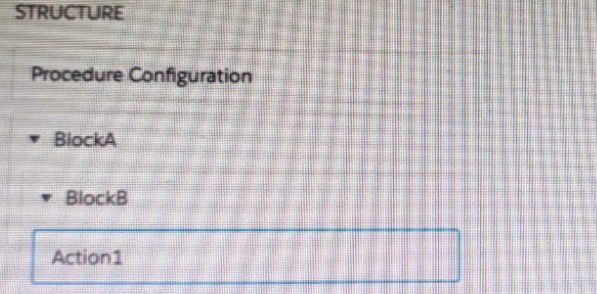
Refer to theexhibit below. In this integration production structure, what Send JSON Path would be used to send the Output of the Action1 element to a Remote Action?
A. Action1. BlockB. Block A
B. Action1: BlockB. Block A
C. BlockA: BlockB. Action 1
D. BlockB:BlockB. Action1
Summary
In an Integration Procedure, the Send JSON Path is used to reference data from a previous element's output. The path is constructed by traversing the procedure's hierarchy from the top-level block down to the specific action, using colons (:) as delimiters. This structured path ensures the data pipeline correctly locates and retrieves the output from a nested action to pass it to a subsequent step.
Correct Option
B. Action1:BlockB:BlockA
This is the correct JSON Path syntax. It follows the hierarchical structure of the Integration Procedure, starting from the target action (Action1), moving up to its immediate parent block (BlockB), and finally to the top-level block (BlockA). The colons (:) are the standard delimiters used to separate each level in the hierarchy within the OmniStudio data pipeline for sending data between elements.
Incorrect Option
A. Action1.BlockB.BlockA
This uses periods (.) as delimiters, which is incorrect for navigating the block and action hierarchy in an Integration Procedure's JSON Path. Periods are typically used for accessing fields within a JSON object, not for traversing the procedural structure.
C. BlockA:BlockB:Action1
This path is in the wrong order. The correct navigation for a Send JSON Path starts from the element whose data you want to send (Action1) and then moves upward through its parent blocks. This path would not resolve correctly.
D. BlockB:BlockB:Action1
This path is incorrect and contains a redundancy (BlockB repeated). It also starts from the block level rather than from the specific action whose output needs to be sent. The path must begin with the source action name.
Reference
Salesforce OmniStudio Developer Guide: Integration Procedure Data Pipelining
A customer sets up to LWC Omniscripts, one embedded into another. Account is set in a Set Values element in the parent Omniscript.
The AccountId set in the parent Omniscript is used to another Set Values element ContextAccountid in the embedded OmniScript. The embedded Omniscript is activated.
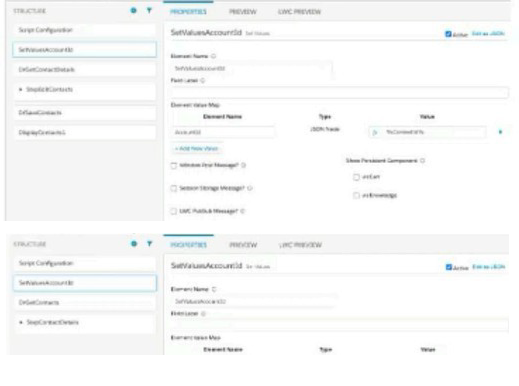
While previewing the OmniScript flow from the parent, it is found that Account is set correctly in the parent OmniScript. However. ContextAccountId in the embedded OmniScript is not set with theAccountId from parent Omniscript. On previewing the embedded OmniScript individually, it is found that ContextAccountId isset correctly.
What is the reason for this? Refer to the exhibit below.
A. Both parent and embedded OmniScripts have the same element name for the Set values element.
B. A developer failed to include a Navigation Element to pass data from the parent OmniScript.
C. The LWC PubSub Message flag in the Set Values action of the parent has not been set.
D. The flag passDataJSON in the parent OmniScript in not configured correctly.
Summary
When embedding an LWC OmniScript within a parent LWC OmniScript, data is passed between them using the Lightning Message Service (LMS) via a feature called LWC PubSub. For a value set in the parent script to be available in the embedded script, the Set Values element in the parent that holds the data must be configured to broadcast this data. If this broadcast flag is not enabled, the embedded script cannot receive the data, even if the parent script has the value correctly set in its own context.
Correct Option
C. The LWC PubSub Message flag in the Set Values action of the parent has not been set.
This is the specific configuration required to pass data from a parent LWC OmniScript to an embedded one. The "LWC PubSub Message" checkbox on the Set Values element in the parent OmniScript must be checked. This enables the data to be published via the Lightning Message Service, making it available for the embedded OmniScript to subscribe to and consume. Without this flag set, the data remains isolated within the parent's context.
Incorrect Option
A. Both parent and embedded OmniScripts have the same element name for the Set values element.
While it is a best practice to use unique element names for clarity, having the same name for Set Values elements in parent and embedded scripts does not prevent data from being passed via LWC PubSub. The PubSub communication is based on the "LWC PubSub Message" setting and the structure of the data, not on the element names themselves.
B. A developer failed to include a Navigation Element to pass data from the parent OmniScript.
A Navigation Element is used to control the user's flow between steps within a single OmniScript. It is not the mechanism for passing data between a parent and an embedded OmniScript. Data passing for embedded scripts is handled by the LWC PubSub configuration on elements like Set Values.
D. The flag passDataJSON in the parent OmniScript in not configured correctly.
There is no standard property named "passDataJSON" in the OmniScript configuration. Data passing in embedded LWC OmniScripts is handled by the LWC PubSub mechanism, not by a generic property with this name.
Reference
Salesforce OmniStudio Developer Guide: Embed an OmniScript in an OmniScript
Refer to the exhibit.
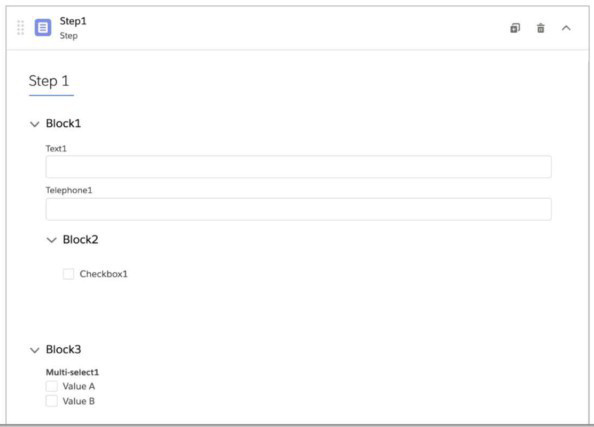
What JSON code correct represent the step in the OmniScript Structure panel shown?
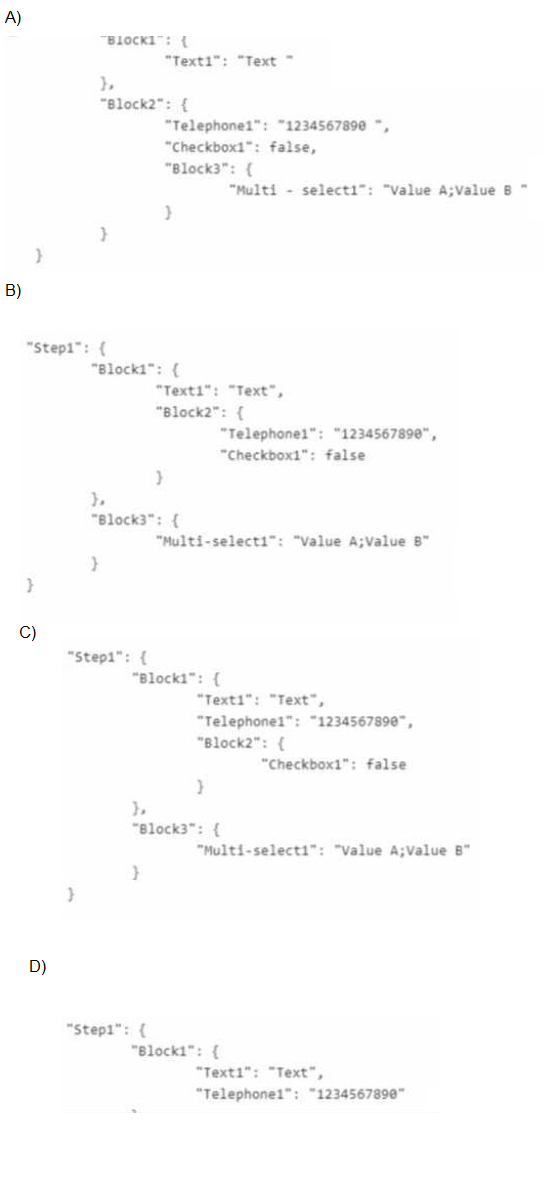
A. Option A
B. Option B
C. Option C
D. Option D
Summary
The OmniScript structure shows a hierarchy where elements are nested within blocks and steps. The JSON output must reflect this exact hierarchical relationship. Elements inherit the data context of their parent container, meaning a field inside a block will appear within that block's node in the JSON structure. The correct JSON will accurately represent all parent-child relationships shown in the structure panel.
Correct Option
C. Option C
This option correctly represents the hierarchical structure:
Step1 is the top-level container.
Block1 is a direct child of Step1 and contains Text1.
Telephone1 is shown at the same level as Block1 in the structure panel, making it a direct child of Step1 (not nested inside Block1 or Block2).
Block2 is a direct child of Step1 and contains Checkbox1.
Block3 is a separate direct child of Step1 and contains Multi-select1.
Incorrect Option
A. Option A
This structure is incorrect because it places Telephone1 inside Block2, but in the structure panel, Telephone1 is at the same level as Block1 and not nested within Block2. It also incorrectly nests Block3 inside Block2.
B. Option B
This structure incorrectly nests Block2 inside Block1, but in the structure panel, Block1 and Block2 are shown as sibling elements at the same level under Step1.
D. Option D
This structure is incomplete and only shows part of the JSON (only Block1 with Text1 and Telephone1), missing Block2, Checkbox1, Block3, and Multi-select1 entirely.
Reference
Salesforce OmniStudio Developer Guide: OmniScript Data JSON Structure
A developer needs to create a list of cases for an account in a single Datable in a FlexCard. Like the one shown below.
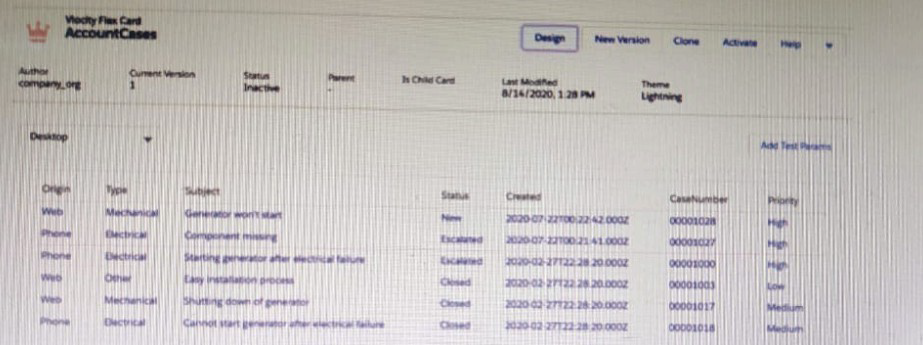
How can the developer configure the FlexCard to display the case records in this way?
A. Enable the record Looping feature on the data table elements
B. Select the Repeatable Mode property on the data table elements
C. Enable the Repeat Records feature on the FlexCard Setup tab
D. Disable the Repeat Record feature on the FlexCard setup tab
Summary
To display multiple records (like a list of cases for an account) within a single DataTable element in a FlexCard, the card's data source must provide an array of records. The DataTable element must then be configured to iterate over this array and display each record as a row. This requires a specific property on the DataTable that enables this iterative display mode.
Correct Option
B. Select the Repeatable Mode property on the data table element
This is the correct configuration. The "Repeatable Mode" property on the DataTable element, when enabled, instructs the FlexCard to treat its bound data as an array. The DataTable will then automatically create a row for each element in the array, displaying all the case records in a tabular format as required.
Incorrect Option
A. Enable the record Looping feature on the data table elements
There is no standard property called "record Looping" on a DataTable element. The feature that enables iteration over a dataset is called "Repeatable Mode."
C. Enable the Repeat Records feature on the FlexCard Setup tab
The "Repeat Records" feature in the FlexCard's Setup tab is used to make the entire card repeat for each record in the dataset, creating multiple card instances. This is used for layouts like a grid of cards, not for displaying multiple records within a single DataTable inside one card.
D. Disable the Repeat Record feature on the FlexCard setup tab
Disabling the "Repeat Records" feature ensures that only a single FlexCard instance is rendered. This is typically the desired base state when you want to show multiple records inside a component (like a DataTable) within that single card. However, this action alone does not configure the DataTable to display multiple rows; that is done by setting "Repeatable Mode" on the DataTable itself.
Reference
Salesforce OmniStudio Developer Guide: DataTable Element Properties
| Page 6 out of 15 Pages |
| 45678 |
| OmniStudio-Developer Practice Test Home |
Real-World Scenario Mastery: Our OmniStudio-Developer practice exam don't just test definitions. They present you with the same complex, scenario-based problems you'll encounter on the actual exam.
Strategic Weakness Identification: Each practice session reveals exactly where you stand. Discover which domains need more attention, before Salesforce Certified OmniStudio Developer - Plat-Dev-210 exam day arrives.
Confidence Through Familiarity: There's no substitute for knowing what to expect. When you've worked through our comprehensive OmniStudio-Developer practice exam questions pool covering all topics, the real exam feels like just another practice session.
Copyright © All Rights Reserved