
A developer needs to build a DataRaptor Transform to send current weather to both an OmniScript Card Layout. Which of these samples would be valid for the Expected Output JSON?
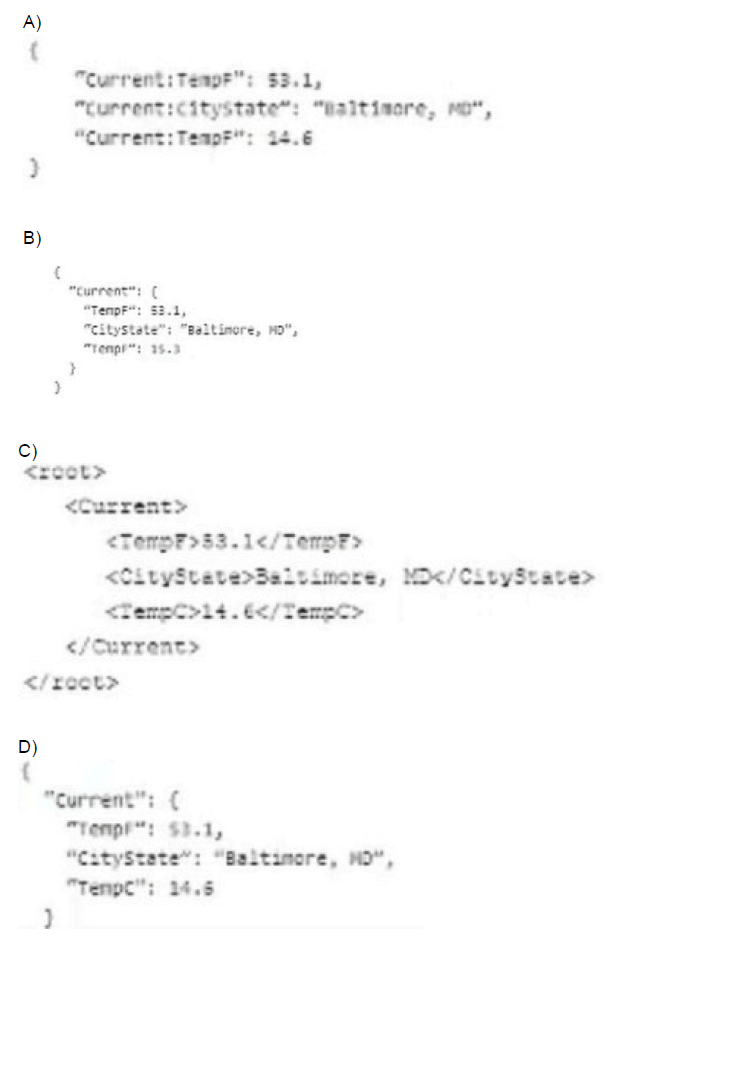
A. Option A
B. Option B
C. Option C
D. Option D
Summary
The DataRaptor Transform requires a valid JSON structure for its "Expected Output JSON." This defines the schema that the Transform will build. A valid JSON object must have key-value pairs enclosed in curly braces {}, with keys in double quotes and values that can be strings, numbers, objects, or arrays. The structure must also be free of duplicate keys at the same level, as this makes the JSON invalid and unparsable.
Correct Option
D. Option D
This is the only valid JSON structure. It is a properly formatted JSON object {} with a single top-level key, "Current", whose value is another valid JSON object. This nested object contains unique keys ("TempF", "CityState", "TempC") with appropriate string and number values. This structure is both syntactically correct and semantically sound for representing structured weather data.
Incorrect Option
A. Option A
This is invalid JSON for two reasons. First, it uses a double colon :: as a separator (e.g., "Current::TempF"), which is not standard JSON syntax. Second, and most critically, it contains a duplicate key "Current::TempF" at the same level, which is not allowed in a JSON object and would cause a parsing error.
B. Option B
This option is invalid because it contains a duplicate key "TempF" within the same "Current" object. A JSON object cannot have two identical keys. This would fail during parsing and is not a valid structure.
C. Option C
This is not JSON; it is an XML structure. It is enclosed in
Reference
Salesforce OmniStudio Developer Guide: DataRaptor Transform
A developer is creating a FlexCard for a new Community page. The FlexCard will display case information along with actions to close the case and update the case, and it will be styled using the Community's theme.
What must the developer do to configure the FlexCard for deployment in acommunity?
A. Set the Deployment property in Card Configuration to "Community"
B. Add the FlexCard's API name to the FlexCard Player component
C. Set the Target property in Publish Options to "CommunityPage"
D. Configure the Component Visibility in the Custom Component
Summary
To display a FlexCard on a Salesforce Community page, it must be embedded within a specific Lightning component that acts as its container and renderer. The FlexCard itself is a headless component; it needs a visual host to be displayed to users. This is done by adding the FlexCard Player component to the Community page and configuring it to point to the specific FlexCard.
Correct Option
B. Add the FlexCard's API name to the FlexCard Player component
This is the correct and necessary step. The "FlexCard Player" is a pre-built Lightning component designed to host and display FlexCards within Lightning pages and Communities. The developer must add this component to the desired Community page and then set its "Card" property to the API name of the FlexCard they created. This creates the link between the visual container and the FlexCard's logic and design.
Incorrect Option
A. Set the Deployment property in Card Configuration to "Community"
There is no standard "Deployment" property within the FlexCard's configuration settings that is set to "Community." The deployment target is managed by how and where the FlexCard is used (e.g., by placing it in the FlexCard Player within a Community), not by an internal property.
C. Set the Target property in Publish Options to "CommunityPage"
The "Publish Options" in an OmniStudio component are used to make the component available in certain Salesforce environments, like the OmniScript in a Lightning App Page. It is not the mechanism for deploying a FlexCard to a Community. The deployment is handled by using the FlexCard Player on the page itself.
D. Configure the Component Visibility in the Custom Component
While Component Visibility settings can control when a component is shown (e.g., based on user profile or record type), this is a secondary step for controlling access. It does not perform the primary task of actually placing and rendering the FlexCard on the Community page. The foundational step is first to add the FlexCard Player component.
Reference
Salesforce OmniStudio Developer Guide: Add a FlexCard to a Community
A developer is configuring a Data Raptor Load to Save contract data. The developer needs to set the record type of the contact using Developer Name.
Which two configuration actions should the developer take to set this up in the Data Raptor Load?
A. Check is Lookup property when mapping the fields.
B. Add Link to Record Type object in the Contact Object with the id field of Record Type object.
C. Select Record Type in the Lookup object list. Development in the lookup Field list, and ID in the Lookup Requested Field list.
D. Select Record Type in the Lookup Object list. ID in the Lookup Field list, and Development in the Lookup requested Field list.
E.
Summary
Setting a Record Type using its DeveloperName in a DataRaptor Load requires a lookup operation. The DataRaptor needs to find the Salesforce RecordType ID associated with the given DeveloperName and then assign that ID to the Contact's RecordTypeId field. This is accomplished by configuring a Lookup in the DataRaptor's mapping, which performs a query to resolve the DeveloperName to its corresponding ID.
Correct Option
A. Check is Lookup property when mapping the fields.
This is the fundamental first step. For any field that requires a value to be resolved from another object (like getting a RecordType ID from a DeveloperName), you must enable the is Lookup checkbox on that field's mapping in the DataRaptor Load. This tells the DataRaptor that the provided value is not the final ID but a key to look up the ID from another object.
C. Select RecordType in the Lookup object list. DeveloperName in the Lookup Field list, and ID in the Lookup Requested Field list.
This configuration defines the lookup relationship:
Lookup Object: RecordType - The object to query.
Lookup Field: DeveloperName - The field on the RecordType object that will be matched against the input value from the OmniScript/Integration Procedure.
Lookup Requested Field: Id - The field from the RecordType object that you want to retrieve and assign to the Contact's RecordTypeId field.
Incorrect Option
B. Add Link to RecordType object in the Contact Object with the id field of RecordType object.
This describes creating a relationship in the DataRaptor's "Object Link" section, which is used for extracting and transforming related data in a DataRaptor Extract or Transform. It is not the mechanism for looking up an ID to use when saving a record in a DataRaptor Load.
D. Select RecordType in the Lookup Object list. ID in the Lookup Field list, and DeveloperName in the Lookup requested Field list.
This configuration is reversed and incorrect. It would try to use an Id value from the input data to look up a DeveloperName from the RecordType object. The requirement is the opposite: you have a DeveloperName and need to find the Id.
Reference
Salesforce OmniStudio Developer Guide: Configure a DataRaptor Load
Refer to the following row-versioned calculation matrix.
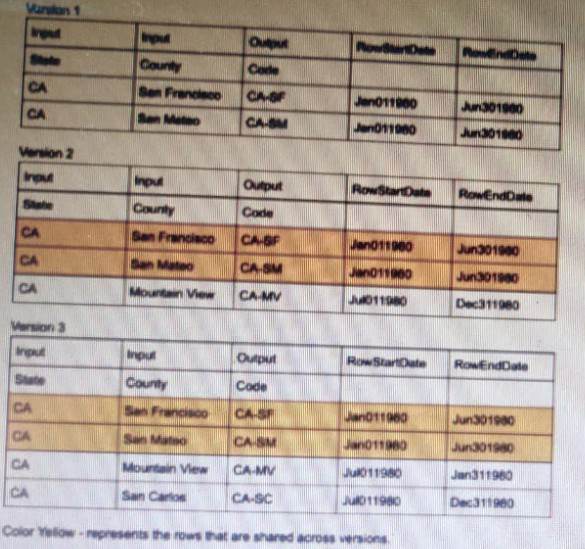
The developer needs to delete the row that contains the Code CA-SF. If the developer deletes that row in Version 3, what is the result?
A. The row is deleted only in Version 3.
B. The row is deleted In Versions 2 and 3 but will remain in Version 1.
C. The row is deleted in Version 3 and Version 1.
D. The row is deleted in all versions
Summary
Calculation Matrices in OmniStudio use a row-versioning system. Each version maintains its own independent set of rows. When a developer creates a new version, it starts as a copy of a previous version, but edits (additions, modifications, or deletions) made to that new version do not affect the rows in previous versions. This isolation allows for managing different rule sets over time without altering historical logic.
Correct Option
A. The row is deleted only in Version 3.
This is the correct behavior of the row-versioning system. A deletion is an edit specific to the version in which it is performed. Since Version 3 is its own distinct entity, deleting the row for code CA-SF will only remove it from Version 3. Versions 1 and 2 remain unchanged and will continue to have their original data, including the CA-SF row.
Incorrect Option
B. The row is deleted In Versions 2 and 3 but will remain in Version 1.
This is incorrect. An edit in a newer version does not cascade backward to previous versions. Version 2 is a separate, established version. A change in Version 3 has no impact on it.
C. The row is deleted in Version 3 and Version 1.
This is incorrect. Versions 1 and 3 have no direct link that would cause a change in one to affect the other. Version 1 is an entirely separate and older version of the matrix.
D. The row is deleted in all versions
This is incorrect. The row-versioning system is designed to prevent this exact scenario. It ensures that changes are contained within the version they are made, preserving the integrity of all other versions for historical reference and different effective date ranges.
Reference
Salesforce OmniStudio Developer Guide: Calculation Matrices and Versions
A developer has an existing DataRaptorLoad that insert Contact records with inputs as LastName and firstName. The DataRaptor works as expected when previewed.
The developer creates an integration Procedure to test the DataRaptor and is using a SetValues element in the Integration Procedure toset the first name and last name for the contact record. The DataRaptor and Integration Procedure are set up as shown in the exhibit below.
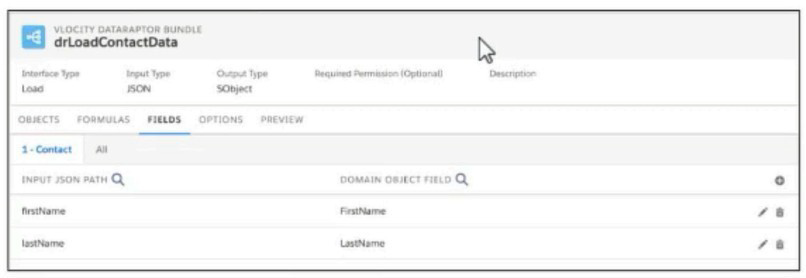
When the developer executes the Integration procedure in preview, the following error message displays: Required fields are missing: [last Name]’’,
How should the developer address this issue?
A. SetValuesContactDetails should have been added to Additional input of DataRaptor Post Action in Integration Procedure
B. The Set values Action Keys should include the DataRaptor Post Action element name path, e,g LoadContactDetails, lastname
C. The DataRaptor Post Action in the integration procedure should have been executed before the Set Values Action
D. The valid field names should be added in the Domain object field in theDataRaptor
Summary
The error indicates that the DataRaptor Load is not receiving the lastName value. The "Send Only Additional Input" checkbox is selected on the DataRaptor action, which means it will ignore the standard data pipeline and only use the key-value pairs defined in its "Additional Input" section. Since the lastName and firstName values from the Set Values element are not mapped there, the DataRaptor receives an empty request, causing the missing field error.
Correct Option
A. SetValuesContactDetails should have been added to Additional input of DataRaptor Post Action in Integration Procedure
This is the correct solution. Because "Send Only Additional Input" is checked, the developer must explicitly map the pipeline data from the SetValuesContactDetails action to the DataRaptor's input parameters in the "Additional Input" section. For example, they would create entries with Key lastName and Value {SetValuesContactDetails:lastName}, and Key firstName and Value {SetValuesContactDetails:firstName}.
Incorrect Option
B. The Set values Action Keys should include the DataRaptor Post Action element name path, e.g LoadContactDetails, lastname
This is not a valid configuration. The "Keys" in a Set Values element are the names of the variables it creates in the pipeline (e.g., lastName). They do not need to include the name of subsequent actions. The issue is not with the Set Values configuration but with how its output is passed to the next action.
C. The DataRaptor Post Action in the integration procedure should have been executed before the Set Values Action
The action order in the exhibit is correct. The Set Values action must execute first to create the lastName and firstName variables in the pipeline before the DataRaptor can use them. Reversing the order would mean the DataRaptor runs before the values are set, which would also cause an error.
D. The valid field names should be added in the Domain object field in the DataRaptor
The DataRaptor's configuration is correct, as proven by the fact that it "works as expected when previewed." The Domain Object Field mappings (firstName to FirstName, lastName to LastName) are already properly set. The problem is not within the DataRaptor's internal setup but in the Integration Procedure's data piping to it.
Reference
Salesforce OmniStudio Developer Guide: DataRaptor Interface Types
On a FlexCard canvas, several fields display with Salesforce data, but one of the fields shows only the label. What could cause this?
A. In the Setup Pabel, {recordId} is misspelled in the Data Source Input Map.
B. The field name in the FlexCard state does not match the DataRaptorExtract’s Output JSON Path name.
C. In the FlexCard state, the Field type for the field does not match the type in the Salesforce record.
D. There are No test Data test Parameters configured.
Summary
When a FlexCard field displays its label but no value, it indicates a successful data retrieval at the card level but a failed data mapping at the individual field level. The FlexCard's DataRaptor runs and fetches data, which is why other fields populate. However, for the specific field showing only the label, the connection between the DataRaptor's output and the card's element is broken, typically due to a name mismatch.
Correct Option
B. The field name in the FlexCard state does not match the DataRaptor Extract’s Output JSON Path name.
This is the most direct cause. Each element on a FlexCard (like a Text element) has a "Property" setting that maps it to a specific node in the JSON data provided by the DataRaptor. If the property is set to AccountNumber but the DataRaptor's output JSON path for that value is Account.AccountNumber (or simply AccNumber), the mapping fails. The element renders its label but finds no data at the specified path, leaving the value blank.
Incorrect Option
A. In the Setup Panel, {recordId} is misspelled in the Data Source Input Map.
A misspelled {recordId} in the Data Source Input Map would cause a complete data retrieval failure. The DataRaptor would not receive a valid record ID and would return no data, resulting in all fields being empty, not just a single field.
C. In the FlexCard state, the Field type for the field does not match the type in the Salesforce record.
FlexCard elements are generally type-agnostic when displaying text. They interpret the data from the DataRaptor as a string for display purposes. A type mismatch might cause formatting issues but would not typically prevent any value from being displayed at all. The label would still show, and some representation of the data (e.g., a number as text) would usually appear.
D. There are No test Data test Parameters configured.
Missing test parameters would prevent the FlexCard from loading any data during preview in the builder. The scenario implies that testing is occurring and that several fields are displaying data correctly, which means the DataRaptor is successfully running and the test parameters are likely configured.
Reference
Salesforce OmniStudio Developer Guide: Troubleshoot FlexCards
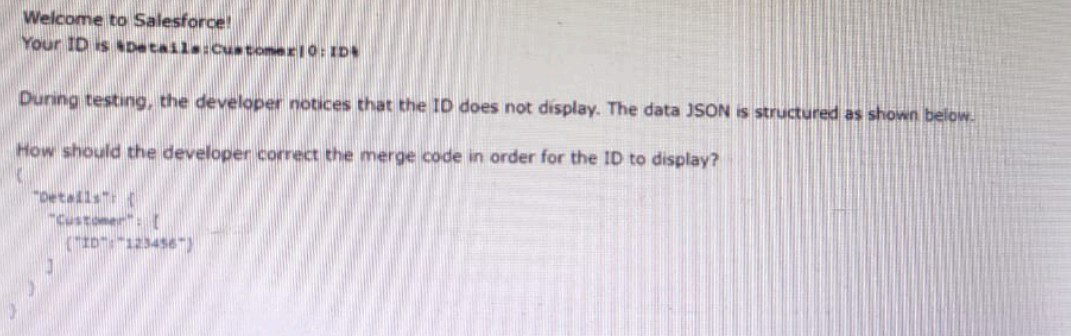
A developer is creating an OmniScript that provisions trail orgs to their customers. The following text block in the Omniscript uses a merge code to display the ID for the new trail org:
A. To %sDetails: Customer|0: ID$
B. To %Details: Customer|1: ID%
C. To %%sDetails: Customer|0: ID%%
D. To %Details: Customer|n: ID%
Summary
The issue is that the Customer node in the JSON structure is an array (indicated by the square brackets []), not a single object. To access a field from a specific record within an array, you must specify the index of that record using the pipe and index syntax |index. Array indices start at 0, so the first element in the array is at index 0. The correct merge field syntax in an OmniScript Text Block uses percent signs %%...%%.
Correct Option
C. To %%Details:Customer|0:ID%%
This is the correct merge field syntax. Details:Customer|0:ID breaks down as follows:
Details: The parent node.
Customer: The array node.
|0: The index specifier, targeting the first element in the Customer array.
ID: The target field within that specific array element.
Using %%...%% is the correct syntax for merge fields in an OmniScript Text Block.
Incorrect Option
A. To %sDetails: Customer|0: ID$
This uses incorrect delimiters. The correct delimiters for a merge field in an OmniScript Text Block are percent signs %%...%%, not a mix of %s and $.
B. To %Details: Customer|1: ID%
While the syntax |1 is valid for accessing the second element in an array (since indices start at 0), the provided JSON structure shows only one object in the Customer array. Therefore, index 1 is out of bounds, and no data would be found.
D. To %Details: Customer|n: ID%
Using |n is not valid syntax. The index must be a specific numerical value (e.g., 0, 1, 2) to pinpoint a single element within the array. The placeholder n will not resolve and will cause the merge field to fail.
Reference
Salesforce OmniStudio Developer Guide: Merge Fields
What OmniStudio tool pre-populates the data m a PDF used by an OmniScript?
A. A SOQL Query
B. A DataRaptor Load
C. A DataRaptor Extract
D. A DataRaptor Transform
Summary
Generating a PDF from an OmniScript often requires restructuring the data collected during the script's execution into a specific format suitable for the PDF template. The data from the OmniScript is typically flat or structured for the UI, while the PDF may need a nested or differently organized JSON structure. This requires a data transformation step between the OmniScript and the PDF Action.
Correct Option
D. A DataRaptor Transform
A DataRaptor Transform is the correct tool for this purpose. It is specifically designed to take an input JSON (the data from the OmniScript) and restructure it into a different output JSON format. The PDF Action uses this transformed output to populate the PDF template fields. The Transform can nest data, combine values, calculate new fields, and format data exactly as required by the PDF layout.
Incorrect Option
A. A SOQL Query
While a SOQL query can retrieve data, it is not the tool used to structure data for a PDF. A SOQL query is typically embedded within a DataRaptor (Extract or Turbo Extract). The data for the PDF comes from the OmniScript's session data, not a direct database query at the moment of PDF generation.
B. A DataRaptor Load
A DataRaptor Load is used for creating, updating, or upserting records in the database. It is a tool for writing data, not for reading and restructuring data to pre-populate a document. Its function is the opposite of what is needed for PDF generation.
C. A DataRaptor Extract
A DataRaptor Extract is used to retrieve data from Salesforce objects. While it can be used to get data for the initial OmniScript, it is not the primary tool for restructuring the OmniScript's final state data into the specific format needed for the PDF template. That is the role of a Transform.
Reference
Salesforce OmniStudio Developer Guide: DataRaptor Transform
A developer is creating aFlex Cardfor a new Community page. The FlexCard will display case information along with action to close the case and update the case. And it will be styled using the Community’s theme.
What must be developer do to configure the FlexCard for deployment in acommunity?
A. Add the FlexCard’s API name to FlexCard Player component
B. Set the Target property inpublishingOptions tothe Community page’’
C. Configure the Component visibility in the custom Component.
D. Set the Developer property in Card Configuration to ‘’Community’’
Summary
To display a FlexCard on a Salesforce Community page, it must be embedded within a specific Lightning component that acts as its container and renderer. The FlexCard itself is a headless component; it needs a visual host to be displayed to users. This is done by adding the FlexCard Player component to the Community page and configuring it to point to the specific FlexCard.
Correct Option
A. Add the FlexCard’s API name to FlexCard Player component
This is the correct and necessary step. The "FlexCard Player" is a pre-built Lightning component designed to host and display FlexCards within Lightning pages and Communities. The developer must add this component to the desired Community page and then set its "Card" property to the API name of the FlexCard they created. This creates the link between the visual container and the FlexCard's logic and design.
Incorrect Option
B. Set the Target property in publishing Options to the Community page
The "Publish Options" in an OmniStudio component are used to make the component available in certain Salesforce environments, like the OmniScript in a Lightning App Page. It is not the primary mechanism for deploying a FlexCard to a Community. The deployment is handled by using the FlexCard Player on the page itself.
C. Configure the Component visibility in the custom Component.
While Component Visibility settings can control when a component is shown (e.g., based on user profile or record type), this is a secondary step for controlling access. It does not perform the primary task of actually placing and rendering the FlexCard on the Community page. The foundational step is first to add the FlexCard Player component.
D. Set the Developer property in Card Configuration to ‘’Community’’
There is no standard "Developer" or "Deployment" property within the FlexCard's configuration settings that is set to "Community." The deployment target is managed by how and where the FlexCard is used (e.g., by placing it in the FlexCard Player within a Community), not by an internal property.
Reference
Salesforce OmniStudio Developer Guide: Add a FlexCard to a Community
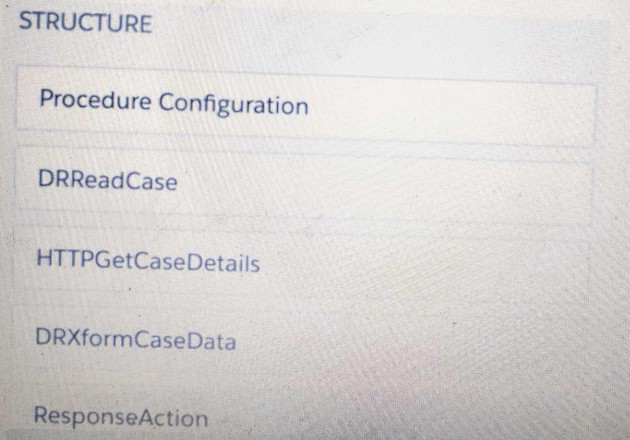
Refer to the exhibit below. What is the merge code needed for this Integration Procedure structure to pass a CaseData node from the HTTP Action's output to the DataRaptor Transform Action?
A. %HTTPGetDetails:CaseData%
B. %DRXformCaseData: CaseData%
C. {{ HTTPGetCaseDetails:CaseData}}
D. {{CaseData}}
Summary
In an Integration Procedure, data is passed between actions through a data pipeline using merge field syntax. To reference an output from a previous action, you use a specific pattern that identifies the source action and the data node. The correct syntax uses double curly braces and follows the sequence of execution, where the output of an earlier action becomes the input for a later one.
Correct Option
C. {{HTTPGetCaseDetails:CaseData}}
This is the correct merge field syntax for passing data between actions within an Integration Procedure. The double curly braces {{...}} are the standard delimiters. HTTPGetCaseDetails is the name of the action that produces the data, and CaseData is the specific node within that action's output that needs to be passed to the DataRaptor Transform Action.
Incorrect Option
A. %HTTPGetDetails:CaseData%
This syntax is incorrect for two reasons. First, it uses percent signs % instead of the correct double curly braces {{ }}. Second, the action name is misspelled; it should be HTTPGetCaseDetails, not HTTPGetDetails.
B. %DRXformCaseData:CaseData%
This is incorrect because it references the target action (DRXformCaseData) as the source. The DRXformCaseData action is the one that needs the data, not the one that provides it. The data must come from the previous action in the sequence, which is HTTPGetCaseDetails.
D. {{CaseData}}
This syntax is incomplete. While it uses the correct delimiters, it does not specify which action in the procedure is the source of the CaseData. Without specifying the source action (e.g., HTTPGetCaseDetails), the Integration Procedure cannot resolve where to get the value from.
Reference
Salesforce OmniStudio Developer Guide: Integration Procedure Data Pipelining
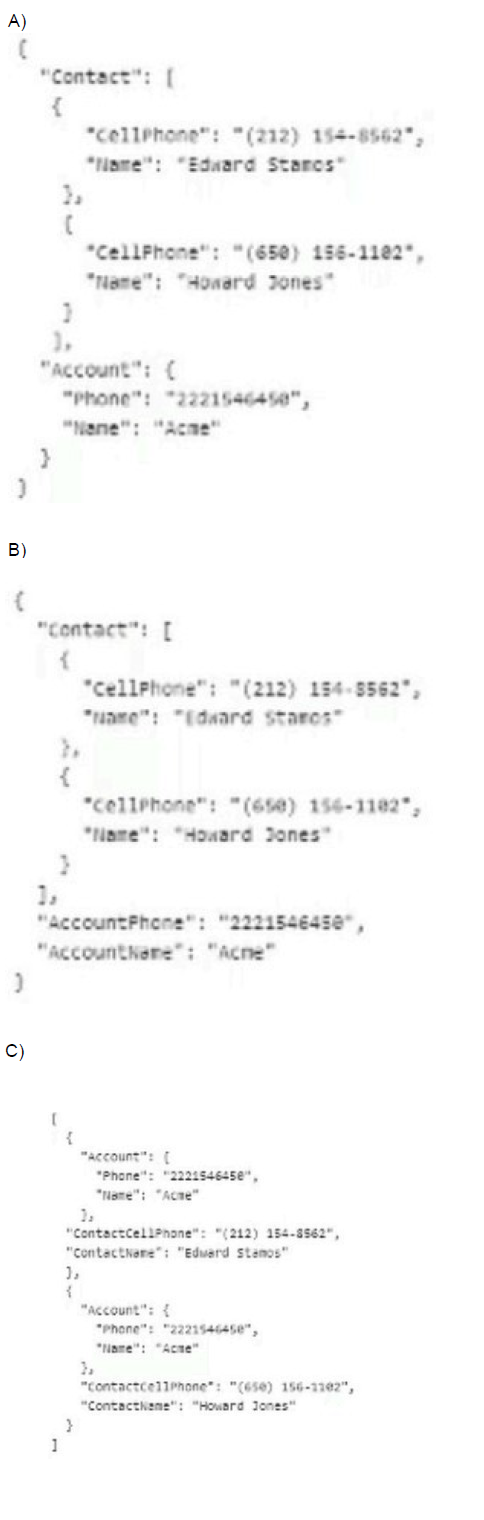
Refer to the exhibit.

The card layout uses an integration Procedure as a data source. The cards use the layout data source.
A. Option A
B. Option B
C. Option C
Summary
The card layout displays a single Account with multiple related Contacts. Each card combines the parent Account data with one of its child Contacts. The correct JSON structure must represent this one-to-many relationship in a way that the card layout can iterate over. The standard pattern is an array of objects, where each object contains both the parent record fields and the fields for a single child record.
Correct Option
C. Option C
This is the correct structure for a card layout with a one-to-many relationship. It presents an array of two objects. Each object contains:
The parent Account data (Name: "Acme", Phone: "2221546450")
The specific child Contact data for one record (e.g., ContactName: "Eduard Stancs", ContactCellPhone: "(212) 154-8562")
This format allows the card layout to create one card for each element in the outer array, with each card displaying the repeating Account information alongside a unique Contact.
Incorrect Option
A. Option A
This structure is invalid and illogical. It places the single Account object inside the same structure as the multiple Contact objects. A card layout using this would be unable to correctly associate one Account with multiple Contacts for iterative display, as the Account is not a peer to the Contacts in the array.
B. Option B
This structure is invalid JSON (mismatched brackets) and conceptually flawed. It tries to put the AccountPhone and AccountName at the same level as the Contact array, but not as a structured object. More importantly, it does not provide a clear, iterable array where each element contains the combined Account and Contact data needed to render individual cards.
Reference
Salesforce OmniStudio Developer Guide: FlexCard Data Sources
A developer needs to use the COUNTIF function to process data entered by the user in an
OmniScript. The output of the function needs to be displayed to the user immediately in the
current step.
Based on best practice, which element should the developer use this function in?
A. Set Values element
B. Formula element
C. Range element
Explanation:
This question tests your knowledge of the most efficient and appropriate OmniScript element for performing real-time calculations and displaying the result within the same step, without navigating away.
Let's analyze each option:
A. Set Values element: This is incorrect for this specific requirement. A Set Values element is designed to set values in the background data JSON. While you could use a COUNTIF function within a Set Values element to calculate a value and then use a separate Display element to show it, this is an inefficient and overly complex solution for a simple real-time display. The Set Values element itself does not have a visual component to display the result to the user "immediately." It requires a separate element and a redundant data mapping step.
B. Formula element: This is the correct and recommended best practice. The Formula element is specifically designed for this exact purpose. It allows you to define a formula (using functions like COUNTIF) and displays the calculated result directly on the screen. It performs the calculation in real-time as the user interacts with the form, and it does not modify the underlying data JSON unless you explicitly configure it to do so with its "Save Result to JSON" property. It is the lightest-weight and most direct way to show a calculated value to the user in the current step.
C. Range element: This is incorrect. A Range element is an input element that allows a user to select a value from a predefined range (like a slider). It is not used for calculations or displaying the results of functions. It is for capturing user input, not for processing and displaying data.
Reference
The key differentiators are:
- For displaying a calculated value immediately: Use a Formula element. It is declarative, requires no extra steps, and provides instant user feedback.
- For storing a calculated value in the data JSON for later use (e.g., in a subsequent Integration Procedure): Use a Set Values element.
- For a simple, read-only display of a value that is already in the JSON (not calculated on the fly): Use a Display element.
Therefore, following OmniStudio best practices for performance and simplicity, the Formula element is the clear choice for using a COUNTIF function and displaying the output to the user immediately in the current step.
| Page 4 out of 15 Pages |
| 23456 |
| OmniStudio-Developer Practice Test Home |
Real-World Scenario Mastery: Our OmniStudio-Developer practice exam don't just test definitions. They present you with the same complex, scenario-based problems you'll encounter on the actual exam.
Strategic Weakness Identification: Each practice session reveals exactly where you stand. Discover which domains need more attention, before Salesforce Certified OmniStudio Developer - Plat-Dev-210 exam day arrives.
Confidence Through Familiarity: There's no substitute for knowing what to expect. When you've worked through our comprehensive OmniStudio-Developer practice exam questions pool covering all topics, the real exam feels like just another practice session.
Copyright © All Rights Reserved