
You need a solution to safeguard public cloud-hosted web applications from the OWASP Top 10 vulnerabilities. The solution must support the same region in which your applications reside, with minimum traffic cost. Which solution meets the requirements?
A. Use FortiGate
B. Use FortiCNP
C. Use FortiWeb
D. Use FortiADC
Explanation:
✅ Correct Answer: C - Use FortiWeb
FortiWeb serves as Fortinet's dedicated Web Application Firewall (WAF) solution, specifically engineered to protect public cloud-hosted web applications against OWASP Top 10 vulnerabilities such as SQL injection, XSS, and broken access control. Deployable as FortiWeb Cloud WAF-as-a-Service in major cloud providers like AWS, Azure, and Google Cloud, it operates within the same region as applications to minimize latency and traffic costs through regional scrubbing. Machine learning-based anomaly detection and FortiGuard threat intelligence ensure comprehensive, low-overhead protection with rapid deployment.
❌ Incorrect answer: A - Use FortiGate
FortiGate functions primarily as a next-generation firewall (NGFW) focused on network-level security, perimeter defense, VPN, and SD-WAN capabilities rather than specialized web application layer protection. While it offers some web filtering and application control, it lacks the deep OWASP Top 10 mitigation features like signature-based attack blocking and behavioral analysis required for web apps. Regional cloud deployment exists but incurs higher traffic costs compared to purpose-built WAFs, making it suboptimal for this specific use case.
❌ Incorrect answer: B - Use FortiCNP
FortiCNP (Fortinet Cloud Native Protection) provides cloud security posture management (CSPM) and broader cloud workload protection, focusing on misconfigurations, compliance, and runtime threat detection across multi-cloud environments. It does not deliver dedicated WAF functionality for OWASP Top 10 web vulnerabilities at the application layer. While regionally aware, its scope emphasizes governance over real-time traffic inspection, failing to meet the low-cost, same-region web app safeguarding requirements.
❌ Incorrect answer: D - Use FortiADC
FortiADC is an application delivery controller (ADC) optimized for load balancing, traffic management, global server load balancing (GSLB), and application acceleration. It includes basic security like SSL offloading but lacks comprehensive OWASP Top 10 defenses such as advanced input validation or bot mitigation. Primarily hardware/virtual appliance-based, it does not natively support cloud-native, same-region WAF-as-a-Service deployment with minimal traffic costs.
🔧 Conclusion:
FortiWeb best aligns with safeguarding cloud web apps from OWASP Top 10 by providing a cloud-native WAF with regional deployment for optimal performance and cost efficiency. Other options fall short: FortiGate is network-focused, FortiCNP is posture-oriented, and FortiADC prioritizes delivery over security. This selection ensures robust, scalable protection without re-architecting environments, leveraging Fortinet's integrated Security Fabric for holistic defense.
Reference:
Web Application Firewall
Refer to the exhibit.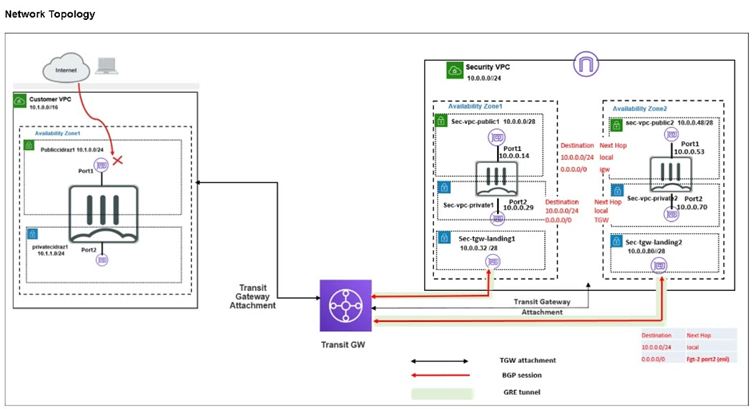
In your Amazon Web Services (AWS), you must allow inbound HTTPS access to the Customer VPC
FortiGate VM from the internet. However, your HTTPS connection to the FortiGate VM in the Customer
VPC is not successful.
Also, you must ensure that the Customer VPC FortiGate VM sends all the outbound Internet traffic through
the Security VPC.
How do you correct this issue with minimal configuration changes? (Choose three.)
A. Add a route with your local internet public IP address as the destination and the internet gateway as the target.
B. Add a route with your local internet public IP address as the destination and the transit gateway as the target.
C. Add a route to the destination 0.0.0.0/0 with the transit gateway as the target.
D. Deploy an internet gateway, associate an EIP with the Customer VPC private subnet, and then add a new route with destination 0.0.0.0/0 with the internet gateway as the target.
E. Deploy an internet gateway, attach it to the Customer VPC, and then associate an EIP with the port1 of the FortiGate in the Customer VPC.
Explanation:
✅ Correct Answer:
A. Add a route with your local internet public IP address as the destination and the internet gateway as the target.
This route ensures symmetric routing for your HTTPS management session. Inbound traffic from your public IP reaches the FortiGate via the new IGW and EIP. Without this, the default route sends responses via the TGW to the Security VPC, causing asymmetry and connection failure. Adding a specific /32 route for your IP to the IGW lets responses return directly, fixing the issue with minimal change while preserving overall outbound policy.
C. Add a route to the destination 0.0.0.0/0 with the transit gateway as the target.
This default route in the Customer VPC route table directs all outbound internet traffic from the FortiGate VM through the TGW to the Security VPC for centralized inspection and egress. It meets the requirement without altering existing setups, ensuring non-management outbound flows are secured. This is essential as the current topology likely lacks this route, allowing direct or no outbound.
E. Deploy an internet gateway, attach it to the Customer VPC, and then associate an EIP with the port1 of the FortiGate in the Customer VPC.
Attaching an IGW makes the Customer VPC internet-facing, and assigning an EIP to port1 (the public interface) provides a static public IP for inbound HTTPS access. The exhibit shows no IGW in Customer VPC, explaining the failed connection. This minimal addition enables direct internet reachability to the FortiGate without redesigning subnets or adding unnecessary routes.
❌ Incorrect answer
B. Add a route with your local internet public IP address as the destination and the transit gateway as the target.
Routing your public IP via TGW forces management response traffic through the Security VPC, exacerbating asymmetric routing since inbound arrives directly via IGW. This doesn't fix the connection failure and could introduce inspection or NAT issues in Security VPC not intended for management. It's too specific and misdirected, not addressing symmetry needed for successful HTTPS.
D. Deploy an internet gateway, associate an EIP with the Customer VPC private subnet, and then add a new route with destination 0.0.0.0/0 with the internet gateway as the target.
EIPs associate with interfaces, not subnets, making this invalid. Adding 0.0.0.0/0 to IGW bypasses the Security VPC for all outbound, violating the requirement to route through it. The FortiGate's port2 is in private subnet, but inbound targets port1; this misconfigures egress and doesn't enable proper public access.
🔧 Conclusion:
The core problems are no public exposure for inbound HTTPS (no IGW/EIP) and missing centralized outbound routing, plus potential asymmetry for management. A, C, and E resolve this minimally: E enables inbound, C enforces outbound via Security, and A ensures symmetric paths for your session responses. B and D are distractors—B worsens routing, D breaks rules and mechanics. This aligns with hub-spoke designs in AWS Transit Gateway setups.
Reference:
FortiGate / FortiOS 7.6.0 AWS Administration Guide (sections on deploying FortiGate-VM with EIP, IGW integration, and Transit Gateway routing for centralized security).
An administrator decides to use the Use managed identity option on the FortiGate SDN connector with Microsoft Azure. However, the SDN connector is failing on the connection. What must the administrator do to correct this issue?
A. Make sure to add the Client secret on FortiGate side of the configuration.
B. Make sure to add the Tenant ID on FortiGate side of the configuration.
C. Make sure to enable the system assigned managed identity on Azure.
D. Make sure to set the type to system managed identity on FortiGate SDN connector settings.
Explanation:
The failure occurs because managed identity authentication depends entirely on Azure-side configuration. FortiGate does not store secrets, tenant IDs, or identity types when managed identity is used. The administrator must enable the system-assigned managed identity on the Azure resource so Azure can issue tokens to FortiGate. Without this step, the SDN connector cannot authenticate, regardless of FortiGate configuration changes.
✅ Correct Answer: C
When using managed identity with the FortiGate Azure SDN connector, authentication relies entirely on Azure’s managed identity service. If the system-assigned managed identity is not enabled on the Azure resource (for example, the FortiGate VM), Azure cannot issue an access token. As a result, the SDN connector fails to authenticate. Enabling the system-assigned managed identity in Azure is mandatory for FortiGate to securely access Azure APIs without credentials.
❌ Incorrect Answer: A
A client secret is used only with service principal–based authentication, not with managed identities. Managed identity explicitly removes the need for secrets or certificates. Adding a client secret on the FortiGate side contradicts the managed identity design and has no effect on authentication. FortiGate will still fail to connect because Azure does not expect or validate client secrets when managed identity is selected.
❌ Incorrect Answer: B
The tenant ID is required when authenticating with a service principal. However, when using a system-assigned managed identity, Azure automatically determines the tenant context. FortiGate does not require a manually configured tenant ID for managed identity authentication. Adding or modifying the tenant ID on FortiGate does not resolve the issue because the failure occurs due to missing identity enablement in Azure.
❌ Incorrect Answer: D
FortiGate automatically understands the identity type when Use managed identity is selected in the SDN connector. There is no separate or manual configuration required to set the identity type to system-managed. If the Azure-side managed identity is disabled, changing FortiGate connector settings alone will not fix the connection failure.
Reference:
Fortinet Documentation – FortiGate SDN Connector for Microsoft Azure (Managed Identity)
Fortinet Documentation – FortiGate 7.6 Administration Guide
How does an administrator secure container environments in Amazon AWS from newly emerged security threats? (Choose one answer)
A. Using Docker-related application control signatures.
B. Using Amazon AWS-related application control signatures.
C. Using distributed network-related application control signatures.
D. Using Amazon AWS_S3-related application control signatures.
Explanation:
To secure containers in AWS, the focus must be on the container runtime and orchestration layer. FortiGate integrates with the environment and uses purpose-built Docker-related application control signatures within its Intrusion Prevention System (IPS) to identify and mitigate threats targeting the container infrastructure directly, providing precise and updated security as new vulnerabilities are discovered.
✅ Correct Answer:
A. Using Docker-related application control signatures.
Fortinet's FortiGate can inspect container traffic by leveraging the Docker-specific application control signatures within its IPS engine. These signatures are designed to detect and block known vulnerabilities, exploits, and malicious activities targeting Docker container APIs, daemons, and orchestration systems. When new threats emerge, FortiGuard Labs updates these specific signatures, allowing the FortiGate to immediately protect the container environment without relying on generic network signatures. This provides targeted security for the unique protocols and services used in container ecosystems.
❌ Incorrect Answers:
B. Using Amazon AWS-related application control signatures. These signatures are tailored for securing interactions with AWS control plane APIs (e.g., EC2, IAM) and management services, not for securing the internal application traffic or vulnerabilities within the container workloads themselves.
C. Using distributed network-related application control signatures. This is a distracter. While general network IPS signatures offer broad protection, they are not optimized for the specific application-layer protocols (like the Docker API) and threat patterns unique to container environments.
D. Using Amazon AWS_S3-related application control signatures. These signatures specifically protect against threats related to Amazon S3 bucket interactions, such as data exfiltration or policy violations. They do not address runtime threats within containerized applications.
Reference:
Fortinet Document Library: FortiGate Application Control Guide.
Refer to the exhibit.
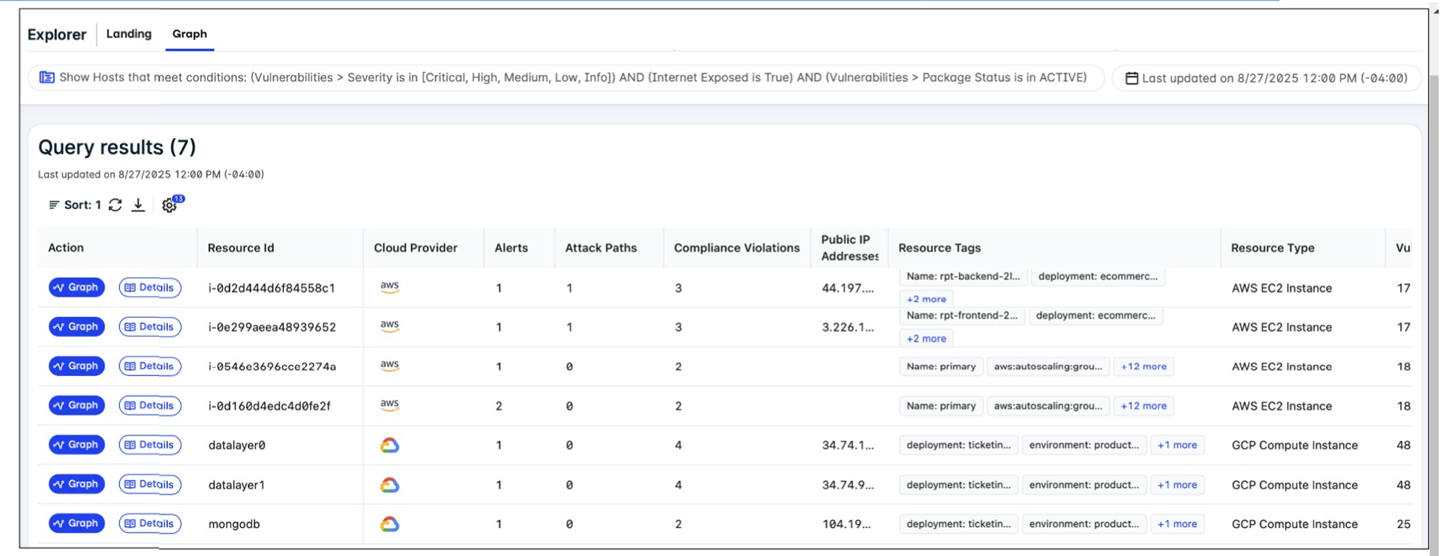
A FortiCNAPP administrator used the FortiCNAPP Explorer to reveal all hosts exposed to the internet that
are running active packages with vulnerabilities of all severity levels. Why do only the first two results have
an attack path? (Choose one answer)
A. Attack paths are available only for AWS resources with public IP addresses.
B. Attack paths are available only for AWS resources with high impact scores.
C. Attack paths are available only for resources with potential multi-hop exposure.
D. Attack paths are available only for resources that have critical vulnerabilities.
Explanation:
The presence of an Attack Path in the FortiCNAPP Explorer is fundamentally tied to external exposure. Because the administrator filtered for internet-exposed hosts, the system specifically generates paths for those resources that have a Public IP address, as these represent the direct entry points for external attackers. Resources lacking a public IP are not directly reachable from the internet, leading to an attack path count of zero in this context.
🟢 A. Attack paths are available only for AWS resources with public IP addresses.
In FortiCNAPP, an Attack Path represents a visualized sequence of potential exploit steps that an external attacker could take to reach a sensitive resource. For the platform to generate and display such a path in the Explorer, the target resource must be externally reachable. Resources without a public IP address are considered shielded from direct internet-based attacks, so the Explorer does not calculate a direct external attack path for them in this specific view.
🔴 B. Attack paths are available only for AWS resources with high impact scores.
While impact scores help prioritize which vulnerabilities to address first, they do not dictate the availability of an attack path. An attack path is a structural map of reachability, whereas an impact score is a measure of potential damage. A resource with a low impact score can still have an attack path if it is exposed to the internet via a public IP address.
🔴 C. Attack paths are available only for resources with potential multi-hop exposure.
Attack paths are not limited to complex, multi-hop scenarios; even a single-step exposure (e.g., a direct exploit of a service on a public IP) is visualized as an attack path in FortiCNAPP. The primary requirement for the "Attack Path" column to populate in the Explorer is the presence of an external entry point, regardless of how many "hops" follow the initial breach.
🔴 D. Attack paths are available only for resources that have critical vulnerabilities.
FortiCNAPP calculates attack paths based on network reachability and configuration, not just the severity of active packages. Even if a resource only has medium or low-severity vulnerabilities, the system will still generate an attack path if that resource is exposed to the internet. Vulnerability severity influences the risk score within the path, but not the existence of the path itself.
Reference:
FortiCNAPP Administration Guide - Attack Path
The cloud administration team is reviewing an AWS deployment that was done using CloudFormation. The deployment includes six FortiGate instances that required custom configuration changes after being deployed. The team notices that unwanted traffic is reaching some of the FortiGate instances because the template is missing a security group. To resolve this issue, the team decides to update the JSON template with the missing security group and then apply the updated template directly, without using a change set. What is the result of following this approach?
A. If new FortiGate instances are deployed later they will include the updated changes.
B. Some of the FortiGate instances may be deleted and replaced with new copies.
C. The update is applied, and the security group is added to all instances without interruption.
D. CloudFormation rejects the update and warns that a new full stack is required.
Explanation:
✅ Correct Answer: B
When you update a CloudFormation stack directly without using a change set, CloudFormation evaluates which resources need modification. Adding a security group to existing FortiGate EC2 instances often requires replacement because security groups are typically defined at instance launch time. CloudFormation will terminate the existing instances and create new ones with the updated security group configuration. This is problematic because the team made custom configuration changes to the six FortiGate instances after deployment, and those customizations will be lost when instances are replaced.
❌ Incorrect Answer: A
While it's true that future FortiGate instances deployed from the updated template will include the new security group, this answer misses the immediate impact on existing instances. The question asks about the result of applying the updated template to the current deployment, not future deployments. The existing six FortiGate instances with custom configurations are at risk of being replaced, which is the critical issue here. This option ignores the replacement behavior that CloudFormation triggers when certain resource properties are modified.
❌ Incorrect Answer: C
CloudFormation cannot simply add a security group to running EC2 instances without interruption. Security groups are immutable properties that require instance replacement in most scenarios. When you modify properties that require replacement, CloudFormation follows a replacement strategy (either delete-then-create or create-then-delete depending on configuration). The instances won't continue running unchanged while the security group is applied. This answer incorrectly assumes CloudFormation can perform in-place updates for all resource modifications, which isn't how the service handles immutable properties.
❌ Incorrect Answer: D
CloudFormation doesn't reject stack updates or require a completely new stack when you add resources like security groups. Stack updates are a standard CloudFormation operation, and the service is designed to handle incremental changes. CloudFormation will process the update and determine the appropriate actions (update in-place, update with interruption, or replacement) for each affected resource. Rejecting the update entirely would contradict CloudFormation's core functionality of managing infrastructure changes over time through stack updates.
🔧 Conclusion:
The key lesson is understanding CloudFormation's replacement behavior and the importance of using change sets before applying updates. Change sets provide a preview of what CloudFormation will do, showing which resources will be replaced, updated, or deleted. Since the FortiGate instances have custom configurations applied post-deployment, replacing them means losing those customizations. Always use change sets to preview infrastructure changes, especially when dealing with stateful resources or resources with manual configurations that aren't captured in the template.
Reference:
About FortiGate-VM for AWS
You are investigating an attack path for a top risky host. You notice that the Common Vulnerability Scoring System (CVSS) and the vulnerability impact scores are very high. However, the attack path severity for the top risky host itself is low. Which two pieces of contextualized information can help you understand why? (Choose two answers)
A. The FortiCNAPP risk score
B. The package status
C. The vulnerability score
D. The fix version
Explanation:
✅ Correct Answer:
A. The FortiCNAPP risk score provides a contextualized, holistic view of risk by integrating multiple factors such as asset criticality, exposure, and exploitability, which may explain why the overall attack path severity is low despite high CVSS scores.
B. The package status indicates whether the vulnerable software is actively installed, running, or reachable, which directly affects real-world exploitability and can lower the effective risk even if the vulnerability itself is severe.
❌ Incorrect answer
C. The vulnerability score (such as CVSS) is already stated to be very high in the scenario, so it does not help explain the discrepancy between high vulnerability impact and low attack path severity—it is part of the problem, not the explanation.
D. The fix version tells you what version resolves the vulnerability but does not, by itself, provide contextual insight into why the current attack path severity is low unless combined with deployment or usage data.
🔧 Key Insight:
The apparent contradiction between high vulnerability scores and low attack path severity is resolved by examining contextual risk indicators. FortiCNAPP’s aggregated risk score accounts for environmental and operational factors, while package status reveals whether the vulnerable component is actually active or exposed. Together, they clarify that theoretical severity does not always translate to practical risk in the specific host environment.
Reference:
FortiCNAPP (formerly Lacework) documentation
Refer to the exhibit.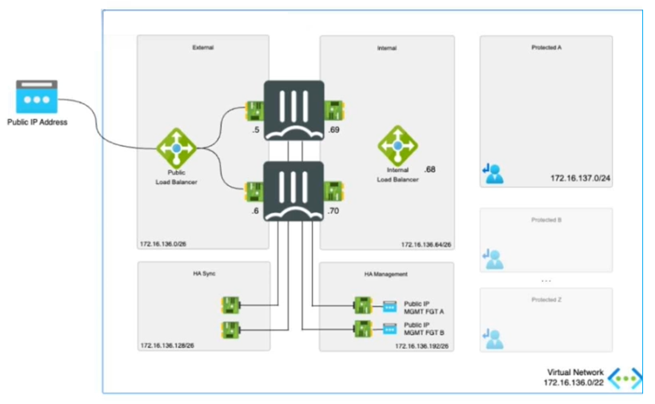
The exhibit shows an active-passive high availability FortiGate pair with external and internal Azure load
balancers There is no SDN connector used in this solution.
Which configuration must the administrator implement on each FortiGate?
A. Single BGP route to Azure probe IP address.
B. One static route to Azure Lambda IP address.
C. Two static routes to Azure probe IP address.
D. Two BGP routes lo Azure probe IP address.
Explanation:
✅ Correct Answer: C - Two static routes to Azure probe IP address.
In an active-passive HA FortiGate deployment on Azure without SDN connector, external and internal Azure load balancers require health probes to monitor FortiGate instances. Each FortiGate must configure two static routes—one for the external load balancer's probe IP and one for the internal—to ensure probes reach the active unit via backend pool mappings. This setup directs probe traffic correctly, avoiding asymmetry, as dynamic routing like BGP is not utilized here. Static routes provide reliable, low-cost probe handling matching the diagram's dual LB architecture.
❌ Incorrect answer: A - Single BGP route to Azure probe IP address.
BGP routing is unsuitable without SDN connector or explicit dynamic routing setup, as this solution relies on static configurations for simplicity in Azure HA. A single BGP route cannot address dual probes from external/internal LBs, risking failover detection failures. Probes demand precise static directing to active FortiGate IPs, preventing blackholing or misdirection in passive-active monitoring flows shown in the exhibit.
❌ Incorrect answer: B - One static route to Azure Lambda IP address.
Azure Lambda is a serverless compute service unrelated to load balancer probes, which use dedicated health check IPs, not Lambda endpoints. One route fails to cover both external/internal probes, causing incomplete monitoring and potential HA disruptions. The diagram depicts standard LB probes, requiring dual static routes to specific probe IPs for proper active-passive traffic steering.
❌ Incorrect answer: D - Two BGP routes to Azure probe IP address.
BGP introduces unnecessary complexity without SDN connector, lacking Azure integration for automatic probe handling. Dual BGP routes risk route flapping during HA failover, unlike stable static routes tailored for probe traffic. This static-focused design ensures probes hit correct interfaces/ports as per exhibit LBs, maintaining seamless health checks.
🔧 Conclusion:
Configuring two static routes to Azure probe IPs on each FortiGate ensures reliable health monitoring for external/internal LBs in active-passive HA without SDN. This matches the diagram's topology, directing probes to active unit precisely while avoiding dynamic routing pitfalls. Alternatives fail on routing method, count, or relevance, risking HA instability; static approach offers simplicity, cost-efficiency, and Azure best-practice compliance.
Reference:
About FortiGate-VM for Azure
An administrator is configuring a software-defined network (SDN) connector in FortiWeb to dynamically obtain information about existing objects in an Amazon Elastic Kubernetes Service (EKS) cluster. Which AWS policy should the administrator attach to a user to achieve this goal?
A. AmazonEKSConnectorServiceRolePolicy
B. AmazonEKSComputePolicy
C. AmazonEKSServicePolicy
D. AmazonEKSClusterPolicy
Explanation:
🟢 D. AmazonEKSClusterPolicy
This managed policy grants the necessary permissions for an IAM user or role to interact with EKS clusters at a cluster level. It includes actions like eks:DescribeCluster, eks:ListClusters, and others needed to authenticate to the EKS API server and retrieve cluster metadata. For FortiWeb's SDN connector to dynamically pull information (such as pod IPs, services, or node details) from an EKS cluster, the configured AWS credentials require this policy to describe and access the cluster resources securely. Attaching this allows the connector to query the Kubernetes API via EKS without broader unnecessary privileges.
🔴 A. AmazonEKSConnectorServiceRolePolicy
This policy is designed for specific AWS-managed connectors or add-ons (like for EKS add-ons or connectors in other services), not for general user access to describe or query EKS clusters. It lacks the core eks:Describe* and List* actions needed for an external tool like FortiWeb SDN connector to authenticate and fetch dynamic object data from the cluster. Attaching this would likely result in permission denied errors when trying to obtain existing objects.
🔴 B. AmazonEKSComputePolicy
This policy focuses on compute-related operations, such as managing node groups, Fargate profiles, or auto-scaling configurations in EKS. It does not include permissions to describe the cluster itself or access the Kubernetes API for object enumeration. FortiWeb needs cluster-level read access to pull dynamic info, not compute management, so this policy won't enable the SDN connector to function for this purpose.
🔴 C. AmazonEKSServicePolicy
This policy is intended for the EKS service principal itself (aws:eks service) to perform backend operations on behalf of the cluster. It's not attachable to regular IAM users or roles for external access. Attaching it to a user would be invalid or ineffective, as it's reserved for AWS service-linked roles, and it doesn't provide the user-level eks: actions required for FortiWeb to query cluster objects dynamically.
🔧 Conclusion:
FortiWeb uses the AWS SDN connector (similar to FortiGate/FortiADC patterns) to integrate with EKS for dynamic server/IP discovery in server pools or policies. The key requirement is IAM permissions to authenticate to the EKS cluster and describe its configuration/objects via the Kubernetes API endpoint. AmazonEKSClusterPolicy is the appropriate managed policy for this, as it provides the minimal cluster read access without over-privileging. The other options target different EKS roles (service, compute, or connector-specific) and won't allow the connector to retrieve the needed dynamic information from the cluster.
Reference:
FortiWeb Administration Guide (sections on SDN connectors and AWS integration); AWS documentation - Amazon EKS managed policies
Refer to the exhibit.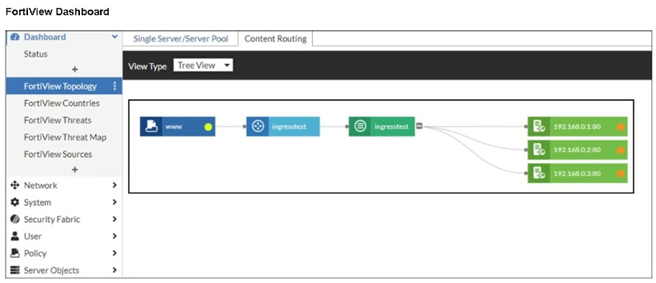
An administrator installed a FortiWeb ingress controller to protect a containerized web application. What is
the reason for the status shown in FortiView? (Choose one answer)
A. The SDN connector is not authenticated correctly.
B. The FortiWeb VM is missing a route to the node subnet.
C. The manifest file deployed is configured with the wrong node IP addresses.
D. The load balancing type is not set to round-robin.
Explanation:
The FortiView status indicates that FortiWeb can see the ingress and backend structure but cannot forward traffic successfully. This points to a missing or incorrect route between the FortiWeb VM and the Kubernetes node subnet. Without proper routing, backend services remain unreachable regardless of SDN configuration, manifest accuracy, or load-balancing settings.
✅ Correct Answer: B
The FortiView topology shows the ingress service and backend nodes, but traffic health indicators suggest communication failure. This typically happens when the FortiWeb VM cannot reach Kubernetes worker nodes. If the FortiWeb VM lacks a route to the node subnet, it cannot forward traffic to backend pods, causing the observed degraded or inactive status. Proper routing between the FortiWeb network and node subnet is mandatory for ingress traffic flow.
❌ Incorrect Answer: A
An unauthenticated SDN connector affects dynamic object synchronization and cloud resource discovery, not direct traffic forwarding between FortiWeb and Kubernetes nodes. The ingress controller can still deploy and show topology even if SDN authentication fails. Therefore, SDN connector authentication issues would not directly cause the backend node connectivity problem shown in FortiView.
❌ Incorrect Answer: C
If the manifest file contained incorrect node IP addresses, the ingress controller would fail to register or map backend services correctly. In such cases, the topology would either not populate or show missing backend nodes. The exhibit shows nodes present but unreachable, indicating a network routing issue rather than a configuration error in the manifest.
❌ Incorrect Answer: D
Load-balancing method selection, such as round-robin, affects traffic distribution among healthy backends but does not impact basic reachability. Even with an incorrect or default load-balancing algorithm, FortiWeb must still be able to route traffic to node IPs. The issue shown relates to connectivity failure, not traffic distribution behavior.
Reference:
Fortinet Documentation – FortiWeb Kubernetes Ingress Controller Guide
Fortinet Documentation – FortiWeb Administration Guide
Refer to the exhibit.
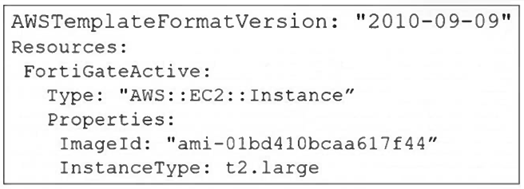
A senior administrator in a multinational organization needs to include a comment in the template shown in
the exhibit to ensure that administrators from other regions change the EC2 instance size value to one that
meets the requirements in their local deployments. How can the administrator add the comment in that section
of the file? (Choose one answer)
A. The administrator can run the aws cloudformation update-stack and include the comment.
B. The administrator must update the AWSTemplateFormatVersion to a more current version.
C. The administrator must convert the template to JSON format before adding the comment.
D. The administrator can add the comment with the # character next to the InstanceType section.
Explanation:
✅ Correct Answer:
D. The administrator can add the comment with the # character next to the InstanceType section.
The exhibit shows a CloudFormation template in YAML format. YAML natively supports single-line comments using the # character. The administrator can add a comment on the same line as the InstanceType key or on a separate line above it to document that the value should be changed to meet local deployment requirements. For example: InstanceType: t2.large # CHANGE TO LOCAL REQUIREMENT. This is a standard and effective method for inline documentation within YAML-based templates.
❌ Incorrect Answers:
A. The administrator can run the aws cloudformation update-stack and include the comment.
The update-stack command is used to deploy changes to a stack, not to embed human-readable comments within the template file itself. Comments are for template authors and readers, not a parameter for the deployment command.
B. The administrator must update the AWSTemplateFormatVersion to a more current version.
The version specified ("2010-09-09") is the fundamental template format version and is still current. Changing it does not enable or relate to the ability to add comments; comments are a feature of the YAML/JSON syntax, not the template format version.
C. The administrator must convert the template to JSON format before adding the comment.
This is incorrect and counterproductive. JSON does not support comments as part of its official specification. Converting to JSON would actually remove the ability to add compliant comments. YAML is the preferred format for readable CloudFormation templates precisely because it supports features like comments.
🔧 Key Insight:
For AWS CloudFormation templates written in YAML, inline documentation for other administrators is best achieved using the native comment syntax. Adding a comment prefixed with # next to the InstanceType parameter is the correct, simple, and standards-compliant approach to indicate that the value is region-specific and should be reviewed.
Reference:
AWS CloudFormation User Guide: AWS CloudFormation Template Formats.
What is the main advantage of using SD-WAN Transit Gateway Connect over traditional SD-WAN?
A. You can use BGP over IPsec for maximum throughput.
B. You can combine it with IPsec to achieve higher bandwidth.
C. It eliminates the use of ECMP.
D. You can use GRE-based tunnel attachments.
Explanation:
The transition from traditional SD-WAN attachments to Transit Gateway Connect focuses on performance and simplified orchestration. By utilizing GRE-based tunnels instead of standard IPsec VPNs, organizations can achieve up to four times the bandwidth per tunnel (5 Gbps vs 1.25 Gbps) and simplify dynamic routing via BGP. This makes GRE the defining technical advantage for high-performance FortiGate SD-WAN integrations within AWS environments.
✅ D. You can use GRE-based tunnel attachments.
The primary technical advantage of using AWS Transit Gateway (TGW) Connect over traditional SD-WAN attachments (like standard VPN or VPC attachments) is its native support for GRE-based tunnel attachments. Traditional SD-WAN integrations often rely on IPsec VPNs, which are capped at 1.25 Gbps per tunnel. By using GRE (Generic Routing Encapsulation), TGW Connect allows for much higher throughput—up to 5 Gbps per tunnel—and supports an increased MTU of 8500 bytes, significantly reducing encapsulation overhead and improving performance for cloud-native SD-WAN architectures.
❌ A. You can use BGP over IPsec for maximum throughput.
While BGP over IPsec is a standard method for traditional SD-WAN connectivity to AWS, it is not the main advantage of TGW Connect; in fact, it is the limitation that TGW Connect seeks to overcome. IPsec tunnels have significant performance bottlenecks due to encryption overhead and a strict throughput limit of 1.25 Gbps. TGW Connect moves away from IPsec as the primary transport, favoring GRE to achieve "maximum throughput" that IPsec cannot provide natively.
❌ B. You can combine it with IPsec to achieve higher bandwidth.
This is technically incorrect because TGW Connect is designed to replace or bypass the need for multiple managed IPsec VPN tunnels to achieve high bandwidth. While GRE can technically be wrapped in IPsec, the "Connect" attachment itself uses a VPC attachment as an underlay, allowing GRE to run over a high-bandwidth private backbone (up to 20 Gbps total per attachment) without the specific CPU-intensive overhead associated with scaling traditional IPsec tunnels.
❌ C. It eliminates the use of ECMP.
TGW Connect does not eliminate Equal-Cost Multi-Path (ECMP); rather, it leverages it. ECMP is a critical component of the TGW Connect architecture, allowing traffic to be load-balanced across multiple GRE tunnels (Connect peers) to reach the aggregated 20 Gbps bandwidth limit. Eliminating ECMP would actually hinder the scalability and high-availability benefits that TGW Connect provides to SD-WAN deployments.
Reference:
FortiGate Public Cloud 7.6.0 - SD-WAN Transit Gateway Connect FortiOS 6.4.3 New Features - Support AWS transit gateway connect attachment
| Page 1 out of 5 Pages |