
Refer to the exhibits.
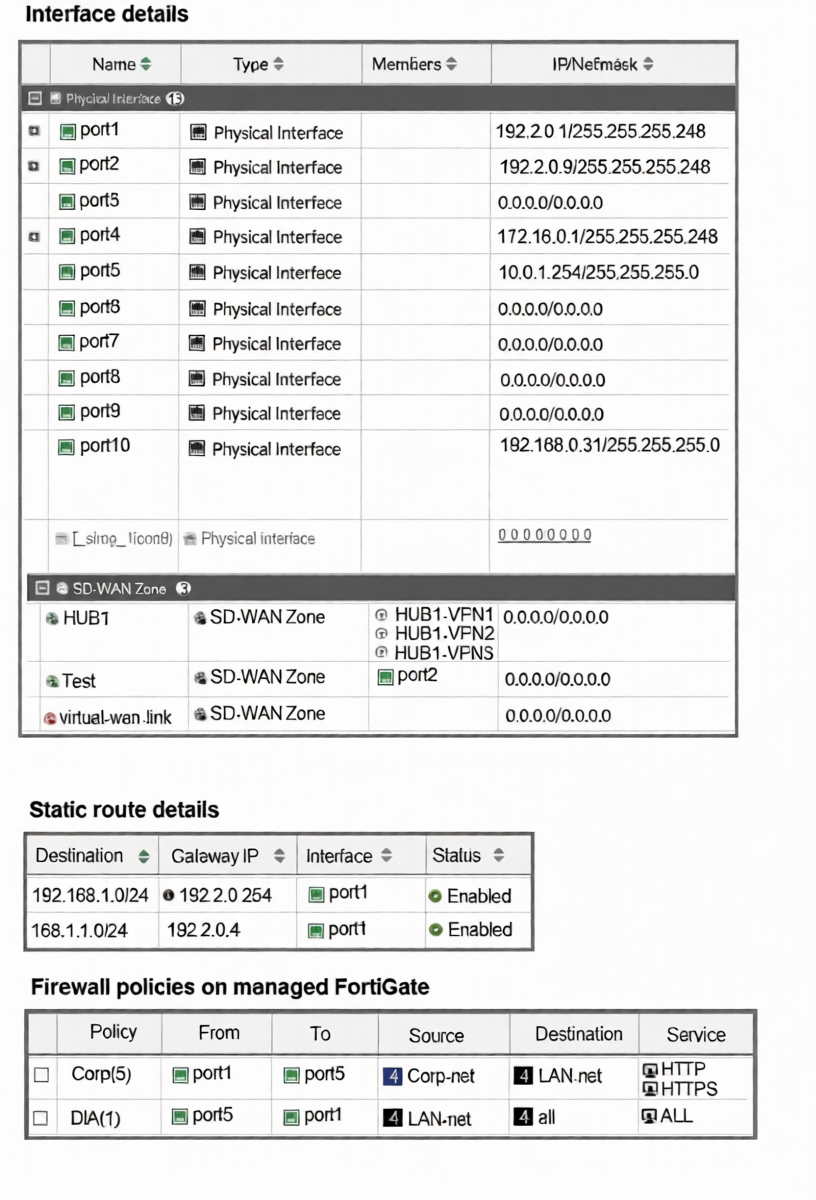
The interface details, static route configuration, and firewall policies on the managed FortiGate device are
shown.
You want to configure a new SD-WAN zone, named Underlay, that contains the interfaces port1 and port2.
What must be your first action?
A. Define port1 as an SD-WAN member.
B. Delete the static routes.
C. Delete the SD-WAN Zone Test.
D. Delete the firewall policies.
Explanation:
To add an interface to an SD-WAN zone, that interface must not be referenced by any other configuration object that would conflict with SD-WAN's dynamic path control. The exhibit shows that port1 is currently used by two static routes.
SD-WAN zones manage egress path selection dynamically, while static routes define fixed egress paths. If port1 is simultaneously a member of an SD-WAN zone and referenced in static routes, this creates a configuration conflict. The FortiGate will not allow the same interface to be used in both static routing and SD-WAN zone membership unless the static routes are removed first.
Therefore, the first action is to delete the static routes that use port1 as the egress interface.
Why other options are incorrect:
A: Defining port1 as an SD-WAN member is part of the process, but it cannot be done while port1 is still bound to static routes. The static routes must be removed first.
C: Deleting the "Test" SD-WAN zone is unnecessary. It contains only port2 and does not conflict with adding port1 to a new zone.
D: Deleting firewall policies is not required. The policies shown use port1 as a source/destination interface in rules, which is permissible. Firewall policies can coexist with SD-WAN zones.
Reference
FortiOS 7.6 SD-WAN Administration Guide > Configuring SD-WAN Members: An interface cannot be added to an SD-WAN zone if it is already referenced in a static route. The static route must be removed or modified to use a different interface or an SD-WAN zone itself before the interface can become an SD-WAN member.
Refer to the exhibit.
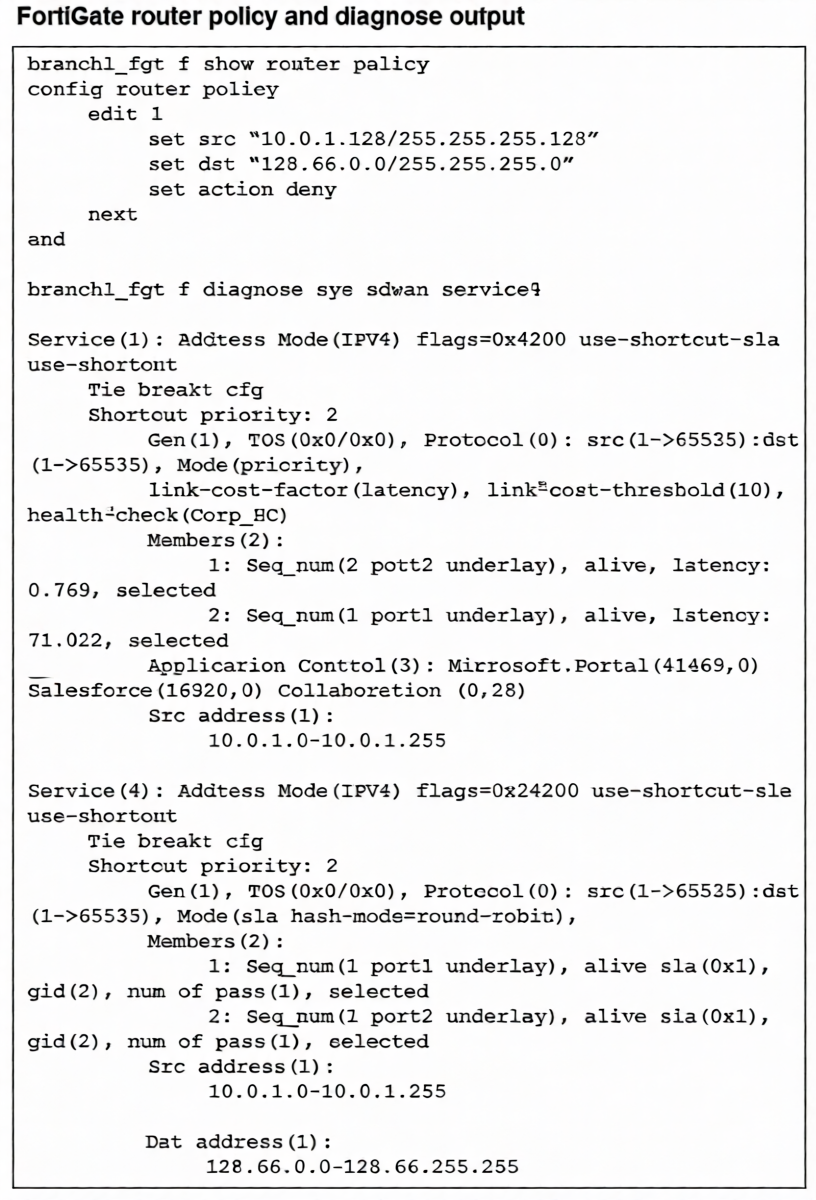
How does FortiGate handle the traffic with the source IP 10.0.1.130 and the destination IP 128.66.0 125?
A. FortiGate drops the traffic flow.
B. FortiGate routes the traffic flow according to the forwarding information base (FIB).
C. FortiGate load balances the traffic flow through port7 and port8.
D. FortiGate steers the traffic flow through port7.
Explanation:
Traffic from 10.0.1.130 to 128.66.0.125 matches Router Policy 1, which has an action of deny. Router policies (policy-based routing) are evaluated before SD-WAN rules in the packet processing flow. Since a matching router policy with a deny action is found, the packet is discarded immediately. The SD-WAN rule (Service 4) that also matches this destination is never reached or evaluated. Therefore, despite SD-WAN being configured for load balancing, the traffic is blocked at the routing stage and never forwarded.
Correct Option
A is correct because a router policy with a deny action takes precedence over SD-WAN rules.
The matching policy (src 10.0.1.128/25, dst 128.66.0.0/24, action deny) causes the FortiGate to drop the packet before any SD-WAN path selection occurs.
Incorrect Options:
B: Incorrect. The forwarding information base (FIB) is not used because the router policy denies the traffic first, halting the routing process.
C: Incorrect. The traffic is not load-balanced; it is dropped. Additionally, the SD-WAN members are port1 and port2, not port7 and port8.
D: Incorrect. The traffic is not steered through any interface; it is denied. The referenced interface (port7) is also not a member of the relevant SD-WAN service, which uses port1 and port2.
Reference:
FortiOS 7.6 Router Policy Guide: Router policies are processed in the routing stage before SD-WAN evaluation. If a router policy matches and has action deny, the packet is discarded. The SD-WAN rule logic is only applied if the router policy action is permit or no router policy matches. This order ensures routing policies can override SD-WAN path selection, including blocking traffic entirely.
Refer to the exhibit.
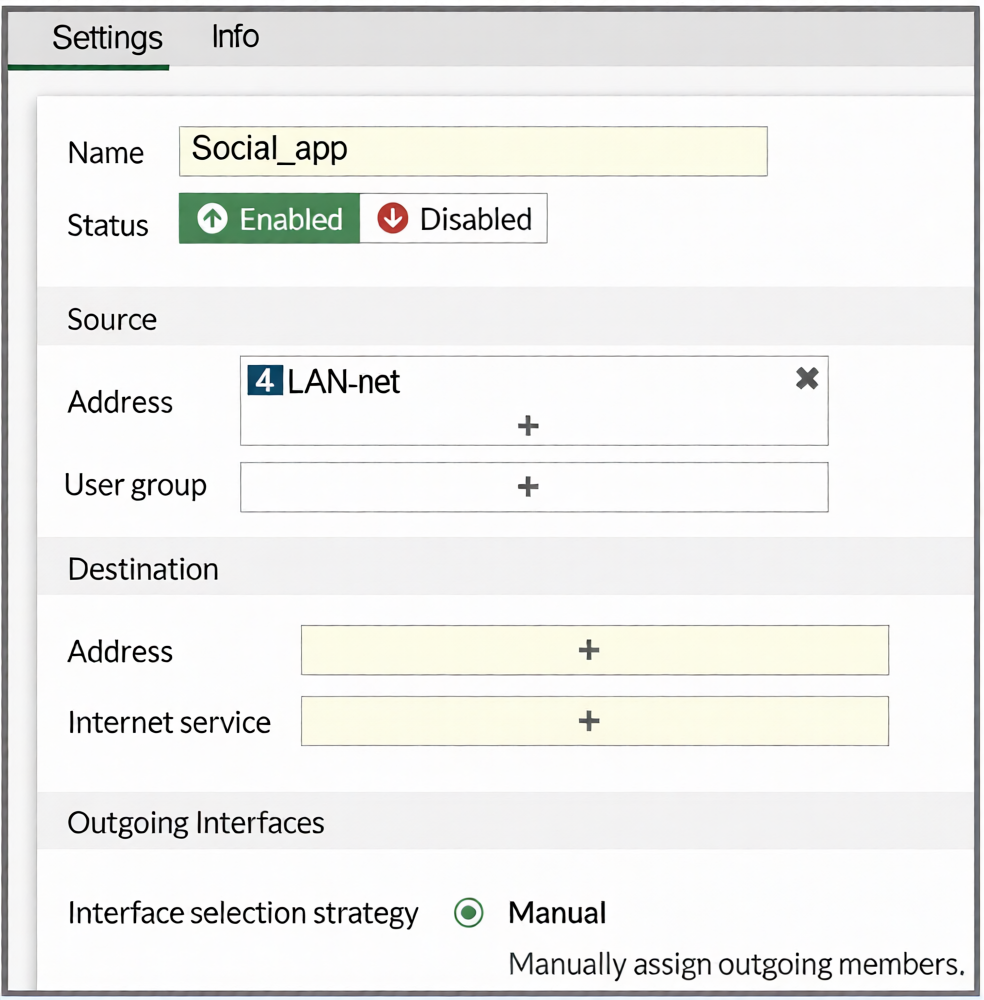
You configure SD-WAN on a standalone FortiGate device. You want to create an SD-WAN rule that steers
Facebook and Linkedin traffic through the less costly internet link. The FortiGate GUI page appears as shown
in the exhibit.
What should you do to set Facebook and LinkedIn as destinations?
A. Install a license to allow applications as destinations of SD-WAN rules.
B. In the Internet service field, select Facebook and LinkedIn.
C. Enable the applications as destinations of the SD-WAN rule feature visibility.
D. You cannot configure applications as destinations of an SD-WAN rule on a standalone FortiGate device.
Explanation:
The FortiGate GUI restricts certain configuration options by default to simplify the interface. The "Internet Service" field shown in the exhibit is visible because the Feature Visibility setting for "Internet Service Application in SD-WAN Rule" is enabled.
To use specific applications (Facebook, LinkedIn) as destinations in an SD-WAN rule, you must first enable the corresponding Feature Visibility setting: "Application as Destination in SD-WAN Rule." Once enabled, the GUI will present an "Application" field in the SD-WAN rule configuration, allowing you to select Facebook and LinkedIn directly.
Why other options are incorrect:
A: Incorrect. No special license is required to use applications as destinations in SD-WAN rules. This is a feature visibility setting, not a licensed feature.
B: Incorrect. The Internet Service field is for predefined FortiGuard Internet Service databases (IP ranges), not for individual applications like Facebook or LinkedIn. Selecting them here is not possible.
D: Incorrect. You can configure applications as destinations on a standalone FortiGate. The capability exists but is hidden by default in the GUI; it must be enabled via Feature Visibility.
Reference
FortiOS 7.6 Administration Guide > SD-WAN > Creating SD-WAN Rules: Details that to use "Application" as a match criterion in an SD-WAN rule, the administrator must first enable it under System > Feature Visibility > SD-WAN Components > "Application as Destination in SD-WAN Rule."
You manage an SD-WAN topology. You will soon deploy 50 new branches. Which three tasks can you do in advance to simplify this deployment? (Choose three.)
A. Update the DHCP server configuration.
B. Create model devices.
C. Create a ZTP template.
D. Define metadata variables value for each device.
E. Create policy blueprint.
Explanation:
B is correct: Creating model devices on FortiManager pre-defines device-specific configurations (like hostname, SNMP, and interface settings) in advance. This template can be cloned for each new branch, ensuring consistency and reducing manual configuration.
C is correct: A ZTP (Zero Touch Provisioning) template automates the initial deployment. When a new branch FortiGate boots and connects to the internet, it contacts FortiManager, which pushes the pre-configured ZTP template, automating the entire setup without onsite intervention.
E is correct: A policy blueprint defines a standard set of firewall policies, address objects, and services. When assigned to a new branch device, it automatically provisions the security policy framework, saving significant manual configuration time.
Why other options are incorrect:
A: Incorrect. While DHCP may be part of the network setup, updating the DHCP server is an infrastructure task specific to each site's local network. It is not a centralized SD-WAN topology preparation task that can be done in advance for all 50 branches on FortiManager.
D: Incorrect. Defining metadata variable values for each device is a per-device task, not something that can be fully done in advance for 50 unknown devices. You can define metadata variables, but their values (like specific IPs) are assigned per device during provisioning.
Reference
FortiManager 7.6 Administration Guide > Device & Manager > Model Devices: Describes using model devices as configuration templates.
(Refer to the exhibits.
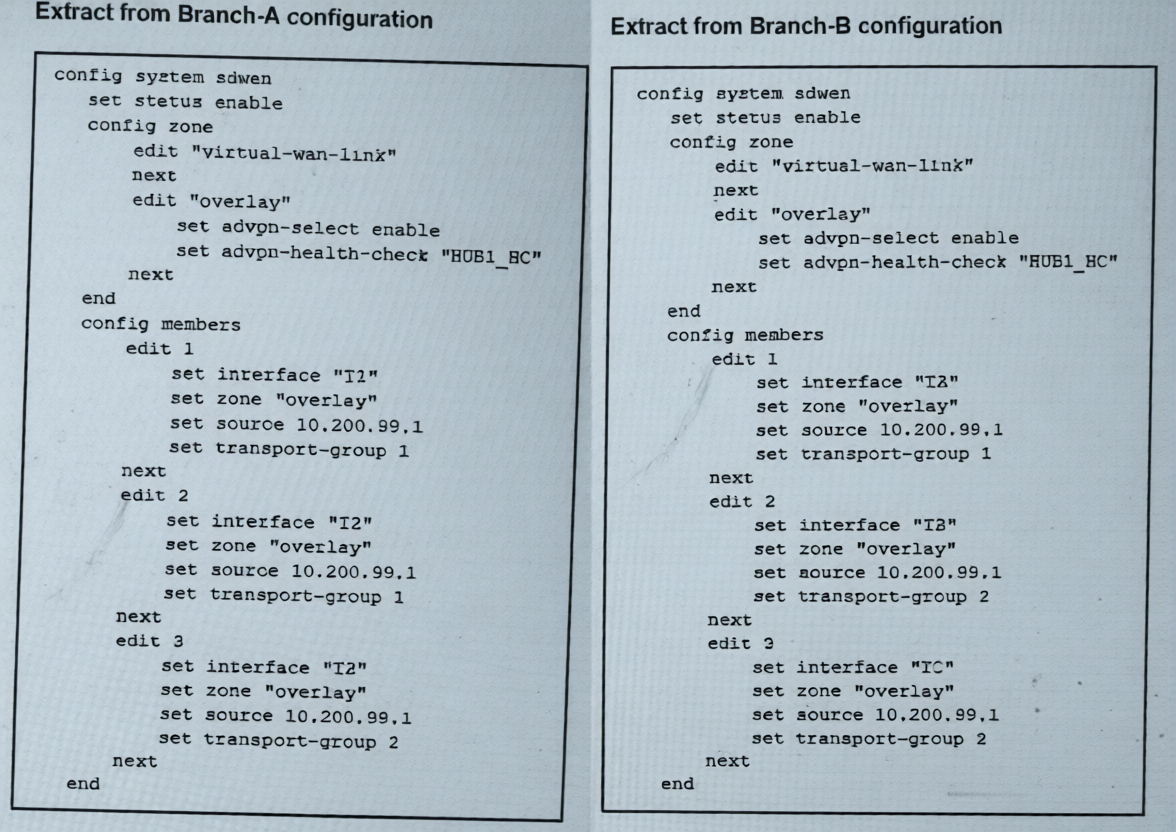
The SD-WAN zones and members configuration of two branch devices are shown. The two branch devices
are part of the same hub-and-spoke topology and connect to the same hub. The devices are configured to
allow Auto-Discovery VPN (ADVPN). The configuration on the hub allows the initial communication
between the two spokes.
When traffic flows require it, between which interfaces can the devices establish shortcuts? Choose one
answer.)
A. Any interface in the overlay zones
B. Interface connected to HUB only
C. Between T3 on Branch-A and TC on Branch-B
D. Between T2 on Branch-A and TA on Branch-B
Explanation:
Auto-Discovery VPN (ADVPN) shortcuts are established directly between spokes using their transport interfaces that belong to the same transport-group. The transport-group is a key identifier that determines which underlay paths can form direct tunnels.
Analyzing the configuration:
Branch-A has three members (T2, T2, T3) in transport-groups 1, 1, and 2 respectively.
Branch-B has three members (TA, TB, TC) in transport-groups 1, 2, and 2 respectively.
For a shortcut to form, both spokes must use an interface in a common transport-group.
The only shared transport-group between both branches is group 1. In group 1:
Branch-A uses T2 (member 1 or 2).
Branch-B uses TA (member 1).
Therefore, ADVPN shortcuts can only be established between T2 on Branch-A and TA on Branch-B.
Why Other Options Are Incorrect:
A: Incorrect. Shortcuts cannot use any interface in the overlay zones. They require a matching transport-group ID, which is a specific underlay path constraint.
B: Incorrect. Shortcuts are designed to bypass the hub for direct spoke-to-spoke communication. They are not built toward the hub.
C: Incorrect. While T3 (Branch-A) and TC (Branch-B) are both in transport-group 2, this pairing is not the primary or only valid shortcut path. The question implies a specific correct match based on the configuration, which clearly points to the group 1 interfaces (T2 and TA).
Reference
FortiOS 7.6 IPsec VPN & SD-WAN Administration Guide > ADVPN Configuration: States that ADVPN shortcuts are negotiated between spokes using their transport interfaces that share a common transport-group ID. The hub facilitates the initial discovery, but the shortcut tunnel is built directly between the spokes' designated transport interfaces in the same group. This ensures the underlay network path is correctly aligned for direct communication.
Exhibit.
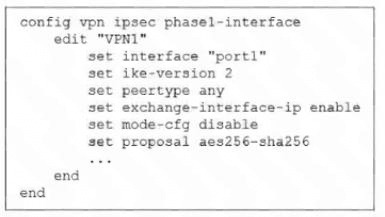
The administrator configured the IPsec tunnel VPN1 on a FortiGate device with the parameters shown in
exhibit.
Based on the configuration, which three conclusions can you draw about the characteristics and requirements
of the VPN tunnel? (Choose three.)
A. The tunnel interface IP address on the spoke side is provided by the hub.
B. The remote end can be a third-party IPsec device.
C. The administrator must manually assign the tunnel interface IP address on the hub side
D. The remote end must support IKEv2.
E. This configuration allows user-defined overlay IP addresses.
Refer to the exhibit.
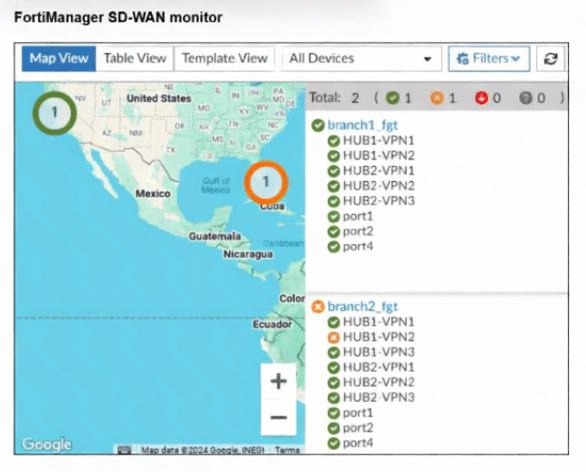
An administrator checks the status of an SD-WAN topology using the FortiManager SD-WAN monitor
menus. All members are configured with one or two SLAs.
Which two conclusions can you draw from the output shown? (Choose two.)
A. The template view should be used to see the hub devices.
B. One member of branch2_fgt is missing the SLAs.
C. branch2_fgt establishes six tunnels to the hubs and they are all up.
D. This SD-WAN topology contains only two branch devices.
(Refer to the exhibit. You noticed that one SD-WAN member went down and you immediately collected the
session output shown in the exhibit. What can you conclude from this output? Choose one answer.)
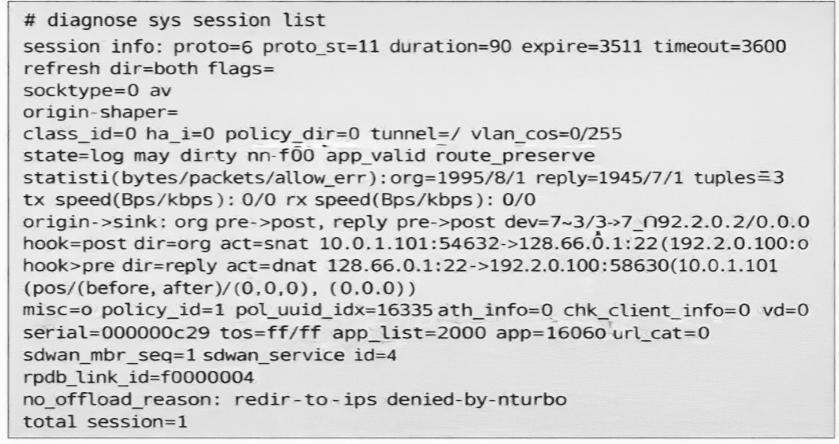
A. FortiGate didn’t receive any traffic related to this session after the interface went down.
B. FortiGate flushed the gateway for the session.
C. FortiGate cannot reevaluate the session.
D. FortiGate already reevaluated this session.
Refer to the exhibit.
.jpeg)
The administrator configured the SD-WAN rule ID 4 with two members (port1 and port2) and strategy lowest
cost (SLA).
What are the two characteristics of the session shown in the exhibit? (Choose two.)
A. FortiGate steered this flow according to an SD-WAN rule 4.
B. FortiGate will never re-evaluate this session.
C. FortiGate steered this flow according to the application detected and the outgoing interface is port3.
D. FortiGate will re-evaluate this session if the outgoing interface goes down.
Refer to the exhibit.
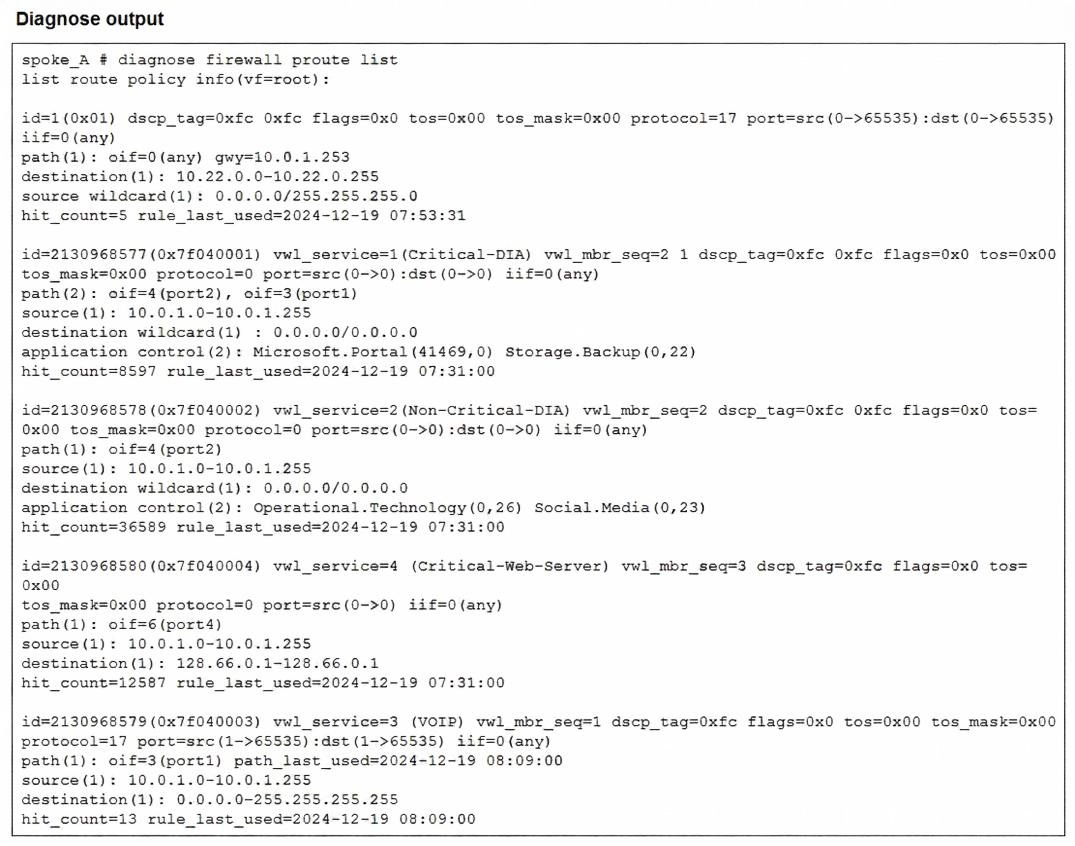
Which two conclusions can you draw from the output shown? (Choose two.)
A. One SD-WAN rule is defined with application categories as the destination.
B. UDP traffic destined to the subnet 10.22.0.0/24 matches a manual SD-WAN rule.
C. One SD-WAN rule allows traffic load balancing.
D. UDP traffic destined to the subnet 10.22.0.0/24 matches a policy route.

Refer to the exhibit that shows event logs on FortiGate.
Based on the output shown in the exhibit, what can you say about the tunnels on this device?
A. The master tunnel HU82-VPN3 cannot accept ADVPN shortcuts.
B. The device steers voice traffic through the VPN tunnel HUB1-VPN3.
C. The VPN tunnel HUB1-VPN1_0 is a shortcut tunnel.
D. There is one shortcut tunnel built from master tunnel VPN4.
You have a FortiGate configuration with three user-defined SD-WAN zones and two members in each of these zones. One SD-WAN member is no longer in use in health-check and SD-WAN rules. You want to delete it. What happens if you delete the SD-WAN member from the FortiGate GUI?
A. FodiGate accepts the deletion and removes routes as required.
B. FortiGate displays an error message. You must use the CLI to delete an SD-WAN member.
C. FortiGate displays an error message. SD-WAN zones must contain at least two members
D. FortiGate accepts the deletion and places the member in the default SD-WAN zone.
| Page 2 out of 8 Pages |
| Previous |