
(As an IT manager, you want to delegate the installation and management of your SD-WAN deployment to a managed security service provider (MSSP). Each site must maintain direct internet access and be secure. You expect significant traffic flow between the sites and want to delegate as much of the network administration and management as possible to the MSSP. Which two MSSP deployment blueprints address your requirements? Choose two answers.)
A. Use a shared hub on the MSSP premises and a dedicated hub on the customer premises, and install the spokes on the customer premises.
B. Install a dedicated hub on the MSSP premises for the customer, and install the spokes on the customer premises.
C. Install the hub and spokes on the customer premises, and enable the MSSP to manage the SD-WAN deployment using FortiManager with a dedicated ADOM
D. Use a shared hub on the MSSP premises with a dedicated VDOM for the customer, and install the spokes on the customer premises.
Explanation:
This scenario describes a Managed Security Service Provider (MSSP) model where the customer wants to offload maximum administrative control while maintaining Direct Internet Access (DIA) at each branch (spoke). The requirement for "significant traffic flow between the sites" necessitates an efficient, centrally managed hub for inter-spoke traffic.
Both correct options (B & D) place the hub FortiGate at the MSSP's data center. This is the key design principle that meets the core requirement: it delegates the administration, installation, and management of the critical hub—which controls the SD-WAN overlay and inter-site routing—to the MSSP. The spokes remain at customer sites, preserving local internet breakout (DIA). Traffic between sites (east-west) will typically flow through the MSSP-managed hub for optimized routing and security inspection.
Option B (Dedicated Hub):
The MSSP provisions a physical or virtual FortiGate dedicated solely to the customer. This offers maximum isolation and customization.
Option D (Shared Hub with VDOM):
The MSSP uses a multi-tenant FortiGate, isolating the customer within a dedicated Virtual Domain (VDOM). This is a cost-effective and scalable MSSP model.
Why the other options are incorrect:
Option A is incorrect because it proposes a dedicated hub on the customer premises. This contradicts the requirement to delegate "as much...management as possible," as the customer would then be responsible for that on-premises hub's infrastructure and connectivity.
Option C is incorrect because it places both the hub and spokes on customer premises. While the MSSP can manage the configuration via FortiManager (with a dedicated ADOM), they do not own or manage the underlying infrastructure, WAN links, or installation. This is a managed service model, not the fully delegated MSSP deployment blueprint requested.
Reference
This aligns with Fortinet's documented MSSP blueprints for SD-WAN, specifically the "MSSP Hosted Hub" models. The Fortinet SD-WAN 7.6 Administration Guide and the Fortinet MSSP Deployment Guide detail that to maximize delegation, the hub should be under the MSSP's physical control, whether as a dedicated device or within a shared device using VDOMs, while spokes remain at the edge for local internet access.
(Refer to the exhibit.
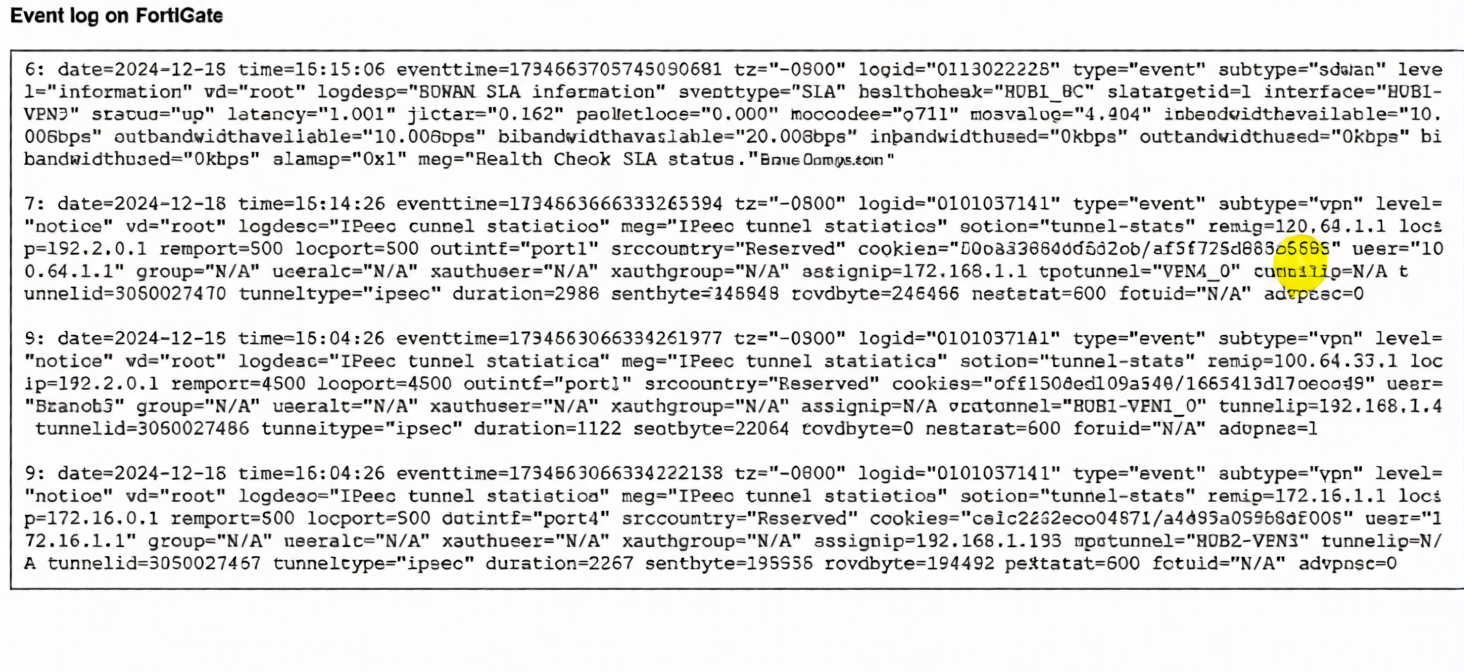
The event log on a FortiGate device is shown.
Based on the output shown in the exhibit, what can you conclude about the tunnels on this device? (Choose one answer))
A. There is one shortcut tunnel built from the master tunnel VPN4.
B. The voice traffic is steered through the VPN tunnel HUB1-VPN3.
C. The VPN tunnel HUB1-VPN1_0 is a shortcut tunnel.
D. The master tunnel HUB2-VPN3 cannot accept Auto-Discovery VPN (ADVPN) shortcuts.
Explanation:
The log entries are key for identifying Auto-Discovery VPN (ADVPN) shortcut tunnels. In ADVPN, a shortcut tunnel is a direct IPsec tunnel built dynamically between two spokes (or a hub and spoke for optimization), bypassing the hub for specific traffic. The critical indicator is the advpn=1 field.
Log Entry 9 (for HUB1-VPN1_0 tunnel) explicitly shows advpn=1. This confirms it is an ADVPN shortcut tunnel. The cvptunnel="HUB1-VPN1_0" is the name, and the presence of advpn=1 is the definitive flag.
Log Entry 6 (for HUB1-VPN3 tunnel) shows an SLA health check with slatargetid=1. While this indicates it's part of an SD-WAN performance SLA monitor, there is no advpn field in this SLA log entry to classify it as a shortcut or master tunnel for voice traffic.
Log Entry 8 (for HUB2-VPN3 tunnel) shows advpn=0. This means it is not a shortcut tunnel; it is a regular or master tunnel, which can accept ADVPN shortcuts (contradicting option D).
Why the other options are incorrect:
A: Incorrect. The logs do not show a tunnel named "VPN4," nor do they show a master/shortcut relationship between tunnels labeled "VPN4" and another.
B: Incorrect. Log Entry 6 for HUB1-VPN3 only shows SLA metrics (latency, jitter). While these metrics are relevant for voice, the log does not show any actual traffic being steered. It is a health check log, not a traffic flow log.
D: Incorrect. Log Entry 9 for HUB2-VPN3 shows advpn=0, meaning it is not itself a shortcut. However, a master tunnel (advpn=0) is the prerequisite for accepting shortcut requests. The statement that it "cannot accept" shortcuts is false.
Reference
Fortinet NSE 6 SD-WAN 7.6 Study Guide / Administration Guide: The advpn flag in IPsec tunnel logs (type="event" subtype="vpn") is the definitive field to identify ADVPN shortcut tunnels (advpn=1) versus regular/master tunnels (advpn=0).
Refer to the exhibit, which shows the SD-WAN rule status and configuration.
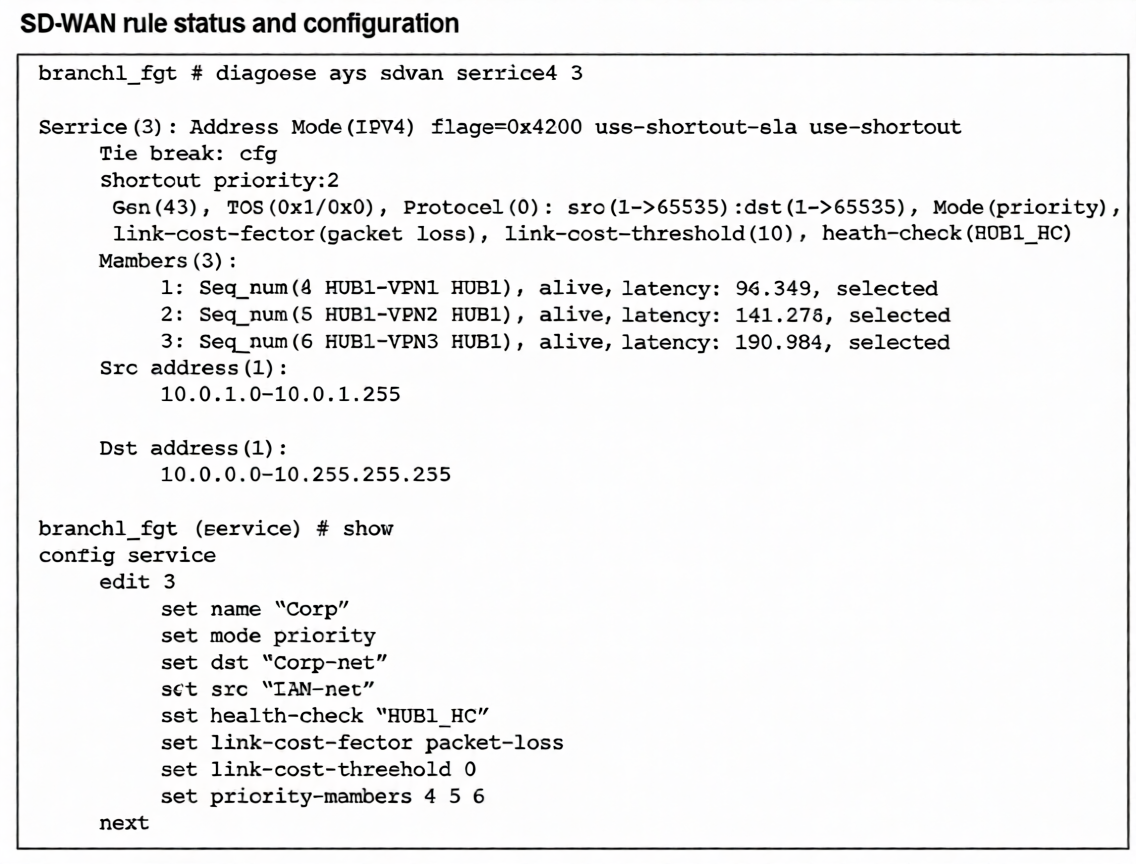
Based on the exhibit, which change in the measured latency will first make HUB1-VPN3 the new preferred
member?
A. When HUB1-VPN3 has a lower latency than HUB1-VPN1 and HUB1-VPN2
B. When HUB1-VPN3 has a latency of 80 ms
C. When HUB1-VPN3 has a latency of 90 ms
D. When HUB1-VPN1 has a latency of 200 ms
Explanation:
The SD-WAN service rule is configured in priority mode but includes the critical flag use-shortest-sla, as shown in the diagnose sys sdwan service output. This flag modifies standard priority behavior: instead of strictly following sequence number order, it selects the member with the best SLA performance (lowest latency, jitter, or loss) from among the configured priority members, provided all meet the link-cost-threshold.
Key parameters:
link-cost-factor: packet-loss
link-cost-threshold: 10 (members with packet loss >10% are excluded)
Current latencies: HUB1-VPN1=96.349 ms, HUB1-VPN2=141.278 ms, HUB1-VPN3=190.984 ms
Since all members are "alive" and presumably meeting the packet-loss threshold, the use-shortest-sla flag causes the member with the lowest latency to be preferred. Currently, HUB1-VPN1 is selected (lowest at 96.349 ms). For HUB1-VPN3 to become preferred, its latency must drop below HUB1-VPN1's current 96.349 ms.
Option C (90 ms) is the only choice where HUB1-VPN3's latency falls below this threshold while still being the highest possible value under 96 ms, making it the precise point where preference would switch.
Why other options are incorrect:
A: Incorrect because it's incomplete. HUB1-VPN3 must have lower latency specifically than HUB1-VPN1's current 96 ms, not just lower than both.
B: While 80 ms would also make HUB1-VPN3 preferred, the question asks for the first change. With use-shortest-sla, preference switches as soon as latency drops below 96 ms. 90 ms represents that threshold value—the highest latency still triggering the change.
D: If HUB1-VPN1's latency rises to 200 ms, HUB1-VPN3 (190 ms) still wouldn't be preferred because HUB1-VPN2 (141 ms) has better latency and would be selected first under use-shortest-sla.
Reference
Fortinet SD-WAN 7.6 Administration Guide: The use-shortest-sla flag in priority mode enables performance-based selection where the member with the best SLA metrics (latency/jitter/loss) is chosen from the priority list, overriding strict sequence order when latency differences exceed measurement variations.
You have configured the performance SLA with the probe mode as Prefer Passive. What are two observable impacts of this configuration? (Choose two.)
A. FortiGate passively monitors the member if TCP traffic is passing through the member.
B. After FortiGate switches to active mode, the SLA performance rule falls back to passive monitoring after 3 minutes.
C. FortiGate passively monitors the member if ICMP traffic is passing through the member.
D. During passive monitoring, the SLA performance rule cannot detect dead members.
E. FortiGate can offload the traffic that is subject to passive monitoring to hardware.
Explanation:
When an SLA performance rule is configured with Probe Mode set to "Prefer Passive", the FortiGate primarily uses passive monitoring of actual user traffic to measure performance metrics (latency, jitter, packet loss), rather than sending active probe packets. This mode has specific operational characteristics.
Why C is correct:
In "Prefer Passive" mode, the FortiGate can utilize ICMP traffic (like ping replies) passing through the SD-WAN member interface to gather performance data. This is a documented passive monitoring method alongside TCP traffic.
Why D is correct:
A key limitation of passive monitoring is that it requires traffic flow. If a member link fails or has no traffic, there are no packets to analyze, so the dead member may not be detected promptly. Active probing is required for reliable dead gateway detection.
Why the other options are incorrect:
A: Incorrect. While TCP traffic can be used for passive monitoring, the statement is misleading. "Prefer Passive" mode utilizes both TCP and ICMP traffic for passive measurements, not TCexclusively.
B: Incorrect. The "Prefer Passive" mode does not automatically fall back to passive after 3 minutes. The "After 3 minutes" behavior is specific to the "Probe Passive" mode, where active probing runs for 3 minutes after a failure is detected before returning to passive-only.
E: Incorrect. Passive monitoring itself is a traffic inspection method and does not enable or disable hardware offloading. Hardware offloading depends on NPU/ASIC support and traffic profile, not the SLA monitoring mode.
Reference
FortiOS 7.6 SD-WAN Administration Guide > Configuring SD-WAN > Performance SLA: Explicitly states that in "Prefer Passive" mode, the FortiGate uses both TCP and ICMP traffic for passive measurements when available, and switches to active probes only when passive data is insufficient. It also notes that passive monitoring cannot detect dead members without traffic flow.
Which statement describes FortiGate behavior when you reference a zone in a static route?
A. FoftiGate installs ECMP static routes for the first two members of the zone.
B. FortiGate ignores the static routes defined through members referenced in the zone.
C. FortiGate routes the traffic through the best performing member of the zone.
D. FortiGate installs a static route for each member in the zone.
Explanation:
When you create an interface zone and add multiple physical or logical interfaces to it, then reference that zone in a static route, the FortiGate's behavior is to install an equal-cost multipath (ECMP) static route for every member interface within that zone.
This means:
The FortiGate creates a separate routing table entry for each interface in the zone, all pointing to the same destination network.
Traffic can be load-balanced across all zone members (if ECMP is enabled and properly configured).
This is a fundamental routing construct that treats the zone as a logical group of egress paths.
Why the other options are incorrect:
A: Incorrect. The FortiGate installs ECMP routes for all zone members, not just the first two. The number of routes equals the number of zone members.
B: Incorrect. The opposite is true; static routes are explicitly installed for each member. Ignoring them would break routing.
C: Incorrect. Static routes using a zone do not incorporate performance-based routing or SLA monitoring. The "best performing member" selection is a feature of SD-WAN rules, not basic static routing. A zone-based static route uses ECMP or routing priority settings, not real-time performance metrics.
Reference
FortiOS 7.6 Administration Guide > Network > Static Routes: Explicitly states, "When you add a zone to a static route, the route is added to the routing table for each zone member interface, creating equal-cost multipath (ECMP) routes."
(Refer to the exhibit. The administrator configured two SD-WAN rules to load balance the traffic.
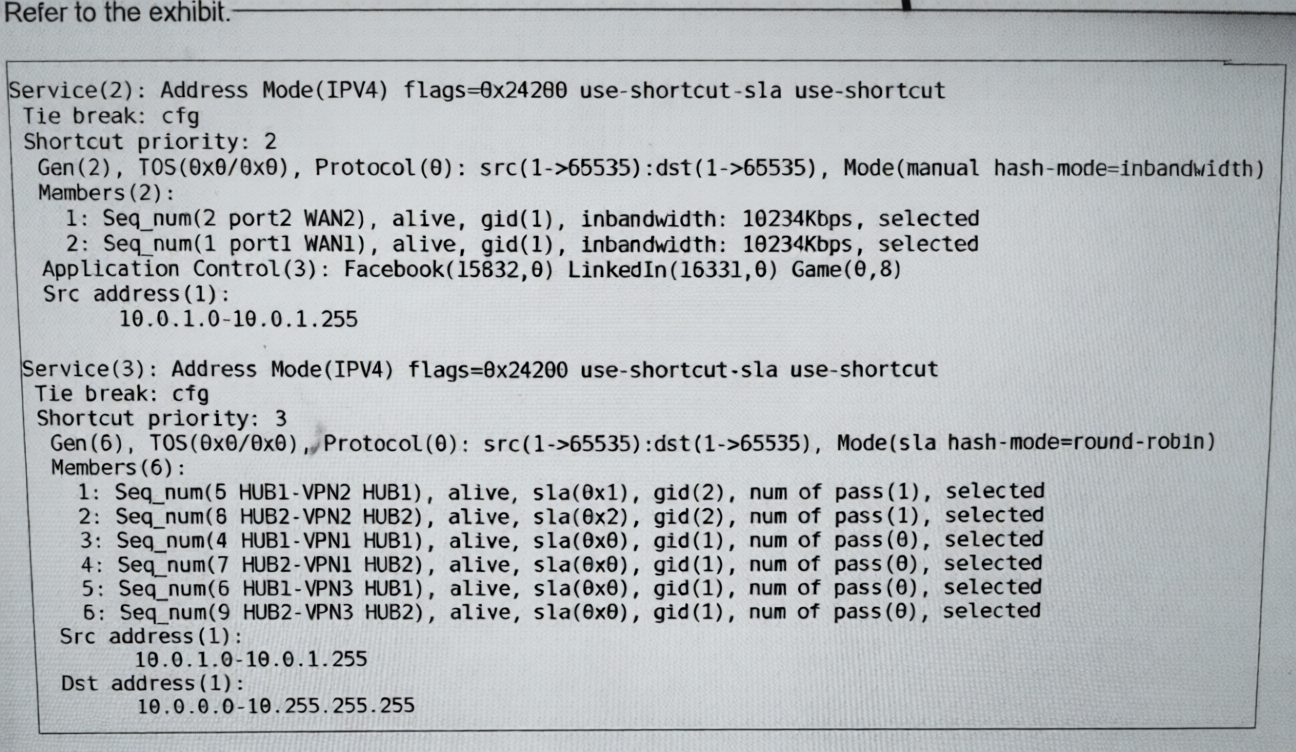
Which interfaces does FortiGate use to steer the traffic from 10.0.1.124 to 10.0.0.254? Choose one answer.)
A. HUB2-VPN2
B. HUB1-VPN2 or HUB2-VPN2
C. port1 or port2
D. Any interface in the HUB1 or HUB2 zones
Explanation:
The diagnose sys sdwan service output displays two distinct SD-WAN rules. Traffic steering is determined by rule matching order and operational status of members within the matched rule.
1. Rule Matching:
Traffic from 10.0.1.124 to 10.0.0.254 has:
Source IP (10.0.1.124) within 10.0.1.0-10.0.1.255 (matches both rules)
Destination IP (10.0.0.254) within 10.0.0.0-10.255.255.255 (matches only Service (3))
Since Service (2) has no destination constraint and handles only specific applications (Facebook, LinkedIn, Game), general corporate traffic (10.0.0.0/16) is exclusively handled by Service (3).
2. Service (3) Analysis:
Mode: sla (SLA mode)
Hash mode: round-robin
Members: Six VPN tunnels (HUB1-VPN1/2/3, HUB2-VPN1/2/3)
Key field: sla(0x...) indicates SLA compliance:
sla(0x1) and sla(0x2) = Passing SLA (HUB1-VPN2, HUB2-VPN2)
sla(0x0) = Not meeting SLA (all other four tunnels)
In SLA mode, traffic is only distributed among members that meet the SLA thresholds. With hash-mode=round-robin, the two compliant members (HUB1-VPN2 and HUB2-VPN2) will share the traffic load.
Why Other Options Are Incorrect:
A: HUB2-VPN2 alone is incorrect because the rule uses round-robin load balancing between both SLA-compliant members. Traffic could use either tunnel.
C: port1 or port2 are the physical underlay interfaces for Service (2) only (application-specific rule). Service (3) uses VPN overlay interfaces (tunnels), not physical interfaces directly.
D: "Any interface in the HUB1 or HUB2 zones" is incorrect because four of the six zone members have sla(0x0), meaning they fail SLA and are excluded from traffic distribution in SLA mode. Only the two compliant members are used.
Reference
FortiOS 7.6 SD-WAN Administration Guide > Configuring SD-WAN > Performance SLA: Explains that in sla mode, only members meeting the configured SLA thresholds (latency, jitter, packet loss) are selected for traffic steering.
(You want to configure two static routes: one that references an SD-WAN zone and a second one that references an SD-WAN member that belongs to that zone. Which statement about this scenario is true? Choose one answer.)
A. You cannot create static routes for individual SD-WAN members.
B. You cannot create static routes that reference an SD-WAN zone.
C. The destination subnets must be different.
D. The source subnets must be different.
Explanation:
In FortiOS (including 7.6), static routes support referencing an SD-WAN zone (e.g., virtual-wan-link or a custom zone) as the outgoing interface. This allows the route to use any healthy member within the zone, providing flexibility for load balancing, failover, or ECMP across multiple links. Documentation explicitly states: "SD-WAN zones and members can be used in IPv4 and IPv6 static routes to make route configurations more flexible." However, the GUI and CLI for static routes (under config router static) allow selecting only an SD-WAN zone in the interface field—not an individual SD-WAN member interface.
You cannot directly configure a static route pointing to a single SD-WAN member (e.g., WAN1 or port2 when configured as an SD-WAN member). Attempting this is not supported; the interface dropdown lists zones, not individual members. This design encourages zone-based routing for SD-WAN-aware behavior (SLA monitoring, performance steering). Individual member routes would bypass SD-WAN logic.
Thus, in the scenario of configuring one static route referencing a zone and another referencing a member in that zone: the second is impossible.
Why the other options are incorrect:
B. You cannot create static routes that reference an SD-WAN zone
→ False; this is fully supported and recommended for default routes and subnets in SD-WAN setups.
C. The destination subnets must be different
→ No such restriction; overlapping or identical destinations are allowed (resolved by priority/distance), but irrelevant here.
D. The source subnets must be different
→ Static routes do not use source subnets (unlike policy routes); source is not a factor, so no requirement.
References:
Administration Guide → SD-WAN members and zones:
Administration Guide → Specify an SD-WAN zone in static routes:
Refer to the exhibits.
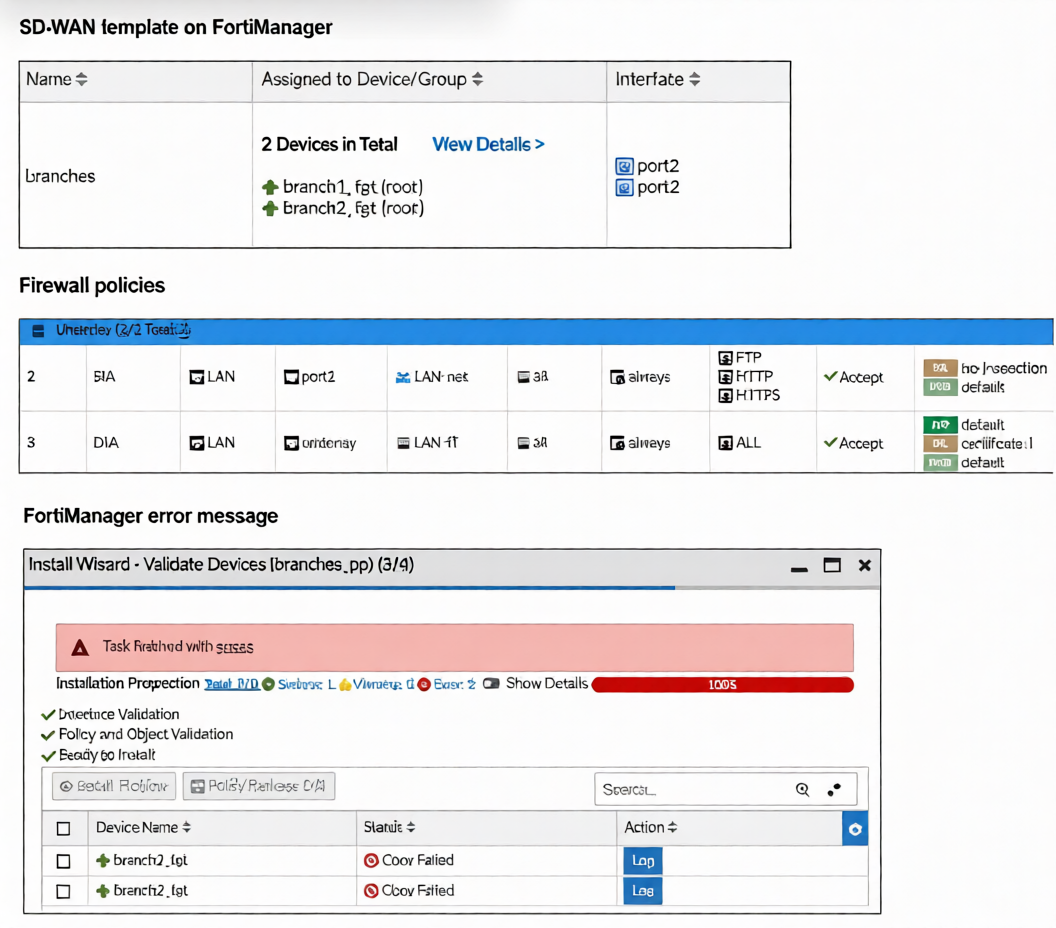 You use FortiManager to manage the branch devices and configure the SD-WAN template. You have
configured direct internet access (DIA) for the IT department users. Now. you must configure secure internet
access (SIA) for all local LAN users and have set the firewall policies as shown in the second exhibit.
Then, when you use the install wizard to install the configuration and the policy package on the branch
devices, FortiManager reports an error as shown in the third exhibit.
Which statement describes why FortiManager could not install the configuration on the branches?
You use FortiManager to manage the branch devices and configure the SD-WAN template. You have
configured direct internet access (DIA) for the IT department users. Now. you must configure secure internet
access (SIA) for all local LAN users and have set the firewall policies as shown in the second exhibit.
Then, when you use the install wizard to install the configuration and the policy package on the branch
devices, FortiManager reports an error as shown in the third exhibit.
Which statement describes why FortiManager could not install the configuration on the branches?
A. You must direct SIA traffic to a VPN tunnel.
B. You cannot install firewall policies that reference an SD-WAN zone.
C. You cannot install firewall policies that reference an SD-WAN member.
D. You cannot install SIA and DIA rules on the same device.
Explanation :
FortiManager fails to install the configuration because the firewall policies reference SIA and DIA as outgoing interfaces. These are SD-WAN zones defined within an SD-WAN template. In FortiManager's architecture, SD-WAN template zones are not exposed as selectable interfaces in the firewall policy object database. During pre-install validation, FortiManager cannot resolve these zone references, resulting in a "Conf Failed" error. The policies must use concrete interfaces (e.g., port2, wan1) or a regular interface zone defined at the device level, not an SD-WAN template zone.
Correct Option
B is correct. Firewall policies in a policy package cannot use an SD-WAN zone from a template as an egress interface. These zones are part of the SD-WAN configuration namespace and are unavailable to the firewall policy engine, causing a validation failure upon installation.
Incorrect Options
A: Incorrect. The error is not about routing SIA traffic to a VPN tunnel; it is a configuration validation failure. A policy can successfully use a VPN tunnel interface (e.g., to_HUB) as its egress interface.
C: Incorrect.You can install policies that reference an individual SD-WAN member interface (e.g., port1). These are standard, concrete interfaces that exist in the global object database and are valid for policy configuration.
D: Incorrect. A FortiGate device can host both SIA and DIA rules simultaneously. The error is specific to the invalid interface reference in the policy configuration, not a conflict between SIA and DIA functionalities.
Reference:
FortiManager Administration Guide (v7.6): SD-WAN zones configured within an SD-WAN template are not available as outgoing interfaces in firewall policies. Policies must reference interfaces or zones defined at the device/global level. This separation prevents policy binding to dynamic SD-WAN objects, ensuring clean template management. The validation failure occurs when a policy package references an unresolved interface object from an SD-WAN template.
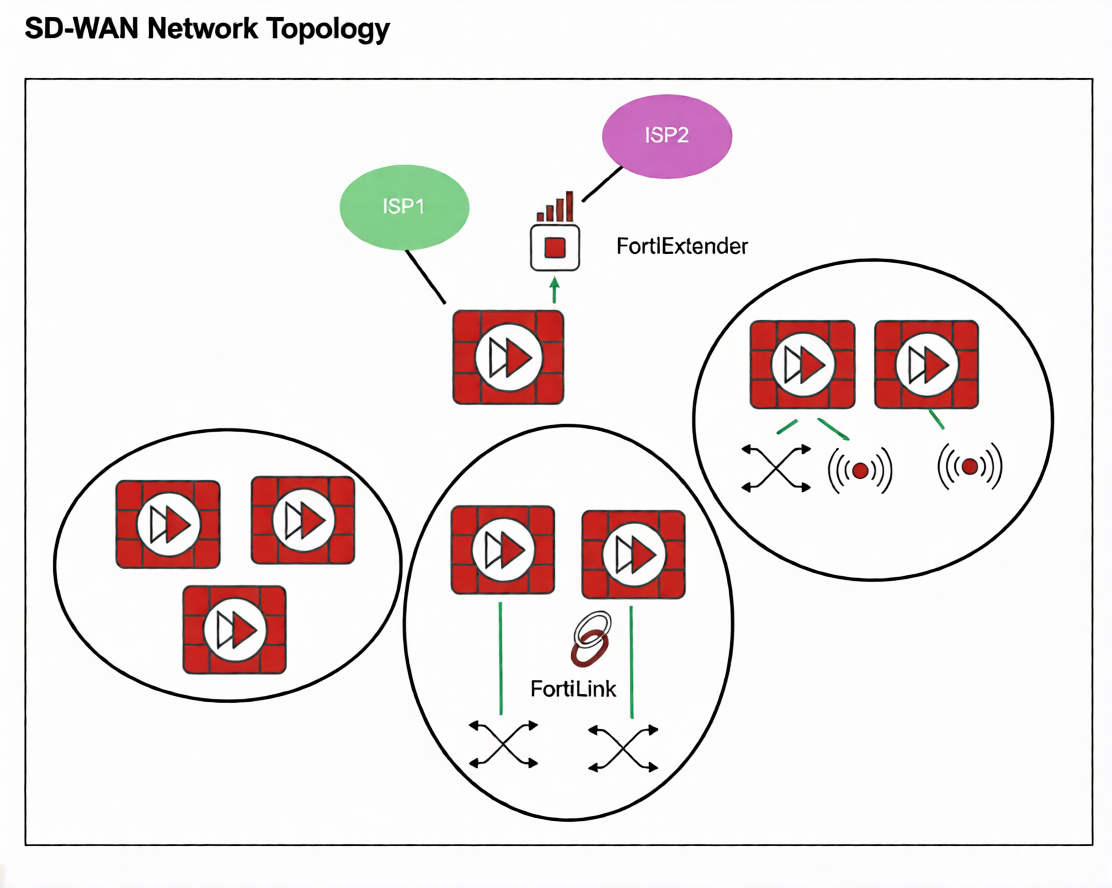
Refer to the exhibit.
You want to configure SD-WAN on a network as shown in the exhibit.
The network contains many FortiGate devices. Some are used as NGFW, and some are installed with
extensions such as FortiSwitch. FortiAP. or Forti Ex tender.
What should you consider when planning your deployment?
A. You can build an SD-WAN topology that includes all devices. The hubs can be FortiGate devices with Forti Extender.
B. You can build an SD-WAN topology that includes all devices. The hubs must be devices without extensions.
C. You must use FortiManager to manage your SD-WAN topology.
D. You must build multiple SD-WAN topologies. Each topology must contain only one type of extension.
Explanation:
The exhibit shows a network with various Fortinet devices (FortiGate, FortiExtender, FortiSwitch, FortiAP). In a Fortinet SD-WAN fabric, hub devices are critical for establishing the overlay VPN mesh and managing control-plane traffic.
The key consideration is that hub FortiGates must be dedicated to the SD-WAN routing function. If a FortiGate acts as a hub and also manages local extensions (like a FortiSwitch, FortiAP, or FortiExtender) via FortiLink, it can lead to complex dependencies and potential traffic loops. Specifically, if the SD-WAN overlay relies on an underlay interface that is also part of a FortiLink aggregate (e.g., for switch or AP management), a failure in the local extension could destabilize the entire SD-WAN overlay.
Therefore, hubs should be devices without local FortiLink-managed extensions to ensure stability and simplified troubleshooting.
Why other options are incorrect:
A: Incorrect. Hubs should not have FortiExtender (or other extensions like FortiSwitch/FortiAP) managed via FortiLink, as this creates underlay dependency on the extension, risking SD-WAN stability.
C: Incorrect. While FortiManager is recommended for centralized management, it is not mandatory to build an SD-WAN topology. SD-WAN can be configured directly on FortiGates.
D: Incorrect. You do not need separate topologies per extension type. You can have a single SD-WAN topology, but spoke devices can have extensions (e.g., a branch FortiGate with FortiSwitch). The restriction primarily applies to hub devices.
Reference
Fortinet SD-WAN 7.6 Deployment Guide - Design Considerations: Recommends that SD-WAN hub FortiGates should not be used as FortiLink aggregation devices for switches, APs, or extenders to avoid underlay dependency and ensure overlay stability.
Refer to the exhibits.
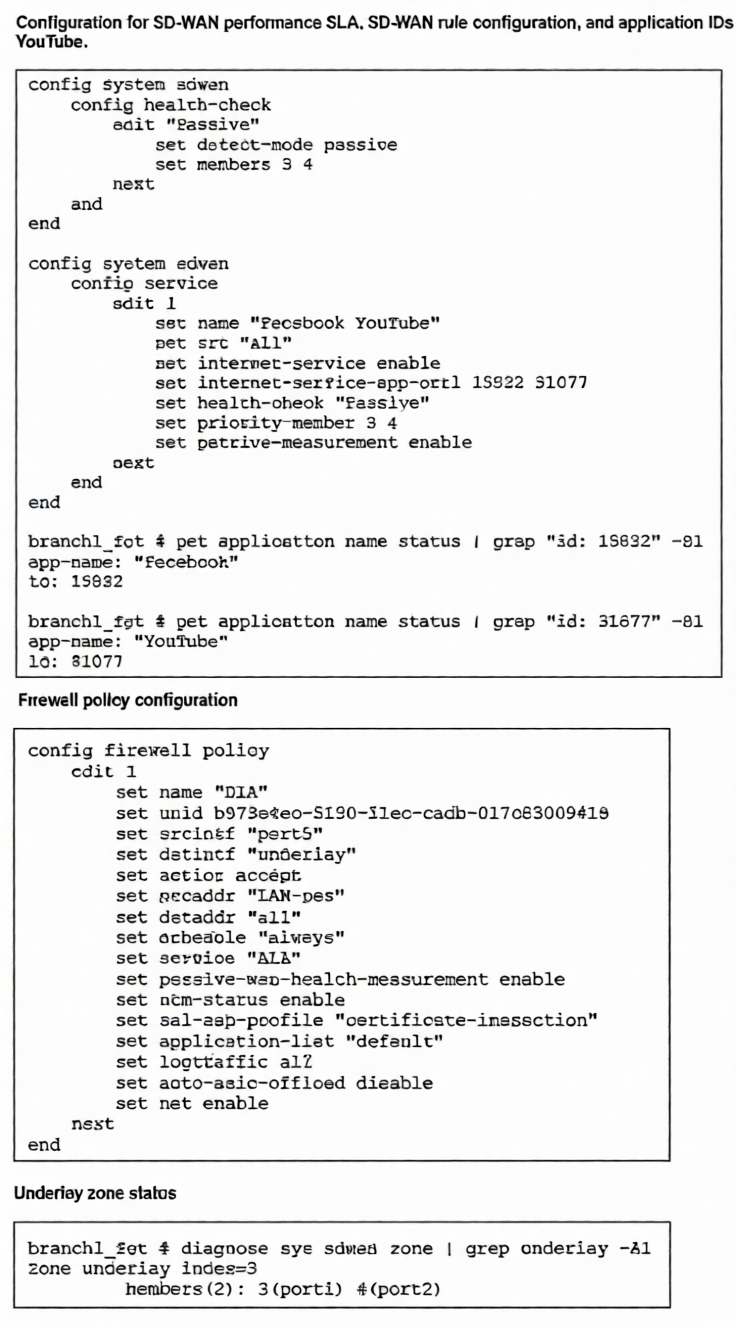
The exhibits show the configuration for SD-WAN performance. SD-WAN rule, the application IDs of
Facebook and YouTube along with the firewall policy configuration and the underlay zone status.Which two statements are true about the health and performance of SD-WAN members 3 and 4? (Choose
two.)
A. Only related TCP traffic is used for performance measurement.
B. The performance is an average of the metrics measured for Facebook and YouTube traffic passing through the member.
C. Encrypted traffic is not used for the performance measurement.
D. FortiGate identifies the member as dead when there is no Facebook and YouTube traffic passing through the member.
Explanation:
The health-check "Passive" is configured with detect-mode passive and applied to the SD-WAN service rule for Facebook and YouTube. This setup has specific operational characteristics:
A is correct: In passive detect mode, the FortiGate measures performance only using existing TCP traffic flows that match the SD-WAN rule (here, Facebook/YouTube). It does not generate active probes or use non-TCP traffic.
D is correct: A key limitation of passive mode is dead member detection. Since measurement relies solely on Facebook/YouTube traffic, if those applications aren't passing through a member, the FortiGate cannot determine if that member is alive or dead. It may not detect a failure until traffic attempts to use that path.
Why other options are incorrect:
B: Incorrect.
The performance metrics are not averaged across applications. Each traffic flow is measured individually, and the rule evaluates member performance based on real-time measurements of whatever matching traffic exists.
C: Incorrect.
The configuration does not exclude encrypted traffic. Facebook and YouTube traffic (HTTPS) is encrypted, and passive measurement works on this encrypted traffic by analyzing TCP characteristics (latency, packet loss) at the transport layer without decrypting.
Reference
FortiOS 7.6 SD-WAN Guide > Performance SLA: States that in passive detect mode, "the FortiGate monitors only TCP traffic matching the rule for performance metrics" and "cannot detect dead members without matching traffic flow."
Which three factors about SLA targets and SD-WAN rules should you consider when configuring SD-WAN rules? (Choose three.)
A. Member metrics are measured only if a rule uses the SLA target.
B. SLA targets are used only by SD-WAN rules that are configured with a Lowest Cost (SLA) strategy.
C. SD-WAN rules can use SLA targets to check whether the preferred members meet the SLA requirements.
D. When configuring an SD-WAN rule, you can select multiple SLA targets if they are from the same performance SLA.
E. When configuring an SD-WAN rule, you can select multiple SLA targets from different performance SLAs.
Explanation:
C is correct: The primary purpose of referencing an SLA target in an SD-WAN rule is to validate that selected members meet the defined performance thresholds (latency, jitter, loss) before being used for traffic steering.
E is correct: An SD-WAN rule can reference multiple SLA targets from different performance SLA configurations. This allows a rule to enforce composite performance requirements (e.g., one target for latency, another for jitter).
A is correct: SLA target measurement (active probing or passive monitoring) is only performed for members in rules that reference that SLA target. If no rule uses a particular SLA target, its probes are not sent, conserving bandwidth.
Why other options are incorrect:
B: Incorrect. SLA targets are not exclusive to Lowest Cost (SLA) strategy. They can also be used in Priority, Weighted, and Manual strategies to validate member performance before selection.
D: Incorrect. While you can select multiple SLA targets, they can be from different performance SLAs, not necessarily the same one. The requirement "from the same performance SLA" is false; you can mix targets across different SLA configurations.
Reference
FortiOS 7.6 SD-WAN Administration Guide > Configuring SD-WAN > Performance SLA:
SLA targets define thresholds; rules reference them to validate members.
Rules can use multiple targets from different SLA configurations for comprehensive checks.
Health-check probes run only for SLA targets referenced by active rules.
This ensures efficient resource usage and flexible performance validation across various traffic types.
You are tasked with configuring ADVPN 2.0 on an SD-WAN topology already configured for ADVPN. What should you do to implement ADVPN 2.0 in this scenario?
A. Update the IPsec tunnel configurations on the hub.
B. Update the SD-WAN configuration on the branches.
C. Update the IPsec tunnel configuration on the branches.
D. Delete the existing ADVPN configuration and configure ADVPN 2.0.
Explanation:
In an existing ADVPN-enabled SD-WAN topology, upgrading to ADVPN 2.0 does not require redesigning SD-WAN or hub configurations. The primary enhancement in ADVPN 2.0 is the ability for branches to dynamically establish shortcut tunnels directly with other branches. This behavior is controlled at the IPsec layer, not by SD-WAN policies. Because the hub already serves as a registration and routing point, it continues to function without modification. Therefore, updating the branch IPsec tunnel configuration is sufficient to enable ADVPN 2.0 functionality.
Why the incorrect options are wrong
A. Update the IPsec tunnel configurations on the hub
This is incorrect because ADVPN 2.0 eliminates the need for hub-assisted shortcut creation. The hub configuration remains unchanged in an existing ADVPN setup.
B. Update the SD-WAN configuration on the branches
SD-WAN is responsible for traffic steering, not for establishing ADVPN shortcut tunnels. Shortcut negotiation occurs at the IPsec level.
D. Delete the existing ADVPN configuration and configure ADVPN 2.0
ADVPN 2.0 is backward-compatible and implemented by modifying existing IPsec settings, not by rebuilding the configuration.
References
Fortinet FortiOS 7.6 IPsec VPN Administration Guide – Details ADVPN configuration and branch-initiated shortcuts.
| Page 1 out of 8 Pages |