
What are two features of FortiGate FSSO agentless polling mode? (Choose two.)
A. FortiGate uses the AD server as the collector agent.
B. FortiGate uses the SMB protocol to read the event viewer logs from the DCs.
C. FortiGate does not support workstation check.
D. FortiGate directs the collector agent to use a remote LDAP server.
Explanation:
Correct Answers: B and C
🟢 FortiGate FSSO agentless polling mode enables user authentication monitoring without deploying external DC or collector agents. FortiGate directly polls domain controllers using the SMB protocol over TCP port 445 to read Windows Security event logs (specifically event IDs 4768 and 4769 for logon/logoff), confirming option B.
🟢 Workstation check (verification of user IP-to-hostname binding) is not supported in agentless mode, as FortiGate lacks the additional capabilities of a dedicated collector agent, making option C correct.
🔴 Option A is incorrect because FortiGate itself acts as the collector, not the AD server.
🔴 Option D is wrong, as agentless polling does not involve directing a collector agent or remote LDAP for event collection; LDAP serves group filtering separately.
Reference: FortiGate 7.4 Administration Guide (FSSO Polling Connector) and NSE4 study materials covering FortiOS 7.6 FSSO topics.
You have configured the below commands on a FortiGate.
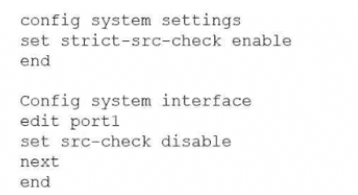
What would be the impact of this configuration on FortiGate?
A. FortiGate will enable strict RPF on all its interfaces and porti will be exempted from RPF checks.
B. FortiGate will enable strict RPF on all its interfaces and porti will be enable for asymmetric routing.
C. The global configuration will take precedence and FortiGate will enable strict RPF on all interfaces.
D. Port1 will be enabled with flexible RPF. and all other interfaces will be enabled for strict RPF
Explanation:
The correct answer is A. FortiGate will enable strict RPF on all its interfaces and port1 will be exempted from RPF checks.
Here's what this configuration actually does:
✔️ config system settings → set strict-src-check enable
This globally enables strict Reverse Path Forwarding (RPF) mode for the VDOM.
In strict mode, FortiGate performs a stricter anti-spoofing check: for every incoming packet, it looks up the best route back to the source IP. If that best reverse route doesn't point out the same interface the packet came in on, the packet is dropped.
(By default, without this setting, it's feasible/loose mode, which only requires at least one feasible route back via the incoming interface.)
✔️ config system interface → edit port1 → set src-check disable
This disables the source/RPF check completely on port1 only.
So even though strict mode is active globally, port1 ignores the RPF check entirely—packets coming in on port1 won't be dropped for failing the reverse path check (useful for asymmetric routing scenarios or certain VPNs where return traffic takes a different path).
The per-interface src-check disable overrides the global strict-src-check setting for that specific interface. Strict mode applies to every other interface, but port1 is fully exempted from any RPF validation.
Why the others are incorrect:
B — "port1 will be enable for asymmetric routing" is vague and not precise. Disabling src-check on port1 does allow asymmetric traffic through that interface (since RPF won't block it), but the phrasing "enable for asymmetric routing" isn't how FortiGate describes it, and it doesn't match the full impact.
C — No, the interface-level setting takes precedence over the global one here. Global doesn't override per-interface disable.
D — "Flexible RPF" isn't a real term in FortiGate. The modes are strict vs feasible (loose). Disabling src-check isn't "flexible"—it's completely off for that interface.
Reference:
Fortinet's official documentation (e.g., FortiOS 7.6 Administration Guide → Routing concepts section) and the key technical tip on community.fortinet.com explain this behavior clearly:
🔹 strict-src-check enable → strict RPF globally
🔹 src-check disable on interface → bypasses RPF entirely on that interface, overriding the global mode
A network administrator has enabled full SSL inspection and web filtering on FortiGate. When visiting any HTTPS websites, the browser reports certificate warning errors. When visiting HTTP websites, the browser does not report errors. What is the reason for the certificate warning errors?
A. The option invalid SSL certificates is set to allow on the SSL/SSH inspection profile.
B. The matching firewall policy is set to proxy inspection mode.
C. The browser does not trust the certificate used by FortiGate for SSL inspection.
D. The certificate used by FortiGate for SSL inspection does not contain the required certificate extensions.
Explanation:
Why C is correct
With full SSL inspection, FortiGate performs a man-in-the-middle operation on HTTPS traffic. It resigns the server certificate using a local CA certificate configured in the SSL/SSH inspection profile.
If the client browser does not trust that CA, it cannot validate the certificate chain, so it throws a certificate warning.
This behavior only affects HTTPS because:
🔹 HTTPS uses certificates and trust chains.
🔹 HTTP does not use certificates at all, so no warning appears.
This is the classic and expected outcome when the FortiGate CA certificate has not been installed and trusted on the client.
Why the other options are wrong
A. The option invalid SSL certificates is set to allow on the SSL/SSH inspection profile.
Incorrect.
This setting controls how FortiGate handles upstream server certificates that are invalid (expired, self-signed, etc.). It does not affect whether the client trusts FortiGate’s own inspection certificate. Even if set to allow, the browser will still warn if it does not trust FortiGate’s CA.
B. The matching firewall policy is set to proxy inspection mode.
Incorrect.
Proxy mode is required for full SSL inspection and web filtering. It is not the cause of certificate warnings. If anything, proxy mode is functioning correctly here.
D. The certificate used by FortiGate for SSL inspection does not contain the required certificate extensions.
Incorrect.
FortiGate-generated CA certificates include the necessary extensions for SSL inspection by default. Missing extensions would indicate a broken or manually misconfigured certificate, which is not the standard cause tested in NSE4. The exam expects you to recognize the client trust issue, not certificate structure problems.
Key exam takeaway
Full SSL inspection always causes certificate warnings unless the FortiGate CA certificate is trusted by the client.
Reference (Fortinet official)
🔹 FortiOS Administration Guide – SSL/SSH Inspection
Explains that the FortiGate re-signs certificates and requires the CA certificate to be installed on client devices.
Fortinet Documentation → FortiOS 7.6 → Security Profiles → SSL/SSH Inspection
Refer to the exhibits.
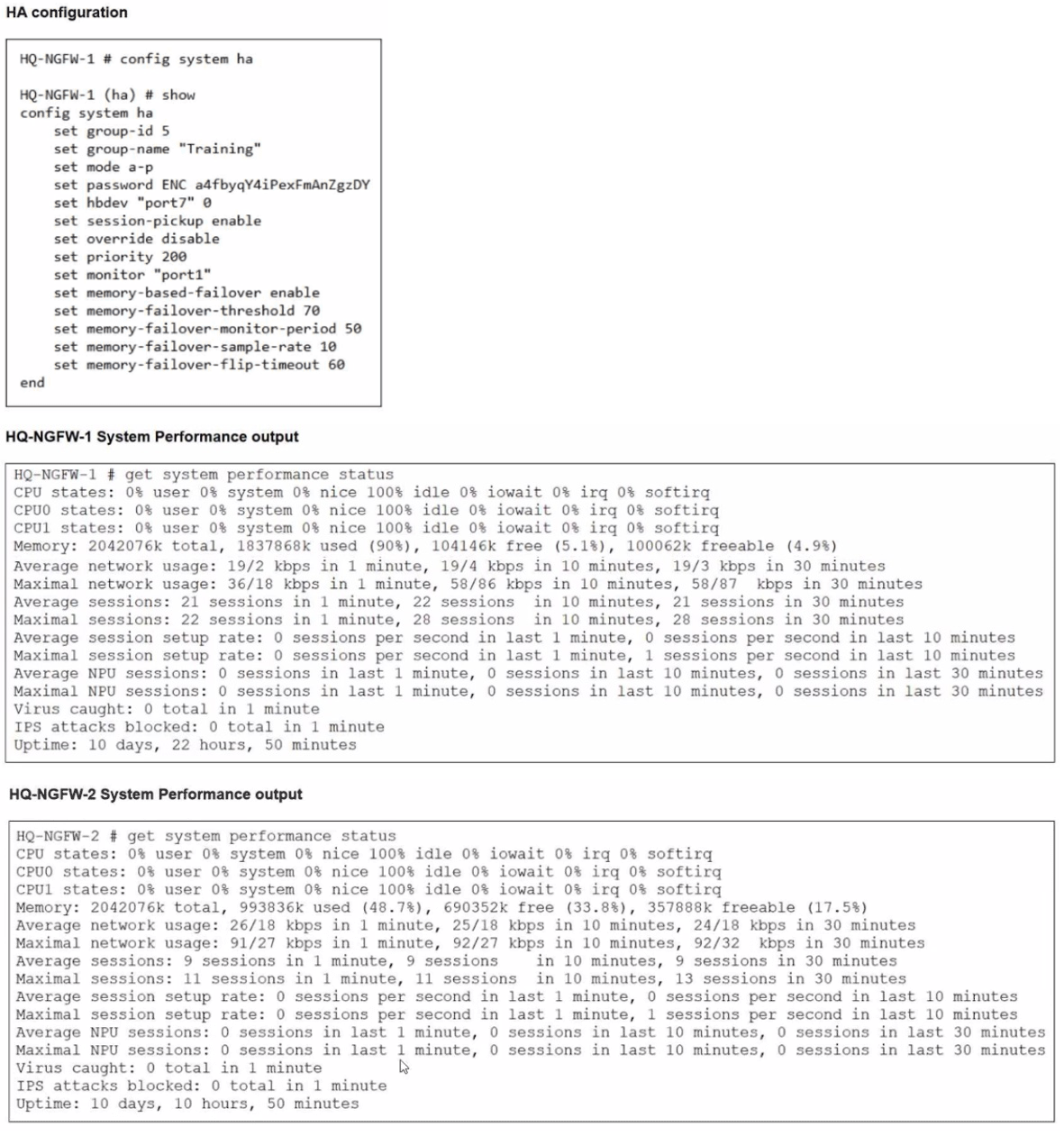
An administrator has observed the performance status outputs on an HA cluster for 55
seconds.
Which FortiGate is the primary?
A. HQ-NGFW-1 with the parameter memory-failover-flip-timeout setting
B. HQ-NGFW-2 with the parameter priority setting
C. HQ-NGFW-1 with the parameter override setting
D. HQ-NGFW-2 with the parameter memory-failover-threshold setting
Explanation:
The correct answer is D.
Technical Analysis
In this scenario, we must evaluate the HA election criteria specifically for memory-based failover, which is a feature enabled in this cluster's configuration.
➡️ Memory Threshold Breach: The configuration for HQ-NGFW-1 sets a memory-failover-threshold of 70%. Performance status shows HQ-NGFW-1 is currently at 90% memory usage, while HQ-NGFW-2 is at approximately 48.7%.
➡️ Monitoring Period: The memory-failover-monitor-period is set to 50 seconds. This is the duration the memory must stay above the threshold to trigger a failover.
➡️ Observation Window: The administrator has observed these statuses for 55 seconds. Because 55 seconds is greater than the 50-second monitor period, the threshold violation has been sustained long enough to trigger a failover.
➡️ Resulting Primary: Once the primary (HQ-NGFW-1) triggers a failover due to memory pressure, the secondary unit with memory usage below the threshold (HQ-NGFW-2) becomes the new primary.
Why Other Options are Incorrect
A: The memory-failover-flip-timeout (set to 60 minutes in this case) is a timer that prevents the cluster from failing back to the original unit too quickly to avoid "flapping". It does not determine which unit is currently primary during the initial 55-second window.
B: While HQ-NGFW-2 has a priority setting, the memory-based failover event overrides standard priority-based election when one unit exceeds its healthy resource threshold for the defined period.
C: Even though HQ-NGFW-1 has a higher priority (200) and override might be disabled, the specific memory-failover trigger has already transitioned the role to HQ-NGFW-2.
Reference
FortiOS 7.6 Administration Guide: "When memory-based failover is enabled, a failover occurs if the primary unit's memory usage exceeds the memory-failover-threshold for a duration longer than the memory-failover-monitor-period."
What are two features of collector agent advanced mode? (Choose two.)
A. In advanced mode, security profiles can be applied only to user groups, not individual users.
B. In advanced mode. FortiGate can be configured as an LDAP client and group filters can be configured on FortiGate.
C. Advanced mode uses the Windows convention—NetBios: Domain\Username.
D. Advanced mode supports nested or inherited groups.
Explanation:
The two correct features of collector agent advanced mode are:
🔹 Advanced mode supports nested or inherited groups.
🔹 In advanced mode, FortiGate can be configured as an LDAP client and group filters can be configured on FortiGate.
The information is consistent across multiple exam preparation sites. The table below breaks down why each answer choice is correct or incorrect.
✅ Correct
A. Supports nested or inherited groups
This is a key feature of advanced mode, allowing it to recognize users in subgroups within monitored Active Directory groups.
B. FortiGate as LDAP client with group filters
In advanced mode, FortiGate can query LDAP/AD directly, and group filters are configured on the FortiGate itself for more granular control.
❌ Incorrect
C. Security profiles only for user groups
In both standard and advanced modes, security profiles can be applied to individual users or groups. This is not a distinguishing feature of advanced mode.
D. Uses Windows convention (NetBIOS)
This is actually a feature of standard mode. Advanced mode typically uses the LDAP naming convention (CN=User, OU=Name, DC=Domain).
✍️ Key Takeaway for the Exam
The main distinctions between standard and advanced mode often center on nested group support and where configuration occurs (agent vs. FortiGate). To solidify this, focus on understanding the operational differences in how user and group information is retrieved and processed in each mode.
Refer to the exhibit.
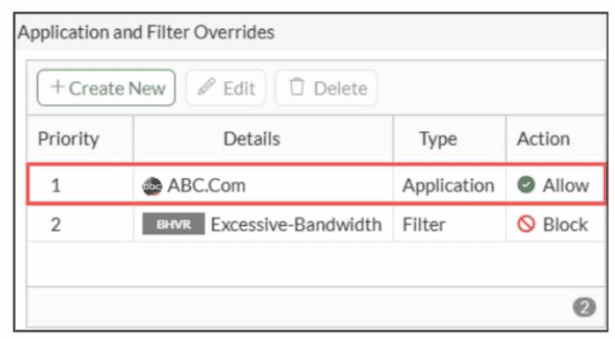
An administrator has configured an Application Overrides for the ABC.Com application
signature and set the Action to Allow This application control profile is then applied to a
firewall policy that is scanning all outbound traffic. Logging is enabled in the firewall policy.
To test the configuration, the administrator accessed the ABC.Com web site several times.
Why are there no logs generated under security logs for ABC.Com?
A. The ABC Com is hitting the category Excessive-Bandwidth.
B. The ABC.Com Type is set as Application instead of Filter.
C. The ABC.Com is configured under application profile, which must be configured as a web filter profile.
D. The ABC Com Action is set to Allow
Explanation:
Correct Answer: D
The ABC.Com application override is configured with Action set to Allow in the application control profile. In FortiGate, when an application override explicitly allows traffic (regardless of the base signature category or default action), no security log event is generated for that specific application because allowed override traffic bypasses standard logging mechanisms in application control.
The profile is correctly applied to a firewall policy scanning outbound traffic with logging enabled, but the explicit Allow override prevents ABC.Com detection from triggering a log entry under Log & Report > Security Events > Application Control.
Why others are wrong:
A: Incorrect. Excessive-Bandwidth is a separate filter override (priority 2, Block action) that doesn't affect ABC.Com (priority 1).
B: Incorrect. Application type is appropriate for custom application signatures like ABC.Com; Filter type is for category-based rules.
C: Incorrect. Application overrides belong in application control profiles, not web filter profiles.
Reference: FortiOS 7.6 Application Control documentation on override logging behavior and NSE4_FGT_AD-7.6 content inspection topics.
An administrator wants to form an HA cluster using the FGCP protocol. Which two requirements must the administrator ensure both members fulfill? (Choose two.)
A. They must have the same hard drive configuration.
B. They must have the same number of configured VDOMs.
C. They must have the heartbeat interfaces in the same subnet
D. They must have the same HA group ID.
Explanation:
The correct answers are C and D.
✔️ C. They must have the heartbeat interfaces in the same subnet
✔️ D. They must have the same HA group ID.
Here's the breakdown:
For FGCP HA to form a cluster successfully, the FortiGates must match on several key HA-specific settings so they can discover each other, negotiate, and synchronize properly via the heartbeat.
✅ Heartbeat interfaces in the same subnet (C):
The dedicated heartbeat interfaces (usually ha1/ha2 or whatever you designate) need direct Layer 2 connectivity. They communicate using multicast/broadcast packets, so they must be in the same subnet (same broadcast domain). If they're not, the units can't see each other's heartbeats, and the cluster won't form.
This is a hard requirement for FGCP heartbeat communication.
✅ Same HA group ID (D):
The group ID must match exactly on all members. It's used during discovery and negotiation—FortiGates only form a cluster with others that have the identical group ID (along with matching mode, password, etc.). Different group IDs mean they ignore each other, even if physically connected.
This is explicitly required for cluster formation.
Why the others are not required:
A. Same hard drive configuration:
Yes, hardware must generally match (same model, same number of hard disks, same firmware, etc.), but the exact "configuration" (like RAID setup or partitioning) doesn't have to be identical for the cluster to form. The base hardware match is needed for sync and operation, but this option is worded too specifically and isn't a strict formation prerequisite like the heartbeat/group ID items.
B. Same number of configured VDOMs:
This is a common misconception. The number of configured (enabled/created) VDOMs doesn't need to match for HA to form. What matters is the VDOM mode (single vs multi) and having compatible VDOM licenses if using more than the base allowance. But mismatched counts of actual configured VDOMs won't prevent cluster formation—the configs sync anyway.
Reference:
FortiOS 7.6 Administration Guide → High Availability section (specifically FGCP overview and HA heartbeat interface pages):
→ Docs confirm identical HA settings (group-id, password, mode) are required for negotiation.
→ Heartbeat interfaces must share the same broadcast domain/subnet for communication.
→ Hardware parity (model, firmware, disk count) is listed, but not "configuration" details or exact VDOM count as blockers for initial cluster formation.
When configuring firewall policies which of the following is true regarding the policy ID? (Choose two.)
A. A firewall policy ID identifies the order of policy execution in firewall policies.
B. A policy ID cannot be modified once a policy is created.
C. You can create a policy in CLI with policy ID 0
D. It is mandatory to provide a policy ID while creating a firewall policy regardless of GUI or CLI.
Explanation:
Correct answers: A and B
A. A firewall policy ID identifies the order of policy execution in firewall policies.
Correct.
FortiGate evaluates firewall policies top-down by policy ID order. The policy with the lowest ID is evaluated first, then the next higher ID, and so on, until a match is found.
This is why policy reordering in the GUI actually changes policy IDs under the hood.
Important nuance:
The GUI hides this detail by letting you drag policies, but internally FortiOS still uses policy IDs to define execution order.
B. A policy ID cannot be modified once a policy is created.
Correct.
Once a policy is created, its policy ID is immutable. You cannot edit it directly in either GUI or CLI.
To change order, FortiGate:
Renumbers policy IDs automatically (GUI move), or
Requires deleting and recreating the policy (CLI, if you want a specific ID)
This is a common exam trap. You can move policies, but you cannot manually change an existing policy’s ID.
Why the other options are wrong
C. You can create a policy in CLI with policy ID 0
Incorrect.
Policy ID 0 is reserved and cannot be used for user-defined firewall policies. Attempting this in CLI will fail.
Valid policy IDs start from 1.
D. It is mandatory to provide a policy ID while creating a firewall policy regardless of GUI or CLI.
Incorrect.
GUI: You never specify a policy ID. FortiGate assigns it automatically.
CLI: If you use edit 0, FortiGate auto-assigns the next available ID.
config firewall policy
edit 0
set name "example"
next
end
The system assigns the ID for you.
Reference:
FortiOS 7.6 Administration Guide → Firewall Policy Order and Matching
An administrator has configured a dialup IPsec VPN on FortiGate with add-route enabled. However, the static route is not showing in the routing table. Which two statements about this scenario are correct? (Choose two.)
A. The administrator must use a policy route instead of a static route for add-route to work properly.
B. The administrator must ensure phase 2 is successfully established
C. The administrator must define the remote network correctly in the phase 2 selectors.
D. The administrator must enable a dynamic routing protocol on the dialup interface.
Explanation:
B. The administrator must ensure phase 2 is successfully established The add-route feature in FortiOS is event-driven. The FortiGate does not pre-populate the routing table when the tunnel is configured; instead, it waits for a successful Phase 2 (IPsec SA) negotiation. Only after the Phase 2 selectors are negotiated and the security association is active will the FortiGate "install" the corresponding route into the routing table. If the tunnel is down or only Phase 1 is up, the route will not appear.
C. The administrator must define the remote network correctly in the phase 2 selectors The add-route feature specifically uses the Phase 2 Quick Mode selectors (specifically the "Remote Address" or "Proxy-ID") to determine what destination to add to the routing table.
🔹 If the remote client proposes a subnet (e.g., 10.0.1.0/24), the FortiGate uses that information to create a static route pointing to the tunnel.
🔹 If the Phase 2 selectors are set to 0.0.0.0/0 (all traffic) or are incorrectly defined, the FortiGate may not have a specific enough prefix to install, or it may conflict with existing routes.
Why the other options are incorrect:
A: Policy routes are used to bypass the routing table for specific traffic steering. add-route is specifically designed to populate the RIB (Routing Information Base) with static routes; you do not need a policy route to make the static route appear.
D: While dynamic routing protocols (like BGP or OSPF) are common in large-scale VPN deployments (like ADVPN), the add-route feature is a static/manual alternative to dynamic routing. Enabling a dynamic protocol is a different method entirely and is not a requirement for the add-route setting to function.
Reference
FortiOS 7.6 Administration Guide: "When add-route is enabled on a dialup server, the FortiGate unit adds a host route to its routing table for each dialup client that connects. The route is added when the Phase 2 SA is established and uses the remote IP address from the Phase 2 selector."
Refer to the exhibit.
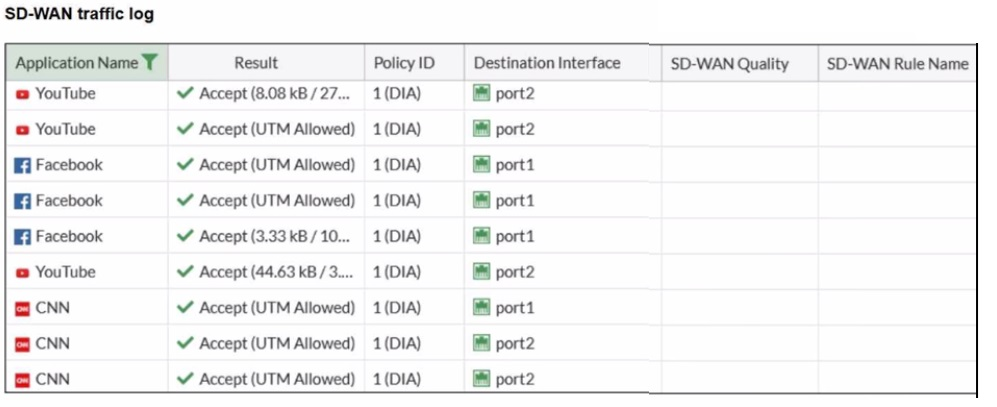
The administrator configured SD-WAN rules and set the FortiGate traffic log page to
display SD-WAN-specific columns: SD-WAN Quality and SD-WAN Rule Name
FortiGate allows the traffic according to policy ID 1 placed at the top. This is the policy that
allows SD-WAN traffic. Despite these settings, the traffic logs do not show the name of the
SD-WAN rule used to steer those traffic flows
What could be the reason?
A. SD-WAN rule names do not appear immediately. The administrator must refresh the page.
B. There is no application control profile applied to the firewall policy.
C. Destinations in the SD-WAN rules are configured for each application, but feature visibility is not enabled.
D. FortiGate load balanced the traffic according to the implicit SD-WAN rule.
Explanation:
The correct answer is D. FortiGate load balanced the traffic according to the implicit SD-WAN rule.
Here’s a detailed breakdown of why this is the case and why the other options are less likely:
Detailed Explanation:
✔️ How SD-WAN Rules Work: An SD-WAN rule is a matching condition that tells the FortiGate how to handle specific traffic (e.g., route "YouTube" traffic to port2). The SD-WAN Rule Name column in the log will only show a value if traffic was matched and steered by a user-defined SD-WAN rule that you configured.
✔️ The Implicit SD-WAN Rule: At the bottom of the SD-WAN rule list, there is always an implicit (default) SD-WAN rule. Its purpose is to catch any traffic that does not match any of the user-defined rules above it. This implicit rule performs automatic load balancing based on the link health and load-balancing algorithm. Crucially, when traffic is handled by this implicit rule, the SD-WAN Rule Name field in the logs remains blank.
✔️ Analyzing the Logs: Your logs show "YouTube" traffic consistently going to port2 and "Facebook" to port1. While this looks like steering, without a specific rule name, it is the result of the implicit rule's load-balancing decision. The traffic for "CNN" is split between port1 and port2, which is classic behavior of a load-balancing rule, not a specific performance rule tied to a named application.
Why the Other Options Are Incorrect:
A. Refresh the page
Rule names appear in logs immediately if a rule is matched. A refresh is not needed.
B. No application control profile
Application control identifies the apps (YouTube, Facebook), which is already working as seen in the Application Name column. This is not related to SD-WAN rule naming.
C. Feature visibility not enabled
The SD-WAN Quality and SD-WAN Rule Name columns are already visible in the log viewer, meaning feature visibility is enabled. The issue is that the column is empty, not missing.
Key Takeaway for the Exam:
A blank SD-WAN Rule Name in the traffic log, while all other SD-WAN information is present, is the primary indicator that traffic is being handled by the implicit SD-WAN rule for load balancing.
Refer to the exhibit.
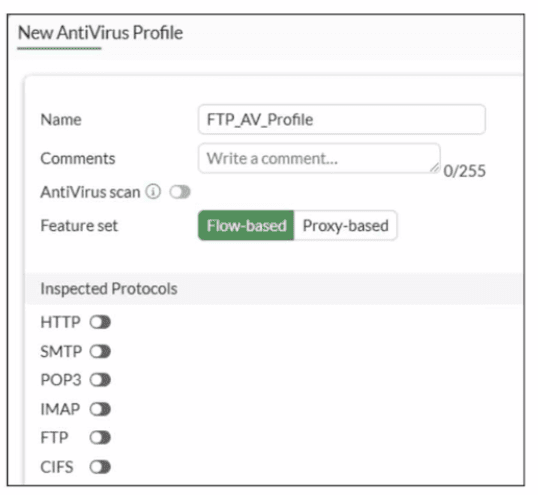
Why is the Antivirus scan switch grayed out when you are creating a new antivirus profile
for FTP?
A. Antivirus scan is disabled under System -> Feature visibility
B. None of the inspected protocols are active in this profile.
C. The Feature Set for the profile is Flow-based but it must be Proxy-based
D. FortiGate. with less than 2 GB RAM. does not support the Antivirus scan feature.
Explanation:
✅ Correct Answer: B
The Antivirus scan switch is grayed out because no inspected protocols are selected in the FTP Antivirus profile. In FortiGate, the Antivirus scan option becomes available only after enabling at least one protocol (such as FTP) under Inspected Protocols, as antivirus scanning requires a protocol context to operate.
The exhibit shows FTP unchecked along with all other protocols (HTTP, SMTP, IMAP, POP3, CIFS), leaving no scanning scope defined, which disables the feature toggle.
❌ Why others are wrong:
A: Feature visibility affects global UI options but doesn't gray out per-profile settings like this.
C: Flow-based supports FTP AV scanning; Proxy-based isn't required for basic antivirus on FTP traffic.
D: RAM size doesn't disable AV scan availability; it's a configuration prerequisite issue.
Reference:
FortiOS 7.6 Administration Guide - Antivirus Profile configuration (Content Inspection section, NSE4_FGT_AD-7.6 exam topics).
A network administrator is reviewing firewall policies in both Interface Pair View and By Sequence View. The policies appear in a different order in each view. Why is the policy order different in these two views?
A. By Sequence View groups policies based on rule priority, while Interface Pair View always follows the order of traffic logs.
B. The firewall dynamically reorders policies in Interface Pair View based on recent traffic patterns, but By Sequence View remains static.
C. Interface Pair View sorts policies based on matching interfaces, while By Sequence View shows the actual processing order of rules.
D. Policies in Interface Pair View are prioritized by security levels, while By Sequence View strictly follows the administrator's manual ordering.
Explanation:
The correct answer is C. Interface Pair View sorts policies based on matching interfaces, while By Sequence View shows the actual processing order of rules.
Here's why the orders look different:
FortiGate evaluates firewall policies top-down in a single, fixed sequence—the order you see in By Sequence View. That's the real processing order: the first matching policy wins, full stop. This view lists every policy exactly as it's checked, without any grouping.
Interface Pair View organizes the same policies into collapsible sections/groups based on the incoming and outgoing interface pairs (e.g., all policies from port1 → port2 in one section, port2 → wan1 in another). Within each section, the relative order matches the global sequence, but because it's grouped by interface pairs, the overall list appears reordered compared to the flat By Sequence View. It's just a different way to display the same set of rules for easier management when you have many policies—especially useful when troubleshooting traffic between specific interfaces.
The key point: both views reflect the same evaluation logic and order; only the presentation changes. Interface Pair View doesn't change priorities or reorder anything—it groups by src/dst interfaces to make scanning faster.
Why the others don't hold up:
A — No, neither view bases order on traffic logs, and rule priority isn't a separate thing here (it's the sequence).
B — FortiGate doesn't dynamically reorder policies based on traffic patterns in any view. The order is static unless you manually move rules.
D — There's no prioritization by "security levels" in Interface Pair View (that's not a FortiGate concept for policy ordering). By Sequence does follow the admin's manual ordering, but that's true for both—the difference is grouping, not priority method.
This is straight from Fortinet's docs (FortiOS 7.6 Administration Guide, Firewall Policy section, and the Policy views/policy lookup topic): Interface Pair View groups by incoming/outgoing pairs while showing check order within groups; By Sequence is the ungrouped, full top-down list.
| Page 1 out of 5 Pages |