
Topic 5: Misc, Questions
You have a Microsoft 365 subscription that uses Microsoft Teams and contains a user named User.
You need to ensure that User1 can investigate call-quality issues and identify the following types of information:
Caller and recipient names Device names and IP addresses
The number and names of all meeting participants
The solution must use the principle of least privilege.
Which role should you assign to User1?
A. Teams Device Administrator
B. Teams communication support engineer
C. Teams Administrator
D. Teams communication admin
Explanation:
The requirement is for User1 to investigate call-quality issues with access to caller/recipient names, device details, IP addresses, and meeting participant information. This is a support and troubleshooting role focused on call analytics, not on administrative configuration of policies, devices, or settings. The principle of least privilege means granting only the permissions necessary for this specific task. The Teams communication support engineer role is explicitly designed for this purpose, providing read-only access to call and meeting diagnostic data.
Correct Option:
B. Teams communication support engineer
This role is specifically tailored for support personnel who troubleshoot communications issues. It grants permissions to read call records, call details, and telemetry data in the Teams admin center, including information about callers, devices, IP addresses, and meeting participants. It does not allow the user to change configurations, perfectly aligning with the principle of least privilege for an investigative task.
Incorrect Option:
A. Teams Device Administrator:
This role manages Teams devices (phones, panels, etc.)—tasks like configuring, restarting, and updating devices. It does not provide access to the detailed call analytics and user-level call records needed for quality investigation.
C. Teams Administrator:
This is a broad, high-privilege role that allows management of all Teams settings (teams, policies, users, configuration). It provides far more access than necessary (violating least privilege) and is intended for full administrators, not dedicated troubleshooters.
D. Teams communication admin:
This role is for managing call routing policies, phone numbers, and emergency addresses. It is focused on the configuration of voice and telephony features, not on investigative read-only access to call quality diagnostics and meeting participant details.
Reference:
Microsoft Docs - Use Teams administrator roles to manage Teams: The documentation defines the Teams communication support engineer role as having permissions to "read call records, call details, and telemetry data to troubleshoot communication issues." This directly matches the requirements. The Teams communication administrator role is defined for managing calling and phone system features, not for troubleshooting access.
Your company has 200 users.
You plan to upgrade all the users from Microsoft Skype for Business Online to Microsoft
Teams. Enterprise Voice must be enabled for all users.
You need to recommend a coexistence mode for the Microsoft Teams upgrade policy.
Which mode should you recommend?
A. Skype for Business with Teams collaboration
B. Islands
C. Teams only
D. Skype for Business with Teams collaboration and meetings
Explanation:
The requirement is to upgrade all users to Teams while also enabling Enterprise Voice (Phone System) for them. In the Teams upgrade journey, when you need to introduce voice calling capabilities, the Islands mode is a strategic, transitional step. Islands mode allows users to run both Skype for Business and Teams side-by-side. This is critical because Enterprise Voice (calling plans, direct routing) is only fully supported and functional in Teams for new deployments, but you may need time to pilot and configure voice services for all users before cutting over completely from Skype for Business.
Correct Option:
B. Islands
Islands mode is the recommended starting point for an organization planning to enable Enterprise Voice in Teams. It allows you to:
Deploy the Teams client to all users while keeping Skype for Business active.
Pilot and configure Phone System (calling plans, direct routing) for a subset of users in Teams Only mode, while the rest continue using Skype for Business for voice.
Gradually migrate users to "Teams Only" with voice functionality fully tested and operational.
This provides a controlled coexistence period essential for a successful voice migration.
Incorrect Option:
A. Skype for Business with Teams collaboration and D. Skype for Business with Teams collaboration and meetings:
In these modes, Skype for Business remains the primary client for chat, meetings, and calling. Teams is used only for collaboration (files, channels) and possibly meetings. You cannot enable Enterprise Voice in Teams for users in these modes—voice remains in Skype for Business. These modes do not support the requirement to move voice to Teams.
C. Teams only:
This is the final target state, not the recommended initial coexistence mode for a planned migration involving voice. Moving all 200 users directly to "Teams Only" without a pilot phase for Enterprise Voice could lead to service disruption if voice configuration isn't fully tested and validated.
Reference:
Microsoft Docs - Understand Microsoft Teams and Skype for Business coexistence and interoperability: The official guidance states that Islands mode is the typical starting point for organizations. It allows Teams to be installed alongside Skype for Business, enabling a phased migration where voice can be moved to Teams on a per-user basis while others remain on Skype for Business. This is the essential step before moving users to "Teams Only."
Your company has a Microsoft 365 subscription.
All users have computers that run Windows 10. The computers are joined to Azure Active Directory (Azure AD) and enrolled in Microsoft Intune. All the users are standard users.
The company plans to start using Microsoft Teams.
You need to deploy the Microsoft Teams client to the computers. What should you use?
A. an Azure AD app registration
B. a domain-based Group Policy Object (GPO)
C. Azure App Service
D. an app in Microsoft Intune
Explanation:
The environment described uses Azure AD-joined devices and Microsoft Intune for management (a modern, cloud-based MDM approach). The requirement is to deploy the Microsoft Teams client to all Windows 10 computers. Since the devices are enrolled in Intune, the correct and most efficient method is to use Intune's app deployment capabilities. Intune can deploy the Teams MSI (machine-wide installer) as a required app to all targeted devices, ensuring installation regardless of user actions.
Correct Option:
D. an app in Microsoft Intune
Microsoft Intune is the cloud-based Mobile Device Management (MDM) service used in this environment. You can add the Microsoft Teams (machine-wide installer) MSI as a Windows app (Win32) or a Microsoft Store app (new) in Intune. You then assign it to the group of users or devices with a Required installation context. Intune will automatically download and install the client on all targeted Azure AD-joined devices, which is the modern, scalable deployment method for this scenario.
Incorrect Option:
A. an Azure AD app registration:
App registrations are used to integrate applications with Azure AD for authentication and API permissions (like a custom web app). They are not used to deploy desktop client software to physical devices.
B. a domain-based Group Policy Object (GPO):
While GPOs can deploy software via traditional Active Directory, the computers are Azure AD-joined, not domain-joined to an on-premises Active Directory. Therefore, there is no domain Group Policy infrastructure available. This is a cloud-managed environment, making Intune the correct tool.
C. Azure App Service:
Azure App Service is a Platform-as-a-Service (PaaS) for building and hosting web applications, mobile backends, and RESTful APIs. It has no capability to deploy desktop applications to end-user Windows 10 computers.
Reference:
Microsoft Docs - Deploy Microsoft Teams with Microsoft Intune: The official documentation details the steps to deploy Teams using Intune, including using the machine-wide installer. This is the recommended deployment method for cloud-managed, Azure AD-joined devices.
Your company has a Microsoft Office 365 subscription. The company has the administrators and the security requirements shown in the following table.
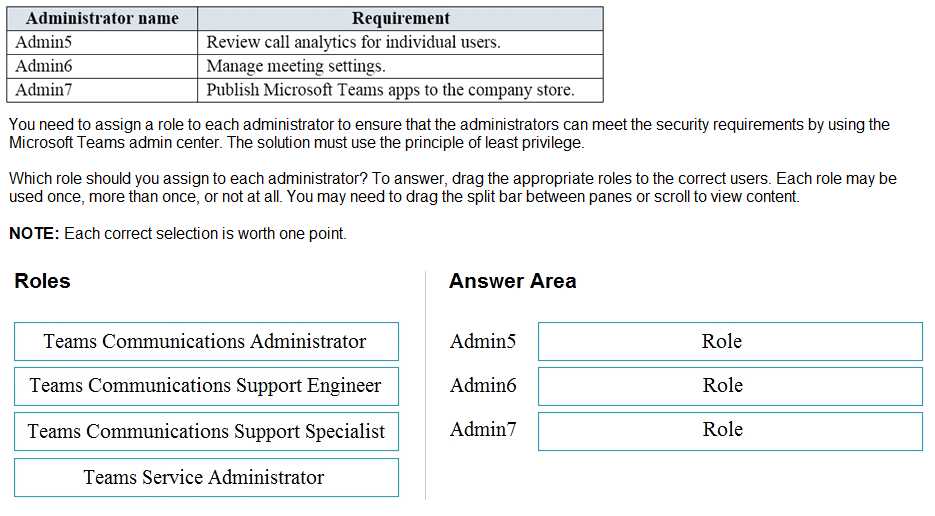
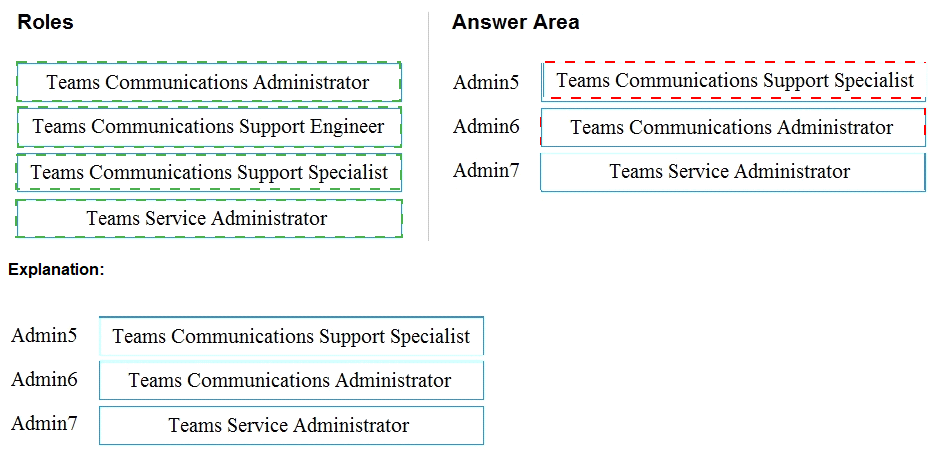
1. Admin5 Requirement: Review call analytics for individual users.
Correct Role: Teams Communications Support Engineer
Why: This role is specifically designed for support personnel to troubleshoot call quality issues. It provides read-only access to call analytics, call records, and user-level telemetry data, which is exactly what Admin5 needs. It does not grant permissions to change settings, aligning with least privilege.
2. Admin6 Requirement: Manage meeting settings.
Correct Role: Teams Communications Administrator
Why: The Teams Communications Administrator role has permissions to manage meeting settings in the Teams admin center (e.g., meeting policies, conference bridge settings, live event policies). This is more specific than the broader Teams Administrator role and matches the requirement precisely.
3. Admin7 Requirement: Publish Microsoft Teams apps to the company store.
Correct Role: Teams Service Administrator
Why: The Teams Service Administrator role has permissions to manage and publish apps in the Teams app store (tenant apps/custom apps). This role is tailored for managing the Teams service ecosystem, including apps, while having more limited permissions than the full Teams Administrator.
Answer Area Mapping:
Admin5: Teams Communications Support Engineer
Admin6: Teams Communications Administrator
Admin7: Teams Service Administrator
Explanation for Roles Not Used:
Teams Communications Support Specialist: This is a more restricted role than the Support Engineer. It typically allows viewing user call quality data for a specific user only (often via the "Call Analytics" tab in the user's profile), not broad analytics across all users. The "Support Engineer" role is the better fit for the general requirement to "review call analytics for individual users."
You have a Microsoft 36S E5 subscription that uses Microsoft Teams.
You need to enforce multi-factor authentication (MFA) for all users that access Microsoft
Teams outside the corporate network.
What should you configure?
A. a compliance policy
B. a Teams policy
C. a sign-in risk policy
D. a Conditional Access policy
Explanation:
The requirement is to enforce Multi-Factor Authentication (MFA) based on a condition: when users access Microsoft Teams from outside the corporate network. This is a classic access control scenario based on user location, which is precisely what Azure AD Conditional Access policies are designed for. Conditional Access policies allow you to define rules (like requiring MFA) that are triggered when specific conditions (such as network location not being the trusted corporate IP range) are met.
Correct Option:
D. a Conditional Access policy
An Azure AD Conditional Access policy is the correct solution. You would create a policy that:
Targets: All users or specific users/groups.
Cloud apps: Includes Microsoft Teams.
Conditions: Sets a Location condition to exclude the trusted corporate network IP addresses (defined as a Named Location in Azure AD).
Access controls: Grants access but Requires multi-factor authentication.
This ensures MFA is prompted only when accessing Teams from untrusted (non-corporate) networks.
Incorrect Option:
A. a compliance policy:
Compliance policies in Microsoft Endpoint Manager (Intune) are used to enforce device compliance rules (like requiring encryption or a minimum OS version) before granting access to resources. They are not used to enforce MFA based on network location for an application like Teams.
B. a Teams policy:
Teams policies (meeting, messaging, calling) control features and settings within the Teams application itself, such as who can record meetings or use private channels. They cannot enforce authentication requirements like MFA; that is an identity-layer control handled by Azure AD.
C. a sign-in risk policy:
This is a subset of Azure AD Identity Protection, which uses machine learning to detect risky sign-in behavior (like impossible travel or unfamiliar locations). A sign-in risk policy can require MFA or block access when risk is detected, but it is not the primary tool for enforcing a blanket MFA requirement based on a defined network location. Conditional Access is more direct and predictable for this specific geographic/IP-based rule.
Reference:
Microsoft Docs - Conditional Access: Require MFA for all users: The Conditional Access documentation provides templates and examples for creating policies that require MFA based on various conditions, including location. The location condition is explicitly used to define trusted IP ranges and apply controls to "Any location" except those trusted networks.
You have a Microsoft 365 subscription.
You need to create the call queues shown in the following table.
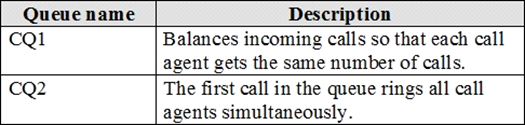
Which routing method should you configure for each call queue? To answer, select the appropriate options in the answer area.
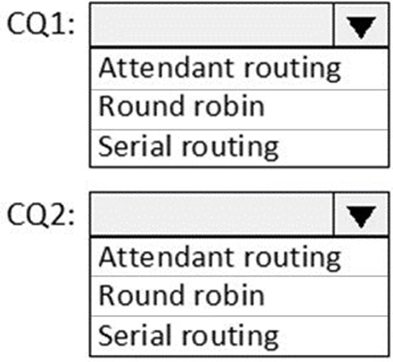
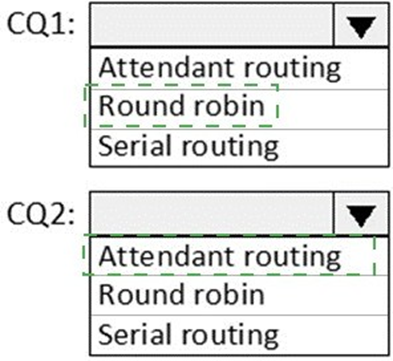
Explanation of Each Routing Method:
CQ1: Round robin
Round robin is a load-balancing method that distributes calls sequentially to agents in a predefined, repeating order. It ensures an even distribution of call volume so that, over time, each agent receives approximately the same number of calls, matching the description of "balances incoming calls."
CQ2: Attendant routing
Attendant routing (also known as simultaneous ringing) makes all available agents' phones ring at the same time when a new call enters the queue. The first agent to answer gets the call. This is ideal for small, highly responsive teams where immediate pickup is critical, matching the description "rings all call agents simultaneously."
Why the Other Option Is Incorrect:
Serial routing: This method rings agents one at a time in a specific order (like a list). If the first agent doesn't answer, it rings the second, and so on. It does not balance calls evenly (CQ1) nor ring all agents at once (CQ2).
Exhibit:
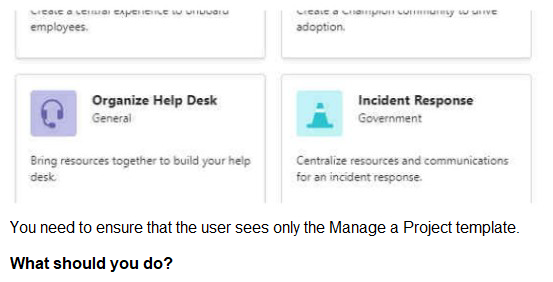
A. From PowerShell, modify the Teams policies.
B. From the Microsoft Teams admin center. modify the team templates
C. From the Microsoft Teams admin center, modify the templates policies.
D. From PowerShell, modify the team templates.
Your company has a Microsoft Office 365 subscription.
The company has the departments and teams shown in the following table.
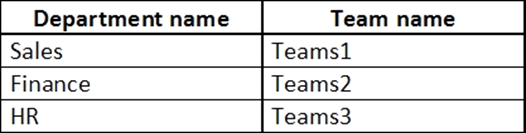
You need to recommend which policies must be created to meet the following requirements:
Users in the HR department must be prevented from sending messages marked as Urgent.
Users in the finance department must be able to send messages marked as Urgent.
Users in the finance department must be able to delete sent messages.
The solution must only affect the HR department users and the finance department users.
What is the minimum number of policies you should recommend?
A. two messaging policies
B. one messaging policy and one permission policy
C. one permission policy only
D. two permission policies
E. one messaging policy only
You have a Microsoft 365 subscription that uses Microsoft Teams.
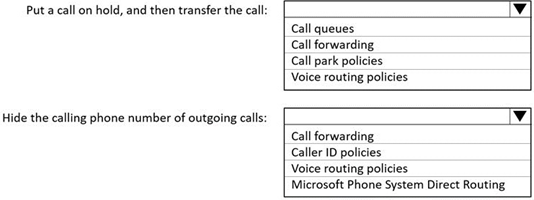
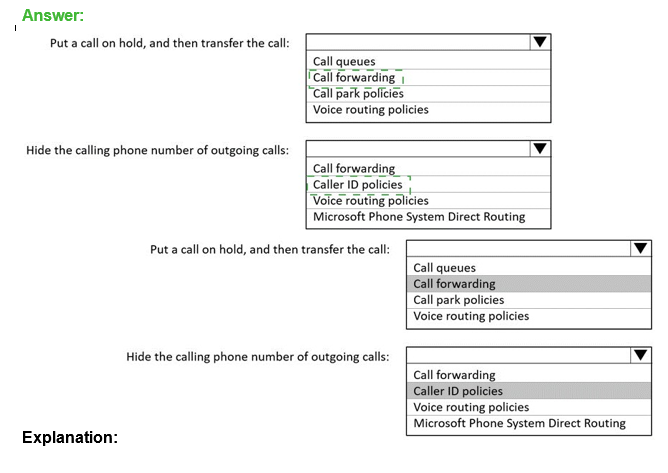
You need to configure phone settings to meet the following requirements: Put a call on hold, and then transfer the call.
Hide the calling phone number of outgoing calls.
What should you configure for each requirement? To answer, select the appropriate options in the answer area.
NOTE: Each correct selection is worth one point.
Your company uses Teams.
All users are assigned a Microsoft 365 E? license.
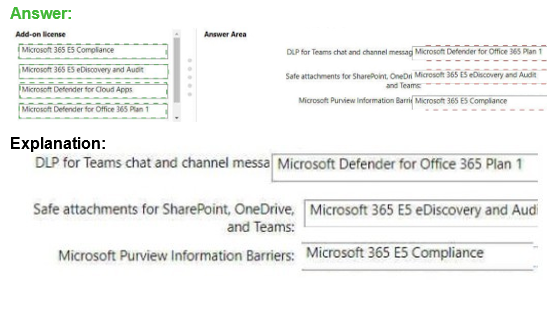
You need to purchase add-on licenses that will enable the following features for the Teams environment
Microsoft Purview Information Barriers
Data loss prevention (DIP) for Teams chat and channel messages Safe attachments for Microsoft SharePoint OneDrive and Teams
To answer, drag the appropriate reports to the correct requirements. Each report may be used once, more than once, or not at all.

Your company uses Teams and deploys the Yammer Communities app to all users.
The communications department at the company needs you to replace the image on the
Teams app bar for the Communities app.
Which three actions should you perform in sequence? To answer, drag the appropriate
reports to the correct requirements. Each report may be used once, more than once, or not
at all.
You have a Microsoft 365 subscription.
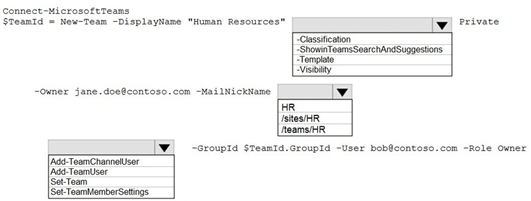
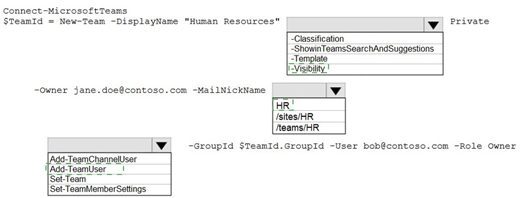
You need to create a new Microsoft Teams team named Human Resources that meets the following requirements:
All join requests must be approved by an owner of the team.
The URL for the Microsoft SharePoint Online site of the team must be /teams/HR. Two users named jane@contoso.com and bob@contoso.com must be assigned as team owners.
How should you complete the PowerShell command? To answer, select the appropriate options in the answer area.
NOTE: Each correct selection is worth one point.
| Page 3 out of 28 Pages |
| Previous |