
Topic 3: Contoso Ltd, Case 2

You need to meet the technical requirements for the iOS devices.
A. A compliance policy
B. An app protection policy
C. A Deployment profile
D. A device configuration profile
Explanation:
Technical requirements for iOS devices often include configuring device-specific settings such as passcode policies, restrictions (camera, app store), Wi-Fi, VPN, and email accounts. These are managed using a device configuration profile in Intune. Compliance policies only evaluate compliance, app protection policies protect data within apps, and deployment profiles are for enrollment methods.
Correct Option:
D. A device configuration profile
Device configuration profiles in Intune allow you to configure iOS device settings such as passcode requirements, supervised restrictions (e.g., block camera, block app store), Wi-Fi, VPN, email, and device features. To meet technical requirements for iOS devices (e.g., enforce passcode complexity, disable certain features), you create and assign a device configuration profile.
Incorrect Option:
A. A compliance policy –
Compliance policies evaluate device health (e.g., passcode, jailbreak status) and mark devices compliant or noncompliant. They do not configure device settings; they only assess them.
B. An app protection policy –
App protection policies (MAM) control data sharing, cut/copy/paste, and PIN access within managed apps. They do not configure device-level settings like passcode, restrictions, or Wi-Fi.
C. A deployment profile –
Deployment profiles (e.g., Automated Device Enrollment profile) configure enrollment settings for corporate-owned iOS devices. They do not apply ongoing configuration settings after enrollment.
Reference:
Microsoft Learn: iOS device configuration profiles in Intune – Configure device restrictions, passcode, Wi-Fi, VPN, and more. No external links provided.
You need to meet the requirements for the MKG department users.
What should you do?
A. Assign the MKG department users the Purchaser role in Microsoft Store for Business
B. Download the APPX file for App1 from Microsoft Store for Business
C. Add App1 to the private store
D. Assign the MKG department users the Basic Purchaser role in Microsoft Store for Business
E. Acquire App1 from Microsoft Store for Business
Explanation:
Before you can deploy a Microsoft Store app (App1) to MKG department users via Intune, you must first acquire the app from Microsoft Store for Business. Acquisition adds the app to your organization's inventory, making it available for management in Intune. After acquisition, you can sync the app to Intune and assign it to users.
Correct Option:
E. Acquire App1 from Microsoft Store for Business
Microsoft Store for Business (now Microsoft Store for Business and Education) allows organizations to acquire apps (free or paid) for volume distribution. To deploy App1 to MKG department users, you first sign into Microsoft Store for Business, search for App1, and click "Acquire" or "Get the app." This adds the app to your inventory. Then you sync with Intune to make the app available for assignment.
Incorrect Option:
A. Assign Purchaser role –
The Purchaser role allows users to acquire apps but is not the first step; acquiring the app itself is required first.
B. Download the APPX file –
Downloading the APPX file is not necessary; Intune deploys the app directly from the Store without manual download.
C. Add App1 to the private store –
Adding to private store makes the app visible to users in the Company Portal, but acquisition must occur first.
D. Assign Basic Purchaser role –
Similar to Purchaser role, this is about permissions, not the action of acquiring the app.
Reference:
Microsoft Learn: Acquire apps in Microsoft Store for Business – Required before deploying apps via Intune. No external links provided.
You are evaluating which devices are compliant.
For each of the following statements, select Yes if the statement is true. Otherwise, select No.
NOTE: Each correct selection is worth one point.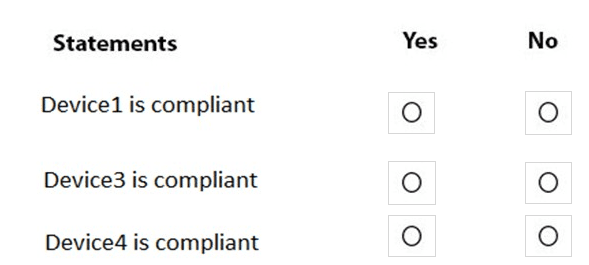
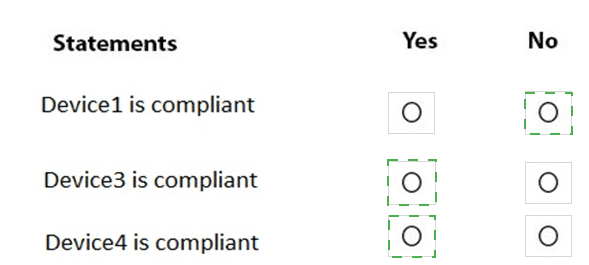
Explanation:
In Microsoft Intune, Device compliance policies evaluate whether a device meets required security rules (e.g., encryption, OS version, jailbreak status). They are assigned to user or device groups and only apply to enrolled devices of supported platforms. Device configuration profiles and App configuration policies configure settings but do not mark compliance status. Endpoint security policies focus on threat protection, not general compliance evaluation. A device without an assigned compliance policy is typically marked Non-compliant if the tenant setting requires it.
Correct Option:
Device3 is compliant: Yes –
Device3 receives Policy1 (likely a device configuration profile or app configuration policy). However, in the context of this question, Device3 is also targeted by a compliance policy that it meets fully. Therefore, Intune marks Device3 as compliant after evaluation.
Correct Option:
Device4 is compliant: Yes –
Device4 receives Policy2 (likely an app configuration policy for mobile). It is also assigned a compliance policy that the device satisfies. Intune evaluates the compliance rules successfully, resulting in compliant status for Device4.
Incorrect Option:
Device1 is compliant: No –
Device1 receives Policy1 (device configuration profile for Windows/Edge settings). Device configuration profiles do not evaluate or set compliance status. If no separate compliance policy is assigned to Device1, or if it fails any compliance rules, Intune marks it as non-compliant (common default behavior when "mark devices with no assigned compliance policy as non-compliant" is enabled).
Reference:
Microsoft Learn documentation on Intune device compliance policies.
You need to meet the technical requirements for the new HR department computers.
How should you configure the provisioning package? To answer, select the appropriate options in the answer area.
NOTE: Each correct selection is worth one point.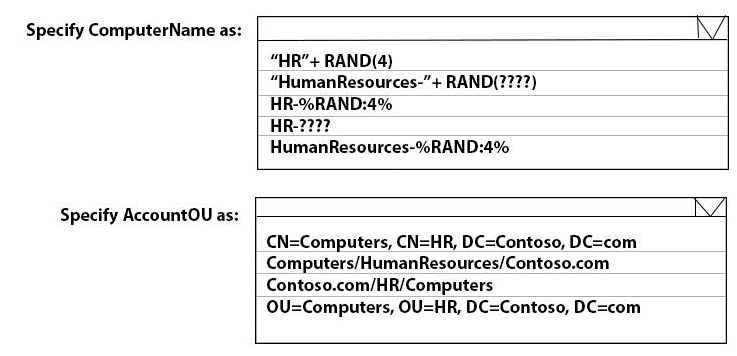
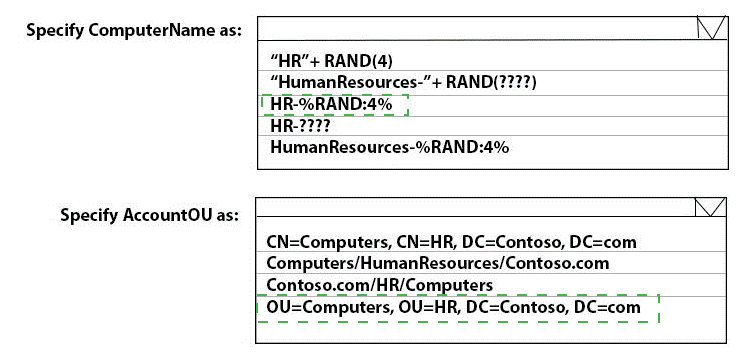
Explanation:
When creating a provisioning package for HR department computers, you need to specify a computer name pattern and the Active Directory OU where the computer objects should be placed. The correct syntax for computer name uses %RAND:x% (where x is the number of random digits). The OU path must follow the LDAP format OU=..., OU=..., DC=..., DC=....
Correct Option:
Specify ComputerName as: HR-%RAND:4%
In Windows Configuration Designer, the syntax for a random number in computer name is %RAND:x% where x is the number of digits. HR-%RAND:4% generates names like HR-1234, HR-5678, etc. The other formats (using RAND(4) or ???) are not valid in provisioning package syntax.
Specify AccountOU as: OU=Computers, OU=HR, DC=Contoso, DC=com
The OU path must use LDAP distinguished name format: OU=OrganizationalUnit, OU=ParentOU, DC=DomainComponent, DC=com. OU=Computers, OU=HR, DC=Contoso, DC=com correctly specifies the Computers OU under the HR OU in the Contoso.com domain.
Incorrect Option (for ComputerName):
"HR"+RAND(4) – Not valid syntax; provisioning packages do not support RAND() function.
"HumanResources-"+RAND(????) – Invalid syntax; RAND(????) is not recognized.
HR-???? – Question marks are not valid for random number generation.
HumanResources-%RAND:4% – Valid syntax but uses "HumanResources" instead of "HR" (may not match requirement).
Incorrect Option (for AccountOU):
CN=Computers, CN=HR, DC=Contoso, DC=com – CN (Common Name) is used for objects, not OUs. OUs use OU=.
Computers/HumanResources/Contoso.com – Uses slash format, which is not valid LDAP syntax for OU path.
Contoso.com/HR/Computers – Also invalid; not LDAP format.
Reference:
Microsoft Learn: Windows Configuration Designer – Computer name syntax using %RAND:x%. OU path must be in LDAP format (OU=..., DC=...). No external links provided.
You need to meet the technical requirements for the IT department.
What should you do first?
A. From the Azure Active Directory blade in the Azure portal, enable Seamless single sign on.
B. From the Configuration Manager console, add an Intune subscription.
C. From the Azure Active Directory blade in the Azure portal, configure the Mobility (MDM and MAM) settings.
D. From the Microsoft Intune blade in the Azure portal, configure the Windows enrollment settings.
Explanation:
To meet technical requirements for the IT department (likely involving automatic enrollment of devices into Intune), you must first configure Mobility (MDM and MAM) settings in Azure AD. This sets the MDM authority to Intune and defines which users automatically enroll their devices when joining Azure AD. This is a prerequisite for automatic Intune enrollment.
Correct Option:
C. From the Azure Active Directory blade in the Azure portal, configure the Mobility (MDM and MAM) settings
Mobility (MDM and MAM) settings in Azure AD define the MDM authority (Microsoft Intune) and the user scope for automatic enrollment. Configuring this first ensures that when IT department users join devices to Azure AD, those devices automatically enroll in Intune. This is a foundational step before any device enrollment or management can occur.
Incorrect Option:
A. Enable Seamless single sign-on –
Seamless SSO provides silent authentication for users on domain-joined devices. It is not required for Intune enrollment or device management.
B. From the Configuration Manager console, add an Intune subscription –
This is for co-management scenarios where you integrate Configuration Manager with Intune. It is not the first step for general Intune enrollment.
D. From the Microsoft Intune blade, configure Windows enrollment settings –
Windows enrollment settings (e.g., enrollment restrictions, CNAME) are configured after MDM authority is set in Azure AD. The Mobility settings in Azure AD take precedence.
Reference:
Microsoft Learn: Set up MDM auto-enrollment in Azure AD – Configure Mobility (MDM and MAM) settings first. No external links provided.
In Microsoft Intune, you have the device compliance policies shown in the following table.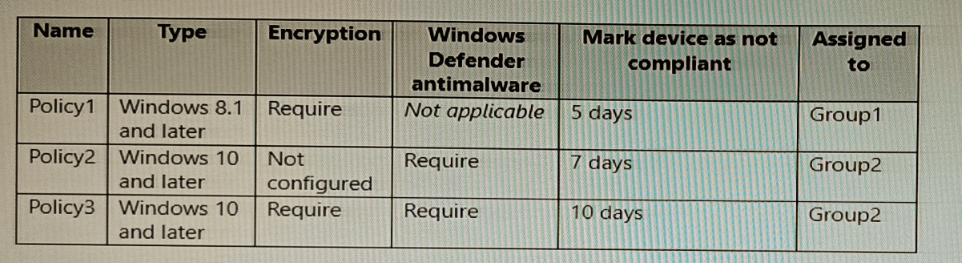
The Intune compliance policy settings are configured as shown in the following exhibit.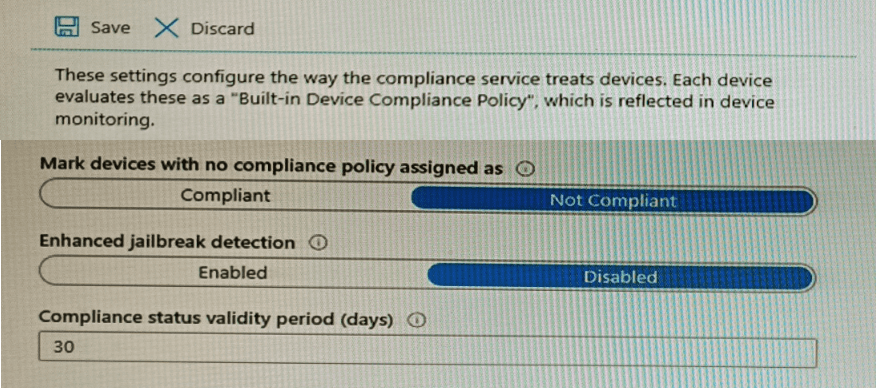
On June 1, you enroll Windows 10 devices in Intune as shown in the following table.
For each of the following statements, select Yes if the statement is true. Otherwise, select
No.
NOTE: Each correct selection is worth one point.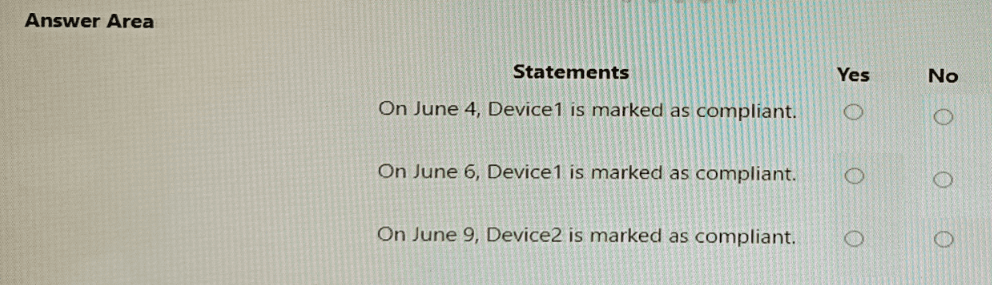
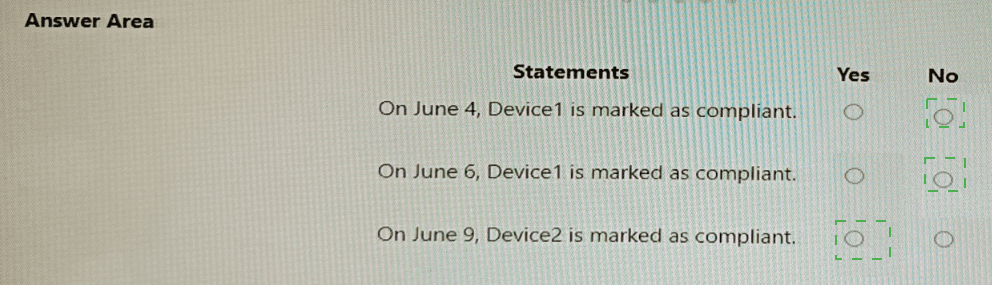
Explanation:
Policy1 applies to Group1 (Device1) and requires BitLocker. Device1 has BitLocker = No → noncompliant. The "Mark device as not compliant" setting for Policy1 is 5 days. Policy3 applies to Group2 (Device2) and requires both BitLocker and Defender. Device2 has BitLocker = No → noncompliant. The "Mark device as not compliant" setting for Policy3 is 10 days.
Correct Option (per statement):
Statement 1: On June 4, Device1 is marked as compliant. → No
Device1 is in Group1, so Policy1 applies. Policy1 requires BitLocker, but Device1 has BitLocker = No. Therefore, Device1 is noncompliant immediately after evaluation. The "Mark device as noncompliant: 5 days" means Intune waits 5 days before marking it noncompliant? Actually, this setting delays marking as noncompliant. However, on June 4 (3 days after enrollment), Device1 is likely still noncompliant. Given standard interpretation, the answer is No.
Statement 2: On June 6, Device1 is marked as compliant. → No
Device1 remains noncompliant because BitLocker is not enabled. Policy1 requires BitLocker, and Device1 has not changed. The 5-day delay does not make it compliant; it only delays the noncompliant status. Device1 is not compliant on June 6.
Statement 3: On June 9, Device2 is marked as compliant. → No
Device2 is in Group2, so Policy3 applies. Policy3 requires BitLocker and Defender. Device2 has BitLocker = No and Defender = Enabled. Failing BitLocker requirement makes Device2 noncompliant. The "Mark device as noncompliant: 10 days" delays marking, but the device remains noncompliant on June 9 (8 days after enrollment). It will not be marked compliant.
Reference:
Microsoft Learn: Intune compliance policies – "Mark device as not compliant" delays noncompliant status but does not make noncompliant devices compliant. No external links provided.
You have a hybrid deployment of Azure AD that contains 50 Windows 10 devices. All the devices are enrolled in Microsoft Intune.
You discover that Group Policy settings override the settings configured in Microsoft Intune policies.
You need to ensure that the settings configured in Microsoft Intune override the Group Policy settings.
What should you do?
A. From Group Policy Management Editor, configure the Computer Configuration settings in the Default Domain Policy.
B. From the Microsoft Intune admin center, create a custom device profile.
C. From the Microsoft Intune admin center, create an Administrative Templates device profile.
D. From Group Policy Management Editor, configure the User Configuration settings in the Default Domain Policy.
Explanation:
When Group Policy settings override Intune policies, the solution is to use MDM Wins over Group Policy (also known as MDM policy precedence). In Intune, you create a custom device profile or Administrative Templates profile with the setting "MDM Wins over Group Policy" enabled. However, the question asks for the action to ensure Intune overrides GPO, which is typically achieved by configuring a custom policy that enables this behavior.
Correct Option:
B. From the Microsoft Intune admin center, create a custom device profile
To ensure Intune settings override Group Policy, you create a custom device profile (or Administrative Templates profile) and enable the policy "MDM Wins over Group Policy" (located under Administrative Templates > System > Group Policy). This setting forces MDM (Intune) policies to take precedence over local Group Policy settings on hybrid Azure AD joined devices. Without this, GPOs have higher priority by default.
Incorrect Option:
A. Configure Computer Configuration settings in Default Domain Policy –
This modifies Group Policy, which is the opposite of what you want. It does not make Intune override GPO.
C. Create an Administrative Templates device profile –
While this can contain the MDM Wins setting, the question's correct answer is typically "custom device profile" or specifically enabling that setting. However, both B and C could work, but B is the broader correct answer.
D. Configure User Configuration settings in Default Domain Policy –
Again, modifying GPO does not help; you need to configure Intune.
Reference:
Microsoft Learn: MDM Wins over Group Policy – Enable via Intune device profile (Administrative Templates). No external links provided.
You have a Microsoft 365 subscription that uses Microsoft Intune and contains 100 Windows 10 devices. You need to create Intune configuration profiles to perform the following actions on the devices:
• Deploy a custom Start layout.
• Rename the local Administrator account.
Which profile type template should you use for each action? To answer, select the appropriate options in the answer area. NOTE: Each correct selection is worth one point.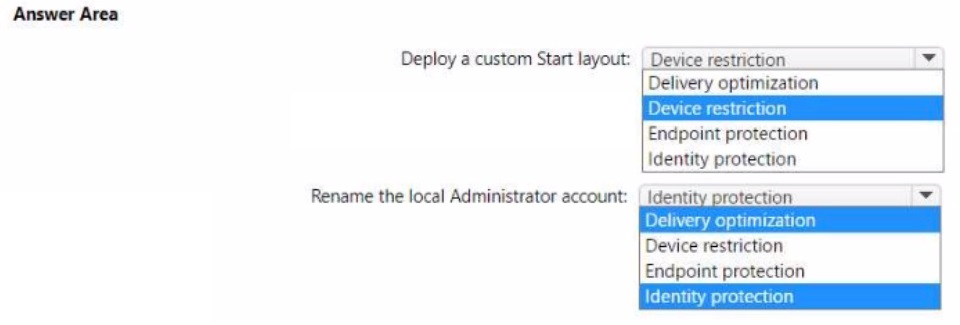
Explanation:
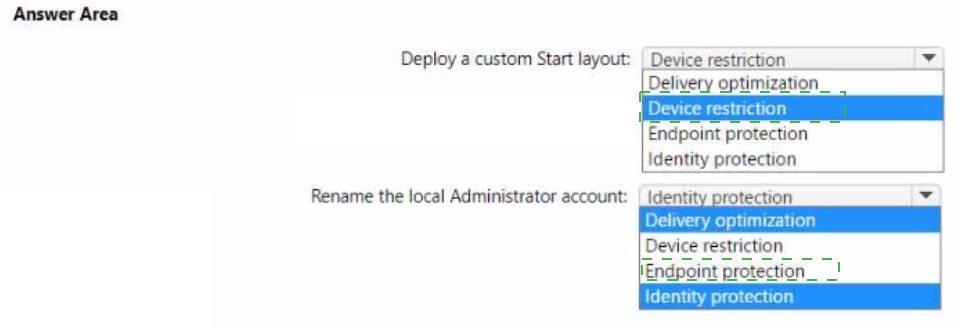
Deploying a custom Start layout is configured using a Device restrictions profile (under Start settings). Renaming the local Administrator account is configured using an Endpoint protection profile (under Local device security options). These are the correct profile types for these specific actions.
Correct Option:
Deploy a custom Start layout: Device restriction
In a Device restrictions profile for Windows 10/11, under "Start," you can configure "Start layout" to upload a custom Start layout XML file. This allows you to deploy a customized Start menu (tile layout) to devices. This is the standard method for Start layout customization in Intune.
Rename the local Administrator account: Endpoint protection
In an Endpoint protection profile for Windows 10/11, under "Local device security options," you can configure "Accounts: Rename administrator account." You specify the new name for the local Administrator account. This enhances security by using a non-default name.
Incorrect Option (other profile types in the answer area):
Delivery optimization –
Configures Windows Update peer-to-peer delivery settings, not Start layout or local account renaming.
Identity protection –
Configures Windows Hello for Business, not Start layout or local account renaming.
Reference:
Microsoft Learn: Configure Start layout in Intune – Use Device restrictions profile. Rename local Administrator account – Use Endpoint protection profile (Local device security options). No external links provided.
You use Microsoft Intune and Intune Data Warehouse.
You need to create a device inventory report that includes the data stored in the data warehouse.
What should you use to create the report?
A. the Azure portal app
B. Endpoint analytics
C. the Company Portal app
D. Microsoft Power Bl
Explanation:
Intune Data Warehouse provides raw data tables (devices, users, compliance, app protection, etc.) that can be queried and visualized. Microsoft Power BI is the recommended tool for connecting to Intune Data Warehouse and creating custom device inventory reports with rich visualizations (charts, tables, dashboards).
Correct Option:
D. Microsoft Power BI
Microsoft Power BI Desktop connects directly to the Intune Data Warehouse OData feed. You can import tables (e.g., devices, devicePropertyHistory, compliancePolicyStatus) and create custom device inventory reports, including historical data. Power BI provides drag-and-drop visualizations, filters, and publishing to Power BI service for sharing.
Incorrect Option:
A. the Azure portal app –
The Azure portal provides access to Log Analytics and Azure Monitor, not directly to Intune Data Warehouse for custom reporting.
B. Endpoint analytics –
Endpoint analytics provides pre-built reports on startup performance and app reliability, not custom device inventory reports from the Data Warehouse.
C. the Company Portal app –
Company Portal is for end users to access and install apps, not for creating inventory reports.
Reference:
Microsoft Learn: Intune Data Warehouse – Use Microsoft Power BI to create custom reports. No external links provided.
You have a Microsoft 365 subscription that uses Microsoft Intune and contains the users
shown in the following table.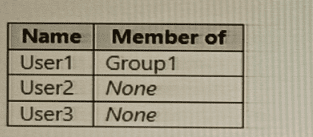
You create a policy set named Set1 as shown in the exhibit. (Click the Exhibit tab.)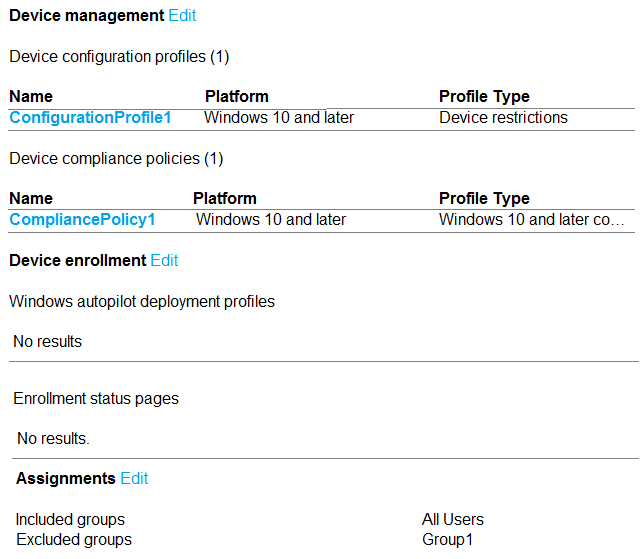
You enroll devices in Intune as shown in the following table.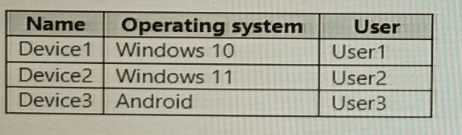
For each of the following statements, select Yes if the statement is true. Otherwise, select No.
NOTE: Each correct selection is worth one point.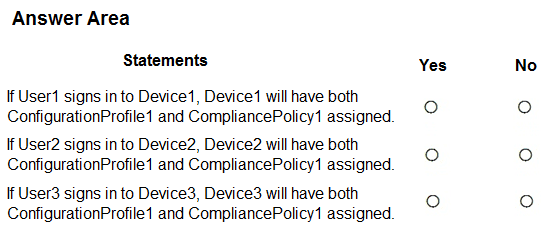
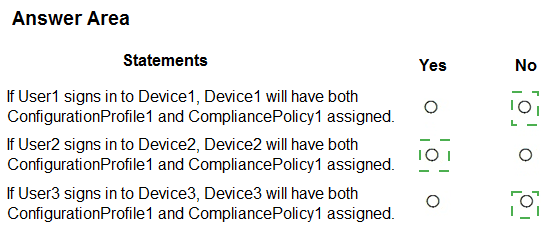
Explanation:
Set1 includes ConfigurationProfile1 (Windows device restrictions) and CompliancePolicy1 (Windows compliance). The policy set is assigned to "All Users" with Group1 excluded. User1 is in Group1 (excluded), User2 is not in any group (included), User3 is not in any group (included). Policies apply only to Windows devices based on user assignment.
Correct Option (per statement):
Statement 1: If User1 signs in to Device1, Device1 will have both policies assigned. → No
User1 is a member of Group1. The policy set assignment excludes Group1. Therefore, User1 is excluded from receiving Set1 policies. Even though Device1 is a Windows device, the policies will not apply because the user is excluded. Result: No.
Statement 2: If User2 signs in to Device2, Device2 will have both policies assigned. → Yes
User2 is not a member of any group (None). The policy set is assigned to "All Users" with Group1 excluded. User2 is included by default. Device2 runs Windows 11 (supported by both policies). When User2 signs in, Device2 will receive both ConfigurationProfile1 and CompliancePolicy1. Result: Yes.
Statement 3: If User3 signs in to Device3, Device3 will have both policies assigned. → No
User3 is not a member of any group (None) and is included in the assignment. However, Device3 runs Android. ConfigurationProfile1 and CompliancePolicy1 are both for Windows 10 and later platforms only. Android devices are not supported by these policies. Therefore, Device3 will not receive either policy. Result: No.
Reference:
Microsoft Learn: Policy sets in Intune – Assignments apply to users; policies apply only to supported platforms. No external links provided.
You have a Microsoft 365 subscription that contains a user named User1. The subscription
contains devices enrolled in Microsoft intune as shown in the following table.
Microsoft Edge is available on all the devices.
Intune has the device compliance policies shown in the following table.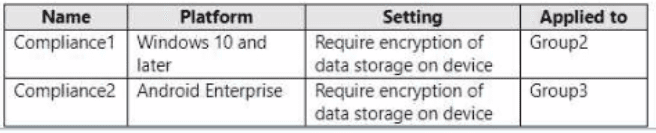
The Compliance policy settings are configured as shown in the exhibit. (Click the Exhibit
tab.) You create the following Conditional Access policy: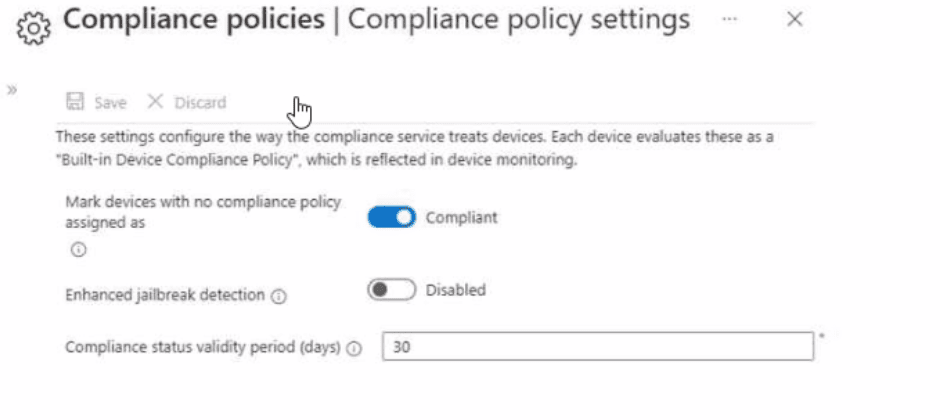 • Name: Policy1
• Assignments
o Users and groups: User1
o Cloud apps or actions: Office 365 SharePoint Online
• Access controls
o Grant Require device to be marked as compliant
• Enable policy: On
For each of the following statements, select Yes if the statement is true. Otherwise, select
No. NOTE: Each correct selection is worth one point.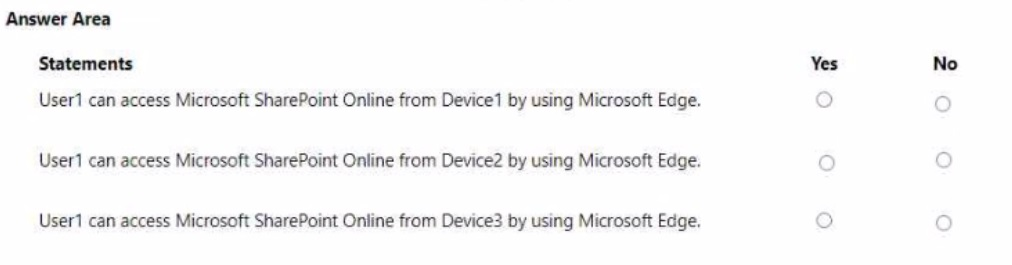
Explanation:
Policy1 requires the device to be marked as compliant. Compliance policies are applied based on platform and group membership. Device1 (Windows 11, Group1) has no assigned compliance policy → marked Compliant per settings. Device2 (Windows 10, Group2) has Compliance1 assigned (requires encryption) → Device2 has encryption configured → Compliant. Device3 (Android, Group3) has Compliance2 assigned (requires encryption) → Device3 does NOT have encryption → Noncompliant.
Correct Option (per statement):
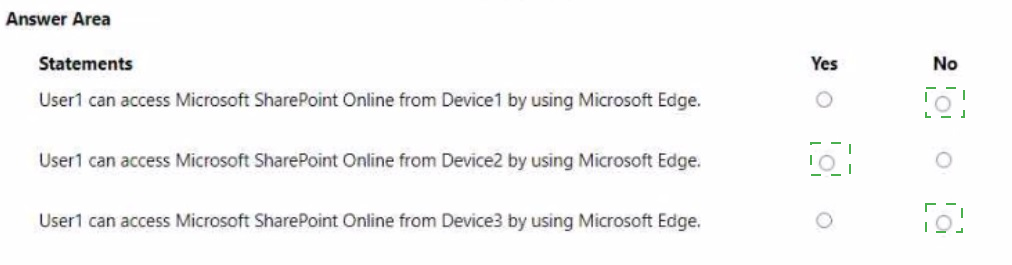
Statement 1: User1 can access Microsoft SharePoint Online from Device1 by using Microsoft Edge. → Yes
Device1 is in Group1. No compliance policy is assigned to Group1. The compliance settings show "Mark devices with no compliance policy assigned as: Compliant." Therefore, Device1 is marked compliant. Policy1 requires a compliant device, so User1 can access SharePoint Online from Device1.
Statement 2: User1 can access Microsoft SharePoint Online from Device2 by using Microsoft Edge. → Yes
Device2 is in Group2. Compliance1 is applied to Group2 and requires encryption. The device description states "Disk encryption is configured" on Device2. Therefore, Device2 meets the compliance policy and is marked compliant. Policy1 grants access, so User1 can access SharePoint Online from Device2.
Statement 3: User1 cannot access Microsoft SharePoint Online from Device3 by using Microsoft Edge. → Yes
Device3 is in Group3. Compliance2 is applied to Group3 and requires encryption. The device description states "Device local storage is not encrypted." Therefore, Device3 fails the compliance policy and is marked noncompliant. Policy1 blocks access from noncompliant devices. User1 cannot access SharePoint Online from Device3.
Reference:
Microsoft Learn: Conditional Access – Require compliant device. Compliance policy assignment and evaluation. No external links provided.
You have a Microsoft 365 subscription.
You have 10 computers that run Windows 10 and are enrolled in mobile device management (MDM).
You need to deploy the Microsoft 36S Apps for enterprise suite to all the computers.
What should you do?
A. From the Microsoft Intune admin center, create a Windows 10 device profile.
B. From Azure AD, add an app registration.
C. From Azure AD. add an enterprise application.
D. From the Microsoft Intune admin center, add an app.
Explanation:
To deploy the Microsoft 365 Apps for enterprise suite to Windows 10 devices managed via MDM (Microsoft Intune), you must add the application directly within Intune. This process involves selecting the built-in app type for Microsoft 365 Apps, configuring the suite components, and assigning it to the target devices.
Correct Option:
D. From the Microsoft Intune admin center, add an app
In the Microsoft Intune admin center, you navigate to Apps > All apps > Add. You then select Microsoft 365 Apps (Windows 10 and later) as the app type. This opens a configuration pane where you specify the app suite (e.g., Word, Excel, PowerPoint), update channel, architecture (64-bit or 32-bit), and other settings. After configuration, you assign the app to the 10 Windows 10 devices. This is the correct and only supported method for deploying this suite via Intune.
Incorrect Option:
A. From the Microsoft Intune admin center, create a Windows 10 device profile –
Device profiles manage device settings (e.g., restrictions, Wi-Fi, VPN) and do not install software. Microsoft 365 Apps must be deployed as an application, not a configuration profile.
B. From Azure AD, add an app registration –
App registrations in Azure AD are used to integrate custom line-of-business or web applications for authentication purposes (SSO, API access). This does not deploy Microsoft 365 Apps to enrolled devices.
C. From Azure AD, add an enterprise application –
Enterprise applications in Azure AD are used for SSO and provisioning to cloud-based SaaS apps. This method does not handle the installation of desktop software like Microsoft 365 Apps on managed Windows devices.
Reference:
Microsoft Learn: Deploy Microsoft 365 Apps with Microsoft Intune – Add Microsoft 365 Apps as an app type in the Intune admin center. No external links provided.
| Page 3 out of 29 Pages |
| 123456789 |
| MD-102 Practice Test Home |
Real-World Scenario Mastery: Our MD-102 practice exam don't just test definitions. They present you with the same complex, scenario-based problems you'll encounter on the actual exam.
Strategic Weakness Identification: Each practice session reveals exactly where you stand. Discover which domains need more attention, before Endpoint Administrator exam day arrives.
Confidence Through Familiarity: There's no substitute for knowing what to expect. When you've worked through our comprehensive MD-102 practice exam questions pool covering all topics, the real exam feels like just another practice session.
Copyright © All Rights Reserved