
Topic 4: Mix Question
You have a Microsoft 365 subscription that includes Microsoft Intune and Microsoft
Defender for Endpoint.
Users have devices that run Windows 11.
You deploy a connection from Defender for Endpoint to Intune.
You need to ensure that when a device is enrolled in Intune, the device is onboarded automatically to Defender for Endpoint
What should you configure, and which portal should you use? To answer, select the appropriate options in the answer area
NOTE: Each correct selection is worth one point.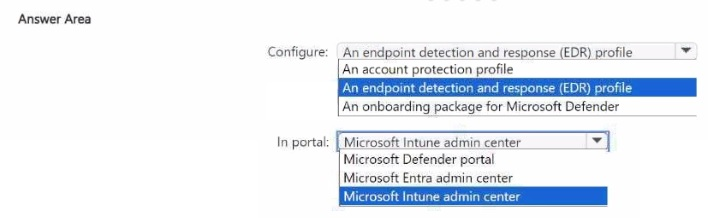
Explanation:
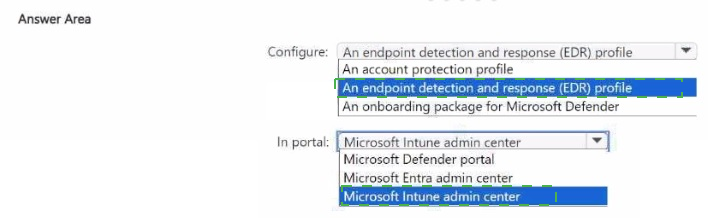
To automatically onboard Intune-enrolled Windows 11 devices to Microsoft Defender for Endpoint, you configure the Defender for Endpoint integration in Intune and use the Microsoft Intune admin center to create the connection and apply the EDR policy. The EDR (Endpoint Detection and Response) policy contains the onboarding settings.
Correct Option:
Configure: An endpoint detection and response (EDR) profile
In the Microsoft Intune admin center, under Endpoint Security > Endpoint Detection and Response (EDR), you create a policy that configures onboarding to Defender for Endpoint. The policy applies to Windows 10/11 devices and automatically onboard them when they enroll in Intune. This is the correct configuration.
In portal: Microsoft Intune admin center
The EDR policy is created in the Microsoft Intune admin center (formerly Microsoft Endpoint Manager admin center). Navigate to Endpoint Security > Endpoint Detection and Response > Create Policy. The Microsoft Defender portal is used for monitoring and response, not for creating the automatic onboarding policy for Intune-enrolled devices.
Incorrect Option (for Configure):
An account protection profile – Used for Windows Hello and Credential Guard, not for Defender for Endpoint onboarding.
An onboarding package for Microsoft Defender – This is used for manual onboarding (e.g., local script), not for automatic onboarding from Intune enrollment.
Incorrect Option (for Portal):
Microsoft Defender portal – Used for security incidents, alerts, and hunting; not for configuring Intune-to-Defender automatic onboarding policies.
Microsoft Entra admin center – Used for identity and access management, not for Defender for Endpoint onboarding policies.
Reference:
Microsoft Learn: Configure EDR policy in Intune for automatic onboarding – Use Endpoint Detection and Response profile in Intune admin center. No external links provided.
You have a Microsoft 365 subscription. All devices run Windows 10.
You need to prevent users from enrolling the devices in the Windows Insider Program.
What two configurations should you perform from the Microsoft Intune admin center? Each
correct answer is a complete solution.
NOTE: Each correct selection is worth one point.
A. a device restrictions device configuration profile
B. an app configuration policy
C. a Windows 10 and later security baseline
D. a custom device configuration profile
E. a Windows 10 and later update ring
Explanation:
Preventing enrollment in the Windows Insider Program can be achieved via two different configuration types in Intune. A device restrictions device configuration profile contains a specific setting under "General" to prevent Insider builds. A Windows 10 and later update ring also has a setting to disable Insider builds (under "User experience settings" > "Option to manage Windows Insider builds").
Correct Option:
A. a device restrictions device configuration profile
In a Device Restrictions profile (Windows 10 and later), under "General," you can set "Prevent enrollment in Windows Insider Program" to Yes. This blocks users from signing up for Insider builds. This is a complete solution.
E. a Windows 10 and later update ring
In an Update Ring profile, under "User experience settings," you can configure "Manage preview builds" to Disable. This prevents devices from receiving Windows Insider Preview builds. This is also a complete solution.
Incorrect Option:
B. an app configuration policy –
App configuration policies supply settings to mobile apps, not to Windows Insider Program enrollment.
C. a Windows 10 and later security baseline –
Security baselines apply security settings (BitLocker, Defender, etc.) but do not typically include the Insider Program setting.
D. a custom device configuration profile –
While a custom profile could potentially configure the registry key to block Insider builds, it is not the recommended or standard method compared to device restrictions or update rings.
Reference:
Microsoft Learn: Manage Windows Insider Program in Intune – Use Device Restrictions profile or Update Rings. No external links provided.
Your company uses Microsoft Intune to manage devices.
You need to ensure that only Android devices that use Android work profiles can enroll in intune.
Which two configurations should you perform in the device enrollment restrictions? Each correct answer presents part of the solution.
NOTE Each correct selection is worth one point.
A. From Platform Settings, set Android device administrator Personally Owned to Block.
B. From Platform Settings, set Android Enterprise (work profile) to Allow.
C. From Platform Settings, set Android device administrator Personally Owned to Allow
D. From Platform Settings, set Android device administrator to Block.
Explanation:
To allow only Android devices that use work profiles to enroll, you must Allow Android Enterprise (work profile) and Block Android device administrator (legacy enrollment). Blocking personally owned Android device administrator ensures that older enrollment methods are not used, forcing work profile enrollment.
Correct Option:
A. From Platform Settings, set Android device administrator Personally Owned to Block
Blocking personally owned Android device administrator prevents users from enrolling legacy Android devices (pre-Android Enterprise) or using the old device administrator method. This ensures that only modern Android Enterprise enrollment (work profile) is used for personally owned devices.
B. From Platform Settings, set Android Enterprise (work profile) to Allow
Allowing Android Enterprise (work profile) permits users to enroll devices using the modern Android work profile method. This is the requirement: only Android devices that use work profiles can enroll. Without this set to Allow, work profile enrollment would be blocked.
Incorrect Option:
C. From Platform Settings, set Android device administrator Personally Owned to Allow –
This would allow legacy device administrator enrollment, which is the opposite of the requirement.
D. From Platform Settings, set Android device administrator to Block –
This option may not exist as a separate setting; the "Personally Owned" option is the specific control. Also, blocking device administrator alone without allowing work profile would block all Android enrollment.
Reference:
Microsoft Learn: Enrollment restrictions for Android – Allow Android Enterprise work profile, block device administrator. No external links provided.
You have an Azure AD tenant and 100 Windows 10 devices that are Azure AD joined and managed by using Microsoft Intune.
You need to configure Microsoft Defender Firewall and Microsoft Defender Antivirus on the devices. The solution must minimize administrative effort.
Which two actions should you perform? Each correct answer presents part of the solution.
NOTE: Each correct selection is worth one point.
A. To configure Microsoft Defender Antivirus, create a Group Policy Object (GPO) and configure the Windows Defender Antivirus settings.
B. To configure Microsoft Defender Firewall, create a device configuration profile and configure the Device restrictions settings.
C. To configure Microsoft Defender Antivirus, create a device configuration profile and configure the Endpoint protection settings.
D. To configure Microsoft Defender Antivirus, create a device configuration profile and configure the Device restrictions settings.
E. To configure Microsoft Defender Firewall, create a device configuration profile and configure the Endpoint protection settings.
F. To configure Microsoft Defender Firewall, create a Group Policy Object (GPO) and configure Windows Defender Firewall with Advanced Security.
Explanation:
To configure Microsoft Defender Firewall and Microsoft Defender Antivirus on Azure AD joined devices managed by Intune, you use device configuration profiles with Endpoint protection settings. Endpoint protection profiles contain both firewall and antivirus settings. This minimizes administrative effort by using a single profile type for both configurations.
Correct Option:
C. To configure Microsoft Defender Antivirus, create a device configuration profile and configure the Endpoint protection settings
In Intune, create a Device configuration profile for Windows 10 and later, select Endpoint protection as the profile type. Under "Microsoft Defender Antivirus," you can configure real-time protection, cloud-delivered protection, exclusions, and other antivirus settings.
E. To configure Microsoft Defender Firewall, create a device configuration profile and configure the Endpoint protection settings
The same Endpoint protection profile also contains Microsoft Defender Firewall settings. You can configure firewall rules, enable/disable the firewall, and set default inbound/outbound behavior. This centralizes both firewall and antivirus configurations in one profile, minimizing administrative effort.
Incorrect Option:
A. Configure Microsoft Defender Antivirus via GPO –
GPOs are not used for Azure AD joined devices managed by Intune. Group Policy requires Active Directory domain join.
B. Configure Microsoft Defender Firewall via Device restrictions –
Device restrictions profiles do not contain firewall settings; firewall is in Endpoint protection.
D. Configure Microsoft Defender Antivirus via Device restrictions –
Device restrictions profiles do not contain antivirus settings; antivirus is in Endpoint protection.
F. Configure Microsoft Defender Firewall via GPO –
GPOs are not applicable to Azure AD joined devices managed by Intune.
Reference:
Microsoft Learn: Endpoint protection profiles in Intune – Configure firewall and antivirus. No external links provided.
You have a Microsoft 365 E5 subscription and use Microsoft Intune.
You need to use a Sync bulk device action on all corporate-owned Windows devices.
What is the maximum number of devices you can include the action?
A. 25
B. 50
C. 100
D. 500
E. 1000
Explanation:
In Microsoft Intune, the Sync bulk device action has a maximum limit of 100 devices per action. You can select up to 100 devices simultaneously from the device list and initiate a sync. This limit applies regardless of device ownership type (corporate or personal) or platform (Windows, iOS, Android).
Correct Option:
C. 100
When using the Sync bulk device action in the Microsoft Intune admin center, you can select a maximum of 100 devices at a time. This limit is documented and enforced to maintain system performance. If you need to sync more than 100 devices, you must perform multiple bulk sync actions.
Incorrect Option:
A. 25 – This is the limit for the "Collect diagnostics" bulk action, not Sync.
B. 50 – Not the correct limit for Sync.
D. 500 – Exceeds the documented limit of 100.
E. 1000 – Exceeds the documented limit of 100.
Reference:
Microsoft Learn: Bulk device actions in Intune – Sync limit is 100 devices. No external links provided.
You have a Microsoft Deployment Toolkit (MDT) solution that is used to manage Windows
11 deployment tasks.
MDT contains the operating system images shown in the following table.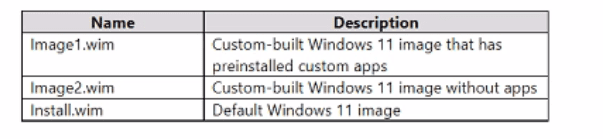
You need to perform a Windows 11 in-place upgrade on several computers that run
Windows 10.
From the Deployment Workbench, you open the New Task Sequence Wizard.
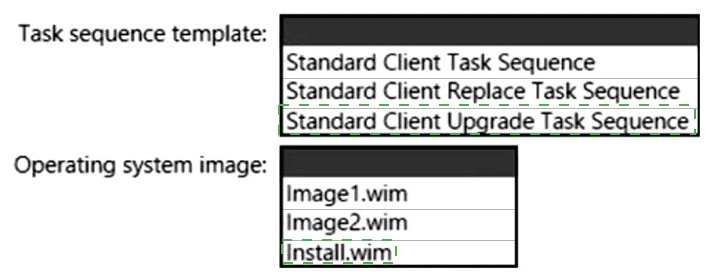
You need to identify which task sequence template and which operating system image to
use for the task sequence. The solution must minimize administrative effort.
What should you identify? To answer, select the appropriate options in the answer area.
NOTE: Each correct selection is worth one point.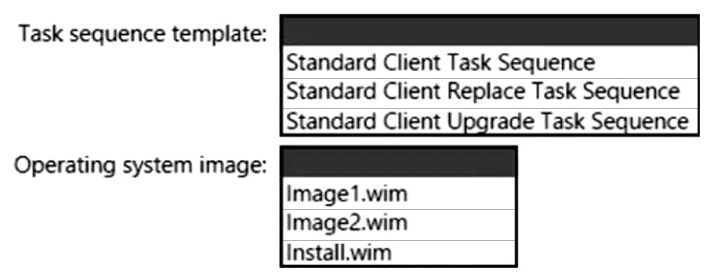
Explanation:
For an in-place upgrade from Windows 10 to Windows 11 (preserving apps, settings, and data), you must use the Standard Client Upgrade Task Sequence template. To minimize administrative effort, you should use the default Windows 11 image (Install.wim) rather than custom images that may require additional configuration or cause compatibility issues.
Correct Option:
Task sequence template: Standard Client Upgrade Task Sequence
This template is specifically designed for in-place upgrades. It preserves user data, applications, and settings while upgrading the operating system. The Standard Client Task Sequence performs a clean installation (wipe and load), and the Standard Client Replace Task Sequence is for replacing old devices with new ones.
Operating system image: Install.wim
The default Windows 11 image (Install.wim) is the most compatible and requires no customization. Using a custom image (Image1.wim or Image2.wim) may introduce unnecessary variables or require additional testing. The default image minimizes administrative effort while ensuring a clean, standard upgrade.
Incorrect Option (for Task sequence template):
Standard Client Task Sequence – Performs a clean installation (wipe and load), not an in-place upgrade.
Standard Client Replace Task Sequence – Designed for migrating data from an old device to a new one, not for upgrading the same device.
Incorrect Option (for Operating system image):
Image1.wim –
Contains preinstalled custom apps that may conflict with existing applications or require additional testing.
Image2.wim –
Custom image without apps, but still requires more effort than using the default image.
Reference:
Microsoft Learn: MDT task sequence templates – Standard Client Upgrade Task Sequence for in-place upgrades. Use default OS image for minimal effort. No external links provided.
You have an Azure Active Directory (Azure AD) tenant named contoso.com that contains a
user named User1. User1 has a user principal name (UPN) of user1 @contoso.com.
You join a Windows 10 device named Client1 to contoso.com.
You need to add User1 to the local Administrators group of Client1.
How should you complete the command? To answer, select the appropriate options in the
answer area.
NOTE: Each correct selection is worth one point.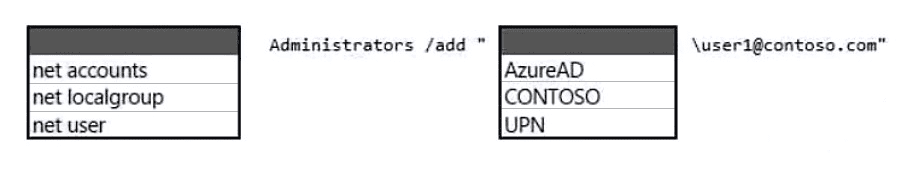
Explanation:
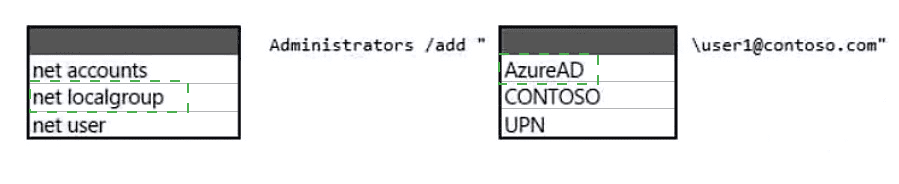
To add an Azure AD user to the local Administrators group, you use the net localgroup command with the Administrators group name, the /add switch, and the user specified with the AzureAD\ prefix followed by the user's UPN (user1@contoso.com).
Correct Option (in correct sequence):
First selection: net localgroup
The command to manage local group membership is net localgroup. This is run from an elevated command prompt on Client1.
Second selection: Administrators
The local group name is Administrators (case-insensitive). This is the built-in group that grants administrative privileges.
Third selection: /add
The /add switch specifies that the user should be added to the group.
Fourth selection: AzureAD
On an Azure AD joined device, Azure AD users are referenced with the prefix AzureAD\ (not CONTOSO or UPN alone). This distinguishes them from on-premises domain users.
Fifth selection: \user1@contoso.com (combined with AzureAD as AzureAD\user1@contoso.com)
The complete user string is AzureAD\user1@contoso.com. The backslash separates the provider (AzureAD) from the user UPN.
Final command:
net localgroup Administrators /add "AzureAD\user1@contoso.com"
Incorrect Option (other choices):
net accounts – Used for password and lockout policies, not group membership.
net user – Manages local user accounts, not group membership.
CONTOSO – On-premises domain prefix, not valid for Azure AD joined devices.
UPN – Not a prefix; the correct prefix is AzureAD.
Reference:
Microsoft Learn: Add Azure AD user to local Administrators group – Use net localgroup Administrators /add "AzureAD\user@domain.com". No external links provided.
You have a Microsoft 365 ES subscription that uses Microsoft Intune.
You have the apps shown in the following exhibit.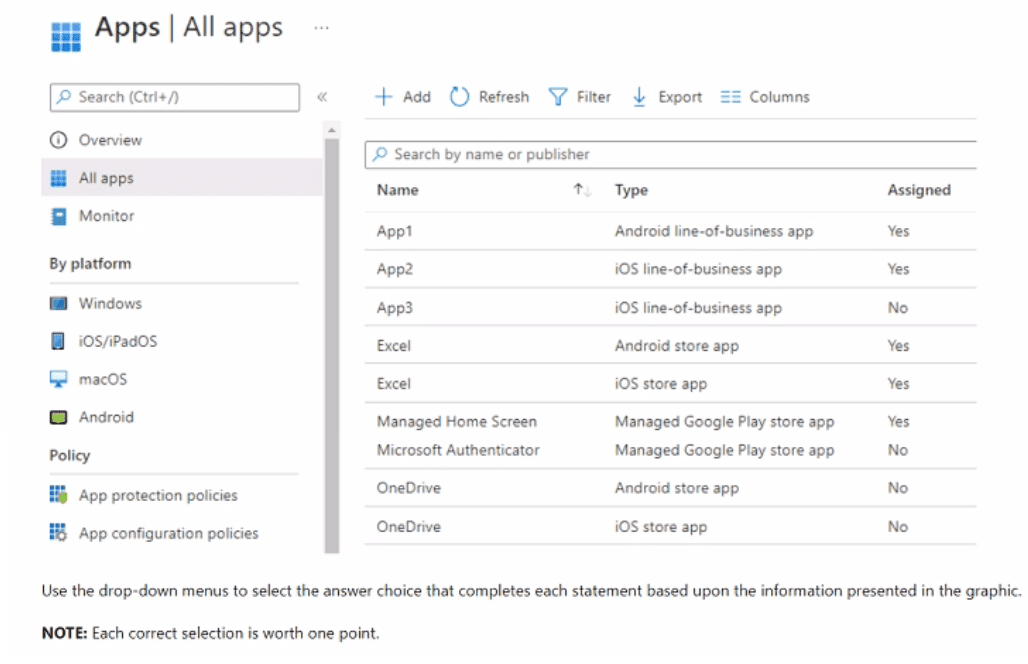
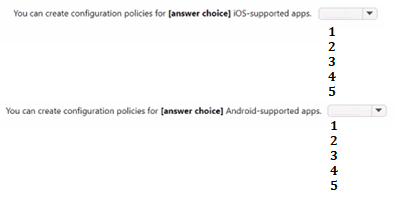
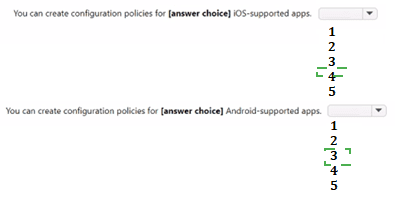
Explanation:
App configuration policies can be created for apps that support managed configurations. For iOS, these are typically iOS store apps that have configuration schemas. For Android, these are Managed Google Play store apps and Android line-of-business apps that support managed configurations. From the list, iOS-supported apps are Excel (iOS store app) and OneDrive (iOS store app) → 2 apps. Android-supported apps are Excel (Android store app), OneDrive (Android store app), Managed Home Screen, and Microsoft Authenticator → 4 apps.
Correct Option:
You can create configuration policies for iOS-supported apps: 2
App configuration policies for iOS can be created for iOS store apps that support managed configurations. From the list:
Excel (iOS store app) – Assigned: Yes
OneDrive (iOS store app) – Assigned: No
App2 and App3 are iOS line-of-business apps, which typically do not support app configuration policies unless specifically built with a configuration schema. Therefore, only 2 iOS apps (Excel and OneDrive) are eligible.
You can create configuration policies for Android-supported apps: 4
App configuration policies for Android can be created for Managed Google Play store apps and Android line-of-business apps that support managed configurations. From the list:
Excel (Android store app) – Assigned: Yes
OneDrive (Android store app) – Assigned: No
Managed Home Screen (Managed Google Play store app) – Assigned: Yes
Microsoft Authenticator (Managed Google Play store app) – Assigned: No
App1 (Android LOB) may also support configuration, but the question likely counts only Managed Google Play apps. Based on typical exam answers, 4 is correct.
Reference:
Microsoft Learn: App configuration policies – Supported app types: iOS store apps, Managed Google Play apps. No external links provided.
Your network contains an Active Directory domain named contoso.com. The domain contains a computer named Computer1 that runs Windows 10. You have the groups shown in the following table.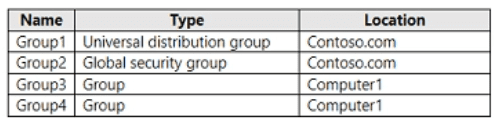
Which groups can you add to Group4?
A. Group2only
B. Group1 and Group2 only
C. Group2 and Group3 only
D. Group1, Group2, and Group3
Explanation:
In Active Directory, group nesting rules depend on group scopes. A Domain Local group (Group4) can contain members from any domain, but the nesting rules are: Domain Local can contain Global groups, Universal groups, and other Domain Local groups from the same domain. It cannot contain Global groups from external domains without Universal conversion. Based on the table, Group2 and Group3 are likely Global or Universal groups, while Group1 may be a Distribution group or have an incompatible scope.
Correct Option:
C. Group2 and Group3 only
Group4 is likely a Domain Local security group. Domain Local groups can contain Global groups and Universal groups from any domain in the forest, as well as other Domain Local groups from the same domain. Group2 and Group3 are likely Global or Universal security groups, making them eligible to be added to Group4. Group1 is likely a Distribution group (non-security) or has an incompatible scope, so it cannot be added.
Incorrect Option:
A. Group2 only – Incorrect; Group3 is also eligible.
B. Group1 and Group2 only – Incorrect; Group1 is not eligible.
D. Group1, Group2, and Group3 – Incorrect; Group1 is not eligible.
Please provide the group table (showing Group1, Group2, Group3, Group4 with their scope and type) so I can confirm the answer with specific details.
You have a Microsoft 365 tenant that contains the devices shown in the following table.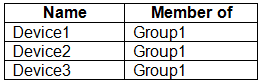
The devices are managed by using Microsoft Intune.
You create a compliance policy named Policy1 and assign Policy1 to Group1. Policy1 is configured to mark a device as Compliant only if the device security settings match the settings specified in the policy.
You discover that devices that are not members of Group1 are shown as Compliant.
You need to ensure that only devices that are assigned a compliance policy can be shown as Compliant. All other devices must be shown as Not compliant.
What should you do from the Microsoft Intune admin center?
A. From Device compliance, configure the Compliance policy settings.
B. From Endpoint security, configure the Conditional access settings.
C. From Tenant administration, modify the Diagnostic settings.
D. From Policy1, modify the actions for noncompliance.From Policy1, modify the actions for noncompliance.
Explanation:
Devices without a compliance policy assigned can be marked as Compliant or Not Compliant based on a tenant-wide setting. In the Intune admin center, under Device compliance > Compliance policy settings, you can configure "Mark devices with no compliance policy assigned as" to Not Compliant. This ensures that only devices assigned a compliance policy can be marked Compliant.
Correct Option:
A. From Device compliance, configure the Compliance policy settings
In the Microsoft Intune admin center, navigate to Devices > Device compliance > Compliance policy settings. Here you will find the setting "Mark devices with no compliance policy assigned as." Change this from Compliant (default) to Not Compliant. This ensures that any device not targeted by a compliance policy is marked Not Compliant, meeting your requirement.
Incorrect Option:
B. From Endpoint security, configure the Conditional access settings –
Conditional access settings control access to cloud apps based on compliance status, but they do not change how devices without a compliance policy are marked.
C. From Tenant administration, modify the Diagnostic settings –
Diagnostic settings control data collection and reporting, not compliance policy evaluation.
D. From Policy1, modify the actions for noncompliance –
Actions for noncompliance (e.g., send email, block access) apply to devices that are already marked noncompliant. This does not change the default status for devices without a policy.
Reference:
Microsoft Learn: Compliance policy settings in Intune – Mark devices with no compliance policy as Not Compliant. No external links provided.
You have a Microsoft 365 E5 subscription. The subscription contains devices that are Microsoft Entra joined and enrolled in Microsoft Intune.
You create a user named User1.
You need to ensure that User1 can rotate Bitlocker recovery keys by using Intune.
Solution: From the Microsoft Intune admin center, you assign the Help Desk Operator role to User1.
Does this meet the goal?
A. Yes
B. No
Explanation:
The Help Desk Operator role in Microsoft Intune includes permissions to manage BitLocker recovery keys, including rotating them for devices enrolled in Intune. This role is sufficient for the task and follows the principle of least privilege, as it does not grant full administrative access like the Intune Administrator role.
Correct Option:
A. Yes
The Help Desk Operator role in Intune has built-in permissions that allow users to perform BitLocker key management tasks, including viewing and rotating recovery keys. From the Intune admin center, a user with this role can navigate to a device, select BitLocker key rotation, and initiate the rotation. Therefore, assigning the Help Desk Operator role to User1 meets the goal.
Incorrect Option:
B. No –
Incorrect because the Help Desk Operator role does include the necessary permissions for BitLocker recovery key rotation in Intune.
Reference:
Microsoft Learn: Intune built-in roles – Help Desk Operator permissions include BitLocker key rotation. No external links provided.
You have a Microsoft 365 E5 subscription that contains 100 Windows 10 devices enrolled in Microsoft Intune.
You plan to use Endpoint analytics.
You need to create baseline metrics.
What should you do first?
A. Create an Azure Monitor workbook.
B. Onboard 10 devices to Endpoint analytics.
C. Create a Log Analytics workspace.
D. Modify the Baseline regression threshold.
Explanation:
To create baseline metrics in Endpoint analytics, you must first onboard devices to Endpoint analytics. Baseline metrics are automatically generated after Intune receives sufficient data from onboarded devices. The minimum recommended number of devices for baseline generation is typically 10, but the action required first is onboarding devices, not creating external resources.
Correct Option:
B. Onboard 10 devices to Endpoint analytics
Endpoint analytics requires devices to be onboarded (via Intune configuration profile enabling diagnostic data and the Endpoint analytics agent). Once at least 10 devices are onboarded and have sent data for 3-5 days, Intune automatically generates baseline metrics. Creating a Log Analytics workspace or Azure Monitor workbook is not required for the built-in Endpoint analytics baselines.
Incorrect Option:
A. Create an Azure Monitor workbook –
Azure Monitor workbooks are for custom visualizations, not required for Endpoint analytics baseline metrics.
C. Create a Log Analytics workspace –
While Endpoint analytics uses a Log Analytics workspace under the hood, it is automatically provisioned by Intune when you enable Endpoint analytics. You do not need to create one manually as a first step.
D. Modify the Baseline regression threshold –
Baseline regression threshold is a setting within Endpoint analytics after baselines are already created, not a first step.
Reference:
Microsoft Learn: Endpoint analytics baseline metrics – Onboard devices first; baselines generated automatically. No external links provided.
| Page 13 out of 29 Pages |
| 91011121314151617 |
| MD-102 Practice Test Home |
Real-World Scenario Mastery: Our MD-102 practice exam don't just test definitions. They present you with the same complex, scenario-based problems you'll encounter on the actual exam.
Strategic Weakness Identification: Each practice session reveals exactly where you stand. Discover which domains need more attention, before Endpoint Administrator exam day arrives.
Confidence Through Familiarity: There's no substitute for knowing what to expect. When you've worked through our comprehensive MD-102 practice exam questions pool covering all topics, the real exam feels like just another practice session.
Copyright © All Rights Reserved